Reflected XSS on help.shopify.com
becfe31193676118ae5073d Follow
 Originally disclosed on HackerOne
- Disclosed after 10 months
Summary by the program
The returnTo parameter on help.shopify.com/en/support/confirm-account-details was vulnerable to XSS by using the javascript: protocol for the URL. In this case, the exploit relies on:
- an account being in an incomplete state
- the account holder clicking on the exploit URL
- the account holder logging into help.shopify.com
- the account holder clicking the continue button
The report
Summary:
Reflected Cross Site Scripting (XSS) on https://help.shopify.com/en/support/confirm-account-details?returnTo=
Platform(s) affected:
All platforms in other languages, exp:
Steps To Reproduce:
- Open the URL https://help.shopify.com/en/support/confirm-account-details?returnTo=javascript:alert(document.cookie)
- Make login
- Back again to https://help.shopify.com/en/support/confirm-account-details?returnTo=javascript:alert(document.cookie)
- Click on button "Continue"
- The JS will execute.
Notes:
- If the user already logged, just access the url and click on the button that the js will be executed.
- Also possible make a "Open redirect" when the user click on the button.
EXP:
https://help.shopify.com/en/support/confirm-account-details?returnTo=https://evil.com
Supporting Material:
Impact
The attacker can execute javascript code and redirect targets for others pages.
Attachments
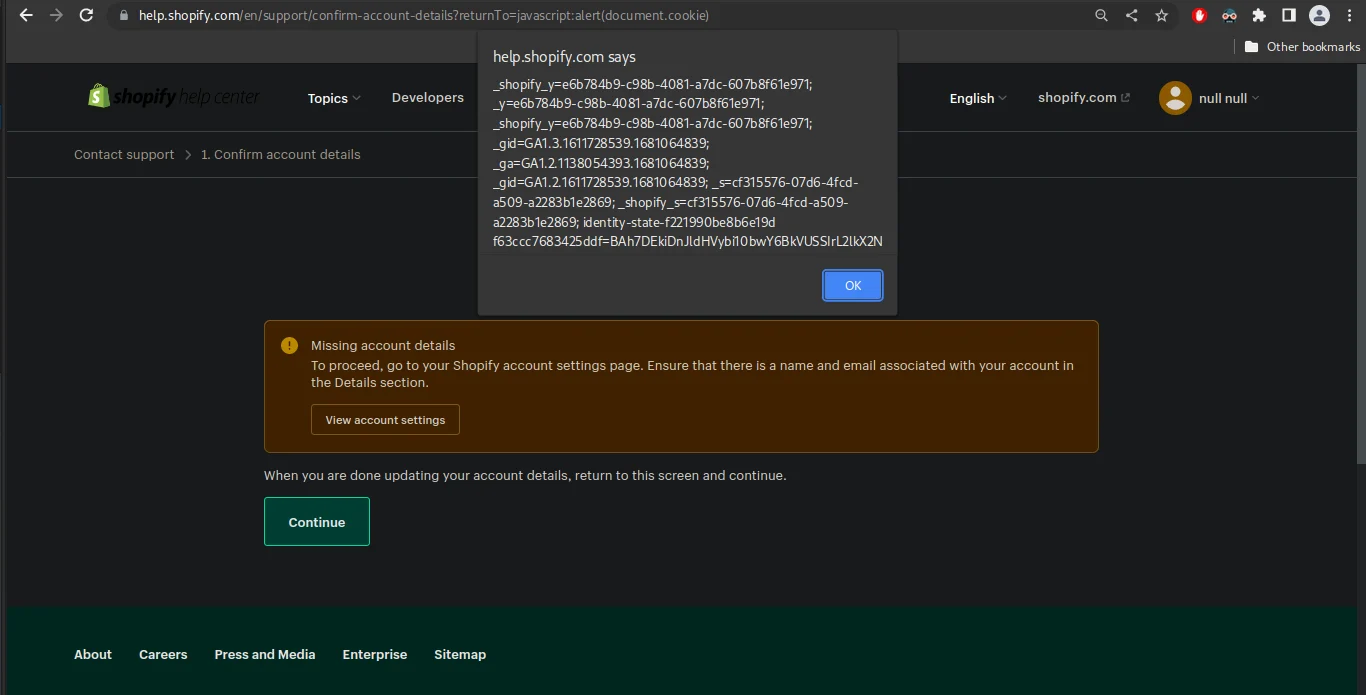
Context
Shopify's help centre lives at help.shopify.com, and one of its pages, /en/support/confirm-account-details, is a confirmation step in the account flow. The page takes a returnTo parameter, which is meant to hold the URL the user should be sent back to after confirming their account details. The same page exists in other languages, for example under /es/.
The bug is a reflected cross-site scripting issue in that returnTo parameter. The program's own summary describes it as XSS via the javascript: protocol used as the value of returnTo. The report was rated low severity with a CVSS score of 2.4, and a bounty of 500.00 USD was paid. It was disclosed on 2024-01-25.
Setup
The exploit depends on a specific account state and a sequence of user actions. According to the program's summary, four conditions must hold:
- an account is in an incomplete state;
- the account holder clicks the exploit URL;
- the account holder logs into
help.shopify.com; - the account holder clicks the continue button.
The researcher also notes a shortcut: if the user is already logged in, it is enough to open the URL and click the button, and the JavaScript executes. No special tooling is described in the report.
Finding it
The researcher found that a javascript: value in the returnTo parameter is executed when the continue button is clicked. Supplying a javascript: URL as the value means that when the page's continue button is used, the browser treats the value as script rather than as a destination to redirect to. The same parameter also accepts arbitrary external URLs, which the researcher separately flagged as an open redirect.
Exploitation
Step 1: Open the crafted URL
The researcher opens the following URL:
https://help.shopify.com/en/support/confirm-account-details?returnTo=javascript:alert(document.cookie)
The returnTo value is a javascript: URI whose body is alert(document.cookie). Because the scheme is not validated, the value is not treated as a plain link target.
Step 2: Log in
The researcher logs in, as listed in the program's summary of the exploit conditions.
Step 3: Return to the crafted URL
The researcher navigates back to the same URL:
https://help.shopify.com/en/support/confirm-account-details?returnTo=javascript:alert(document.cookie)
Step 4: Click "Continue"
The researcher clicks the button labelled "Continue" on the page. This is the action that consumes the returnTo value.
Step 5: Script executes
The JavaScript runs in the context of help.shopify.com. In the proof of concept the payload is alert(document.cookie), so the visible result is an alert containing the page's cookies.
The screenshot is the proof of concept attached to the report.
Shortcut when already logged in
The researcher notes that if the user is already logged in, there is no need to repeat the login step: accessing the URL and clicking the button is enough for the JavaScript to execute.
Open redirect
The same parameter can also be used as an open redirect when the user clicks the button. The researcher gives this example:
https://help.shopify.com/en/support/confirm-account-details?returnTo=https://evil.com
The researcher notes an open redirect is also possible when the user clicks the button, giving this example.
Root cause
The returnTo parameter is used as a navigation target without validating its scheme. A value beginning with javascript: is therefore accepted and later executed when the continue button triggers the navigation, instead of being treated as an ordinary URL. The same absence of validation allows any external URL, which is what produces the open redirect. The report does not describe the server-side or client-side code responsible, so the exact location of the missing check is not stated.
Impact
The attacker can execute JavaScript code in the context of the help centre and can redirect targets to other pages. Execution is conditional: the victim must be in the incomplete-account state (or already logged in), must open the crafted URL, and must click the continue button. The program's summary spells out the same chain, including the login step for accounts that are not yet logged in. The report does not describe what an attacker could reach with the executed script beyond the demonstration of reading document.cookie.
Fix
The fix implied by the finding is to validate the returnTo value before using it for navigation: accept only expected schemes (for example https) and restrict destinations to trusted hosts, rejecting javascript: and other unexpected schemes as well as arbitrary external URLs. Whether Shopify implemented this, and how, is not described in the report.
Variants to test
- Other language paths of the same page, such as
https://help.shopify.com/es/, with the samereturnTo=javascript:alert(document.cookie)value. A positive result is the script executing after the continue button is clicked. - Other schemes in
returnTo, for exampledata:orvbscript:, where the browser or application might still treat the value as executable. A positive result is script execution from the crafted value. - Absolute external URLs in
returnTo, as in thehttps://evil.comexample. A positive result is the browser leaving the help centre for the supplied domain after the button is clicked. - Protocol-relative and encoded variants of the value, to see whether a filter that blocks the literal
javascript:can be bypassed. A positive result is execution or redirection despite the filter.
Hunting notes
Parameters whose name suggests a post-action destination, such as returnTo, redirect, next or continue, are worth testing wherever an application sends the user onwards after a form submission or confirmation. The signal during recon is a parameter that is reflected into a link, a form action or a client-side navigation. The report shows the value being consumed only when the user clicks the continue button, so the tester has to follow the full flow rather than rely on immediate reflection.
The report also shows why the account state matters: the page sits in an account confirmation flow, and the program's summary lists the incomplete-account state and the login step as preconditions. The report notes a shortcut for already logged-in users and gives an open redirect example.
What happened, in plain words
Shopify runs a help centre at help.shopify.com. One of its pages, /en/support/confirm-account-details, is a confirmation step in the account flow: it is where a user confirms their account details. That page accepts a value called returnTo, which is meant to hold the address the user should be sent back to after confirming. The same page exists in other languages, for example under /es/.
The bug is a reflected cross-site scripting issue in that returnTo value. Instead of a normal web address, the researcher supplied a javascript: address, which browsers treat as a small program rather than a place to go. When the page's continue button used that value, the browser ran the program. The program's summary describes it as XSS via the javascript: protocol used as the value of returnTo. The report was rated low severity with a CVSS score of 2.4, a bounty of 500.00 USD was paid, and it was disclosed on 2024-01-25.
A few words before we go further, because they come up constantly below:
- A parameter is a named value stuck onto the end of a web address after a question mark. In
page?colour=blue, the parameter iscolourand its value isblue. The server (or the page's own code) reads it and does something with it. - Reflected means the value you put in comes straight back out at you, usually inside the page you get in response. Nothing is stored on the server; it only exists for that one request.
- Cross-site scripting (XSS) means getting your own JavaScript to run inside someone else's website, in that site's own context. JavaScript is the programming language browsers run, and it can read the page, read cookies and change what the user sees.
- A cookie is a small piece of text a website asks the browser to keep and send back with every later request to that site. It is often used to remember who is logged in, which is why reading cookies is a serious thing for an attacker to be able to do.
- A protocol (or scheme) is the first part of an address, before the colon:
httpsinhttps://example.com,mailtoinmailto:[redacted].javascript:is also a scheme, and a browser that follows ajavascript:address runs the text after the colon as code instead of loading a page. - An open redirect is when a site will send a visitor onwards to any address someone supplies, including one the site's owners do not control. It is often used in phishing, because the link starts on a trusted domain.
Setup
The exploit depends on a specific account state and a sequence of user actions. According to the program's summary, four conditions must hold:
- an account is in an incomplete state;
- the account holder clicks the exploit URL;
- the account holder logs into
help.shopify.com; - the account holder clicks the continue button.
The program's summary lists these four conditions for the exploit. The victim has to arrive at the crafted address, because that is how the malicious value gets into the page. They have to be logged in, because the page is part of an account process. And they have to press the button, because that is the moment the page uses the returnTo value.
The researcher also notes a shortcut: if the user is already logged in, it is enough to open the URL and click the button, and the JavaScript executes. No special tooling is described in the report; a normal browser is all that is needed.
Finding it
The researcher identified that the returnTo parameter on the confirm-account-details page is reflected into a navigation context without restricting the URL scheme. In plain terms: the page takes whatever you put in returnTo and later uses it to decide where to send the browser, and it never checks what kind of address it is. Supplying a javascript: URL as the value means that when the page's continue button is used, the browser treats the value as script rather than as a destination to redirect to.
The same parameter also accepts arbitrary external URLs, which the researcher separately flagged as an open redirect. So the missing check has two visible consequences: code can run, and visitors can be sent anywhere.
Exploitation
Step 1: Open the crafted URL
The researcher opens the following URL:
https://help.shopify.com/en/support/confirm-account-details?returnTo=javascript:alert(document.cookie)
Line by line:
https://help.shopify.comis the site being visited, the Shopify help centre./en/support/confirm-account-detailsis the path to the confirmation page, in its English version.?starts the list of parameters.returnTo=is the parameter name and the start of its value.javascript:alert(document.cookie)is the value.javascript:tells the browser that what follows is code, not an address.alert(...)is a built-in browser function that pops up a box showing whatever is inside the brackets.document.cookieis how JavaScript reads the cookies for the current page.
So the whole thing says: "on the confirmation page, remember that after confirming, the user should go to this little program." The returnTo value is a javascript: URI whose body is alert(document.cookie). Because the scheme is not validated, the value is not treated as a plain link target.
Step 2: Log in
The researcher logs in. This is the step that satisfies the incomplete-account precondition described in the program's summary: the confirmation page is reached as part of the account flow.
Step 3: Return to the crafted URL
The researcher navigates back to the same URL:
https://help.shopify.com/en/support/confirm-account-details?returnTo=javascript:alert(document.cookie)
This is the same address as in step 1, character for character.
Step 4: Click "Continue"
The researcher clicks the button labelled "Continue" on the page. This is the action that consumes the returnTo value. The button click is when the JavaScript executes.
Step 5: Script executes
The JavaScript runs in the context of help.shopify.com. "In the context of" means the code runs as if it were part of that site: it can see that site's page and that site's cookies, not the attacker's own site. In the proof of concept the payload is alert(document.cookie), so the visible result is an alert containing the page's cookies.
The screenshot is the proof of concept attached to the report.
Shortcut when already logged in
The researcher notes that if the user is already logged in, there is no need to repeat the login step: accessing the URL and clicking the button is enough for the JavaScript to execute. This matters for judging risk, because it removes one of the four conditions from the chain for anyone who already has a session open.
Open redirect
The same parameter can also be used as an open redirect when the user clicks the button. The researcher gives this example:
https://help.shopify.com/en/support/confirm-account-details?returnTo=https://evil.com
Line by line:
- Everything up to
returnTo=is the same confirmation page as before. - The value is now
https://evil.com, an external address. - Because the page does not check where
returnTopoints, the continue button sends the visitor to that address.
The researcher notes an open redirect is also possible when the user clicks the button, giving this example.
Root cause
The returnTo parameter is used as a navigation target without validating its scheme. A value beginning with javascript: is therefore accepted and later executed when the continue button triggers the navigation, instead of being treated as an ordinary URL. The same absence of validation allows any external URL, which is what produces the open redirect. The report does not describe the server-side or client-side code responsible, so the exact location of the missing check is not stated.
Impact
The attacker can execute JavaScript code in the context of the help centre and can redirect targets to other pages. Execution is conditional: the victim must be in the incomplete-account state (or already logged in), must open the crafted URL, and must click the continue button. The program's summary spells out the same chain, including the login step for accounts that are not yet logged in. The report does not describe what an attacker could reach with the executed script beyond the demonstration of reading document.cookie.
Fix
The fix implied by the finding is to validate the returnTo value before using it for navigation: accept only expected schemes (for example https) and restrict destinations to trusted hosts, rejecting javascript: and other unexpected schemes as well as arbitrary external URLs. Whether Shopify implemented this, and how, is not described in the report.
Variants to test
- Other language paths of the same page, such as
https://help.shopify.com/es/, with the samereturnTo=javascript:alert(document.cookie)value. A positive result is the script executing after the continue button is clicked. - Other schemes in
returnTo, for exampledata:orvbscript:, where the browser or application might still treat the value as executable. A positive result is script execution from the crafted value. - Absolute external URLs in
returnTo, as in thehttps://evil.comexample. A positive result is the browser leaving the help centre for the supplied domain after the button is clicked. - Protocol-relative and encoded variants of the value, to see whether a filter that blocks the literal
javascript:can be bypassed. A positive result is execution or redirection despite the filter.
Hunting notes
Parameters whose name suggests a post-action destination, such as returnTo, redirect, next or continue, are worth testing wherever an application sends the user onwards after a form submission or confirmation. The signal during recon is a parameter that is reflected into a link, a form action or a client-side navigation. The report shows the value being consumed only when the user clicks the continue button, so the tester has to follow the full flow rather than rely on immediate reflection.
The report also shows why the account state matters: the page sits in an account confirmation flow, and the program's summary lists the incomplete-account state and the login step as preconditions. The report notes a shortcut for already logged-in users and gives an open redirect example.
Glossary
- API: a way for one piece of software to ask another to do something or give it data, with agreed rules for the request and the reply.
- Bounty: money paid by a company to a researcher who reports a valid security problem.
- Browser context: the site a piece of JavaScript is treated as belonging to; code running in a site's context can read that site's page and cookies.
- Cookie: a small piece of text a website asks the browser to store and send back with later requests, often used to remember a logged-in session.
- Cross-site scripting (XSS): getting your own JavaScript to run inside someone else's website, in that site's context.
- CVSS: a standard scoring system that rates the severity of a security issue, usually from 0 to 10.
- Disclosure: the point at which a reported security issue is made public.
- Domain: the part of a web address that names the site, such as
help.shopify.comorevil.com. - Encoded variant: a value written in an alternative form (for example with percent signs) that means the same thing to a browser but may slip past a simple filter.
- Host: the machine or site named in an address; in practice, the domain part.
- JavaScript: the programming language that browsers run, used to make pages interactive.
javascript:scheme: an address form where the browser runs the text after the colon as code instead of loading a page.- Open redirect: a flaw where a site will send a visitor onwards to any address someone supplies, including one the site does not control.
- Parameter: a named value attached to a web address after a question mark, read by the server or the page.
- Payload: the specific value an attacker supplies to trigger a flaw, here the
javascript:address. - Proof of concept (PoC): a small demonstration showing that a flaw really works.
- Protocol (scheme): the first part of an address before the colon, such as
https,mailtoorjavascript. - Protocol-relative URL: an address beginning with
//that borrows the scheme of the page it appears on. - Recon: the information-gathering stage of security testing, before attempting an exploit.
- Redirect: sending the browser from one address to another.
- Reflected: a value that comes straight back out in the response to the same request, without being stored.
- Root cause: the underlying reason a flaw exists, as opposed to its visible symptom.
- Session: the period during which a site remembers that a particular browser is logged in as a particular user.
- Severity: how serious an issue is judged to be, often expressed as low, medium, high or critical.
- URL: a web address, such as
https://help.shopify.com/en/. - Validation: checking that a supplied value is of the expected kind before using it.
- XSS: short for cross-site scripting.




