Self XSS
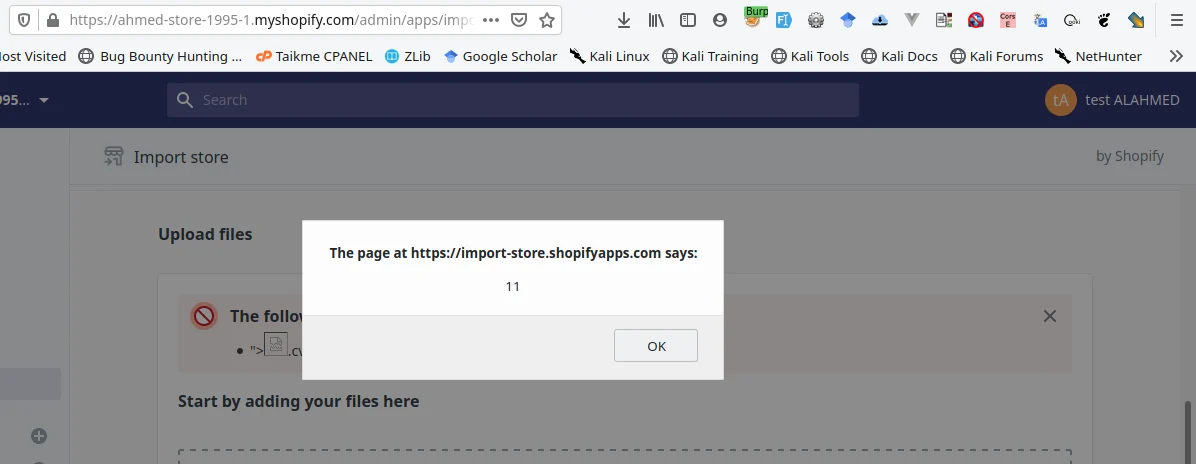
A self-XSS was found in the Shopify admin import-store page, where a CSV file with a malicious filename could execute script.
 Originally disclosed on HackerOne
- Triaged in 9 hours
- Fixed in 2 days
- Paid in 2 days
- Disclosed after 2 days
I have found self xss in myshopify.com/admin/apps/import-store/
POC
1 - Go to yourstore.myshopify.com 2 - Go to settings > App -> Import [ maybe ask you for your platform select any one ] 3 - Upload file csv with file name payload xss "><img src=xx onerror=alert(document.domain)>
Impact
XSS Attack
Attachments
Not written yet. The AI write-up for this report has not been written yet. The Original tab links to the source.
How it worked
Root cause
Likely the application failed to sanitise or encode the uploaded CSV filename before displaying it in the admin interface.
What the attacker needed
Victim uploads a crafted CSV file
How it was found
- Go to your store's myshopify.com admin.
- Navigate to Settings > App > Import and select a platform if prompted.
- Upload a CSV file whose filename contains an XSS payload.
Explained by bugbounty.wiki with AI from the original and checked against quotes from it; it can still be wrong. Read the original before relying on a detail.
Not written yet. The AI write-up for this report has not been written yet. The Original tab links to the source.
Self-XSS is a type of cross-site scripting where the victim must be tricked into running the malicious code themselves. Here, a CSV file with a crafted filename could contain code that runs in the browser.
What is XSS?
Script an attacker supplies runs in another user's browser, on the target's origin, with that user's session.




