www.shopify.com XSS on blog pages via sharing buttons
The social sharing buttons on Shopify blog pages inserted the page URL into an inline JavaScript handler without escaping, so a crafted query string could break out and run script. An attacker could send a victim a link that executes arbitrary JavaScript in the shopify.com origin when the victim clicks a share button.
 Originally disclosed on HackerOne
- Triaged in 13 hours
- Fixed in 48 days
- Paid in 48 days
- Disclosed after 48 days
social sharing buttons (facebook and linkedin) vulnerable to xss at www.shopify.com/guides/* www.shopify.com/videos/* and www.shopify.com/success-stories/*
steps to reproduce:
- go to page
https://www.shopify.com/videos/pop-up-shop?x=');alert(1)// - share this page by clicking facebook or linkedin sharing button
page contains malicious js:
<a class="icon social-shares__icon icon-facebook--square" onclick="window.open('http://facebook.com/sharer.php?u=https://www.shopify.com/videos/pop-up-shop?x=');alert(1)//','mywindow','width=500,height=400,toolbar=no,location=no,directories=no,status=no,menubar=no,scrollbars=yes,copyhistory=no,resizable=yes'); return false;" href="http://facebook.com/sharer.php?u=https://www.shopify.com/videos/pop-up-shop?x=');alert(1)//','mywindow','width=500,height=400,toolbar=no,location=no,directories=no,status=no,menubar=no,scrollbars=yes,copyhistory=no,resizable=yes" data-ga-event="Blog" data-ga-action="Facebook share">
    <span class="visuallyhidden">Facebook</span>
  </a>
Attachments
Context
Shopify's public marketing site, www.shopify.com, hosts editorial content under several path prefixes, including /guides/*, /videos/* and /success-stories/*. Pages in these sections carry social sharing buttons for Facebook and LinkedIn so that a reader can post a link to the page on those networks. The buttons are rendered as anchors whose onclick handler opens a popup window pointing at the network's sharer endpoint, with the current page URL passed as the u parameter.
The report shows that the page URL was placed into that handler without adequate escaping, so a crafted query string on a Shopify content page turned into script execution on www.shopify.com. The weakness was classified as generic cross-site scripting and the report was disclosed on 21 October 2015, with a bounty of 500 USD.
Setup
No accounts, roles, tools or versions are described in the report. The only precondition is that the target page is one of the content pages that render the Facebook and LinkedIn sharing buttons, that is, pages under /guides/*, /videos/* or /success-stories/*. The researcher used a normal browser session and the sharing buttons themselves as the trigger.
Finding it
The sharing buttons build their popup URL from the address of the page being shared. Because the page address includes the query string, anything an attacker appends to the URL becomes part of the string that is later embedded in the button's onclick attribute. If that value is not escaped for the HTML and JavaScript attribute context, a quote in the query string can break out of the string literal and inject code.
Exploitation
Step 1: Craft a page URL with a payload in the query string
The researcher chose a video page and appended a query parameter whose value closes the JavaScript string and the surrounding call, then runs alert(1):
https://www.shopify.com/videos/pop-up-shop?x=');alert(1)//
Its value ');alert(1)// is designed to terminate the window.open(...) argument list early and comment out the remainder of the original expression.
Step 2: Trigger a sharing button
With that URL loaded, the researcher clicked the Facebook or LinkedIn sharing button. The click runs the inline onclick handler, which now contains the injected code, and the browser executes alert(1).
Step 3: Observe the injected markup
The page delivered the following anchor for the Facebook button, with the payload reflected into both the onclick attribute and the href:
<a class="icon social-shares__icon icon-facebook--square" onclick="window.open('http://facebook.com/sharer.php?u=https://www.shopify.com/videos/pop-up-shop?x=');alert(1)//','mywindow','width=500,height=400,toolbar=no,location=no,directories=no,status=no,menubar=no,scrollbars=yes,copyhistory=no,resizable=yes'); return false;" href="http://facebook.com/sharer.php?u=https://www.shopify.com/videos/pop-up-shop?x=');alert(1)//','mywindow','width=500,height=400,toolbar=no,location=no,directories=no,status=no,menubar=no,scrollbars=yes,copyhistory=no,resizable=yes" data-ga-event="Blog" data-ga-action="Facebook share">
    <span class="visuallyhidden">Facebook</span>
  </a>
In the onclick value, the single quote in the payload closes the string that began at window.open('http://facebook.com/sharer.php?u=.... The ) closes the window.open call, the ; ends the statement, and alert(1) becomes a separate statement. The trailing // comments out the rest of the original handler, including the window features and the return false;, so the injected statement is what runs. The same payload also appears unescaped in the href, which points at the Facebook sharer with the malicious URL as the u parameter.
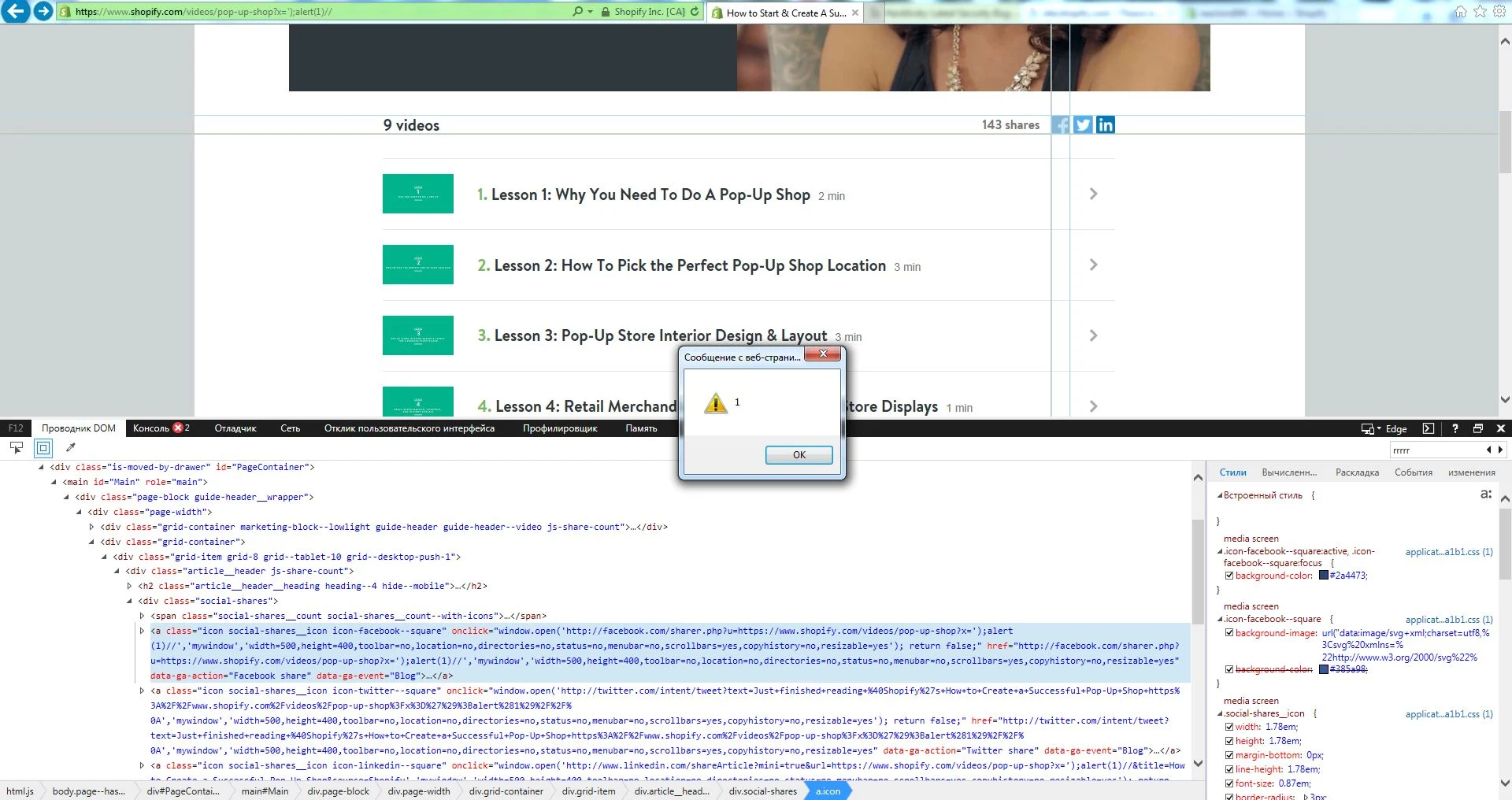
The attachment shows the sharing button markup with the payload reflected into it.
Root cause
The sharing button template interpolates the current page URL into an inline JavaScript event handler attribute without escaping it for that context. A single quote in the query string therefore terminates the string literal inside window.open(...), and the rest of the value is parsed as JavaScript. The same value is also written into the href without escaping, so the payload survives in two attributes of the same element. The report does not describe any filtering that would have blocked the quote characters.
Impact
An attacker who can get a victim to open a crafted link on www.shopify.com can run script in the origin of the Shopify marketing site when the victim clicks a Facebook or LinkedIn sharing button on the page. The report demonstrates this with alert(1) only and does not describe theft of cookies, sessions or other data, nor any account or privilege requirement. The affected pages are the content sections listed above, and the trigger is a user click on a sharing button rather than page load alone.
Fix
The report does not state what fix was applied. The appropriate change is to escape the page URL for the JavaScript string and HTML attribute contexts before it is placed in the onclick and href values, or to stop building the handler from an inline string and instead read the URL from a safe source at click time.
Variants to test
- Other content sections that render the same sharing component: request a page under a different prefix with the same
?x=');alert(1)//suffix and click each sharing button. A positive result is the payload appearing unescaped in the button'sonclickorhrefand executing on click. - The LinkedIn button specifically: the report names both networks but only shows the Facebook markup. Inspect the LinkedIn anchor for the same interpolation and confirm whether the payload executes there too.
- Other query parameters and other quote styles: try a double quote or a backslash in a parameter value to see whether the escaping handles only one quote character. A positive result is a broken string literal in the generated handler.
- Other places where the current URL is embedded, such as canonical links, Open Graph tags or analytics attributes on the same pages. A positive result is the payload reflected unescaped into an executable or navigable context.
Hunting notes
This class of bug hides in components that copy the current page URL into inline event handlers, href values or analytics attributes, especially social sharing widgets that are reused across many templates. During recon, look for pages whose markup contains window.open( with a sharer URL and the page address inside it, then check whether the address is escaped. The report shows impact with a simple alert, and the bounty was 500 USD.
What happened, in plain words
Shopify runs a public website at www.shopify.com where it publishes articles, videos and customer stories. Those pages have small buttons that let a reader share the page on Facebook or LinkedIn. When you click one of those buttons, the page runs a short piece of JavaScript that opens a small popup window pointing at Facebook's or LinkedIn's sharing service, with the address of the page you are reading passed along so the network knows what to share.
The researcher found that the address of the page was being pasted into that JavaScript without being cleaned up first. That means if you add extra characters to the end of the page address, those characters end up inside the JavaScript that runs when you click the share button. By choosing the right characters, an attacker can make the page run their own JavaScript instead of just opening a popup. This kind of bug is called cross-site scripting, or XSS: a website ends up running code that a visitor did not write and did not intend to run.
The report was filed on HackerOne, a platform where security researchers report bugs to companies. Shopify paid a bounty of 500 USD and disclosed the report on 21 October 2015. The weakness was classified as generic cross-site scripting.
Background you need
A few ideas come up again and again below, so here they are from scratch.
A URL and its query string. A URL is a web address, like https://www.shopify.com/videos/pop-up-shop. Everything after a ? is called the query string. It is a list of name and value pairs, for example ?x=hello, and websites use it to pass small pieces of information around. The query string is part of the address, so it is also part of what gets copied when a page shares its own address.
HTML attributes. A web page is written in HTML. Elements like links (<a>) can carry extra information in attributes, such as href (where the link goes) or onclick (what to do when it is clicked). Attribute values are usually wrapped in quotes, and the browser treats everything inside those quotes as one value.
JavaScript and string literals. JavaScript is the programming language browsers run. A string literal is text written inside quotes, for example 'hello'. The browser knows the string ends at the closing quote. If an attacker can sneak a quote character into a place where a string is being built, they can end the string early and have whatever follows treated as code. That is the heart of this bug.
Inline event handlers. Instead of putting JavaScript in a separate file, a page can put it directly in an attribute like onclick="...". The browser runs that code when the event happens, in this case a click. Because the code lives inside an HTML attribute, it has to be escaped carefully: any quote in the data that gets placed there could break out of the attribute or out of a string inside it.
Escaping (output encoding). Escaping means converting characters that have special meaning into a safe form before putting them into a page. For example, a single quote inside a JavaScript string could be written as \' so the browser treats it as text rather than as the end of the string. If a site skips this step, user-controlled text can change the structure of the page or the code.
A popup window. window.open(...) is a JavaScript function that opens a new browser window. It takes the address to open, a name for the window, and a list of features such as width and height.
A bounty. A bug bounty is a reward a company pays to someone who reports a security problem responsibly, instead of exploiting it or publishing it.
Where the bug lived
The Shopify marketing site publishes content under several address prefixes: /guides/*, /videos/* and /success-stories/*. The * just means "any page under this section". Pages in all three sections show Facebook and LinkedIn sharing buttons.
Each button is a link element. Its onclick attribute opens a popup pointing at the network's sharing service, and the address of the current page is passed as a parameter called u. The report shows that this address was placed into the handler without adequate escaping, so a crafted query string on a Shopify content page turned into script execution on www.shopify.com.
What you need to try it
Nothing special. The report describes no accounts, roles, tools or software versions. The only requirement is that the page you open is one of the content pages that show the Facebook and LinkedIn sharing buttons, meaning a page under /guides/*, /videos/* or /success-stories/*. The researcher used an ordinary browser and the sharing buttons themselves as the trigger.
How the researcher found it
The sharing buttons build their popup address from the address of the page being shared. Because the page address includes the query string, anything an attacker adds to the URL becomes part of the text that later gets placed inside the button's onclick attribute. If that text is not escaped for the HTML and JavaScript context, a quote in the query string can end the string early and inject code.
Reproducing it
Step 1: Build a page address with a payload in the query string
The researcher picked a video page and added a query parameter whose value closes the JavaScript string and the surrounding function call, then runs alert(1):
https://www.shopify.com/videos/pop-up-shop?x=');alert(1)//
Line by line:
https://www.shopify.com/videos/pop-up-shopis the normal address of a video page.?x=starts the query string and gives it a parameter namedx.'is a single quote. It is there to close the string literal that the page will build around the address.)closes thewindow.open(...)call early.;ends that JavaScript statement.alert(1)is a new statement that shows a small popup box with the number 1. It is a harmless way to prove that code ran.//starts a comment in JavaScript, so everything after it on the same line is ignored. This hides the leftover part of the original handler, which would otherwise cause a syntax error.
Step 2: Click a sharing button
With that address loaded in the browser, the researcher clicked the Facebook or LinkedIn sharing button. The click runs the inline onclick handler, which now contains the injected code, and the browser executes alert(1).
Why this step matters: the payload alone does nothing while it sits in the address bar. It only becomes code when the page copies the address into the button's handler and the browser runs that handler on a click. The click is the trigger.
Step 3: Look at the markup the page produced
The page delivered the following link element for the Facebook button, with the payload reflected into both the onclick attribute and the href:
<a class="icon social-shares__icon icon-facebook--square" onclick="window.open('http://facebook.com/sharer.php?u=https://www.shopify.com/videos/pop-up-shop?x=');alert(1)//','mywindow','width=500,height=400,toolbar=no,location=no,directories=no,status=no,menubar=no,scrollbars=yes,copyhistory=no,resizable=yes'); return false;" href="http://facebook.com/sharer.php?u=https://www.shopify.com/videos/pop-up-shop?x=');alert(1)//','mywindow','width=500,height=400,toolbar=no,location=no,directories=no,status=no,menubar=no,scrollbars=yes,copyhistory=no,resizable=yes" data-ga-event="Blog" data-ga-action="Facebook share">
<span class="visuallyhidden">Facebook</span>
</a>
What each part does:
<a ...>opens a link element. Theclassattribute gives it styling, including the Facebook icon.onclick="..."is the code the browser runs when the link is clicked. Inside it,window.open('http://facebook.com/sharer.php?u=https://www.shopify.com/videos/pop-up-shop?x=')was meant to open the Facebook sharing popup with the page address as theuparameter.- The single quote in the payload closes the string that began at
window.open('http://facebook.com/sharer.php?u=.... - The
)closes thewindow.opencall, the;ends the statement, andalert(1)becomes a separate statement that the browser runs. - The trailing
//comments out the rest of the original handler, including the window features and thereturn false;, so the injected statement is what runs. href="..."is the fallback address of the link. The same payload appears there unescaped, pointing at the Facebook sharing service with the malicious address as theuparameter.data-ga-eventanddata-ga-actionare extra attributes used for analytics, recording that the button is a Facebook share.<span class="visuallyhidden">Facebook</span>is the text label, hidden visually but available to screen readers.
The attachment shows the sharing button markup with the payload reflected into it.
Why it worked
The sharing button template puts the current page address into an inline JavaScript event handler attribute without escaping it for that context. A single quote in the query string therefore ends the string literal inside window.open(...), and the rest of the value is read as JavaScript. The same value is also written into the href without escaping, so the payload survives in two attributes of the same element. The report does not describe any filtering that would have blocked the quote characters.
What an attacker could do
An attacker who can get a victim to open a crafted link on www.shopify.com can run script in the origin of the Shopify marketing site when the victim clicks a Facebook or LinkedIn sharing button on the page. "Origin" here means the site's identity in the browser: script running in that origin can act as that site towards the browser.
The report demonstrates this with alert(1) only. It does not describe theft of cookies, sessions or other data, and it does not describe any account or privilege requirement. The affected pages are the content sections listed above, and the trigger is a user click on a sharing button rather than page load alone.
How to fix it
The appropriate change is to escape the page address for the JavaScript string and HTML attribute contexts before it is placed in the onclick and href values, or to stop building the handler from an inline string and instead read the address from a safe source at click time.
Other things worth testing
- Other content sections that render the same sharing component: request a page under a different prefix with the same
?x=');alert(1)//suffix and click each sharing button. A positive result is the payload appearing unescaped in the button'sonclickorhrefand executing on click. - The LinkedIn button specifically: the report names both networks but only shows the Facebook markup. Inspect the LinkedIn link element for the same interpolation and confirm whether the payload executes there too.
- Other query parameters and other quote styles: try a double quote or a backslash in a parameter value to see whether the escaping handles only one quote character. A positive result is a broken string literal in the generated handler.
- Other places where the current address is embedded, such as canonical links, Open Graph tags or analytics attributes on the same pages. A positive result is the payload reflected unescaped into an executable or navigable context.
Notes for anyone hunting similar bugs
This class of bug hides in components that copy the current page address into inline event handlers, href values or analytics attributes, especially social sharing widgets that are reused across many templates. During recon, look for pages whose markup contains window.open( with a sharing service address and the page address inside it, then check whether the address is escaped. The report shows impact with a simple alert, and the bounty was 500 USD.
Glossary
- Attribute: extra information attached to an HTML element, such as
hreforonclick, written as a name and a value. - Bounty: a reward a company pays to someone who reports a security problem responsibly.
- Cross-site scripting (XSS): a bug where a website ends up running code that an attacker supplied, usually because user-controlled text was placed into a page without proper escaping.
- Escaping (output encoding): converting characters with special meaning into a safe form before placing them into a page or a script.
- Event handler: code that runs in response to something happening, such as a click;
onclickis one example. - HackerOne: a platform where security researchers report bugs to companies and companies pay bounties.
- HTML: the language web pages are written in, made of elements and attributes.
href: the attribute of a link that says where the link points.- Inline handler: JavaScript written directly inside an HTML attribute rather than in a separate file.
- JavaScript: the programming language that browsers run to make pages interactive.
onclick: the attribute that holds code to run when an element is clicked.- Origin: the identity of a site in the browser, made of scheme, host and port; script running in an origin can act as that site towards the browser.
- Payload: the crafted piece of text an attacker supplies to trigger a bug.
- Popup window: a separate small browser window opened by a page, here via
window.open(...). - Query string: the part of a URL after the
?, made of name and value pairs. - Reflected: said of input that is copied straight back into the page the server returns.
- String literal: text written inside quotes in a programming language.
- URL: a web address.
window.open(...): a JavaScript function that opens a new browser window with a given address and features.//: in JavaScript, the start of a comment that runs to the end of the line.