XSS on https://app.shopify.com/
The signup parameter on a Shopify partners page was reflected into a JavaScript context without proper encoding, allowing an attacker to execute arbitrary script in a victim's browser. This could let the attacker control the victim's browser or account on the vulnerable application.
 Originally disclosed on HackerOne
- Fixed in 44 hours
- Paid in 7 days
- Disclosed after 8 days
DESCRIPTION
It has been identified that the page located at https://app.shopify.com/ is prone to cross-site scripting issues. Cross-site Scripting (XSS) refers to client-side code injection attack wherein an attacker can execute malicious scripts (also commonly referred to as a malicious payload) into a legitimate website or web application.
IMPACT
A XSS vulnerability arises when web applications take data from users and dynamically include it in web pages without first properly validating the data. XSS vulnerabilities allow an attacker to execute arbitrary commands and display arbitrary content in a victim user's browser. A successful XSS attack leads to an attacker controlling the victim’s browser or account on the vulnerable web application.
TEST ENVIRONMENT
- Google Chrome 49.0.2623.75 (64-bit) on Mac OS X 10.11.3
- Firefox 45.0 on Mac OS X 10.11.3
PROOF OF CONCEPT
Steps to reproduce:
- Login.
- Visit the following page: https://app.shopify.com/services/partners?signup=confirm(document.domain)&signup_action=whitehat_signup
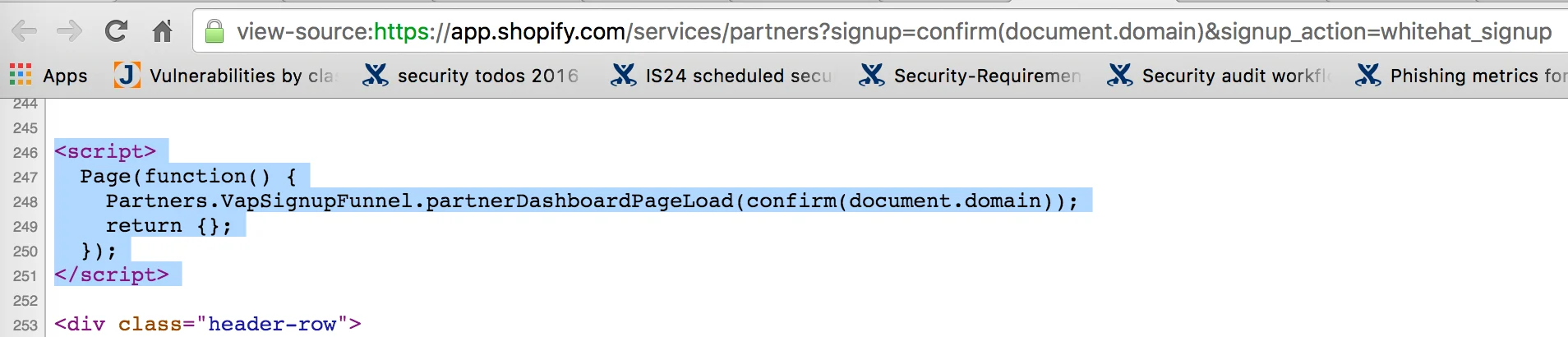
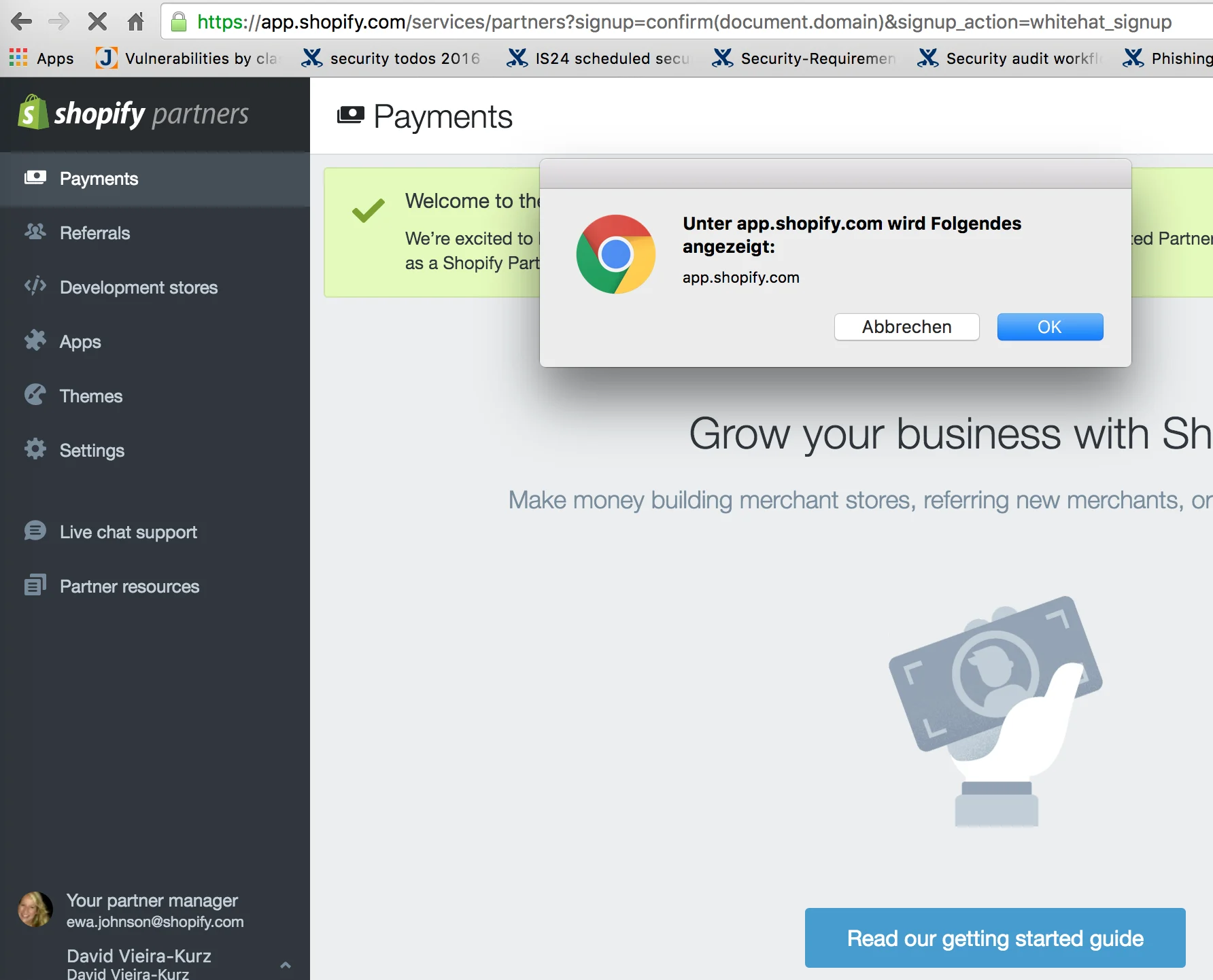
The „signup“ param will execute the passed javascript code and will be rendered like this:
Page(function() {
Partners.VapSignupFunnel.partnerDashboardPageLoad(confirm(document.domain));
return {};
});
SCREENSHOT
Screenshots are attached.
REMEDIATION
- All input should be neutralized before being reflected back to client (i.e.
browser), not just parameters that the user is supposed to specify, but all data in the request, including hidden fields, cookies, headers, the URL itself, and so forth.
- Make use of entity encoding in the used context. See also:
https://www.owasp.org/index.php/XSS_(Cross_Site_Scripting)_Prevention_Cheat_Sheet
CREDITS
David Vieira-Kurz aka @secalert (https://hackerone.com/secalert)
Attachments
Context
The target is https://app.shopify.com/, the authenticated application surface for Shopify. The specific feature involved is the partners signup funnel: the page at https://app.shopify.com/services/partners handles partner account signup and, on load, initialises a client-side signup funnel object. The report describes the page as prone to cross-site scripting, where data taken from the request is included in the page without proper validation.
Setup
The researcher tested from two browsers on the same host platform:
- Google Chrome 49.0.2623.75 (64-bit) on Mac OS X 10.11.3
- Firefox 45.0 on Mac OS X 10.11.3
The only precondition stated is that the tester is logged in before visiting the crafted URL.
Finding it
The researcher identified that the partners page reflects request data into the page and that the signup parameter is placed into a JavaScript context rather than being neutralised. The general reasoning given is the standard one: a web application takes data from users and dynamically includes it in web pages without first properly validating the data, which is what allows script injection.
Exploitation
Step 1: Log in
Authenticate to app.shopify.com as normal. The report gives no further detail about the account used.
Step 2: Visit the crafted URL
With a session in place, request the partners page with a signup parameter containing a JavaScript expression and a signup_action parameter set to whitehat_signup:
https://app.shopify.com/services/partners?signup=confirm(document.domain)&signup_action=whitehat_signup
The signup value is confirm(document.domain), a harmless proof-of-concept expression that pops a browser dialog showing the current document's domain. The signup_action=whitehat_signup parameter accompanies it; the report does not explain what role, if any, it plays in reaching the vulnerable code path.
Step 3: Observe the reflected output
The value of signup is not encoded or otherwise neutralised. It is rendered into the page inside a generated script block, so the expression becomes part of the JavaScript that the page executes on load:
Page(function() {
Partners.VapSignupFunnel.partnerDashboardPageLoad(confirm(document.domain));
return {};
});
In this output the injected expression sits as the argument to Partners.VapSignupFunnel.partnerDashboardPageLoad, inside a Page(function() { ... }) wrapper. Because the value is written into executable script rather than into inert markup, the browser evaluates confirm(document.domain) when the page loads, and the dialog appears. The report lists both browsers in its test environment.
Root cause
The signup request parameter is reflected into a JavaScript context in the page without validation or context-appropriate encoding. The report's remediation section frames the mistake generally: input is reflected back to the client without being neutralised, and the fix must cover all data in the request, not just parameters the user is supposed to specify, including hidden fields, cookies, headers and the URL itself. Because the sink is script, HTML entity encoding alone would not be the right control; the report points to context-aware entity encoding as the general approach. The report does not show the server-side code, so the exact mechanism by which the value reaches the script block is not stated.
Impact
As described in the report, an XSS vulnerability of this kind allows an attacker to execute arbitrary commands and display arbitrary content in a victim user's browser. A successful attack leads to the attacker controlling the victim's browser or the victim's account on the vulnerable web application. The proof of concept itself only demonstrates execution of confirm(document.domain), which shows script execution in the page's origin without causing harm. Exploitation against another user would require that user to open the crafted URL while logged in; the report does not discuss delivery, CSRF protections, or any additional constraints.
Fix
The report recommends two measures:
- Neutralise all input before reflecting it back to the client, covering not only parameters the user is expected to supply but all data in the request, including hidden fields, cookies, headers and the URL itself.
- Apply entity encoding appropriate to the context in which the data is used, referencing the OWASP Cross Site Scripting Prevention Cheat Sheet.
Variants to test
- Other parameters on the same partners signup flow: try each parameter that plausibly feeds the funnel initialisation and look for it appearing unencoded inside the generated script block.
- Different JavaScript contexts: where a value lands inside a string literal, try breaking out of the quotes; where it lands as a bare expression, as here, a simple
confirm(document.domain)or similar call is enough to confirm execution. - The
signup_actionparameter and any sibling action parameters: check whether they are also interpolated into the same script block. - Other pages that call the same
Page(function() { ... })wrapper with request-derived values, since the wrapper pattern suggests a shared templating path.
A positive result is the value appearing verbatim in the returned script and the browser evaluating it on load.
Hunting notes
This class of bug hides in server-rendered pages that bootstrap client-side code: the initial state passed to a JavaScript framework or page object is a common place for unencoded reflection, and it is easy to miss because the value never appears in visible HTML. During recon, look for pages whose source contains inline script that embeds request parameters, especially signup, onboarding and dashboard entry points that accept query parameters. The proof of concept uses confirm(document.domain), which shows execution without touching user data. The report records a bounty of 500.00 USD and was disclosed on 2016-04-05.
Attachments
What happened, in plain words
Shopify runs a website at https://app.shopify.com/. One of the things that lives there is the partners signup page, at https://app.shopify.com/services/partners. One of the pages there is the partners signup page, at https://app.shopify.com/services/partners.
When that page loads, it does not just show fixed text. It also runs a small program written in JavaScript, the language that web browsers understand. That program initialises a client-side signup funnel object. To do that, the page takes some information from the address the visitor typed (the part after the question mark) and drops it into the program.
The problem is that the page did not check that information first. It copied whatever was in the address straight into the program. So if someone put a piece of JavaScript into the address, the browser would run it as if Shopify had written it itself. That is what "cross-site scripting", usually shortened to XSS, means: a website is tricked into running code that came from an attacker, and the browser treats that code as part of the trusted site.
A simple everyday comparison: imagine a receptionist who reads out loud any note handed to them, without checking who wrote it. If someone hands over a note saying "tell everyone the office is closed", the receptionist announces it as if it were official news. The receptionist is not lying; they simply passed on unverified content. A website that reflects input without checking is that receptionist.
The researcher who found this used a deliberately harmless piece of JavaScript as the test. It only makes the browser show a small pop-up with the site's domain name in it. Nothing is stolen or changed. The pop-up is proof that the browser ran the researcher's code, which is all that is needed to show the hole is real. The report records a bounty of 500.00 USD and was disclosed on 2016-04-05.
Context
The target is https://app.shopify.com/, the logged-in application surface for Shopify. The specific feature involved is the partners signup funnel: the page at https://app.shopify.com/services/partners handles partner account signup and, when it loads, initialises a client-side signup funnel object.
A few of those words deserve unpacking for a newcomer:
- Client-side means the work happens in your browser (the "client"), not on Shopify's computers (the "server"). The server sends a page containing a program, and your browser runs that program.
- A funnel is the sequence of screens a new user goes through to complete a signup. The word suggests a funnel shape: many people start, fewer finish, and each screen moves them along.
- An object in programming is a bundle of related code and data that has a name. Here the bundle is called
Partners.VapSignupFunnel, and the page calls one of its functions to get the signup screen ready.
The report describes the page as prone to cross-site scripting, where data taken from the request is included in the page without proper validation. "The request" is simply the message your browser sends to the server when you open an address; it contains the address itself, including anything after the question mark.
Setup
The researcher tested from two browsers on the same host platform:
- Google Chrome 49.0.2623.75 (64-bit) on Mac OS X 10.11.3
- Firefox 45.0 on Mac OS X 10.11.3
Testing in two different browsers matters because browsers do not all behave identically. If a flaw shows up in both, it is more likely to be a real problem in the website rather than a quirk of one browser.
The only precondition stated is that the tester is logged in before visiting the crafted URL. "Logged in" means the site already knows who you are, usually because you entered a username and password earlier and the site gave your browser a small piece of proof to carry around. That proof is often called a session cookie or a session token: a short string your browser stores and sends back with every request so the site can recognise you. The report's first step is to log in before visiting the crafted URL.
Finding it
The researcher identified that the partners page reflects request data into the page, and that the signup parameter is placed into a JavaScript context rather than being neutralised.
Two more terms to explain:
- A parameter (also called a query parameter) is a named value attached to the end of a web address. In
page?colour=blue, the parameter is calledcolourand its value isblue. Parameters are how one page can show different things depending on what you ask for. - Reflect means the server takes a value from your request and sends it straight back inside the page it returns. It is like saying your own words back to you.
- Neutralise (or encode) means making a value safe to place in a page, so that the browser treats it as plain text rather than as instructions. For example, turning a
<character into a code that displays as<but is not read as the start of an HTML tag. - A JavaScript context is a spot in the page where the browser expects program code, not text. Putting data there is far more dangerous than putting it in ordinary visible text, because the browser will try to run it.
The general reasoning given is the standard one: a web application takes data from users and dynamically includes it in web pages without first properly validating the data, which is what allows script injection. "Dynamically" means the page is assembled at the moment you ask for it, using values from your request, rather than being a fixed file.
Exploitation
Step 1: Log in
Authenticate to app.shopify.com as normal. The report gives no further detail about the account used.
Why this step: the partners page sits behind the login. Logging in first puts the browser in the same position as a real partner would be.
Step 2: Visit the crafted URL
With a session in place, request the partners page with a signup parameter containing a JavaScript expression and a signup_action parameter set to whitehat_signup:
https://app.shopify.com/services/partners?signup=confirm(document.domain)&signup_action=whitehat_signup
Line by line, in plain words:
https://app.shopify.com/services/partnersis the page being opened: the partners signup page.- The
?marks the start of the parameters. Everything after it is extra information handed to the page. signup=confirm(document.domain)sets the parameter namedsignupto the valueconfirm(document.domain). This is the test payload, the piece of code the researcher wants the page to run.&separates one parameter from the next.signup_action=whitehat_signupsets a second parameter namedsignup_actionto the valuewhitehat_signup. The report does not explain what role, if any, this parameter plays in reaching the vulnerable code path.
What the payload itself does:
documentis the browser's built-in name for the page currently open. It is an object, a bundle of information and actions about that page.document.domainasks that object for the page's domain name, hereapp.shopify.com.confirm(...)is a built-in browser function that shows a small dialog box with an OK and a Cancel button, displaying whatever text it is given. It is harmless: it shows a message and waits for a click.
So the whole payload means: show a pop-up containing the current page's domain name. If that pop-up appears, the browser ran the researcher's code, and the hole is confirmed. Choosing such a gentle payload is deliberate: it proves execution without touching anyone's data.
Step 3: Observe the reflected output
The value of signup is not encoded or otherwise neutralised. It is rendered into the page inside a generated script block, so the expression becomes part of the JavaScript that the page executes on load:
Page(function() {
Partners.VapSignupFunnel.partnerDashboardPageLoad(confirm(document.domain));
return {};
});
Line by line:
Page(function() {starts a call to something calledPage, handing it a function. A function is a named block of instructions that can be run later. Here the block is anonymous: it has no name of its own and is simply passed along.Partners.VapSignupFunnel.partnerDashboardPageLoad(confirm(document.domain));is the line where the injected value landed.Partners.VapSignupFunnelis the signup funnel object mentioned earlier,partnerDashboardPageLoadis one of its functions, and the researcher'sconfirm(document.domain)sits inside the brackets as the argument handed to that function. An argument is a value you pass into a function so it has something to work with.return {};ends the anonymous function by handing back an empty object,{}. This is ordinary housekeeping so the surrounding code has something to receive.});closes thePage(...)call and the function block.
Because the value is written into executable script rather than into inert markup, the browser evaluates confirm(document.domain) when the page loads, and the dialog appears. The report lists both browsers in its test environment.
Root cause
The signup request parameter is reflected into a JavaScript context in the page without validation or context-appropriate encoding. In other words, the page took the value from the address bar and pasted it into a place where the browser expects instructions, without first making it safe.
The report's remediation section frames the mistake generally: input is reflected back to the client without being neutralised, and the fix must cover all data in the request, not just parameters the user is supposed to specify, including hidden fields, cookies, headers and the URL itself. "Headers" are the extra lines of information your browser and the server exchange alongside the page itself, such as what kind of browser you use. "Hidden fields" are form values that are not shown on screen but are still sent when you submit.
Because the sink is script, HTML entity encoding alone would not be the right control; the report points to context-aware entity encoding as the general approach. A sink is the place where data ends up being used, in this case the script block. "Context-aware" means the encoding must match the surroundings: what makes a value safe inside ordinary text is not the same as what makes it safe inside a script. The report does not show the server-side code, so the exact mechanism by which the value reaches the script block is not stated.
Impact
As described in the report, an XSS vulnerability of this kind allows an attacker to execute arbitrary commands and display arbitrary content in a victim user's browser. "Arbitrary" means whatever the attacker chooses, not a fixed set. A successful attack leads to the attacker controlling the victim's browser or the victim's account on the vulnerable web application.
Why that is serious: code running inside a page is treated as part of that page. It can read what the page can read and do what the page can do, including acting as the logged-in user. That is why the report talks about control of the account, not just a stray pop-up.
The proof of concept itself only demonstrates execution of confirm(document.domain), which shows script execution in the page's origin without causing harm. "Origin" here means the combination of scheme, host and port that the browser uses to decide which pages may talk to each other, in this case the app.shopify.com site.
Exploitation against another user would require that user to open the crafted URL while logged in; the report does not discuss delivery, CSRF protections, or any additional constraints. "Delivery" means how the attacker gets the victim to open the link, for example by sending it in a message. CSRF, cross-site request forgery, is a different class of attack where a page causes your browser to send a request you did not intend; the report does not analyse whether it is relevant here.
Fix
The report recommends two measures:
- Neutralise all input before reflecting it back to the client, covering not only parameters the user is expected to supply but all data in the request, including hidden fields, cookies, headers and the URL itself.
- Apply entity encoding appropriate to the context in which the data is used, referencing the OWASP Cross Site Scripting Prevention Cheat Sheet.
In plain words: before the page sends anything back, it should make every incoming value safe for the exact spot where it will be placed. Checking only the obvious fields is not enough, because attackers look at everything the request carries. OWASP is a well-known non-profit project that publishes free guidance on web security, and the cheat sheet is its reference page on preventing XSS.
Variants to test
- Other parameters on the same partners signup flow: try each parameter that plausibly feeds the funnel initialisation and look for it appearing unencoded inside the generated script block.
- Different JavaScript contexts: where a value lands inside a string literal, try breaking out of the quotes; where it lands as a bare expression, as here, a simple
confirm(document.domain)or similar call is enough to confirm execution. A string literal is text written between quotes in code; if your input lands there, you first have to get out of the quotes before your code is treated as code. - The
signup_actionparameter and any sibling action parameters: check whether they are also interpolated into the same script block. "Interpolated" means inserted into a larger piece of text or code. - Other pages that call the same
Page(function() { ... })wrapper with request-derived values, since the wrapper pattern suggests a shared templating path. A wrapper is a piece of code that surrounds other code and runs it in a standard way; if many pages use the same wrapper, a flaw in how it handles values may affect all of them.
A positive result is the value appearing verbatim in the returned script and the browser evaluating it on load. "Verbatim" means exactly as typed, with nothing added or changed.
Hunting notes
This class of bug hides in server-rendered pages that bootstrap client-side code: the initial state passed to a JavaScript framework or page object is a common place for unencoded reflection, and it is easy to miss because the value never appears in visible HTML. "Bootstrap" here means to set something up at the start, and "initial state" is the starting information the page hands to its own program.
During recon, look for pages whose source contains inline script that embeds request parameters, especially signup, onboarding and dashboard entry points that accept query parameters. "Recon" is short for reconnaissance: the exploratory phase where you look around a site before testing anything. "Inline script" is JavaScript written directly inside the page rather than in a separate file. You can see it in a browser by choosing to view the page source.
The proof of concept uses confirm(document.domain), which shows execution without touching user data. "Triage" is the first review a security team does to decide whether a report is valid and how serious it is.
A bounty is a payment a company makes to a researcher who reports a valid security problem.
Attachments
Glossary
- Argument: a value passed into a function so the function has something to work with.
- Bootstrap: to set something up at the start, here the starting information a page hands to its own program.
- Bounty: a payment a company makes to a researcher who reports a valid security problem.
- Client-side: work that happens in your browser rather than on the server.
- Context-aware encoding: making a value safe in a way that matches the exact place it will be used, such as text versus script.
- Cookie (session cookie): a short string your browser stores and sends back with requests so the site can recognise you as logged in.
- CSRF (cross-site request forgery): an attack where a page causes your browser to send a request you did not intend.
- Cross-site scripting (XSS): a flaw where a website runs code supplied by an attacker and treats it as part of the trusted site.
- Delivery: how an attacker gets a victim to open a crafted link or page.
- Document: the browser's built-in name for the page currently open.
- Dynamic: assembled at the moment of the request using values from that request, rather than being a fixed file.
- Encode / neutralise: make a value safe to place in a page so the browser treats it as text, not instructions.
- Entity encoding: replacing special characters with codes that display the same but are not read as markup.
- Function: a named block of instructions that can be run when called.
- Funnel: the sequence of screens a user goes through to complete a signup.
- Headers: extra lines of information exchanged between browser and server alongside the page.
- Hidden field: a form value not shown on screen but still sent on submission.
- Inline script: JavaScript written directly inside the page rather than in a separate file.
- Interpolate: insert a value into a larger piece of text or code.
- JavaScript: the programming language web browsers run.
- JavaScript context: a spot in a page where the browser expects program code rather than text.
- Object: a bundle of related code and data that has a name.
- Origin: the combination of scheme, host and port that browsers use to decide which pages may interact.
- OWASP: a non-profit project that publishes free web security guidance.
- Parameter (query parameter): a named value attached to a web address after a question mark.
- Payload: the piece of code or data an attacker wants the target to run or accept.
- Recon: reconnaissance, the exploratory phase of looking around a site before testing.
- Reflect: send a value from the request straight back inside the returned page.
- Session: the state of being logged in, recognised by the site across requests.
- Sink: the place where data ends up being used, such as a script block.
- String literal: text written between quotes in code.
- Triage: the first review a security team does to decide whether a report is valid and how serious it is.
- Verbatim: exactly as typed, with nothing added or changed.
- Wrapper: code that surrounds other code and runs it in a standard way.