HTML Injection inside Slack promotional emails
The first name field on a Slack account accepted HTML, which was stored and then included unescaped in promotional emails sent from Slack. An attacker could inject markup into official emails to reformat them and support targeted phishing.

- Triaged in 8 days
- Fixed in 18 days
- Paid in 18 days
- Disclosed after 5 months
Hi,
There's a HTML injection vulnerability present inside emails sent from slack when the FIRST name on the account contains HTML. The html is stored in the backend database and when emails are sent (promotional, etc), the HTML is sent along with the rest of the email.
In my PoC, which is provided below, i inserted a <img> tag to prove this vulnerability exists.
F268173
Impact
This vulnerability can lead to the reformatting/editing of emails from an official slack email address, which can be used in targeted phishing attacks.
This could lead to users being tricked into giving logins away to malicious attackers.
Attachments
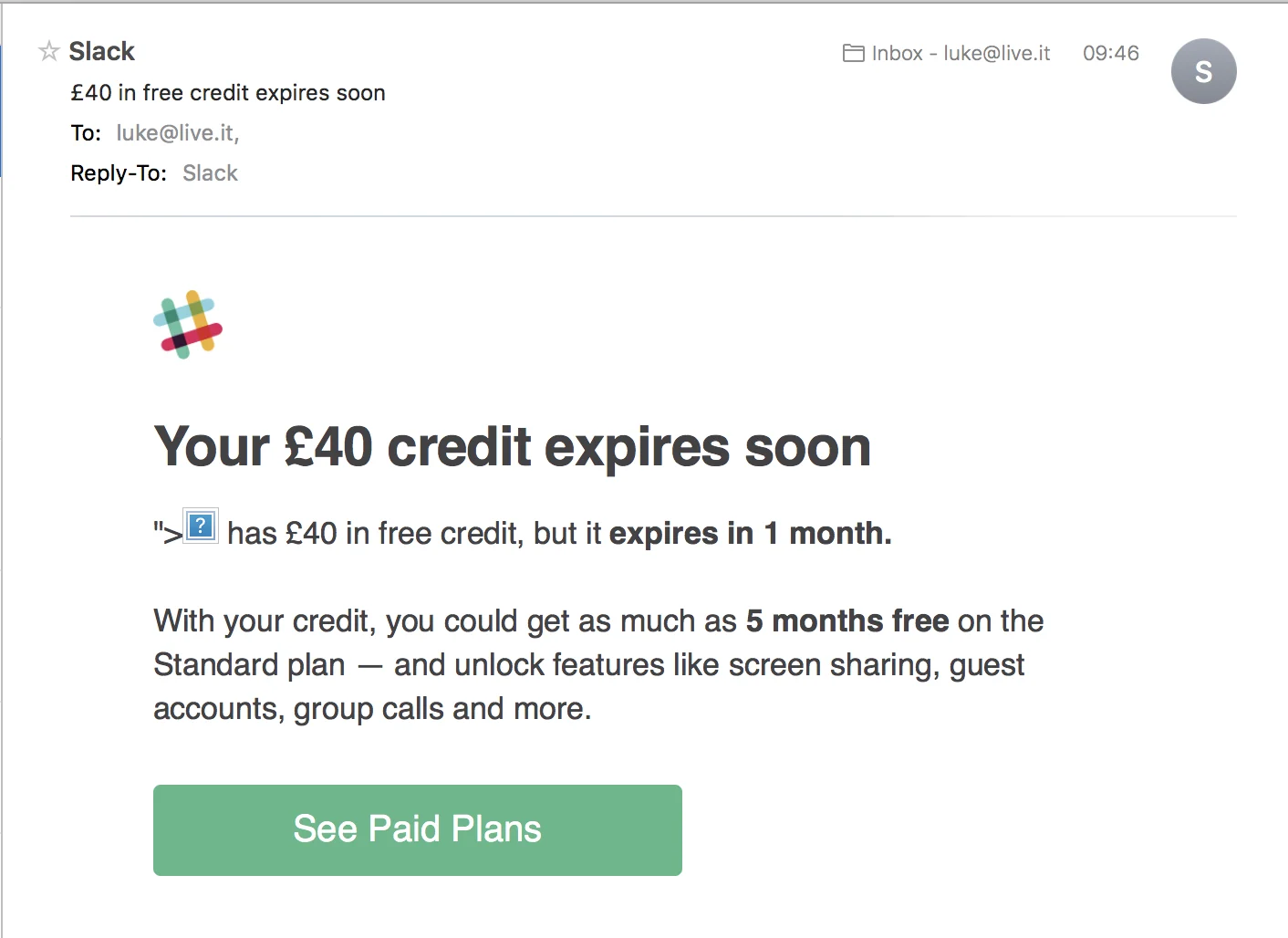
What the report shows
The target is Slack's promotional email pipeline. The researcher, 0x0luke, found that the first name field on a Slack account is stored in the backend database and later interpolated into outgoing emails without HTML encoding. When the first name contains HTML markup, that markup is delivered as part of the email body.
The proof of concept used an <img> tag placed in the first name field. The report does not reproduce the exact payload string, only stating that an image tag was inserted to demonstrate the injection. The researcher also referenced an internal identifier, F268173, which appears to be the platform's tracking number for the submission.
The report includes a screenshot as an attachment.
The report was disclosed on 30 July 2018, rated low severity, and paid a bounty of 100.00 USD. The report does not describe the fix that was applied.
Root cause
The first name is stored in the backend database and sent along with emails when they are generated. The HTML is stored in the backend database and sent along with emails. Because the injection happens server-side at email generation time, the browser's own protections never come into play: the recipient's mail client renders whatever HTML the server sent.
Impact
The report frames the impact as reformatting or editing of emails sent from an official Slack address, which could support targeted phishing. An attacker can reformat or edit emails sent from an official Slack address, which can be used in targeted phishing. The researcher notes this could trick users into handing over credentials. The report does not demonstrate credential theft, only the injection itself, and the low severity rating reflects that the attacker must first get a victim to open a promotional email.
How this kind of bug works
HTML injection in email is the email-side sibling of reflected and stored XSS. The mechanism is the same: a value that originates from a user is placed into an HTML document without context-aware escaping. The difference is the rendering context. Mail clients strip scripts and often sanitise aggressively, so classic script execution is usually blocked, but layout, images, links and forms frequently survive. That is enough for phishing, tracking pixels and brand spoofing.
The bug class appears wherever a template engine treats user data as markup rather than text. Common sources are display names, profile fields, organisation names, ticket subjects and comment bodies. The dangerous property is persistence: a name set once is reused in welcome emails, digests, notifications and promotional campaigns, so the injection surface is every template that references the field.
Defences are straightforward. Escape all interpolated values for the HTML context, ideally through a templating engine with auto-escaping enabled by default. Apply a strict allowlist to profile fields at input time, rejecting angle brackets and other markup characters. Add a Content Security Policy to webmail surfaces where possible, and sanitise any field that genuinely needs to accept rich text with a well-maintained HTML sanitiser.
How to test for it
- Identify every profile field that is likely to appear in an email: first name, last name, display name, company, job title, workspace name.
- Set the field to a benign but distinctive markup payload, for example a bold tag wrapping a unique string, or an image tag pointing at a host you control.
- Trigger as many email types as you can: signup confirmation, password reset, invitations to other users, notification digests, promotional or newsletter messages.
- Inspect the raw message source, not just the rendered view, and check whether the markup arrived intact.
- If an image tag is used, watch your listener for the request, which proves the client rendered the markup.
A positive result is markup appearing unescaped in the delivered email body. Common false positives include values that are escaped in some templates but not others, and mail clients that display the raw HTML source rather than rendering it. Test across more than one client before claiming impact. Also check whether the field is sanitised on input, since a payload that is stripped at save time will never reach the template.
How it is fixed
Enable contextual auto-escaping in the email templating layer so that every interpolated variable is HTML-encoded by default. Validate profile fields on input with an allowlist that rejects markup characters. Where rich content is a genuine requirement, run it through a maintained sanitiser before storage. Add regression tests that render each email template with hostile input and assert that the output is encoded.
Hunting notes
Email injection hides in the gap between web application testing and mail infrastructure, which is why it is often missed. Look at any product that personalises messages: SaaS onboarding flows, e-commerce order confirmations, helpdesk notifications, calendar invites. Recon signals include templated emails that greet you by name, profile fields that accept unusual characters, and separate marketing subdomains that reuse the same user database.
To make a report land, show the full path from input to delivered message: the field you controlled, the email that carried the payload, and the raw source proving the markup survived. Demonstrate a realistic abuse case, such as a link that appears to come from the official domain, rather than stopping at a rendered image.
What happened, in plain words
Slack is a messaging product that people use at work. Like most online services, it sends emails, including promotional campaigns. Those emails often greet you by name, for example "Hi Alex, ...". The name comes from the first name field you fill in when you create your account.
The researcher, 0x0luke, found that this first name is stored in Slack's backend database and then copied into outgoing emails without being cleaned up. If the first name contains HTML, the code that describes how a web page or email is laid out, that HTML is sent along with the email as if it were part of the message. The report calls this an HTML injection vulnerability.
HTML injection means that a value a user controls is placed into a document as markup rather than as plain text. A simple comparison: imagine a form letter where the clerk types your name into a blank. If you write "Alex" you get "Dear Alex". If you write a drawing instruction instead, and the clerk copies it faithfully into the letter, the recipient sees a drawing where the name should be. That is what happened here.
To prove it, the researcher put an <img> tag, an HTML instruction that tells the reader to display an image, into the first name field. The report does not reproduce the exact payload string; it only says that an image tag was inserted. The researcher also mentioned an internal identifier, F268173, which looks like the platform's tracking number for the submission.
The report includes a screenshot as an attachment.
The report was disclosed on 30 July 2018, rated low severity, and paid a bounty of 100.00 USD. It does not describe the fix that was applied.
Why it matters
The report explains the impact as the reformatting or editing of emails sent from an official Slack email address. Because the message still comes from Slack's own domain, a recipient has little reason to doubt it. An attacker can reformat or edit emails sent from an official Slack address, which can be used in targeted phishing. The researcher notes this could trick users into giving their logins away.
The report demonstrates the injection itself, not a successful theft of credentials.
In general, how this kind of bug works
HTML injection in email is a close relative of cross-site scripting (XSS), a class of bug where a website displays user-supplied content as code. The mechanism is the same: a value that comes from a user is placed into an HTML document without being escaped. Escaping means converting characters that have a special meaning in HTML, such as < and >, into plain text so they are displayed rather than interpreted.
The difference is where the document is rendered. Email clients usually strip scripts and sanitise aggressively, so running JavaScript is normally blocked. But layout, images, links and forms often survive. That is enough for phishing, tracking pixels and brand spoofing.
The bug appears wherever a template engine, the software that fills in placeholders in a message, treats user data as markup rather than text. Common sources are display names, profile fields, organisation names, ticket subjects and comment bodies. The dangerous property is persistence: a name set once is reused in welcome emails, digests, notifications and promotional campaigns, so every template that mentions the field becomes an injection point.
Defences are straightforward. Escape every interpolated value for the HTML context, ideally through a templating engine with auto-escaping on by default. Apply a strict allowlist to profile fields at input time, rejecting angle brackets and other markup characters. Add a Content Security Policy, a browser instruction that limits what a page may load, to webmail surfaces where possible, and sanitise any field that genuinely needs rich text with a well-maintained HTML sanitiser.
In general, how to test for it
- Identify every profile field likely to appear in an email: first name, last name, display name, company, job title, workspace name.
- Set the field to a benign but distinctive markup payload, for example a bold tag wrapping a unique string, or an image tag pointing at a host you control.
- Trigger as many email types as you can: signup confirmation, password reset, invitations to other users, notification digests, promotional or newsletter messages.
- Inspect the raw message source, not just the rendered view, and check whether the markup arrived intact.
- If an image tag is used, watch your listener for the request, which proves the client rendered the markup.
A positive result is markup appearing unescaped in the delivered email body. Common false positives include values escaped in some templates but not others, and mail clients that show raw HTML source rather than rendering it. Test across more than one client before claiming impact. Also check whether the field is sanitised on input, since a payload stripped at save time never reaches the template.
In general, how it is fixed
Enable contextual auto-escaping in the email templating layer so every interpolated variable is HTML-encoded by default. Validate profile fields on input with an allowlist that rejects markup characters. Where rich content is a genuine requirement, run it through a maintained sanitiser before storage. Add regression tests that render each email template with hostile input and assert that the output is encoded.
In general, where to look
Email injection hides in the gap between web application testing and mail infrastructure, which is why it is often missed. Look at any product that personalises messages: SaaS onboarding flows, e-commerce order confirmations, helpdesk notifications, calendar invites. Signals include templated emails that greet you by name, profile fields that accept unusual characters, and separate marketing subdomains that reuse the same user database.
To make a report land, show the full path from input to delivered message: the field you controlled, the email that carried the payload, and the raw source proving the markup survived. Demonstrate a realistic abuse case, such as a link that appears to come from the official domain, rather than stopping at a rendered image.
Glossary
- HTML: the language that describes the structure and layout of web pages and HTML emails.
- HTML injection: placing user-controlled HTML into a document so that it is interpreted as markup instead of text.
- Tag: an HTML instruction such as
<img>, which tells the renderer to display an image. - Payload: the value an attacker submits to trigger a bug.
- Backend database: the storage system on the server where account details such as the first name are kept.
- Template engine: software that fills placeholders in a message with values, such as a name.
- Escaping / encoding: converting special characters into plain text so they are displayed rather than interpreted.
- Sanitising: cleaning input by removing or neutralising dangerous markup.
- Allowlist: a list of permitted characters or values; anything else is rejected.
- XSS (cross-site scripting): a bug class where a website displays user content as code, often JavaScript.
- Phishing: tricking someone into handing over credentials or other sensitive data by impersonating a trusted party.
- Tracking pixel: a tiny image embedded in a message that reports back when it is loaded.
- Content Security Policy: a browser instruction that restricts what a page may load or run.
- Bounty: a payment made by a company to a researcher who reports a valid vulnerability.
- Severity: a rating of how serious a vulnerability is.
- Disclosure: the public release of a vulnerability report.