Reflected Xss
A reflected cross-site scripting flaw was reported in a Slack authentication page where the 'u' parameter was not properly escaped. An attacker could inject script that executes in the victim's browser when the crafted request is submitted.

- Paid in 9 hours
- Disclosed after 3 months
- go to https://auth.slack.com/generate/
- input username and password, and submit the request.
- In the next step application asks for the password you just created like the application says "We're almost done. Just need to test that you remember your password. Enter it again for me". Enter the password again(you created in previous step), submit and intercept the request using burp intruder.
- Modify the 'u' param to a xss payload like u=<img src=x onerror=alert(1)>
- Submit the request and check the response, the application does not properly escape the special char and hence xss got executed.
For better reproduction use Firefox
Attachments
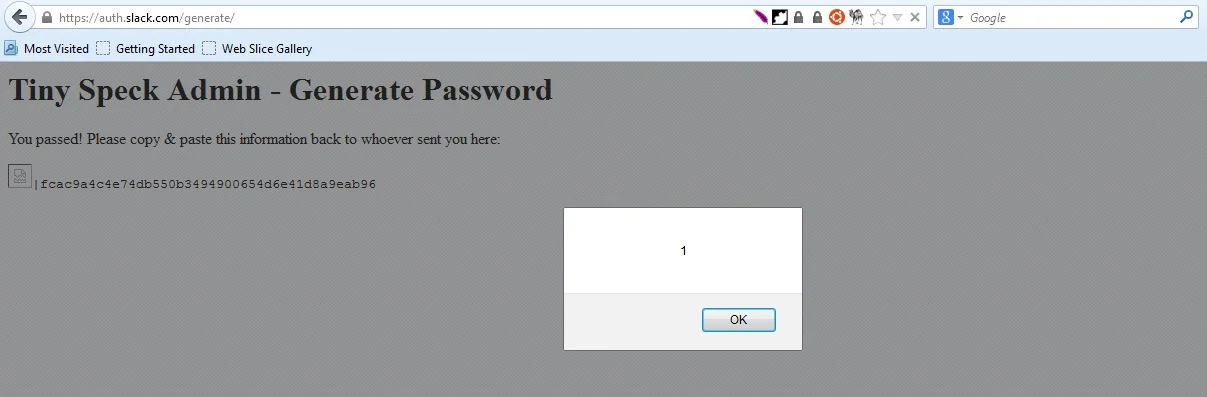
What the report shows
This is a reflected cross-site scripting report against Slack's account generation flow, filed on HackerOne by the researcher niks and disclosed on 19 May 2014. The platform records a bounty of 500.00 USD and classifies the weakness as generic cross-site scripting. No CVSS score or severity rating is given.
The affected feature is the account generation page at https://auth.slack.com/generate/, specifically the password confirmation step that follows initial sign-up. The researcher's reproduction is short and linear:
- Open
https://auth.slack.com/generate/. - Enter a username and password and submit the request.
- On the next step the application asks the user to re-enter the password just created, with the message "We're almost done. Just need to test that you remember your password. Enter it again for me". Enter the same password again, submit, and intercept the request with Burp.
- Change the
uparameter to an XSS payload:
u=<img src=x onerror=alert(1)>
- Submit the request and inspect the response. The application does not properly escape the special characters, so the payload executes.
The researcher adds one practical note: for a better reproduction, use Firefox.
The attached screenshot, slack_xss_poc.jpg, is the proof of concept for the execution described in step 5.
The report does not describe the fix, the response body, or the exact context in which the value was reflected.
Root cause
The report points to a missing output encoding step: a user-controlled value, the u parameter, is written back into the response without escaping the special characters that make HTML meaningful. Because the value lands in an HTML context where a tag such as <img> is parsed, the browser builds an element with an event handler and runs the JavaScript in onerror.
The report does not identify the exact sink, so the precise place where the value is written back is unknown. The report does not identify the exact sink, so this remains an inference from the behaviour described.
Impact
Reflected XSS runs script in the origin of the vulnerable page. The script runs in the origin of the vulnerable page, auth.slack.com. The report does not examine what that origin exposes.
The report itself does not demonstrate account takeover, data theft or any chained exploit; it shows script execution with alert(1). The practical impact therefore depends on what the authentication origin exposes and on how easily the crafted request can be delivered, neither of which the report examines.
How this kind of bug works
Reflected XSS arises when an application takes input from the current request and includes it in the response without context-appropriate encoding. The browser cannot tell developer-written markup from injected markup, so any characters that are significant in the surrounding context (HTML tags, attribute delimiters, URL schemes, JavaScript string terminators) become part of the page's structure and script.
The bug class persists because output is assembled in many places and encoding is easy to forget, especially in older templating, error pages, confirmation and redirect screens, and anywhere a value is concatenated into a string. The defence is output encoding applied at the point of rendering, chosen for the context: HTML entity encoding for element content, attribute encoding inside attributes, JavaScript encoding inside script blocks, URL encoding inside URLs. Input validation and blocklists of payload patterns are weaker substitutes because they are easy to bypass. A Content Security Policy that forbids inline script reduces the damage but does not fix the underlying encoding flaw.
How to test for it
- Map every parameter that the application reflects: query string, form body, path segments, headers that appear in responses, and hidden fields carried between steps of a multi-stage flow.
- For each one, send a unique benign marker first and confirm it appears in the response. Note the exact context: between tags, inside an attribute, inside a script block, inside a URL.
- Send context-appropriate probe characters: angle brackets and quotes for HTML, quote and semicolon for attributes, quote and backslash for script strings. Look for the characters surviving unencoded rather than being turned into entities.
- Where the reflection is in HTML, try a harmless tag with an event handler and confirm execution in a browser. Test in more than one browser, since parsing and filtering differ.
- Repeat the flow end to end, including intermediate steps, because a value may be reflected only after a second submission.
A positive result is the browser executing your script in the target origin, confirmed in the DOM and not merely the payload appearing in the source. Common false positives: the payload is reflected but encoded, so it renders as text; the reflection sits in a context where it cannot break out; a web application firewall blocks execution for your browser but the underlying flaw remains; or the value is reflected on a different origin that does not share the sensitive cookies.
How it is fixed
Apply output encoding at the sink, matched to context, and prefer templating engines that encode by default. Validate input against an allowlist where the expected format is narrow, such as a username. Set a restrictive Content Security Policy as defence in depth. Add regression tests that assert the encoding of reflected values, and review other parameters rendered by the same template, since a missing escape usually appears in more than one place.
Hunting notes
Reflections cluster in multi-step flows: sign-up, password reset, invitation acceptance, email confirmation, and any page that echoes back what the user just typed. Authentication hosts are high value because a finding there has obvious consequences. Recon signals worth following are parameters named after user data (u, user, email, name, next, redirect) and pages that render a personalised confirmation message.
What happened, in plain words
This is a bug report about Slack, the workplace chat product. It was filed on HackerOne, a website where security researchers report bugs to companies, by a researcher called niks, and it was made public on 19 May 2014. The platform records a bounty of 500.00 USD paid for it, and files the weakness under the general label of cross-site scripting. No severity score is given.
The bug is a reflected cross-site scripting (XSS) flaw. XSS means getting a website to run JavaScript that the site's own developers never wrote. JavaScript is the programming language browsers use to make pages interactive, and a browser will happily run any script that appears in a page it trusts. "Reflected" means the malicious script is not stored on the server: it travels in the request you send and is echoed straight back in the response. A useful comparison is a photocopier that copies whatever you put on the glass, including a rude note you slipped in, and hands the copy to the next person.
The affected feature is Slack's account generation page at https://auth.slack.com/generate/, specifically the step where a new user is asked to type their password a second time. The researcher's reproduction is short and linear:
- Open
https://auth.slack.com/generate/. - Enter a username and password and submit the request.
- On the next step the application asks the user to re-enter the password just created, with the message "We're almost done. Just need to test that you remember your password. Enter it again for me". Enter the same password again, submit, and intercept the request with Burp.
- Change the
uparameter to an XSS payload:
u=<img src=x onerror=alert(1)>
- Submit the request and inspect the response. The application does not properly escape the special characters, so the payload executes.
The researcher adds one practical note: for a better reproduction, use Firefox.
A few terms in those steps need unpacking. A request is the message your browser sends to a server when you click a button or load a page; a response is what the server sends back. A parameter is a named value carried in that request, here the one called u. Burp is a tool that sits between your browser and the server so you can read and edit requests before they are sent; intercepting means pausing a request mid-flight to change it.
The payload is worth reading piece by piece. <img src=x onerror=alert(1)> is an HTML image tag. src=x tells the browser to load an image from a location called x, which does not exist. onerror is an attribute that names code to run when loading fails, and alert(1) is a tiny JavaScript instruction that pops up a dialog box showing the number 1. So the payload asks the browser to load a broken image and then run a script as a consolation prize. alert(1) is harmless on purpose: it proves script execution without doing damage.
The attached screenshot, slack_xss_poc.jpg, is the proof of concept for the execution described in step 5.
The script runs in the origin of the vulnerable page, meaning the browser treats it as coming from auth.slack.com. A session is the server's memory of you being logged in, usually held in a cookie, a small piece of data the browser stores and sends back with each request. The report itself does not demonstrate account takeover or data theft; it shows script execution with alert(1). The practical impact depends on what the authentication origin exposes and on how easily the crafted request can be delivered, and the report does not examine either. It also does not describe the fix, the response body, or the exact context in which the value was reflected.
In general, how this kind of bug works
Reflected XSS arises when an application takes input from the current request and includes it in the response without context-appropriate encoding. Encoding means converting characters that have special meaning into a safe form, for example turning < into < so the browser displays it as text instead of treating it as the start of a tag. The browser cannot tell developer-written markup from injected markup, so any characters that are significant in the surrounding context (HTML tags, attribute delimiters, URL schemes, JavaScript string terminators) become part of the page's structure and script.
The bug class persists because output is assembled in many places and encoding is easy to forget, especially in older templating, error pages, confirmation and redirect screens, and anywhere a value is concatenated into a string. The defence is output encoding applied at the point of rendering, chosen for the context: HTML entity encoding for element content, attribute encoding inside attributes, JavaScript encoding inside script blocks, URL encoding inside URLs. Input validation and blocklists of payload patterns are weaker substitutes because they are easy to bypass. A Content Security Policy, a set of rules a site sends to tell the browser which scripts are allowed, that forbids inline script reduces the damage but does not fix the underlying encoding flaw.
In general, how to test for it
- Map every parameter that the application reflects: query string, form body, path segments, headers that appear in responses, and hidden fields carried between steps of a multi-stage flow.
- For each one, send a unique benign marker first and confirm it appears in the response. Note the exact context: between tags, inside an attribute, inside a script block, inside a URL.
- Send context-appropriate probe characters: angle brackets and quotes for HTML, quote and semicolon for attributes, quote and backslash for script strings. Look for the characters surviving unencoded rather than being turned into entities.
- Where the reflection is in HTML, try a harmless tag with an event handler and confirm execution in a browser. Test in more than one browser, since parsing and filtering differ.
- Repeat the flow end to end, including intermediate steps, because a value may be reflected only after a second submission.
A positive result is the browser executing your script in the target origin, confirmed in the DOM (the browser's live model of the page) and not merely the payload appearing in the source. Common false positives: the payload is reflected but encoded, so it renders as text; the reflection sits in a context where it cannot break out; a web application firewall blocks execution for your browser but the underlying flaw remains; or the value is reflected on a different origin that does not share the sensitive cookies.
In general, how it is fixed
Apply output encoding at the sink, the place where the value is written into the page, matched to context, and prefer templating engines that encode by default. Validate input against an allowlist where the expected format is narrow, such as a username. Set a restrictive Content Security Policy as defence in depth. Add regression tests that assert the encoding of reflected values, and review other parameters rendered by the same template, since a missing escape usually appears in more than one place.
In general, where to look
Reflections cluster in multi-step flows: sign-up, password reset, invitation acceptance, email confirmation, and any page that echoes back what the user just typed. Authentication hosts are high value because a finding there has obvious consequences. Recon signals worth following are parameters named after user data (u, user, email, name, next, redirect) and pages that render a personalised confirmation message.
Glossary
- XSS (cross-site scripting): a bug where a site runs JavaScript an attacker supplied, because user input reaches the page without being made safe.
- Reflected XSS: XSS where the malicious value travels in the request and is echoed back in the response rather than stored on the server.
- Request: the message a browser sends to a server, for example when you submit a form.
- Response: what the server sends back to the browser.
- Parameter: a named value carried in a request, such as
u. - Payload: the crafted input an attacker sends to trigger a bug.
- HTML: the markup language that describes the structure of a web page.
- Tag: an HTML element such as
<img>, which tells the browser to display or load something. - Attribute: a setting inside a tag, such as
srcoronerror. - Event handler: an attribute that names code to run when something happens, such as an image failing to load.
- JavaScript: the programming language browsers run to make pages interactive.
- Encoding (output encoding): converting special characters into a safe form so the browser treats them as text, not code.
- Escape: to make a character safe for the context it appears in.
- Origin: the combination of scheme, host and port that the browser uses to decide which site a page belongs to; script from one origin is trusted as that origin.
- Session: the server's record of you being logged in.
- Cookie: a small piece of data the browser stores for a site and sends back with each request.
- Burp: a tool that sits between browser and server so requests can be read and edited.
- Intercept: to pause a request in transit and change it before it reaches the server.
- DOM: the browser's live model of the page, which changes as scripts run.
- Content Security Policy: rules a site sends to the browser saying which scripts may run.
- Web application firewall: a filter in front of a site that tries to block malicious requests.
- Allowlist: a list of permitted values, rejecting everything else.
- False positive: a test result that looks like a bug but is not exploitable.
- Bounty: a payment a company makes for a valid security report.
- Triage: the first review of a report to decide whether it is valid.