URL link spoofing
The message posting API allowed a user to supply a link with a display text that differed from its actual destination, so a message could show a trusted URL while linking to an attacker-controlled site. An attacker could use this to phish victims by making a malicious link appear legitimate.
bfe3fdb1088411d8ef018aa3abde8 Follow
 Originally disclosed on HackerOne
- Triaged in 5 months
- Fixed in 13 months
- Paid in 8 months
- Disclosed after 15 months
Words such as http://example.com and example.com included in the message are displayed by URL link. This URL link naturally links to example.com. However, we can spoof the link destination by changing the message post request.
 POST /api/chat.postMessage HTTP/1.1
 Host: example.slack.com
 ...

 ...
 -----------------------------87462859699239992111770463
 Content-Disposition: form-data; name="text"

-http://example.com
+<http://evil.com|http://example.com>
 -----------------------------87462859699239992111770463
 ...
The URL link http://example.com is displayed in the message, but in fact it is linked to evil.com. For example, like http://example.com.
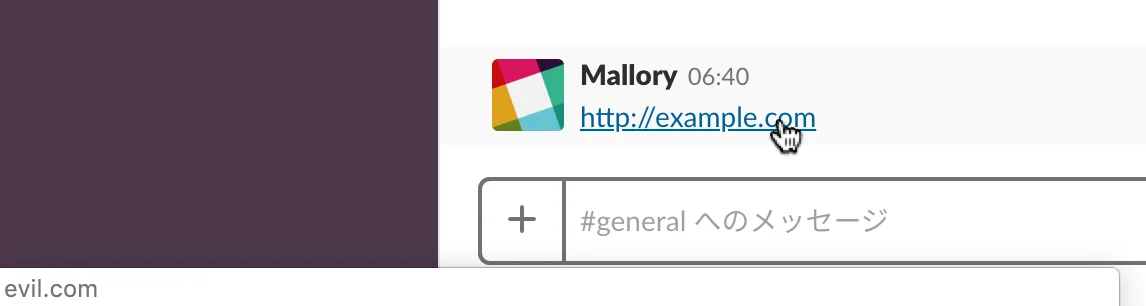
I took a screenshot of Slack on Chrome, so the link destination is displayed in the status bar. However, desktop apps and mobile apps do not have a status bar.
Impact
It is used for phishing attack. For example, an attacker posts a message like the following. Victims click on this URL link will lead to a fake login page.
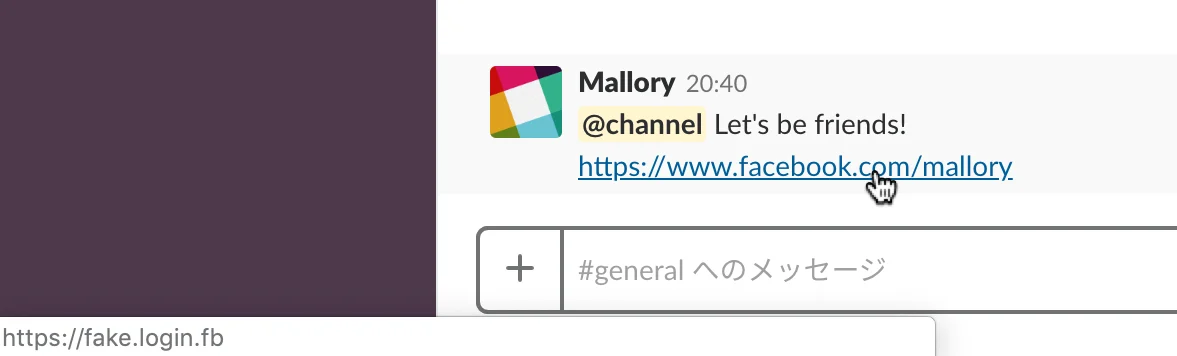
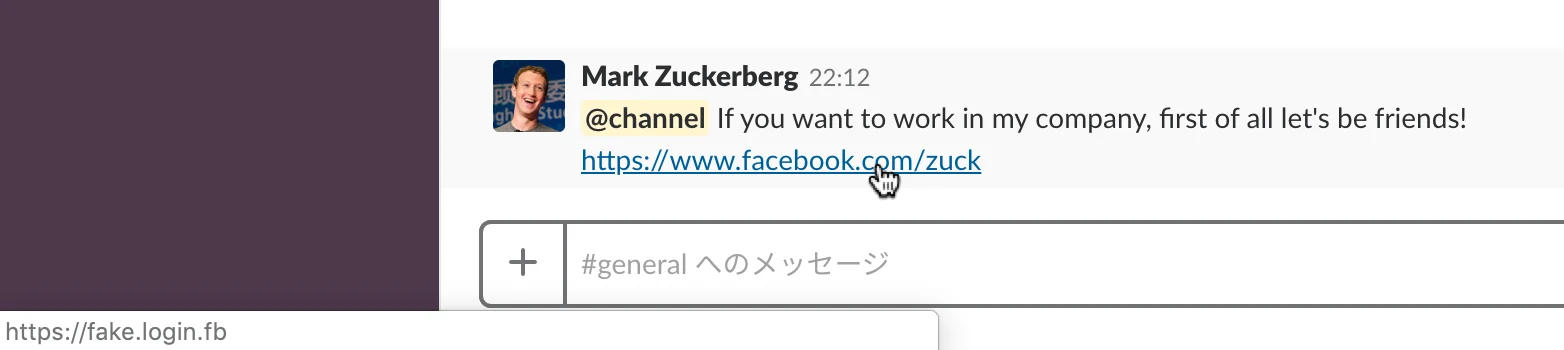
In addition, It is already known that we can create Slack accounts with the same name. Therefore, an attacker can increase the success rate of phishing by spoofing an influential person.
Context
Slack renders bare URLs and domain names in a message as clickable links. When a user posts http://example.com or example.com, the client turns that text into an anchor that points at the same destination. The report is about the message-posting API behind that feature: chat.postMessage. The researcher found that the link text and the link destination can be decoupled by changing the request body, so the message shows one URL while the anchor points somewhere else.
This is a phishing primitive rather than a code-execution or data-access bug. The program rated it low severity (CVSS 3.5) under the Phishing weakness, on the slack.com asset, and paid a 250 USD bounty. It was disclosed on 2020-04-26.
Setup
The report does not describe any special accounts, roles or tooling. The only precondition visible in the text is the ability to send a chat.postMessage request to a workspace host, which is what the normal client does when a user posts a message. The researcher modified the multipart body of the request and showed the result in Slack on Chrome.
Finding it
The starting observation is ordinary behaviour: words such as http://example.com and example.com in a message are displayed as URL links, and that link naturally points to example.com. The researcher changed the value of the text field in the request that carries the message.
Exploitation
Step 1: post a message with a crafted text field
The normal request sends the URL as the value of the text form field. The researcher changed that value to Slack's link markup form, <url|text>, where the first part is the destination and the second is the displayed label.
 POST /api/chat.postMessage HTTP/1.1
 Host: example.slack.com
 ...

 ...
 -----------------------------87462859699239992111770463
 Content-Disposition: form-data; name="text"

-http://example.com
+<http://evil.com|http://example.com>
 -----------------------------87462859699239992111770463
 ...
The request is a multipart form post to /api/chat.postMessage on the workspace host. The only changed part is the text field: the plain URL is replaced with <http://evil.com|http://example.com>. The renderer treats the part before the pipe as the link target and the part after it as the visible text, so the message displays http://example.com while the anchor points at evil.com.
Step 2: confirm the mismatch in the client
The result is a message whose visible URL is http://example.com but whose link destination is evil.com, equivalent to a markdown link written as http://example.com.
The screenshot was taken in Slack on Chrome, where hovering the link shows the real destination in the browser status bar. That status bar is the only place a careful user can see the mismatch. The desktop and mobile Slack apps have no status bar, so there the displayed text is the only thing the victim sees before clicking.
Root cause
The message text is interpreted as markup by the client, and the markup syntax allows an arbitrary destination to be paired with an arbitrary label. The message text is interpreted as markup, and the markup syntax allows an arbitrary destination to be paired with an arbitrary label. The client then renders the label as the visible text and the destination as the href. In a browser the status bar exposes the discrepancy, but the native clients provide no equivalent affordance, which is why the same message is more convincing there.
Impact
The technique is used for phishing. An attacker posts a message containing such a link, and victims who click it are led to a fake login page.
The report also notes that it is already known that Slack accounts can be created with the same name, so an attacker can raise the success rate of the phishing by spoofing an influential person.
The impact depends on the victim clicking the link, and on the victim not checking the destination. In the browser the status bar reveals the real target on hover; in the desktop and mobile apps it does not. The report does not describe any server-side effect, credential capture mechanism or additional precondition beyond posting the message.
Fix
The natural fix, given the root cause, is for the server or client to reject or neutralise link markup whose visible label is itself a URL that differs from the destination, so that a displayed URL always matches where the link goes.
Variants to test
- Try the same
<destination|label>markup in other fields that end up rendered as message text, such as edited messages, thread replies, channel topics or profile fields. A positive result is a rendered link whose label differs from its destination. - Try other markup forms the client understands, for example markdown-style links, to see whether any of them bypass a filter that only covers the angle-bracket form. A positive result is the same label/destination mismatch through a different syntax.
- Try labels that look like trusted internal URLs or login pages rather than a generic example domain. A positive result is a message that renders a plausible internal-looking link pointing at an attacker-controlled host.
- Check the native clients specifically, since the status bar is absent there. A positive result is a link that looks identical to a normal URL in the desktop or mobile app while pointing elsewhere.
Hunting notes
This kind of bug hides in features that accept user text and render it as rich content: chat messages, comments, bios, descriptions and notification emails. During recon, the signal is any place where a client turns plain text into links automatically, because that means a markup parser sits between the stored text and the rendered anchor. The researcher demonstrated the mismatch in the browser with the status bar visible, pointed out that the desktop and mobile clients have no status bar, and noted that accounts can be created with the same name to raise the success rate of phishing. That combination of a convincing lure and no visible warning is what makes the report actionable for a program.
What happened, in plain words
Slack is a messaging app where people type messages and share links. When you type a web address like http://example.com into a message, Slack automatically turns it into a clickable link. Normally, the text you see and the place the link takes you are the same. The researcher found that by changing the request that sends the message, you can make the link show one address but actually take you to a different one. This is called URL link spoofing. It is a phishing trick: an attacker can make a link look like it goes to a trusted site, but it really goes to a fake login page. The report was rated low severity (CVSS 3.5) and paid a 250 USD bounty. It was disclosed on 2020-04-26.
Context
Slack turns bare URLs and domain names in a message into clickable links. When a user posts http://example.com or example.com, the client (the Slack app or website) turns that text into a link that points to the same destination. The report is about the message-posting API behind that feature: chat.postMessage. An API is a way for programs to talk to a service; here, it is the endpoint that the Slack client uses to send a message. The researcher found that the link text and the link destination can be separated by changing the request body, so the message shows one URL while the link points somewhere else.
This is a phishing primitive rather than a code-execution or data-access bug. Phishing is when an attacker tricks you into clicking a link and entering your information on a fake site that looks real. The program rated it low severity (CVSS 3.5) under the Phishing weakness, on the slack.com asset, and paid a 250 USD bounty. It was disclosed on 2020-04-26.
Setup
The report does not describe any special accounts, roles or tooling. The only precondition visible in the text is the ability to send a chat.postMessage request to a workspace host, which is what the normal client does when a user posts a message. The researcher modified the multipart body of the request and showed the result in Slack on Chrome. A proxy is a tool that sits between your browser and the internet, letting you see and change the requests you send. A multipart body is a way of formatting data sent to a server, often used when a form has multiple fields or files.
Finding it
The starting observation is ordinary behaviour: words such as http://example.com and example.com in a message are displayed as URL links, and that link naturally points to example.com. The researcher changed the value of the text field in the request that carries the message. Markup is a way of writing text with special instructions, like <url|text>, that a program interprets to create links or formatting.
Exploitation
Step 1: post a message with a crafted text field
The normal request sends the URL as the value of the text form field. The researcher changed that value to Slack's link markup form, <url|text>, where the first part is the destination and the second is the displayed label.
 POST /api/chat.postMessage HTTP/1.1
 Host: example.slack.com
 ...

 ...
 -----------------------------87462859699239992111770463
 Content-Disposition: form-data; name="text"

-http://example.com
+<http://evil.com|http://example.com>
 -----------------------------87462859699239992111770463
 ...
This is an HTTP request, the format browsers and apps use to ask a server to do something. Let us go through it line by line.
POST /api/chat.postMessage HTTP/1.1: This is the request line.POSTmeans we are sending data to the server./api/chat.postMessageis the path of the API endpoint that posts a message.HTTP/1.1is the version of the protocol.Host: example.slack.com: This tells the server which website we are talking to. Here it is a Slack workspace atexample.slack.com....: These lines are omitted; they would contain other headers, such as authentication information (like a cookie or token) that proves who we are. A cookie is a small piece of data stored by your browser and sent with requests to identify you; a token is similar but often used in APIs.- The lines with
-----------------------------87462859699239992111770463are boundaries that separate parts of a multipart form. Each part can have its own headers and content. Content-Disposition: form-data; name="text": This header says that this part is a form field namedtext. That is the field that holds the message content.- The line starting with
-(in the diff) is the original value:http://example.com. The line starting with+is the new value:<http://evil.com|http://example.com>. The diff format shows what was changed: the plain URL was replaced with the markup.
The request is a multipart form post to /api/chat.postMessage on the workspace host. The only changed part is the text field: the plain URL is replaced with <http://evil.com|http://example.com>. The renderer treats the part before the pipe as the link target and the part after it as the visible text, so the message displays http://example.com while the link points at evil.com.
Step 2: confirm the mismatch in the client
The result is a message whose visible URL is http://example.com but whose link destination is evil.com, equivalent to a markdown link written as http://example.com. Markdown is a simple way to format text; in markdown, [text](url) creates a link with the given text and destination.
The screenshot was taken in Slack on Chrome, where hovering the link shows the real destination in the browser status bar. That status bar is the only place a careful user can see the mismatch. The desktop and mobile Slack apps have no status bar, so there the displayed text is the only thing the victim sees before clicking.
Root cause
The message text is interpreted as markup by the client, and the markup syntax allows an arbitrary destination to be paired with an arbitrary label. The message text is interpreted as markup, and the markup syntax allows an arbitrary destination to be paired with an arbitrary label. The client then renders the label as the visible text and the destination as the href. In a browser the status bar exposes the discrepancy, but the native clients provide no equivalent affordance, which is why the same message is more convincing there. The href is the attribute in a link that tells the browser where to go.
Impact
The technique is used for phishing. An attacker posts a message containing such a link, and victims who click it are led to a fake login page.
The report also notes that it is already known that Slack accounts can be created with the same name, so an attacker can raise the success rate of the phishing by spoofing an influential person.
The impact depends on the victim clicking the link, and on the victim not checking the destination. In the browser the status bar reveals the real target on hover; in the desktop and mobile apps it does not. The report does not describe any server-side effect, credential capture mechanism or additional precondition beyond posting the message.
Fix
The natural fix, given the root cause, is for the server or client to reject or neutralise link markup whose visible label is itself a URL that differs from the destination, so that a displayed URL always matches where the link goes.
Variants to test
- Try the same
<destination|label>markup in other fields that end up rendered as message text, such as edited messages, thread replies, channel topics or profile fields. A positive result is a rendered link whose label differs from its destination. - Try other markup forms the client understands, for example markdown-style links, to see whether any of them bypass a filter that only covers the angle-bracket form. A positive result is the same label/destination mismatch through a different syntax.
- Try labels that look like trusted internal URLs or login pages rather than a generic example domain. A positive result is a message that renders a plausible internal-looking link pointing at an attacker-controlled host.
- Check the native clients specifically, since the status bar is absent there. A positive result is a link that looks identical to a normal URL in the desktop or mobile app while pointing elsewhere.
Hunting notes
This kind of bug hides in features that accept user text and render it as rich content: chat messages, comments, bios, descriptions and notification emails. During recon, the signal is any place where a client turns plain text into links automatically, because that means a markup parser sits between the stored text and the rendered anchor. The researcher demonstrated the mismatch in the browser with the status bar visible, pointed out that the desktop and mobile clients have no status bar, and noted that accounts can be created with the same name to raise the success rate of phishing. That combination of a convincing lure and no visible warning is what makes the report actionable for a program.
Glossary
- API: A way for programs to talk to a service, like a menu of requests a server understands.
- Phishing: A trick where an attacker makes a fake site or message look real to steal information.
- CVSS: A scoring system that rates the severity of security vulnerabilities.
- Bounty: A reward paid to a researcher for finding and reporting a bug.
- Multipart body: A format for sending form data with multiple parts, often used for file uploads or forms.
- Proxy: A tool that sits between your browser and the internet, letting you see and change requests.
- Markup: Special instructions in text, like
<url|text>, that a program interprets to create links or formatting. - Renderer: The part of a program that turns text or markup into what you see on screen.
- HTTP request: The format browsers and apps use to ask a server to do something.
- POST: An HTTP method that sends data to a server.
- Host: The website or server you are talking to.
- Cookie: A small piece of data stored by your browser and sent with requests to identify you.
- Token: A piece of data, similar to a cookie, often used in APIs to prove who you are.
- Boundary: A string that separates parts of a multipart form.
- Content-Disposition: A header that describes a part of a form, including its name.
- Diff: A format that shows changes between two versions of text, with
-for removed lines and+for added lines. - Markdown: A simple way to format text, where
[text](url)creates a link. - Status bar: The area at the bottom of a browser window that shows where a link will take you when you hover over it.
- href: The attribute in a link that tells the browser where to go.
- Recon: The phase of exploring a target to find potential vulnerabilities.
- Markup parser: A program that reads markup and turns it into formatted content.






