URL filter bypass in Enterprise Grid
The profile field URL validation in Slack Enterprise Grid was enforced only in the browser, so a crafted profile update request could store a URL with a non-http scheme such as tel:. A victim who clicked the link in the attacker's profile could be made to place a phone call to the attacker.
bfe3fdb1088411d8ef018aa3abde8 Follow
 Originally disclosed on HackerOne
- Paid in 9 months
- Disclosed after 12 months
URL filter bypass in Enterprise Grid
Description
Slack Enterprise Grid seems to be able to add arbitrary column to the profile of the account. In my company there is a おすすめランチ (My Favorite Lunch) column, and we can set the URL of the website and Display text.
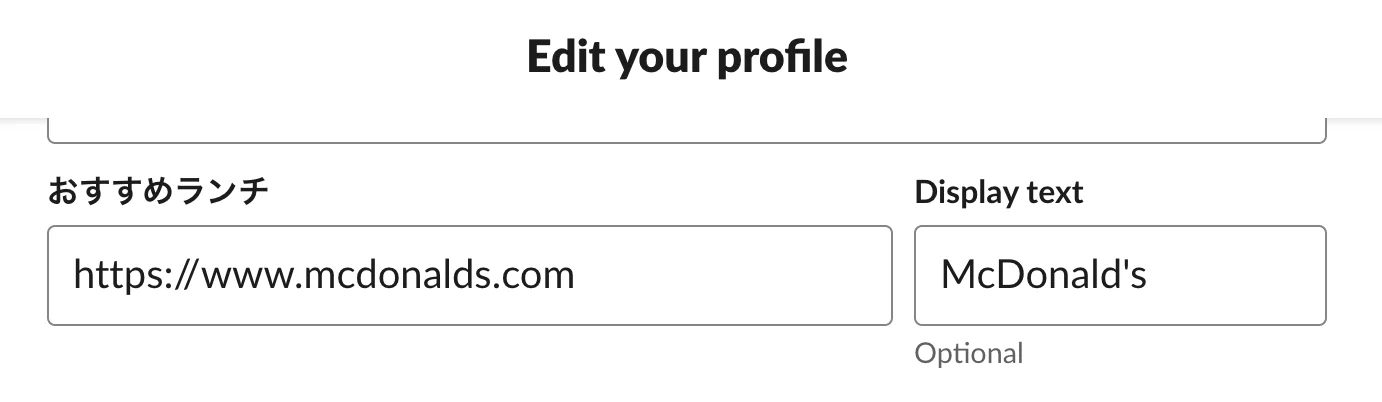
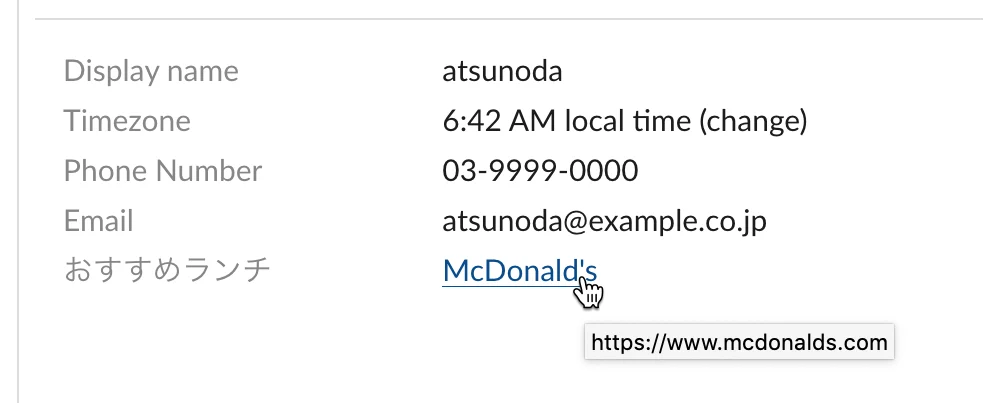
Only the http: or https: scheme can be set in the URL, and other schemes can not be set by input validation.
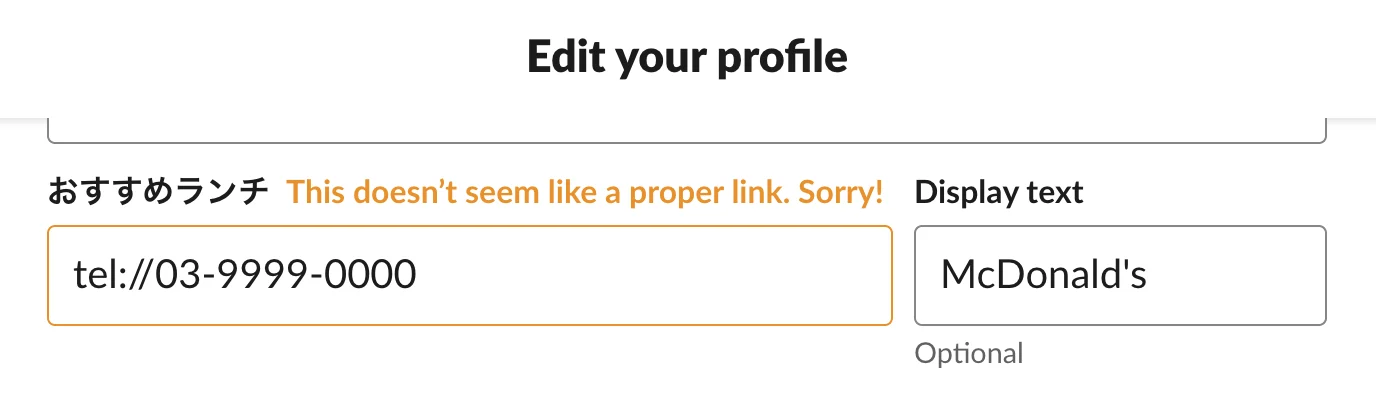
However, since input validation exists on the client side, we can bypass this validation by changing the profile setting request.
 POST /api/users.profile.set HTTP/1.1
 Host: example-corp.slack.com
 ...

 -----------------------------7110134921404748136166706634
 Content-Disposition: form-data; name="profile"

-{"real_name":"Akaki Tsunoda","title":"","phone":"03-9999-0000","fields":{"XfABVBP467":{"value":"https://www.mcdonalds.com","alt":"McDonald's"}}}
+{"real_name":"Akaki Tsunoda","title":"","phone":"03-9999-0000","fields":{"XfABVBP467":{"value":"tel://03-9999-0000","alt":"McDonald's"}}}
 -----------------------------7110134921404748136166706634
 ...
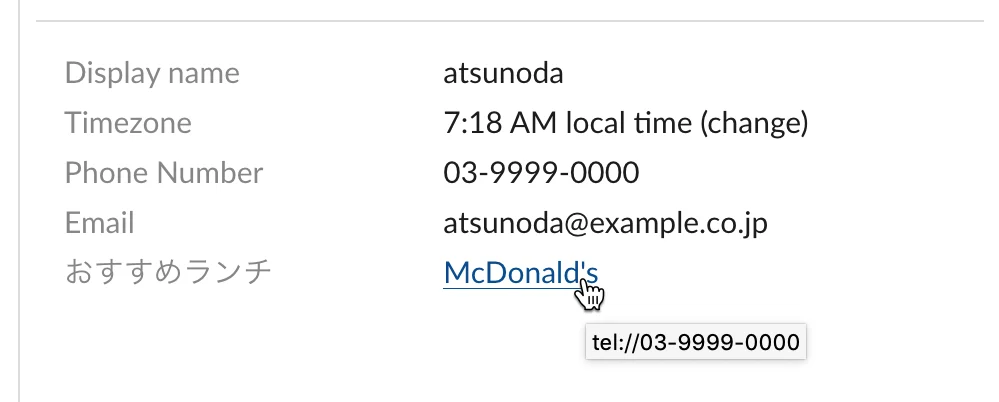
I took screenshots on browser, so an illegal URL is displayed, but it is not displayed in mobile apps.
Impact
In the case of using the tel: scheme, the victim who clicked on the link included in the attacker's profile inadvertently call the attacker. In the future attackers may exploit Slack or other app's deep linking (Custom URL Scheme).
Note: I could not execute JavaScript because I could not use javascript: or data: scheme by server side input validation.
URL filter bypass in Enterprise Grid
Context
Slack Enterprise Grid lets an organisation add custom columns to user profiles. In the researcher's company there was a column called おすすめランチ (My Favorite Lunch), and each user could set a URL and a display text for it. The profile editor restricts the URL to the http: or https: scheme, and other schemes are rejected by input validation.
The validation is the interesting part: it runs on the client side. The profile setting request itself is a normal API call, so anyone who can edit that request can send a value the UI would never produce.
Setup
The captured request is addressed to example-corp.slack.com, and the custom column's field identifier was XfABVBP467. The screenshots were taken in a browser. No special role beyond the ability to edit one's own profile is described.
Finding it
While looking at the custom profile column, the researcher noticed that the URL field accepted a website address and a display text. Trying to enter a non-HTTP scheme in the UI was blocked, which showed that a scheme allowlist existed. The question was where that allowlist lived. Since the profile is saved through an API request, the researcher captured that request and changed the value by hand.
Exploitation
Step 1: capture the profile update request
The profile save is a multipart form POST to /api/users.profile.set. The profile part contains a JSON document with the user's details and the custom fields. The original value for the custom column was an HTTPS URL:
 POST /api/users.profile.set HTTP/1.1
 Host: example-corp.slack.com
 ...

 -----------------------------7110134921404748136166706634
 Content-Disposition: form-data; name="profile"

-{"real_name":"Akaki Tsunoda","title":"","phone":"03-9999-0000","fields":{"XfABVBP467":{"value":"https://www.mcdonalds.com","alt":"McDonald's"}}}
+{"real_name":"Akaki Tsunoda","title":"","phone":"03-9999-0000","fields":{"XfABVBP467":{"value":"tel://03-9999-0000","alt":"McDonald's"}}}
 -----------------------------7110134921404748136166706634
 ...
Step 2: swap the scheme
The only change is inside fields.XfABVBP467.value: https://www.mcdonalds.com becomes tel://03-9999-0000. The alt display text stays the same. The modified body was sent, and the illegal URL was displayed in the browser.
Step 3: observe the result
In the browser the illegal URL is rendered as a link. The researcher notes that it is not displayed in the mobile apps, so the behaviour differs by client.
Root cause
The scheme allowlist is enforced only in the client. The server does not apply the client's scheme allowlist, so a request built outside the UI can store schemes such as tel:. The researcher also tried javascript: and data: and could not use them, because server-side input validation rejected those schemes. So the server does have some validation, but it does not cover tel: (and, by implication, other non-web schemes).
Impact
With a tel: URL in a profile field, a victim who clicks the link in the attacker's profile places a call to the attacker without meaning to. The researcher notes that attackers may in future abuse deep linking (custom URL schemes) in Slack or other apps. The impact is bounded: JavaScript could not be executed, because javascript: and data: were blocked by server-side validation, and the link is not shown in the mobile apps.
Fix
The report does not describe a fix. The obvious change is to enforce the same scheme allowlist on the server that the client applies, so that only http: and https: can be stored in a profile URL field regardless of how the request is built.
Variants to test
- Try other schemes in the same field, such as
sms:,mailto:,intent:or app-specific custom schemes, and check whether the server stores them. A positive result is a saved value that the UI would have rejected. - Try the same bypass on other profile fields that take a URL, and on other clients (web, desktop, mobile) to see where the link is rendered. A positive result is a clickable link in any client.
- Try to get past the server-side check that blocked
javascript:anddata:with encoding or case tricks. A positive result is a stored value that executes script when clicked.
Hunting notes
This kind of bug hides wherever a form validates input in the browser but saves through an API that can be called directly. The signal during recon is a field with a visible restriction (a scheme allowlist, a length limit, a format check) combined with a save request you can intercept and replay. The researcher showed impact by demonstrating that the resulting link was rendered in the browser, and by stating clearly what could not be achieved (javascript: and data: were blocked server-side). That combination of a working bypass and an honest limit is what makes the report credible.
What happened, in plain words
Slack is a chat application that companies use to talk internally. Its paid Enterprise Grid plan lets an organisation add extra columns to each person's profile, beyond the standard name and job title. In the researcher's company there was a column called おすすめランチ (My Favorite Lunch), and each person could put a web address and a display text in it.
The profile editor only lets you type a web address that starts with http: or https:. Those two prefixes are called schemes: the little word at the start of a link that tells the browser what kind of thing the link points to. A web page is http: or https:, a phone number is tel:, an email address is mailto:, and so on. The editor refused anything else.
The catch was where that refusal happened. It happened in the browser, in the page you are looking at. When you press save, the browser sends a message to Slack's server, and that message is just text travelling over the network. If you can catch that message and change it before it leaves, the server never sees what the editor would have allowed. It sees whatever you typed into the message.
The researcher did exactly that: caught the save message and swapped the web address for a phone number link. The result was a profile link that, when clicked in a browser, starts a phone call. That is the bug: a check that only exists in the browser can be skipped by anyone who edits the request.
The pieces you need to know
Before the steps make sense, here are the ideas involved, from zero.
A server and a client. The server is the computer that stores everything: your profile, your messages, your company's data. The client is the program you use to talk to it, usually a browser or a phone app. The client asks, the server answers.
An API. An API is the fixed set of addresses a server listens on for those requests. Think of a restaurant: the menu is the API, the kitchen is the server. You can order anything on the menu, and the kitchen will cook it, whether or not the printed menu in the window shows it nicely. Slack's profile save is one such address, /api/users.profile.set.
A request. A request is the message the client sends. It has a method (the verb, such as POST, meaning "here is some data, save it"), a path (which address on the server), headers (small labels such as which host you are talking to), and a body (the actual data).
A multipart form. When a request carries a form with several parts, the body is split into sections, each separated by a boundary line: a long random string of dashes and digits. Each section has a Content-Disposition line naming the field, then the value. It is like a folder with dividers, each divider labelled.
JSON. JSON is a way of writing data as text using curly braces, quotes and colons. {"name":"value"} means a label name holding value. Servers and clients use it because both sides can read it easily.
Input validation. Validation is a check that the data you typed is acceptable. A scheme allowlist is one: only http: and https: are permitted. The important question with any validation is where it runs. If it runs only in the client, it is a courtesy to the user, not a security control, because the user (or an attacker) controls the client.
An intercepting proxy. A proxy is a program that sits between your browser and the server, like a postal worker who opens every letter, lets you rewrite it, and then sends it on. Security testers use one to see and change requests. The screenshots were taken in a browser.
A custom profile field. Slack lets a company define extra profile columns. Each one gets an internal identifier, a short code the server uses to know which column you mean. In this workspace the column for My Favorite Lunch had the identifier XfABVBP467. Each field holds a value (the link) and an alt (the text shown to people).
Phishing. Phishing is tricking someone into an action that harms them, usually by making something look trustworthy. A link labelled with a familiar name that actually does something unexpected is a classic shape of it. That is the category this report was filed under.
Setting the scene
The researcher worked against a Slack Enterprise Grid workspace. In the captured request the host is example-corp.slack.com, which is a placeholder for the company's own Slack address. The profile had the custom column described above, with identifier XfABVBP467. The tools were a browser and an intercepting proxy. Nothing in the report suggests any special permission was needed beyond being able to edit your own profile.
These two screenshots show the custom profile column as it appears in the product, with its URL and display text.
Finding it
Looking at the custom column, the researcher saw that it took a web address plus a display text. Typing a non-web scheme into the editor was blocked, which proved an allowlist existed. The next question was the useful one: does that allowlist live in the browser or on the server? Since the profile is saved by an API request, the answer could be found by catching that request and editing the value by hand.
This screenshot shows the editor refusing a scheme other than http: or https:.
Exploitation
Step 1: capture the profile update request
Saving the profile sends a multipart form POST to /api/users.profile.set. One part of the form is named profile, and its content is a JSON document with the user's details and the custom fields. The original value for the custom column was an HTTPS address:
 POST /api/users.profile.set HTTP/1.1
 Host: example-corp.slack.com
 ...

 -----------------------------7110134921404748136166706634
 Content-Disposition: form-data; name="profile"

-{"real_name":"Akaki Tsunoda","title":"","phone":"03-9999-0000","fields":{"XfABVBP467":{"value":"https://www.mcdonalds.com","alt":"McDonald's"}}}
+{"real_name":"Akaki Tsunoda","title":"","phone":"03-9999-0000","fields":{"XfABVBP467":{"value":"tel://03-9999-0000","alt":"McDonald's"}}}
 -----------------------------7110134921404748136166706634
 ...
Line by line:
POST /api/users.profile.set HTTP/1.1is the request line: the verbPOST(send and save this data), the path of the API address that saves profiles, and the version of the protocol.Host: example-corp.slack.comsays which server the request is addressed to. It is a placeholder for the company's Slack workspace....stands for headers the report does not show, such as the ones that identify the logged-in user.- The long dashed line is the boundary, the divider between parts of the form. It appears again at the end to close the last part.
Content-Disposition: form-data; name="profile"labels this part: it is form data, and its name isprofile.- The line starting with
-is the original JSON, the one the browser would send. The line starting with+is the edited JSON. In a diff,-means removed and+means added. - Inside the JSON,
real_name,titleandphoneare ordinary profile details.fieldsholds the custom columns.XfABVBP467is the identifier of the My Favorite Lunch column. Itsvalueis the link, and itsaltis the text people see. - The only difference between the two lines is the
value:https://www.mcdonalds.comin the original,tel://03-9999-0000in the edited version.
Step 2: swap the scheme
The change is confined to fields.XfABVBP467.value. The alt text is untouched, so the link still reads as something harmless. The edited body was sent, and the illegal address appeared in the profile in the browser.
This screenshot shows the result: the illegal address stored in the profile and rendered as a link in the browser.
Step 3: observe the result
In the browser the stored address is shown as a clickable link. The researcher notes that it is not displayed in the mobile apps, so the behaviour depends on which client you use.
Root cause
The scheme allowlist is enforced only in the client. The server does not apply the client's scheme allowlist, so a request built outside the editor can store schemes such as tel:. The researcher also tried javascript: and data: and could not use them, because server-side validation rejected those. So the server does check something, but its check does not cover tel: and, by implication, other non-web schemes.
Impact
With a tel: address in a profile field, a victim who clicks the link in the attacker's profile places a call to the attacker without meaning to. The researcher notes that attackers may in future abuse deep linking, the mechanism where a custom URL scheme opens a particular app, in Slack or elsewhere. The impact is limited: JavaScript could not be run, because javascript: and data: were blocked by server-side validation, and the link is not shown in the mobile apps.
Fix
The report does not describe a fix. The natural change is to apply the same scheme allowlist on the server that the client applies, so that only http: and https: can be stored in a profile URL field however the request was built.
Variants to test
- Try other schemes in the same field, such as
sms:,mailto:,intent:or app-specific custom schemes, and see whether the server stores them. A positive result is a saved value the editor would have refused. - Try the same bypass on other profile fields that take a URL, and on other clients (web, desktop, mobile) to see where the link is rendered. A positive result is a clickable link in any client.
- Try to get past the server-side check that blocked
javascript:anddata:using encoding or case tricks. A positive result is a stored value that runs script when clicked.
Hunting notes
This kind of bug hides wherever a form checks input in the browser but saves through an API that can be called directly. During recon, the signal is a field with a visible restriction (a scheme allowlist, a length limit, a format check) combined with a save request you can intercept and replay. The researcher showed impact by demonstrating that the resulting link was rendered in the browser, and by stating clearly what could not be achieved: javascript: and data: were blocked server-side. A working bypass plus an honest limit is what makes the report credible.
Glossary
- API: the fixed set of addresses a server listens on so that clients can ask it to do things.
- API request: a message a client sends to one of those addresses, with a method, path, headers and body.
- Boundary: the random divider line that separates the parts of a multipart form body.
- Client: the program you use to talk to a server, such as a browser or a phone app.
- Client-side validation: a check performed in the browser or app, which the user can bypass because they control that program.
- Content-Disposition: the header line inside a multipart form that names each part.
- Custom profile field: an extra profile column a company defines, identified by a short code such as
XfABVBP467. - Deep linking: using a custom URL scheme to open a particular app or a particular place inside it.
- Diff: a side-by-side or stacked view of two versions of text, where
-marks removed lines and+marks added ones. - Enterprise Grid: Slack's plan for large organisations, which includes custom profile columns.
- Header: a small label at the top of a request, such as which host it is addressed to.
- Input validation: a check that data is acceptable, for example that a link uses an allowed scheme.
- Intercepting proxy: a tool that sits between browser and server so you can read and edit requests in transit.
- JSON: a text format for data using braces, quotes and colons, readable by both clients and servers.
- Method: the verb of a request, such as
POST, meaning send and save this data. - Multipart form: a request body split into labelled parts by boundary lines.
- Phishing: tricking someone into an action that harms them, often by making a link look trustworthy.
- Root cause: the underlying reason a bug exists, as opposed to its visible symptom.
- Scheme: the word at the start of a link that says what kind of thing it points to, such as
http:,https:,tel:ormailto:. - Scheme allowlist: a rule that only listed schemes are accepted.
- Server: the computer that stores the data and answers requests.
- Server-side validation: a check performed on the server, which a user cannot skip by editing their own request.
- Severity: the rating of how serious a bug is, here low.
- Bounty: a payment a company makes to a researcher who reports a valid bug.



