HTML injection on newsroom.snap.com/* via search?q=1
The search page on Snap's newsroom site reflected the query parameter without sanitising it, so an attacker could inject arbitrary HTML. A crafted link could show fake content and a link to an attacker-controlled site, enabling phishing or defacement.

- Triaged in 5 days
- Fixed in 55 days
- Paid in 8 days
- Disclosed after 2 months
Hi security team members,
Hope you are well!
I found an unauthenticated HTML injection in the browser of NewRooms section: https://newsroom.snap.com/[code_country]/*. It is possible to inject any HTML code from the "?q=" parameter of the following endpoints newsroom.snap.com/[code_country]/search?q= since the text input in the search engine is not sanitized at all.
The steps to reproduce the attack are:
-
Inject any HTML code into the URL: https://newsroom.snap.com/es-ES/search?q=%3Ca%20style=%22position:absolute;margin:50px;%20background-color:%20yellow;%20z-index:1000;top:50px;padding:100px;font-weight:bold;font-size:45px;color:red;%22%20href=%22https://evil.com%22%3EClick%20here%20for%20win%201000%E2%82%AC!%3C/a%3E
-
In this PoC example, an attacker would send this seemingly legitimate URL to victims pretending that Snapchat is offering money as an excuse. In reality, these users would access the attacker's website (https://evil.com/) if they click on the <a></a> element.
Impact
An attacker can inject as much HTML code as desired and edit the style of the website to cause a Defacement in order to deceive users through Phishing, links to other websites controlled by the attacker through scams,... . There are many scenarios .
Attachments
Context
Snapchat's newsroom site, newsroom.snap.com, serves news and announcements for different locales. The site uses a country or language code in the path, such as es-ES, and includes a search feature that accepts a query through the q parameter. The researcher found that the search page reflects the query into the HTML without sanitisation, allowing HTML injection in the browser.
Setup
No account or special role is needed. The issue is unauthenticated and can be triggered by visiting a crafted URL in a browser.
Finding it
The researcher noticed that the search input on newsroom.snap.com/[code_country]/search?q= is not sanitised at all. Because the value of q is placed into the page as HTML, any HTML markup supplied in the parameter is rendered by the browser. This is an HTML injection, not necessarily script execution, but it is enough to alter the page and insert links.
Exploitation
Step 1: Inject HTML through the search parameter
The researcher supplied a URL with an encoded <a> element in the q parameter:
https://newsroom.snap.com/es-ES/search?q=%3Ca%20style=%22position:absolute;margin:50px;%20background-color:%20yellow;%20z-index:1000;top:50px;padding:100px;font-weight:bold;font-size:45px;color:red;%22%20href=%22https://evil.com%22%3EClick%20here%20for%20win%201000%E2%82%AC!%3C/a%3E
Decoded, the payload is an anchor element with inline CSS that positions it absolutely, gives it a yellow background, a high z-index, padding, bold red text, and a link to https://evil.com. The link text is "Click here for win 1000€!". Because the search page reflects the query without sanitisation, the browser renders this element as part of the page.
Step 2: Use the crafted URL in a phishing scenario
In the researcher's proof of concept, an attacker would send this seemingly legitimate URL to victims, pretending that Snapchat is offering money. If a victim clicks the injected link, they are taken to the attacker's website at https://evil.com/. The page itself still belongs to newsroom.snap.com, which makes the link appear trustworthy.
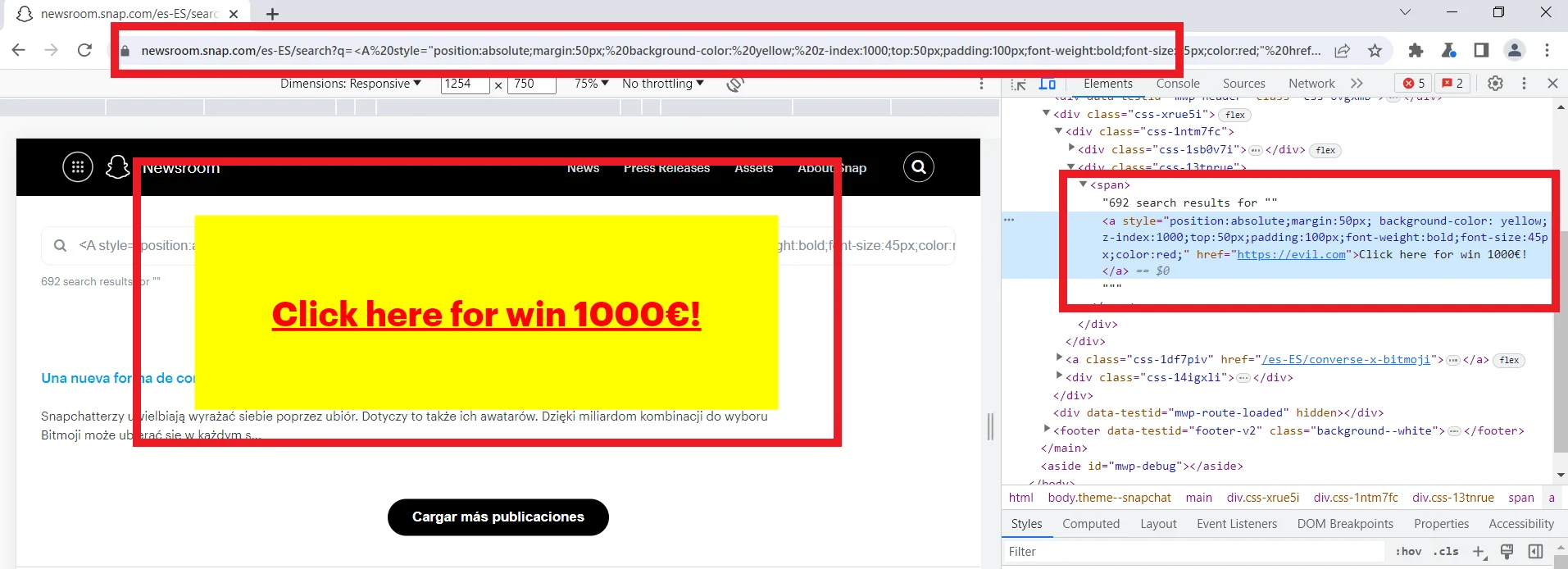
The attached screenshot shows the injected link rendered on the newsroom search page.
Root cause
The search page takes the value of the q parameter and inserts it into the HTML response without sanitising or encoding it. As a result, HTML tags in the query are interpreted by the browser rather than displayed as text. The report does not describe any server-side filtering or output encoding that would have prevented this.
Impact
An attacker can inject as much HTML code as desired and edit the style of the website, causing defacement. This can be used to deceive users through phishing, to link to other websites controlled by the attacker for scams, and in many other scenarios. The attack requires a victim to open a crafted URL, and the impact described is limited to HTML injection: the report does not demonstrate script execution or access to user data.
Fix
The report does not state what fix was applied. The appropriate remediation is to sanitise or HTML-encode the q parameter before including it in the page, so that user input is treated as text and not as markup.
Variants to test
- Try other locale paths, such as
en-USorfr-FR, with the sameqparameter. A positive result is the same injected element appearing on the page. - Try other HTML elements, such as
<img>,<iframe>or<style>, in theqparameter. A positive result is that the element is rendered or its attributes take effect. - Test other search or filter parameters on the same site that reflect input into the page. A positive result is any reflected markup that the browser interprets.
Hunting notes
This kind of bug tends to hide in search pages, error messages and any feature that reflects user input into HTML. During recon, look for parameters that appear in the page source, especially on marketing or newsroom subdomains that may receive less security attention.
What happened, in plain words
Snapchat runs a separate website for news and announcements, at newsroom.snap.com. Like many websites, it has a search box. When you search for something, the site puts your search words into the address bar as part of the link, after ?q=. For example, if you search for "hello", the address becomes something like .../search?q=hello.
A security researcher found that this search page takes whatever you type after q= and drops it straight into the page without cleaning it up. That means if you put HTML code (the language used to build web pages) into the search box, the browser does not show it as text. Instead, it treats it as part of the page and actually builds it. This is called HTML injection.
With this, an attacker can make the Snapchat newsroom page display a fake link, styled to look like a Snapchat promotion, that sends people to a website the attacker controls. The page still has the Snapchat address, so it looks trustworthy. The researcher showed this with a fake "win 1000€" link.
No account is needed to do this. Anyone who clicks a crafted link can be tricked.
Context
newsroom.snap.com is Snapchat's newsroom site. It shows news and announcements for different countries and languages. The site uses a short code in the address to pick the language, such as es-ES for Spanish (Spain). It also has a search feature: you type a word, and the site shows results. The search word is passed in the address as the q parameter. For example, ?q=hello means "search for hello".
The researcher found that the search page takes the value of q and puts it into the HTML of the page without sanitisation. Sanitisation means cleaning input so that dangerous characters or tags are removed or neutralised. Because there is none, any HTML you put in q becomes part of the page. This is HTML injection in the browser.
Setup
You do not need an account or any special permission. The issue is unauthenticated: it works for anyone, without logging in. All you need is a normal web browser.
Finding it
The researcher noticed that the search input on newsroom.snap.com/[code_country]/search?q= is not sanitised at all. The [code_country] part is a placeholder for the language code, such as es-ES. Because the value of q is placed into the page as HTML, any HTML markup you put in the parameter is rendered by the browser. Rendered means the browser builds it and shows it as part of the page, instead of showing the raw code as text.
This is HTML injection, not necessarily script execution. Script execution would mean running JavaScript code that can do things like steal cookies or change the page dynamically. HTML injection is simpler: it lets you add or change elements on the page, such as links and styling. That is enough to alter the page and insert links.
Exploitation
Step 1: Inject HTML through the search parameter
The researcher supplied a URL with an encoded <a> element in the q parameter:
https://newsroom.snap.com/es-ES/search?q=%3Ca%20style=%22position:absolute;margin:50px;%20background-color:%20yellow;%20z-index:1000;top:50px;padding:100px;font-weight:bold;font-size:45px;color:red;%22%20href=%22https://evil.com%22%3EClick%20here%20for%20win%201000%E2%82%AC!%3C/a%3E
Let us break this down. The address starts with https://newsroom.snap.com/es-ES/search?q=. That is the search page for Spanish (Spain), and q= starts the search query. Everything after q= is the value of the search term, but it has been URL-encoded. URL encoding replaces characters that are not allowed in a URL with a percent sign and two hexadecimal digits. For example, < becomes %3C, > becomes %3E, a space becomes %20, and " becomes %22. This is done so the browser sends the characters correctly.
If you decode it, the value is:
This is an anchor element, written <a>. It creates a link. The href attribute says where the link goes: here, https://evil.com, a domain the attacker controls. The text between <a> and </a> is what the user sees and clicks: "Click here for win 1000€!". The style attribute contains inline CSS, which controls how the element looks. Let us go through the CSS properties:
position:absolutetakes the element out of the normal page flow and lets you place it at exact coordinates.margin:50pxadds space around it.background-color: yellowgives it a yellow background.z-index:1000puts it on top of other elements (higher numbers are closer to the viewer).top:50pxmoves it 50 pixels from the top of the page.padding:100pxadds space inside the element, making it bigger.font-weight:boldmakes the text bold.font-size:45pxmakes the text very large.color:redmakes the text red.
Because the search page reflects the query without sanitisation, the browser renders this element as part of the page. In other words, the page shows a big, bold, red link on a yellow background, positioned over the page, linking to https://evil.com.
Step 2: Use the crafted URL in a phishing scenario
In the researcher's proof of concept, an attacker would send this seemingly legitimate URL to victims. The URL starts with https://newsroom.snap.com/, so it looks like a real Snapchat address. The attacker pretends that Snapchat is offering money, to make people curious. If a victim clicks the injected link, they are taken to the attacker's website at https://evil.com/. The page itself still belongs to newsroom.snap.com, which makes the link appear trustworthy. This is phishing: tricking people into clicking a link or giving information by pretending to be a trusted party.
The attached screenshot shows the injected link rendered on the newsroom search page.
Root cause
The search page takes the value of the q parameter and inserts it into the HTML response without sanitising or encoding it. Encoding here means converting characters like < and > into harmless text (for example, < and >) so the browser shows them as text instead of treating them as tags. Because there is no encoding, HTML tags in the query are interpreted by the browser rather than displayed as text. The report does not describe any server-side filtering or output encoding that would have prevented this.
Impact
An attacker can inject as much HTML code as desired and edit the style of the website. This is called defacement: changing how a page looks, often to mislead. It can be used to deceive users through phishing, to link to other websites controlled by the attacker for scams, and in many other scenarios. The attack requires a victim to open a crafted URL. The impact described is limited to HTML injection: the report does not demonstrate script execution or access to user data.
Fix
The report does not state what fix was applied. The appropriate remediation is to sanitise or HTML-encode the q parameter before including it in the page, so that user input is treated as text and not as markup. In plain terms, the site should escape special characters so that < becomes < and the browser shows the code as text instead of building it.
Variants to test
- Try other locale paths, such as
en-USorfr-FR, with the sameqparameter. A positive result is the same injected element appearing on the page. - Try other HTML elements, such as
<img>,<iframe>or<style>, in theqparameter. A positive result is that the element is rendered or its attributes take effect. - Test other search or filter parameters on the same site that reflect input into the page. A positive result is any reflected markup that the browser interprets.
Hunting notes
This kind of bug tends to hide in search pages, error messages and any feature that reflects user input into HTML. During recon (short for reconnaissance, the early phase of looking around a target to find interesting parts), look for parameters that appear in the page source, especially on marketing or newsroom subdomains that may receive less security attention.
Glossary
- HTML: The language used to structure web pages, made of tags like
<a>for links and<img>for images. - HTML injection: When a website puts user input into a page as HTML without cleaning it, so the browser builds the input as part of the page.
- Sanitisation: Cleaning input to remove or neutralise dangerous characters or tags.
- Encoding (HTML encoding): Converting special characters like
<and>into harmless text (for example,<and>) so they are displayed as text, not interpreted as tags. - URL encoding: Replacing characters that are not allowed in a URL with a percent sign and two hexadecimal digits, such as
%3Cfor<. - Parameter: A named value in a URL, after
?, such asq=hello. qparameter: The name of the search query parameter on the newsroom site.- Anchor element (
<a>): An HTML tag that creates a link; thehrefattribute says where it goes. - Attribute: Extra information inside an HTML tag, such as
hreforstyle. - CSS: The language used to style web pages, controlling colours, sizes and positions.
- Inline CSS: CSS written directly in a
styleattribute on an element. z-index: A CSS property that controls stacking order; higher numbers appear on top.- Phishing: Tricking people into clicking a link or giving information by pretending to be a trusted party.
- Defacement: Changing how a page looks, often to mislead.
- Unauthenticated: Works without logging in or having an account.
- Script execution: Running JavaScript code in the browser, which can do more than HTML injection, such as reading cookies or changing the page dynamically.
- Cookie: A small piece of data a website stores in your browser, often used to keep you logged in.
- Recon: Short for reconnaissance; the early phase of exploring a target to find interesting parts.
- Proof of concept (PoC): A demonstration that shows the issue is real, often with a crafted URL or code.
- Remediation: The fix for a security issue.
- Reflect: When a website takes input from a request and includes it in the response page.




