Cross-site scripting: The power of the hidden parameters.
A hidden parameter 'cs' caused the page to generate a link tag that reflected the 'Couponcode' parameter without filtering, allowing an attacker to inject an SVG with an onload handler and execute JavaScript in the victim's browser.
 Published on medium.com
Hey everyone! This is another XSS writeup that you can learn from, a strange one in fact.
The full write-up lives on its author's site
It belongs to its author, so we link to it rather than copy it. The other two tabs are our own rewrites, checked against it.
Context
This is a reflected cross-site scripting write-up against a Sony asset, found while working through the Sony program on HackerOne. The target is a subdomain of sony.jp that the researcher describes as having many user interactions. The page also had an option to add a coupon code. The feature of interest is therefore the coupon code entry: a user-supplied value that the page takes from the query string and reflects back into the HTML.
The report's title frames the finding as "the power of the hidden parameters", because the payload only executed once a second, undocumented parameter was added alongside the visible one.
Setup
The researcher used passive subdomain enumeration and HTTP probing, with no accounts or special roles mentioned. The tools were:
amassin passive mode, to collect subdomains ofsony.jp.httprobe, to keep only the subdomains that answered over HTTP.
The starting point was a Google dork search to find Sony domains:
site:*.sony.*
That led to the sony.jp domain, which was then enumerated for subdomains.
Finding it
After collecting subdomains, the researcher reviewed the list and picked one host that stood out for the amount of functionality it exposed. On that host, attempts at CSRF, IDOR, SQL injection and even RCE produced nothing of interest, so the focus moved to XSS.
Parameter hunting on the host returned many parameters but no working XSS. The turning point was reading the page source in the browser and looking specifically for hidden parameters. There the researcher found a parameter named cs.
The practical tip given in the report is to always check the source for hidden parameters: open the page source and search for hidden, input or var.
Exploitation
Step 1: try the visible parameter
Because the page offered a coupon code field, the researcher tried the Couponcode parameter with a standard SVG-based payload:
redacted.sony.jp/?Couponcode=hunter"><svg/onload=confirm(document.cookie)>
The payload breaks out of an attribute with "> and then injects an <svg> element whose onload handler calls confirm(document.cookie). On its own this did not execute: the value was filtered.
Step 2: add the hidden parameter
Adding the cs parameter to the same request made the payload fire. The final URL was:
redacted.sony.jp/?Couponcode=hunter"><svg/onload=confirm(document.cookie)>&cs=
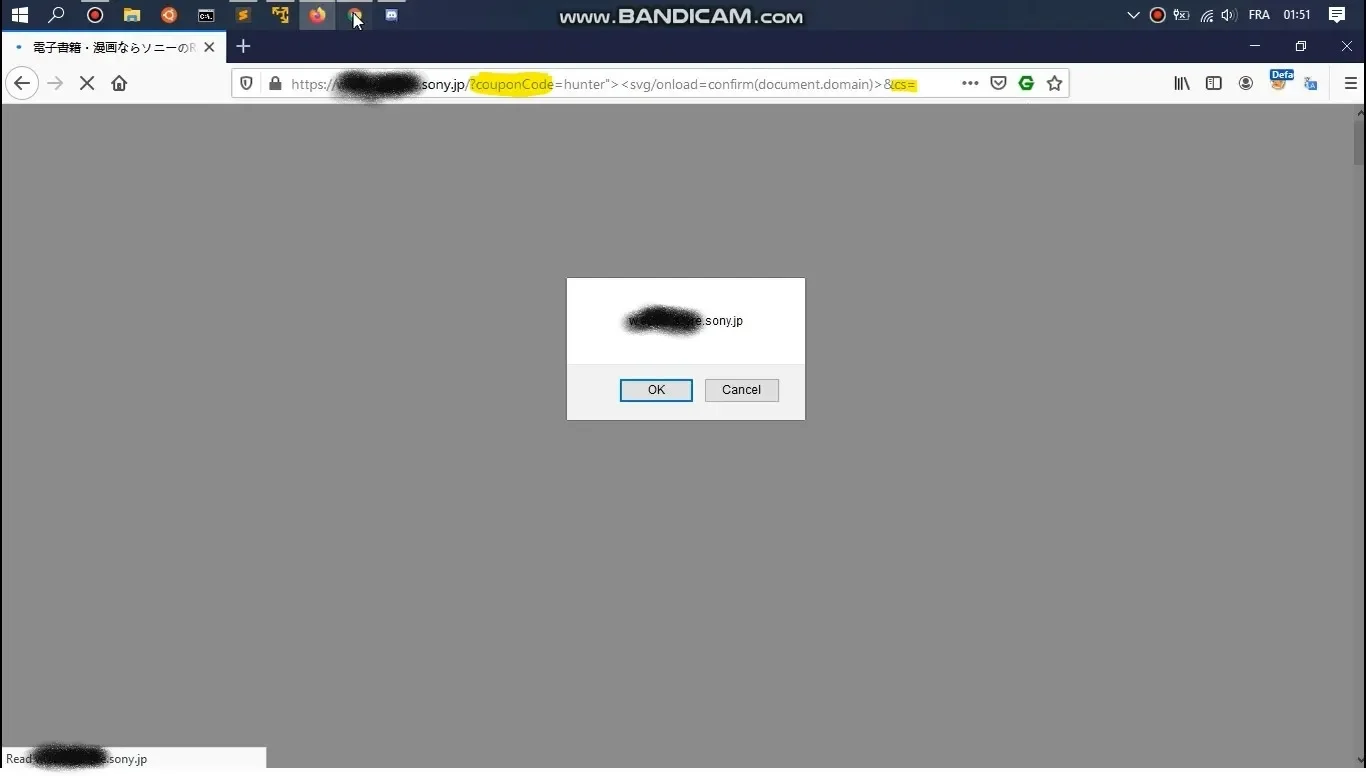
Step 3: understand why it worked
With only Couponcode, the payload was filtered. With cs present as well, the application generated a new <link> tag in the source code, and that tag carried the value without any filtering. The report gives the generated markup as:
<link href="https://redacted.sony.jp/?Couponcode=hunter"><svg/onload=confirm(document.cookie)>&cs=">
In other words, the Couponcode value is placed inside the href attribute of a <link> element. The "> in the payload closes the attribute and the tag, and the <svg/onload=...> that follows becomes a separate element in the document, which the browser parses and executes. The cs parameter is what caused this <link> tag to be generated in the response.
Root cause
The application reflects the Couponcode query parameter into the href attribute of a <link> tag that is only generated when the cs parameter is present. The value is not HTML-encoded in that context, so an attacker who supplies both parameters can break out of the attribute and inject arbitrary markup, including an event handler that runs JavaScript.
The filtering that protects the Couponcode parameter on its own is not applied to the value as it is written into the generated <link> tag. The report does not describe the filter itself, only that the payload was filtered in the first case and unfiltered in the second. The cs parameter causes a <link> tag to be generated whose value is not filtered.
Impact
An attacker who can get a victim to open a crafted URL on the affected host can run JavaScript in the origin of that Sony subdomain. The proof of concept reads document.cookie and displays it in a confirm dialog, which demonstrates access to the victim's cookies for that origin, subject to the usual cookie flags such as HttpOnly. The report does not state which cookies were exposed or whether any session token was among them.
Exploitation requires the victim to follow a link containing both the Couponcode and cs parameters.
Fix
The fix implied by the root cause is to HTML-encode the Couponcode value, and any other user-controlled value, when it is written into the href attribute of the generated <link> tag, so that ", < and > cannot terminate the attribute or the tag. The same encoding should apply on every code path that emits the tag, not only the one reached without cs.
Variants to test
- Hidden parameters that switch code paths. Search the page source for
hidden,inputandvar, then add each hidden parameter to a request that already carries a reflected value. A positive result is a response where the reflected value appears in a new context, or unfiltered, that was not present without the extra parameter. - Reflection inside
hrefof a generated tag. Send a value containing">followed by an element with an event handler, such as<svg/onload=...>, and check whether the browser parses it as a new element. A positive result is the handler firing. - Filter bypass by context change. Where a parameter is filtered in one response, look for a second parameter that causes the same value to be emitted in a different tag or attribute. A positive result is the same payload executing only when both parameters are present.
- Coupon and discount fields generally. On e-commerce style pages, test the coupon code parameter with attribute-breaking characters and confirm whether the value is encoded in every place it appears in the response.
What happened, in plain words
A security researcher found a bug on a Sony website. The bug let him make the website run his own JavaScript code in his browser when he opened a special link. This kind of bug is called cross-site scripting, or XSS for short.
The interesting part is that the bug only appeared when he added a second, hidden setting to the web address. The visible setting (a coupon code field) was filtered. Adding the hidden one caused a new <link> tag to be generated with no filter. That is why the title talks about "the power of the hidden parameters".
This article walks through the whole story from the beginning, assuming you have never done security testing before. You only need a browser and a computer to follow along.
Some words you will meet first
Before we start, a few everyday ideas. Each one is explained again in the Glossary at the end.
- A URL (web address) is the text you type in the browser bar, like
example.com/page. The part after a?is called the query string. It carries small pieces of information called parameters, written asname=valueand joined with&. Think of a restaurant order slip: the dish name is the parameter name, and what you want on it is the value. - A subdomain is a smaller site that belongs to a bigger one. If
sony.jpis a big building,shop.sony.jpandsupport.sony.jpare different rooms inside it. Each room can have its own website and its own bugs. - HTML is the language web pages are written in. It is made of tags like
<link>or<svg>, and tags can have attributes, which are extra settings written inside the tag, likehref="...". - JavaScript is the programming language that runs inside your browser. It can read things on the page, including your cookies.
- A cookie is a small piece of text a website stores in your browser so it can recognise you on the next visit. It is like the wristband you get at a festival: it tells the staff you already paid. If someone steals your wristband, they can pretend to be you. That is why reading cookies matters.
- XSS (cross-site scripting) means a website takes something an attacker wrote and puts it into the page in a way that the browser treats as code instead of plain text. The attacker's code then runs as if the website itself had written it.
- Reflected XSS is the specific kind where the attacker's text is not stored on the server. It travels in the URL, the server sends it straight back in the page, and the browser runs it. The victim has to click a link the attacker prepared.
- A payload is the piece of text an attacker sends to try to trigger the bug. In this story it is a short snippet of HTML and JavaScript.
- Filtering means the website removes or changes dangerous characters before putting your text on the page. A filter is like a bouncer at the door who checks what you are carrying.
- Encoding (or escaping) is the safe way to show special characters as text. For example,
<becomes<so the browser shows a less-than sign instead of starting a new tag. - Recon (reconnaissance) is the first phase of testing: gathering information about what exists before trying anything.
- A dork is a search query written in a special way to make a search engine reveal things, such as all pages on a certain domain.
- HackerOne is a website where companies publish their bug bounty programmes. A bug bounty programme is an offer: find a bug in our systems, report it responsibly, and we may pay you.
The starting point
The researcher was browsing HackerOne programmes and noticed Sony's programme. He decided to test Sony. He began with a Google search using a dork:
site:*.sony.*
Line by line:
site:tells Google to only show results from a particular site.*.sony.*is a wildcard pattern. The*means "anything". So this asks Google for any page whose address containssonywith something before and after it, which surfaces Sony domains around the world.
Why do this? Because a big company owns many domains, and each one is a possible target. The search led him to the domain sony.jp.
Collecting subdomains
A single domain like sony.jp usually hides many subdomains. To find them, the researcher used a tool called amass, which gathers subdomain names from public sources without sending any traffic to Sony itself. That mode is called passive.
amass enum -passive -d sony.jp -o sony.txt
Line by line:
amassis the name of the tool.enummeans "enumerate", that is, list everything that matches.-passivetells it to only use public information, not to probe the target directly.-d sony.jpsets the domain to investigate.-o sony.txtsaves the results into a file calledsony.txt.
Why passive? Because it is quiet. You learn what exists without alerting anyone.
Not every name in that list will actually be a working website. Some may be old, internal, or simply not respond. So the next step is to check which ones answer. The researcher used a tool called httprobe for that. The report also gives a combined one-liner:
amass enum -passive -d sony.jp -o sony.jp ; cat sony.jp | httprobe | tee sony.txt ; rm sony.jp
Line by line:
amass enum -passive -d sony.jp -o sony.jpruns the enumeration and writes the raw list to a file calledsony.jp.;separates commands, so the next one runs after the first finishes.cat sony.jpprints the contents of that file.|is a pipe. It takes the output of the command on the left and feeds it as input to the command on the right. Think of it as passing a bucket along a line of workers.httprobereceives each name and checks whether it answers over HTTP (the protocol browsers use to fetch pages). It prints only the ones that respond.| tee sony.txtshows the results on screen and also saves them tosony.txtat the same time.teeis named after the T-shaped pipe that splits a flow in two directions.; rm sony.jpdeletes the temporary raw file once it is no longer needed.
Why keep only live hosts? Because testing a name that does not answer wastes time. You want the shortlist of real, reachable websites.
Picking a target
He went through the list and noticed one subdomain with a lot of functions. "A lot of functions" means many things a visitor can do: forms, buttons, fields, interactions. More features usually means more places where input from the user is handled, and every such place is a possible bug.
On that host he tried several common bug types:
- CSRF (cross-site request forgery): tricking a logged-in user's browser into sending a request the user did not intend.
- IDOR (insecure direct object reference): changing an identifier in a URL, like
?id=5to?id=6, to see someone else's data. - SQL injection: sneaking database commands into input fields so the database runs them.
- RCE (remote code execution): making the server run the attacker's own code. The most serious kind.
None of these produced anything of interest. So he turned to XSS.
Looking for parameters
He searched for parameters on the site and found many, but none led to XSS. A parameter is simply a named value in the URL or in a form. Finding parameters is useful because each one is a place where the site takes input from the visitor.
Then he did something important: he opened the page's source code in the browser. The source is the raw HTML the server sent, before the browser draws it on screen. You can see it with "View source" in the browser menu.
He searched that source for hidden parameters: parameters that exist in the page but are not shown to the visitor in a visible field. He found one named cs.
The report gives a practical tip: always look for hidden parameters in the source. Open the source and search for the words hidden, input or var. Why those words? Because hidden is the name of an HTML input type that is not displayed, input marks form fields in general, and var often introduces variables in JavaScript. All three are places where a parameter can hide.
He tried injecting a bunch of XSS payloads into cs, and nothing worked.
The breakthrough
He was about to give up and move to another subdomain. Instead he encouraged himself and tried one more idea: the parameter Couponcode.
Why that one? Because the page had an option to add a coupon code. A coupon code field is a place where the visitor types something and the site shows it back, for example to confirm the code was applied. Anywhere a site shows your input back to you is a prime candidate for XSS.
He sent this URL:
redacted.sony.jp/?Couponcode=hunter"><svg/onload=confirm(document.cookie)>
Line by line:
redacted.sony.jp/is the address of the target page. The host name has been replaced withredactedto keep it private.?starts the query string.Couponcode=huntersets the parameterCouponcodeto the valuehunter. That part is harmless.">is the interesting part. The double quote is meant to close an attribute value in the HTML, and the>is meant to close the tag itself. If the site puts your text inside an attribute likehref="...", these two characters let you escape out of it.<svg ...>starts a new HTML element.svgis a tag used for drawing graphics, but it can also carry event handlers.onload=is an attribute that tells the browser: when this element finishes loading, run the code that follows.confirm(document.cookie)is the code.document.cookiereads the cookies for the current site, andconfirm(...)shows them in a pop-up box with an OK button. Seeing that pop-up is proof that your code ran.
Unfortunately, no XSS. The payload was filtered. In other words, the site cleaned up or removed the dangerous characters before putting the value on the page.
But then he added the cs parameter to the same request, and the XSS popped up. The final URL was:
redacted.sony.jp/?Couponcode=hunter"><svg/onload=confirm(document.cookie)>&cs=
Line by line:
- Everything before
&cs=is exactly the same as before. &separates one parameter from the next in a query string.cs=adds a second parameter namedcswith an empty value. It does not need a value; its mere presence is what matters.
Why it worked
Here is the explanation the report gives.
When the payload was in Couponcode alone, it was filtered, so nothing happened. When cs was also present, the site generated a new <link> tag in the source code, and that tag had no filter. The report shows the generated markup like this:
<link href="https://redacted.sony.jp/?Couponcode=hunter"><svg/onload=confirm(document.cookie)>&cs=">
Line by line:
<link href="...">is an HTML tag. Thehrefattribute normally holds a web address. Here the site is building that address from theCouponcodevalue you sent.- The site writes your value straight into the
hrefattribute without encoding it. So the"in your payload closes the attribute, and the>closes the tag. - After that,
<svg/onload=confirm(document.cookie)>is no longer inside the attribute. It is a brand new element in the page. The browser parses it, sees theonloadhandler, and runs the JavaScript. - The trailing
&cs="is the rest of the original URL, now sitting outside the tag as loose text. It does no harm.
So the cs parameter acts like a switch. With it, the site generates that <link> tag, and the value inside it is not filtered. The filter that applies to Couponcode on its own is not applied to the value in the generated <link> tag.
That is the whole trick. The report does not describe what the filter itself looks like, only that the payload was filtered in the first case and unfiltered in the second.
What this means for real users
The researcher's JavaScript ran in the origin of that Sony subdomain when he opened the crafted link. "Origin" means the combination of scheme, host and port that the browser uses to decide what a page is allowed to touch. Code running in that origin can read what the site's own code can read.
The proof of concept reads document.cookie and shows it in a pop-up. That demonstrates access to the victim's cookies for that origin. Some cookies are marked HttpOnly, which means JavaScript cannot read them; the report does not say which cookies were exposed or whether a session token was among them.
Exploitation requires the victim to follow a link containing both the Couponcode and cs parameters.
How it should be fixed
The fix implied by the root cause is to HTML-encode the Couponcode value, and any other user-controlled value, when it is written into the href attribute of the generated <link> tag. Encoding means turning ", < and > into safe text so they cannot end the attribute or the tag. The same encoding should apply on every code path that emits the tag, not only the one reached without cs.
Things to try yourself
- Hidden parameters that switch code paths. Search the page source for
hidden,inputandvar, then add each hidden parameter to a request that already carries a reflected value. A positive result is a response where the reflected value appears in a new context, or unfiltered, that was not present without the extra parameter. - Reflection inside
hrefof a generated tag. Send a value containing">followed by an element with an event handler, such as<svg/onload=...>, and check whether the browser parses it as a new element. A positive result is the handler firing. - Filter bypass by context change. Where a parameter is filtered in one response, look for a second parameter that causes the same value to be emitted in a different tag or attribute. A positive result is the same payload executing only when both parameters are present.
- Coupon and discount fields generally. On e-commerce style pages, test the coupon code parameter with attribute-breaking characters and confirm whether the value is encoded in every place it appears in the response.
Glossary
- Amass: a tool that collects subdomain names from public sources, optionally without touching the target.
- Attribute: an extra setting written inside an HTML tag, such as
href="...". - Bug bounty programme: a company's offer to reward people who report security bugs responsibly.
- Cookie: a small piece of text a website stores in your browser to recognise you later.
- CSRF (cross-site request forgery): tricking a logged-in user's browser into sending a request they did not intend.
- Dork: a specially written search query that makes a search engine reveal specific pages or domains.
- Encoding (escaping): converting special characters into safe text so the browser shows them instead of treating them as code.
- Filtering: removing or altering dangerous characters in user input before it reaches the page.
- HackerOne: a platform where companies publish bug bounty programmes.
- Hidden parameter: a parameter present in the page source but not shown in a visible field.
- HTML: the language web pages are written in, made of tags and attributes.
- HTTP: the protocol browsers use to fetch pages from servers.
- httprobe: a tool that checks which hostnames answer over HTTP.
- IDOR (insecure direct object reference): changing an identifier in a request to access someone else's data.
- JavaScript: the programming language that runs inside the browser.
- Origin: the combination of scheme, host and port that decides what a page may access.
- Parameter: a named value in a URL or form, written as
name=value. - Payload: the text an attacker sends to try to trigger a bug.
- Pipe (
|): a shell symbol that feeds the output of one command into the next. - Query string: the part of a URL after
?, carrying parameters. - Recon (reconnaissance): the information-gathering phase before testing.
- Reflected XSS: XSS where the attacker's text travels in the URL, is sent back in the page, and runs in the victim's browser.
- SQL injection: sneaking database commands into input so the database runs them.
- Subdomain: a smaller site belonging to a larger domain, like
shop.example.comunderexample.com. - Tag: a building block of HTML, such as
<link>or<svg>. - URL: a web address.




