Unsufficent input verification leads to DoS and resource consumption
The user lookup endpoint failed to limit the length of the email parameter, so a very long email caused the backend to hang and return a 503 error. An attacker could open many such connections to cause a denial of service and increase resource consumption.

- Fixed in 12 days
- Paid in 12 days
- Disclosed after 4 months
Summary:
This vulnerability affects the endpoint at api.sorare.com/api/v1/users/ where weakness in verifying the length of the email parameter can lead to partial DoS of the backend component.
Steps To Reproduce:
This endpoint accepts an email address and it returns a salt used in the authentication process.
If you make a GET request to api.sorare.com/api/v1/users/[email protected] the response is {"salt":"$2a$11$jRK7l5zD3IlSRiAoB0DEru"} .
The endpoint success to verify if the email is a valid one as if you submit a failed email you get a 400 bad request with the error {"errors":"Invalid Email format"} , but it fails to limit the length of the email. A very long email causes the server to hang out and returns a 503 service Unavailable
- Make the following request (with different
_cfcookie):
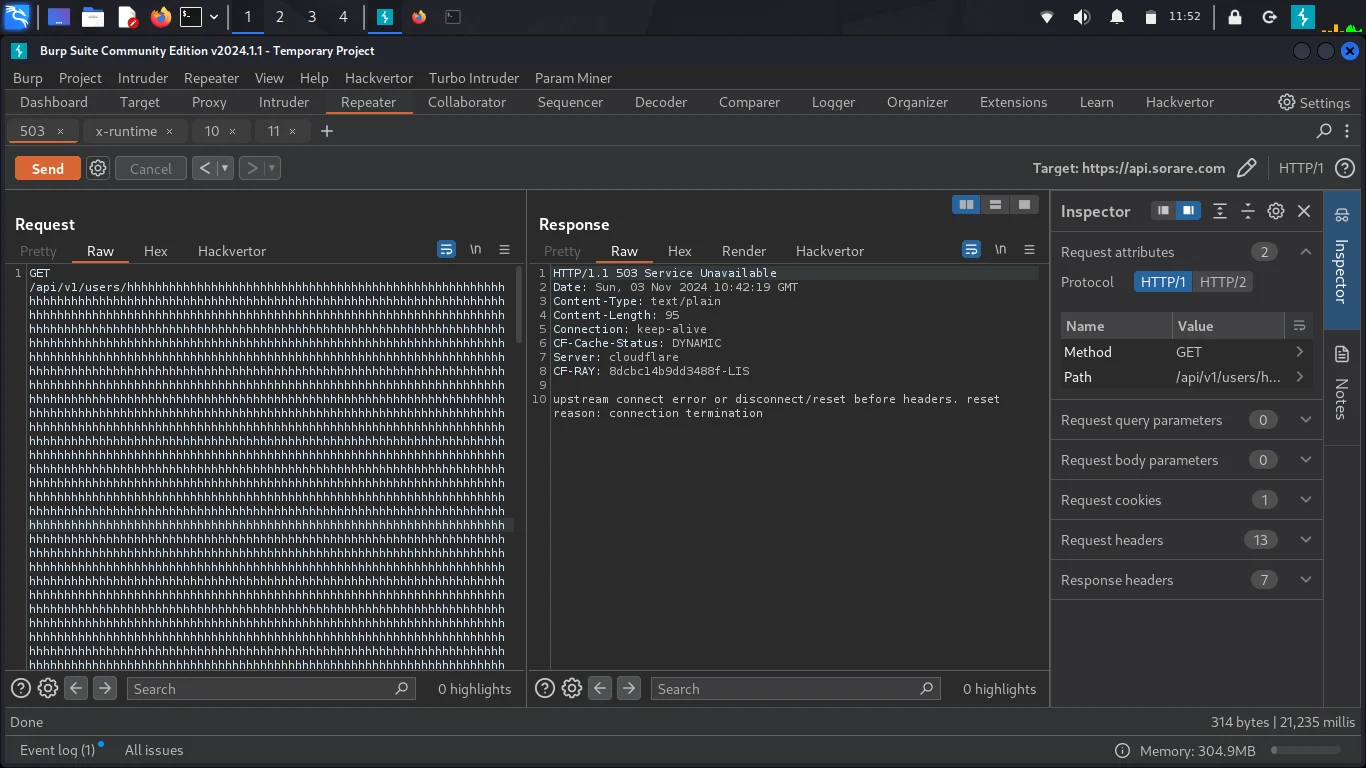
GET /api/v1/users/hhhhhhhhhhhhhhhhhhhhhhhhhhhhhhhhhhhhhhhhhhhhhhhhhhhhhhhhhhhhhhhhhhhhhhhhhhhhhhhhhhhhhhhhhhhhhhhhhhhhhhhhhhhhhhhhhhhhhhhhhhhhhhhhhhhhhhhhhhhhhhhhhhhhhhhhhhhhhhhhhhhhhhhhhhhhhhhhhhhhhhhhhhhhhhhhhhhhhhhhhhhhhhhhhhhhhhhhhhhhhhhhhhhhhhhhhhhhhhhhhhhhhhhhhhhhhhhhhhhhhhhhhhhhhhhhhhhhhhhhhhhhhhhhhhhhhhhhhhhhhhhhhhhhhhhhhhhhhhhhhhhhhhhhhhhhhhhhhhhhhhhhhhhhhhhhhhhhhhhhhhhhhhhhhhhhhhhhhhhhhhhhhhhhhhhhhhhhhhhhhhhhhhhhhhhhhhhhhhhhhhhhhhhhhhhhhhhhhhhhhhhhhhhhhhhhhhhhhhhhhhhhhhhhhhhhhhhhhhhhhhhhhhhhhhhhhhhhhhhhhhhhhhhhhhhhhhhhhhhhhhhhhhhhhhhhhhhhhhhhhhhhhhhhhhhhhhhhhhhhhhhhhhhhhhhhhhhhhhhhhhhhhhhhhhhhhhhhhhhhhhhhhhhhhhhhhhhhhhhhhhhhhhhhhhhhhhhhhhhhhhhhhhhhhhhhhhhhhhhhhhhhhhhhhhhhhhhhhhhhhhhhhhhhhhhhhhhhhhhhhhhhhhhhhhhhhhhhhhhhhhhhhhhhhhhhhhhhhhhhhhhhhhhhhhhhhhhhhhhhhhhhhhhhhhhhhhhhhhhhhhhhhhhhhhhhhhhhhhhhhhhhhhhhhhhhhhhhhhhhhhhhhhhhhhhhhhhhhhhhhhhhhhhhhhhhhhhhhhhhhhhhhhhhhhhhhhhhhhhhhhhhhhhhhhhhhhhhhhhhhhhhhhhhhhhhhhhhhhhhhhhhhhhhhhhhhhhhhhhhhhhhhhhhhhhhhhhhhhhhhhhhhhhhhhhhhhhhhhhhhhhhhhhhhhhhhhhhhhhhhhhhhhhhhhhhhhhhhhhhhhhhhhhhhhhhhhhhhhhhhhhhhhhhhhhhhhhhhhhhhhhhhhhhhhhhhhhhhhhhhhhhhhhhhhhhhhhhhhhhhhhhhhhhhhhhhhhhhhhhhhhhhhhhhhhhhhhhhhhhhhhhhhhhhhhhhhhhhhhhhhhhhhhhhhhhhhhhhhhhhhhhhhhhhhhhhhhhhhhhhhhhhhhhhhhhhhhhhhhhhhhhhhhhhhhhhhhhhhhhhhhhhhhhhhhhhhhhhhhhhhhhhhhhhhhhhhhhhhhhhhhhhhhhhhhhhhhhhhhhhhhhhhhhhhhhhhhhhhhhhhhhhhhhhhhhhhhhhhhhhhhhhhhhhhhhhhhhhhhhhhhhhhhhhhhhhhhhhhhhhhhhhhhhhhhhhhhhhhhhhhhhhhhhhhhhhhhhhhhhhhhhhhhhhhhhhhhhhhhhhhhhhhhhhhhhhhhhhhhhhhhhhhhhhhhhhhhhhhhhhhhhhhhhhhhhhhhhhhhhhhhhhhhhhhhhhhhhhhhhhhhhhhhhhhhhhhhhhhhhhhhhhhhhhhhhhhhhhhhhhhhhhhhhhhhhhhhhhhhhhhhhhhhhhhhhhhhhhhhhhhhhhhhhhhhhhhhhhhhhhhhhhhhhhhhhhhhhhhhhhhhhhhhhhhhhhhhhhhhhhhhhhhhhhhhhhhhhhhhhhhhhhhhhhhhhhhhhhhhhhhhhhhhhhhhhhhhhhhhhhhhhhhhhhhhhhhhhhhhhhhhhhhhhhhhhhhhhhhhhhhhhhhhhhhhhhhhhhhhhhhhhhhhhhhhhhhhhhhhhhhhhhhhhhhhhhhhhhhhhhhhhhhhhhhhhhhhhhhhhhhhhhhhhhhhhhhhhhhhhhhhhhhhhhhhhhhhhhhhhhhhhhhhhhhhhhhhhhhhhhhhhhhhhhhhhhhhhhhhhhhhhhhhhhhhhhhhhhhhhhhhhhhhhhhhhhhhhhhhhhhhhhhhhhhhhhhhhhhhhhhhhhhhhhhhhhhhhhhhhhhhhhhhhhhhhhhhhhhhhhhhhhhhhhhhhhhhhhhhhhhhhhhhhhhhhhhhhhhhhhhhhhhhhhhhhhhhhhhhhhhhhhhhhhhhhhhhhhhhhhhhhhhhhhhhhhhhhhhhhhhhhhhhhhhhhhhhhhhhhhhhhhhhhhhhhhhhhhhhhhhhhhhhhhhhhhhhhhhhhhhhhhhhhhhhhhhhhhhhhhhhhhhhhhhhhhhhhhhhhhhhhhhhhhhhhhhhhhhhhhhhhhhhhhhhhhhhhhhhhhhhhhhhhhhhhhhhhhhhhhhhhhhhhhhhhhhhhhhhhhhhhhhhhhhhhhhhhhhhhhhhhhhhhhhhhhhhhhhhhhhhhhhhhhhhhhhhhhhhhhhhhhhhhhhhhhhhhhhhhhhhhhhhhhhhhhhhhhhhhhhhhhhhhhhhhhhhhhhhhhhhhhhhhhhhhhhhhhhhhhhhhhhhhhhhhhhhhhhhhhhhhhhhhhhhhhhhhhhhhhhhhhhhhhhhhhhhhhhhhhhhhhhhhhhhhhhhhhhhhhhhhhhhhhhhhhhhhhhhhhhhhhhhhhhhhhhhhhhhhhhhhhhhhhhhhhhhhhhhhhhhhhhhhhhhhhhhhhhhhhhhhhhhhhhhhhhhhhhhhhhhhhhhhhhhhhhhhhhhhhhhhhhhhhhhhhhhhhhhhhhhhhhhhhhhhhhhhhhhhhhhhhhhhhhhhhhhhhhhhhhhhhhhhhhhhhhhhhhhhhhhhhhhhhhhhhhhhhhhhhhhhhhhhhhhhhhhhhhhhhhhhhhhhhhhhhhhhhhhhhhhhhhhhhhhhhhhhhhhhhhhhhhhhhhhhhhhhhhhhhhhhhhhhhhhhhhhhhhhhhhhhhhhhhhhhhhhhhhhhhhhhhhhhhhhhhhhhhhhhhhhhhhhhhhhhhhhhhhhhhhhhhhhhhhhhhhhhhhhhhhhhhhhhhhhhhhhhhhhhhhhhhhhhhhhhhhhhhhhhhhhhhhhhhhhhhhhhhhhhhhhhhhhhhhhhhhhhhhhhhhhhhhhhhhhhhhhhhhhhhhhhhhhhhhhhhhhhhhhhhhhhhhhhhhhhhhhhhhhhhhhhhhhhhhhhhhhhhhhhhhhhhhhhhhhhhhhhhhhhhhhhhhhhhhhhhhhhhhhhhhhhhhhhhhhhhhhhhhhhhhhhhhhhhhhhhhhhhhhhhhhhhhhhhhhhhhhhhhhhhhhhhhhhhhhhhhhhhhhhhhhhhhhhhhhhhhhhhhhhhhhhhhhhhhhhhhhhhhhhhhhhhhhhhhhhhhhhhhhhhhhhhhhhhhhhhhhhhhhhhhhhhhhhhhhhhhhhhhhhhhhhhhhhhhhhhhhhhhhhhhhhhhhhhhhhhhhhhhhhhhhhhhhhhhhhhhhhhhhhhhhhhhhhhhhhhhhhhhhhhhhhhhhhhhhhhhhhhhhhhhhhhhhhhhhhhhhhhhhhhhhhhhhhhhhhhhhhhhhhhhhhhhhhhhhhhhhhhhhhhhhhhhhhhhhhhhhhhhhhhhhhhhhhhhhhhhhhhhhhhhhhhhhhhhhhhhhhhhhhhhhhhhhhhhhhhhhhhhhhhhhhhhhhhhhhhhhhhhhhhhhhhhhhhhhhhhhhhhhhhhhhhhhhhhhhhhhhhhhhhhhhhhhhhhhhhhhhhhhhhhhhhhhhhhhhhhhhhhhhhhhhhhhhhhhhhhhhhhhhhhhhhhhhhhhhhhhhhhhhhhhhhhhhhhhhhhhhhhhhhhhhhhhhhhhhhhhhhhhhhhhhhhhhhhhhhhhhhhhhhhhhhhhhhhhhhhhhhhhhhhhhhhhhhhhhhhhhhhhhhhhhhhhhhhhhhhhhhhhhhhhhhhhhhhhhhhhhhhhhhhhhhhhhhhhhhhhhhhhhhhhhhhhhhhhhhhhhhhhhhhhhhhhhhhhhhhhhhhhhhhhhhhhhhhhhhhhhhhhhhhhhhhhhhhhhhhhhhhhhhhhhhhhhhhhhhhhhhhhhhhhhhhhhhhhhhhhhhhhhhhhhhhhhhhhhhhhhhhhhhhhhhhhhhhhhhhhhhhhhhhhhhhhhhhhhhhhhhhhhhhhhhhhhhhhhhhhhhhhhhhhhhhhhhhhhhhhhhhhhhhhhhhhhhhhhhhhhhhhhhhhhhhhhhhhhhhhhhhhhhhhhhhhhhhhhhhhhhhhhhhhhhhhhhhhhhhhhhhhhhhhhhhhhhhhhhhhhhhhhhhhhhhhhhhhhhhhhhhhhhhhhhhhhhhhhhhhhhhhhhhhhhhhhhhhhhhhhhhhhhhhhhhhhhhhhhhhhhhhhhhhhhhhhhhhhhhhhhhhhhhhhhhhhhhhhhhhhhhhhhhhhhhhhhhhhhhhhhhhhhhhhhhhhhhhhhhhhhhhhhhhhhhhhhhhhhhhhhhhhhhhhhhhhhhhhhhhhhhhhhhhhhhhhhhhhhhhhhhhhhhhhhhhhhhhhhhhhhhhhhhhhhhhhhhhhhhhhhhhhhhhhhhhhhhhhhhhhhhhhhhhhhhhhhhhhhhhhhhhhhhhhhhhhhhhhhhhhhhhhhhhhhhhhhhhhhhhhhhhhhhhhhhhhhhhhhhhhhhhhhhhhhhhhhhhhhhhhhhhhhhhhhhhhhhhhhhhhhhhhhhhhhhhhhhhhhhhhhhhhhhhhhhhhhhhhhhhhhhhhhhhhhhhhhhhhhhhhhhhhhhhhhhhhhhhhhhhhhhhhhhhhhhhhhhhhhhhhhhhhhhhhhhhhhhhhhhhhhhhhhhhhhhhhhhhhhhhhhhhhhhhhhhhhhhhhhhhhhhhhhhhhhhhhhhhhhhhhhhhhhhhhhhhhhhhhhhhhhhhhhhhhhhhhhhhhhhhhhhhhhhhhhhhhhhhhhhhhhhhhhhhhhhhhhhhhhhhhhhhhhhhhhhhhhhhhhhhhhhhhhhhhhhhhhhhhhhhhhhhhhhhhhhhhhhhhhhhhhhhhhhhhhhhhhhhhhhhhhhhhhhhhhhhhhhhhhhhhhhhhhhhhhhhhhhhhhhhhhhhhhhhhhhhhhhhhhhhhhhhhhhhhhhhhhhhhhhhhhhhhhhhhhhhhhhhhhhhhhhhhhhhhhhhhhhhhhhhhhhhhhhhhhhhhhhhhhhhhhhhhhhhhhhhhhhhhhhhhhhhhhhhhhhhhhhhhhhhhhhhhhhhhhhhhhhhhhhhhhhhhhhhhhhhhhhhhhhhhhhhhhhhhhhhhhhhhhhhhhhhhhhhhhhhhhhhhhhhhhhhhhhhhhhhhhhhhhhhhhhhhhhhhhhhhhhhhhhhhhhhhhhhhhhhhhhhhhhhhhhhhhhhhhhhhhhhhhhhhhhhhhhhhhhhhhhhhhhhhhhhhhhhhhhhhhhhhhhhhhhhhhhhhhhhhhhhhhhhhhhhhhhhhhhhhhhhhhhhhhhhhhhhhhhhhhhhhhhhhhhhhhhhhhhhhhhhhhhhhhhhhhhhhhhhhhhhhhhhhhhhhhhhhhhhhhhhhhhhhhhhhhhhhhhhhhhhhhhhhhhhhhhhhhhhhhhhhhhhhhhhhhhhhhhhhhhhhhhhhhhhhhhhhhhhhhhhhhhhhhhhhhhhhhhhhhhhhhhhhhhhhhhhhhhhhhhhhhhhhhhhhhhhhhhhhhhhhhhhhhhhhhhhhhhhhhhhhhhhhhhhhhhhhhhhhhhhhhhhhhhhhhhhhhhhhhhhhhhhhhhhhhhhhhhhhhhhhhhhhhhhhhhhhhhhhhhhhhhhhhhhhhhhhhhhhhhhhhhhhhhhhhhhhhhhhhhhhhhhhhhhhhhhhhhhhhhhhhhhhhhhhhhhhhhhhhhhhhhhhhhhhhhhhhhhhhhhhhhhhhhhhhhhhhhhhhhhhhhhhhhhhhhhhhhhhhhhhhhhhhhhhhhhhhhhhhhhhhhhhhhhhhhhhhhhhhhhhhhhhhhhhhhhhhhhhhhhhhhhhhhhhhhhhhhhhhhhhhhhhhhhhhhhhhhhhhhhhhhhhhhhhhhhhhhhhhhhhhhhhhhhhhhhhhhhhhhhhhhhhhhhhhhhhhhhhhhhhhhhhhhhhhhhhhhhhhhhhhhhhhhhhhhhhhhhhhhhhhhhhhhhhhhhhhhhhhhhhhhhhhhhhhhhhhhhhhhhhhhhhhhhhhhhhhhhhhhhhhhhhhhhhhhhhhhhhhhhhhhhhhhhhhhhhhhhhhhhhhhhhhhhhhhhhhhhhhhhhhhhhhhhhhhhhhhhhhhhhhhhhhhhhhhhhhhhhhhhhhhhhhhhhhhhhhhhhhhhhhhhhhhhhhhhhhhhhhhhhhhhhhhhhhhhhhhhhhhhhhhhhhhhhhhhhhhhhhhhhhhhhhhhhhhhhhhhhhhhhhhhhhhhhhhhhhhhhhhhhhhhhhhhhhhhhhhhhhhhhhhhhhhhhhhhhhhhhhhhhhhhhhhhhhhhhhhhhhhhhhhhhhhhhhhhhhhhhhhhhhhhhhhhhhhhhhhhhhhhhhhhhhhhhhhhhhhhhhhhhhhhhhhhhhhhhhhhhhhhhhhhhhhhhhhhhhhhhhhhhhhhhhhhhhhhhhhhhhhhhhhhhhhhhhhhhhhhhhhhhhhhhhhhhhhhhhhhhhhhhhhhhhhhhhhhhhhhhhhhhhhhhhhhhhhhhhhhhhhhhhhhhhhhhhhhhhhhhhhhhhhhhhhhhhhhhhhhhhhhhhhhhhhhhhhhhhhhhhhhhhhhhhhhhhhhhhhhhhhhhhhhhhhhhhhhhhhhhhhhhhhhhhhhhhhhhhhhhhhhhhhhhhhhhhhhhhhhhhhhhhhhhhhhhhhhhhhhhhhhhhhhhhhhhhhhhhhhhhhhhhhhhhhhhhhhhhhhhhhhhhhhhhhhhhhhhhhhhhhhhhhhhhhhhhhhhhhhhhhhhhhhhhhhhhhhhhhhhhhhhhhhhhhhhhhhhhhhhhhhhhhhhhhhhhhhhhhhhhhhhhhhhhhhhhhhhhhhhhhhhhhhhhhhhhhhhhhhhhhhhhhhhhhhhhhhhhhhhhhhhhhhhhhhhhhhhhhhhhhhhhhhhhhhhhhhhhhhhhhhhhhhhhhhhhhhhhhhhhhhhhhhhhhhhhhhhhhhhhhhhhhhhhhhhhhhhhhhhhhhhhhhhhhhhhhhhhhhhhhhhhhhhhhhhhhhhhhhhhhhhhhhhhhhhhhhhhhhhhhhhhhhhhhhhhhhhhhhhhhhhhhhhhhhhhhhhhhhhhhhhhhhhhhhhhhhhhhhhhhhhhhhhhhhhhhhhhhhhhhhhhhhhhhhhhhhhhhhhhhhhhhhhhhhhhhhhhhhhhhhhhhhhhhhhhhhhhhhhhhhhhhhhhhhhhhhhhhhhhhhhhhhhhhhhhhhhhhhhhhhhhhhhhhhhhhhhhhhhhhhhhhhhhhhhhhhhhhhhhhhhhhhhhhhhhhhhhhhhhhhhhhhhhhhhhhhhhhhhhhhhhhhhhhhhhhhhhhhhhhhhhhhhhhhhhhhhhhhhhhhhhhhhhhhhhhhhhhhhhhhhhhhhhhhhhhhhhhhhhhhhhhhhhhhhhhhhhhhhhhhhhhhhhhhhhhhhhhhhhhhhhhhhhhhhhhhhhhhhhhhhhhhhhhhhhhhhhhhhhhhhhhhhhhhhhhhhhhhhhhhhhhhhhhhhhhhhhhhhhhhhhhhhhhhhhhhhhhhhhhhhhhhhhhhhhhhhhhhhhhhhhhhhhhhhhhhhhhhhhhhhhhhhhhhhhhhhhhhhhhhhhhhhhhhhhhhhhhhhhhhhhhhhhhhhhhhhhhhhhhhhhhhhhhhhhhhhhhhhhhhhhhhhhhhhhhhhhhhhhhhhhhhhhhhhhhhhhhhhhhhhhhhhhhhhhhhhhhhhhhhhhhhhhhhhhhhhhhhhhhhhhhhhhhhhhhhhhhhhhhhhhhhhhhhhhhhhhhhhhhhhhhhhhhhhhhhhhhhhhhhhhhhhhhhhhhhhhhhhhhhhhhhhhhhhhhhhhhhhhhhhhhhhhhhhhhhhhhhhhhhhhhhhhhhhhhhhhhhhhhhhhhhhhhhhhhhhhhhhhhhhhhhhhhhhhhhhhhhhhhhhhhhhhhhhhhhhhhhhhggggggggggggggggggggggggggggggggggggggggggggggggggdddddddddddddddddddddddddddddddddddddxxxxxxxxxxxxxxxxxxxxxxxxxxxxxxxxxxxxxxxxxxxxxxxxxxxxxxxxxxxxxxxxxxxxxxxxxxxxxxxxxxxxxxxxxxxxxxxxxxxxxxxxxxxxxxxxxxxxxxxxxxxxxxxxxxxxxxxxxxxxxxxxxxxxxxxxxxxxxxxxxxhhhhhhhhhhhhhhhhhhhhhhhhhhhhhhhhhhhhhhhhhhhhhhhhhhhhhhhhhhhhhhhhhhhhhhhh@proton.m HTTP/1.1
Host: api.sorare.com
Cookie: __cf_bm=9OaUM.giLDiauLzJdo_GmBe4HUb.b1Ww66OqWqLaE74-1730630466-vxrMfXGqWgZpN_nup4TeNmQVdURFFkked9rACxPAilZLx24WQBOQJQ;
User-Agent: Mozilla/5.0 (X11; Linux x86_64; rv:109.0) Gecko/20100101 Firefox/115.0
Accept: text/html,application/xhtml+xml,application/xml;q=0.9,image/avif,image/webp,*/*;q=0.8
Accept-Language: en-US,en;q=0.5
Accept-Encoding: gzip, deflate, br
Dnt: 1
Upgrade-Insecure-Requests: 1
Sec-Fetch-Dest: document
Sec-Fetch-Mode: navigate
Sec-Fetch-Site: none
Sec-Fetch-User: ?1
Te: trailers
The response you wind up getting:
HTTP/1.1 503 Service Unavailable
Date: Sun, 03 Nov 2024 10:42:19 GMT
Content-Type: text/plain
Content-Length: 95
Connection: keep-alive
CF-Cache-Status: DYNAMIC
Server: cloudflare
CF-RAY: 8dcbc14b9dd3488f-LIS

upstream connect error or disconnect/reset before headers. reset reason: connection termination
Supporting Material/References:
Impact
If you see the screenshot from the response above, the header connection: keep-alive may help aggravate the impact. As a single connection with the long email parameter takes around 20 seconds to get the response, an attacker with enough resources (zombies/botnets) can open unlimited amount of connections leading to DoS.
An other impact is the resource consumption. The app uses Amazon AWS and the heavy load from an attacker would stress the memory, CPU etc, causing the hosting bill to go up.
Context
The target is Sorare's API at api.sorare.com. The report focuses on one endpoint, api.sorare.com/api/v1/users/, which takes an email address as input and returns the salt that the client uses during the authentication process. In other words, before a password is checked, the client asks this endpoint for the per-user salt, and the endpoint answers with a value such as {"salt":"$2a$11$jRK7l5zD3IlSRiAoB0DEru"}.
That makes the endpoint a small but security-relevant part of the login flow: it is reachable without authentication, it accepts a single user-controlled string, and it does work on the server side to look the value up and produce a response. The researcher's finding is that this input is checked for format but not for length, and that an oversized email address drives the backend into a state where it stops answering and the edge returns a 503. The weakness is classified as uncontrolled resource consumption, with low severity and a 300 USD bounty, disclosed on 26 February 2025.
Setup
The report describes no accounts, roles or privileges. The reproduction shows no login step and no account is mentioned. The only precondition the researcher states is that each request carries a _cf cookie, and that the cookie should differ between requests:
Make the following request (with different
_cfcookie)
The request shown in the report sends a __cf_bm cookie, which is Cloudflare's bot-management cookie, set by the edge in front of the API. The researcher's note asks for a different _cf cookie each time; the report does not explain why. The report does not explain this further.
No particular tooling is named. The reproduction is a single GET request, which can be issued with a browser, a proxy such as Burp, or a command-line client; the request in the report is written in raw HTTP form with a Firefox 115 user agent on Linux. The only other thing needed is the ability to send a very long URL path segment, which any HTTP client can do.
Finding it
The endpoint's job is narrow: take an email address, look up the matching account, and return the salt. Because the input is a single user-controlled string that reaches backend logic, the researcher probed how strictly it is validated. Two behaviours stood out.
First, format validation is present and works. A well-formed address such as [redacted] is accepted and produces a salt. A malformed one is rejected with a 400 and a clear error message. So the endpoint does parse and check the value it receives.
Second, length validation is absent. Nothing in the response or the error handling suggests an upper bound on how long the email parameter may be. When the researcher submitted a very long value in place of the email, the request did not come back with a validation error. Instead the backend hung, and the edge in front of it eventually answered with a 503 Service Unavailable. The combination is the finding: the endpoint verifies that the input looks like an email but never verifies that it is a reasonable size, and the oversized value is expensive enough to process that the origin stops responding in time.
The researcher frames this as a partial denial of service of the backend component rather than a full outage, and the reproduction below shows both sides of the behaviour: the normal salt response, the format rejection, and the oversized request that ends in a 503.
Exploitation
The reproduction is four observations in sequence: a normal lookup, a format rejection, the oversized request, and the response that comes back. Each one is a single GET to the same endpoint, and together they show that the endpoint validates the shape of the email but not its size.
Step 1: Normal request and salt response
A well-formed address is accepted and the endpoint returns the salt for it. The researcher uses [redacted]:
The response body is:
{"salt":"$2a$11$jRK7l5zD3IlSRiAoB0DEru"}
This confirms the endpoint's normal behaviour: the email is taken from the path, the account is looked up, and the salt used in authentication is returned. The value is a salt string prefixed $2a$11$, returned by the endpoint for the supplied email. No authentication is required to get it, which is what makes the endpoint interesting as an unauthenticated input surface.
Step 2: Format validation works
To check whether the input is validated at all, the researcher submits an address that is not a valid email. The endpoint rejects it with a 400 Bad Request and the body:
{"errors":"Invalid Email format"}
So there is a format check in front of the lookup, and it produces a clean, explicit error. This matters for the finding: the endpoint is not simply passing the raw string through. It parses the value, decides whether it is an email, and only then does the work of looking up the salt. What the check does not do is bound the length of the value. A string can be a syntactically valid email and still be enormous, and the format check has nothing to say about that.
Step 3: Oversized email request
The researcher then sends an email parameter consisting of a very long run of characters ending in @proton.m, as a GET to the same path. The request is copied exactly as it appears in the report:
Root cause
The mistake is a missing upper bound on the email parameter. The endpoint does validate the input, but only for shape: the value must parse as an email address, and if it does not, the request is rejected with {"errors":"Invalid Email format"}. Nothing in that check constrains how many characters the address may contain. A string can satisfy the email format and still be arbitrarily long, and the oversized value is then passed on to the backend lookup.
The consequence is that the expensive part of the request, the server-side work that resolves the email to an account and produces the salt, runs on input whose size the client fully controls. The report's observation is that a very long email makes the server hang and the edge return a 503, so the backend does not complete that work within the time the edge is prepared to wait. Why the long value is so costly is not established in the report; the researcher attributes the behaviour to the missing length verification and leaves it there. Likely the lookup or the parsing of the value scales badly with its length, but that is inference, not something the report demonstrates.
The existing defence, format validation, is the wrong kind of check for this problem. It answers "is this an email?" and not "is this a reasonable email?". Because the two questions are independent, a value that passes the first can be as large as the client likes, and the endpoint has no second gate before it starts the work.
Impact
The effect of a single oversized request is a partial denial of service of the backend component: the origin does not answer in time and the edge returns a 503. The researcher is explicit that this is partial, not a full outage, and the impact section builds the case from two properties of the response.
The first is timing. A single connection carrying the long email parameter takes around 20 seconds to get a response. That figure is the researcher's own measurement, and it is what turns a single slow request into a volume problem: each connection occupies backend capacity for roughly 20 seconds before it resolves. An attacker with enough resources, which the report describes as zombies or a botnet, can open an unlimited number of connections in parallel, and the aggregate load on the backend grows with the number of concurrent long requests rather than with any per-request cost the server can absorb.
The second is the connection: keep-alive header in the 503 response. The researcher notes that this header may help aggravate the impact, because the connection is not torn down after the failed request.
The other impact is resource consumption. The application runs on Amazon AWS, and the researcher argues that the heavy load from an attacker would stress memory, CPU and the rest of the instance, with the hosting bill going up as a direct consequence. That is a cost-based impact rather than an availability one: even below the threshold where requests start failing, sustained oversized requests consume paid capacity.
The conditions are worth stating plainly. The endpoint is unauthenticated, so no account is needed. The requests must carry a _cf cookie, and the researcher's reproduction varies it between requests, which suggests the edge's bot management is part of what stands between the attacker and the origin. The impact therefore depends on the attacker being able to keep sending requests that the edge forwards, and on having enough source addresses or connections to sustain concurrency. The report does not quantify how many concurrent requests are needed to affect other users, and it does not claim that ordinary traffic was disrupted during testing; the 503 shown is the response to the researcher's own request.
Fix
The change the report calls for is a maximum length on the email parameter, enforced before the value is processed. The endpoint already parses the input and rejects anything that is not an email, so the natural place for the new check is alongside the existing format validation: reject the request as soon as the email exceeds a sane bound, and do it before any lookup or other backend work begins. A real email address is short, so a sane maximum length costs nothing for legitimate clients and removes the oversized input.
Two properties of the fix matter as much as the limit itself. First, it must run before the expensive work, not after it: a length check that happens once the value has already been handed to the lookup does not protect the backend. Second, the rejection should be a normal client error, the same 400 with a clear message that the format check already produces, rather than a request that is allowed through and left to time out at the edge.
A length limit on the parameter is the direct fix; a request-size limit at the edge or proxy in front of the API would be a sensible second layer, since it would bound every endpoint rather than this one, but the report does not propose it and does not say what the edge was configured to allow.
Variants to test
The pattern to look for elsewhere is the same one: an unauthenticated endpoint that takes a user-controlled string, validates its shape, and then does work whose cost grows with the size of that string. The following are concrete variations, each with the observation that would make it worth pursuing.
-
Other endpoints that take an email address. Anything that resolves an email to an account, a salt, a public key or a "does this user exist" answer is a candidate, because it is reachable without authentication and has to do a lookup on the supplied value. Send a well-formed but very long address and watch the response time and status. A positive result is the same shape as this report: the request hangs for a noticeable period and the edge returns a 5xx, while a short address returns normally.
-
Other identifier parameters on the same API. User IDs, usernames, slugs, handles and public keys are often validated for format (numeric, alphanumeric, a fixed prefix) without any bound on length. Take a parameter that is known to be validated, confirm the validation rejects a malformed value, then send a syntactically valid but oversized one. A positive result is a response time that scales with the length of the input, or a 5xx where a short value gives a 200.
-
Parameters with format checks but no length checks, generally. The report's finding is that format validation and length validation are independent, and that the first does not imply the second. Any field with a visible format error message is worth testing for a length bound: send a value that passes the format and grows by orders of magnitude, and compare timings. A positive result is a monotonic increase in response time as the value grows, which points to work proportional to input size rather than a fixed rejection.
-
Path segments versus query parameters versus bodies. The report's value sits in the path. The same endpoint family may accept the identifier in a query string or a JSON body on other routes, and those may be handled by different middleware with different limits. Try the oversized value in each position and note which one reaches the backend.
-
Timing as the primary signal. A 503 is the loud outcome, but a request that merely takes seconds longer than normal is the earlier and more reliable signal, and it is what tells you the cost is in the backend rather than in the edge. Measure a baseline with a short valid value, then a series of increasing lengths, and look for the point where the curve bends.
-
The edge's reaction. The report's oversized request ends at Cloudflare with
upstream connect error or disconnect/reset before headers. reset reason: connection termination. On other targets, a 502, 503 or 504 with an upstream or connection-reset body is a sign that the origin failed to answer in time, which is the same condition. Distinguish it from an edge-level block, which usually returns a challenge or a 403 rather than an upstream error. -
Cookie and session variation. The researcher notes that each request should carry a different
_cfcookie. On other targets, if repeated requests with the same bot-management or session cookie start being challenged or cached, vary the cookie and see whether the requests reach the origin again. A positive result is that fresh cookies keep producing the slow or failing response. -
Concurrency, carefully. The impact argument rests on many connections each occupying the backend for around 20 seconds. If you test concurrency, keep it small and scoped to your own requests, and watch whether other requests to the same host slow down at the same time. A positive result is that a handful of concurrent oversized requests degrades responses to unrelated requests, which is the difference between a slow endpoint and a denial of service.
-
Keep-alive behaviour. The report flags
connection: keep-alivein the 503 as a possible aggravation but does not demonstrate it. On another target, check whether the connection survives the failed request and whether a second oversized request can be sent on it. A positive result is a second slow or failing response on the same connection without a new handshake. -
Other expensive unauthenticated lookups. The same reasoning applies beyond email: password-reset lookups, username availability checks, invitation-code checks and search or autocomplete endpoints all take a client string and do backend work. Test each for a length bound the same way, with a valid short value as the baseline and an oversized valid value as the probe.
Hunting notes
This class of bug hides in endpoints that are unauthenticated, take a single client-controlled string, and do backend work on it. The salt endpoint is a textbook example: it exists to be called before login, so it cannot require a session, and its whole job is to resolve a user-supplied value to a stored one. Any endpoint with those three properties is worth a length probe, because the developer's attention is usually on whether the value is correct, not on how big it is.
The recon signals that point to it are mostly about what the endpoint says back. An endpoint that returns a per-user secret, such as a salt, a public key or a "user exists" answer, is doing a lookup on the supplied value, and lookups are where input size can turn into cost. An endpoint that produces a distinct format error, like {"errors":"Invalid Email format"}, tells you validation exists and tells you exactly which check is being applied. That is useful in both directions: it confirms the value is parsed before use, and it invites the next question, which is whether anything else about the value is checked. A clean 400 for a malformed value next to a 200 for a well-formed one is the pattern to look for; the gap between them is where a missing length bound sits.
The other signal is timing. A short valid value gives a baseline, and a valid but much longer value that takes noticeably longer, or that ends in a 5xx from the edge, is the finding. The report's oversized request ends at Cloudflare with upstream connect error or disconnect/reset before headers. reset reason: connection termination, which is the edge saying the origin did not answer in time. That body, or a 502, 503 or 504 with an upstream flavour, is the loud version of the signal; a request that merely takes seconds longer than the baseline is the quiet one and is worth measuring first, because it shows the cost is in the backend rather than in the edge.
The researcher's note about varying the _cf cookie is a practical recon lesson. The API sits behind Cloudflare bot management, and the reproduction sends a __cf_bm cookie with each request. If repeated probes with the same cookie start being challenged or handled differently, a fresh cookie keeps the requests reaching the origin. When you are measuring timing, that matters: a request that never reaches the backend tells you nothing about the backend's cost.
Showing enough impact for the program to accept it came down to three things in the report. The first is the baseline pair: a normal request that returns the salt, and a malformed one that returns the 400, which together prove the endpoint validates format and works as intended for ordinary input. The second is the oversized request itself, sent as a single GET with the long value in the path, which produces the 503 rather than a validation error. The third is the timing figure, around 20 seconds per connection, which turns one slow request into a volume argument: many connections, each occupying the backend for that long, with connection: keep-alive in the 503 response as the researcher's stated reason the impact could be worse.
That combination is what a triager needs for a resource-consumption report: proof that the input is accepted, proof that the server does expensive work on it, and a number that makes the aggregate case. A single 503 on its own can be dismissed as a fluke or as the edge misbehaving; a 503 that follows a valid oversized input, next to a 200 for a short one and a 400 for a malformed one, is a reproducible behaviour. The report does not claim that other users were affected during testing, and it keeps the impact hedged as partial, which is the honest framing for a finding of this kind.
What happened, in plain words
Sorare runs a website and a set of services behind it, and one of those services is an API at api.sorare.com. An API is the part of a system that other software talks to directly, rather than the part a person clicks on. A useful comparison is a counter in a shop: you walk up, say what you want, and the person behind the counter fetches it for you. You never go into the back room yourself. An API works the same way: a program asks for something in a fixed format, and the API goes and gets it.
A single API can offer many different things, and each one is reached at its own address, called an endpoint. If the API is the counter, an endpoint is one specific window at that counter: the window for returns, the window for complaints, the window for collecting an order. The endpoint in this report is api.sorare.com/api/v1/users/, and its job is to hand out a small piece of data called a salt when you give it an email address.
A salt is a short random string that a login system mixes into a password before storing or checking it. The point is that two people who choose the same password end up with different stored values, so an attacker who steals the stored values cannot spot the repeats. The comparison is a pinch of salt added to a dish: the same recipe comes out different every time, and without knowing the exact pinch you cannot reproduce the result. Before a login can be checked, the client (the app or website in your browser) needs to know which salt belongs to the account, so it asks this endpoint for it. That is why the endpoint exists and why it has to be reachable before anyone has logged in.
The researcher found that this endpoint checks whether the email you send looks like an email, but never checks how long it is. A normal email address is short. A deliberately enormous one is sent to the endpoint, and the server then tries to work with it. The work takes so long that the server stops answering in time, and the system in front of it gives up and returns an error page with the code 503.
A denial of service, usually shortened to DoS, means making a service unavailable to the people who need it, without breaking into it. The everyday comparison is a shop assistant who is perfectly healthy but is kept on the phone by one caller for an hour, so nobody else can get through. The researcher describes this case as a partial denial of service: one backend component becomes unresponsive, not the whole company. A single such request takes around 20 seconds to come back, and someone controlling many machines at once could open many of these slow requests in parallel, which is where the real risk lies.
A bounty is a payment a company makes to someone who reports a security problem responsibly instead of exploiting it. Low severity means the company judged the practical risk to be limited, which fits a bug that needs a lot of traffic to cause trouble and that only slows one part of the system.
The rest of this article walks through the same ground the researcher covered: what the pieces are, how the test was set up, how the problem was found, the exact requests and responses, why it happens, what an attacker could do with it, how to fix it, where else to look for the same pattern, and a few habits that help when hunting for bugs like this one.
The pieces involved
Before the test makes sense, it helps to know what each part of the system is and what it is for. None of this requires any security background, just a rough idea of how a website and the service behind it talk to each other.
What an API and an endpoint are
A website is what you see: pages, buttons, forms. Behind it, the same company usually runs a separate service that does the actual work, and that service is called an API. The comparison from the overview holds: the API is a counter, and you speak to it in a fixed way rather than wandering into the back room. When the Sorare website or app needs to know something, it does not read a database itself; it asks the API, and the API answers.
The API in this report lives at the address api.sorare.com. The api at the front is just a name the company chose, the same way a shop might put "deliveries" on one door and "collections" on another. The sorare.com part is the company's domain, the name that identifies it on the internet.
One API offers many separate services, and each one has its own address, called an endpoint. If the API is the counter, an endpoint is one window at that counter. The endpoint in this report is api.sorare.com/api/v1/users/. Reading it from left to right: api.sorare.com is the API, /api/v1/ is a version marker (the company's way of saying "this is the first version of this interface"), and /users/ is the window that deals with user accounts. When the researcher sends a request, they add an email address to the end of that address, and the endpoint answers about that user.
What the salt endpoint does
The /users/ endpoint takes an email address and returns a salt. A salt, as the overview said, is a short random string mixed into a password before it is stored or checked, so that two people with the same password do not end up with identical stored values. The comparison is a pinch of salt in a dish: the same recipe comes out different every time, and without knowing the exact pinch you cannot reproduce the result.
The endpoint's answer looks like this:
{"salt":"$2a$11$jRK7l5zD3IlSRiAoB0DEru"}
This is a small piece of data in a format called JSON, which is just a way of writing labelled values as text. The label is salt, and the value is the string in quotes. The value is the salt string returned by the endpoint. You do not need to understand the marker to follow the report, only to recognise that the endpoint is handing back a real, per-user value rather than a generic message.
Why does the client ask for this before login? Because to check a password, the system has to mix in the right salt first. The client (the app or website in your browser) does not know which salt belongs to which account, so it asks this endpoint, gets the salt back, and then uses it when it prepares the password for checking. That is the endpoint's whole job: look up the account by email, return its salt.
The important property for this report is that the endpoint has to be reachable before anyone has logged in. If it required a login, the client could never get the salt it needs to perform the login in the first place. So the endpoint is open to anyone who knows the address, with no account and no password. In security language, an endpoint that can be used without logging in is called unauthenticated. The comparison is a building's front desk that will tell any visitor which floor a named employee sits on, without asking the visitor for ID, because visitors need that information before they can sign in at reception.
Cookies and the _cf cookie
A cookie is a small piece of text that a website asks your browser to keep and to send back with later requests. The comparison is a cloakroom ticket: the attendant gives you a ticket, and when you come back you show it so they know which coat is yours. Cookies are how a website recognises that two requests come from the same browser, for example to keep you logged in between pages.
The request in this report carries a cookie named __cf_bm. The cf stands for Cloudflare, a company that sits in front of many websites and filters traffic before it reaches them. Cloudflare's job here is bot management: it tries to tell apart real browsers from automated tools, and the __cf_bm cookie is the ticket it hands out so it can recognise a browser it has already seen. The comparison is a bouncer at the door who gives each guest a wristband; on the way back in, the wristband tells the bouncer this person has already been checked.
The researcher's reproduction includes a note about this cookie:
Make the following request (with different
_cfcookie)
In plain words: send the request, but use a different _cf cookie each time. The request shown in the report actually sends a __cf_bm cookie, so the note is about varying that bot-management ticket between requests. The report does not explain why the cookie should differ between requests. The report does not explain this further, so treat it as a practical tip from the researcher rather than a fully documented mechanism.
That is all the background needed. The next section covers how the researcher set up the test, which turns out to require almost nothing beyond a way to send a request.
Setting up to test
One of the striking things about this report is how little preparation it needed. There is no account to create, no role to obtain, no special software to install and no privileged position to reach. The researcher simply sent requests to a public address and watched what came back. That is worth dwelling on, because it is often the case with this class of bug: the barrier to testing is low, and the barrier to noticing the problem is mostly about knowing what to look for.
No accounts or privileges
The report describes no accounts, no roles and no privileges of any kind. Nothing in the reproduction depends on being logged in, on owning a particular user, or on having any special access. The reproduction shows no login step and no account is mentioned.
The comparison is a public information desk in a station. Anyone can walk up and ask which platform a named train leaves from, and the person behind the desk will look it up and tell them. They do not need a ticket, a membership card or a reason. That openness is the whole point of the desk, and it is also why the desk has to be careful about what it does with the questions it is asked. Here, the "question" is an email address, and the desk looks it up and answers with the salt.
Because no account is needed, there is nothing to register, nothing to verify and nothing to wait for. A tester can begin on the first request.
The one precondition: the _cf cookie
The only precondition the researcher states is that each request carries a _cf cookie, and that the cookie should differ between requests. The report puts it like this:
As covered earlier, the request in the report actually sends a __cf_bm cookie, which is Cloudflare's bot-management ticket. The note is telling the reader to vary that ticket from one request to the next rather than reusing the same one. The likely reason, again, is that the Cloudflare layer in front of the API may treat a stream of requests carrying an identical ticket differently from requests that each present a fresh one, and varying the ticket keeps the requests reaching the server behind. The report does not spell this out, so it is best read as a practical instruction from someone who has already done the testing.
For a beginner, the practical meaning is simple: when you repeat the request, make sure the cookie value is not identical every time. In a browser this happens naturally as the site refreshes its own cookie; with a tool that lets you edit requests by hand, you change the value yourself.
No particular tooling
The report names no tool. The reproduction is a single GET request, and a GET is the ordinary kind of request a browser makes when you type an address into the address bar and press Enter: "please give me the thing at this address". Because it is just a GET, it can be sent in several ways, and the report does not insist on any of them:
- A browser. You can paste the address into the address bar. This is the simplest route and needs nothing installed, though it gives you less control over the cookie and over how the response is displayed.
- A proxy such as Burp. A proxy is a program that sits between your browser and the internet, letting you see and edit each request before it is sent. Burp Suite is a well-known tool of this kind. It is useful here because you can change the cookie by hand and read the raw response, including the status code and headers.
- A command-line client. A program run from a terminal that sends a request and prints the response. This is handy for repeating a request many times or for scripting it.
The report does not recommend one over another. The point is that the request is ordinary enough to be sent by any of them.
What the request looks like
The request in the report is written in raw HTTP form, the plain-text shape that all web requests take underneath whatever tool sends them. It identifies itself with a Firefox 115 user agent on Linux. A user agent is a line in the request that tells the server which browser and operating system the client claims to be. The comparison is a caller introducing themselves on the phone: "this is Firefox, running on Linux". Servers sometimes use this line to decide how to respond, and tools let you set it to whatever you like.
The request also carries the usual headers a browser sends: what content types it accepts, what language it prefers, whether it wants compressed responses, and various security-related hints. None of these are special to the test; they are simply what a normal Firefox request looks like. The report includes them because it copied the request as it was actually sent.
The one real requirement: a very long path segment
The only genuine requirement, beyond being able to send a request at all, is the ability to send a very long value in the URL path. The email address sits at the end of the address, in the part of the URL called the path, and the test replaces a normal short email with an enormous string of characters. Any HTTP client can do this; there is no special trick. The comparison is writing an absurdly long name on a form: the form has a box for "name", and nothing stops you from filling it with thousands of characters instead of the two or three words a name normally takes.
That is the entire setup. No account, no privilege, no special tool, just a request with a fresh cookie and a very long email in the path. The next section shows what the researcher did with it and what came back.
Finding the problem
With the setup out of the way, the researcher's next move was to work out how carefully the endpoint checks the email it is given. The endpoint's job is narrow: take an email address, look up the matching account, and return the salt. Because the input is a single string that the client fully controls, the natural question is how strictly that string is validated before the server acts on it. The comparison is a form at a counter: you can write anything you like in the box, and the question is whether the person behind the counter reads it carefully, checks it against the rules, and refuses it if it is wrong, or just takes it and starts work.
The researcher probed the input in a simple, methodical way, and two behaviours stood out. The first is that the endpoint does check the shape of the value: it wants something that looks like an email address, and it rejects anything that does not. The second is that it does not check the size of the value: nothing stops a client from sending an email address that is thousands of characters long, and the server then tries to work with it. The combination is the finding. The endpoint verifies that the input looks like an email but never verifies that it is a reasonable size, and the oversized value is expensive enough to process that the server behind the API stops responding in time.
Checking the normal behaviour
The first thing to establish is what the endpoint does when it is used correctly. The researcher sent a well-formed, ordinary email address, [redacted], and the endpoint accepted it and returned a salt. This matters because it shows the endpoint is working as intended for normal input: it parses the value, recognises it as an email, looks up the account, and answers with the per-user salt. Without this baseline, a later failure could be blamed on the endpoint being broken in general rather than on the specific input. The comparison is checking that a door opens normally before you try to force it: you want to know the door works, so that when it jams you can be sure the jam is caused by what you did, not by a faulty door.
The researcher's own description of this step is short: the endpoint accepts an email address and returns a salt used in the authentication process. That single sentence is the baseline against which everything else is measured.
Checking what is rejected
The second thing to establish is whether the endpoint checks the input at all. To test this, the researcher submitted an address that is not a valid email. The endpoint rejected it with a 400 Bad Request and a clear error message. A 400 is the HTTP status code that means "the request you sent was malformed or unacceptable"; the comparison is a clerk handing your form back and saying "this is not filled in properly". The error body was:
{"errors":"Invalid Email format"}
Read line by line, this is again JSON, the labelled-text format introduced earlier. The label is errors, and the value is the message Invalid Email format. In plain words: "the thing you sent is not in the shape of an email address, so I am not going to process it." This is a clean, explicit rejection, and it proves something important: the endpoint is not simply passing the raw string straight through to the lookup. It parses the value, decides whether it is an email, and only then does the work of looking up the salt. The comparison is a receptionist who reads your form, notices the name box is filled with nonsense, and hands it back before passing it to anyone else.
So there is a format check in front of the lookup, and it produces a clear error. That is good practice as far as it goes. But it raises the next question: if the endpoint checks the shape of the value, does it also check the size?
Noticing what is not checked
The answer is no. Nothing in the response or the error handling suggests an upper bound on how long the email parameter may be. A string can be a syntactically valid email and still be enormous: as long as it has the right general shape, with characters before an @ and something after it, the format check has nothing to say about how many characters it contains. The comparison is a form that asks for a "name" and checks only that you wrote something in the box, not that what you wrote is a sensible length. You could write a single letter, or you could write a whole paragraph, and the form would accept both.
To test this, the researcher submitted a very long value in place of the email. The request did not come back with a validation error. Instead, the server behind the API hung, and the system in front of it eventually answered with a 503 Service Unavailable. A 503 is the HTTP status code that means "the service is temporarily unable to handle your request"; the comparison is a shop with a sign in the window saying "closed for now, please come back later". The important detail is which component produced the 503: it was the edge, the layer in front of the API, giving up because the server behind it did not answer in time. The server itself did not reject the input; it simply could not finish the work fast enough.
The researcher frames this as a partial denial of service of the backend component rather than a full outage. The comparison is one till in a supermarket going down while the others keep working: customers at that till are stuck, but the shop as a whole is still open. The endpoint's backend component becomes unresponsive under the oversized input, which is the partial denial of service.
The reproduction that follows shows both sides of the behaviour in sequence: the normal salt response, the format rejection, and the oversized request that ends in a 503. Each one is a single GET to the same endpoint, and together they show that the endpoint validates the shape of the email but not its size. The next section walks through each of those four observations, with the exact requests and responses, explained line by line.
Reproducing it step by step
This section walks through the researcher's reproduction in the order it happened. There are four observations: a normal lookup that returns a salt, a malformed email that is rejected, the oversized request itself, and the 503 response that comes back. Each one is a single GET to the same endpoint, and together they tell the whole story. The comparison is a science experiment: first you show the equipment working normally, then you show what happens when you push it past its limits, and you record exactly what you did at each stage so someone else can repeat it.
A GET is the ordinary kind of request a browser makes when you type an address and press Enter: "please give me the thing at this address". It carries no body, just the address and some headers, which is why the whole test can be done with a browser, a proxy or a command-line client. The endpoint is the same in every step, api.sorare.com/api/v1/users/, and the only thing that changes is the email value stuck on the end.
Step 1: A normal request and the salt
The first step establishes the baseline. The researcher sends a well-formed, ordinary email address, [redacted], to the endpoint:
Read line by line, this is one line of raw HTTP, the plain-text shape every web request takes underneath whatever tool sends it:
GETis the method, the verb that says what kind of request this is.GETmeans "give me the thing at this address". It is the same method your browser uses when you load a page.api.sorare.comis the host, the API's address on the internet. It is the counter from the earlier comparison./api/v1/users/is the path, the specific window at that counter./api/v1/is a version marker, and/users/is the window that deals with user accounts.[redacted]is the email address appended to the path. It is deliberately short and simple: a single letter before the@, a single letter and a dot after it. It is a syntactically valid email, which is all the endpoint needs to do its lookup.
The response body is:
{"salt":"$2a$11$jRK7l5zD3IlSRiAoB0DEru"}
Read line by line, this is JSON, the labelled-text format introduced earlier:
- The outer braces
{and}mark the start and end of a single object, a collection of labelled values. "salt"is the label, the name of the value being returned.:separates the label from its value."$2a$11$jRK7l5zD3IlSRiAoB0DEru"is the value itself, a string in quotes. The$2a$11$at the front is a marker that says which password-hashing scheme produced this salt; the rest is the salt.
This confirms the endpoint's normal behaviour: the email is taken from the path, the account is looked up, and the salt used in authentication is returned. The value is a bcrypt-style salt string, prefixed $2a$11$, so the client receives the per-user salt before it hashes and submits a password. bcrypt is a well-known password-hashing scheme, a recipe for turning a password into a fixed-length scrambled value that cannot easily be reversed. The $2a$ part names the variant of the scheme, and the 11 is a cost setting that controls how much work the hashing takes. None of that is central to the bug; what matters is that the endpoint is returning a genuine per-user secret.
No authentication is required to get it, which is what makes the endpoint interesting as an unauthenticated input surface. The comparison is the front desk that will tell any visitor which floor a named employee sits on, without asking the visitor for ID, because visitors need that information before they can sign in at reception. The endpoint has to answer before login, so it cannot require a login, and that openness is exactly what a tester can use.
Step 2: A malformed email is rejected
The second step checks whether the endpoint validates its input at all. The researcher submits an address that is not a valid email. The endpoint rejects it with a 400 Bad Request and the body:
{"errors":"Invalid Email format"}
Read line by line:
- The outer braces mark a single JSON object.
"errors"is the label. Note that it is plural,errors, unlike the singularsaltin the previous response. The endpoint uses a different shape for failures than for successes.:separates the label from its value."Invalid Email format"is the message, a plain-English explanation of why the request was refused.
A 400 is the HTTP status code that means "the request you sent was malformed or unacceptable". The comparison is a clerk handing your form back and saying "this is not filled in properly". The status code and the body together give a clean, explicit rejection.
This matters for the finding: the endpoint is not simply passing the raw string through.
What the check does not do is bound the length of the value. A string can be a syntactically valid email and still be enormous, and the format check has nothing to say about that. That gap is the next thing to test.
Step 3: The oversized email request
The third step is the actual probe. The researcher sends an email parameter consisting of a very long run of characters ending in @proton.m, as a GET to the same path. The request is copied exactly as it appears in the report:
Why it happens
The root cause is a missing upper bound on the email parameter. The endpoint does validate the input, but only for shape: the value must parse as an email address, and if it does not, the request is rejected with {"errors":"Invalid Email format"}. Nothing in that check constrains how many characters the address may contain. A string can satisfy the email format and still be arbitrarily long, and the oversized value is then passed on to the backend lookup.
The comparison is a form at a counter that asks for a "name" and checks only that you wrote something in the box, not that what you wrote is a sensible length. The person behind the counter then has to read the whole paragraph before they can do anything with it, and if the paragraph is long enough, they are still reading when the next customer arrives.
The consequence is that the expensive part of the request, the server-side work that resolves the email to an account and produces the salt, runs on input whose size the client fully controls. The report's observation is that a very long email makes the server hang and the edge return a 503, so the backend does not complete that work within the time the edge is prepared to wait. Why the long value is so costly is not established in the report; the researcher attributes the behaviour to the missing length verification and leaves it there. Likely the lookup or the parsing of the value scales badly with its length, but that is inference, not something the report demonstrates.
The existing defence, format validation, is the wrong kind of check for this problem. It answers "is this an email?" and not "is this a reasonable email?". Because the two questions are independent, a value that passes the first can be as large as the client likes, and the endpoint has no second gate before it starts the work. The comparison is a nightclub that checks your ID at the door but never checks how many people are already inside: everyone with valid ID gets in, and the room fills up until it cannot take any more.
Rate limiting is a rule that says "no more than N requests from one source in a given time", like a shop that serves each customer once and sends them to the back of the queue if they come straight back. A request-size limit is a cap on how large a single request may be, like a letterbox that will not accept a parcel bigger than the slot. A timeout is a deadline after which the server gives up on a request, like a phone that hangs up after a set number of rings. None of these are described in the report as being in place at the application layer.
The only component that visibly reacts is the edge, the layer in front of the API, and it reacts by giving up with a 503 rather than by rejecting the input. The comparison is a receptionist who keeps calling the back office, gets no answer, and eventually tells the visitor "sorry, we cannot help you right now" without ever knowing why the back office went quiet. The edge is doing its job by not waiting forever, but by the time it gives up, the backend has already spent the time on the oversized value, and that spent time is the cost the attacker is imposing.
What an attacker could do
The effect of a single oversized request is a partial denial of service of the backend component: the server behind the API does not answer in time and the edge returns a 503. The researcher is explicit that this is partial, not a full outage. The impact section builds the case from two properties of the response, and it is worth taking them one at a time.
The timing: around 20 seconds per connection
The first property is timing. A single connection carrying the long email parameter takes around 20 seconds to get a response. That figure is the researcher's own measurement, and it is what turns a single slow request into a volume problem. The comparison is a phone line that stays busy for twenty seconds per caller: one caller is a minor annoyance, but if enough callers dial at once, the line is never free for anyone else.
Each connection occupies backend capacity for roughly 20 seconds before it resolves. An attacker with enough resources, which the report describes as zombies or a botnet, can open an unlimited number of connections in parallel. A botnet is a collection of ordinary computers and devices that have been infected with malware and are controlled remotely, without their owners knowing. The comparison is a crowd of people who all dial the same number at the same moment because someone told them to; none of them individually is doing anything clever, but together they keep every line busy. The aggregate load on the backend grows with the number of concurrent long requests rather than with any per-request cost the server can absorb.
The keep-alive header
The second property is the connection: keep-alive header in the 503 response. A header is a labelled line in a request or response that carries extra information about it, alongside the actual content. The comparison is the note on the outside of an envelope: it is not the letter itself, but it tells the postal service something useful about how to handle it. connection: keep-alive is a header that says "do not close this connection after this response; keep it open so it can be reused".
The researcher notes that this header may help aggravate the impact, because the connection is not torn down after the failed request. The comparison is a phone call where, after the other side says "sorry, we cannot help you", the line stays open instead of being hung up, so the next call can go straight through on the same line without dialling again. The report does not go further than that. In plain words: the researcher suspects it makes things worse, but the report does not prove it.
Resource consumption and the hosting bill
The other impact is resource consumption. The application runs on Amazon AWS, which is a cloud provider: a company that rents out computers and storage over the internet, so that a business does not have to own and maintain its own machines. The comparison is renting a venue by the hour rather than buying the building: you pay for what you use, and the more people you let in, the more you pay.
The researcher argues that the heavy load from an attacker would stress memory, CPU and the rest of the instance, with the hosting bill going up as a direct consequence. Memory is the working space a computer uses to hold data it is currently dealing with, and CPU is the part that does the actual calculating. The comparison is a kitchen during a dinner rush: the more orders come in, the harder the cooks work and the more ingredients get used, and the bill for all of it lands on the restaurant owner. That is a cost-based impact rather than an availability one: even below the threshold where requests start failing, sustained oversized requests consume paid capacity. In other words, an attacker does not have to knock the service over to cause harm; simply making it work hard costs the company money.
The conditions the attack depends on
The conditions are worth stating plainly, because they explain why the severity was rated low.
- The endpoint is unauthenticated. No account is needed, so there is nothing to register or verify before sending requests. That makes the attack easy to start.
- The requests must carry a
_cfcookie. The researcher's reproduction varies it between requests, which suggests the edge's bot management is part of what stands between the attacker and the server behind it. The comparison is the bouncer at the door handing out a fresh wristband each time: if the bouncer starts refusing people with old wristbands, the attacker has to keep getting new ones. - The attacker needs enough source addresses or connections to sustain concurrency. A single machine sending one request at a time is not enough; the impact depends on many slow requests running at once, which is why the report talks about botnets.
The impact therefore depends on the attacker being able to keep sending requests that the edge forwards, and on having enough source addresses or connections to sustain concurrency. The report does not quantify how many concurrent requests are needed to affect other users, and it does not claim that ordinary traffic was disrupted during testing. The 503 shown is the response to the researcher's own request, not evidence that other people were locked out. That honesty is part of why the finding is framed as partial: the researcher demonstrated that the component can be made to hang, and argued from there about what a determined attacker could do, without overstating what was actually observed.
The comparison for the whole picture is a single narrow door into a building. One person standing in the doorway blocks it for everyone behind them, but only for as long as they stand there. A crowd of people who each stand in the doorway for twenty seconds, one after another, keeps the door blocked continuously. The researcher showed that one person can block the doorway; the report's impact argument is about what a crowd could do, and it is careful to say that the crowd part was reasoned about rather than tested.
How to fix it
The fix the report calls for is simple to state: put a maximum length on the email parameter, and enforce it before the value is processed. The endpoint already parses the input and rejects anything that is not an email, so the natural place for the new check is right alongside the existing format validation. The comparison is a form at a counter that already checks you wrote something in the "name" box; the fix is to add a second rule that the box may not contain more than, say, a few dozen characters, and to apply that rule at the same moment the form is read, before it is passed to anyone else.
A real email address is short. A real email address is short, so a sane maximum length costs nothing for legitimate clients. So a limit set anywhere in that range costs nothing for legitimate clients: nobody with a genuine address ever hits it. The comparison is a letterbox with a slot of a fixed size: ordinary letters go through without a thought, and a parcel that is far too big simply does not fit, so it never reaches the person inside.
Two properties of the fix matter as much as the limit itself.
- It must run before the expensive work, not after it. A length check that happens once the value has already been handed to the lookup does not protect the backend, because the cost has already been paid by the time the check runs. The comparison is a bouncer who checks your ticket after you are already inside the venue: by then it is too late to keep you out. The check has to sit at the door, before any work begins.
- The rejection should be a normal client error. The same 400 with a clear message that the format check already produces is the right shape: the client is told plainly that the value is not acceptable, and the server does no further work. The comparison is the clerk handing your form back with a note saying what is wrong, rather than taking the form, disappearing into the back office, and leaving you waiting. A clean rejection is better for everyone: the client learns what to fix, and the server spends no time on the bad request.
So the fix here is the recommendation that follows from the finding, not a description of a deployed patch. The comparison is a doctor's note suggesting a change of habit: it says what would prevent the problem, but it does not tell you whether the patient has actually followed the advice.
There is a sensible second layer, though the report does not propose it. A request-size limit at the edge or proxy in front of the API would bound every endpoint, not just this one. The comparison is a building-wide rule that no parcel larger than a certain size may enter the building at all, regardless of which office it is addressed to: it protects every office at once, rather than each office having to install its own letterbox. That is attractive because it catches the same class of problem wherever it appears, not only on the endpoint the researcher happened to test. But the report does not suggest it and does not say what the edge was configured to allow, so treat it as a reasonable idea rather than part of the finding.
The report also does not describe any application-layer rate limiting, request-size limit or timeout that would have caught the oversized value earlier. The only component that visibly reacted was the edge, which gave up with a 503. A length limit on the parameter is the direct fix; a request-size limit at the edge or proxy would be a sensible second layer, since it would bound every endpoint rather than this one. The comparison is a shop that installs a lock on the one door that was found unlocked, and then considers a building-wide alarm as well: the lock fixes the specific problem, and the alarm covers the doors nobody has checked yet.
Other places to look for the same pattern
The pattern to look for elsewhere is the same one that produced this report: an unauthenticated endpoint that takes a user-controlled string, validates its shape, and then does work whose cost grows with the size of that string. The comparison is a set of forms at a counter, each asking for a different piece of information, and each checking only that you wrote something sensible in the box, never how much you wrote. Any form with that habit is worth a length probe.
The following are concrete variations, each with the observation that would make it worth pursuing. They are the same variations the technical write-up lists, explained here in plain words.
Endpoints that take an email or another identifier
-
Other endpoints that take an email address. Anything that resolves an email to an account, a salt, a public key or a "does this user exist" answer is a candidate, because it is reachable without authentication and has to do a lookup on the supplied value. The comparison is other information desks in the same station that will look up a named passenger: each one has to answer before the passenger has a ticket, so each one is open to anyone. Send a well-formed but very long address and watch the response time and status. A positive result is the same shape as this report: the request hangs for a noticeable period and the edge returns a 5xx, while a short address returns normally. A 5xx is any status code in the 500s, the family that means "the server had a problem", of which 503 is one example.
-
Other identifier parameters on the same API. User IDs, usernames, slugs, handles and public keys are often validated for format (numeric, alphanumeric, a fixed prefix) without any bound on length. The comparison is a form that asks for a membership number and checks only that you wrote digits, not how many. Take a parameter that is known to be validated, confirm the validation rejects a malformed value, then send a syntactically valid but oversized one. A positive result is a response time that scales with the length of the input, or a 5xx where a short value gives a 200. A 200 is the status code that means "here is your answer, everything went fine".
-
Parameters with format checks but no length checks, generally. The report's finding is that format validation and length validation are independent, and that the first does not imply the second. The comparison is a form that checks your postcode has the right pattern of letters and digits but never checks that you did not type a thousand of them. Any field with a visible format error message is worth testing for a length bound: send a value that passes the format and grows by orders of magnitude, and compare timings. A positive result is a monotonic increase in response time as the value grows, which points to work proportional to input size rather than a fixed rejection. Monotonic here just means "it keeps going up as the input gets bigger, never down".
Where the value sits and how it is measured
-
Path segments versus query parameters versus bodies. The report's value sits in the path, the part of the address after the host. The same endpoint family may accept the identifier in a query string (the part after a
?in the address) or a JSON body (the content sent along with the request) on other routes, and those may be handled by different middleware. Middleware is software that sits between the incoming request and the code that does the real work, doing jobs like checking, logging or limiting; the comparison is a series of checkpoints a parcel passes through before it reaches the right office, and different routes can pass through different checkpoints. Try the oversized value in each position and note which one reaches the backend. -
Timing as the primary signal. A 503 is the loud outcome, but a request that merely takes seconds longer than normal is the earlier and more reliable signal, and it is what tells you the cost is in the backend rather than in the edge. The comparison is a shop that is not yet closed but is serving more and more slowly: the queue is the early warning, and the "closed" sign is the late one. Measure a baseline with a short valid value, then a series of increasing lengths, and look for the point where the curve bends.
-
The edge's reaction. The report's oversized request ends at Cloudflare with
upstream connect error or disconnect/reset before headers. reset reason: connection termination. Upstream means the server behind the edge, the one the edge is forwarding requests to; the comparison is the back office that the receptionist keeps calling. On other targets, a 502, 503 or 504 with an upstream or connection-reset body is a sign that the server behind failed to answer in time, which is the same condition. Distinguish it from an edge-level block, which usually returns a challenge or a 403 rather than an upstream error. A 403 is the status code that means "you are not allowed to do this", and a challenge is a page that asks you to prove you are a real browser.
Cookies, concurrency and keep-alive
-
Cookie and session variation. The researcher notes that each request should carry a different
_cfcookie. On other targets, if repeated requests with the same bot-management or session cookie start being challenged or cached, vary the cookie and see whether the requests reach the server behind again. The comparison is the bouncer who starts refusing people with old wristbands: get a fresh one and see whether you get back in. A positive result is that fresh cookies keep producing the slow or failing response. -
Concurrency, carefully. The impact argument rests on many connections each occupying the backend for around 20 seconds. Concurrency means several requests being handled at the same time rather than one after another; the comparison is several customers at the counter at once instead of a single queue. If you test concurrency, keep it small and scoped to your own requests, and watch whether other requests to the same host slow down at the same time. A positive result is that a handful of concurrent oversized requests degrades responses to unrelated requests, which is the difference between a slow endpoint and a denial of service.
-
Keep-alive behaviour. The report flags
connection: keep-alivein the 503 as a possible aggravation but does not demonstrate it. On another target, check whether the connection survives the failed request and whether a second oversized request can be sent on it. The comparison is a phone line that stays open after the other side says "sorry, we cannot help you": can you speak again without dialling? A positive result is a second slow or failing response on the same connection without a new handshake.
Other expensive unauthenticated lookups
- Other expensive unauthenticated lookups. The same reasoning applies beyond email: password-reset lookups, username availability checks, invitation-code checks and search or autocomplete endpoints all take a client string and do backend work. The comparison is any desk that will look something up for you without asking for ID: each one is doing work on a value you chose, and each one is worth asking "how big a value will you accept?". Test each for a length bound the same way, with a valid short value as the baseline and an oversized valid value as the probe.
Tips for hunting this kind of bug
This class of bug hides in endpoints that are unauthenticated, take a single client-controlled string, and do backend work on it. The salt endpoint is a textbook example: it exists to be called before login, so it cannot require a session, and its whole job is to resolve a user-supplied value to a stored one. The comparison is a public information desk whose entire purpose is to answer questions from strangers; it cannot ask for ID without defeating its own purpose, so it has to be careful about the questions it accepts. Any endpoint with those three properties is worth a length probe, because the developer's attention is usually on whether the value is correct, not on how big it is.
The recon signals that point to it are mostly about what the endpoint says back. Recon, short for reconnaissance, means the early looking-around phase of testing, before you try anything clever: the comparison is walking around a building to see which doors are open before you try any of them. An endpoint that returns a per-user secret, such as a salt, a public key or a "user exists" answer, is doing a lookup on the supplied value, and lookups are where input size can turn into cost. An endpoint that produces a distinct format error, like {"errors":"Invalid Email format"}, tells you validation exists and tells you exactly which check is being applied. That is useful in both directions: it confirms the value is parsed before use, and it invites the next question, which is whether anything else about the value is checked. A clean 400 for a malformed value next to a 200 for a well-formed one is the pattern to look for; the gap between them is where a missing length bound sits. The comparison is a form that hands back a specific complaint about one box: the complaint tells you the form is being read, and it makes you wonder which other boxes are not being read at all.
The other signal is timing. A short valid value gives a baseline, and a valid but much longer value that takes noticeably longer, or that ends in a 5xx from the edge, is the finding. The report's oversized request ends at Cloudflare with upstream connect error or disconnect/reset before headers. reset reason: connection termination, which is the edge saying the server behind did not answer in time. That body, or a 502, 503 or 504 with an upstream flavour, is the loud version of the signal; a request that merely takes seconds longer than the baseline is the quiet one and is worth measuring first, because it shows the cost is in the backend rather than in the edge. The comparison is a shop that first serves you slowly and only later puts up the "closed" sign: the slowness is the earlier and more useful warning.
The researcher's note about varying the _cf cookie is a practical recon lesson. The API sits behind Cloudflare bot management, and the reproduction sends a __cf_bm cookie with each request. If repeated probes with the same cookie start being challenged or handled differently, a fresh cookie keeps the requests reaching the server behind. When you are measuring timing, that matters: a request that never reaches the backend tells you nothing about the backend's cost. The comparison is a bouncer who starts turning away people with old wristbands: if you never get past the door, you cannot tell how busy the back office is.
Showing enough impact for the program to accept it came down to three things in the report.
- The baseline pair. A normal request that returns the salt, and a malformed one that returns the 400, which together prove the endpoint validates format and works as intended for ordinary input. The comparison is showing that the door opens normally and that the lock works, before showing that it can be jammed.
- The oversized request itself. Sent as a single
GETwith the long value in the path, which produces the 503 rather than a validation error. This is the proof that the input is accepted and that the server does expensive work on it. - The timing figure. Around 20 seconds per connection, which turns one slow request into a volume argument: many connections, each occupying the backend for that long, with
connection: keep-alivein the 503 response as the researcher's stated reason the impact could be worse.
That combination is what a triager needs for a resource-consumption report: proof that the input is accepted, proof that the server does expensive work on it, and a number that makes the aggregate case. A triager is the person at the company who reads incoming reports and decides whether they are real and how serious they are; the comparison is the editor who reads a submitted article and decides whether to publish it. A single 503 on its own can be dismissed as a fluke or as the edge misbehaving; a 503 that follows a valid oversized input, next to a 200 for a short one and a 400 for a malformed one, is a reproducible behaviour. The comparison is a single cough versus a cough that reliably follows the same trigger every time: the first could be anything, the second points at a cause.
The report does not claim that other users were affected during testing, and it keeps the impact hedged as partial, which is the honest framing for a finding of this kind. The comparison is a doctor who says "this could become serious if it continues" rather than "this patient is already in danger": the first is a fair warning based on what was seen, and the second would be an overstatement.
Glossary
- API: the part of a system that other software talks to directly, rather than the part a person clicks on; the counter you speak to rather than the back room.
- Endpoint: one specific address within an API, the way one window at a counter serves one kind of request.
- Salt: a short random string mixed into a password before it is stored or checked, so that two people with the same password do not end up with identical stored values.
- bcrypt: a well-known password-hashing scheme; the
$2a$11$prefix on the salt names its variant and cost setting. - Cookie: a small piece of text a website asks your browser to keep and send back with later requests, so the site can recognise the same browser; like a cloakroom ticket.
__cf_bm: Cloudflare's bot-management cookie, the ticket the edge hands out so it can recognise a browser it has already seen.- Bot management: the process of telling apart real browsers from automated tools, usually done at the edge.
- Cloudflare: a company that sits in front of many websites and filters traffic before it reaches them.
- Edge: the layer in front of the API that receives requests first and forwards them to the server behind; the receptionist who calls the back office.
- Origin / upstream: the server behind the edge, the one the edge forwards requests to; the back office the receptionist keeps calling.
- 400: the HTTP status code meaning "the request you sent was malformed or unacceptable"; a clerk handing your form back.
- 403: the HTTP status code meaning "you are not allowed to do this".
- 503: the HTTP status code meaning "the service is temporarily unable to handle your request"; a "closed for now" sign in the window.
- 5xx: the family of status codes in the 500s, all meaning the server had a problem.
- 200: the HTTP status code meaning "here is your answer, everything went fine".
- Keep-alive: a header saying "do not close this connection after this response; keep it open so it can be reused".
- DoS (denial of service): making a service unavailable to the people who need it, without breaking into it; a caller who keeps the line busy so nobody else gets through.
- Botnet: a collection of ordinary computers and devices infected with malware and controlled remotely, without their owners knowing; a crowd told to dial the same number at once.
- Unauthenticated: reachable without logging in, with no account and no password.
- GET: the ordinary kind of request a browser makes when you type an address and press Enter; "please give me the thing at this address".
- HTTP: the plain-text protocol that web requests and responses follow underneath whatever tool sends them.
- Header: a labelled line in a request or response carrying extra information about it; the note on the outside of an envelope.
- User agent: a line in the request that tells the server which browser and operating system the client claims to be; a caller introducing themselves on the phone.
- Rate limiting: a rule that says "no more than N requests from one source in a given time"; a shop that serves each customer once and sends them to the back of the queue if they come straight back.
- Request-size limit: a cap on how large a single request may be; a letterbox that will not accept a parcel bigger than the slot.
- Timeout: a deadline after which the server gives up on a request; a phone that hangs up after a set number of rings.
- AWS (Amazon Web Services): a cloud provider that rents out computers and storage over the internet, so a business does not have to own and maintain its own machines.
- Memory: the working space a computer uses to hold data it is currently dealing with.
- CPU: the part of a computer that does the actual calculating.
- CVSS: a standard scoring system for rating the severity of a security problem.
- Bounty: a payment a company makes to someone who reports a security problem responsibly instead of exploiting it.
- Disclosure: the point at which a reported security problem is made public, here 26 February 2025.
- Middleware: software that sits between the incoming request and the code that does the real work, doing jobs like checking, logging or limiting; a series of checkpoints a parcel passes through.
- Recon (reconnaissance): the early looking-around phase of testing, before trying anything clever; walking around a building to see which doors are open.
- Triager: the person at the company who reads incoming reports and decides whether they are real and how serious they are; the editor who decides whether to publish a submitted article.
- Monotonic: going up as the input gets bigger, never down.
- Concurrency: several requests being handled at the same time rather than one after another; several customers at the counter at once.
- JSON: a way of writing labelled values as text, using braces, labels in quotes and colons.
Other places to look for the same pattern
Endpoints that take an email or another identifier
Where the value sits and how it is measured
Cookies, concurrency and keep-alive
Other expensive unauthenticated lookups
Tips for hunting this kind of bug
The other signal is timing.
- The screenshot of the failing response backs up the 503.
Glossary
- Salt: a short random string mixed into a password before it is stored or checked, so that two people with the same password do not end up with identical stored values; a pinch of salt in a dish.
- bcrypt: a well-known password-hashing scheme; the
$2a$11$prefix on the salt names its variant and its cost setting. - Cookie: a small piece of text a website asks your browser to keep and send back with later requests, so the site can recognise the same browser; a cloakroom ticket.
- Bot management: the process of telling apart real browsers from automated tools, usually done at the edge; a bouncer who gives each guest a wristband.
- Keep-alive: a header saying "do not close this connection after this response; keep it open so it can be reused"; a phone line left open after the other side has finished speaking.
- Path: the part of a web address after the host, naming the specific resource being asked for; the window you walk up to at the counter.
- Query string: the part of a web address after a
?, carrying extra values along with the request. - Proxy: a program that sits between your browser and the internet, letting you see and edit each request before it is sent; Burp Suite is one example.
- Burp Suite: a well-known proxy tool used to inspect and modify web requests.
- Partial denial of service: a denial of service that takes down one component rather than the whole service; one till in a supermarket going down while the others keep working.
- Severity: a rating of how serious a security problem is judged to be, here low.
- Public key: a value that can be shared openly and is used in some authentication schemes; an endpoint that returns one is doing a lookup on the value you supplied.


