Operation CreateOrUpdateSo5LineupMutation does not restrict multiple captains
The team-editing GraphQL mutation accepted a lineup in which every player was marked as captain, even though the interface only allows one. An attacker could therefore give all players the captain scoring bonus and gain an unfair advantage over other users.

- Triaged in 8 days
- Fixed in 8 days
- Paid in 8 days
- Disclosed after 20 days
Summary:
By tampering with the POST request to the endpoint CreateOrUpdateSo5LineupMutation while editing a team you can change all football players to have the captain attribute to 'true'. This goes against the UI enforced logic of having only one captain per team, as this attribute gives the football player a 50% score bonus disrupting game logic.
Steps To Reproduce:
- Go to https://sorare.com/football
- Edit a team you own.
- Press "Confirm" button.
- Intercept the request made to /federation/graphql with the "operationName":"CreateOrUpdateSo5LineupMutation"
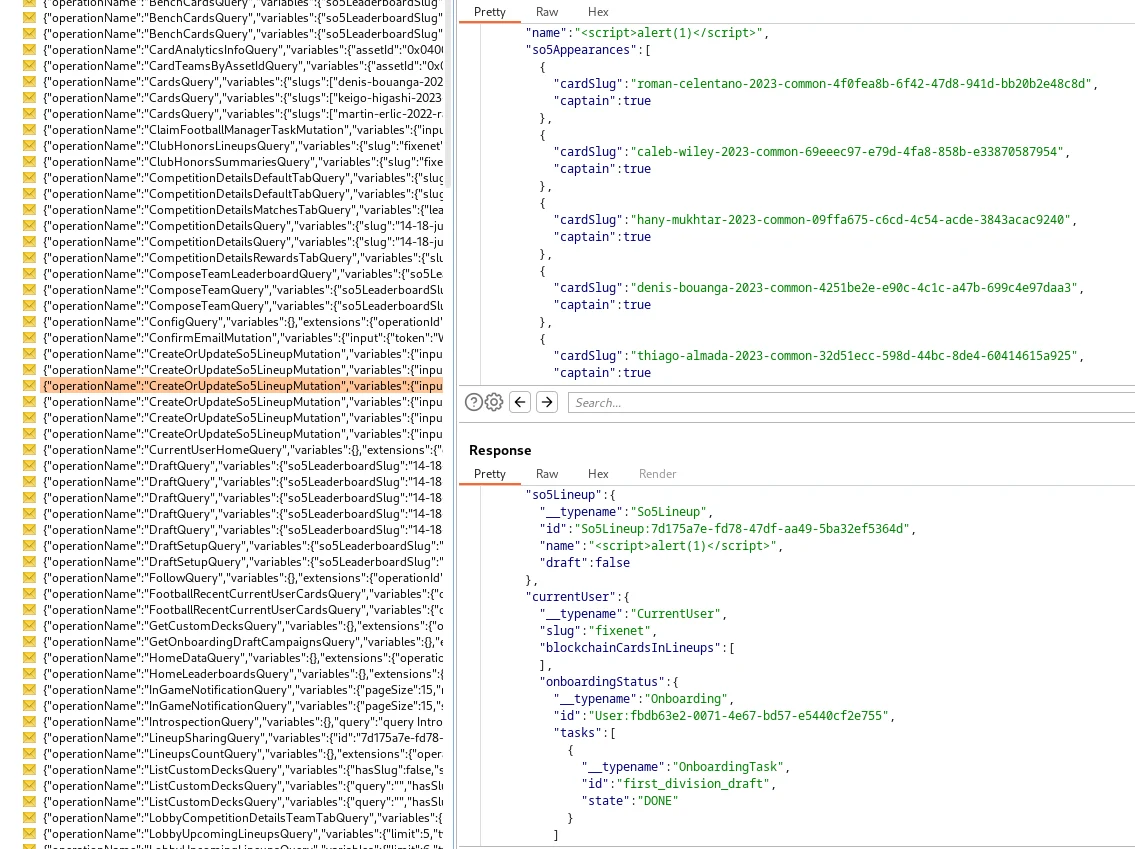
- Change all the players attribute "captain":true
Result:
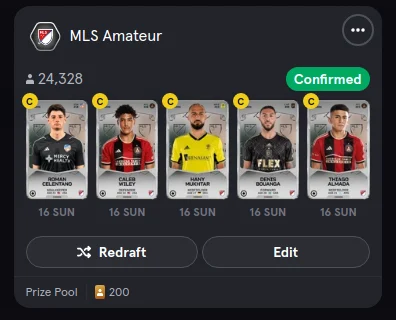
Confirmed team of all captains:
Impact
An attacker could get an unfair advantage vs other users that are following the expected game logic, since the API does not check for multiple captains.
What the report shows
The target is the Sorare football product, and the feature under test is the team editing flow that submits a SO5 lineup. When a user edits a team and presses "Confirm", the browser sends a GraphQL request to /federation/graphql with the operation name CreateOrUpdateSo5LineupMutation. The researcher intercepted that request and changed the captain attribute of every player in the lineup to true.
The UI only allows one captain per team, and the captain attribute grants a 50% score bonus. The API accepted the tampered lineup, so the researcher ended up with a confirmed team in which every player was a captain.
Steps as given in the report:
- Go to https://sorare.com/football
- Edit a team you own.
- Press "Confirm" button.
- Intercept the request made to
/federation/graphqlwith the"operationName":"CreateOrUpdateSo5LineupMutation" - Change all the players attribute
"captain":true
The intercepted request is shown here:
The result, a confirmed team of all captains, is shown here:
The report was rated low severity, classified as Improper Input Validation, and paid a 300.00 USD bounty. It was disclosed on 2023-08-01. The report does not describe a fix.
Root cause
The report's impact section says the API does not check for multiple captains, so the one-captain rule is not enforced server-side. The constraint exists only in the UI, so any client that talks to the GraphQL endpoint directly can bypass it.
Impact
As the report puts it, an attacker could get an unfair advantage over other users who follow the expected game logic, because the API does not check for multiple captains. The captain attribute gives a 50% score bonus, and the report frames the result as an unfair advantage over other users. The report does not go beyond this competitive-advantage framing.
How this kind of bug works
Many applications enforce business rules in the presentation layer: the interface hides the button, greys out the option, or only lets one radio button be selected. The server then receives a structured payload and writes it to storage. If the server does not re-check the rule, the rule is advisory only.
GraphQL makes this easy to hit. A mutation takes a typed input object, often a list of items each with their own flags. The schema may allow a boolean per item without expressing "exactly one true across the list". Validation libraries check types and required fields, not cross-item invariants, so a list of all-true flags passes schema validation and reaches the resolver.
The same pattern appears with quantities, discounts, seat counts, vote counts, role flags and ownership checks: any invariant that spans more than one field or item in a request. The defence is server-side validation of the invariant at the point of persistence, ideally in one place shared by every mutation that can write the same state, plus tests that submit invalid combinations directly to the API.
How to test for it
- Identify features with a visible constraint: one captain, one coupon, one vote, a maximum quantity, a mutually exclusive set of options.
- Capture the request that saves the state. For GraphQL, note the operation name and the input variables; for REST, note the body shape.
- Replay the request with the constraint violated: duplicate the flag across all items, set two mutually exclusive options, raise a quantity above the limit, or send a negative value.
- Confirm the change persisted by reloading the affected page or querying the object again, not just by reading the mutation response.
- Check whether the violation has a measurable effect: a score, a price, a ranking, a permission.
A positive result is a server response that accepts the invalid combination and state that reflects it on a fresh read. Common false positives: the mutation returns success but a later validation step silently corrects the data; the UI displays the tampered state from a local cache while the server stored the valid one; or the constraint is enforced but the error is returned with a 200 status and an errors array you did not read. Always verify server-side state independently.
How it is fixed
Enforce the invariant on the server. For a lineup, validate that exactly one player in the submitted list has the captain flag before saving, and reject the request otherwise. Apply the same check in every mutation that can write the lineup, so a second endpoint cannot be used to reach the same state. Prefer validating the final persisted object rather than the raw input, and add regression tests that submit invalid combinations directly to the API. Returning a clear error for the invalid case also helps clients.
Hunting notes
These bugs cluster around game and scoring logic, e-commerce pricing and discounts, voting and polling, seat and ticket selection, and any admin form with mutually exclusive roles. GraphQL APIs are a strong signal: enumerate mutations from the schema or from captured traffic and look for input objects containing lists of items with per-item flags. Recon signals include operations whose names suggest bulk updates, and client code that computes a constraint before sending the request.
To make the report land, show the before and after state from the server, quantify the effect where the program cares about it (score, rank, money), and keep the reproduction minimal. A clear screenshot of the accepted request and the resulting persisted state, as in this report, is usually enough for a low-severity validation issue.
What happened, in plain words
Sorare is a football game where you build a team of players and score points based on how those real players perform. One player in your team can be marked as the captain, and the captain gets a 50% bonus to their score. The game's rules say a team has only one captain.
The researcher found that the website's interface only allows one captain, while the API does not check for multiple captains. By changing the data the browser sends when you save a team, every player could be marked as captain at once, giving the team a bonus on every player's score.
A few words first, because they come up throughout:
- A request is the message your browser sends to a website's server when you do something, such as pressing a button. Think of it as an order slip you hand to a waiter: the kitchen (the server) cooks whatever the slip says.
- Intercepting a request means catching that order slip on its way out, so you can read it and change what it says before it reaches the kitchen.
- GraphQL is a way for a website to talk to its server where each request names an operation, like a function name, and carries the data for it. Here the operation is called
CreateOrUpdateSo5LineupMutation, which saves a team lineup. - Input validation is the server checking that what it receives makes sense and follows the rules. Improper input validation means it does not check properly.
The steps, and why each one matters
- Go to https://sorare.com/football
- Edit a team you own.
- Press "Confirm" button.
- Intercept the request made to
/federation/graphqlwith the"operationName":"CreateOrUpdateSo5LineupMutation"
Step 4 is the heart of it. The screenshot shows the captured request in an interception tool, where the outgoing data is visible and editable. The request goes to /federation/graphql, and the operationName tells the server which action is being performed: saving a lineup. Because the browser builds this request, and the browser runs on the user's machine, the user can change it.
- Change all the players attribute
"captain":true
Each player in the lineup is sent as an entry with a captain flag that is either true or false. The website's interface only lets you set one player to true, but the request itself has no such limit. Changing every entry to "captain":true asks the server to store a team where everyone is captain.
The result
The server accepted the tampered request and saved the team. The screenshot shows the confirmed team with every player marked as captain.
Impact
The report's own framing is that an attacker could get an unfair advantage over other users who follow the expected game logic, because the API does not check for multiple captains. The captain attribute gives a 50% score bonus, and the report says this gives an unfair advantage over other users.
The report was rated low severity, classified as improper input validation, and paid a 300.00 USD bounty. It was disclosed on 2023-08-01. The report does not describe a fix.
In general, how this kind of bug works
Many applications enforce their rules only in the interface: the button is hidden, the option is greyed out, or only one radio button can be selected. The server then receives the data and saves it. If the server does not check the rule again for itself, the rule is only a suggestion. A useful comparison is a form that asks you to tick exactly one box: the paper form may only have room for one tick, but if you hand in a photocopy with every box ticked, someone has to notice and reject it.
GraphQL makes this pattern easy to reach. A mutation is a GraphQL operation that changes data on the server. It takes a structured input, often a list of items, each with its own flags. The schema, which is the server's description of what data it accepts, can allow a true/false flag on each item without being able to say "exactly one true across the whole list". Validation tools check types and required fields, not rules that span several items, so a list where everything is true passes and reaches the code that saves it.
The same pattern appears with quantities, discounts, seat counts, vote counts, role flags and ownership checks: any rule that spans more than one field or item in a request. The defence is to check the rule on the server at the moment of saving, ideally in one place shared by every operation that can write the same data, plus tests that send invalid combinations straight to the API.
In general, how to test for it
- Look for features with a visible constraint: one captain, one coupon, one vote, a maximum quantity, a set of options where only one may be chosen.
- Capture the request that saves the state. For GraphQL, note the operation name and the input data; for other APIs, note the shape of the body.
- Replay the request with the constraint broken: set the flag on every item, choose two exclusive options, raise a quantity above the limit, or send a negative value.
- Confirm the change was actually saved by reloading the page or asking the server for the object again, not just by reading the reply to your request.
- Check whether the violation has a measurable effect: a score, a price, a ranking, a permission.
A positive result is a server reply that accepts the invalid combination and stored data that reflects it when read fresh. Common false positives: the request reports success but a later check quietly corrects the data; the page shows the tampered state from a local cache while the server kept the valid one; or the rule is enforced but the error comes back with a 200 status and an errors list you did not read. Always verify the server's state independently.
In general, how it is fixed
Enforce the rule on the server. For a lineup, check that exactly one player in the submitted list has the captain flag before saving, and reject the request otherwise. Apply the same check in every operation that can write the lineup, so a second route cannot be used to reach the same state. Prefer checking the final saved object rather than the raw input, and add tests that submit invalid combinations directly to the API. Returning a clear error for the invalid case also helps clients.
Glossary
- API: the interface a website's front end uses to talk to its server, sending requests and receiving data.
- Captain: in this game, the one player in a team who receives a 50% score bonus.
- GraphQL: a way of querying and changing data on a server where each request names an operation and carries structured input.
- Mutation: a GraphQL operation that changes data on the server, as opposed to one that only reads it.
- Operation name: the label in a GraphQL request that says which action is being performed, here
CreateOrUpdateSo5LineupMutation. - Request: the message a browser sends to a server when you do something on a website.
- Intercept: to catch a request on its way out so it can be read and modified before it reaches the server.
- Endpoint: the address a request is sent to, here
/federation/graphql. - Input validation: a server checking that the data it receives is well formed and follows the rules.
- Improper input validation: a weakness where the server fails to perform that check.
- Schema: the server's description of what data and operations it accepts.
- Invariant: a rule that must always hold, such as "exactly one captain per team".
- Persistence: saving data so it remains stored after the request finishes.
- Severity: the rating given to a bug to express how serious it is, here low.
- Bounty: a payment made to a researcher for reporting a valid security bug.




