Exploit Airlines that use T-Mobile for Free WiFi
The airline's in-flight WiFi authentication relied solely on a MAC address and a T-Mobile phone number, without verifying ownership of the number. An attacker could spoof both to obtain unlimited free WiFi access.

I had a long 14 hour flight back to the United States and ended up getting bored in the first 30 minutes. There I was, with a rooted phone and nothing but time.
The full write-up lives on its author's site
It belongs to its author, so we link to it rather than copy it. The other two tabs are our own rewrites, checked against it.
Context
In-flight WiFi on some airlines is provided through T-Mobile, which offers a free hour of connectivity to T-Mobile customers. The gate that decides whether you get that hour is, in the researcher's account, a combination of the device's MAC address and a valid T-Mobile phone number. The researcher was on a 14 hour flight back to the United States with a rooted phone and used the free hour quickly, then set out to get more time out of the same system.
The write-up covers the reasoning, the two-step technique that produced repeat free hours, the disclosure to the airlines, and the recommendations that came out of it. The weakness categories involved are WiFi access control, payment bypass, MAC address spoofing and missing authentication.
Setup
The preconditions were modest:
- A rooted phone. The researcher had rooted it with Magisk on a custom LineageOS build.
- An app that can change the device MAC address. The researcher used one called MacChanger.
- A list of phone numbers known to belong to T-Mobile users, compiled from the contacts list and saved to the phone.
- Access to the T-Mobile site on the in-flight network, and the GoGoInFlight application that shows the remaining flight time.
No accounts beyond the normal T-Mobile customer flow were needed, and no tooling beyond the phone.
Finding it
The researcher first scanned the network to see whether other passengers' MAC addresses could be reused to obtain free WiFi. Every spoofed MAC taken from the network failed to grant further access, which suggested those devices had already consumed their free hour.
That led to the key observation: the system was asking for a valid T-Mobile phone number, but the researcher had never received a text message or any other authentication step proving ownership of the number. The number was accepted as a claim, not verified. Combined with a MAC address that the client controls, both halves of the check were attacker-supplied.
Exploitation
Step 1: MAC spoofing alone
The researcher changed the phone's MAC address to addresses observed on the network and retried the T-Mobile flow. None of them granted additional time, consistent with those devices having already used their free hour. MAC spoofing on its own was not enough.
Step 2: Fresh MAC plus a T-Mobile number
- Compile a list of contacts known to be T-Mobile users and save it to the phone.
- Use MacChanger to set a random MAC address for the phone.
- Open the T-Mobile site on the phone, enter a T-Mobile number from the list together with the newly generated MAC address, and submit.
The result was another free hour of WiFi. Because the number was never verified by SMS or any other challenge, any T-Mobile number worked, and because the MAC could be regenerated at will, the per-device limit could be reset at will.
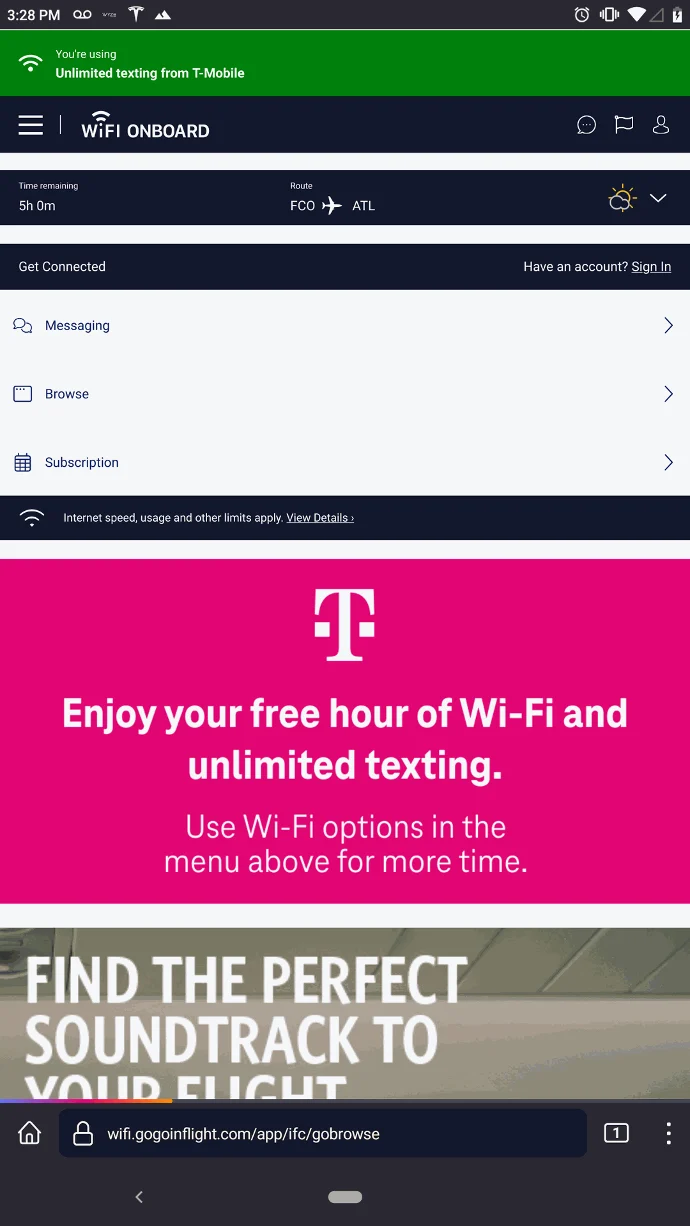
The screenshot shows the successful result of that combination: a new T-Mobile number and a newly generated MAC address yielding another hour.
Step 3: Repeating it through the flight
The GoGoInFlight application shows the remaining flight time alongside the connection state, which documents the sequence: The GoGoInFlight application shows the remaining flight time alongside the connection state, which documents the sequence:
- With 5 hours remaining on the flight, a new T-Mobile phone number and MAC address were in use.
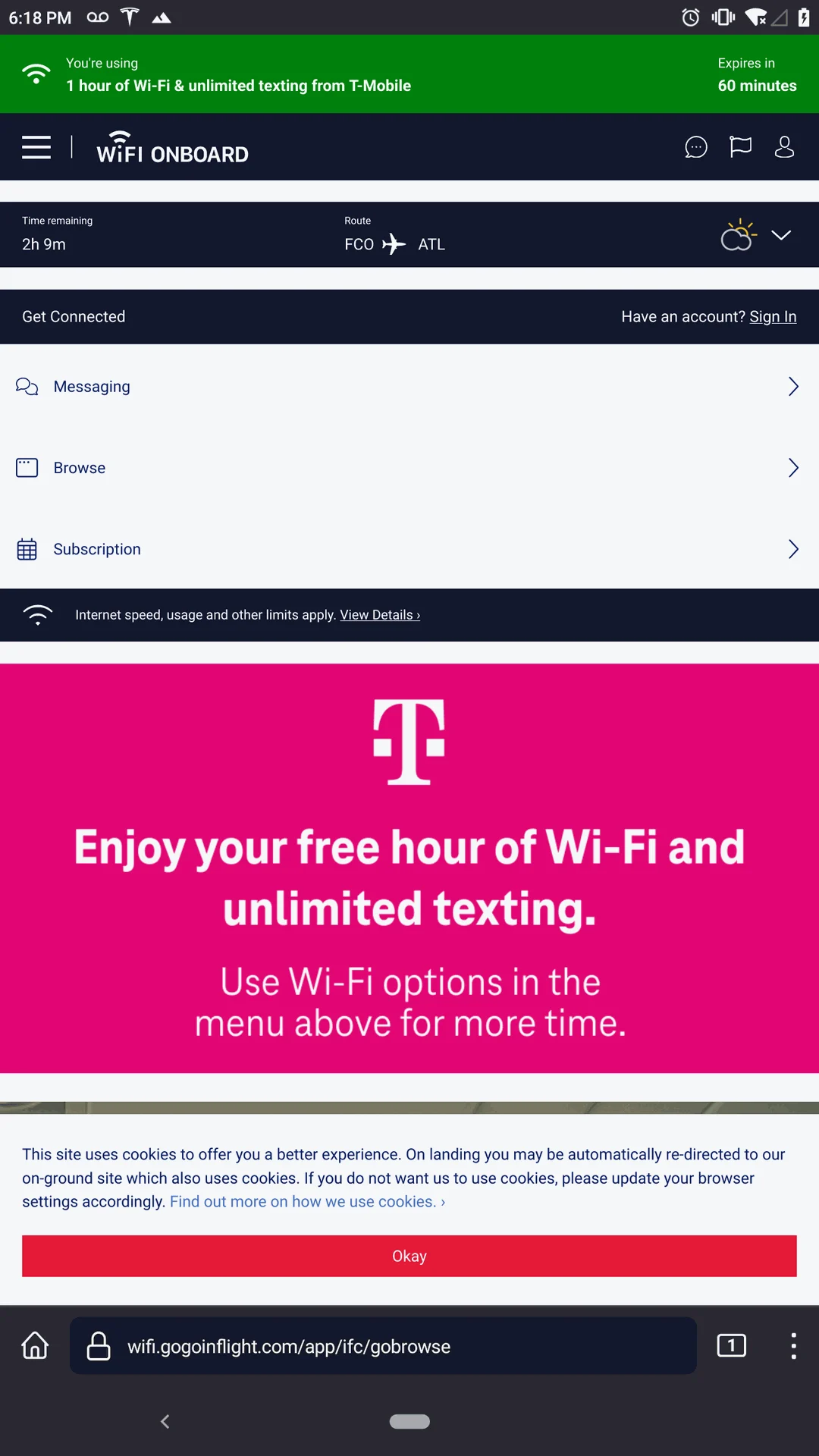
- With 2 hours remaining, the connection was still up.
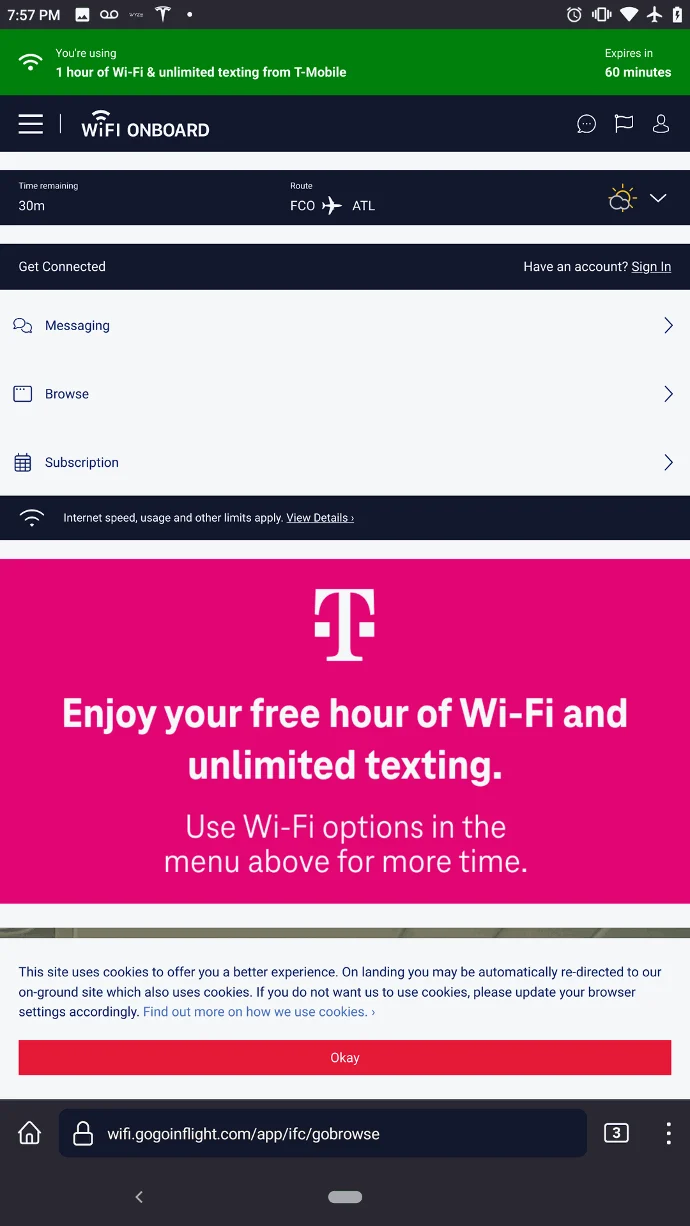
- With 30 minutes remaining, the connection was still up.
The screenshots show the connection still up with 5 hours, 2 hours and 30 minutes of flight remaining.
Root cause
The authentication decision rested on two values the client fully controls: the MAC address of the device and a T-Mobile phone number typed into a form. Neither was bound to anything the client could not change. The MAC address is trivially rewritten on a rooted device, and the phone number was accepted without any proof of ownership, since no SMS or other challenge was sent. The design therefore treated an unverified claim plus a spoofable identifier as sufficient proof of entitlement.
The number was accepted without any SMS or other challenge, and the MAC could be regenerated at will.
Impact
An attacker on an aircraft using this T-Mobile backed WiFi could obtain repeated free hours of connectivity for the duration of the flight, without paying and without owning the T-Mobile numbers used. The requirements were a device whose MAC can be changed and a T-Mobile phone number. The researcher picked numbers from the contacts list that were known to be T-Mobile users.
Fix
The airlines were contacted on 7 July 2022. Their teams said they were already aware of the vulnerability and accepted the risk, since they were going to offer free WiFi to passengers anyway. Their clarifications were:
- From an airline perspective the finding would fall under "out of scope".
- They were going to begin piloting the feature in week-long sprints on select aircraft in select markets beginning two weeks after 7 July 2022, unannounced publicly until it was wholly ready.
- Unlimited full WiFi is now offered to T-Mobile customers: https://www.t-mobile.com/benefits/travel/in-flight-wifi
The researcher's recommendations for airline WiFi providers, if MAC and T-Mobile numbers are the sole authentication method, are:
- SMS-based authentication while boarding or on the ground, during potential connections via LTE or WiFi, which then issues a one-time passcode for WiFi during the flight.
- Any login-based authentication method that does not rely on just a valid T-Mobile number and a new device.
- Other authentication methods that may be in progress.
The general point is that MAC addresses were never intended to be reliable forms of authentication.
Variants to test
- MAC-only reset: on a captive portal that grants time per device, change the MAC and retry without touching any account field. A positive result is a fresh time allowance with no other change.
- Unverified identifier claims: submit a phone number, loyalty number or booking reference that belongs to someone else and see whether access is granted without an SMS, email or other challenge to that identifier. A positive result is access granted with no verification message received.
- Identifier plus device binding: check whether the same number can be reused from a different MAC, or the same MAC with a different number, and whether either combination resets the allowance. A positive result is a new allowance from a combination the server should have rejected.
- SMS challenge bypass: where an SMS step exists, test whether the code is bound to the session and the number, whether it can be replayed, and whether the flow can be completed without ever receiving the message. A positive result is access without a valid code delivered to the claimed number.
- Portal state handling: inspect the portal's requests for client-supplied values that encode entitlement (time remaining, plan, device identity) and try modifying them. A positive result is a changed allowance reflected by the server.
Each of these should be tested only within the scope of the programme that covers the target.
What happened, in plain words
Some airlines offer in-flight WiFi through T-Mobile. If you are a T-Mobile customer, you get one free hour of internet. The system that decides whether you get that hour, according to the researcher's account, looks at two things: the MAC address of your device and a T-Mobile phone number you type in.
The researcher was on a 14 hour flight back to the United States, with a rooted phone. The free hour went quickly, mostly on cat videos, and there were still about twelve hours of flight left. So the researcher worked out how to get more free hours out of the same system, using nothing but the phone.
The write-up walks through the reasoning, the two-step technique that produced repeat free hours, the disclosure to the airlines, and the recommendations that came out of it. The weakness categories involved are WiFi access control, payment bypass, MAC address spoofing and missing authentication.
A few words before we start, because they come up constantly.
A MAC address is a short identifier that every network card has, a bit like a house number for your device on a local network. It is supposed to be unique, and it is written into the hardware, but on many devices the operating system lets you change it. When you change it, the network sees a different device.
Spoofing means pretending to be something you are not. MAC spoofing means telling the network a MAC address that is not the one burned into your hardware.
Rooting a phone means getting full administrator rights on it, the same idea as an administrator account on a computer. It lets you install software that the manufacturer would normally block, including software that changes the MAC address.
Authentication is the process of proving who you are. When a website asks for a password, or sends you a code by text message, it is trying to check that you really are the person you claim to be. Missing authentication means a step like that is absent: the system accepts what you say without checking it.
A captive portal is the web page that appears when you join a WiFi network in a hotel, an airport or a plane. It is the page that asks you to log in or pay before it lets you through to the rest of the internet.
Setup
The preconditions were modest. Here is what the researcher needed:
- A rooted phone. The researcher had rooted it with Magisk on a custom LineageOS build.
- An app that can change the device MAC address. The researcher used one called MacChanger.
- A list of phone numbers known to belong to T-Mobile users, compiled from the contacts list and saved to the phone.
- Access to the T-Mobile site on the in-flight network, and the GoGoInFlight application that shows the remaining flight time.
No accounts beyond the normal T-Mobile customer flow were needed, and no tooling beyond the phone.
Magisk is a tool that roots an Android phone without permanently modifying the system partition, and LineageOS is an alternative Android operating system that people install when they want more control over their device. Neither is required to understand the bug; they are simply what made the MAC change possible on this particular phone. MacChanger is the app that does the actual change: you give it a MAC address, it applies it, and from then on the network sees that address instead of the real one.
The contacts list matters because the system asks for a T-Mobile phone number, and the researcher needed numbers that the system would recognise as belonging to T-Mobile customers. The GoGoInFlight application is the in-flight WiFi app; it shows how much flight time is left.
Finding it
The researcher first scanned the network to see whether other passengers' MAC addresses could be reused to obtain free WiFi. Every spoofed MAC taken from the network failed to grant further access, which suggested those devices had already consumed their free hour.
Scanning the network here means looking at the other devices sharing the same WiFi, the way you might look around a room to see who else is there. Each device announces its MAC address, so the researcher could collect a list of them. The idea was simple: if the free hour is tied to a device, then borrowing someone else's device identity might give a fresh hour. It did not. The likely reason is that those passengers had already used their own free hour, so their MAC addresses were already spent.
That led to the key observation: the system was asking for a valid T-Mobile phone number, but the researcher had never received a text message or any other authentication step proving ownership of the number. The number was accepted as a claim, not verified. Combined with a MAC address that the client controls, both halves of the check were attacker-supplied.
This is the heart of the bug. A phone number on its own is just a string of digits. Anyone can type any number into a form. The only way a website can know that a number belongs to you is to send something to that number, usually a text message with a code, and ask you to type the code back. That step never happened here. So the system was trusting a claim, and the claim could be anything.
Exploitation
Step 1: MAC spoofing alone
The researcher changed the phone's MAC address to addresses observed on the network and retried the T-Mobile flow. None of them granted additional time, consistent with those devices having already used their free hour. MAC spoofing on its own was not enough.
This step is worth spelling out because it rules out the simplest explanation. If the free hour were tied only to the MAC address, then changing the MAC would be enough. It was not. So the system must be checking something else as well, and that something else turned out to be the phone number.
Step 2: Fresh MAC plus a T-Mobile number
- Compile a list of contacts known to be T-Mobile users and save it to the phone.
- Use MacChanger to set a random MAC address for the phone.
- Open the T-Mobile site on the phone, enter a T-Mobile number from the list together with the newly generated MAC address, and submit.
The result was another free hour of WiFi. Because the number was never verified by SMS or any other challenge, any T-Mobile number worked, and because the MAC could be regenerated at will, the per-device limit could be reset at will.
Put the two halves together and the picture is clear. The system wanted a T-Mobile number and a device it had not seen before. The researcher could supply both: a number from the contacts list, and a MAC address generated on the spot. Neither value was checked against anything the researcher could not control. The number was not verified, and the MAC was not tied to the number. So each round of a fresh MAC plus a fresh number produced a fresh hour.
The screenshot shows the successful result of that combination: a new T-Mobile number and a newly generated MAC address yielding another hour.
Step 3: Repeating it through the flight
The GoGoInFlight application shows the remaining flight time alongside the connection state, which documents the sequence: The GoGoInFlight application shows the remaining flight time alongside the connection state, which documents the sequence:
- With 5 hours remaining on the flight, a new T-Mobile phone number and MAC address were in use.
- With 2 hours remaining, the connection was still up.
- With 30 minutes remaining, the connection was still up.
The screenshots show the connection still up with 5 hours, 2 hours and 30 minutes of flight remaining.
The screenshots show the in-flight app at different points in the flight, with the remaining time counting down. That is what turns a single lucky attempt into a repeatable technique.
Root cause
The authentication decision rested on two values the client fully controls: the MAC address of the device and a T-Mobile phone number typed into a form. Neither was bound to anything the client could not change. The MAC address is trivially rewritten on a rooted device, and the phone number was accepted without any proof of ownership, since no SMS or other challenge was sent. The design therefore treated an unverified claim plus a spoofable identifier as sufficient proof of entitlement.
The number was accepted without any SMS or other challenge, and the MAC could be regenerated at will.
In plain terms: the system asked two questions, and both answers came from the person being checked. That is like a bouncer who asks your name and then takes your word for it. A proper check would involve something the person cannot simply make up, such as a code sent to the number they claim to own. Without that, the check is decoration.
Impact
An attacker on an aircraft using this T-Mobile backed WiFi could obtain repeated free hours of connectivity for the duration of the flight, without paying and without owning the T-Mobile numbers used. The requirements were a device whose MAC can be changed and a T-Mobile phone number. The researcher picked numbers from the contacts list that were known to be T-Mobile users.
This is a payment bypass: the service is meant to be paid for, or limited to a paying customer base, and the technique gets around that. It is also a form of access control failure, because the system is supposed to control who gets access and for how long, and it does not.
Fix
The airlines were contacted on 7 July 2022. Their teams said they were already aware of the vulnerability and accepted the risk, since they were going to offer free WiFi to passengers anyway. Their clarifications were:
- From an airline perspective the finding would fall under "out of scope".
- They were going to begin piloting the feature in week-long sprints on select aircraft in select markets beginning two weeks after 7 July 2022, unannounced publicly until it was wholly ready.
- Unlimited full WiFi is now offered to T-Mobile customers: https://www.t-mobile.com/benefits/travel/in-flight-wifi
"Out of scope" is a term from bug bounty programmes. It means the finding is outside the area the programme has agreed to pay for or accept reports about. The airline's position was that the behaviour was known and that they were going to offer free WiFi anyway.
The researcher's recommendations for airline WiFi providers, if MAC and T-Mobile numbers are the sole authentication method, are:
- SMS-based authentication while boarding or on the ground, during potential connections via LTE or WiFi, which then issues a one-time passcode for WiFi during the flight.
- Any login-based authentication method that does not rely on just a valid T-Mobile number and a new device.
- Other authentication methods that may be in progress.
The general point is that MAC addresses were never intended to be reliable forms of authentication.
An SMS-based authentication step means the system sends a code by text message to the number you claim, and you have to type it back. That proves you can receive messages on that number, which is something a random person typing digits into a form cannot do. A one-time passcode is a code that works once and then expires, so it cannot be reused by someone else later.
Variants to test
These are the same ideas applied to other systems. Each one is a way to check whether a captive portal is trusting something it should not.
- MAC-only reset: on a captive portal that grants time per device, change the MAC and retry without touching any account field. A positive result is a fresh time allowance with no other change.
- Unverified identifier claims: submit a phone number, loyalty number or booking reference that belongs to someone else and see whether access is granted without an SMS, email or other challenge to that identifier. A positive result is access granted with no verification message received.
- Identifier plus device binding: check whether the same number can be reused from a different MAC, or the same MAC with a different number, and whether either combination resets the allowance. A positive result is a new allowance from a combination the server should have rejected.
- SMS challenge bypass: where an SMS step exists, test whether the code is bound to the session and the number, whether it can be replayed, and whether the flow can be completed without ever receiving the message. A positive result is access without a valid code delivered to the claimed number.
- Portal state handling: inspect the portal's requests for client-supplied values that encode entitlement (time remaining, plan, device identity) and try modifying them. A positive result is a changed allowance reflected by the server.
Each of these should be tested only within the scope of the programme that covers the target.
A session is the period during which a website remembers who you are, usually by giving your browser a small piece of data to hold on to. If a code is not tied to your session, someone else might be able to use it. Replaying a code means using the same code again after it should have expired. Client-supplied values are pieces of data that your browser sends to the server, which the server should not blindly trust, because your browser is under your control.
Glossary
- MAC address: a short identifier for a network card, used by devices on a local network to tell each other apart.
- MAC spoofing: telling the network a MAC address that is not the one built into your hardware.
- Rooting: gaining full administrator rights on a phone, so you can install software the manufacturer would normally block.
- Magisk: a tool for rooting Android phones without permanently modifying the system partition.
- LineageOS: an alternative Android operating system that people install for more control over their device.
- MacChanger: an app that changes the MAC address of a device.
- Authentication: the process of proving who you are, usually with a password or a code.
- Missing authentication: a situation where a system accepts a claim without checking it.
- Captive portal: the web page that appears when you join a WiFi network and asks you to log in or pay before letting you through.
- SMS-based authentication: a check where the system sends a code by text message to the number you claim, and you type it back.
- One-time passcode: a code that works once and then expires.
- Session: the period during which a website remembers who you are, usually by giving your browser a small piece of data to hold.
- Replay: using the same code or request again after it should have expired.
- Client-supplied values: data your browser sends to the server, which the server should not blindly trust.
- Payment bypass: getting around a payment or entitlement check to use a service you have not paid for.
- Access control: the part of a system that decides who gets access to what, and for how long.
- Out of scope: a finding that falls outside the area a bug bounty programme has agreed to accept or pay for.
- GoGoInFlight: the in-flight WiFi application that shows remaining flight time and connection state.




