From CTFs to Bug Bounty Booty
An exposed .git directory on a subdomain allowed the author to download Git objects and reconstruct source code, which contained hardcoded database credentials. The attacker could then access the database, though the report does not confirm actual exploitation.
 Published on medium.com
While watching some YouTube videos over the weekend I came across a website for custom designing shirts. Being a sucker for almost anything customised I started to have a look and sent it to a friend.
The full write-up lives on its author's site
It belongs to its author, so we link to it rather than copy it. The other two tabs are our own rewrites, checked against it.
Context
Tailor Store is a website for custom designing shirts. While watching YouTube videos over a weekend, the author came across the site, had a look around, and sent it to a friend. After the friend remarked on the high level of design, the author joked that they would now just have to find an SQLi. The author had never attempted bug bounty hunting and does not describe themselves as a web expert, but had taken part in a few CTFs and had recently been reading more about web hacking.
The target that mattered in the end was the subdomain office.tailorstore.com. The report does not describe what that host is meant to serve; it only records what happened when it was browsed to.
Setup
No accounts, roles or credentials were used. The only tool named in the report is Sublist3r.py, used for subdomain enumeration. Later steps used wget and git cat-file against the exposed repository. The author notes that they did not intend to put much effort in, because they did not think they would find anything, and that they were working on another project at the time, so they started simple: find subdomains.
Finding it
Sublist3r returned 28 subdomains. Most did not seem interesting: cdn[1–6].tailorstore.com, dyn[1–4].tailorstore.com and similar. The author looked at some of the others until browsing to office.tailorstore.com produced an invalid certificate.

The invalid certificate is what kept the author on that host. Their reasoning was that a misconfigured certificate made them curious about what else might be badly configured there. They accepted the risk of continuing past the certificate warning, and were then met with basic authentication. Without credentials, the result was a 401 page.

That’s, err, not gonna happen
Exploitation
Step 1: Guess a .git folder
Based on the use of basic authentication, the misconfigured certificate, and challenges from CTFs, the author decided to try their luck and guessed for a .git folder.

The response changed: the earlier request had been 401, and this one returned 403. That suggested .git existed. To confirm, the author browsed to .giss and got a 401 again, then browsed to .git/HEAD. Chrome downloaded a file, which confirmed the guess.

With access to git internal files, the author could access git objects. The report notes that it will not go into too much detail on git internals, and that the author is no expert on them, so some of the internal explanation may be slightly off.
Step 2: Read the master commit hash
The process is described as a typical CTF challenge: restore the files from a repo by finding the hashes of the objects and then fetching the objects. Git stores objects in a directory whose name is the first two bytes of the hash, with the rest of the hash as the file name. A quick wget to /.git/refs/heads/master returned the hash of the master commit:
[redacted]
So the file to fetch next was .git/objects/04/[redacted].
Step 3: Rebuild the repository
Originally the author wrote (in their words, copied) a script that would allow them to read the file, but eventually they ended up rebuilding the whole repo so that they could use git commands.
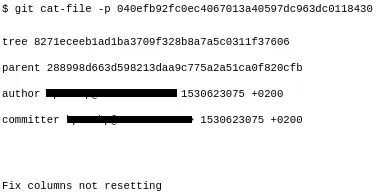
This gave the hash of the directory, which is a "tree" in git terms; a "blob" is a file. The author fetched it with wget and read it with git cat-file:
That produced a directory listing.
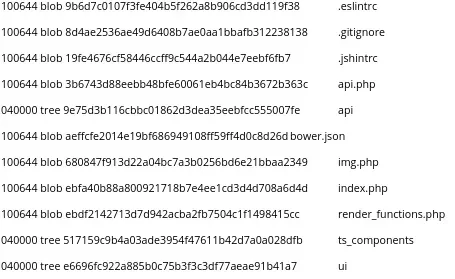
Step 4: Walk into the api directory
The api entry looked interesting. Another wget and git cat-file followed; the author remarks that after all of this, these commands had been seared into their screen.
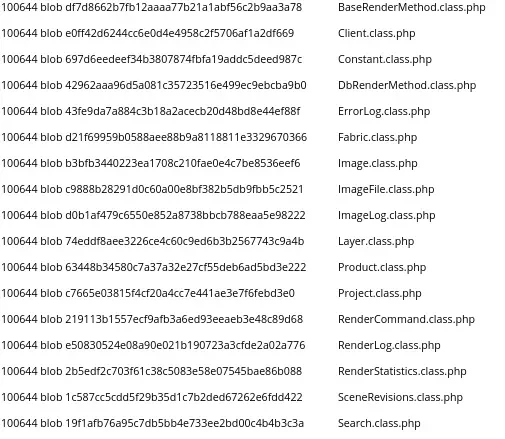
Step 5: Read Product.class.php
The first file examined was Product.class.php. Using wget and git cat-file on the relevant hash path, this time the object was a file rather than a directory, so the author had code.
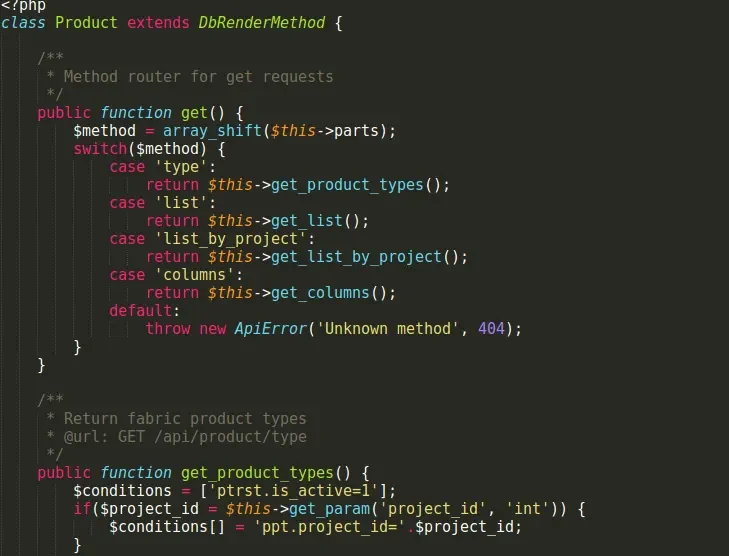
Looking for an SQLi turned up nothing useful: all queries were done using an internal method. The class extends DbRenderMethod, so the author went to look there. They note that they did not notice at first that they already had the hash for that file, and spent ages looking for it.
Step 6: Find the database credentials
The file was grabbed, ready to search for an SQLi, and instead contained full connection details for the DB.
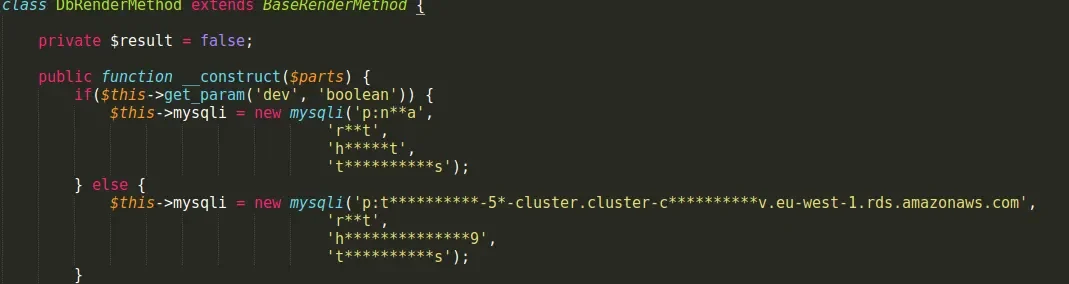

Does this make me a hacker?
The author says this should not have been surprising, since it makes sense that such details would be there, but they had not thought about it at the time. They stopped at this point: Tailor Store did not have a bug bounty, the author did not want to get into too much trouble, and felt this was sufficient to file a report.
Step 7: Disclosure and outcome
The author emailed Tailor Store on a Sunday and received a response by Monday morning. Tailor Store did not have an active bug bounty program, but offered compensation provided a significant issue was reported. The author sent a report; within an hour the server had been secured, the author's account was credited with $200, and they were given permission to publish a report. The author was impressed with the response time, while noting they have nothing to base it on since it was their first time.

I haven’t seen this meme used in a while
From deciding to have a look until having the credentials took less than 2 hours.
Root cause
The exposed .git directory on office.tailorstore.com allowed git internal files and objects to be downloaded, which in turn allowed the repository contents to be reconstructed. The basic authentication in front of the host did not stop the author: the .git path returned 403 rather than 401, while a non-existent path such as .giss returned 401. The report does not state how the server was configured to produce this difference, so the exact mechanism is not documented. The database connection details were then found in source code inside the repository, in the file reached via DbRenderMethod.
Impact
The author could download the git objects behind office.tailorstore.com and reconstruct at least part of the application source, including full database connection details. The author stopped once the credentials were found and reported the issue rather than testing further.
Fix
Tailor Store secured the server within an hour of receiving the report. The general fix implied by the finding is to stop serving the .git directory over HTTP, and to keep credentials out of source that can end up in a web-served repository.
Variants to test
- Request
/.git/HEADon any host you are already looking at. A positive result is a downloadable file whose contents look like a git ref, rather than a 401, 403 or 404. - Compare a guessed path with a deliberately wrong one, as the author did with
.gitand.giss. A positive result is a different status code for the real path, which suggests it exists even when the response body is not shown. - Fetch
/.git/refs/heads/masterand follow the commit hash into/.git/objects/<first two bytes>/<rest>. A positive result is a readable object that can be passed togit cat-file. - Walk trees from the commit into directories such as
apiand read blobs for configuration and database classes. A positive result is source code containing connection strings or credentials. - Treat an invalid certificate on a subdomain as a prompt to look further, as the author did. A positive result is any other misconfiguration on the same host, such as exposed version control or default authentication pages.
The author's own takeaways: one thing leads to another, since the invalid certificate is the reason they kept looking at the subdomain; 100% understanding is not necessary, since they did not manage to restore all the files and did not need them; and CTFs can be realistic, since there is an overlap with real targets. They relied heavily on three references while rebuilding the repo:
What happened, in plain words
A person who had never done bug bounty hunting before was watching YouTube videos over a weekend and came across a website for custom designing shirts, Tailor Store. They had a look around, sent the link to a friend, and when the friend remarked on how well designed the site was, joked that they would now just have to find an SQLi. An SQLi (SQL injection) is a classic web bug where a website builds a database query out of whatever a visitor types, so a clever visitor can type something that changes the query. The joke was that finding one would be the natural next step after admiring the design.
The author was not a web expert. They had taken part in a few CTFs (capture the flag competitions, puzzle-style security challenges where you have to break into a deliberately vulnerable system to find a hidden string called a flag) and had recently been reading more about web hacking. They did not intend to put much effort in, because they did not think they would find anything, and they were busy with another project. So they started with the simplest thing: finding subdomains.
A subdomain is a name that sits in front of the main domain, like shop.example.com next to example.com. Companies often run many of them: a shop, a blog, a support portal, an internal tool that was never meant to be public. Each one is a separate door into the same organisation, and each one can be misconfigured on its own. Enumerating subdomains is therefore a standard first move: you are looking for doors the main site does not link to.
The tool they used, Sublist3r, returned 28 subdomains. Most looked boring: cdn[1–6].tailorstore.com, dyn[1–4].tailorstore.com and similar. A CDN (content delivery network) is a set of servers that serve static files like images and stylesheets close to visitors; a dyn host is typically something dynamic. Neither is usually where the interesting mistakes are. The author looked at some of the others until they browsed to office.tailorstore.com and the browser showed an invalid certificate.
A certificate is what makes the padlock appear in your browser: it proves the server you reached really is the one named in the address bar, and it lets the traffic be encrypted. An invalid certificate means the browser cannot verify that proof. It might be expired, self-signed, or issued for a different name. The browser warns you and asks whether to continue. Most people click away. The author did the opposite: a misconfigured certificate made them curious about what else on that host might be badly configured, so they accepted the risk and continued.
What they got next was basic authentication: a browser pop-up asking for a username and password. Basic authentication is one of the oldest ways to protect a web page. The server sends a challenge, the browser shows the login box, and whatever you type is sent back with every request. Without credentials, the result was a 401 page. A 401 is the HTTP status code for "you are not authorised, identify yourself". HTTP status codes are the three-digit numbers a server sends with every response: 200 means fine, 404 means not found, 401 means log in, 403 means you are identified but not allowed.
That’s, err, not gonna happen
So the author had a host that asked for a password and had a broken certificate. Two small oddities. Based on the basic authentication, the misconfigured certificate, and the kind of challenges they had seen in CTFs, they decided to try their luck and guessed for a .git folder.
A .git folder is the hidden directory git keeps inside a project. Git is the version control system most software teams use: it records every change to every file, so you can go back in time, see who changed what, and work on separate branches. The .git folder is the project's entire history and machinery. It is meant to live on the developer's computer or on a code hosting service, never on a public web server. If a web server serves it, anyone can download the history, including files that were deleted later but are still stored inside.
The response changed. The earlier request had been 401, and this one returned 403. A 403 means "I understood your request and I refuse it". That difference mattered: the deliberately wrong path .giss gave 401, while .git gave 403. Getting 403 for .git suggested the folder existed and the server was treating it differently. To confirm, the author browsed to .giss, a deliberate typo, and got 401 again. Then they browsed to .git/HEAD. Chrome downloaded a file, and the author started to grin.
HEAD is a small file inside .git that points at the branch you currently have checked out. If the server hands you that file, it is handing you the repository's front door.
With access to git internal files, the author could access git objects. Git does not store your files as files. It stores everything as objects: a blob is the content of one file, a tree is a directory listing (names plus which object each name points to), and a commit is a snapshot that points at one tree and records who made it and when. Each object is named by a hash, a long string of hexadecimal characters computed from its content. The same content always gives the same hash, and any change gives a completely different one. That is how git knows whether anything changed.
The author warns that they may have misexplained the git internals. The important part is the method, not the theory.
The task is a very typical CTF challenge: restore the files from a repository. The process is to find the hashes of the objects and then fetch the objects. Git stores objects in a directory whose name is the first two characters of the hash, with the rest of the hash as the file name. So an object with hash abcdef... lives at .git/objects/ab/cdef.... Splitting the hash keeps any single directory from holding too many files.
A quick wget to /.git/refs/heads/master returned the hash of the master commit:
[redacted]
wget is a command-line program that downloads a URL and saves it to a file. refs/heads/master is the file inside .git that records which commit the master branch currently points at. So this one download told the author the exact name of the newest commit object. The file to fetch next was therefore .git/objects/04/[redacted]: first two characters 04 as the folder, the remaining 38 as the file name.
Originally the author wrote (in their words, copied) a script that would let them read the file, but eventually they rebuilt the whole repository so they could use normal git commands on it. Rebuilding means recreating the .git folder locally, object by object, so that git itself can read it. That is much easier than decoding objects by hand.
This gave the hash of the directory, which is a "tree" in git terms; a "blob" is a file. The author fetched it with wget and read it with git cat-file:
git cat-file is a git command that prints the contents of an object given its hash. Pointed at a tree, it prints a directory listing. That is what the author got: a list of names, each with its own hash and a note of whether it is a tree (folder) or a blob (file).
The api entry looked interesting. An API (application programming interface) is the part of a system that other software talks to, rather than the part a human clicks on. In a web application it is usually the code that receives requests from the browser's JavaScript and returns data. It tends to contain the logic and the configuration, which is exactly what an attacker wants to read. Another wget and git cat-file followed; the author remarks that after all of this, these commands had been seared into their screen.
The first file examined was Product.class.php. The .php ending means it is a PHP source file, the server-side code that runs on the web server. Using wget and git cat-file on the relevant hash path, this time the object was a file rather than a directory, so the author had code.
They looked for an SQLi and found nothing useful: all queries were done using an internal method. In other words, the code did not build database queries inline where a visitor's input could be slipped in; it called a shared helper instead. The class extends DbRenderMethod, so the author went to look there. In object-oriented programming, a class can extend another class, meaning it inherits that class's behaviour. If the queries are not in Product.class.php, they are probably in the class it inherits from. The author notes they did not notice at first that they already had the hash for that file, and spent ages looking for it.
The file was grabbed, ready to search for an SQLi, and instead contained full connection details for the DB. A DB (database) is where the application keeps its data: products, orders, customer records. Connection details are the address of the database plus the username and password used to log in to it. They have to live somewhere so the application can connect, but they belong in configuration that never leaves the server, not in source code that can be downloaded.
Does this make me a hacker?
The author says this should not have been surprising, since it makes sense that such details would be there, but they had not thought about it at the time. They stopped at this point: Tailor Store did not have a bug bounty, the author did not want to get into too much trouble, and felt this was sufficient to file a report. A bug bounty is a programme where a company invites outsiders to report security problems and pays for good ones. Without one, the author chose to stop rather than keep testing.
The author emailed Tailor Store on a Sunday and received a response by Monday morning. Tailor Store did not have an active bug bounty programme, but offered compensation provided a significant issue was reported. The author sent a report; within an hour the server had been secured, the author's account was credited with $200, and they were given permission to publish a report. The author was impressed with the response time, while noting they have nothing to base it on since it was their first time.
I haven’t seen this meme used in a while
From deciding to have a look until having the credentials took less than 2 hours.
Why it worked
The exposed .git directory on office.tailorstore.com allowed git internal files and objects to be downloaded, which in turn allowed the repository contents to be reconstructed. The basic authentication in front of the host did not stop the author: the .git path returned 403 rather than 401, while a non-existent path such as .giss returned 401. The report does not state how the server was configured to produce this difference, so the exact mechanism is not documented. The database connection details were then found in source code inside the repository, in the file reached via DbRenderMethod.
What it meant
The author could download the git objects behind office.tailorstore.com and reconstruct at least part of the application source, including full database connection details. The report does not say what was done with those credentials, whether the database was reachable from outside, or what data it held. The author stopped once the credentials were found and reported the issue rather than testing further.
The fix
Tailor Store secured the server within an hour of receiving the report. The general fix implied by the finding is to stop serving the .git directory over HTTP, and to keep credentials out of source that can end up in a web-served repository.
How to look for the same thing
- Request
/.git/HEADon any host you are already looking at. A positive result is a downloadable file whose contents look like a git ref, rather than a 401, 403 or 404. - Compare a guessed path with a deliberately wrong one, as the author did with
.gitand.giss. A positive result is a different status code for the real path, which suggests it exists even when the response body is not shown. - Fetch
/.git/refs/heads/masterand follow the commit hash into/.git/objects/<first two bytes>/<rest>. A positive result is a readable object that can be passed togit cat-file. - Walk trees from the commit into directories such as
apiand read blobs for configuration and database classes. A positive result is source code containing connection strings or credentials. - Treat an invalid certificate on a subdomain as a prompt to look further, as the author did. A positive result is any other misconfiguration on the same host, such as exposed version control or default authentication pages.
The author's own takeaways: one thing leads to another, since the invalid certificate is the reason they kept looking at the subdomain; 100% understanding is not necessary, since they did not manage to restore all the files and did not need them; and CTFs can be realistic, since there is an overlap with real targets. They relied heavily on three references while rebuilding the repository:
- Don't publicly expose .git, or how we downloaded your website's sourcecode
- 9447 CTF 2014 tumorous write-up
- Reading git objects
Glossary
- API: the part of a system that other software talks to, usually returning data rather than web pages.
- Basic authentication: an old login method where the browser shows a pop-up and sends a username and password with every request.
- Blob: in git, the stored content of a single file.
- Bug bounty: a programme where a company invites outsiders to report security problems and pays for good ones.
- CDN: a network of servers that deliver static files such as images and stylesheets from locations close to visitors.
- Certificate: the file that proves a server is who it claims to be and enables encrypted traffic; an invalid one makes the browser warn you.
- Commit: in git, a snapshot of the project at one moment, pointing at a tree and recording who made it and when.
- CTF: capture the flag, a security competition where you break into deliberately vulnerable systems to find hidden strings called flags.
- Database (DB): the system where an application stores its data, such as products, orders and customer records.
- Database connection details: the address, username and password an application uses to log in to its database.
- 403: HTTP status meaning you are identified but not allowed to access the resource.
- 401: HTTP status meaning you must identify yourself, usually by logging in.
- Git: the version control system most software teams use to record every change to every file.
.gitfolder: the hidden directory inside a project where git keeps its entire history and machinery; it should never be served by a web server.git cat-file: a git command that prints the contents of an object given its hash.- Hash: a long string of characters computed from content, used by git to name objects; the same content always gives the same hash.
- HEAD: the file inside
.gitthat points at the branch currently checked out. - HTTP status code: the three-digit number a server sends with every response, such as 200, 401, 403 or 404.
- Object: in git, any stored item: a blob, a tree or a commit, each named by a hash.
- PHP: a programming language commonly used for server-side web code, stored in
.phpfiles. - Refs: the files inside
.gitthat record which commit each branch points at, such asrefs/heads/master. - SQL injection (SQLi): a bug where a website builds a database query out of visitor input, letting a clever visitor change the query.
- Subdomain: a name in front of the main domain, such as
shop.example.comnext toexample.com. - Sublist3r: a tool that finds subdomains of a domain.
- Tree: in git, a directory listing: names plus which object each name points to.
wget: a command-line program that downloads a URL and saves it to a file.



