Hacking a Tapo TC60 Camera
The Tapo TC60 camera exposes a UART console that can be interrupted at boot to reach a root shell, and the device configuration can be decrypted to reveal or inject RTSP account credentials. An attacker with brief physical access could add a backdoor account and view the camera's video stream.

A little while ago, I spotted a Tapo TC60 “Smart Security Camera” on sale at Amazon UK. After my adventures with a smart lockbox and an old safe lock, I wanted to try hacking something with a few more features.
The full write-up lives on its author's site
It belongs to its author, so we link to it rather than copy it. The other two tabs are our own rewrites, checked against it.
Context
A little while ago I spotted a Tapo TC60 "Smart Security Camera" on sale at Amazon UK. After my adventures with a smart lockbox and an old safe lock, I wanted to try hacking something with a few more features. This is what happened.
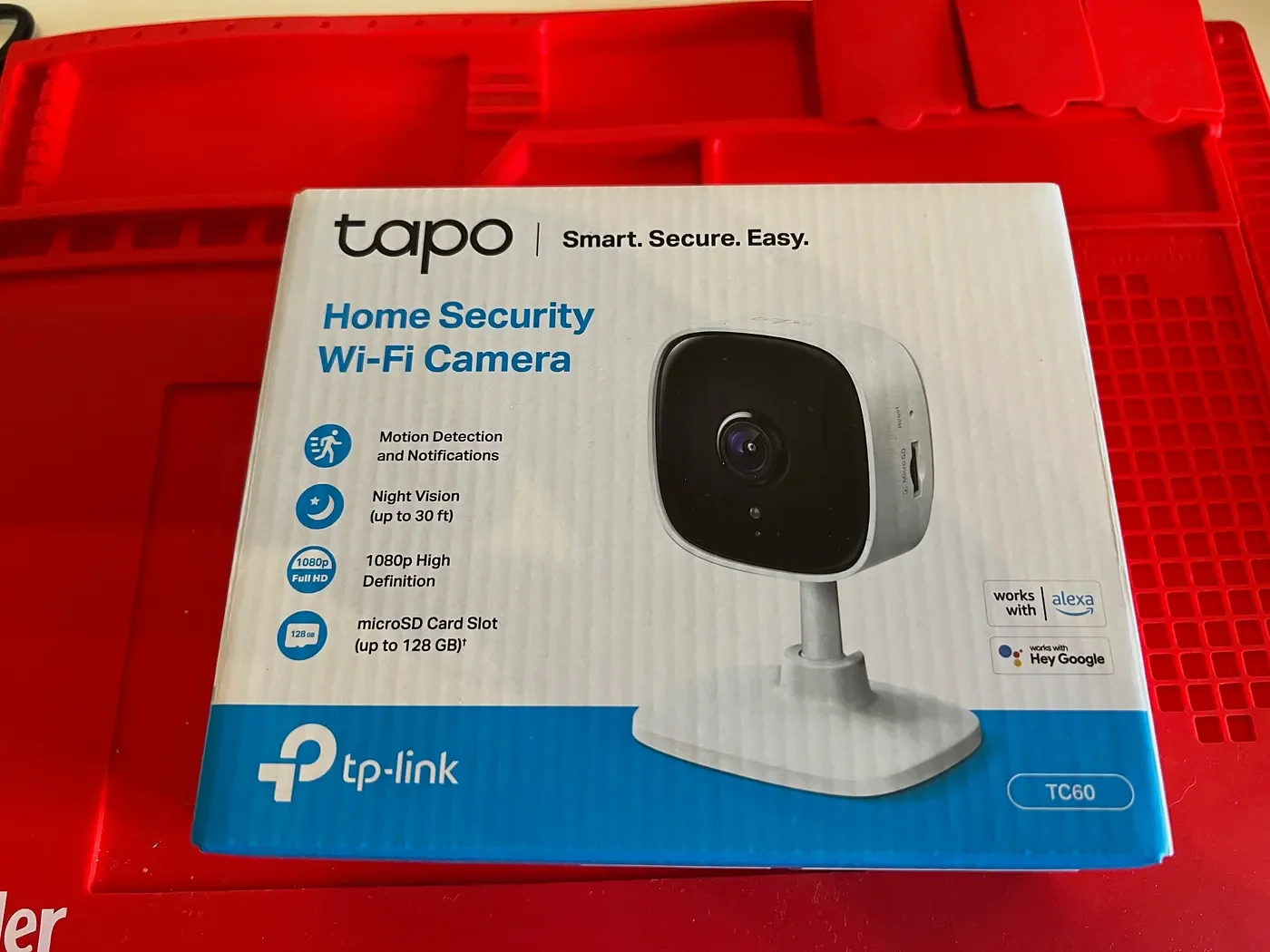
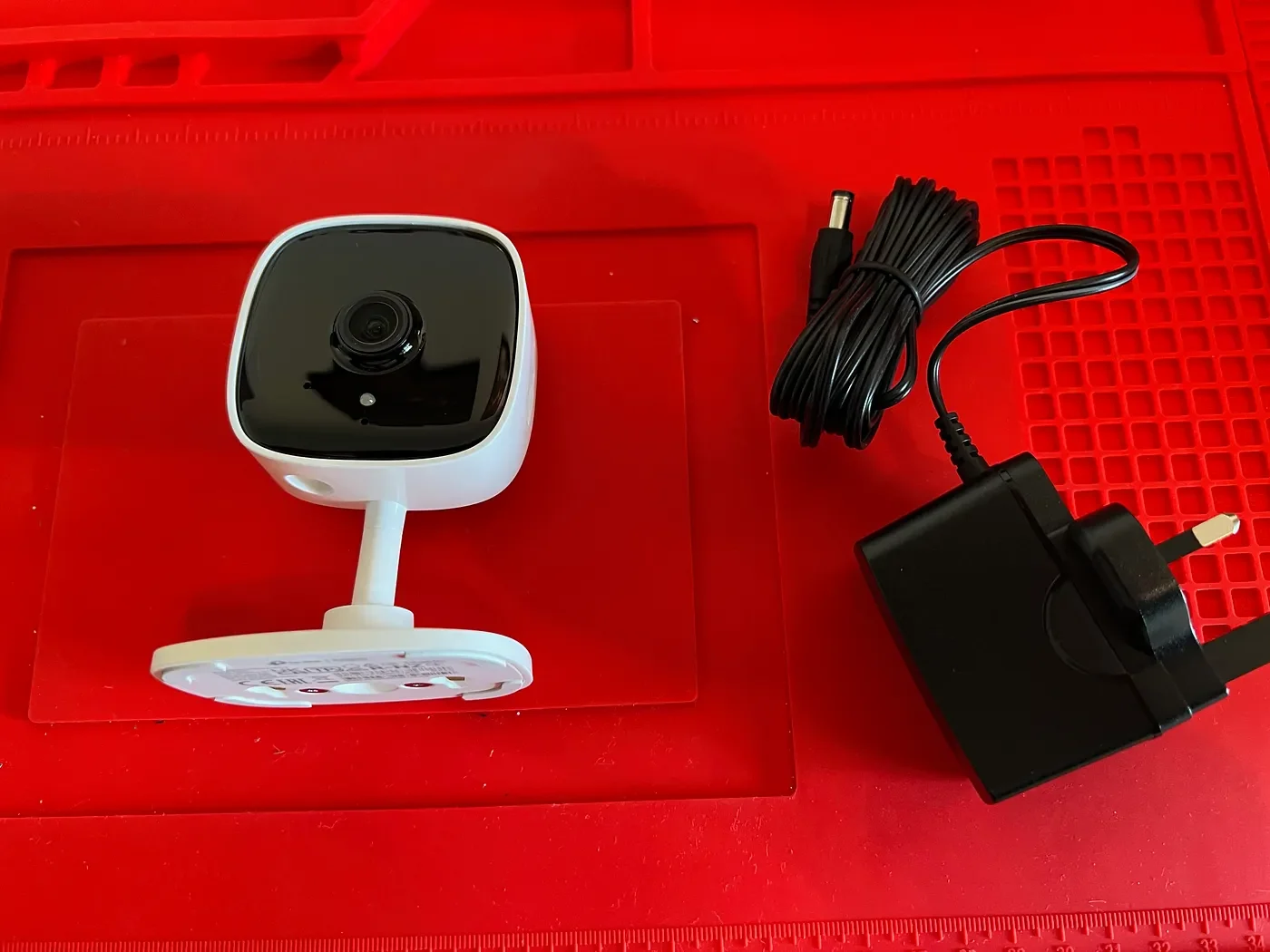
Inside the box, we get the usual collection of manuals, a power adapter, and the camera itself. The camera was much smaller than I expected, with no obvious way into the case.
Setup
I powered the camera on and set it up on the Tapo app. I probably should have captured the setup traffic in BurpSuite, but I'm more interested in the hardware for this post.
The tools used across the work:
- iFixIt picks for opening the case
- a multi-meter and an oscilloscope for probing pads
- a logic analyser for confirming the UART interface
- a Tigard board for talking to the device
- BurpSuite, with my phone configured to proxy through it
- binwalk, for entropy analysis and extraction
- Binary Ninja (cloud) and Ghidra for decompilation
- OpenSSL for offline decryption
- VLC for testing the RTSP stream
Finding it
With the setup complete, I started taking the camera to bits. First removing the stand, then finding a disassembly video of the TC100 on YouTube, which showed how to get into the main camera body.
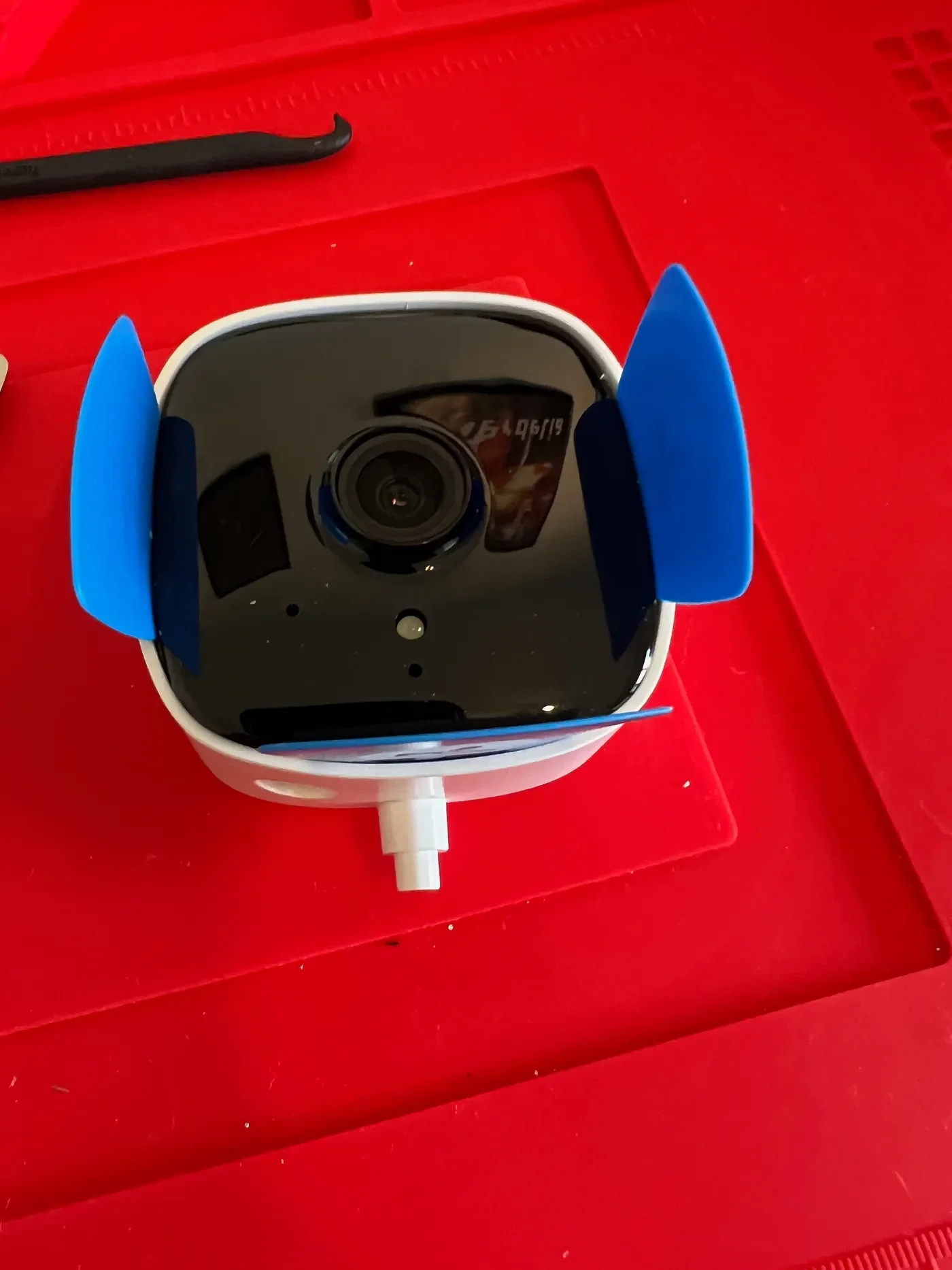
There are 4 clips holding the front of the case on, which releases when another of the iFixIt picks are inserted. This gives us access to the main board.
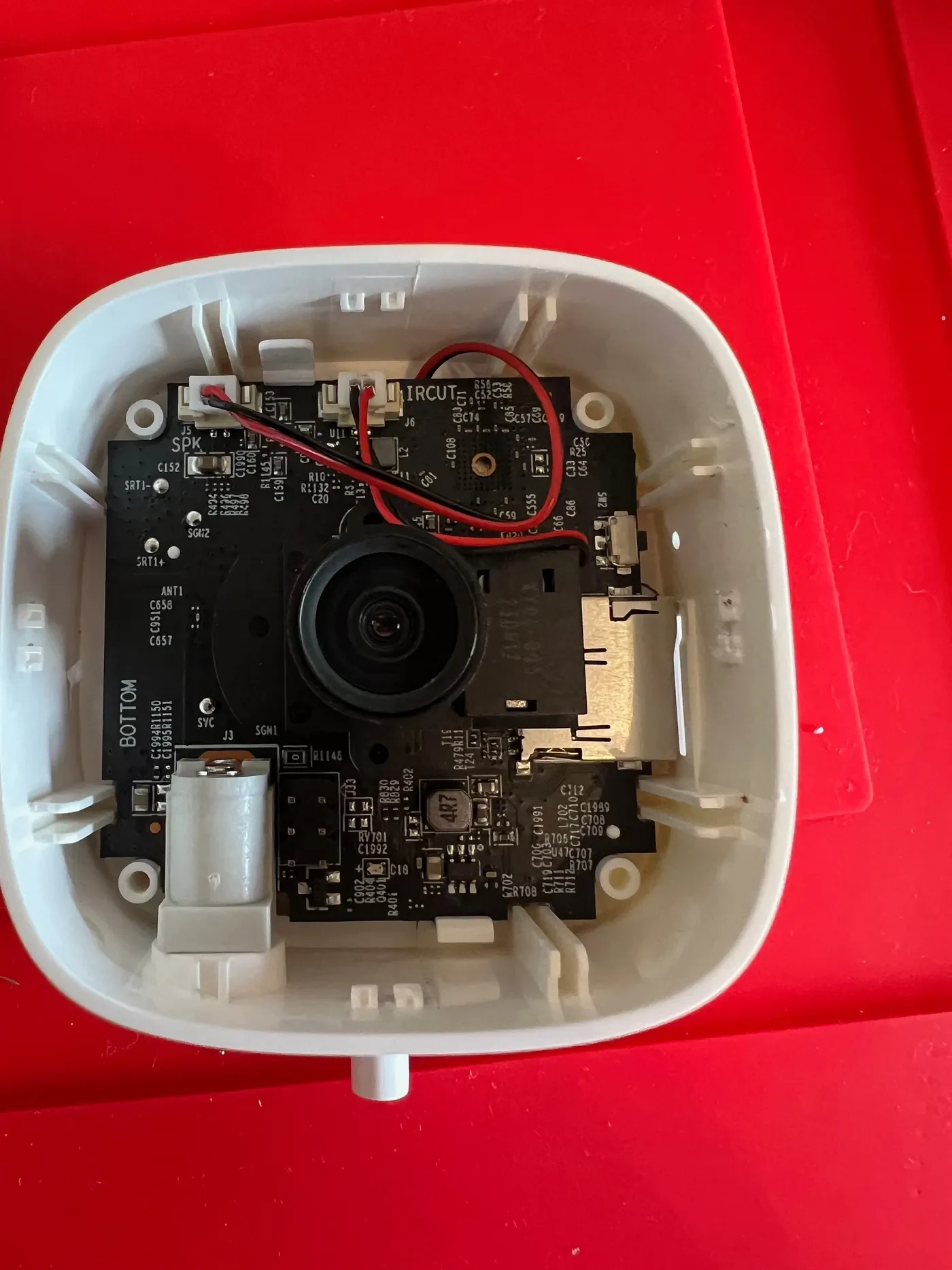
One of the first things to do when approaching something like this is try and identify the chips on the board, as well as any UART/JTAG interfaces. Identifying the chips gives a high-level understanding of what the device is doing, and helps us understand where we might find interesting data. This board has a few obvious components.
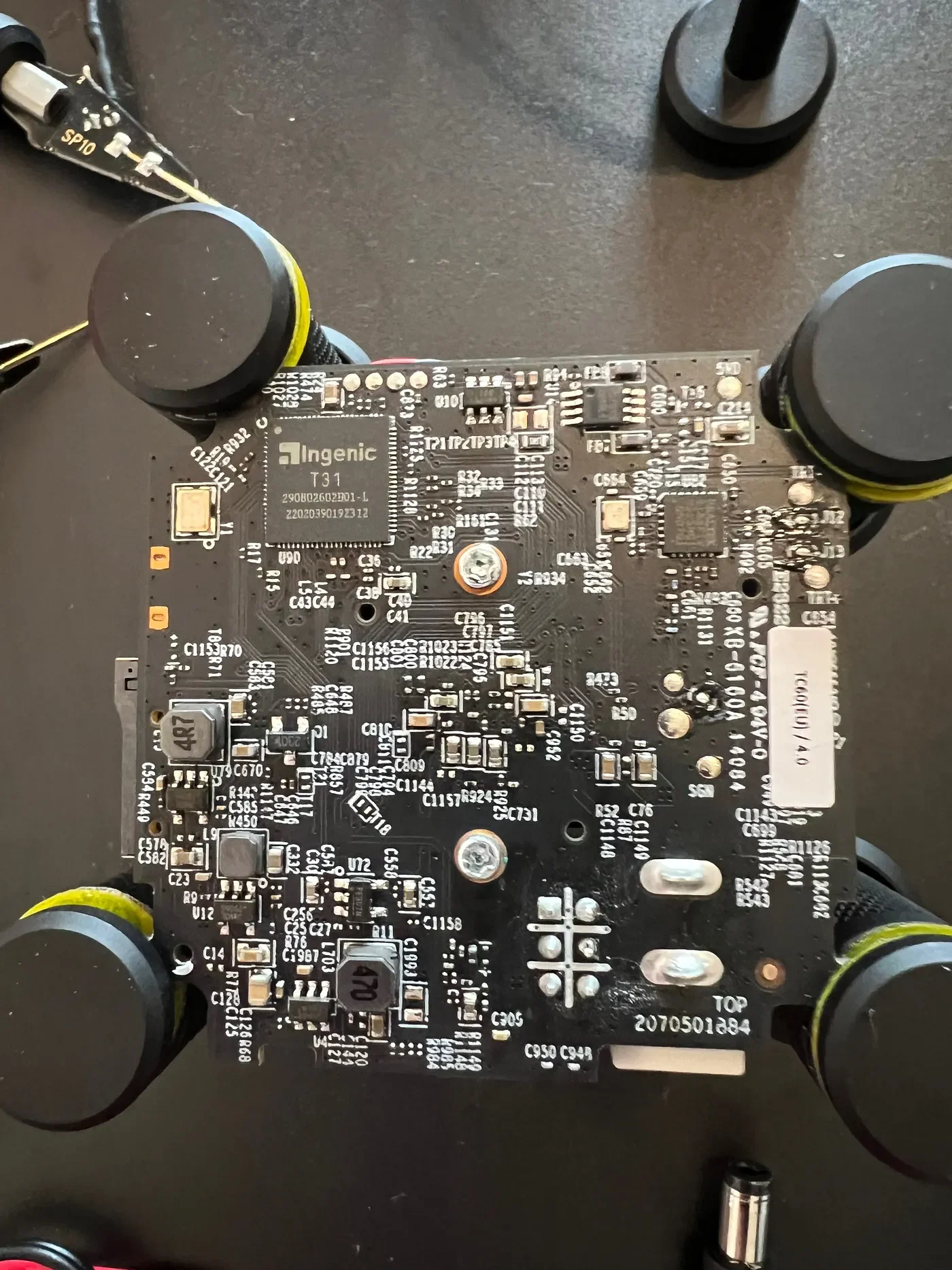
The big chip is an Ingenic T31, a system on chip video processor. There is very little information on this chip available, but we know it is going to be handling video for us.
There is also an RTL8188FTV, a WiFi and network USB chip, designed for use in devices including IP cameras. There are some other ICs, including an audio amplifier, and the usual selection of passive components. Crucially, there is no memory chip on this side of the board.
Turning the board over, we can see the camera assembly, which can be removed. Taking this off reveals the sensor and another IC.
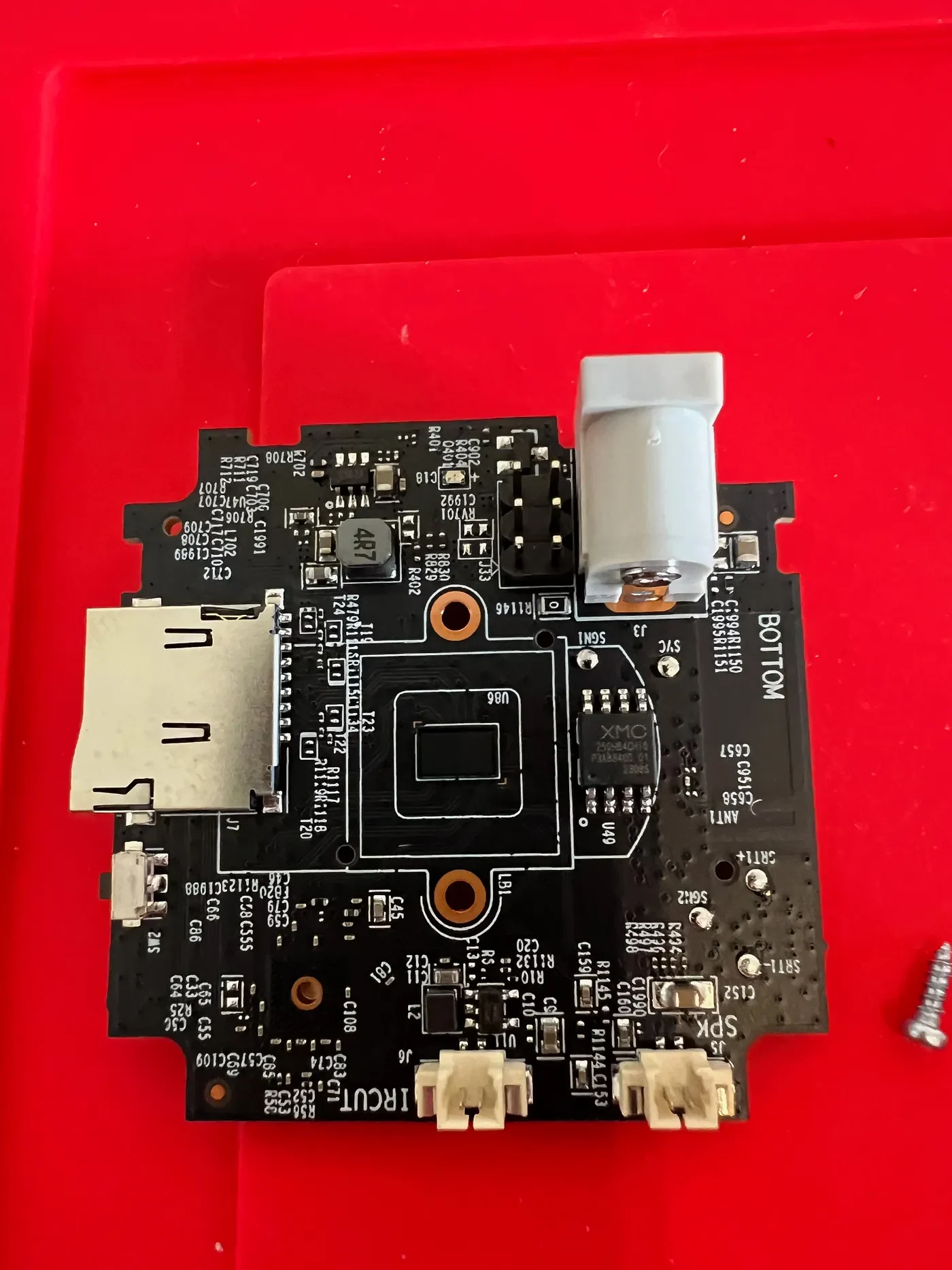
This is a XMC 25QH64C, a serial flash memory chip. This is almost certainly where the firmware for this device is stored.
Examining the board also reveals some pads, which look suspiciously like a UART interface, just above the T31 chip.
A quick check with a multi-meter reveals one of the pins is tied to ground, one likely to Vcc, leaving two unidentified pins. Probing these pins with the oscilloscope reveals what looks like data going out.
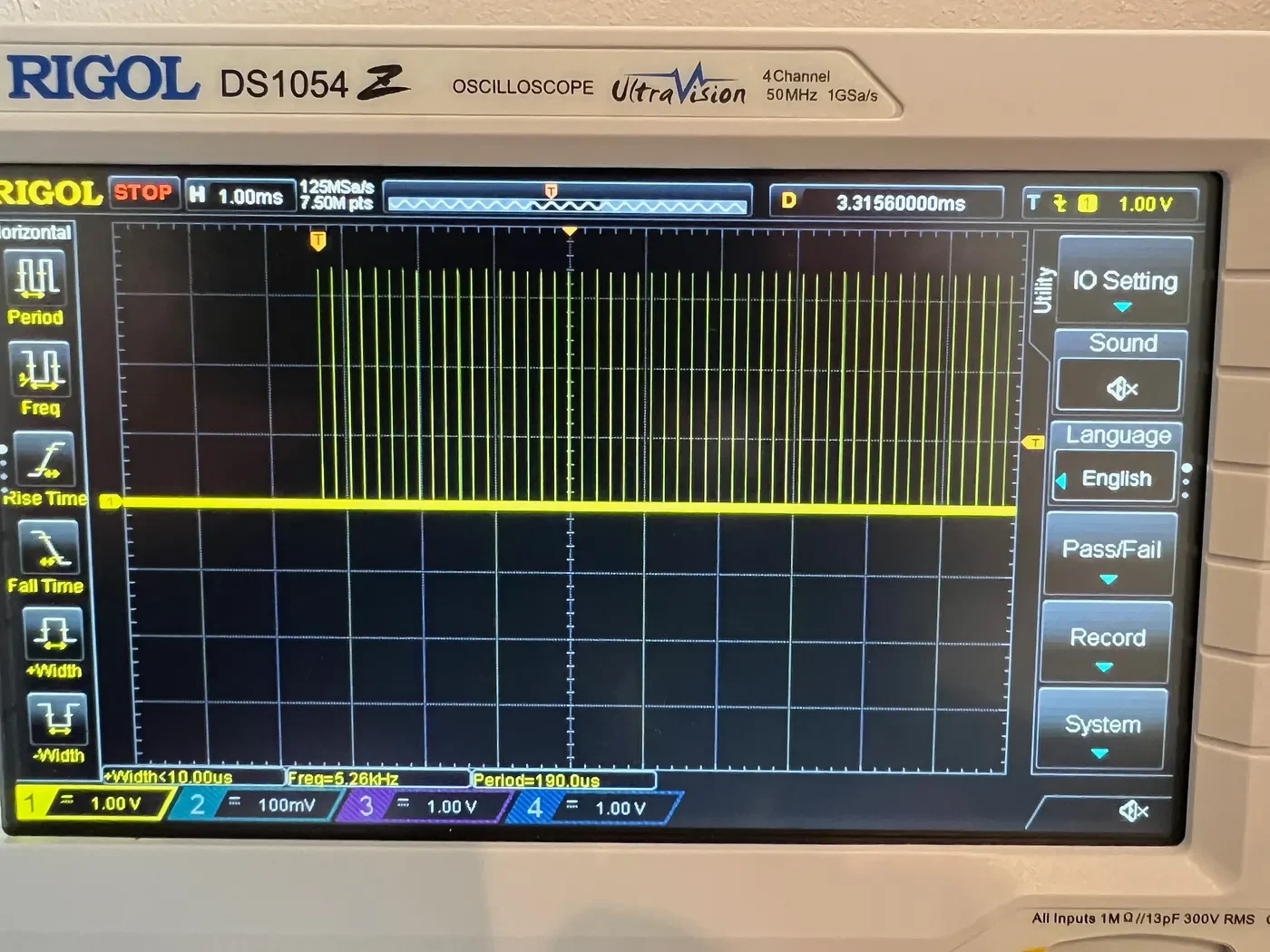
Connecting up the logic analyser verifies that this is indeed a UART interface. We can see the U-Boot logs being displayed when the power is connected.
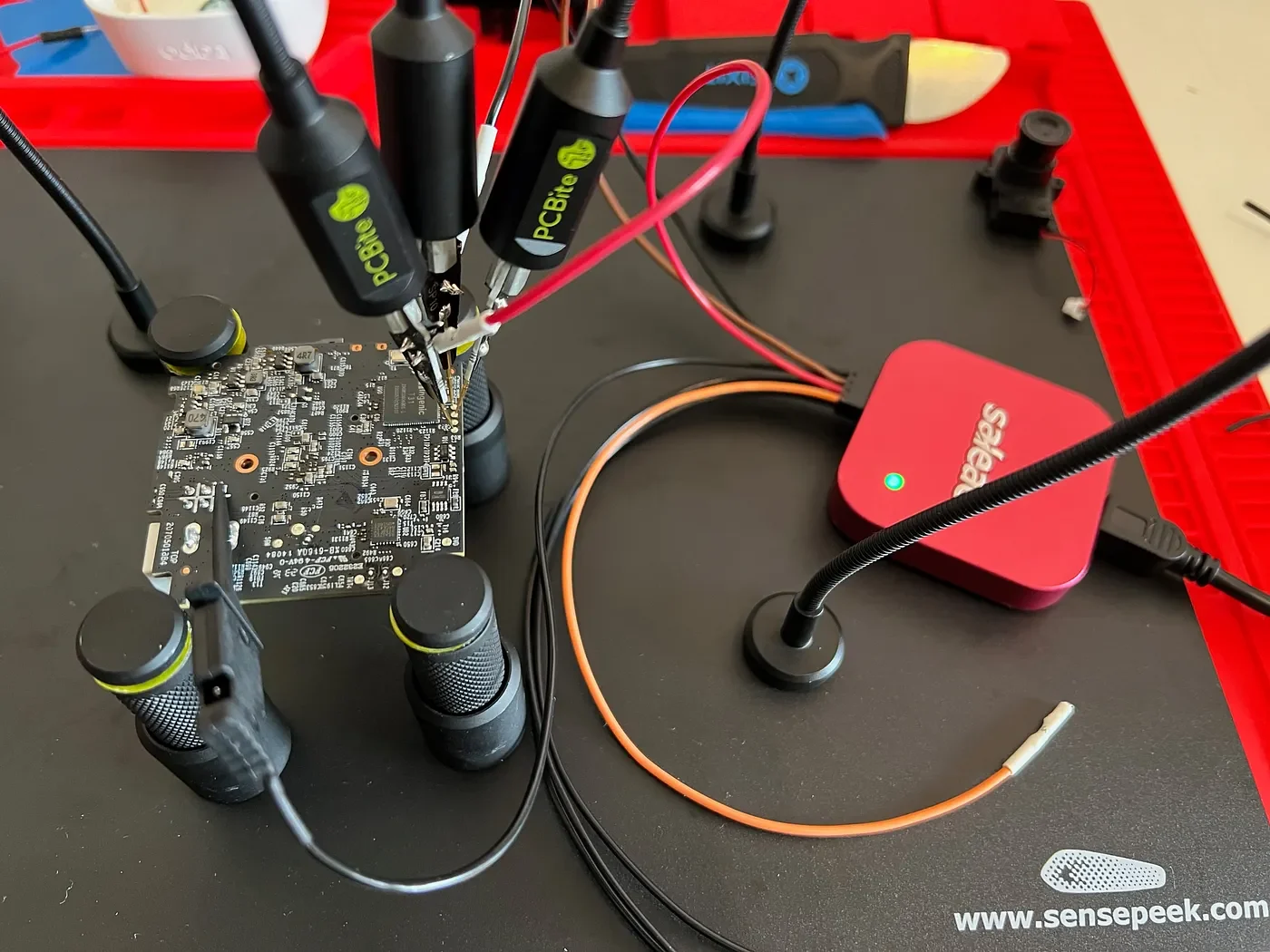
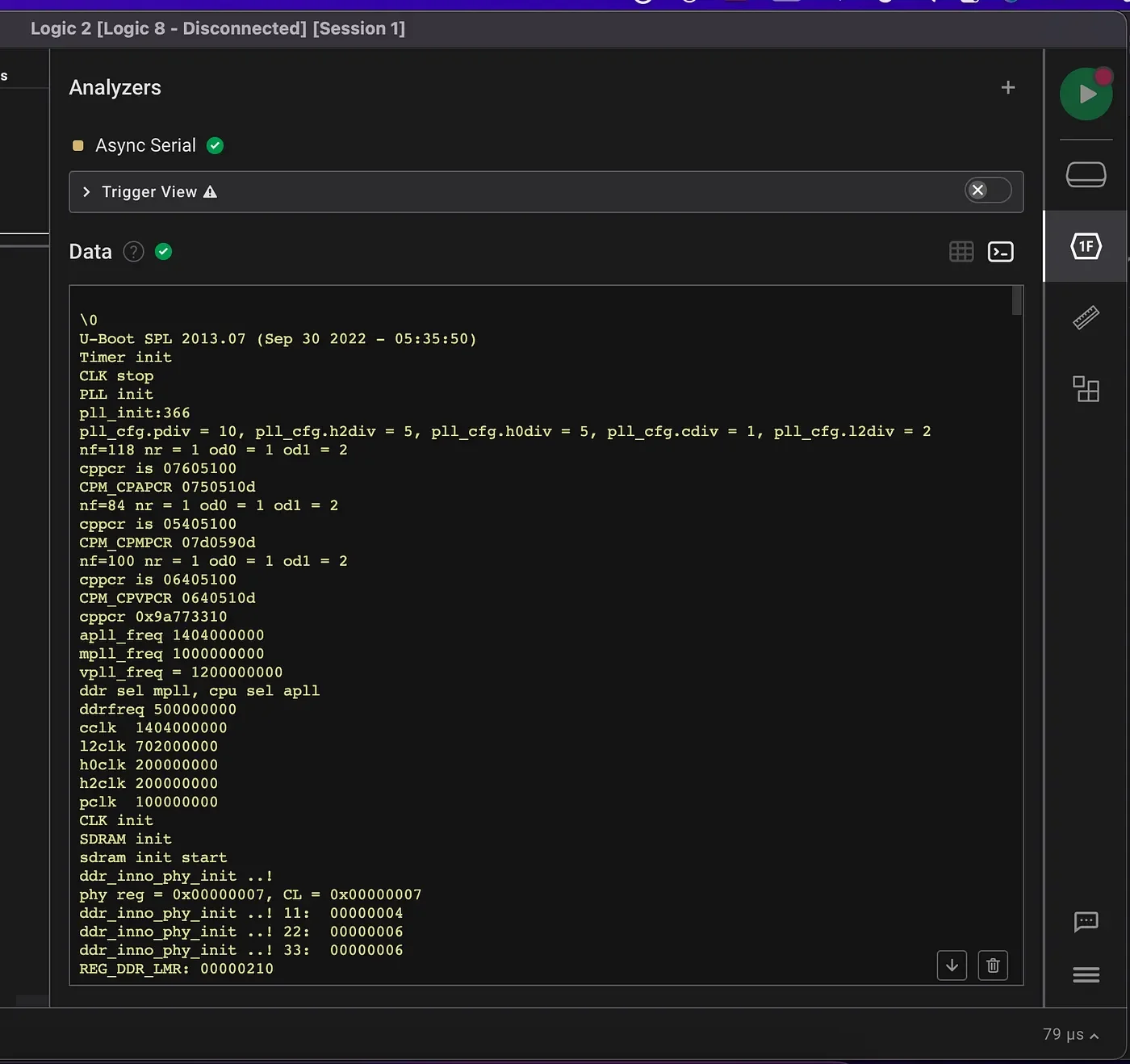
Now we know which pin is TX, we can connect up the Tigard board and try and talk to the device.
Scrolling through the console data, there are no obvious ways to interrupt the boot sequence.
At this point I started researching prior work on this device. While I couldn't find anything on the TC60, I did find some information on the TC200 and TC100. It seems like the TC100 is essentially the same device, so a lot of the information could be useful.
The most useful source of information was this blog post, which also links to a GitHub project related to the TC200.
These projects contain some useful information, such as the escape sequence for the U-Boot loader, allowing us to interrupt the boot sequence and drop into a root shell.
------Firmware check pass!-----Autobooting in 1 secondsisvp_t31# isvp_t31# slpUnknown command 'slp' - try 'help'isvp_t31# setenv bootargs console=ttyS1,115200n8 mem=45M@0x0 rmem=19M@0x2d00000 root=/dev/mtdblock6 rootfstype=squashfs spdev=/dev/mtdblock7 noinitrd init=/bin/shisvp_t31# isvp_t31# printenvbaudrate=115200bootargs=console=ttyS1,115200n8 mem=45M@0x0 rmem=19M@0x2d00000 root=/dev/mtdblock6 rootfstype=squashfs spdev=/dev/mtdblock7 noinitrd init=/bin/shbootcmd=sf probe;sf read 0x80700000 0x80200 0x175000; bootm 0x80700000bootdelay=1ethaddr=[redacted]:27gatewayip=193.169.4.1ipaddr=193.169.4.81loads_echo=1netmask=255.255.255.0serverip=193.169.4.2stderr=serialstdin=serialstdout=serialEnvironment size: 437/16380 bytesisvp_t31# sf probe;sf read 0x80700000 0x80200 0x175000; bootm 0x80700000<snipped>BusyBox v1.19.4 (2022-09-30 05:46:09 CST) built-in shell (ash)Enter 'help' for a list of built-in commands./bin/sh: can't access tty; job control turned off/ # lsbin etc mnt proc root sp_rom tmp vardev lib overlay rom sbin sys usr www/ # helpBuilt-in commands:------------------ . : [ [[ alias bg break cd chdir command continue echo eval exec exit export false fg getopts hash help jobs kill let local printf pwd read readonly return set shift source test times trap true type ulimit umask unalias unset wait/ # iduid=0(root) gid=0(root)
From here, we need to mount the /proc directory, which gets us access to some of the usual Linux tools. We can also cat out the /etc/passwd file, which gives us the hash for the root user.
root:$1$Xr8fF4xx$BFl2tPv719kYGwDH5TFrm.:0:0:root:/root:/bin/ashnobody:*:65534:65534:nobody:/var:/bin/falseadmin:*:500:500:admin:/var:/bin/falseguest:*:500:500:guest:/var:/bin/falseftp:*:55:55:ftp:/home/ftp:/bin/false/ # cat /etc/shadowroot:x:0:0:99999:7:::daemon:*:0:0:99999:7:::ftp:*:0:0:99999:7:::network:*:0:0:99999:7:::nobody:*:0:0:99999:7:::
My research into prior work on this device also turned up an academic paper, talking about some potential risks around poorly secured IoT devices. This included a hypothetical scenario where an owner of a TC100 camera leaves it unattended during a power cut (so the camera doesn't record being tampered with), and a house-mate uses this opportunity to extract the device firmware. This is then analysed off-line, eventually granting them access to the live feed from the device (assuming they are on the same network as the device). We will try and re-create this attack.
The camera model used in the paper has its flash chip located in a different position on the board, allowing easy access with a SOP8 clip. The authors were also able to bridge a connection on the board to put the main IC in reset mode. As covered in a previous post, we need to stop the main IC talking to the flash memory while we dump it, otherwise it will skew our results. In this device, the flash chip and the main IC share the same power rails. Supplying power to the chip while dumping its memory will also cause the main IC to power on. In our case, the main IC is on the opposite side of the board to the flash chip. The flash chip is also located under the camera lens assembly. While it would still be possible to extract the firmware this way, it would be much more complicated to do in the hypothetical scenario of a malicious actor with limited time to access the device. We need another approach.
When looking to attack a device, it is useful to have access to the manufacturer's firmware. While some credential material is likely configured by the user during setup, an analysis of the firmware on the device may well reveal default credentials or other weaknesses which we can exploit, without having to extract the firmware from a running device. Fortunately (or unfortunately, depending on your point of view), manufacturers are becoming more aware of these attacks and are often not supplying firmware downloads on their website. TPLink (who make the Tapo cameras), are one such company. They do provide copies of the GPL code used in these devices, which have contained useful information in other models of camera (see the linked research above). In our case, there did not appear to be any useful information in these files. We need the factory firmware.
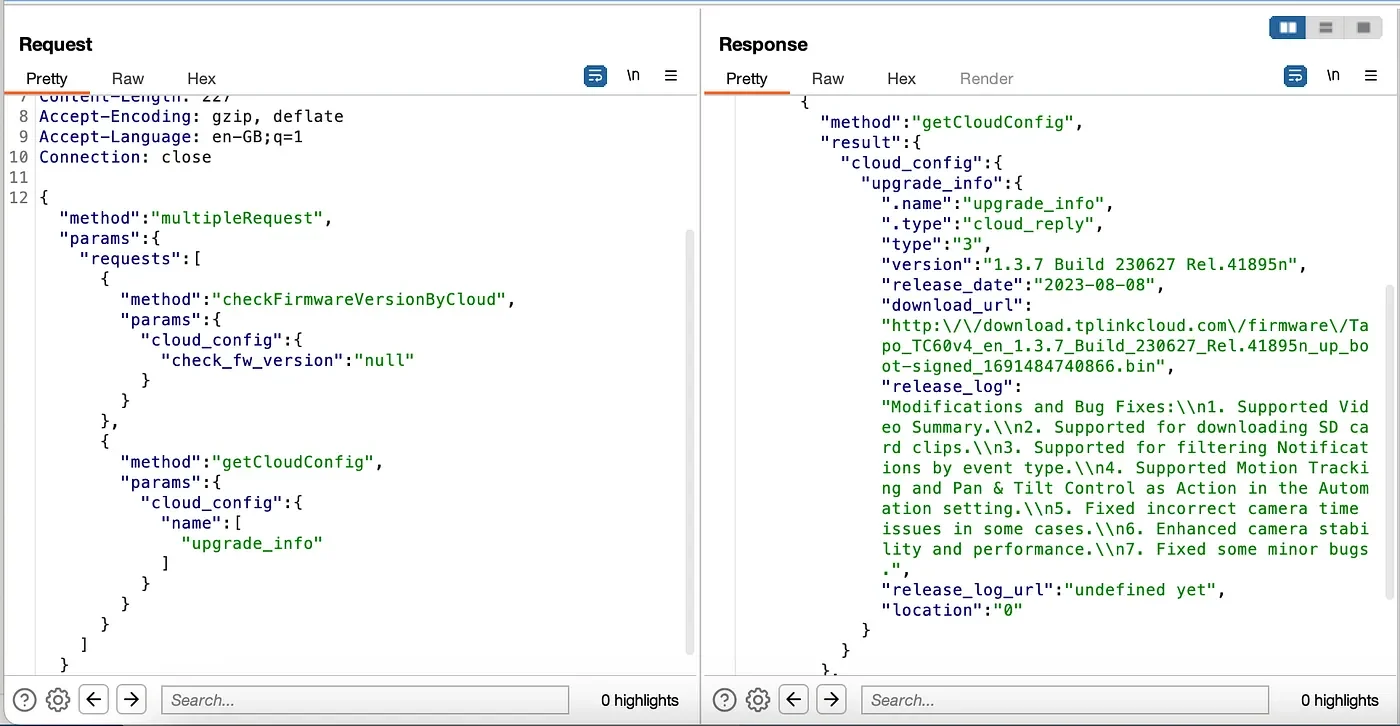
The TC60 has an over the air firmware update function. The camera likely reaches out to an update server and downloads the firmware image. The app also shows the current firmware version, and details of any pending updates, so it probably also talks out to an update server. As it's much easier to intercept traffic between the app and the device, compared with trying to intercept traffic from the device itself, this is the path I tried first. After configuring my phone to proxy traffic through BurpSuite, I opened the Tapo app and clicked around. In the response body of one of the requests sent to the camera was a URL to download the firmware update.
Exploitation
Step 1: Download the OTA firmware and check it
I downloaded the firmware and ran it through binwalk with the -E flag, which shows the entropy of the file.
binwalk -E Tapo_TC60v4_en_1.3.7_Build_230627_Rel.41895n_up_boot-signed_1691484740866.binWARNING: Failed to import matplotlib module, visual entropy graphing will be disabledDECIMAL HEXADECIMAL ENTROPY--------------------------------------------------------------------------------0 0x0 Rising entropy edge (0.994108)
This doesn't look good. High entropy likely means the firmware is encrypted, which we can verify using binwalk to try and extract any data.
binwalk -e Tapo_TC60v4_en_1.3.7_Build_230627_Rel.41895n_up_boot-signed_1691484740866.binDECIMAL HEXADECIMAL DESCRIPTION--------------------------------------------------------------------------------
As expected, binwalk isn't able to extract any data. Running strings over the file also yields no results. The firmware on the camera must contain the keys we need to decrypt the download, but that's not much use if we can't access them. Luckily, we have a UART shell.
Step 2: Dump the firmware through the SD card slot
As this device has an SD card slot, we can also dump the firmware via the shell. The "tapo 200 research project" blog has detailed instructions on how to extract the firmware. At a high level, we can mount the SD card, map the flash RAM to files on disk and copy them into a flashdump.bin file. The full instructions are provided in the linked post, which I won't recreate here.
Now we can run binwalk over the extracted firmware, which gives us access to the file system contents.
❯ binwalk flashdump.binDECIMAL HEXADECIMAL DESCRIPTION--------------------------------------------------------------------------------15892 0x3E14 LZO compressed data26624 0x6800 uImage header, header size: 64 bytes, header CRC: 0xA3F3CA56, created: 2022-09-29 21:36:29, image size: 155294 bytes, Data Address: 0x80100000, Entry Point: 0x0, data CRC: 0xCEE6C40F, OS: Firmware, CPU: MIPS, image type: Firmware Image, image name: "u-boot-lzo.img"26688 0x6840 LZO compressed data141029 0x226E5 CRC32 polynomial table, little endian145193 0x23729 LZO compressed data148629 0x24495 Android bootimg, kernel size: 0 bytes, kernel addr: 0x70657250, ramdisk size: 543519329 bytes, ramdisk addr: 0x6E72656B, product name: "mem boot start"188181 0x2DF15 PEM certificate188910 0x2E1EE PEM certificate190126 0x2E6AE PEM certificate191346 0x2EB72 PEM certificate192538 0x2F01A PEM certificate196864 0x30100 gzip compressed data, from Unix, last modified: 2022-09-29 22:06:28393216 0x60000 LZO compressed data484818 0x765D2 CRC32 polynomial table, little endian488822 0x77576 LZO compressed data524800 0x80200 uImage header, header size: 64 bytes, header CRC: 0x1805EB61, created: 2022-09-29 22:06:13, image size: 1296787 bytes, Data Address: 0x80010000, Entry Point: 0x8031B470, data CRC: 0xD607E5B7, OS: Linux, CPU: MIPS, image type: OS Kernel Image, compression type: lzma, image name: "Linux-3.10.14__isvp_swan_1.0__"524864 0x80240 LZMA compressed data, properties: 0x5D, dictionary size: 8388608 bytes, uncompressed size: -1 bytes1823232 0x1BD200 Squashfs filesystem, little endian, version 4.0, compression:xz, size: 2405062 bytes, 647 inodes, blocksize: 131072 bytes, created: 2022-09-29 22:06:334456448 0x440000 Squashfs filesystem, little endian, version 4.0, compression:xz, size: 3053252 bytes, 162 inodes, blocksize: 131072 bytes, created: 2022-09-29 22:06:358404500 0x803E14 LZO compressed data8415232 0x806800 uImage header, header size: 64 bytes, header CRC: 0xA3F3CA56, created: 2022-09-29 21:36:29, image size: 155294 bytes, Data Address: 0x80100000, Entry Point: 0x0, data CRC: 0xCEE6C40F, OS: Firmware, CPU: MIPS, image type: Firmware Image, image name: "u-boot-lzo.img"8415296 0x806840 LZO compressed data8529637 0x8226E5 CRC32 polynomial table, little endian8533801 0x823729 LZO compressed data8537237 0x824495 Android bootimg, kernel size: 0 bytes, kernel addr: 0x70657250, ramdisk size: 543519329 bytes, ramdisk addr: 0x6E72656B, product name: "mem boot start"8576789 0x82DF15 PEM certificate8577518 0x82E1EE PEM certificate8578734 0x82E6AE PEM certificate8579954 0x82EB72 PEM certificate8581146 0x82F01A PEM certificate8585472 0x830100 gzip compressed data, from Unix, last modified: 2022-09-29 22:06:288781824 0x860000 LZO compressed data8873426 0x8765D2 CRC32 polynomial table, little endian8877430 0x877576 LZO compressed data8913408 0x880200 uImage header, header size: 64 bytes, header CRC: 0x1805EB61, created: 2022-09-29 22:06:13, image size: 1296787 bytes, Data Address: 0x80010000, Entry Point: 0x8031B470, data CRC: 0xD607E5B7, OS: Linux, CPU: MIPS, image type: OS Kernel Image, compression type: lzma, image name: "Linux-3.10.14__isvp_swan_1.0__"8913472 0x880240 LZMA compressed data, properties: 0x5D, dictionary size: 8388608 bytes, uncompressed size: -1 bytes10211840 0x9BD200 Squashfs filesystem, little endian, version 4.0, compression:xz, size: 2405062 bytes, 647 inodes, blocksize: 131072 bytes, created: 2022-09-29 22:06:3312845056 0xC40000 Squashfs filesystem, little endian, version 4.0, compression:xz, size: 3053252 bytes, 162 inodes, blocksize: 131072 bytes, created: 2022-09-29 22:06:35
Step 3: Decrypt the device configuration on the device
Re-visiting the academic paper, we see that the authors followed the process outlined in the "tapo 200 research project" blog, namely, extracting the configuration data from the device and decrypting offline. The configuration data is still encrypted on our device and, like the other devices, we can either decrypt the data manually, off-line, or there is a utility present on the device which allows it to be decrypted. We can verify this works, using the following steps via our UART shell.
- Mount /proc
- Mount /dev
- Mount /tmp
- Run the uc_convert utility
mount -t proc none /procmount -t tmpfs tmpfs /dev -o mode=0755,size=512Kmount tmpfs /tmp -t tmpfs -o size=20633600,nosuid,nodev,mode=1777mknod /dev/slp_flash_chrdev c 222 0/bin/uc_convert -t 0
This creates a directory in /tmp, which contains the decrypted device configuration.
In our hypothetical attack scenario, we could perform this step on the device, via our UART shell, and exfiltrate the decrypted data either via terminal logs or writing to the SD card. We wouldn't need to grab the firmware at all, which certainly helps for this device, where the flash chip is located under the camera lens assembly.
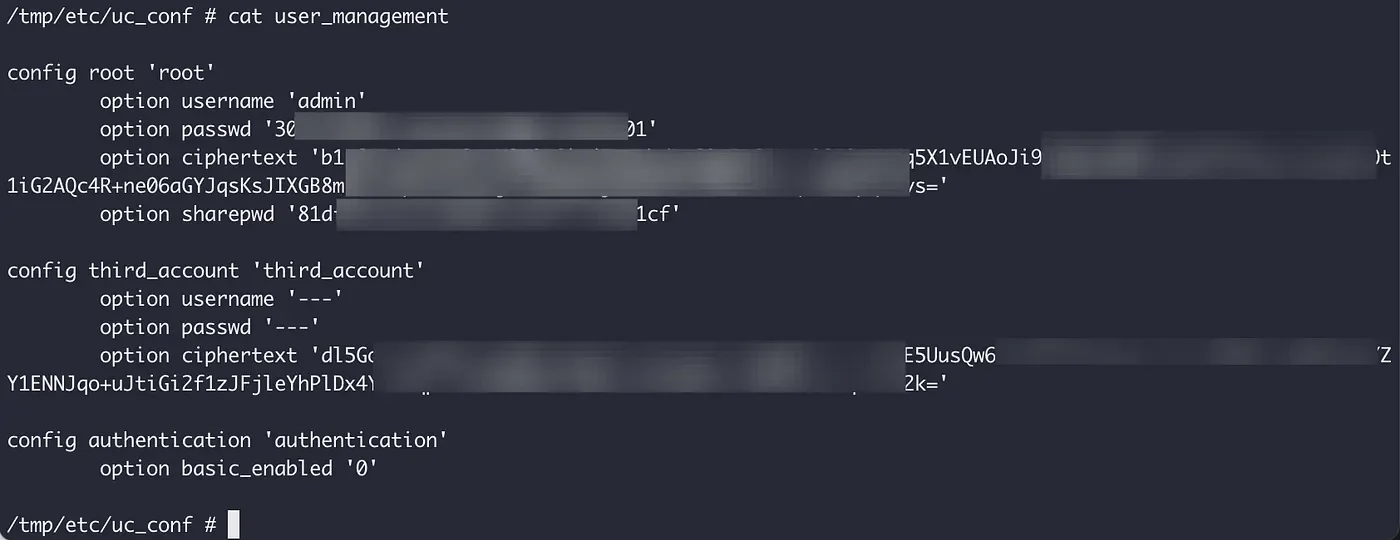
However, as we can see, the third_account username and password values are blanked out. This differs from the device presented in the paper (where the authors were able to crack the hash for this account and use the credentials to access the video stream). So that's it, game over, right? Not quite.
Step 4: Understand the account blobs
We have access to the device as root. Can we simply add an account under the third_account section and gain access to the video feed?
After some investigation, it turns out the answer is yes, with some caveats. Extracting the config using the uc_convert utility, we can find the user account details in /tmp/etc/uc_conf/user_management, as shown above.
The root account blob contains credentials configured when we set up the camera. The passwd field is a simple MD5 hash of the password. We can try and crack this, but that might take some time, if the user selected a strong password. The ciphertext blob is RSA encrypted, which we'll cover shortly.
The third_account blob is, by default, disabled. The username and password values are set to "----". This account is used to allow access to the RTSP stream from the camera, and must be enabled via the mobile app. Enabling this comes with some warnings:
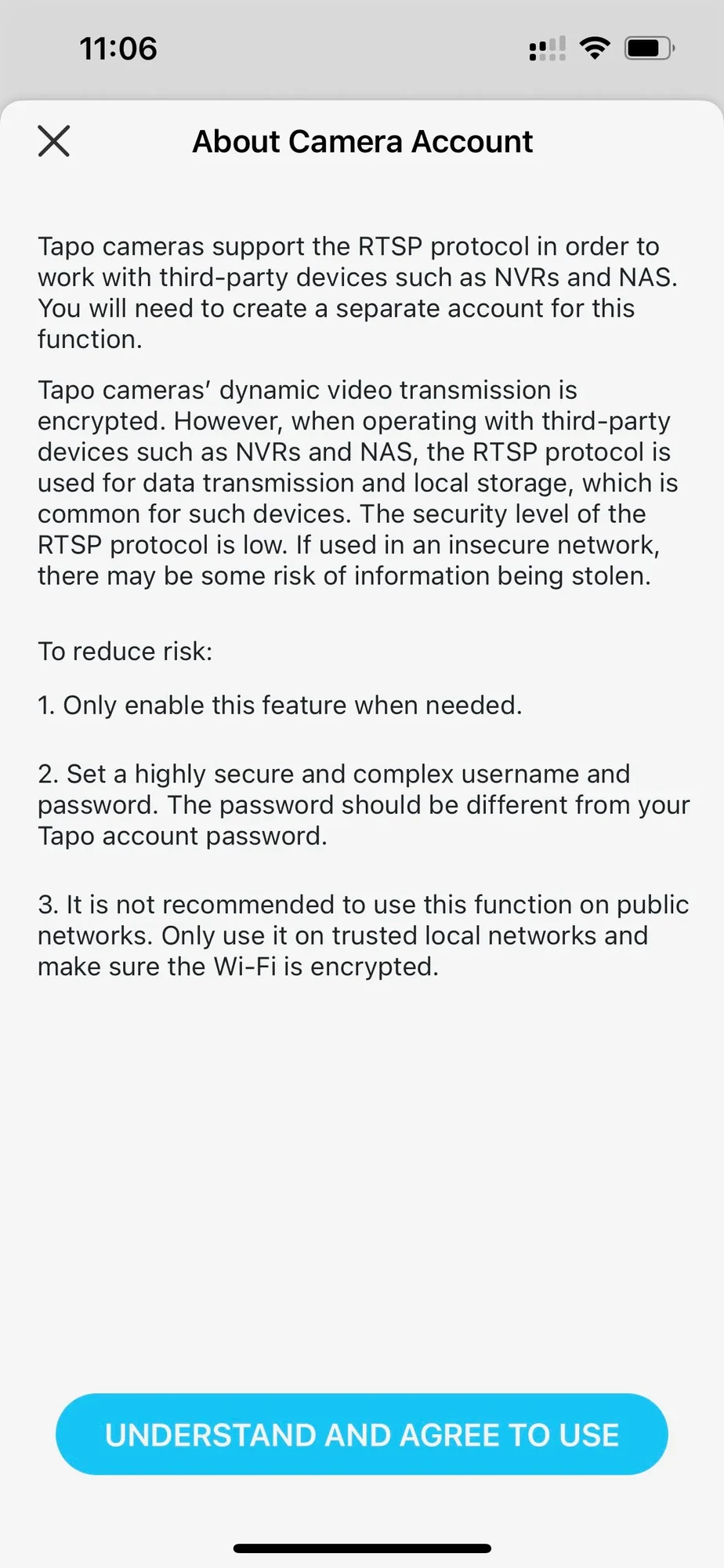
I initially assumed that only the username and password values were required to access the RTSP stream. I modified the config, adding a "backdoor" account with a known password hash (note that this needs to be uppercase, or it won't work), wrote the config back to flash, rebooted the camera and attempted to access the RTSP stream from VLC. This gave me an authentication error.
After lots of experimenting, it turns out that the ciphertext value must also be set to match the username and password values. The mobile app uses the passwd value to validate the password when you perform a "change password" option on the RTSP account, but the RTSP stream uses the ciphertext value. I'm not a reverse engineer, however, we can verify that this is likely RSA encrypted data using Binary Ninja and Ghidra.
Step 5: Follow the ciphertext into the RTSP application
If we throw the cet application (which is what this device uses for RTSP) into Binary Ninja cloud, and search for 'ciphertext', we get the following result:
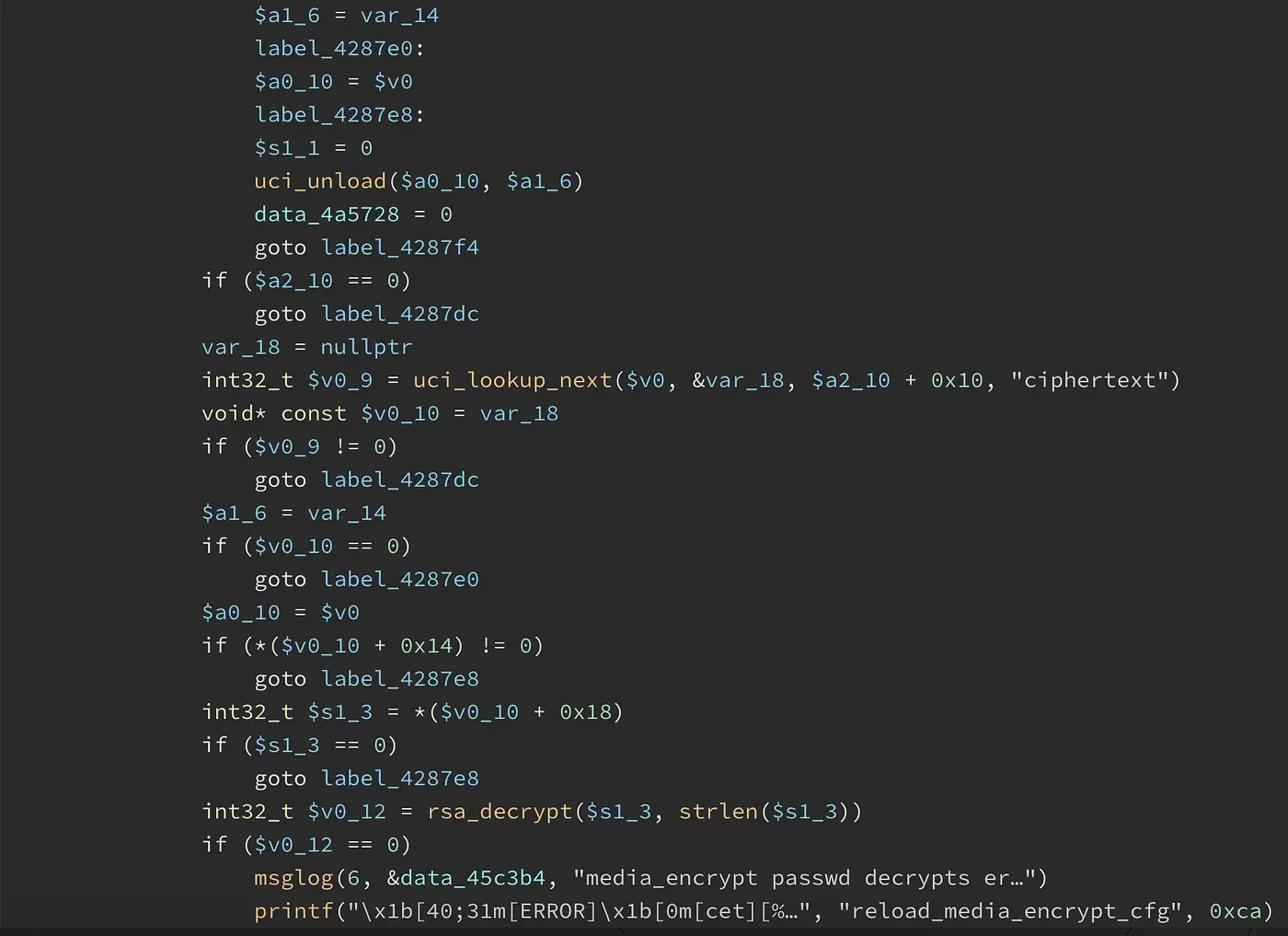
Looking at this function in more detail, we see it calls the following function after reading the ciphertext block in our config file:
int32_t $v0_14 = rsa_decrypt("[redacted]…", 0xac)
rsa_decrypt is an external reference to libdecrypter.so which we can find by grepping the firmware we dumped from the device earlier.
Opening this file with Ghidra, we can find the rsa_decrypt export and start our analysis from there.
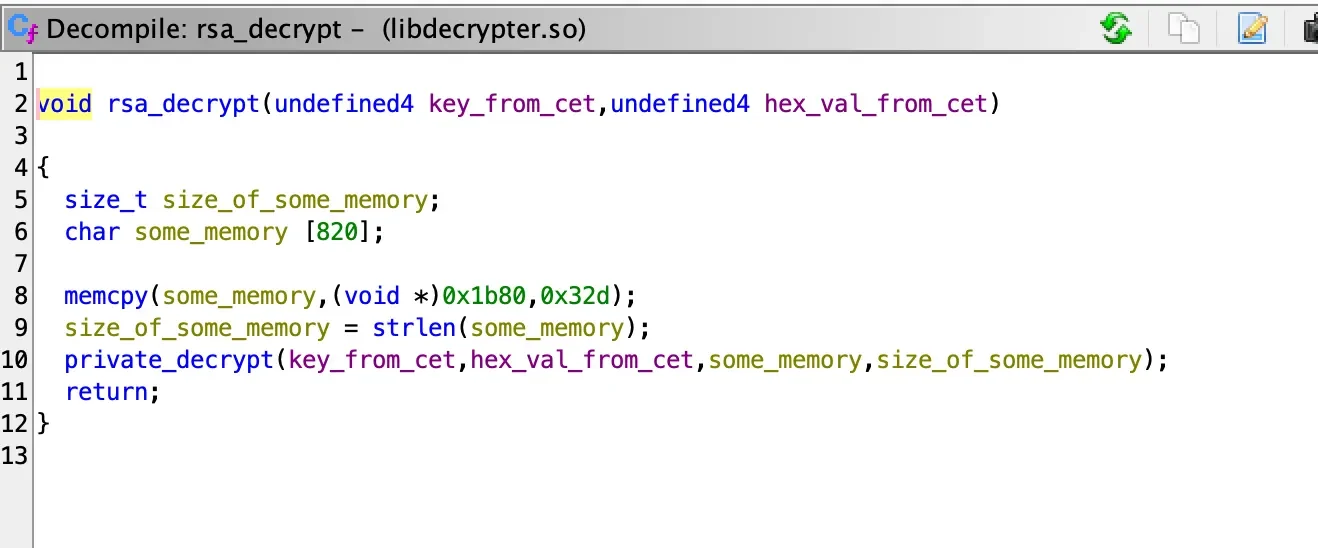
In the private_decrypt function, we can see the code loading an RSA key from somewhere, then doing a base64 decode and an RSA decrypt.
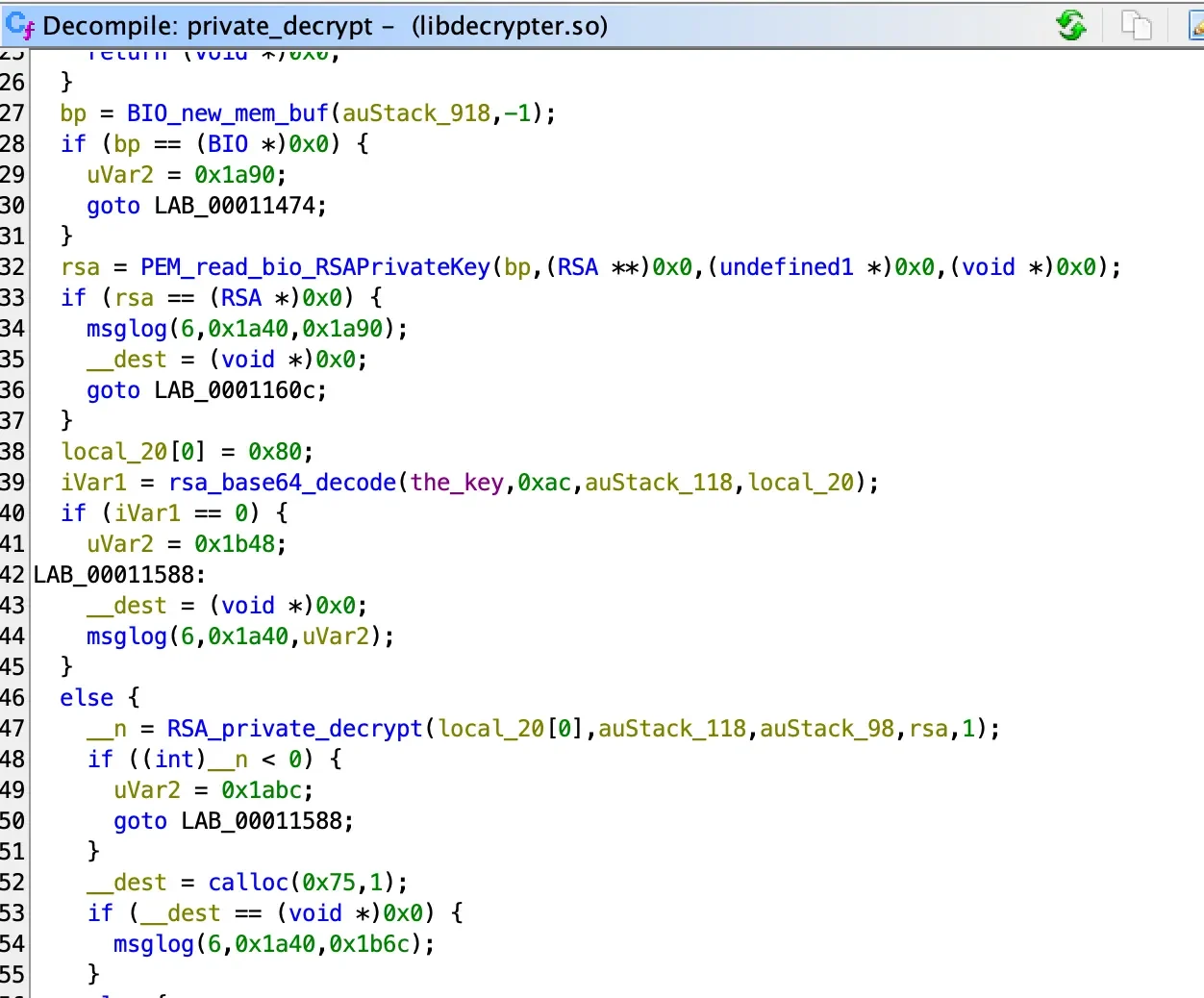
I tried to figure out where the RSA key is loaded from, but I'm just not smart enough to figure out this decompiled code:
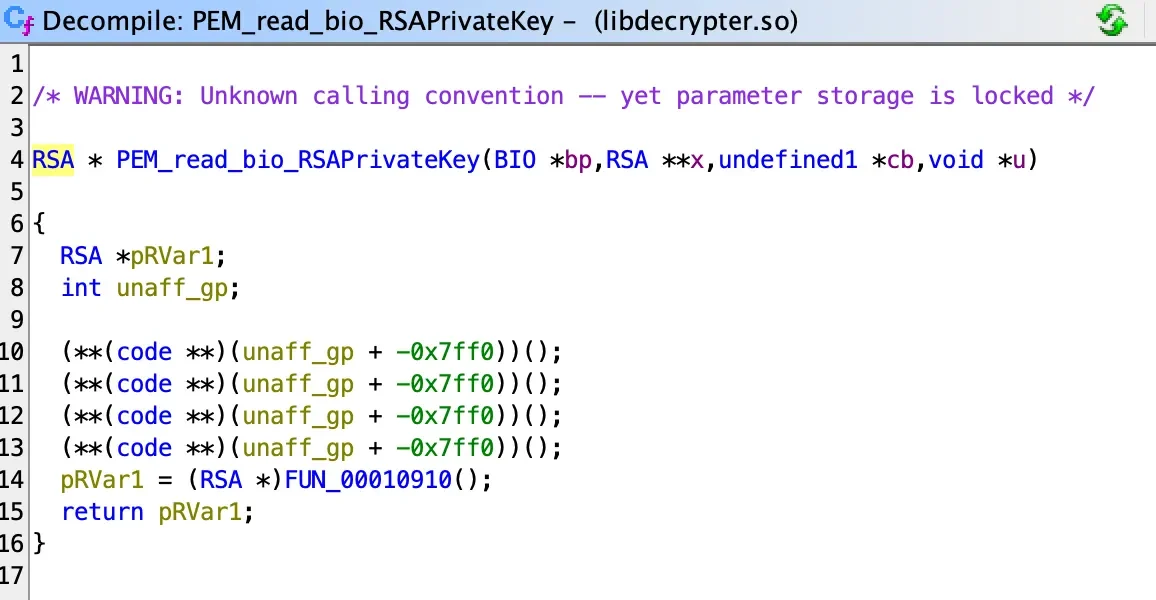
Running strings over the file turns up some RSA keys, but I wasn't able to figure out how to use them to decrypt the config file. I'm glossing over this step, as this post is long enough already, but you can run strings libdecrypt.so if you want to follow along.
Step 6: Test whether the keys are per-device
I had a hunch that the decryption keys are hard-coded, and likely the same on each device. Not being smart enough to reverse the decryption code properly, I did the next best thing and ordered another device to test this theory.
I set up this second device on a new Tapo account, performed the initial setup, then took it apart and connected to the UART interface. Note that the second device was connected to the same WiFi network. I doubt TPLink are using that as the seed for an encryption key, but I've been wrong before.
With access to the UART console, I ran a simple python script to automate dumping the encrypted config. This is a modified version of the script presented in the C200 research project blog.
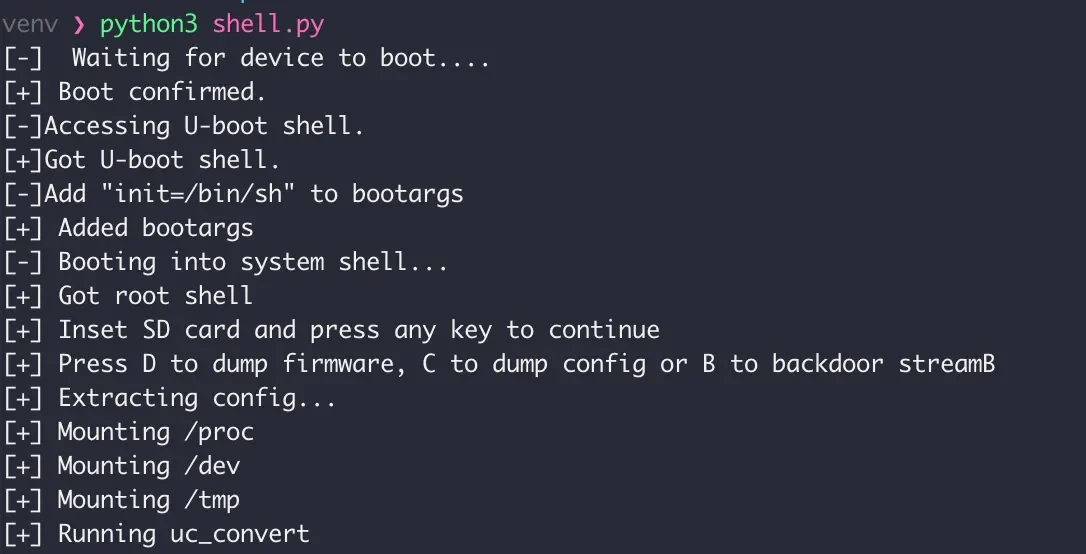
Step 7: Plant the backdoor account
From here, I connected via serial, opened the user_manage file in vi (yes, that's handily supplied on the device), and overwrote the username, passwd and ciphertext values in the file. For the username and passwd, I used backdoor and the MD5 hash of Password206. For the ciphertext, I copied one generated on the original device, which was generated by setting the username and password via the mobile app.
I wrote the modified config back to flash, rebooted the camera and tried to connect to the RTSP stream with VLC:
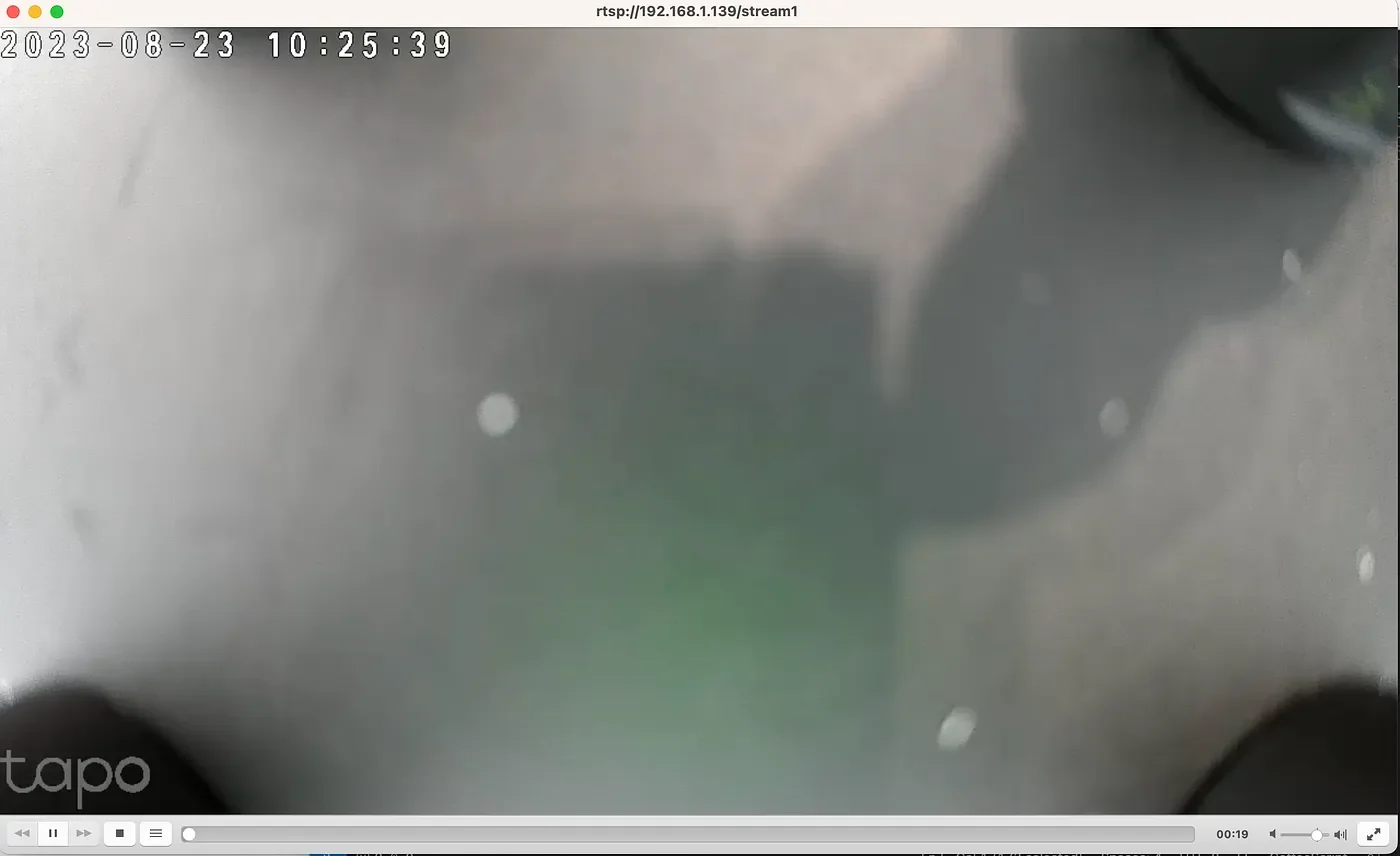
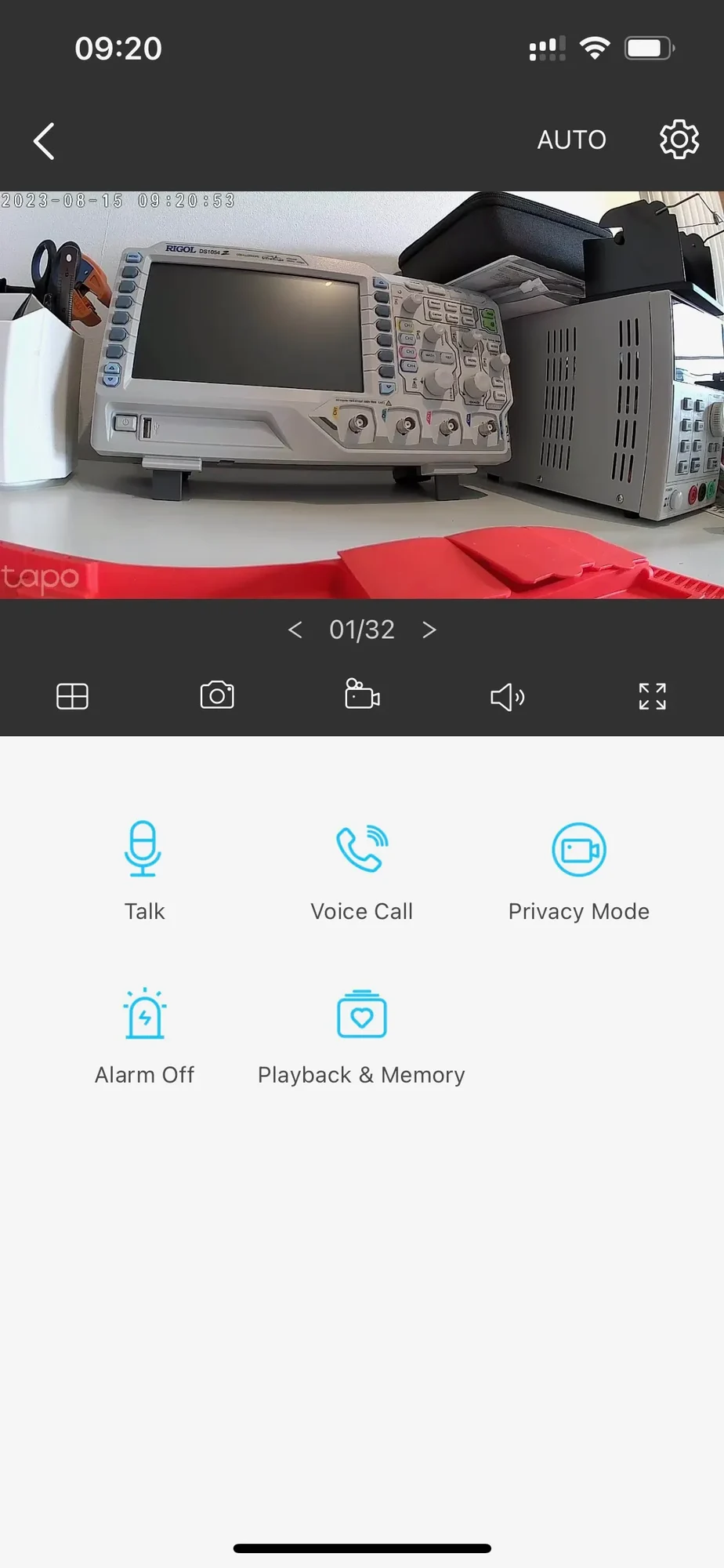
As we can see, the re-used ciphertext value was accepted, granting us access to the camera's video stream (that's the SensePeek mat on my bench, if you were wondering). Actually performing this attack took around 5 minutes, starting from an unopened camera body to having access to the stream.
While we may not have re-created the exact attack presented in the paper, we've certainly achieved what we set out to do. As we are not dumping the flash RAM, we are going to need to supply power to the device. This means we are no longer dependent on waiting for a random power cut to enable our attack. As we are interacting with the device with UART, we need to supply power, which will also enable video capture. You'll have to use your imagination to figure out how this could be done without being detected. While the steps taken to add the backdoor account have been discussed here, I've left out some steps and I'm choosing not to release the python code I used to backdoor the camera. You won't be able to re-create this attack with the information in this post alone.
Step 8: Offline decryption of the config partition
For completion's sake, let's see if we can get the off-line decryption vector working.
The prior work we are referencing goes into detail on how the decryption code works, including where the decryption key is located. The academic paper noted that the key in their device, a TC100, differed from the key in the blog post (a TC200). They found the key in the same location, and were able to decrypt their config data using the same technique. Let's see if our device uses the same approach.
First, we load the uc_convert binary into Binary Ninja cloud.
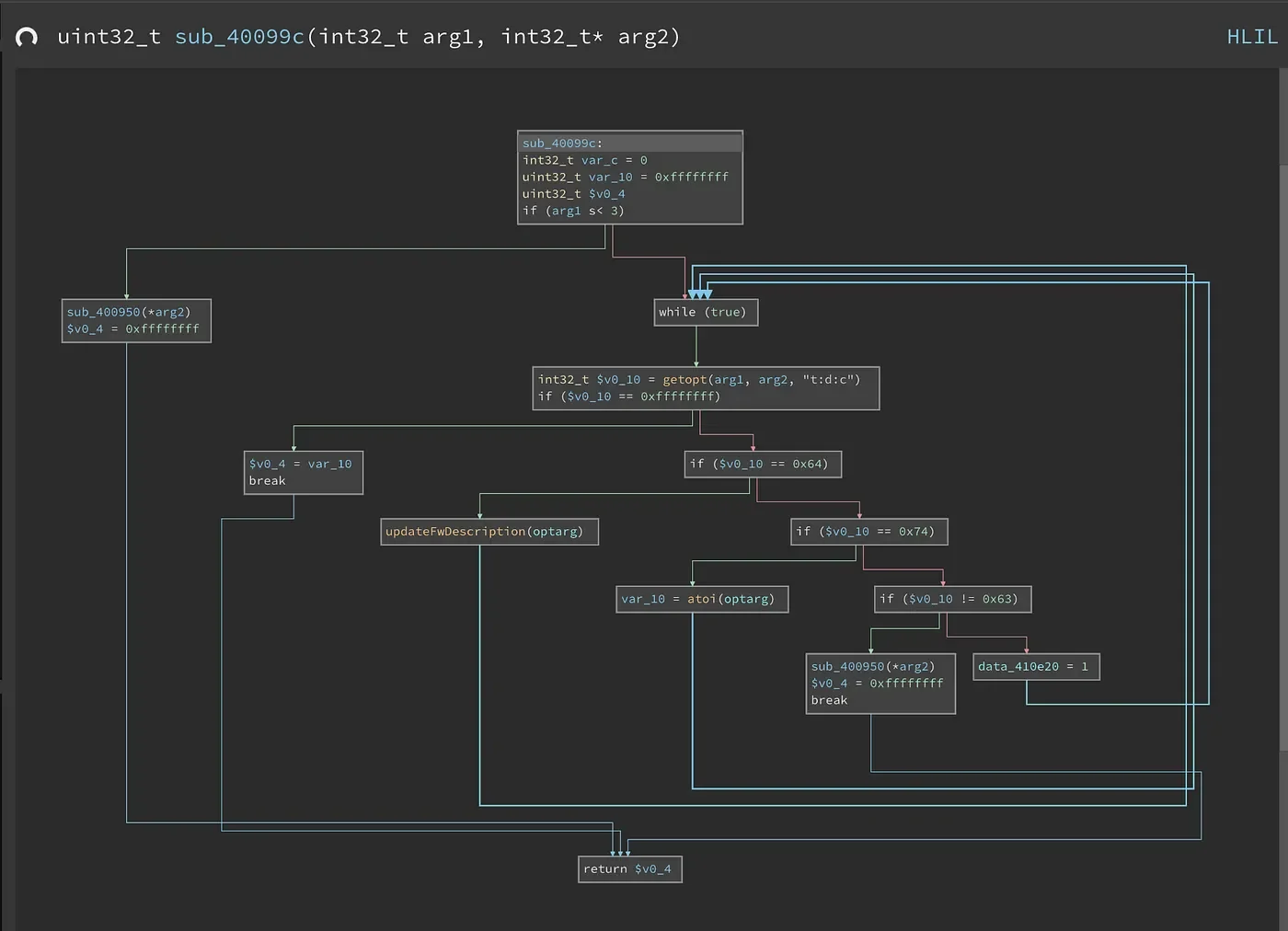
We've already established that I'm not a reverse engineer, but eventually I can figure out that this is parsing arguments. This would probably end up looking something like this:
int main(int argc, char **argv){ if(argc < 3) { showhhelp(); return -1 } while((c = getopt(argc, argv, "t:d:c"))) { switch (c){ case 'd': updateFWDescription(); //we dont care what this does break; case 't': int foo = atoi(optarg); break; case 'c': //do a thing break; default: return -1; }}
At this point, I started to look for the other functions. The only other function which stood out was this one, which I quickly realised was beyond my ability to reverse engineer.
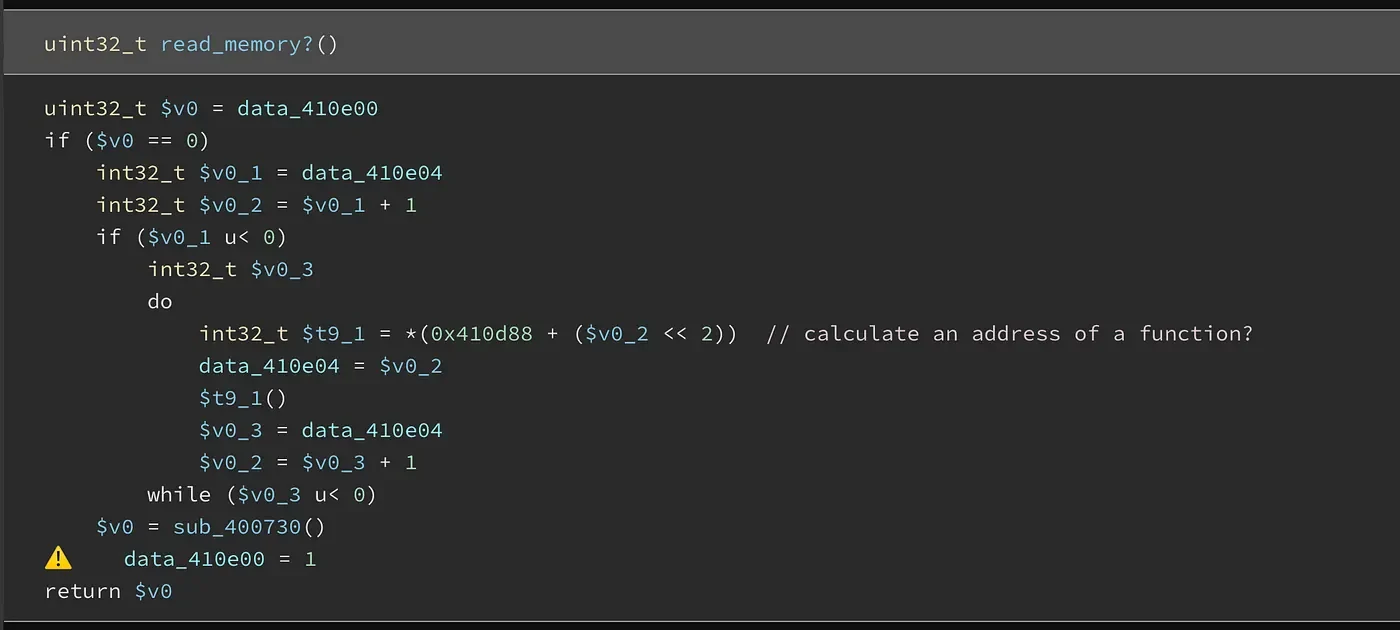
Back to the drawing board.
The prior work we are referencing was able to locate the string used to derive the encryption key, which in their example was "C200 1.0". The authors of the research paper found their key to be "C100 2.0". In both cases this was the model number and firmware hardware version. Let's just grep the firmware dump we have for our model number.
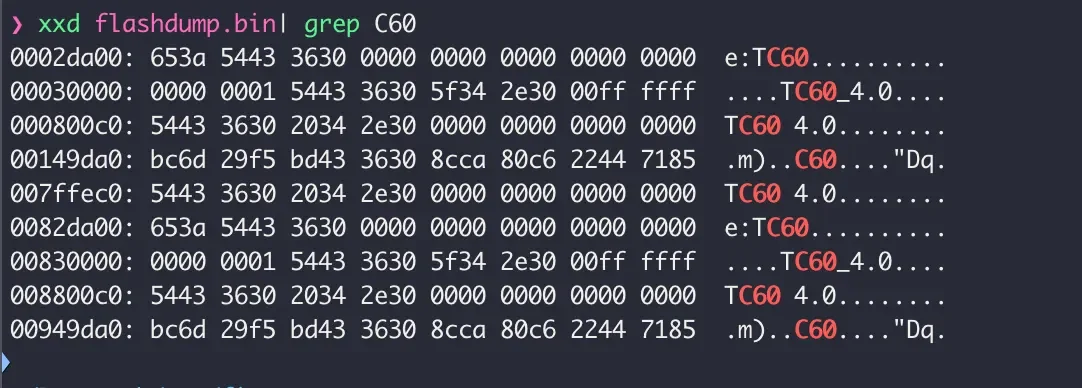
This seems promising. Let's try that in the hash function we have from the prior work.
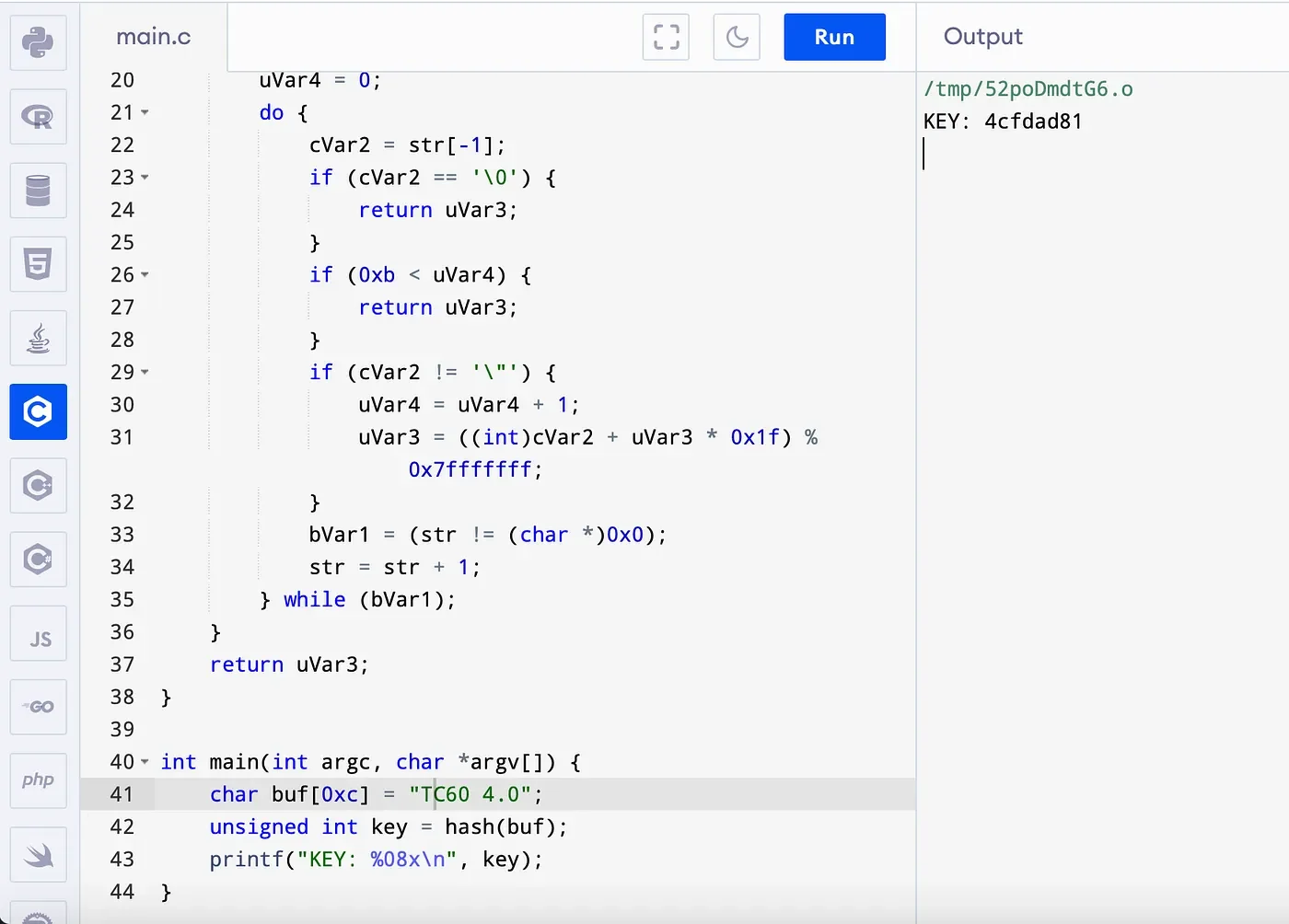
And after converting that from ASCII to hex, we can run the OpenSSL command:
openssl enc -d -des-ecb -nopad -K 3463666461643831 -in mtdblock3.bin -out test.bin`
If you're wondering where the bin file here came from, I dumped it from the camera, using the SD card to exfiltrate it, in the same way as the full firmware dump, except I only dumped the config partition.
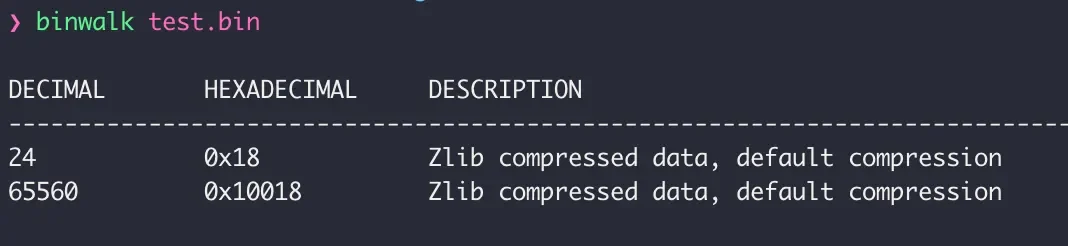
And after extracting, we get our config data.
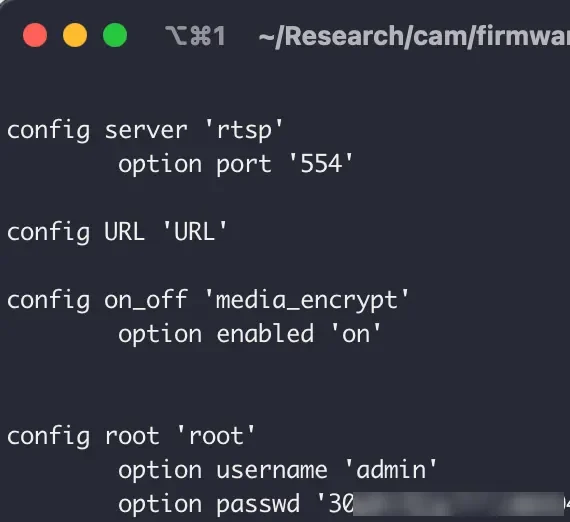
So this model camera is using the same method to protect its config data as the C100 and C200, albeit with a different key. It's worth noting that I'm really standing on the shoulders of giants here, there's no way I'd have figured out that encryption method myself.
Root cause
The device ships with a UART interface that is reachable on exposed pads, and the bootloader can be interrupted with an escape sequence documented in prior research, dropping straight into a root shell. From that shell, the configuration utility uc_convert decrypts the device configuration on demand, and the configuration file is editable with tools already present on the device (vi). The RTSP account's ciphertext field is what the RTSP application actually trusts, and it is not bound to the device: a ciphertext generated on one camera was accepted on a second camera. The passwd field, an MD5 hash, is only used by the mobile app to validate a password change, so it is not the value the stream checks.
The offline path works because the configuration partition is encrypted with DES-ECB using a key derived from the model number and firmware hardware version, following the method from the C100 and C200 research. The key material was found by grepping the firmware dump for the model number, so a dump of the config partition can be decrypted offline.
Impact
With physical access to one of these cameras we can dump the firmware, connect to the UART console, get a root shell and add a backdoor account that allows surreptitious access to the video stream. This backdoor account is not immediately obvious in the app, and would likely not be detected unless the user wanted to enable RTSP access. We'd need physical access to the device, and to be on the same network, to actually view the feed, so the potential for attack here is quite low. We've also seen how we can decrypt the device config offline, using methods presented in other research.
Fix
I did not report a fix, and the post does not describe one.
Variants to test
- Look for UART pads near the main SoC on other Tapo models. A positive result is a pin tied to ground, one likely Vcc, and data on a third pin that a logic analyser decodes as U-Boot output at power on.
- Try the documented U-Boot escape sequence on other models. A positive result is an
isvp_t31#style prompt and, aftersetenv bootargs ... init=/bin/sh, auid=0(root)shell. - Proxy the mobile app and inspect responses from the camera for firmware URLs. A positive result is a download URL in a response body, and a binwalk
-Erun showing a rising entropy edge near offset 0. - Run
uc_convert -t 0after mounting/proc,/devand/tmpon other models. A positive result is a/tmp/etc/uc_conf/user_managementfile with account blobs. - Grep the firmware dump for the model number and hardware version string. A positive result is a string in the same format as
"C200 1.0"and"C100 2.0"that, hashed the same way, produces a key that decrypts the config partition withopenssl enc -d -des-ecb -nopad -K <hex>. - Copy a ciphertext value generated on one device into the
third_accountblob of another device of the same model. A positive result is VLC connecting to the RTSP stream with the matching username and password.
What happened, in plain words
A security researcher bought a small home security camera, the Tapo TC60, and took it apart to see how it works and how well it protects the things it stores. The camera is a typical consumer gadget: it connects to your home WiFi, you set it up with a phone app, it records video, and it can send a live video feed over your network so you can watch it from another device. That live feed uses a standard called RTSP, which is simply a way for video players to request a stream from a camera, a bit like a web browser requesting a web page.
The researcher found that the camera has a hidden maintenance connection on its circuit board, a serial port called UART. A serial port is a very old, very simple way for two pieces of electronics to exchange text, one character at a time. With the right cheap tools, you can attach to it and read the messages the camera prints while it starts up. Those messages come from the bootloader, the small program that runs first and then starts the main operating system. The bootloader can be interrupted, and if you interrupt it you land in a command shell running as the most powerful user on the device, root. Root is the administrator account on Linux-style systems; it can do anything.
From that shell the researcher could read the camera's configuration file, which holds the usernames and passwords for the accounts on the device. So anyone who reaches the shell can read the secrets without breaking any encryption at all.
The most interesting account is called third_account. It is the account used for the RTSP video stream, and it is switched off by default. The researcher edited the configuration file to switch it on with a username and password of their choosing, wrote the file back to the camera's memory, rebooted, and connected to the video stream. The first attempt gave an authentication error, and it only worked once the ciphertext value was also set. It checks a separate encrypted value called ciphertext. Once a valid ciphertext was copied in, the stream opened.
That last point matters because the ciphertext value is not tied to a particular camera. The researcher bought a second camera, generated a ciphertext on the first one through the official app, and copied it onto the second one. The second camera accepted it.
Finally, the researcher showed a second, quieter route. The part of the camera's memory that holds the configuration is encrypted with an old, simple cipher called DES, and the key for that cipher is derived from the model number and the firmware hardware version, which the researcher found by grepping the firmware dump. Anyone who can copy that memory out, even without the camera running, can work out the key and decrypt the configuration on their own computer.
The researcher is careful about how serious this is. To do any of it you need to physically open the camera and attach wires, and to watch the video you also need to be on the same network as the camera. The researcher says the potential for attack here is quite low.
The device and the setup
A little while ago I spotted a Tapo TC60 "Smart Security Camera" on sale at Amazon UK. After my adventures with a smart lockbox and an old safe lock, I wanted to try hacking something with a few more features. This is what happened.
Inside the box, we get the usual collection of manuals, a power adapter, and the camera itself. The camera was much smaller than I expected, with no obvious way into the case.
The TC60 is a small IP camera. "IP camera" just means a camera that talks over a network rather than plugging straight into a screen. It has an SD card slot, so it can store recordings on a memory card like the one in a phone. It has a mobile app for setup and control. It has an over the air firmware update function, which means the camera can download new versions of its own software from the internet, the same way your phone updates its apps. And it has an RTSP stream that can be enabled from the app.
RTSP is the interesting part. It is a standard protocol for streaming video, and it is what a program like VLC uses when you ask it to play a camera feed. The camera keeps a separate account for that stream. The account is disabled by default, and the device stores its credentials in an encrypted configuration blob. A "blob" here just means a chunk of data stored as one unit; "credentials" means the username and password pair.
I powered the camera on and set it up on the Tapo app. I probably should have captured the setup traffic in BurpSuite, but I'm more interested in the hardware for this post.
BurpSuite is a tool that sits between an app and the internet and records every request and response, so you can read them. Capturing the setup traffic would have meant watching what the phone and camera said to each other while the camera was being configured. I skipped that because this post is about the physical device.
The tools used across the work:
- iFixIt picks for opening the case. These are thin plastic or metal tools used to pry apart plastic shells without scratching them.
- a multi-meter and an oscilloscope for probing pads. A multi-meter measures simple electrical properties such as voltage and whether two points are connected. An oscilloscope draws a graph of voltage over time, so you can see a signal change.
- a logic analyser for confirming the UART interface. It is like an oscilloscope for digital signals: it records the highs and lows and can decode them into characters.
- a Tigard board for talking to the device. It is a small USB adapter that lets a computer speak serial protocols.
- BurpSuite, with my phone configured to proxy through it. A proxy is a middleman: the phone is told to send its traffic to BurpSuite, which forwards it on and keeps a copy.
- binwalk, for entropy analysis and extraction. It is a command line tool that scans a file for known structures inside it, such as compressed archives or filesystems.
- Binary Ninja (cloud) and Ghidra for decompilation. These are programs that take compiled software and try to show it back as readable code. Decompilation is the process of doing that.
- OpenSSL for offline decryption. OpenSSL is a widely used toolkit for cryptography; here it is used to decrypt a file with a known key.
- VLC for testing the RTSP stream. VLC is a free video player that can open network streams.
Finding the way in
With the setup complete, I started taking the camera to bits. First removing the stand, then finding a disassembly video of the TC100 on YouTube, which showed how to get into the main camera body.
The TC100 is a different model. A disassembly video of it showed how to get into the main camera body.
There are 4 clips holding the front of the case on, which releases when another of the iFixIt picks are inserted. This gives us access to the main board.
One of the first things to do when approaching something like this is try and identify the chips on the board, as well as any UART/JTAG interfaces. Identifying the chips gives a high-level understanding of what the device is doing, and helps us understand where we might find interesting data. This board has a few obvious components.
JTAG is another debugging interface, similar in spirit to UART but designed for testing chips.
The big chip is an Ingenic T31, a system on chip video processor. "System on chip" means one chip that contains the processor and several supporting parts. There is very little information on this chip available, but we know it is going to be handling video for us.
There is also an RTL8188FTV, a WiFi and network USB chip, designed for use in devices including IP cameras. There are some other ICs, including an audio amplifier, and the usual selection of passive components. "IC" stands for integrated circuit, a chip. "Passive components" are the simple parts like resistors and capacitors that do not process anything themselves. Crucially, there is no memory chip on this side of the board.
That last detail matters because the memory chip is where the camera's software lives. If it is not on this side, it must be on the other.
Turning the board over, we can see the camera assembly, which can be removed. Taking this off reveals the sensor and another IC.
This is a XMC 25QH64C, a serial flash memory chip. This is almost certainly where the firmware for this device is stored. "Firmware" is the software built into a device: the operating system and programs that make it work. "Flash memory" is memory that keeps its contents when the power is off, like the storage in a USB stick.
Examining the board also reveals some pads, which look suspiciously like a UART interface, just above the T31 chip. A "pad" is a small exposed metal square on the board where a wire or probe can be touched.
A quick check with a multi-meter reveals one of the pins is tied to ground, one likely to Vcc, leaving two unidentified pins. Probing these pins with the oscilloscope reveals what looks like data going out.
"Ground" is the zero-volt reference point in a circuit. "Vcc" is the positive supply voltage. In a four-pin serial header, one pin is usually ground, one is power, and the other two carry data in each direction. Seeing a signal on one of the remaining pins is the clue that this is a live data line.
Connecting up the logic analyser verifies that this is indeed a UART interface. We can see the U-Boot logs being displayed when the power is connected.
U-Boot is a bootloader, the first program that runs when the device powers on. It sets things up and then starts the main operating system. Its logs are the text it prints while doing that, and they are gold to a researcher because they often reveal settings and commands.
Now we know which pin is TX, we can connect up the Tigard board and try and talk to the device. "TX" means transmit, the pin the device sends data on. The matching receive pin is usually called RX.
Scrolling through the console data, there are no obvious ways to interrupt the boot sequence.
At this point I started researching prior work on this device. While I couldn't find anything on the TC60, I did find some information on the TC200 and TC100. It seems like the TC100 is essentially the same device, so a lot of the information could be useful.
The most useful source of information was this blog post, which also links to a GitHub project related to the TC200.
These projects contain some useful information, such as the escape sequence for the U-Boot loader, allowing us to interrupt the boot sequence and drop into a root shell. An "escape sequence" here means a specific key press or command that the bootloader listens for during its short countdown.
------Firmware check pass!-----Autobooting in 1 secondsisvp_t31# isvp_t31# slpUnknown command 'slp' - try 'help'isvp_t31# setenv bootargs console=ttyS1,115200n8 mem=45M@0x0 rmem=19M@0x2d00000 root=/dev/mtdblock6 rootfstype=squashfs spdev=/dev/mtdblock7 noinitrd init=/bin/shisvp_t31# isvp_t31# printenvbaudrate=115200bootargs=console=ttyS1,115200n8 mem=45M@0x0 rmem=19M@0x2d00000 root=/dev/mtdblock6 rootfstype=squashfs spdev=/dev/mtdblock7 noinitrd init=/bin/shbootcmd=sf probe;sf read 0x80700000 0x80200 0x175000; bootm 0x80700000bootdelay=1ethaddr=[redacted]:27gatewayip=193.169.4.1ipaddr=193.169.4.81loads_echo=1netmask=255.255.255.0serverip=193.169.4.2stderr=serialstdin=serialstdout=serialEnvironment size: 437/16380 bytesisvp_t31# sf probe;sf read 0x80700000 0x80200 0x175000; bootm 0x80700000<snipped>BusyBox v1.19.4 (2022-09-30 05:46:09 CST) built-in shell (ash)Enter 'help' for a list of built-in commands./bin/sh: can't access tty; job control turned off/ # lsbin etc mnt proc root sp_rom tmp vardev lib overlay rom sbin sys usr www/ # helpBuilt-in commands:------------------ . : [ [[ alias bg break cd chdir command continue echo eval exec exit export false fg getopts hash help jobs kill let local printf pwd read readonly return set shift source test times trap true type ulimit umask unalias unset wait/ # iduid=0(root) gid=0(root)
This is a transcript of the serial console. Reading it in order:
------Firmware check pass!-----andAutobooting in 1 secondsare U-Boot telling us it checked the firmware and is about to start the system. The one second is the window in which the escape sequence has to be sent.isvp_t31#is the U-Boot prompt. The#is the sign that we are at a privileged prompt.slpwas typed and U-Boot repliedUnknown command 'slp' - try 'help', so that is not a valid command here.setenv bootargs console=ttyS1,115200n8 mem=45M@0x0 rmem=19M@0x2d00000 root=/dev/mtdblock6 rootfstype=squashfs spdev=/dev/mtdblock7 noinitrd init=/bin/shchanges the settings the bootloader will pass to the operating system. The important part at the end isinit=/bin/sh, which tells the system to start a shell instead of the normal startup program.console=ttyS1,115200n8says which serial port to use as the console and at what speed.root=/dev/mtdblock6names the storage partition to use as the root filesystem.printenvprints the bootloader's stored settings. Among them,bootcmd=sf probe;sf read 0x80700000 0x80200 0x175000; bootm 0x80700000is the normal sequence: probe the flash chip, read a chunk of it into memory at address0x80700000, then boot that image.bootdelay=1is the one second countdown. Theethaddr,gatewayip,ipaddr,netmaskandserveriplines are network settings baked into the bootloader.- The same
sf probe;sf read ...; bootm ...line is then typed by hand, which repeats the normal boot.<snipped>marks where output was cut out of the transcript. BusyBox v1.19.4 ... built-in shell (ash)is the operating system starting. BusyBox is a small collection of standard Unix tools bundled into one program, common on embedded devices.ashis the shell, the program that reads typed commands./bin/sh: can't access tty; job control turned offis a warning that the shell has no interactive terminal attached in the usual way. It still works./ #is the shell prompt, and#again means root.lslists the top-level folders:bin,dev,etc,lib,mnt,overlay,proc,rom,root,sbin,sp_rom,sys,tmp,usr,var,www. This is a normal Linux layout.helplists the shell's built-in commands, which is how you find out what is available.idprintsuid=0(root) gid=0(root), which confirms the shell is running as root, the administrator.
From here, we need to mount the /proc directory, which gets us access to some of the usual Linux tools. "Mounting" means attaching a storage area or a special filesystem so its contents appear as a folder. /proc is a special folder that the kernel fills with information about running processes. We can also cat out the /etc/passwd file, which gives us the hash for the root user. cat prints a file's contents. A "hash" is the result of running a password through a one-way mathematical function: you can turn a password into a hash easily, but turning a hash back into the password is meant to be hard.
root:$1$Xr8fF4xx$BFl2tPv719kYGwDH5TFrm.:0:0:root:/root:/bin/ashnobody:*:65534:65534:nobody:/var:/bin/falseadmin:*:500:500:admin:/var:/bin/falseguest:*:500:500:guest:/var:/bin/falseftp:*:55:55:ftp:/home/ftp:/bin/false/ # cat /etc/shadowroot:x:0:0:99999:7:::daemon:*:0:0:99999:7:::ftp:*:0:0:99999:7:::network:*:0:0:99999:7:::nobody:*:0:0:99999:7:::
This is two files printed one after the other:
- The first block is
/etc/passwd. Each line is one account, with fields separated by colons: name, password field, user ID, group ID, description, home folder, login shell. Therootline has$1$Xr8fF4xx$BFl2tPv719kYGwDH5TFrm.in the password field, which is a hash of the root password. Thenobody,admin,guestandftplines have*in that field, which means no password login is allowed for them. - The second block is
/etc/shadow, which normally holds the real password hashes. Here therootline hasxin the password field, meaning the hash is kept in/etc/passwdinstead, and the other accounts have*.
My research into prior work on this device also turned up an academic paper, talking about some potential risks around poorly secured IoT devices. "IoT" stands for Internet of Things, the umbrella term for everyday gadgets that connect to a network. This included a hypothetical scenario where an owner of a TC100 camera leaves it unattended during a power cut (so the camera doesn't record being tampered with), and a house-mate uses this opportunity to extract the device firmware. This is then analysed off-line, eventually granting them access to the live feed from the device (assuming they are on the same network as the device). We will try and re-create this attack.
The camera model used in the paper has its flash chip located in a different position on the board, allowing easy access with a SOP8 clip. A SOP8 clip is a small clamp that grips the eight legs of a chip so you can read it without unsoldering it. The authors were also able to bridge a connection on the board to put the main IC in reset mode. "Bridging" means joining two points with a wire or a blob of solder. "Reset mode" means holding the chip in a stopped state so it does not interfere.
As covered in a previous post, we need to stop the main IC talking to the flash memory while we dump it, otherwise it will skew our results. "Dumping" means copying the contents out. If the main chip is still running and reading the flash while you copy it, the copy can come out garbled. In this device, the flash chip and the main IC share the same power rails. "Power rails" are the supply lines that feed electricity to the components. Supplying power to the chip while dumping its memory will also cause the main IC to power on. In our case, the main IC is on the opposite side of the board to the flash chip. The flash chip is also located under the camera lens assembly. While it would still be possible to extract the firmware this way, it would be much more complicated to do in the hypothetical scenario of a malicious actor with limited time to access the device. We need another approach.
When looking to attack a device, it is useful to have access to the manufacturer's firmware. While some credential material is likely configured by the user during setup, an analysis of the firmware on the device may well reveal default credentials or other weaknesses which we can exploit, without having to extract the firmware from a running device. "Default credentials" are the username and password a device ships with before the owner changes them. Fortunately (or unfortunately, depending on your point of view), manufacturers are becoming more aware of these attacks and are often not supplying firmware downloads on their website. TPLink (who make the Tapo cameras), are one such company. They do provide copies of the GPL code used in these devices, which have contained useful information in other models of camera (see the linked research above). GPL is a software licence that requires companies to publish the source code of programs built on GPL code, which is why those files are available. In our case, there did not appear to be any useful information in these files. We need the factory firmware.
The TC60 has an over the air firmware update function. The camera likely reaches out to an update server and downloads the firmware image. The app also shows the current firmware version, and details of any pending updates, so it probably also talks out to an update server. As it's much easier to intercept traffic between the app and the device, compared with trying to intercept traffic from the device itself, this is the path I tried first. After configuring my phone to proxy traffic through BurpSuite, I opened the Tapo app and clicked around. In the response body of one of the requests sent to the camera was a URL to download the firmware update.
A "request" is a message one program sends to another asking for something; the "response body" is the content that comes back. Finding a download URL in a response means the app was told where to fetch the update from, and that URL can be used directly.
Exploitation
Step 1: Download the OTA firmware and check it
I downloaded the firmware and ran it through binwalk with the -E flag, which shows the entropy of the file. "OTA" means over the air, the update delivered over the network. "Entropy" is a measure of how random data looks. Ordinary software and text have patterns and compress well, so their entropy is lower. Encrypted or compressed data looks random, so its entropy is high.
binwalk -E Tapo_TC60v4_en_1.3.7_Build_230627_Rel.41895n_up_boot-signed_1691484740866.binWARNING: Failed to import matplotlib module, visual entropy graphing will be disabledDECIMAL HEXADECIMAL ENTROPY--------------------------------------------------------------------------------0 0x0 Rising entropy edge (0.994108)
Line by line:
binwalk -E <filename>runs binwalk in entropy mode on the downloaded firmware file. The long filename is the update file as named by the manufacturer.WARNING: Failed to import matplotlib module, visual entropy graphing will be disabledmeans the optional graphing library is missing, so binwalk will print numbers instead of drawing a chart. The analysis still runs.- The table has three columns:
DECIMAL(offset in bytes as a normal number),HEXADECIMAL(the same offset in base 16) andENTROPY(the finding). - The single row
0 0x0 Rising entropy edge (0.994108)says that at the very start of the file the entropy jumps to about 0.994, which is close to the maximum of 1. In plain terms, the file looks random from the first byte.
This doesn't look good. High entropy likely means the firmware is encrypted, which we can verify using binwalk to try and extract any data.
binwalk -e Tapo_TC60v4_en_1.3.7_Build_230627_Rel.41895n_up_boot-signed_1691484740866.binDECIMAL HEXADECIMAL DESCRIPTION--------------------------------------------------------------------------------
Line by line:
binwalk -e <filename>runs binwalk in extraction mode. It looks for known file structures inside the file and tries to pull them out.- The table header
DECIMAL HEXADECIMAL DESCRIPTIONis printed, but no rows follow. That means binwalk recognised nothing inside the file, which fits the idea that the whole thing is encrypted.
As expected, binwalk isn't able to extract any data. Running strings over the file also yields no results. strings is a command that pulls out readable text from a binary file; if the file is encrypted, there is no readable text to find. The firmware on the camera must contain the keys we need to decrypt the download, but that's not much use if we can't access them. Luckily, we have a UART shell.
Step 2: Dump the firmware through the SD card slot
As this device has an SD card slot, we can also dump the firmware via the shell. The "tapo 200 research project" blog has detailed instructions on how to extract the firmware. At a high level, we can mount the SD card, map the flash RAM to files on disk and copy them into a flashdump.bin file. "Mapping" here means making the raw memory appear as a file you can copy. The full instructions are provided in the linked post, which I won't recreate here.
Now we can run binwalk over the extracted firmware, which gives us access to the file system contents.
❯ binwalk flashdump.binDECIMAL HEXADECIMAL DESCRIPTION--------------------------------------------------------------------------------15892 0x3E14 LZO compressed data26624 0x6800 uImage header, header size: 64 bytes, header CRC: 0xA3F3CA56, created: 2022-09-29 21:36:29, image size: 155294 bytes, Data Address: 0x80100000, Entry Point: 0x0, data CRC: 0xCEE6C40F, OS: Firmware, CPU: MIPS, image type: Firmware Image, image name: "u-boot-lzo.img"26688 0x6840 LZO compressed data141029 0x226E5 CRC32 polynomial table, little endian145193 0x23729 LZO compressed data148629 0x24495 Android bootimg, kernel size: 0 bytes, kernel addr: 0x70657250, ramdisk size: 543519329 bytes, ramdisk addr: 0x6E72656B, product name: "mem boot start"188181 0x2DF15 PEM certificate188910 0x2E1EE PEM certificate190126 0x2E6AE PEM certificate191346 0x2EB72 PEM certificate192538 0x2F01A PEM certificate196864 0x30100 gzip compressed data, from Unix, last modified: 2022-09-29 22:06:28393216 0x60000 LZO compressed data484818 0x765D2 CRC32 polynomial table, little endian488822 0x77576 LZO compressed data524800 0x80200 uImage header, header size: 64 bytes, header CRC: 0x1805EB61, created: 2022-09-29 22:06:13, image size: 1296787 bytes, Data Address: 0x80010000, Entry Point: 0x8031B470, data CRC: 0xD607E5B7, OS: Linux, CPU: MIPS, image type: OS Kernel Image, compression type: lzma, image name: "Linux-3.10.14__isvp_swan_1.0__"524864 0x80240 LZMA compressed data, properties: 0x5D, dictionary size: 8388608 bytes, uncompressed size: -1 bytes1823232 0x1BD200 Squashfs filesystem, little endian, version 4.0, compression:xz, size: 2405062 bytes, 647 inodes, blocksize: 131072 bytes, created: 2022-09-29 22:06:334456448 0x440000 Squashfs filesystem, little endian, version 4.0, compression:xz, size: 3053252 bytes, 162 inodes, blocksize: 131072 bytes, created: 2022-09-29 22:06:358404500 0x803E14 LZO compressed data8415232 0x806800 uImage header, header size: 64 bytes, header CRC: 0xA3F3CA56, created: 2022-09-29 21:36:29, image size: 155294 bytes, Data Address: 0x80100000, Entry Point: 0x0, data CRC: 0xCEE6C40F, OS: Firmware, CPU: MIPS, image type: Firmware Image, image name: "u-boot-lzo.img"8415296 0x806840 LZO compressed data8529637 0x8226E5 CRC32 polynomial table, little endian8533801 0x823729 LZO compressed data8537237 0x824495 Android bootimg, kernel size: 0 bytes, kernel addr: 0x70657250, ramdisk size: 543519329 bytes, ramdisk addr: 0x6E72656B, product name: "mem boot start"8576789 0x82DF15 PEM certificate8577518 0x82E1EE PEM certificate8578734 0x82E6AE PEM certificate8579954 0x82EB72 PEM certificate8581146 0x82F01A PEM certificate8585472 0x830100 gzip compressed data, from Unix, last modified: 2022-09-29 22:06:288781824 0x860000 LZO compressed data8873426 0x8765D2 CRC32 polynomial table, little endian8877430 0x877576 LZO compressed data8913408 0x880200 uImage header, header size: 64 bytes, header CRC: 0x1805EB61, created: 2022-09-29 22:06:13, image size: 1296787 bytes, Data Address: 0x80010000, Entry Point: 0x8031B470, data CRC: 0xD607E5B7, OS: Linux, CPU: MIPS, image type: OS Kernel Image, compression type: lzma, image name: "Linux-3.10.14__isvp_swan_1.0__"8913472 0x880240 LZMA compressed data, properties: 0x5D, dictionary size: 8388608 bytes, uncompressed size: -1 bytes10211840 0x9BD200 Squashfs filesystem, little endian, version 4.0, compression:xz, size: 2405062 bytes, 647 inodes, blocksize: 131072 bytes, created: 2022-09-29 22:06:3312845056 0xC40000 Squashfs filesystem, little endian, version 4.0, compression:xz, size: 3053252 bytes, 162 inodes, blocksize: 131072 bytes, created: 2022-09-29 22:06:35
This is a long table, but it reads the same way as the earlier one. Each row is a structure binwalk found at a given offset:
DECIMALandHEXADECIMALare the position in the file, in two number formats.DESCRIPTIONsays what was found there.LZO compressed dataandLZMA compressed dataare compressed blocks. Compression is a way of storing data in less space; it has to be undone before the data can be read.uImage header ... image name: "u-boot-lzo.img"is the bootloader image, andimage name: "Linux-3.10.14__isvp_swan_1.0__"is the Linux kernel, the core of the operating system. A "kernel" is the part of the system that manages memory, processes and hardware.CRC32 polynomial tableis a lookup table used for checksums, which are simple numbers used to detect accidental corruption.PEM certificateentries are certificate files, which are used in encrypted network connections.Squashfs filesystem ... 647 inodesand... 162 inodesare two filesystems. A "filesystem" is the way files and folders are organised on storage. An "inode" is the internal record for one file or folder, so the counts tell you roughly how many entries each filesystem holds.- The same set of structures appears twice, once around the start of the file and again around
0x806800onwards. That is normal for firmware that stores two copies, so the device can fall back to the second if the first is damaged.
Step 3: Decrypt the device configuration on the device
Re-visiting the academic paper, we see that the authors followed the process outlined in the "tapo 200 research project" blog, namely, extracting the configuration data from the device and decrypting offline. The configuration data is still encrypted on our device and, like the other devices, we can either decrypt the data manually, off-line, or there is a utility present on the device which allows it to be decrypted. We can verify this works, using the following steps via our UART shell.
- Mount /proc
- Mount /dev
- Mount /tmp
- Run the uc_convert utility
mount -t proc none /procmount -t tmpfs tmpfs /dev -o mode=0755,size=512Kmount tmpfs /tmp -t tmpfs -o size=20633600,nosuid,nodev,mode=1777mknod /dev/slp_flash_chrdev c 222 0/bin/uc_convert -t 0
Line by line:
mount -t proc none /procattaches theprocfilesystem at/proc. This is the special folder that exposes information about running processes, and many standard tools expect it to be there.mount -t tmpfs tmpfs /dev -o mode=0755,size=512Kattaches atmpfsat/dev.tmpfsis a filesystem that lives in memory and disappears on reboot./devis where device files live, the special files that represent hardware. The options set permissions (mode=0755) and a size limit (size=512K).mount tmpfs /tmp -t tmpfs -o size=20633600,nosuid,nodev,mode=1777attaches another in-memory filesystem at/tmp, the scratch folder.nosuidandnodevare safety options that stop certain privileged files from being used from that location.mknod /dev/slp_flash_chrdev c 222 0creates a device file namedslp_flash_chrdev.cmeans character device, a device you read and write as a stream of bytes, and222 0are the major and minor numbers that tell the kernel which driver it belongs to. This is the handle the utility needs to reach the flash memory./bin/uc_convert -t 0runs the on-device conversion utility with the option-t 0.
This creates a directory in /tmp, which contains the decrypted device configuration.
In our hypothetical attack scenario, we could perform this step on the device, via our UART shell, and exfiltrate the decrypted data either via terminal logs or writing to the SD card. "Exfiltrate" means get the data out of the device. We wouldn't need to grab the firmware at all, which certainly helps for this device, where the flash chip is located under the camera lens assembly.
However, as we can see, the third_account username and password values are blanked out. This differs from the device presented in the paper (where the authors were able to crack the hash for this account and use the credentials to access the video stream). "Cracking" a hash means guessing passwords, hashing each guess and comparing, until one matches. So that's it, game over, right? Not quite.
Step 4: Understand the account blobs
We have access to the device as root. Can we simply add an account under the third_account section and gain access to the video feed?
After some investigation, it turns out the answer is yes, with some caveats. Extracting the config using the uc_convert utility, we can find the user account details in /tmp/etc/uc_conf/user_management, as shown above.
The root account blob contains credentials configured when we set up the camera. The passwd field is a simple MD5 hash of the password. MD5 is an old hashing function; it is fast to compute, which is exactly what makes it weak for passwords, because an attacker can try billions of guesses quickly. We can try and crack this, but that might take some time, if the user selected a strong password. The ciphertext blob is RSA encrypted, which we'll cover shortly. RSA is a public-key encryption system: it uses a pair of keys, one public and one private, and data encrypted with one can only be decrypted with the other.
The third_account blob is, by default, disabled. The username and password values are set to "----". This account is used to allow access to the RTSP stream from the camera, and must be enabled via the mobile app. Enabling this comes with some warnings:
I initially assumed that only the username and password values were required to access the RTSP stream. I modified the config, adding a "backdoor" account with a known password hash (note that this needs to be uppercase, or it won't work), wrote the config back to flash, rebooted the camera and attempted to access the RTSP stream from VLC. This gave me an authentication error. A "backdoor" is an access route deliberately added by someone other than the owner. "Authentication error" means the camera rejected the login.
After lots of experimenting, it turns out that the ciphertext value must also be set to match the username and password values. The mobile app uses the passwd value to validate the password when you perform a "change password" option on the RTSP account, but the RTSP stream uses the ciphertext value. I'm not a reverse engineer, however, we can verify that this is likely RSA encrypted data using Binary Ninja and Ghidra. A "reverse engineer" here means someone who takes compiled software and works out how it was built and what it does.
Step 5: Follow the ciphertext into the RTSP application
If we throw the cet application (which is what this device uses for RTSP) into Binary Ninja cloud, and search for 'ciphertext', we get the following result:
Looking at this function in more detail, we see it calls the following function after reading the ciphertext block in our config file:
int32_t $v0_14 = rsa_decrypt("[redacted]…", 0xac)
Line by line:
int32_t $v0_14 =declares a variable of a 32-bit integer type and assigns it the result of the call. The$v0_14name is how the decompiler labels a value it recovered from the compiled code.rsa_decrypt(is the function being called. Its name says it decrypts something with RSA."[redacted]…"is the first argument, a string. The ellipsis shows the string was cut short in the display.0xacis the second argument, a number written in hexadecimal, which is 172 in decimal. It is most likely the length of the data being passed.
rsa_decrypt is an external reference to libdecrypter.so which we can find by grepping the firmware we dumped from the device earlier. A .so file is a shared library, a bundle of code that other programs can load and use. "Grepping" means searching for a piece of text with the grep tool.
Opening this file with Ghidra, we can find the rsa_decrypt export and start our analysis from there. An "export" is a function a library makes available to other programs.
In the private_decrypt function, we can see the code loading an RSA key from somewhere, then doing a base64 decode and an RSA decrypt.
Base64 is a way of writing binary data using only ordinary text characters, so it can be stored in a text file or sent in a message; decoding it turns the text back into the original bytes.
I tried to figure out where the RSA key is loaded from, but I'm just not smart enough to figure out this decompiled code:
Running strings over the file turns up some RSA keys, but I wasn't able to figure out how to use them to decrypt the config file. I'm glossing over this step, as this post is long enough already, but you can run strings libdecrypt.so if you want to follow along.
Step 6: Test whether the keys are per-device
I had a hunch that the decryption keys are hard-coded, and likely the same on each device. "Hard-coded" means written directly into the software rather than generated fresh for each unit. Not being smart enough to reverse the decryption code properly, I did the next best thing and ordered another device to test this theory.
I set up this second device on a new Tapo account, performed the initial setup, then took it apart and connected to the UART interface. Note that the second device was connected to the same WiFi network. I doubt TPLink are using that as the seed for an encryption key, but I've been wrong before. A "seed" is the starting value a key is generated from; if two devices shared a seed, they would share a key.
With access to the UART console, I ran a simple python script to automate dumping the encrypted config. This is a modified version of the script presented in the C200 research project blog.
Step 7: Plant the backdoor account
From here, I connected via serial, opened the user_manage file in vi (yes, that's handily supplied on the device), and overwrote the username, passwd and ciphertext values in the file. vi is a text editor that runs in a terminal. For the username and passwd, I used backdoor and the MD5 hash of Password206. For the ciphertext, I copied one generated on the original device, which was generated by setting the username and password via the mobile app.
I wrote the modified config back to flash, rebooted the camera and tried to connect to the RTSP stream with VLC:
As we can see, the re-used ciphertext value was accepted, granting us access to the camera's video stream (that's the SensePeek mat on my bench, if you were wondering). Actually performing this attack took around 5 minutes, starting from an unopened camera body to having access to the stream.
While we may not have re-created the exact attack presented in the paper, we've certainly achieved what we set out to do. As we are not dumping the flash RAM, we are going to need to supply power to the device. This means we are no longer dependent on waiting for a random power cut to enable our attack. As we are interacting with the device with UART, we need to supply power, which will also enable video capture. You'll have to use your imagination to figure out how this could be done without being detected. While the steps taken to add the backdoor account have been discussed here, I've left out some steps and I'm choosing not to release the python code I used to backdoor the camera. You won't be able to re-create this attack with the information in this post alone.
Step 8: Offline decryption of the config partition
For completion's sake, let's see if we can get the off-line decryption vector working. A "vector" here just means a route to the goal.
The prior work we are referencing goes into detail on how the decryption code works, including where the decryption key is located. The academic paper noted that the key in their device, a TC100, differed from the key in the blog post (a TC200). They found the key in the same location, and were able to decrypt their config data using the same technique. Let's see if our device uses the same approach.
First, we load the uc_convert binary into Binary Ninja cloud.
We've already established that I'm not a reverse engineer, but eventually I can figure out that this is parsing arguments. "Parsing arguments" means reading the options typed after a program's name on the command line. This would probably end up looking something like this:
int main(int argc, char **argv){ if(argc < 3) { showhhelp(); return -1 } while((c = getopt(argc, argv, "t:d:c"))) { switch (c){ case 'd': updateFWDescription(); //we dont care what this does break; case 't': int foo = atoi(optarg); break; case 'c': //do a thing break; default: return -1; }}
Line by line:
int main(int argc, char **argv)is the entry point of a C program.argcis the number of command line arguments andargvis the list of them.if(argc < 3)checks whether fewer than three arguments were given, counting the program name itself.showhhelp(); return -1prints help and exits with an error code if the count is too low.while((c = getopt(argc, argv, "t:d:c")))loops over the options.getoptis a standard helper that reads options one at a time; the string"t:d:c"lists the options it accepts, and the colons meantanddtake a value.switch (c)then handles each option.case 'd':callsupdateFWDescription();and the comment says the researcher does not care what it does.case 't':converts the option's value to a number withatoi(optarg)and stores it infoo.case 'c':is a placeholder with a comment.default: return -1exits on an unknown option.
At this point, I started to look for the other functions. The only other function which stood out was this one, which I quickly realised was beyond my ability to reverse engineer.
Back to the drawing board.
The prior work we are referencing was able to locate the string used to derive the encryption key, which in their example was "C200 1.0". The authors of the research paper found their key to be "C100 2.0". In both cases this was the model number and firmware hardware version. "Derive" means to produce a key from some starting input, here by running that text through a hashing function. Let's just grep the firmware dump we have for our model number.
This seems promising. Let's try that in the hash function we have from the prior work.
And after converting that from ASCII to hex, we can run the OpenSSL command. ASCII is the standard mapping between characters and numbers, so converting to hex means writing each character as its numeric code.
openssl enc -d -des-ecb -nopad -K 3463666461643831 -in mtdblock3.bin -out test.bin`
Line by line:
openssl encruns the encryption and decryption command of OpenSSL.-dmeans decrypt.-des-ecbselects the DES cipher in ECB mode. DES is an old symmetric cipher, meaning the same key encrypts and decrypts. ECB means each block of data is encrypted on its own, with no chaining between blocks.-nopadsays the data is already a whole number of blocks, so no padding is added or removed.-K 3463666461643831supplies the key as a hexadecimal string.-in mtdblock3.binis the input file, the copied config partition.-out test.binis the output file for the decrypted result.
If you're wondering where the bin file here came from, I dumped it from the camera, using the SD card to exfiltrate it, in the same way as the full firmware dump, except I only dumped the config partition.
And after extracting, we get our config data.
So this model camera is using the same method to protect its config data as the C100 and C200, albeit with a different key. It's worth noting that I'm really standing on the shoulders of giants here, there's no way I'd have figured out that encryption method myself.
Root cause
The device ships with a UART interface that is reachable on exposed pads, and the bootloader can be interrupted with an escape sequence documented in prior research, dropping straight into a root shell. From that shell, the configuration utility uc_convert decrypts the device configuration on demand, and the configuration file is editable with tools already present on the device (vi). The RTSP account's ciphertext field is what the RTSP application actually trusts, and it is not bound to the device: a ciphertext generated on one camera was accepted on a second camera. The passwd field, an MD5 hash, is only used by the mobile app to validate a password change, so it is not the value the stream checks.
The offline path works because the configuration partition is encrypted with DES-ECB using a key derived from the model number and firmware hardware version, a scheme inherited from the C100 and C200. That key material is predictable from public strings in the firmware, so anyone with a dump of the config partition can decrypt it without the device.
Impact
With physical access to one of these cameras we can dump the firmware, connect to the UART console, get a root shell and add a backdoor account that allows surreptitious access to the video stream. This backdoor account is not immediately obvious in the app, and would likely not be detected unless the user wanted to enable RTSP access. We'd need physical access to the device, and to be on the same network, to actually view the feed, so the potential for attack here is quite low. We've also seen how we can decrypt the device config offline, using methods presented in other research.
Fix
I did not report a fix, and the post does not describe one. The design changes the findings point to are: not leaving an interruptible bootloader that yields a root shell on production hardware, not shipping an on-device utility that decrypts the configuration for anyone with a shell, and not deriving the config encryption key from public model and version strings. Binding the RTSP ciphertext to the device, rather than accepting a value generated elsewhere, would also have stopped the copied-ciphertext step.
Variants to test
- Look for UART pads near the main SoC on other Tapo models. A positive result is a pin tied to ground, one likely Vcc, and data on a third pin that a logic analyser decodes as U-Boot output at power on.
- Try the documented U-Boot escape sequence on other models. A positive result is an
isvp_t31#style prompt and, aftersetenv bootargs ... init=/bin/sh, auid=0(root)shell. - Proxy the mobile app and inspect responses from the camera for firmware URLs. A positive result is a download URL in a response body, and a binwalk
-Erun showing a rising entropy edge near offset 0. - Run
uc_convert -t 0after mounting/proc,/devand/tmpon other models. A positive result is a/tmp/etc/uc_conf/user_managementfile with account blobs. - Grep the firmware dump for the model number and hardware version string. A positive result is a string in the same format as
"C200 1.0"and"C100 2.0"that, hashed the same way, produces a key that decrypts the config partition withopenssl enc -d -des-ecb -nopad -K <hex>. - Copy a ciphertext value generated on one device into the
third_accountblob of another device of the same model. A positive result is VLC connecting to the RTSP stream with the matching username and password.
Glossary
- ASCII: A standard mapping between characters and numbers, so text can be stored as bytes.
- Authentication error: A rejection of a login attempt because the credentials were not accepted.
- Backdoor: An access route added deliberately by someone other than the owner.
- Base64: A way of writing binary data using only ordinary text characters.
- binwalk: A command line tool that scans a file for known structures such as compressed blocks and filesystems.
- Blob: A chunk of data stored as a single unit.
- Bootloader: The first program that runs when a device powers on, which then starts the operating system.
- Bridging: Joining two points on a circuit with a wire or solder.
- BurpSuite: A tool that sits between an app and the network, recording requests and responses.
- BusyBox: A small bundle of standard Unix tools in one program, common on embedded devices.
- cat: A command that prints a file's contents.
- Ciphertext: Data that has been encrypted, so it looks meaningless until decrypted.
- Compression: Storing data in less space, to be expanded again when needed.
- Cracking a hash: Guessing passwords, hashing each guess and comparing until one matches.
- CRC32: A checksum, a simple number used to detect accidental corruption.
- Credentials: A username and password pair.
- Default credentials: The username and password a device ships with before the owner changes them.
- DES: An old symmetric cipher, where the same key encrypts and decrypts.
- Decompilation: Turning compiled software back into readable code.
- Derive (a key): Produce a key from some starting input, often by hashing it.
- Dumping: Copying the contents of memory or storage out of a device.
- ECB: A mode of encryption where each block of data is encrypted on its own.
- Entropy: A measure of how random data looks; high entropy suggests encryption or compression.
- Escape sequence: A specific input the bootloader listens for during its countdown, which stops it and gives you a prompt.
- Exfiltrate: Get data out of a device.
- Export: A function a library makes available to other programs.
- Firmware: The software built into a device.
- Flash memory: Memory that keeps its contents when the power is off.
- Filesystem: The way files and folders are organised on storage.
- getopt: A standard helper for reading command line options in C programs.
- Ghidra: A free decompiler and reverse engineering tool.
- GPL: A software licence that requires companies to publish the source code of programs built on GPL code.
- grep: A tool that searches text for a pattern.
- Ground: The zero-volt reference point in a circuit.
- Hard-coded: Written directly into the software rather than generated fresh.
- Hash: The result of a one-way function that turns a password into a fixed string; easy to compute, hard to reverse.
- Hex (hexadecimal): A way of writing numbers in base 16, often used for byte values.
- IC: Integrated circuit, a chip.
- Inode: The internal record for one file or folder in a filesystem.
- IoT: Internet of Things, everyday gadgets that connect to a network.
- IP camera: A camera that talks over a network rather than plugging into a screen.
- JTAG: A debugging interface for testing chips.
- Kernel: The core of an operating system, managing memory, processes and hardware.
- Logic analyser: A tool that records digital signals and can decode them into characters.
- Mapping: Making raw memory appear as a file you can copy.
- MD5: An old, fast hashing function, weak for storing passwords.
- Mount: Attach a storage area or special filesystem so its contents appear as a folder.
- Multi-meter: A tool that measures voltage and whether two points are connected.
- OTA: Over the air, an update delivered over the network.
- Oscilloscope: A tool that draws a graph of voltage over time.
- Pad: A small exposed metal square on a circuit board where a probe can be touched.
- Parsing arguments: Reading the options typed after a program's name.
- Passive components: Simple parts like resistors and capacitors that do not process anything themselves.
- PEM certificate: A certificate file used in encrypted network connections.
- Power rails: The supply lines that feed electricity to components.
- Proxy: A middleman that forwards traffic and keeps a copy.
- Request: A message one program sends to another asking for something.
- Response body: The content that comes back in reply to a request.
- Reset mode: Holding a chip in a stopped state so it does not interfere.
- Reverse engineer: Work out how compiled software was built and what it does.
- Root: The administrator account on Linux-style systems, which can do anything.
- RSA: A public-key encryption system using a public and a private key.
- RTSP: A standard protocol for streaming video over a network.
- Seed: The starting value a key is generated from.
- Shared library (.so): A bundle of code that other programs can load and use.
- SOP8 clip: A small clamp that grips the eight legs of a chip so it can be read without unsoldering.
- Squashfs: A compressed filesystem often used on embedded devices.
- strings: A command that pulls readable text out of a binary file.
- System on chip: One chip containing a processor and several supporting parts.
- tmpfs: A filesystem that lives in memory and disappears on reboot.
- TX / RX: The transmit and receive pins of a serial connection.
- UART: A simple serial interface for exchanging text one character at a time.
- U-Boot: A common bootloader used on embedded devices.
- Vector: A route to a goal.
- vi: A text editor that runs in a terminal.
- VLC: A free video player that can open network streams.
- Vcc: The positive supply voltage in a circuit.



