TENDA–N301-v6–(CVE-2023–29680,CVE-2023–29681)
The Tenda N301 v6 router stores the admin password in a cookie using base64 encoding and does not enforce HTTPS, so an attacker on the same network can intercept the cookie via ARP spoofing and decode the password. This allows the attacker to log in and change the password, potentially disrupting network use.
 Published on medium.com
This post describes two weak-code implementations on Tenda routers using firmware v12.02.01.61multi and firmware v12.03.01.06pt, router version N301 from Tenda technology.
The full write-up lives on its author's site
It belongs to its author, so we link to it rather than copy it. The other two tabs are our own rewrites, checked against it.
Context
This write-up covers two weak encoding issues in Tenda N301 v6 routers, tracked as CVE-2023-29680 and CVE-2023-29681. The affected firmware builds are:
| CVE | Firmware |
|---|---|
| CVE-2023-29680 | V12.03.01.06_pt |
| CVE-2023-29681 | V12.02.01.61_multi |
The feature at the centre of the report is the router's administrative login. When an administrator authenticates to the router's web interface, the password is stored and transmitted using a weak encoding, and neither firmware implements settings that would allow HTTPS to be used. The password travels in a cookie named ecos_pw, base64 encoded, over plain HTTP.
Setup
The test scenario is a home network with the Tenda N301 v6 router and an attacker positioned on the same LAN or WLAN. The researcher uses ARP spoofing to place the attacker between the administrator's machine and the router, and Wireshark to capture the traffic. No credentials, accounts or special roles beyond a normal administrator login are described.
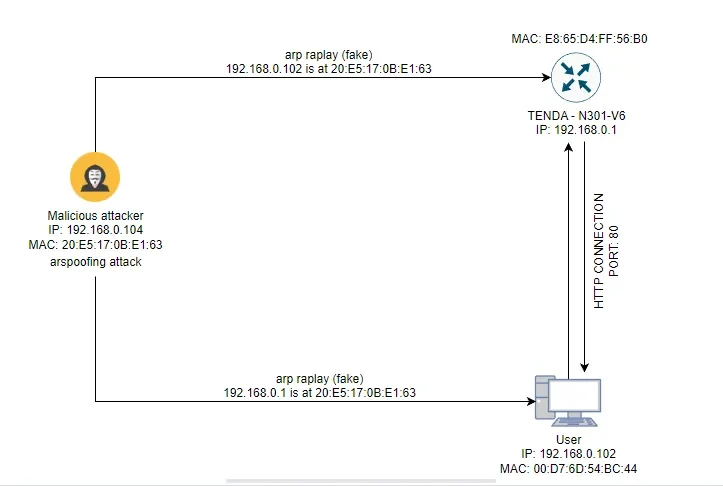
The diagram shows the test scenario: the attacker intercepts communications with the router via ARP spoofing and obtains the password passed in the request header via the cookie in the ecos_pw= attribute, which makes it possible to capture the encoding.
Finding it
The report states that the password used to authenticate to the equipment is stored using a weak encoding, and that the two firmware versions do not implement settings that enable the use of HTTPS. Because the login exchange runs over HTTP, the encoded password is exposed to anyone who can observe the traffic.
The password is sent base64 encoded in a cookie, in the name-value pair attribute:
cookie:ecos_pw=on firmware V12.03.01.06_pt (CVE-2023-29680)set-cookie:ecos_pw=on firmware V12.02.01.61_multi (CVE-2023-29681)
Base64 is an encoding, not encryption, so anyone who captures the value can recover the password. The flaw allows an authenticated attacker on the LAN or WLAN to intercept communications with the router via ARP spoofing and obtain the password passed in the request header via the cookie in the ecos_pw= attribute.
Exploitation
Step 1: Position between the administrator and the router
Using an ARP spoofing technique to forward spoofed packets to the router, the attacker intercepts the communication. The researcher captures the traffic with Wireshark.
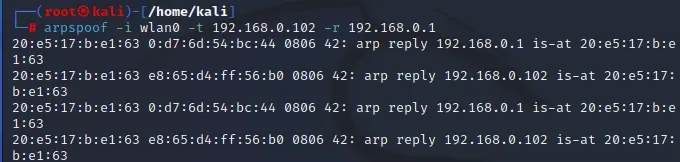
The screenshot shows the sending of fake packets used to place the attacker in the path of the traffic.
Step 2: Capture the credential on V12.03.01.06
With the interception in place, the credentials used when logging into the router are visible in the captured traffic. The researcher obtained the credential on firmware V12.03.01.06_en (CVE-2023-29680).
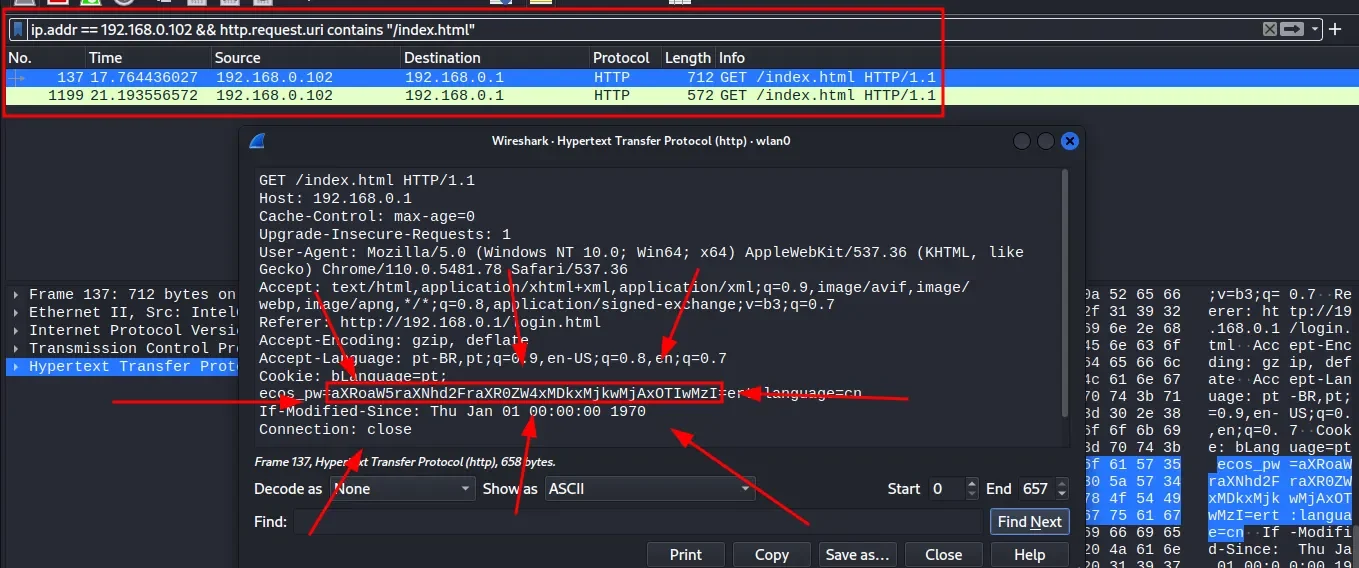
The capture shows the credential obtained after packet interception on firmware V12.03.01.06_en, as the report labels it.
Step 3: Capture the credential on V12.02.01.61_multi
The same technique was applied to the second firmware. The researcher obtained the credential on firmware V12.02.01.61_multi (CVE-2023-29681).
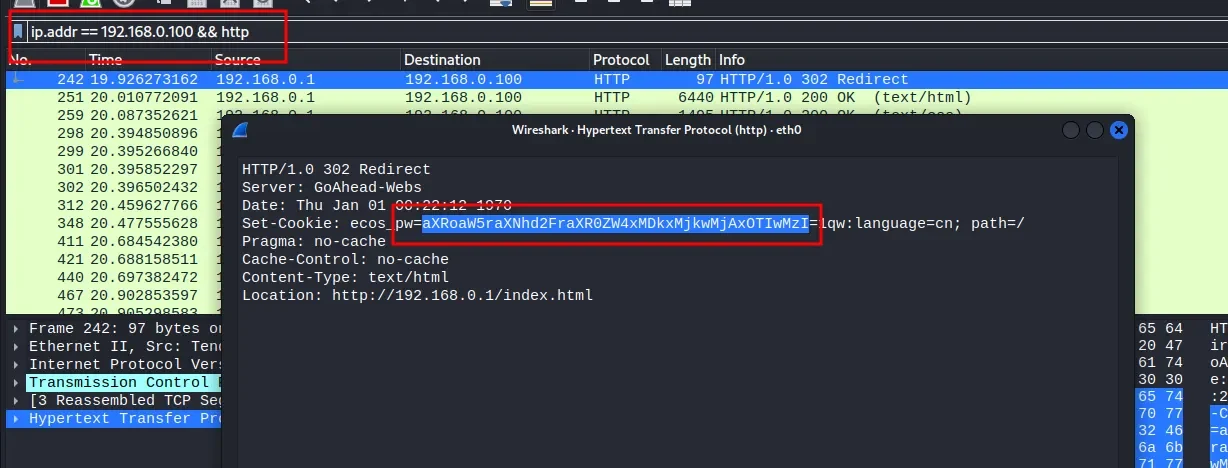
The capture shows the credential obtained after packet interception on firmware V12.02.01.61_multi.
Step 4: Decode and log in
The credential is passed using base64, so it is possible to decode it and log in to the router.

Step 5: Video demonstrations
The researcher published videos showing the exploitation on both firmwares:
Root cause
The password is stored using a weak encoding and sent base64 encoded in a cookie rather than protected with a secure hash, and the login exchange runs over HTTP because the firmware does not offer a way to switch to HTTPS. Base64 is reversible by design, so the cookie value is effectively the plaintext password for anyone who can read the traffic. ARP spoofing on the local network is enough to read that traffic, and no transport encryption stands in the way.
The researcher lists three missing protections that made the vulnerability possible:
- The possibility to switch from HTTP to HTTPS.
- Session management to avoid more than one administrator being connected at the same time.
- The use of secure hash algorithms.
Impact
An attacker who is authenticated on the LAN or WLAN can intercept the login exchange via ARP spoofing and recover the administrator password. With that password the attacker can log in to the equipment and set a new password, and can perform actions that interrupt the use of the network permanently. The attack requires the attacker to be on the same local network as the administrator's traffic and to be able to carry out ARP spoofing; it does not require any prior knowledge of the password.
Fix
The report does not describe a vendor fix or a patched firmware version. Based on the observations in the report, the protections that should be implemented are the ability to switch from HTTP to HTTPS, session management that prevents more than one administrator from being connected at the same time, and the use of secure hash algorithms instead of base64 encoding for the stored and transmitted password.
Variants to test
- Other Tenda models and firmware builds. Capture the login exchange and look for an
ecos_pwcookie in either aCookie:request header or aSet-Cookie:response header. A positive result is a base64 value that decodes to the administrator password. - Other embedded router interfaces. Inspect login requests for cookies or parameters whose values look like base64. A positive result is a value that decodes to readable credentials.
- HTTPS availability. Check whether the administrative interface offers any setting to enable HTTPS. A positive result is a login page that can be reached only over HTTP, with credentials sent in clear text apart from the encoding.
- Concurrent administrator sessions. Log in from two clients at once. A positive result is that both sessions remain active, which the report identifies as a missing protection.
What happened, in plain words
A security researcher, Mateus Pantoja, looked at a common home router, the Tenda N301 version 6, and found that it handles the administrator password badly. Anyone who can listen to the traffic between your computer and the router can read the password and then log in as you.
The problem was reported for two different versions of the router's software (called firmware, the built-in program that runs the device):
| CVE | Firmware |
|---|---|
| CVE-2023-29680 | V12.03.01.06_pt |
| CVE-2023-29681 | V12.02.01.61_multi |
A CVE is a public identifier given to a known security flaw so that people can talk about it unambiguously. The two identifiers here refer to the same underlying weakness in two firmware builds.
The weakness is classified as "Sensitive Information Sent Over an Unencrypted Channel". In everyday terms: a secret is being carried across a channel that anyone nearby can listen in on, like shouting your bank PIN across a crowded room instead of writing it on a piece of paper and handing it over.
The product and the feature involved
The Tenda N301 v6 is a home router: the box that connects your devices to the internet and lets you change settings such as the Wi-Fi name and password. To change those settings you open a web page served by the router itself and log in as the administrator.
That login is the feature at the centre of this report. When the administrator types the password into the router's web page, the router has to receive it, check it, and remember that this browser is now logged in. The way it does that is the source of the problem: the password is stored and sent using a weak encoding, and neither firmware offers a setting to turn on HTTPS.
HTTPS is the encrypted version of the web. When a website uses HTTPS, the traffic between your browser and the server is scrambled so that anyone listening on the network sees only meaningless data. When a site uses plain HTTP, the traffic is readable by anyone in the path. The report says the two firmwares do not implement settings that enable the use of HTTPS, so the login exchange runs over plain HTTP.
Setting up the test
The researcher set up a home network with the Tenda N301 v6 router and placed an attacker on the same local network, either wired (LAN) or wireless (WLAN). The attacker's goal is to sit between the administrator's computer and the router, so that traffic passes through the attacker on its way. The technique used for that is ARP spoofing, and the tool used to record the traffic is Wireshark.
Two concepts are worth explaining from scratch here.
ARP spoofing. On a local network, devices find each other using a protocol called ARP. When your computer wants to send data to the router, it asks "which device has the router's address?" and the router answers with its hardware address. ARP spoofing means sending fake answers to that question so that other devices believe the attacker's machine is the router. The attacker then receives the traffic, can read it, and forwards it on so that nothing appears broken. It is like intercepting the post by putting your own name on the letterbox and then passing the letters on after reading them.
Wireshark. A program that records the individual packets travelling on a network and lets you inspect them. A packet is a small chunk of data, and a login is made of several packets going back and forth. Wireshark shows you the contents of each one.
The diagram shows the test scenario: the attacker intercepts communications with the router via ARP spoofing and obtains the password passed in the request header via the cookie in the ecos_pw= attribute, which makes it possible to capture the encoding.
Finding it
The researcher noticed two things. First, the password used to log in to the router is stored using a weak encoding. Second, the two firmware versions do not implement settings that enable HTTPS. Because the login exchange runs over HTTP, the encoded password is exposed to anyone who can observe the traffic.
The password is sent base64 encoded in a cookie, in the name-value pair attribute:
cookie:ecos_pw=on firmware V12.03.01.06_pt (CVE-2023-29680)set-cookie:ecos_pw=on firmware V12.02.01.61_multi (CVE-2023-29681)
Three terms need unpacking.
Cookie. A small piece of text that a website asks your browser to store and send back with later requests. It is how a website remembers who you are between page loads. Think of it as a name badge the site gives you at the door and asks you to wear on every visit to the counter.
Base64. A way of writing data using only letters, digits and a couple of symbols. It is used so that arbitrary bytes can travel safely through text-based protocols. It is not a secret code: anyone can reverse it with a free tool or a single command. It is like writing a message in a different alphabet, not in a cipher.
Request header and response header. When your browser talks to a server, it sends a request with a set of labelled lines at the top, called headers. The server replies with its own headers. Cookie: is a header the browser sends to the server; Set-Cookie: is a header the server sends to the browser to give it a cookie. The difference between the two firmwares is which direction the ecos_pw cookie appears in.
Base64 is an encoding, not encryption, so anyone who captures the value can recover the password. The flaw allows an authenticated attacker on the LAN or WLAN to intercept communications with the router via ARP spoofing and obtain the password passed in the request header via the cookie in the ecos_pw= attribute.
Exploitation
Step 1: Position between the administrator and the router
Using an ARP spoofing technique to forward spoofed packets to the router, the attacker intercepts the communication. The researcher captures the traffic with Wireshark.
Why this step comes first: to read a conversation you have to be in the path of the conversation. ARP spoofing is how the attacker gets into that path without touching either device. Forwarding the packets on afterwards keeps the connection working, so the administrator does not notice anything wrong.
The screenshot shows the sending of fake packets used to place the attacker in the path of the traffic.
Step 2: Capture the credential on V12.03.01.06
With the interception in place, the credentials used when logging into the router are visible in the captured traffic. The researcher obtained the credential on firmware V12.03.01.06_en (CVE-2023-29680).
Why this works: the login exchange is plain HTTP, so the packets Wireshark records contain the cookie with the encoded password in readable form. Nothing has to be broken; the data is simply there.
The capture shows the credential obtained after packet interception on firmware V12.03.01.06_en.
Step 3: Capture the credential on V12.02.01.61_multi
The same technique was applied to the second firmware. The researcher obtained the credential on firmware V12.02.01.61_multi (CVE-2023-29681).
Why repeat it: the two firmware builds handle the cookie slightly differently (request header versus response header), so each was tested separately to confirm the same weakness exists in both.
The capture shows the credential obtained after packet interception on firmware V12.02.01.61_multi.
Step 4: Decode and log in
The credential is passed using base64, so it is possible to decode it and log in to the router.
Why this is the decisive step: base64 is reversible by design. Once the attacker has the cookie value, decoding it gives back the administrator password in plain text, and that password can be typed into the router's login page like any other.
Step 5: Video demonstrations
The researcher published videos showing the exploitation on both firmwares:
Root cause
The password is stored using a weak encoding and sent base64 encoded in a cookie rather than protected with a secure hash, and the login exchange runs over HTTP because the firmware does not offer a way to switch to HTTPS. Base64 is reversible by design, so the cookie value is effectively the plaintext password for anyone who can read the traffic. ARP spoofing on the local network is enough to read that traffic, and no transport encryption stands in the way.
A hash is different from an encoding. A hash takes data and produces a fixed-length fingerprint that cannot be turned back into the original. A website that stores a hash of your password can check a login attempt by hashing what you typed and comparing fingerprints, without ever keeping your actual password. Base64 does not do that: it is a representation, not a one-way transformation.
The researcher lists three missing protections that made the vulnerability possible:
- The possibility to switch from HTTP to HTTPS.
- Session management to avoid more than one administrator being connected at the same time.
- The use of secure hash algorithms.
A session is the period during which a website treats you as logged in. Session management is how the site keeps track of who is connected. Session management is how the site keeps track of who is connected; the report lists limiting administrators to one at a time as a missing protection.
Impact
An attacker who is authenticated on the LAN or WLAN can intercept the login exchange via ARP spoofing and recover the administrator password. With that password the attacker can log in to the equipment and set a new password, and can perform actions that interrupt the use of the network permanently. The attack requires the attacker to be on the same local network as the administrator's traffic and to be able to carry out ARP spoofing; it does not require any prior knowledge of the password.
In plain terms: someone on your Wi-Fi, or plugged into your network, can wait for you to log in to the router, read your password, and then take over the router. The report notes that the attacker can set a new password and perform actions that interrupt the use of the network permanently.
Fix
The report does not describe a vendor fix or a patched firmware version. Based on the observations in the report, the protections that should be implemented are the ability to switch from HTTP to HTTPS, session management that prevents more than one administrator from being connected at the same time, and the use of secure hash algorithms instead of base64 encoding for the stored and transmitted password.
Variants to test
These are the same ideas applied to other devices and other parts of the login flow. Each one is a way to check whether the same weakness appears elsewhere.
- Other Tenda models and firmware builds. Capture the login exchange and look for an
ecos_pwcookie in either aCookie:request header or aSet-Cookie:response header. A positive result is a base64 value that decodes to the administrator password. - Other embedded router interfaces. Inspect login requests for cookies or parameters whose values look like base64. A positive result is a value that decodes to readable credentials.
- HTTPS availability. Check whether the administrative interface offers any setting to enable HTTPS. A positive result is a login page that can be reached only over HTTP, with credentials sent in clear text apart from the encoding.
- Concurrent administrator sessions. Log in from two clients at once. A positive result is that both sessions remain active, which the report identifies as a missing protection.
Glossary
- ARP spoofing: Sending fake address-resolution replies on a local network so that other devices send their traffic through the attacker's machine.
- Base64: A reversible encoding that represents data using letters, digits and a few symbols. It hides nothing; anyone can decode it.
- Cookie: A small piece of text a website asks your browser to store and send back with later requests, used to remember who you are.
- CVE: A public identifier for a known security vulnerability.
- Firmware: The built-in software that runs a device such as a router.
- Hash: A one-way transformation that turns data into a fixed-length fingerprint which cannot be reversed to the original.
- Header: A labelled line at the top of a web request or response carrying metadata such as cookies.
- HTTP: The plain, unencrypted protocol used to fetch web pages.
- HTTPS: The encrypted version of HTTP, which scrambles traffic so that listeners on the network cannot read it.
- LAN: Local area network, the wired network in a home or office.
- Packet: A small chunk of data sent across a network.
- Session: The period during which a website treats you as logged in.
- Session management: How a website keeps track of who is connected and controls how many sessions exist.
- Wireshark: A program that records and inspects packets travelling on a network.
- WLAN: Wireless local area network, the Wi-Fi network in a home or office.



