TikTok fixes privacy issue discovered by Check Point Research
The TikTok mobile app's friend finder feature allowed an attacker to link phone numbers to user profiles by uploading hashed contacts and syncing them, bypassing the app's request signing. This could enable building a database of users and their phone numbers.
 Published on research.checkpoint.com
In January 2020, we have published a research on TikTok, reporting we have found that a threat actor could reveal personal information saved on the account and take actions on behalf of a victim, manipulating the victim’s account content. That issue was responsibly resolved by TikTok prior to the research disclosure.
The full write-up lives on its author's site
It belongs to its author, so we link to it rather than copy it. The other two tabs are our own rewrites, checked against it.
Context
TikTok is a mobile video sharing application. Among its social features is a friend finder that lets a user sync the contacts stored on their phone so they can find people they already know on TikTok. The feature works by uploading hashed contact details to TikTok's servers and then asking the server which of those contacts correspond to existing profiles.
In the months before this research, Check Point Research had already published work on TikTok in January 2020, reporting that a threat actor could reveal personal information saved on an account and take actions on behalf of a victim. That issue was resolved by TikTok before disclosure. In April 2020 TikTok launched a private bug bounty programme, which grew into a global public partnership with HackerOne in October 2020.
The research described here examined the privacy of the contacts syncing feature. The central finding is that an attacker can connect between profile details and phone numbers, and a successful exploitation can enable an attacker to build a database of users and their related phone numbers. The issue would only have impacted users who chose to associate a phone number with their account (which is not required) or who logged in with a phone number. Check Point Research informed TikTok's developers and security teams, and a solution was responsibly deployed.
Setup
The work was done against the TikTok mobile application. The researchers used a Genymotion emulator running Android 6.0.1, with the TikTok application installed and executed on it. Static and dynamic analysis was performed on the application, and Frida was used as the dynamic instrumentation framework.
Two preconditions matter for the attack chain: a registered device_id and a valid session (X-Tt-Token plus session cookies). Both are described in the steps below. The upload and sync contact requests are limited to 500 contacts per day, per user, and per device, which is the constraint the automation has to work around.
Finding it
The starting point was the contacts syncing flow itself. The application enables contacts syncing so a user can find people they know on TikTok. In simple words, it means that it is possible to connect between profile details and phone numbers.
The syncing process is composed of two requests:
- Upload contacts
- Syncing contacts
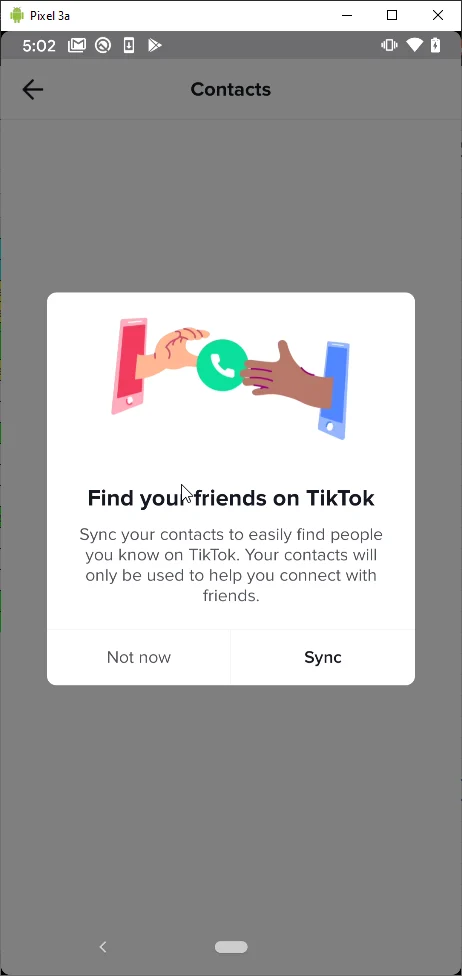
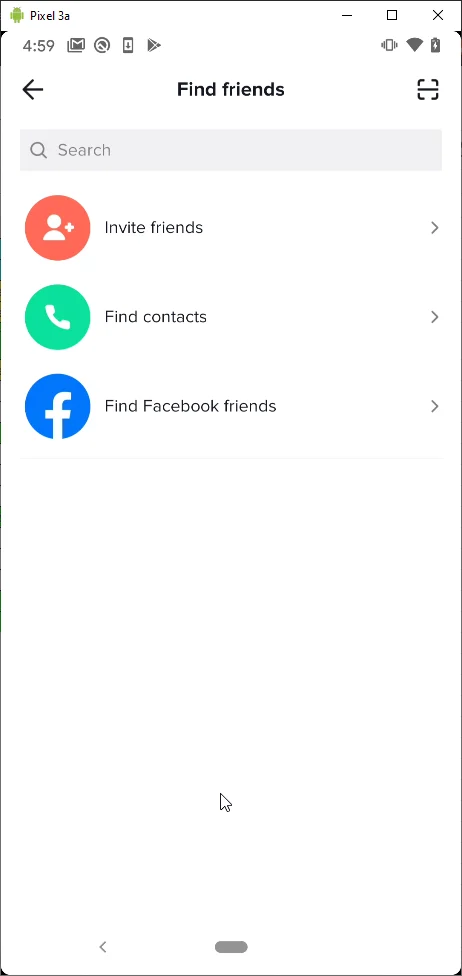
For each contact in the user's contact list, the application builds a JSON object with three attributes:
- Invited:
"False". - Name: the value is hashed using the SHA256 algorithm.
- Phone number: the value is hashed using the SHA256 algorithm.
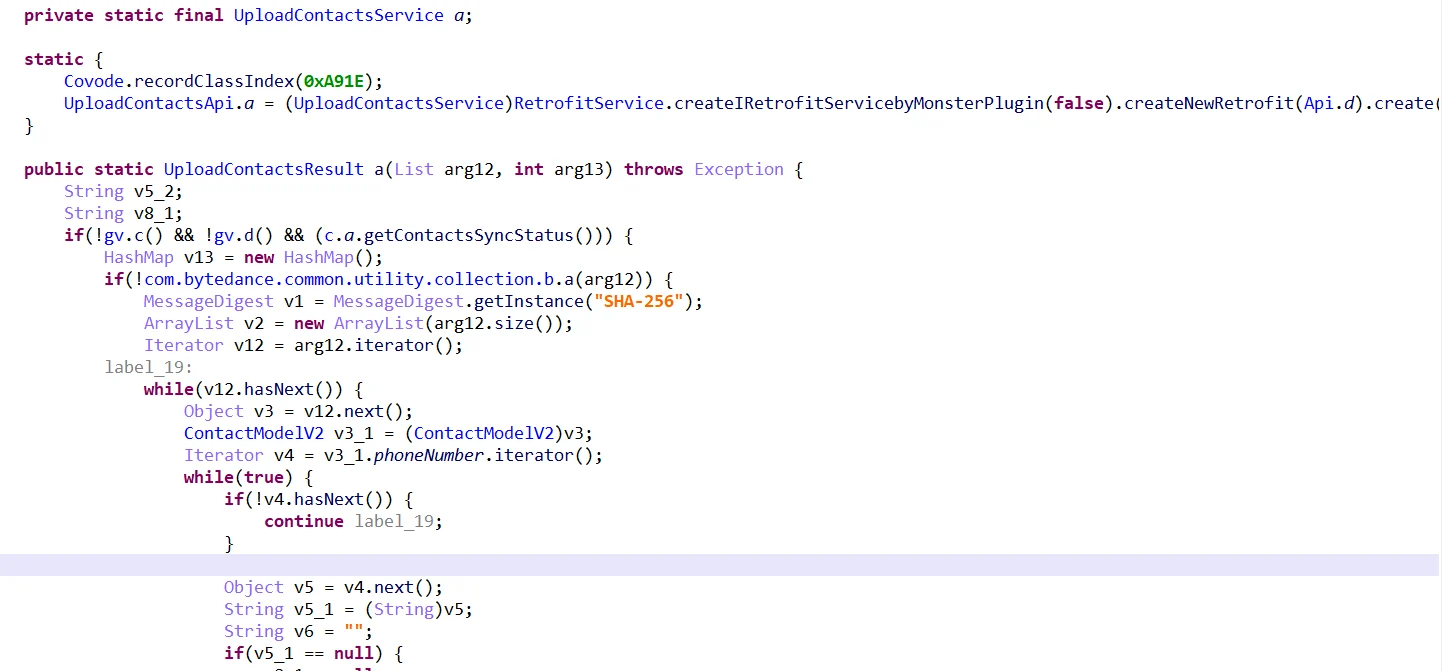
The JSON objects are appended to a single list, and the process continues with uploading the contacts:
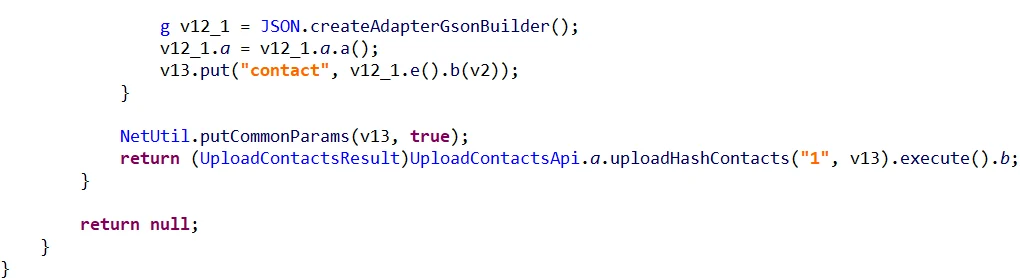
The application uploads the contacts using an HTTP request to https://api16-normal-c-alisg.tiktokv.com/aweme/v1/upload/hashcontacts. The contacts are sent as a list of JSONs in the contact parameter.
For example, for a single contact with the following details:
- Name: Testing Tester
- Phone number: [redacted]
The application sends the following list of JSONs as the value of the contact parameter:

The full HTTP request sent to upload contacts to TikTok:
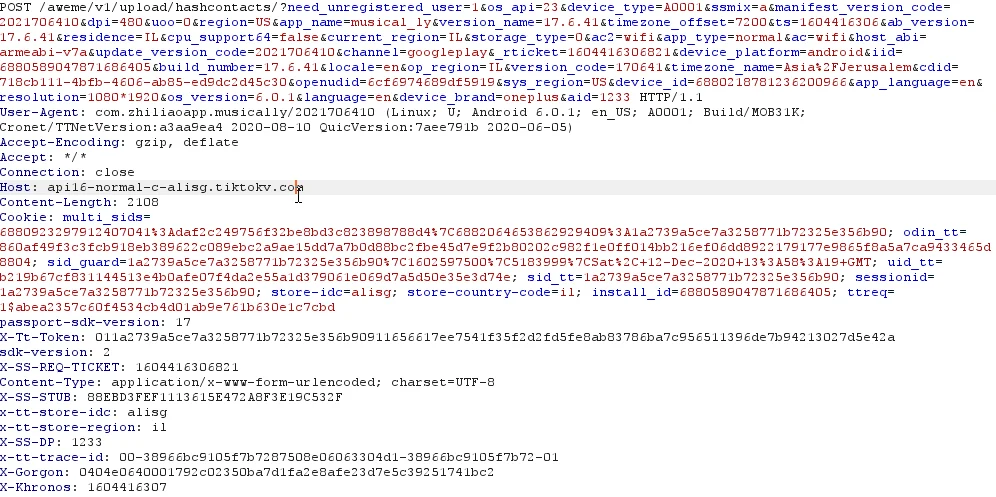
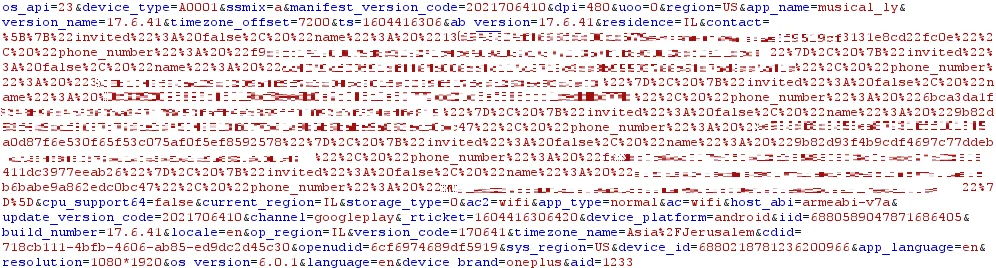
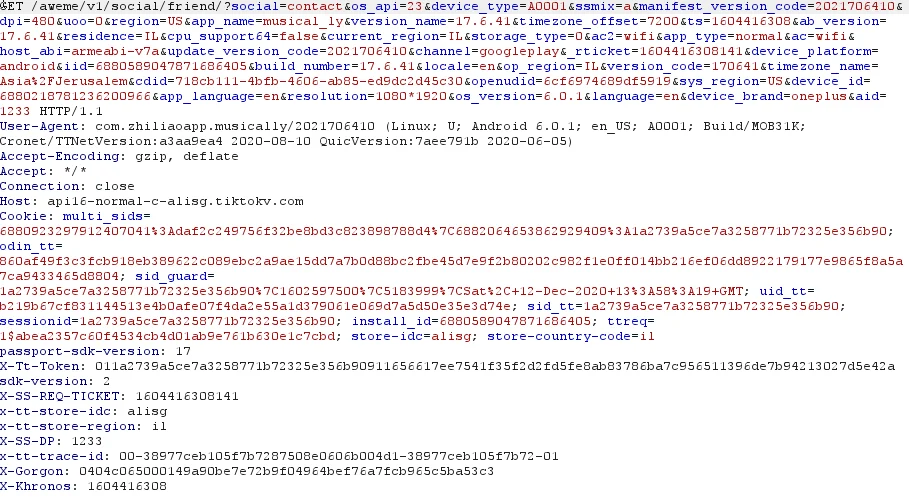
Once the upload contacts request has completed, the application sends a sync request to retrieve all the existing profiles connected to the phone numbers sent before. The HTTP request is sent to https://api16-normal-c-alisg.tiktokv.com/aweme/v1/social/friend.
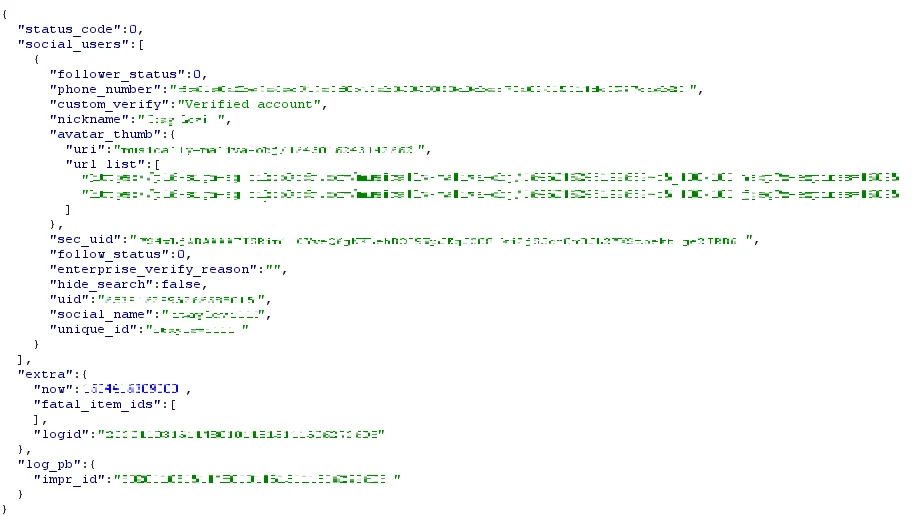
The application server response contains the list of profiles, hashed phone numbers, profile names, unique ids, profile photos, profile properties (such as hide_search), and more.

What made this interesting from a privacy standpoint is the asymmetry: the client sends hashes, but the server answers with profile data tied to those hashes. If a party can submit arbitrary hashed phone numbers at scale, the same endpoint becomes a lookup service from phone number to profile. The research question was therefore simple: can a single user query TikTok's database, causing a privacy violation?
Exploitation
Step 1: Creating a list of devices (registering physical devices)
With each launch, the TikTok mobile application performs a process of device registration to make sure that users are not switching between devices. Registration is performed using an HTTP request to https://log-va.tiktokv.com/service/2/device_register.
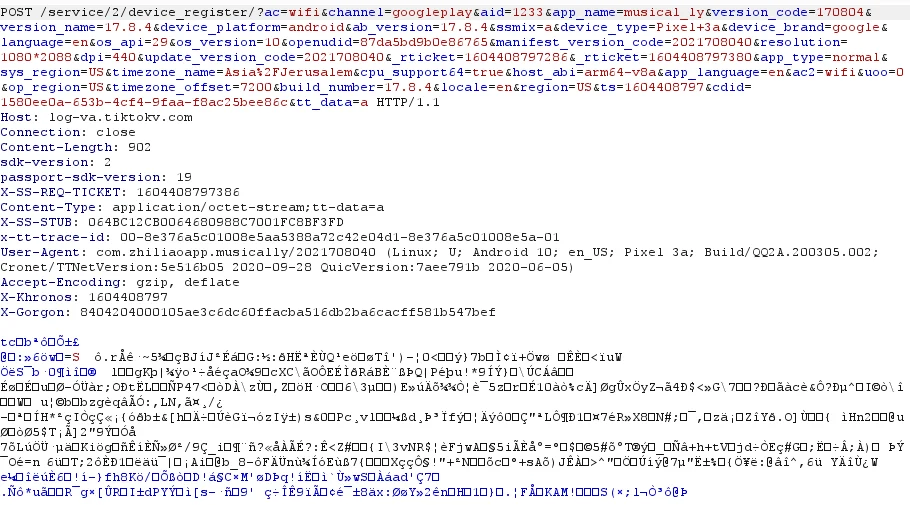
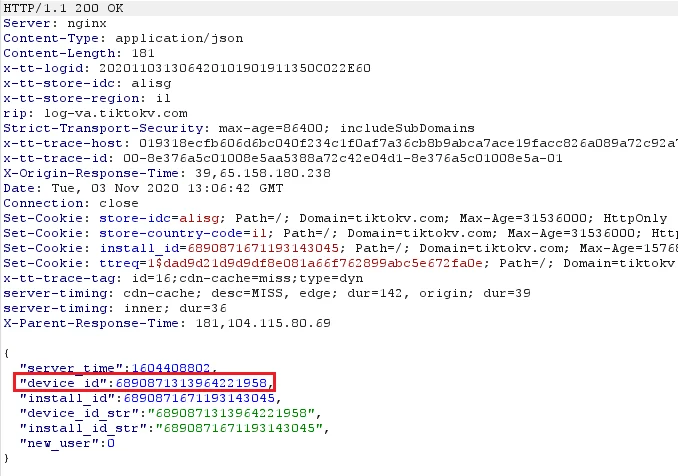
According to the data sent in the HTTP request, the application server generates a unique device_id token. This token is mandatory and is sent with each API request the application makes to the application server.
Step 2: Creating a list of never expired session tokens
Login with SMS was enabled only from a physical device, and it is performed using an HTTP request sent to https://api16-normal-c-alisg.tiktokv.com/passport/mobile/sms_login_only. The body of the request contains the mobile (cell-phone number) and code (OTP) encoded parameters.
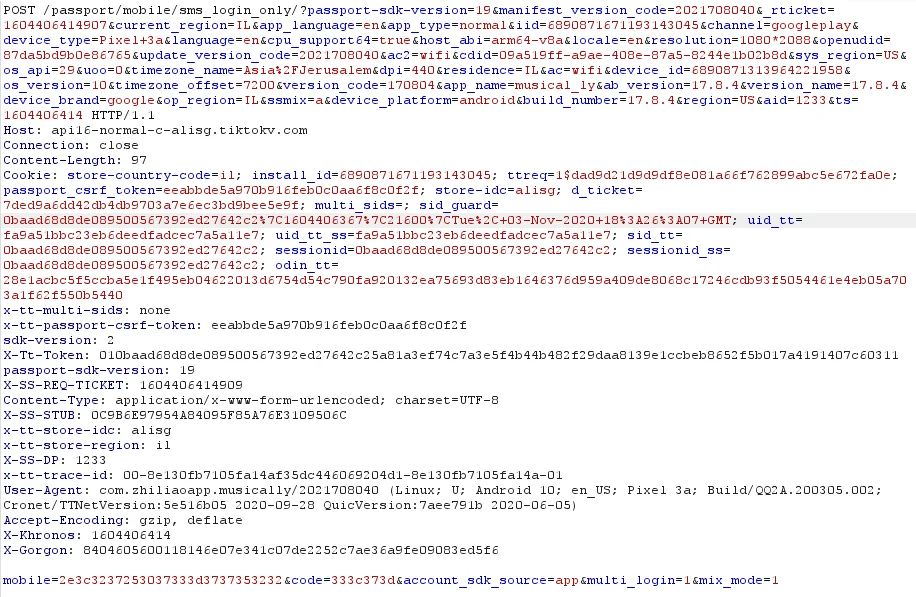
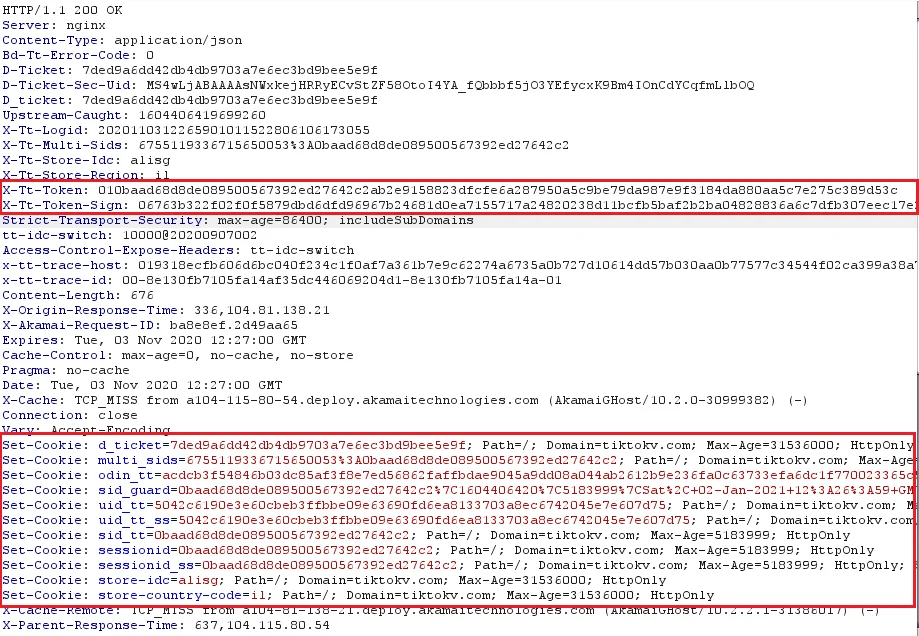
The server validates the data and generates a unique X-Tt-Token token. Additionally, the server sets the session cookies. During the research it was found that the session cookies and the X-Tt-Token values expire after 60 days, meaning the same cookies could be used for long weeks.
Step 3: Bypassing TikTok's HTTP message signing
Capturing TikTok's HTTP requests revealed that the mobile application uses a message signing mechanism, preventing threat actors (and researchers) from tampering with messages and modifying the body of the request. The mechanism requires X-Gorgon and X-Khronos headers for server verification; otherwise data cannot be requested.
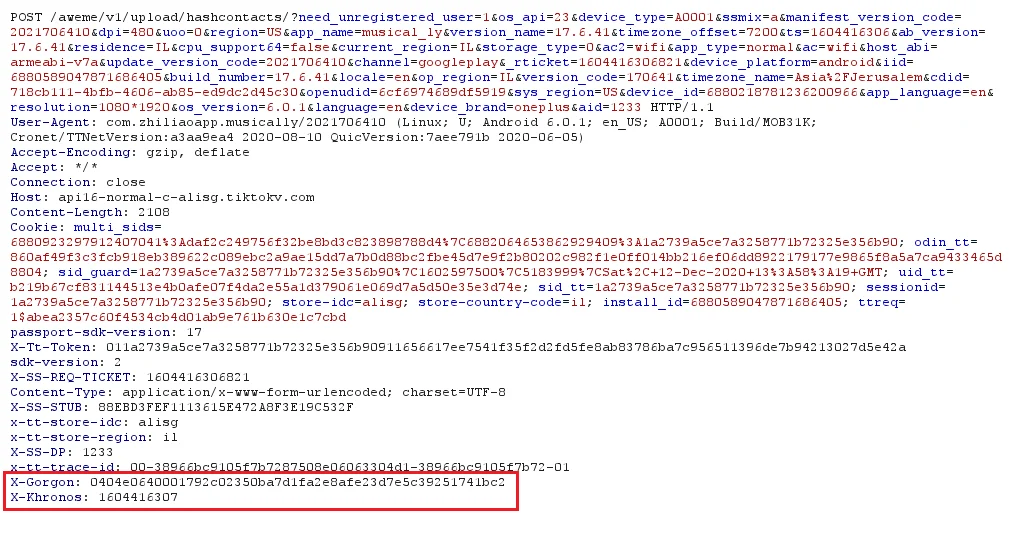
Holding the device_id, the X-Tt-Token token and the long-lived cookies, the researchers could now use a virtual device instead of a physical one. They used a Genymotion emulator running Android 6.0.1 with the TikTok application installed and executed on it.
Static and dynamic analysis followed, to understand whether there is any path to bypass the message signing mechanism, so the body of requests could be modified and an automated process built to connect between profile details and phone numbers in mass figures.
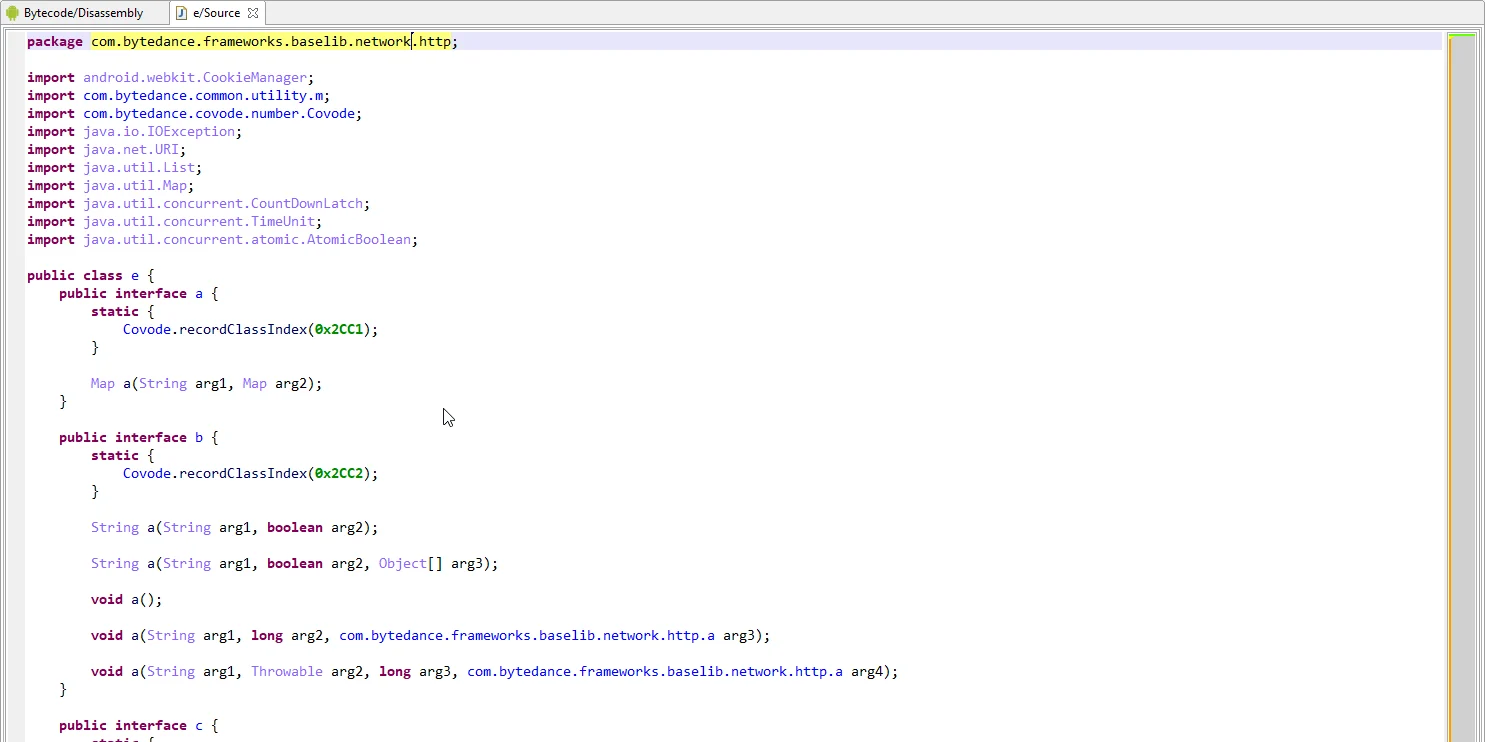
During dynamic analysis it was found that TikTok executes a service in the background. This service was found to be the message signer. The signing process is written as part of the com.bytedance.frameworks.baselib.network.http package, Class e.
The signing process was found to start with a method (obfuscated function name):
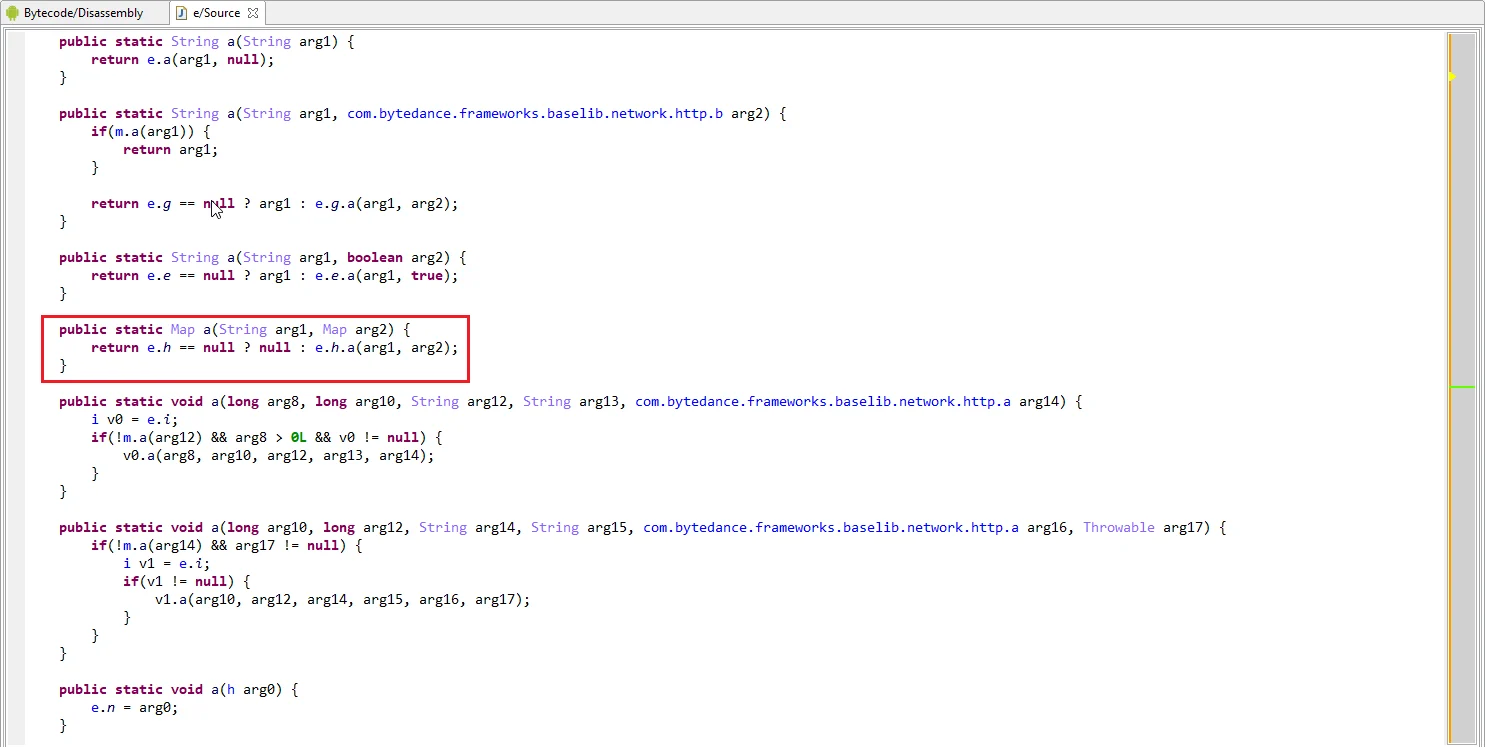
A threat actor can use a dynamic analysis framework such as Frida, hook the function, change the data in the function arguments (the contacts the threat actor wishes to sync), and re-sign the request. The service can therefore be used to sign modified requests, create updated X-Gorgon and X-Khronos header values (message signatures) and send the modified request to the TikTok application server.
Chaining it all together
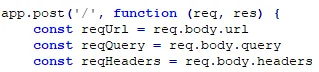
With the ability to modify HTTP requests and re-sign them, the researchers could automate the process of uploading and syncing contacts on a large scale and build a database of users and their connected phone numbers. To create an automated process of message re-signing, they wrote a short Frida script that performs the following actions.
Launching an HTTP server, listening on port 4000:
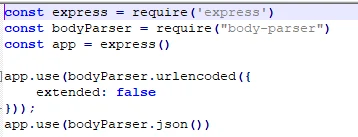
Parse the incoming HTTP POST request and extract data for request signing:
Re-sign the modified request using the a method (described above):
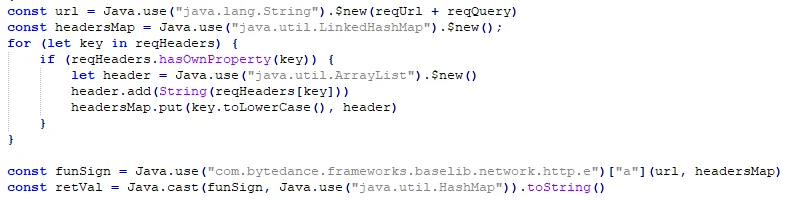
Return the updated X-Gorgon and X-Khronos signatures:

Using this script, a threat actor can create an automation to connect between phone numbers and profile details. The outcome of this attack is a massive database containing linked accounts and phone numbers, causing data leakage and privacy violation.
Root cause
The only thing standing between an attacker and mass enumeration was the request signing mechanism, and that mechanism was implemented client-side in a background service that can be hooked at runtime.
Impact
An attacker could connect between profile details and phone numbers, and build a database of users and their related phone numbers. The affected population is limited to users who have chosen to associate a phone number with their account (which is not required) or who logged in with a phone number. The upload and sync contact requests are limited to 500 contacts per day, per user, and per device. The session cookies and X-Tt-Token values expire after 60 days.
Fix
Check Point Research informed TikTok's developers and security teams about the issue, and a solution was responsibly deployed to ensure users can safely continue using the TikTok app. The report does not describe the specific change that was made.
Variants to test
- Contact sync endpoints on other apps. Submit hashed identifiers for numbers you control and for numbers you do not, and check whether the sync response returns profile data for the latter. A positive result is a response containing profile names, ids or photos for numbers that were never in a real address book.
- Client-side request signing. Look for a signing routine in a background service or native library, hook it with Frida, alter the body and re-sign. A positive result is a server response that accepts the modified body and returns data for the altered parameters.
- Long-lived tokens. Check the expiry of session cookies and auth tokens after SMS or OTP login. A positive result is a token still accepted weeks after issuance.
- Device registration as a rate-limit bypass. Register many
device_idvalues and repeat a rate-limited request. A positive result is the per-device limit resetting for each new registration while the same account remains usable. - Hash-only identifiers. For any endpoint that accepts SHA256 hashes of phone numbers or emails, compute hashes for a small set of known numbers and submit them. A positive result is a match returned for a number the submitting account has no relationship with.
What happened, in plain words
TikTok is a mobile app for sharing short videos. Like many social apps, it has a feature that helps you find people you already know: it can read the contacts saved on your phone and check which of those people also have a TikTok account. To do that, the app sends information about your contacts to TikTok's computers and asks, in effect, "which of these people are on TikTok?"
Check Point Research looked closely at that feature. They found that the way it works lets someone connect a TikTok profile to a phone number, and that someone could use this to build a large database of users and their phone numbers. Only people who chose to add a phone number to their account, or who logged in with a phone number, would have been affected. Adding a phone number is not required to use TikTok.
Check Point Research told TikTok's developers and security teams, and TikTok deployed a fix. This article walks through the whole story from the beginning, explaining each technical idea as it comes up.
Some background first
Before this research, Check Point Research had already published work on TikTok in January 2020. That earlier report said a threat actor could reveal personal information saved on an account and take actions on behalf of a victim. TikTok resolved that issue before the research was published.
In April 2020 TikTok launched a private bug bounty programme. A bug bounty programme is a scheme where a company pays outside researchers for finding and reporting security problems. In October 2020 that programme grew into a global public partnership with HackerOne, a platform where researchers and companies work together on such reports.
The research described here focused on privacy in the contacts syncing feature. The main finding: an attacker can connect between profile details and phone numbers, and a successful exploitation can enable an attacker to build a database of users and their related phone numbers. The issue would only have impacted users who chose to associate a phone number with their account (which is not required) or who logged in with a phone number. Check Point Research informed TikTok's developers and security teams, and a solution was responsibly deployed.
The setup
The work was done against the TikTok mobile application. The researchers used a Genymotion emulator running Android 6.0.1, with the TikTok application installed and executed on it. An emulator is a program that pretends to be a phone, so you can run Android apps on a computer. Static and dynamic analysis was performed on the application. Static analysis means reading the app's code without running it; dynamic analysis means watching the app while it runs. Frida was used as the dynamic instrumentation framework. Frida is a tool that lets a researcher pause a running app, look at what a function receives and returns, and change those values on the fly.
Two preconditions matter for the attack chain: a registered device_id and a valid session (X-Tt-Token plus session cookies). Both are described in the steps below. The upload and sync contact requests are limited to 500 contacts per day, per user, and per device, which is the constraint the automation has to work around.
Finding it
The starting point was the contacts syncing flow itself. The application enables contacts syncing so a user can find people they know on TikTok. In simple words, it means that it is possible to connect between profile details and phone numbers.
The syncing process is composed of two requests:
- Upload contacts
- Syncing contacts
A request here means one message the app sends to TikTok's server, the computer that stores and answers questions about accounts. Think of it like posting a form to a office and getting an answer back.
These two images show the contacts syncing feature in the app, the starting point of the research.
For each contact in the user's contact list, the application builds a JSON object with three attributes. JSON is a simple text format for structured data, like a labelled box with fields inside. A JSON object is one such box, written with curly brackets and pairs of a name and a value.
- Invited:
"False". - Name: the value is hashed using the SHA256 algorithm.
- Phone number: the value is hashed using the SHA256 algorithm.
Hashing deserves a moment. A hash function takes any input, such as a name or a phone number, and produces a fixed-length string of characters, called a hash. The same input always gives the same hash, but you cannot turn the hash back into the input. SHA256 is one well-known hash function. A useful everyday comparison: a hash is like a fingerprint of a value. Two identical values have the same fingerprint, and seeing the fingerprint does not tell you whose it is, unless you already have a list of candidates to compare against.
This image shows the JSON the app builds for a contact, with the name and phone number replaced by their SHA256 hashes.
The JSON objects are appended to a single list, and the process continues with uploading the contacts:
This image shows several of those JSON objects collected into one list, ready to be sent.
The application uploads the contacts using an HTTP request to https://api16-normal-c-alisg.tiktokv.com/aweme/v1/upload/hashcontacts. HTTP is the language browsers and apps use to talk to servers; an HTTP request is one message in that language, with a method (such as GET or POST), a URL, some headers (extra labels) and sometimes a body (the data being sent). The contacts are sent as a list of JSONs in the contact parameter. A parameter is a named slot in a request, like a field on a form.
For example, for a single contact with the following details:
- Name: Testing Tester
- Phone number: [redacted]
The application sends the following list of JSONs as the value of the contact parameter:
This image shows the list of JSONs for the example contact, with the name and phone number hashed.
The full HTTP request sent to upload contacts to TikTok:
These two images show the complete request, including the URL, the headers and the body carrying the contact parameter.
Once the upload contacts request has completed, the application sends a sync request to retrieve all the existing profiles connected to the phone numbers sent before. The HTTP request is sent to https://api16-normal-c-alisg.tiktokv.com/aweme/v1/social/friend.
This image shows the sync request the app sends to that address.
The application server response contains the list of profiles, hashed phone numbers, profile names, unique ids, profile photos, profile properties (such as hide_search), and more. A response is the server's reply to a request, again in HTTP, with its own headers and a body holding the data.
These two images show the server's reply, with the profiles matched to the hashed phone numbers.
What made this interesting from a privacy standpoint is the asymmetry: the client sends hashes, but the server answers with profile data tied to those hashes. If a party can submit arbitrary hashed phone numbers at scale, the same endpoint becomes a lookup service from phone number to profile. An endpoint is simply one address on a server that answers a particular kind of request. The research question was therefore simple: can a single user query TikTok's database, causing a privacy violation?
Exploitation
Step 1: Creating a list of devices (registering physical devices)
With each launch, the TikTok mobile application performs a process of device registration to make sure that users are not switching between devices. Registration is performed using an HTTP request to https://log-va.tiktokv.com/service/2/device_register.
This image shows the device registration request the app sends when it starts.
According to the data sent in the HTTP request, the application server generates a unique device_id token. A token is a short piece of text the server gives you and expects to see again on later requests, a bit like a cloakroom ticket: it proves which device or session you are. This token is mandatory and is sent with each API request the application makes to the application server. An API is the set of addresses and rules a server offers so that apps can ask it for things; each API request is one such question.
This image shows the device_id token returned by the server.
Step 2: Creating a list of never expired session tokens
Login with SMS was enabled only from a physical device, and it is performed using an HTTP request sent to https://api16-normal-c-alisg.tiktokv.com/passport/mobile/sms_login_only. The body of the request contains the mobile (cell-phone number) and code (OTP) encoded parameters. OTP stands for one-time password: the short code sent to your phone by text message to prove the number is yours.
This image shows the SMS login request, with the phone number and the one-time code in the body.
The server validates the data and generates a unique X-Tt-Token token. Additionally, the server sets the session cookies. A cookie is a small piece of data a server asks your app or browser to keep and send back on later requests; a session cookie identifies your logged-in session, like a wristband at an event that shows you are already inside. During the research it was found that the session cookies and the X-Tt-Token values expire after 60 days, meaning the same cookies could be used for long weeks.
This image shows the X-Tt-Token and the session cookies returned after a successful SMS login.
Step 3: Bypassing TikTok's HTTP message signing
Capturing TikTok's HTTP requests revealed that the mobile application uses a message signing mechanism, preventing threat actors (and researchers) from tampering with messages and modifying the body of the request. A message signature here is a value computed from the request's contents, so the server can check that nobody changed the message on the way. The mechanism requires X-Gorgon and X-Khronos headers for server verification; otherwise data cannot be requested. Headers are the labelled extra lines in an HTTP message, and these two carry the signature and a timestamp used to check it.
This image shows the X-Gorgon and X-Khronos headers that the app attaches to its requests.
Holding the device_id, the X-Tt-Token token and the long-lived cookies, the researchers could now use a virtual device instead of a physical one. They used a Genymotion emulator running Android 6.0.1 with the TikTok application installed and executed on it.
Static and dynamic analysis followed, to understand whether there is any path to bypass the message signing mechanism, so the body of requests could be modified and an automated process built to connect between profile details and phone numbers in mass figures.
During dynamic analysis it was found that TikTok executes a service in the background. A service, in Android, is a part of an app that keeps running without a visible screen. This service was found to be the message signer. The signing process is written as part of the com.bytedance.frameworks.baselib.network.http package, Class e. A package is a folder-like grouping of code, and a class is one named block of code inside it.
This image shows the background service identified as the message signer.
The signing process was found to start with a method (obfuscated function name):
This image shows the start of the signing method, whose name has been obfuscated. Obfuscated means deliberately renamed to something meaningless, such as a single letter, to make the code harder to read.
A threat actor can use a dynamic analysis framework such as Frida, hook the function, change the data in the function arguments (the contacts the threat actor wishes to sync), and re-sign the request. To hook a function means to intercept it while the app runs, so your own code sees the values going in and can change them. The service can therefore be used to sign modified requests, create updated X-Gorgon and X-Khronos header values (message signatures) and send the modified request to the TikTok application server.
Chaining it all together
With the ability to modify HTTP requests and re-sign them, the researchers could automate the process of uploading and syncing contacts on a large scale and build a database of users and their connected phone numbers. To create an automated process of message re-signing, they wrote a short Frida script that performs the following actions.
Launching an HTTP server, listening on port 4000:
This image shows the first part of the Frida script, which starts a small HTTP server on port 4000. A port is a numbered door on a computer through which network traffic for a particular program arrives.
Parse the incoming HTTP POST request and extract data for request signing:
This image shows the part of the script that reads the incoming request and pulls out the data that needs signing.
Re-sign the modified request using the a method (described above):
This image shows the script calling the app's own signing method on the modified data.
Return the updated X-Gorgon and X-Khronos signatures:
This image shows the script sending back the fresh signature values.
Using this script, a threat actor can create an automation to connect between phone numbers and profile details. The outcome of this attack is a massive database containing linked accounts and phone numbers, causing data leakage and privacy violation.
Root cause
Enumerable here means you can simply try every possibility, the way you can try every key on a small keyring. The only thing standing between an attacker and mass enumeration was the request signing mechanism, and that mechanism was implemented client-side in a background service that can be hooked at runtime. Client-side means the check happens inside the app on the user's device, where the user (or a researcher) has control.
Impact
An attacker could connect between profile details and phone numbers, and build a database of users and their related phone numbers. The affected population is limited to users who have chosen to associate a phone number with their account (which is not required) or who logged in with a phone number. The upload and sync contact requests are limited to 500 contacts per day, per user, and per device. The session cookies and X-Tt-Token values expire after 60 days. Account takeover means someone else gaining control of your account; that is not what happened here.
Fix
Check Point Research informed TikTok's developers and security teams about the issue, and a solution was responsibly deployed to ensure users can safely continue using the TikTok app. The report does not describe the specific change that was made.
Variants to test
These are the kinds of checks a researcher might repeat on other apps, following the same ideas.
- Contact sync endpoints on other apps. Submit hashed identifiers for numbers you control and for numbers you do not, and check whether the sync response returns profile data for the latter. A positive result is a response containing profile names, ids or photos for numbers that were never in a real address book.
- Client-side request signing. Look for a signing routine in a background service or native library, hook it with Frida, alter the body and re-sign. A positive result is a server response that accepts the modified body and returns data for the altered parameters.
- Long-lived tokens. Check the expiry of session cookies and auth tokens after SMS or OTP login. A positive result is a token still accepted weeks after issuance.
- Device registration as a rate-limit bypass. Register many
device_idvalues and repeat a rate-limited request. A positive result is the per-device limit resetting for each new registration while the same account remains usable. A rate limit is a cap on how often something may be done in a period. - Hash-only identifiers. For any endpoint that accepts SHA256 hashes of phone numbers or emails, compute hashes for a small set of known numbers and submit them. A positive result is a match returned for a number the submitting account has no relationship with.
Glossary
- API: the set of addresses and rules a server offers so apps can ask it for data or actions.
- API request: one message an app sends to a server through that API.
- Bug bounty programme: a scheme where a company pays outside researchers for finding and reporting security problems.
- Class: one named block of code inside a package.
- Client-side: happening inside the app on the user's own device, where the user has control.
- Cookie: a small piece of data a server asks an app or browser to keep and send back on later requests.
- Device registration: the process where an app tells the server about a device and receives a
device_id. - Dynamic analysis: watching an app while it runs, for example to see what functions receive and return.
- Emulator: a program that pretends to be a phone so Android apps can run on a computer.
- Endpoint: one address on a server that answers a particular kind of request.
- Enumerable: small enough that every possibility can simply be tried.
- Frida: a tool that lets a researcher intercept and change a running app's functions.
- Hash: a fixed-length string computed from an input; the same input always gives the same hash, and the input cannot be recovered from it.
- Header: a labelled extra line in an HTTP message carrying information such as a signature or a timestamp.
- Hook: to intercept a function while the app runs so your own code sees and can change its values.
- HTTP: the language browsers and apps use to talk to servers.
- HTTP request: one message in that language, with a method, a URL, headers and sometimes a body.
- JSON: a simple text format for structured data, made of named fields and values.
- Method: a named block of code that performs one task.
- Obfuscated: deliberately renamed to something meaningless to make code harder to read.
- OTP: a one-time password, the short code sent by text message to prove a phone number is yours.
- Package: a folder-like grouping of code.
- Parameter: a named slot in a request, like a field on a form.
- Port: a numbered door on a computer through which network traffic for a particular program arrives.
- Rate limit: a cap on how often something may be done in a period.
- Response: the server's reply to a request, with its own headers and a body holding the data.
- Service: in Android, a part of an app that keeps running without a visible screen.
- SHA256: a well-known hash function.
- Static analysis: reading an app's code without running it.
- Token: a short piece of text a server gives you and expects to see again on later requests, proving which device or session you are.
- Account takeover: someone else gaining control of your account.




