'Request English versions of web pages for enhanced privacy' keeps previous (grayed out) settings
Enabling the 'Request English versions of web pages for enhanced privacy' setting in Tor Browser does not override previously configured language preferences, so the browser continues to send the old Accept-Language header and expose the old navigator.language values. An attacker can use these values to fingerprint users who believe they have improved their privacy.

- Triaged in 18 days
- Fixed in 18 days
- Paid in 18 days
- Disclosed after 18 days
Summary:
Enabling 'Request English versions of web pages for enhanced privacy' in 'Choose your preferred language for displaying pages' continues to use the grayed out settings for JS and HTTP language preferences. This affects navigator.language, navigator.languages, but also Accept-Language.
Steps To Reproduce:
- Change the list of languages in the browser preference 'Choose your preferred language for displaying pages', for example add a new language or reorder the list of languages.
- From the same menu, enable 'Request English versions of web pages for enhanced privacy'. This will gray out the reconfiguration in step 1.
- Verify if the setting in step 2 took place by checking navigator.language, navigator.languages and Accept-Language.
Supporting Material/References:
Accept-Language: ab,en-US;q=0.7,en;q=0.3 is included HTTP Header output with the configuration attached.
Impact
Users that have previously changed language settings (or language settings were changed by the browser previously, such as from a locale-specific installation) may make use of this setting expecting to improve their privacy when using Tor Browser. For example, users might find few websites dynamically change their language, or change their threat model. The settings they changed gray out, which gives confidence that they are overwritten.
However, an attacker can make use of both JavaScript fingerprinting (malicious scripts reading navigator.languages) and HTTP fingerprinting (malicious server reading Accept-Language) to identify users that have changed these settings. This affects users on a Strict security level (disabled JS) through the headers passed.
To resolve this, enabling the setting should enforce the language settings of an English default installation of Tor Browser globally, also maintaining the order of this configuration (that is, "en-US,en" and not "en,en-US"). Currently, I think the best workaround is to manually add, remove and reorder the language preferences or reset about:config's intl.accept_languages.
Attachments
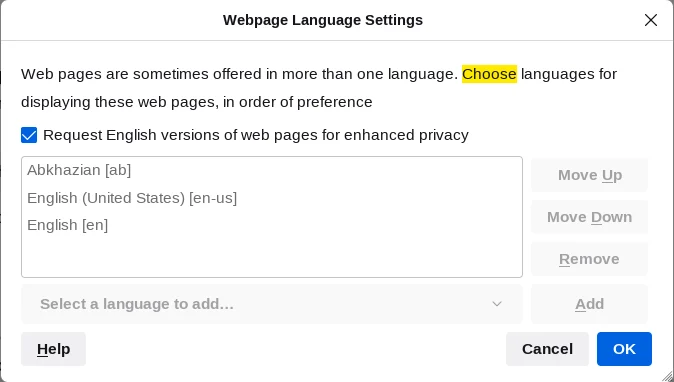
Context
Tor Browser ships a preference called 'Request English versions of web pages for enhanced privacy', found in the 'Choose your preferred language for displaying pages' menu. The intent of the setting is straightforward: when it is enabled, the browser should present itself as an English-language client so that sites do not learn the user's real locale from the language negotiation the browser performs on every request.
The surfaces involved are the JavaScript-visible navigator.language and navigator.languages properties and the HTTP Accept-Language request header. All three are classic fingerprinting inputs: a script can read the first two, and any server sees the third before it returns a byte of content.
The report was filed against Tor Browser in the Tor program on HackerOne, classified as Information Disclosure, and paid a 200.00 USD bounty. It was disclosed on 2023-09-13.
Setup
No accounts, roles or special tooling are described. The precondition is simply a Tor Browser profile whose language list has been customised, either by the user through the preferences UI or by the browser itself, for example through a locale-specific installation. The researcher tested the behaviour by changing the preference, enabling the English-request option, and then inspecting the three surfaces above.
Finding it
The researcher noticed that enabling 'Request English versions of web pages for enhanced privacy' greys out the language list but does not actually replace the values that are used. The greyed-out list still drives navigator.language, navigator.languages and Accept-Language. The visual state of the UI suggests the custom list has been overridden, while the observable behaviour shows it has not.
That mismatch is the bug: the user is given confidence that their previous configuration is no longer in effect, when in fact it is still being sent to every site and exposed to every script.
Exploitation
Step 1: customise the language list
In the browser preference 'Choose your preferred language for displaying pages', change the list of languages, for example by adding a new language or reordering the existing entries. This is the state many users are already in, whether deliberately or because a locale-specific installation produced it.
Step 2: enable the English-request option
From the same menu, enable 'Request English versions of web pages for enhanced privacy'. The reconfiguration from step 1 is greyed out, which reads as though the custom list has been superseded.
Step 3: check what is actually exposed
Verify whether the setting from step 2 took effect by inspecting navigator.language, navigator.languages and Accept-Language. The customised values are still in use. With the configuration attached to the report, the HTTP header output contained:
Accept-Language: ab,en-US;q=0.7,en;q=0.3
This is the key observation. The leading ab is the user's own preference, still advertised with the highest quality value, and the English entries follow only as fallbacks. A genuine English default would not begin with a non-English language at all. The header therefore tells any server that the client is configured for ab before anything else, which is exactly the locale signal the privacy option is supposed to suppress.
The same stale values are what scripts read through navigator.language and navigator.languages.
The attachment shows the configuration used for the test, the state in which the language list has been customised and the English-request option is enabled.
Root cause
Enabling the option does not rewrite the underlying language configuration. The greyed-out UI is a presentation change only, while the stored preferences that feed the JavaScript properties and the request header remain the user's previous values. The custom language survives as the first entry and English appears as a fallback with lower quality values.
Because the values are still present in the profile, no defence intervenes: the header is built from them and the JavaScript properties are populated from them. The only thing that changed was the user's expectation.
Impact
Users who previously changed their language settings, or whose settings were changed by the browser, for example through a locale-specific installation, may enable this option expecting improved privacy in Tor Browser. They might do so because few websites dynamically change their language, or because their threat model has shifted. The settings grey out, which gives confidence that they have been overwritten.
In practice an attacker can combine JavaScript fingerprinting, with malicious scripts reading navigator.languages, and HTTP fingerprinting, with a malicious server reading Accept-Language, to identify users who have changed these settings. The header path matters especially because it affects users on the Strict security level, where JavaScript is disabled: those users are still identified through the headers their browser sends.
Fix
The report proposes that enabling the setting should enforce the language settings of an English default installation of Tor Browser globally, including the order of that configuration, that is en-US,en and not en,en-US. The report does not state which change, if any, was ultimately made.
As a workaround, the researcher suggests manually adding, removing and reordering the language preferences, or resetting intl.accept_languages in about:config.
- Other privacy toggles that grey out a dependent control. Enable the toggle and then read the underlying value through the browser's own diagnostics or a page script. A positive result is the old value still being used after the UI claims it is overridden.
- Header versus JavaScript divergence. Compare
Accept-Languagewithnavigator.languagesafter toggling the option. A positive result is one surface being sanitised while the other keeps the original value. - Ordering of fallback values. Check whether a sanitised default is appended after the user's value rather than replacing it, as with
ab,en-US;q=0.7,en;q=0.3. A positive result is any non-default language carrying the highest quality value. - Locale-specific installations. Test a build whose language list was set at install time rather than by the user, then enable the privacy option. A positive result is the installation locale still leaking through both surfaces.
- JavaScript-disabled profiles. Repeat the header check with scripting off. A positive result is the same identifying header on a configuration the user considers hardened.
This class of bug hides in privacy and anti-fingerprinting features whose UI state is decoupled from the values actually consumed by the network stack and the DOM. The signal during review is a control that becomes disabled or greyed out when another option is enabled: the question to ask is whether the disabled control's stored value is still read anywhere.
Testing is cheap and needs no special access: toggle the option, then read the observable surfaces directly, both the JavaScript properties and the raw request headers. The researcher demonstrated impact by showing a concrete header, Accept-Language: ab,en-US;q=0.7,en;q=0.3, in which the user's own language still leads, and by pointing out that the header path reaches users on the Strict security level where scripts cannot run. Framing the issue as a gap between what the UI promises and what the browser sends is what makes the privacy impact legible to the program.
What happened, in plain words
Tor Browser is a web browser built to make it hard for websites to work out who you are and where you are. It has a privacy setting called 'Request English versions of web pages for enhanced privacy'. The idea is simple: when you switch it on, the browser should tell every website "I speak English" so that the site cannot guess your real language, and through it your country or community.
The researcher found that this setting does not do what it promises. When you turn it on, the browser greys out your language list, which looks like it has replaced your choices with English. But behind the scenes, your old language choices are still being sent to every website and are still readable by any script on a page. So the browser shows you one thing and does another.
This matters because your language is a clue about who you are. If a website can see that your browser asks for pages in a particular language, it can group you with other people who use that language, and that makes you easier to single out. The report calls this kind of leak Information Disclosure: the browser is giving away information about you that you thought you had hidden.
The report was filed against Tor Browser in the Tor program on HackerOne, a platform where security researchers report bugs to the companies that make software. It was classified as Information Disclosure and paid a 200.00 USD bounty. It was disclosed on 2023-09-13.
The pieces involved
Before the steps make sense, here are the three places where your language choice shows up.
navigator.language: a value that any JavaScript running on a web page can read. It holds the single language your browser prefers, such asen-USfor American English. JavaScript is the programming language that makes web pages interactive, and scripts on a page can ask the browser questions like this one.navigator.languages: the same idea, but a list of all your preferred languages in order, most preferred first.Accept-Language: an HTTP header. A header is a small line of text your browser attaches to every request it sends to a server, like the note you write on the outside of an envelope.Accept-Languagetells the server which languages you would like the page in. The server sees it before it sends back a single byte of the page.
All three are classic fingerprinting inputs. Fingerprinting means collecting small details about a browser and combining them into a profile that can recognise the same visitor again, even without cookies. A cookie is a small piece of data a site stores in your browser to remember you; fingerprinting works without one, by reading the browser's own settings. Your language is one such detail, and it is a strong one because most people do not change it.
The report concerns Tor Browser. The researcher changed a setting in the browser, turned on the privacy option, and then looked at what the browser was actually sending and exposing.
Finding it
The researcher noticed a mismatch. Turning on 'Request English versions of web pages for enhanced privacy' greys out the language list, but it does not replace the values that are actually used. The greyed-out list still drives navigator.language, navigator.languages and Accept-Language.
Think of it like a form at a hotel: the receptionist crosses out the box where you wrote your home address and tells you it is no longer needed, but the address is still printed on the key card you carry around. The crossing out is only on the surface.
That mismatch is the bug. The user is given confidence that their previous configuration is no longer in effect, when in fact it is still being sent to every site and exposed to every script.
Reproducing it
Step 1: customise the language list
In the browser preference 'Choose your preferred language for displaying pages', change the list of languages, for example by adding a new language or reordering the existing entries. This is the state many users are already in, whether they did it deliberately or because a version of the browser built for a particular region set it up that way.
Why this step: the bug only shows up when there is a custom list to leak. Starting from a changed list puts the browser in the state the researcher wants to test.
Step 2: enable the English-request option
From the same menu, enable 'Request English versions of web pages for enhanced privacy'. The reconfiguration from step 1 is greyed out, which reads as though the custom list has been superseded.
Why this step: this is the action a privacy-conscious user would take. The greyed-out list is the browser's way of saying "I have taken over from here". The test is whether that claim is true.
Step 3: check what is actually exposed
Verify whether the setting from step 2 took effect by inspecting navigator.language, navigator.languages and Accept-Language. The customised values are still in use. With the configuration attached to the report, the HTTP header output contained:
Accept-Language: ab,en-US;q=0.7,en;q=0.3
Line by line, in plain words:
Accept-Language:is the name of the header, the label on the envelope telling the server what kind of information follows.abis the first language in the list, the one the browser prefers most. In this test it is the user's own custom choice, still advertised first.en-US;q=0.7means American English, with a quality value of 0.7. Theqvalue is a score from 0 to 1 saying how much the browser wants that language compared with the others. A lower number means "this is a fallback, not my first choice".en;q=0.3means English in general, with an even lower score of 0.3, so it is the last fallback.
This is the key observation. The leading ab is the user's own preference, still advertised with the highest quality value, and the English entries follow only as fallbacks. A genuine English default would not begin with a non-English language at all. The header therefore tells any server that the client is configured for ab before anything else, which is exactly the locale signal the privacy option is supposed to suppress.
The same stale values are what scripts read through navigator.language and navigator.languages.
The attachment shows the configuration used for the test, the state in which the language list has been customised and the English-request option is enabled.
Why it happens
Enabling the option does not rewrite the underlying language configuration. The greyed-out interface is a presentation change only, while the stored preferences that feed the JavaScript properties and the request header remain the user's previous values. The custom language survives as the first entry and English appears as a fallback with lower quality values.
Because the values are still present in the browser's profile, nothing stops them being used: the header is built from them and the JavaScript properties are filled from them. The only thing that changed was the user's expectation.
Who is affected
Users who previously changed their language settings, or whose settings were changed by the browser, for example through a version installed for a particular region, may enable this option expecting improved privacy in Tor Browser. They might do so because few websites dynamically change their language, or because their threat model has shifted. A threat model is simply the list of attackers you are trying to defend against and what you are willing to do about them. The settings grey out, which gives confidence that they have been overwritten.
In practice an attacker can combine JavaScript fingerprinting, with malicious scripts reading navigator.languages, and HTTP fingerprinting, with a malicious server reading Accept-Language, to identify users who have changed these settings. The header path matters especially because it affects users on the Strict security level, where JavaScript is disabled: those users are still identified through the headers their browser sends, even though no script can run in their browser.
The proposed fix
The report proposes that enabling the setting should enforce the language settings of an English default installation of Tor Browser globally, including the order of that configuration, that is en-US,en and not en,en-US. The order matters because the first entry is the one the browser prefers most, and a server reading the header will treat it as the strongest signal.
The report does not state which change, if any, was ultimately made.
As a workaround, the researcher suggests manually adding, removing and reordering the language preferences, or resetting intl.accept_languages in about:config. about:config is a special page inside the browser where advanced settings are stored as name and value pairs; intl.accept_languages is the name of the setting that holds your language list.
Similar things to test
- Other privacy toggles that grey out a dependent control. Enable the toggle and then read the underlying value through the browser's own diagnostics or a page script. A positive result is the old value still being used after the interface claims it is overridden.
- Header versus JavaScript divergence. Compare
Accept-Languagewithnavigator.languagesafter toggling the option. A positive result is one surface being cleaned up while the other keeps the original value. - Ordering of fallback values. Check whether a sanitised default is appended after the user's value rather than replacing it, as with
ab,en-US;q=0.7,en;q=0.3. A positive result is any non-default language carrying the highest quality value. - Region-specific installations. Test a build whose language list was set at install time rather than by the user, then enable the privacy option. A positive result is the installation language still leaking through both surfaces.
- Profiles with JavaScript disabled. Repeat the header check with scripting off. A positive result is the same identifying header on a configuration the user considers hardened.
This class of bug hides in privacy and anti-fingerprinting features whose interface state is disconnected from the values actually used by the network stack and the page. The network stack is the part of the browser that sends and receives requests; the page is what scripts can read. The signal during review is a control that becomes disabled or greyed out when another option is enabled: the question to ask is whether the disabled control's stored value is still read anywhere.
Testing is cheap and needs no special access: toggle the option, then read the observable surfaces directly, both the JavaScript properties and the raw request headers. The researcher demonstrated impact by showing a concrete header, Accept-Language: ab,en-US;q=0.7,en;q=0.3, in which the user's own language still leads, and by pointing out that the header path reaches users on the Strict security level where scripts cannot run. Framing the issue as a gap between what the interface promises and what the browser sends is what makes the privacy impact clear to the program.
Glossary
- Tor Browser: a web browser designed to make it hard for websites to identify you or your location.
- Tor: the network and project behind Tor Browser.
- HackerOne: a platform where researchers report security bugs to the companies that make the software, sometimes for a reward.
- Bounty: a payment made to a researcher for reporting a valid security bug.
- Information Disclosure: a bug class where information that should stay hidden is revealed to someone who should not see it.
- Fingerprinting: collecting small details about a browser and combining them to recognise the same visitor again, even without cookies.
- JavaScript: the programming language that makes web pages interactive; scripts on a page can read values from the browser.
navigator.language: a value readable by page scripts holding the browser's single preferred language.navigator.languages: a value readable by page scripts holding the browser's list of preferred languages, most preferred first.- HTTP header: a small line of text attached to every request or response, carrying extra information such as the language you prefer.
Accept-Language: the HTTP header in which the browser tells a server which languages it would like the page in.- Quality value (
q): a score from 0 to 1 inAccept-Languagesaying how strongly the browser wants a given language compared with the others. - Locale: the combination of language and region a user or system is set up for, such as American English.
- Cookie: a small piece of data a site stores in your browser to remember you between visits.
- Threat model: the list of attackers you are trying to defend against and what you are willing to do about them.
- Strict security level: a Tor Browser setting in which JavaScript is disabled.
about:config: a special page inside the browser where advanced settings are stored as name and value pairs.intl.accept_languages: the name of the stored setting that holds your language list.- Network stack: the part of the browser that sends and receives requests over the network.
- DOM: the browser's in-memory model of a web page, which scripts read and change.
- Deanonymisation: working out who a user really is behind an anonymous connection.



