Turning self XSS into good XSS v2
A self-XSS on m.uber.com could be triggered after logging the victim into the attacker's account, and an arbitrary cookie installation on business.uber.com allowed setting cookies for *.uber.com in Safari. Chaining them let an attacker steal the oauth2 cookie of any logged-in user.

This appears to be the issue which I was digging for the most time during my bugbounty experience, it took more than two months to find a perfect solution for a problem.
The full write-up lives on its author's site
It belongs to its author, so we link to it rather than copy it. The other two tabs are our own rewrites, checked against it.
Context
This is a chained-vulnerability story from the Uber bug bounty programme, spanning roughly two months of work in 2016. The two components are:
- A self-stored XSS on
m.uber.com, the mobile rider site, which fires on the index page when a user simply logs in. - An arbitrary cookie installation flaw on
business.uber.com, on the pagehttps://business.uber.com/new/confirm/[exploit-here].
The author was inspired by Jack Whitton's post on turning self-XSS into good XSS, and set out to do the same rather than report the self-XSS on its own. The write-up is as much about the chaining logic and the disclosure outcome as about the bugs themselves.
Setup
The report does not describe a lab, tooling or specific browser versions. The relevant preconditions are about authentication and cookie scoping:
- On
m.uber.com, a user can be authenticated by presenting only the cookie namedtoken. - Other Uber subdomains such as
riders.uber.com,login.uber.com,partners.uber.comand similar need a different cookie,oauth2. - The
oauth2cookie is scoped to*.uber.com. - The arbitrary cookie installation on
business.uber.comworked for Safari users, according to the report.
The author's own route to planting the self-XSS payload was to modify an existing business profile name through the mobile application. A second route to the same self-XSS was reported separately by another researcher (HackerOne report 134124).
Finding it
The self-XSS was found in late March 2016. It launches on the m.uber.com index page when the user logs in, which means the payload sits in the profile and executes in the victim's own session once they are authenticated.
On its own that is a self-XSS: it only fires for the person who stored the payload. The interesting question was whether an attacker could first log a victim into an account they control, where the payload is already stored, and then have the payload run against the victim.
The second bug was found on https://business.uber.com/new/confirm/[exploit-here]. User input is reflected into the server's response directly inside the Cookie header and is not properly sanitised. That makes it possible to install arbitrary cookies for any *.uber.com subdomain, a technique the author credits to earlier research on XSRF cookie setting (miki.it, 2013).
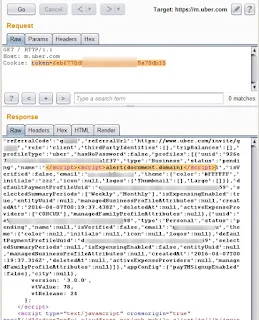
The screenshot shows the self-XSS firing on the index page when the user simply logs in.
Exploitation
Step 1: Self-XSS on m.uber.com
The payload is stored in the profile, here by modifying an existing business profile name via the mobile application. When the account owner logs in, the payload executes on the m.uber.com index page.
Step 2: Arbitrary cookie installation on business.uber.com
The confirm page reflects the path segment into the response's Cookie header without sanitising it. Because the value lands in the response's Cookie header, an attacker can append attributes and additional cookies, including a domain attribute that widens the scope to .uber.com:
https://business.uber.com/new/confirm/test;,arbitrary=cookie;domain=.uber.com
Here test;,arbitrary=cookie;domain=.uber.com is the reflected input. The ; terminates the original cookie value, arbitrary=cookie sets a new cookie, and domain=.uber.com scopes it to every Uber subdomain. The report notes this worked for Safari users.
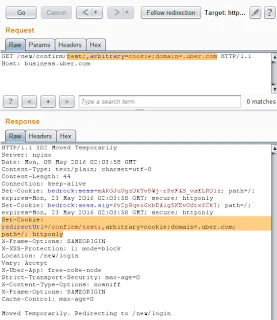
The screenshot shows the arbitrary cookie being installed for the .uber.com domain.
Step 3: Chaining the two
The chain relies on the difference in cookie requirements between subdomains. m.uber.com accepts the token cookie alone, while the other Uber subdomains need oauth2. If the attacker can log the victim into the attacker's own account (the one holding the self-XSS) by setting the token cookie for .uber.com, the payload runs in the victim's browser. Because oauth2 is scoped to *.uber.com, it is also sent to m.uber.com, so the payload running there can read and exfiltrate the victim's real oauth2 cookie and perform other actions as the victim.
The proof of concept is split across several script blocks in the report. The first part is the stored payload:
<script>
function exploit() {
        setTimeout(function() {
                var s1 = new XMLHttpRequest();
                s1.open('GET', 'https://m.uber.com/', false);
                s1.send(null);

                document.location.href='https://m.uber.com/';
        }, 3000);
}
</script>

<body onload="exploit()">
<script>
var xmlhttp = new XMLHttpRequest();
xmlhttp.open('GET', 'https://business.uber.com/new/confirm/test;,[redacted]', false);
xmlhttp.send(null);
</script>
The exploit() function waits three seconds, makes a synchronous request to https://m.uber.com/, then navigates the browser to https://m.uber.com/. The second block makes a synchronous request to the confirm page with a crafted path that installs a token cookie (value redacted in the report as XXXXXXXXXXXXXXX) for domain=.uber.com. That token is the attacker's session token, so the victim's browser is now logged into the attacker's account, where the self-XSS is stored. The navigation to m.uber.com then triggers the payload in the victim's session.
Result
The author reports that the exploit was working since late March and was still working at the time of the report to Uber on 9 May.
The recording shows the exploit working against the target.
Root cause
The two root causes are independent:
- Stored XSS in the profile name on
m.uber.com. The stored payload executes on them.uber.comindex page when the account owner logs in. - Header injection on
business.uber.com/new/confirm/. User input from the URL path is placed into the response'sCookieheader without sanitisation. Because the input can contain;and attribute syntax, an attacker can add cookies and adomainattribute, widening scope to.uber.com.
The design factor that makes the chain work is the cookie model: m.uber.com trusts the token cookie alone, and oauth2 is scoped to *.uber.com, so a cookie set for the parent domain is accepted by m.uber.com and the sensitive oauth2 cookie is exposed to it. The report does not state which server-side or framework defences were present; the implication is that neither the output encoding on the profile name nor the header construction on the confirm page prevented the injection.
Impact
By chaining the two bugs, an attacker could log a victim into an attacker-controlled account with the stored self-XSS, trigger the payload in the victim's browser, and steal the oauth2 cookie of any logged-in user, then perform any other malicious actions with it. The report frames this as good XSS on m.uber.com with the ability to steal sensitive cookie data.
The conditions are explicit: the arbitrary cookie installation worked for Safari users, and the chain depends on the victim visiting the crafted confirm URL and then m.uber.com. The author received 1000 USD instead of the 5k+ they expected for stored XSS with the ability to steal sensitive cookie data.
Fix
According to the report, the self-XSS was silently patched several hours after the issue was reported through HackerOne. The author received a triage response saying the team was having trouble reproducing the proof of concept. After the HackerOne team was brought into the discussion, the author was rewarded 1000 USD for the arbitrary cookie installation rather than the higher amount for the chained stored XSS.
A separate self-XSS on the same domain was reported by another researcher while Uber was resolving this issue, which the author says resulted in a fix of the self-XSS and refusal of the appropriate reward.
Variants to test
- Reflected input in response headers. Look for endpoints where a path segment or parameter appears in a
Set-Cookieor other response header. A positive result is a response where your input introduces a new cookie or attribute, for example adomain=.example.comscope that the browser accepts. - Cookie-scope mismatches between subdomains. Map which subdomains accept which cookies for authentication. A positive result is a low-privilege subdomain that authenticates on a cookie you can set for the parent domain, while a more sensitive cookie is scoped to the parent domain and therefore sent to it.
- Self-XSS plus login CSRF. Find a stored payload that fires after login, then look for a way to force a victim into an attacker-controlled session (cookie injection, login CSRF, or a token in a URL). A positive result is the payload executing in the victim's browser with the victim's other cookies present.
- Browser-specific cookie parsing. Test the same cookie injection in different browsers. A positive result is a browser that accepts the injected cookie and domain attribute where others reject it, as the report notes for Safari.
What happened, in plain words
A security researcher spent more than two months on a bug bounty programme run by Uber. A bug bounty programme is a scheme where a company pays people for finding and reporting security problems in its products, instead of those people using the problems for harm. The researcher found two separate, fairly small weaknesses and worked out how to combine them into one much more serious attack. Combining weaknesses like this is called chaining.
The first weakness was a self-XSS on m.uber.com, the mobile version of Uber's rider website. XSS stands for cross-site scripting: it means an attacker manages to get their own code (usually JavaScript, the language browsers run inside web pages) to run inside someone else's browser while that person is using a website. "Self-XSS" is the weak version: the code only runs for the person who put it there, so on its own it is not much use to an attacker. The researcher had been inspired by a public post by Jack Whitton about turning self-XSS into "good XSS", meaning XSS that actually runs against other people, and decided to try the same rather than report the small bug and stop.
The second weakness was on business.uber.com, on the page https://business.uber.com/new/confirm/[exploit-here]. That page took text from the address the visitor typed and copied it into a response header without cleaning it. Headers are the small pieces of information a web server sends alongside a page, and one of them, the Cookie header, is how a server tells a browser to store a small labelled value. Because the text was not cleaned, an attacker could use it to make the browser store cookies of their choosing for the whole uber.com domain.
Put together, the two bugs let an attacker first log a victim into an account the attacker controls, where the self-XSS payload is already stored, and then have that payload run in the victim's browser. From there the payload could steal the victim's oauth2 cookie, a sensitive login credential, and act as the victim.
The story ends less happily than the technical work deserves. The self-XSS was quietly fixed a few hours after the report, the researcher was told the team could not reproduce the proof of concept, and after HackerOne (the platform that runs the bounty programme) was brought into the discussion, the researcher was paid 1000 USD for the cookie installation bug rather than the 5k+ the combined issue was worth in their view. Another researcher reported a self-XSS on the same domain while Uber was working on this one, and the researcher says that led to the self-XSS being fixed and the appropriate reward being refused.
Background you need first
Before the steps make sense, a few everyday ideas need to be clear.
Cookies and tokens
A cookie is a small piece of text that a website asks your browser to keep and to send back on every later request to that site. Think of it like a cloakroom ticket: the venue gives you a ticket, you show it on the way back in, and the staff know which coat is yours without asking your name again. On the web, the "coat" is your logged-in session, and the cookie is how the site recognises you on each new page load.
A token, in this context, is just a cookie whose value acts as proof that you are logged in. If someone else gets your token, they can often pretend to be you.
Cookies have a scope, called a domain. A cookie set for m.uber.com is only sent to m.uber.com. A cookie set for .uber.com (note the leading dot) is sent to every subdomain: m.uber.com, business.uber.com, riders.uber.com and so on. This scope rule is central to the whole story.
Subdomains
A subdomain is a section of a larger domain. In m.uber.com, the m part is the subdomain and uber.com is the parent. Different subdomains can be different applications, sometimes built and maintained by different teams, but they share the same parent domain and therefore can share cookies scoped to that parent.
What the two Uber sites do
The report does not describe the confirm page's normal purpose beyond the fact that it takes a value from the URL path and reflects it into a response header.
The two authentication cookies
The report describes a mismatch between subdomains:
- On
m.uber.com, a user can be authenticated by presenting only the cookie namedtoken. - Other Uber subdomains, such as
riders.uber.com,login.uber.com,partners.uber.comand similar, need a different cookie,oauth2. - The
oauth2cookie is scoped to*.uber.com.
That last point is the key. The sensitive cookie travels to a subdomain that will accept a much weaker cookie as proof of identity.
Finding the bugs
The self-XSS was found in late March 2016. It fires on the m.uber.com index page when the user simply logs in, which means the payload is stored in the user's profile and runs in that user's own session once they are authenticated. The researcher's own route to planting it was to modify an existing business profile name through the mobile application. A second route to the same self-XSS was reported separately by another researcher, in HackerOne report 134124.
On its own, a self-XSS only fires for the person who stored the payload, so it is not an attack. The question the researcher kept working on was whether an attacker could first log a victim into an account the attacker controls, where the payload is already stored, and then have the payload run against the victim.
The second bug was found on https://business.uber.com/new/confirm/[exploit-here]. User input is reflected into the server's response directly inside the Cookie header and is not properly sanitised. "Sanitised" means cleaned: removing or neutralising characters that have special meaning, so that user input cannot change the structure of what the server sends. Because the input was not cleaned, it was possible to install arbitrary cookies for any *.uber.com subdomain. The researcher credits earlier research on XSRF cookie setting (miki.it, 2013) for the technique.
The screenshot shows the self-XSS firing on the index page when the user simply logs in.
Exploitation, step by step
Step 1: Self-XSS on m.uber.com
The payload is stored in the profile, here by modifying an existing business profile name via the mobile application. When the account owner logs in, the payload executes on the m.uber.com index page. This step alone is the weak half of the chain: it proves that code can be stored and will run, but only for whoever owns the account.
Step 2: Arbitrary cookie installation on business.uber.com
The confirm page reflects the path segment into the response's Cookie header without sanitising it. Because the value lands in the response's Cookie header, an attacker can append attributes and additional cookies, including a domain attribute that widens the scope to .uber.com:
https://business.uber.com/new/confirm/test;,arbitrary=cookie;domain=.uber.com
Line by line, in plain words:
https://business.uber.com/new/confirm/is the page that reflects what comes after it.testis the reflected input. On its own it is harmless: the server would simply puttestinto the cookie header.;is the character that ends one cookie and starts the next in a cookie header. By injecting it, the attacker closes whatever the server was writing and starts a new instruction.arbitrary=cookiesets a new cookie with the namearbitraryand the valuecookie. The name and value are placeholders; the point is that the attacker chooses them.;domain=.uber.comis an attribute that tells the browser to send this cookie to every subdomain ofuber.com, not justbusiness.uber.com.
The report notes this worked for Safari users.
The screenshot shows the arbitrary cookie being installed for the .uber.com domain.
Step 3: Chaining the two
The chain relies on the difference in cookie requirements between subdomains. m.uber.com accepts the token cookie alone, while the other Uber subdomains need oauth2. If the attacker can log the victim into the attacker's own account (the one holding the self-XSS) by setting the token cookie for .uber.com, the payload runs in the victim's browser. Because oauth2 is scoped to *.uber.com, it is also sent to m.uber.com, so the payload running there can read and exfiltrate the victim's real oauth2 cookie and perform other actions as the victim. "Exfiltrate" simply means send the stolen value out to a server the attacker controls.
The proof of concept is split across several script blocks in the report. The first part is the stored payload:
<script>
function exploit() {
        setTimeout(function() {
                var s1 = new XMLHttpRequest();
                s1.open('GET', 'https://m.uber.com/', false);
                s1.send(null);

                document.location.href='https://m.uber.com/';
        }, 3000);
}
</script>

<body onload="exploit()">
<script>
var xmlhttp = new XMLHttpRequest();
xmlhttp.open('GET', 'https://business.uber.com/new/confirm/test;,[redacted]', false);
xmlhttp.send(null);
</script>
What each part does:
<script>opens a script block in the page. Everything until the closing tag is JavaScript the browser will run.function exploit() {starts a named block of code calledexploit, which can be called later.setTimeout(function() { ... }, 3000);says: wait 3000 milliseconds (three seconds), then run the code inside. The delay gives the browser time to finish the earlier request before moving on.var s1 = new XMLHttpRequest();creates anXMLHttpRequest, which is the browser's built-in way for a page to send a request to a server from JavaScript without leaving the page. Think of it as a small messenger the page can send out and wait for.s1.open('GET', 'https://m.uber.com/', false);prepares aGETrequest (the normal kind used to fetch a page) tohttps://m.uber.com/. Thefalsemeans synchronous: the code pauses until the request finishes.s1.send(null);actually sends the request.nullmeans there is no body to send with it.document.location.href='https://m.uber.com/';then navigates the browser tohttps://m.uber.com/, so the page loads normally and the stored payload runs there.}closes the function, and</script>closes the script block.<body onload="exploit()">is the page body with an instruction: when the page finishes loading, call theexploitfunction. This is how the payload starts itself.- The second script block creates another
XMLHttpRequestand sends a synchronousGETtohttps://business.uber.com/new/confirm/test;,[redacted] Thetokenvalue is redacted in the report asXXXXXXXXXXXXXXX. This request is the cookie injection: it makes the victim's browser store the attacker'stokencookie fordomain=.uber.com`. </script>closes the second block.
The order matters. The second block installs the attacker's token cookie for the whole uber.com domain. The first block, after a three-second pause, makes a request to m.uber.com and then navigates there. Because m.uber.com accepts the token cookie alone, the victim's browser is now logged into the attacker's account, where the self-XSS is stored. The navigation to m.uber.com then triggers the payload in the victim's session, and because the victim's real oauth2 cookie is also sent to m.uber.com, the payload can read it.
Result
The researcher reports that the exploit was working since late March and was still working at the time of the report to Uber on 9 May.
The recording shows the exploit working against the target.
Why it worked
The two root causes are independent:
- Stored XSS in the profile name on
m.uber.com. The stored payload executes on them.uber.comindex page when the account owner logs in. Output encoding means converting special characters into harmless equivalents before putting them into a page, so the browser displays them as text instead of treating them as code. - Header injection on
business.uber.com/new/confirm/. User input from the URL path is placed into the response'sCookieheader without sanitisation. Because the input can contain;and attribute syntax, an attacker can add cookies and adomainattribute, widening scope to.uber.com.
The design factor that makes the chain work is the cookie model: m.uber.com trusts the token cookie alone, and oauth2 is scoped to *.uber.com, so a cookie set for the parent domain is accepted by m.uber.com and the sensitive oauth2 cookie is exposed to it. The report does not state which server-side or framework defences were present; the implication is that neither the output encoding on the profile name nor the header construction on the confirm page prevented the injection.
What an attacker could do with it
By chaining the two bugs, an attacker could log a victim into an attacker-controlled account with the stored self-XSS, trigger the payload in the victim's browser, and steal the oauth2 cookie of any logged-in user, then perform any other malicious actions with it. The report frames this as good XSS on m.uber.com with the ability to steal sensitive cookie data.
The conditions are explicit: the arbitrary cookie installation worked for Safari users, and the chain depends on the victim visiting the crafted confirm URL and then m.uber.com. The researcher received 1000 USD instead of the 5k+ they expected for stored XSS with the ability to steal sensitive cookie data.
How it was fixed and what happened next
According to the report, the self-XSS was silently patched several hours after the issue was reported through HackerOne. The researcher received a triage response saying the team was having trouble reproducing the proof of concept. After the HackerOne team was brought into the discussion, the researcher was rewarded 1000 USD for the arbitrary cookie installation rather than the higher amount for the chained stored XSS.
A separate self-XSS on the same domain was reported by another researcher while Uber was resolving this issue, which the researcher says resulted in a fix of the self-XSS and refusal of the appropriate reward.
Things worth testing yourself
- Reflected input in response headers. Look for endpoints where a path segment or parameter appears in a
Set-Cookieor other response header. A positive result is a response where your input introduces a new cookie or attribute, for example adomain=.example.comscope that the browser accepts. - Cookie-scope mismatches between subdomains. Map which subdomains accept which cookies for authentication. A positive result is a low-privilege subdomain that authenticates on a cookie you can set for the parent domain, while a more sensitive cookie is scoped to the parent domain and therefore sent to it.
- Self-XSS plus login CSRF. Find a stored payload that fires after login, then look for a way to force a victim into an attacker-controlled session (cookie injection, login CSRF, or a token in a URL). CSRF, cross-site request forgery, is when a page causes your browser to send a request to another site using your existing login there, without you intending it. A positive result is the payload executing in the victim's browser with the victim's other cookies present.
- Browser-specific cookie parsing. Test the same cookie injection in different browsers. A positive result is a browser that accepts the injected cookie and domain attribute where others reject it, as the report notes for Safari.
Glossary
- Bug bounty programme: a scheme where a company pays researchers for reporting security problems to it.
- Chaining: combining two or more separate weaknesses so that together they achieve more than either could alone.
- XSS (cross-site scripting): getting an attacker's code to run inside another person's browser while they use a website.
- Self-XSS: XSS where the code only runs for the person who stored it, so it is not an attack on anyone else by itself.
- Good XSS: the researcher's term for XSS that actually runs against other users, as opposed to self-XSS.
- JavaScript: the programming language browsers run inside web pages.
- Cookie: a small piece of text a website asks the browser to store and send back on later requests, often used to remember who is logged in.
- Token: here, a cookie whose value acts as proof that you are logged in.
- Cookie scope / domain attribute: the rule that decides which sites a cookie is sent to;
.uber.comcovers every subdomain,m.uber.comcovers only that one. - Subdomain: a section of a larger domain, such as
minm.uber.com. - Header: a small piece of information a web server sends alongside a page, such as instructions about cookies.
Cookieheader /Set-Cookie: the header a server uses to tell the browser to store a cookie.- Sanitise / output encoding: cleaning user input, or converting special characters to harmless equivalents, so it cannot change the structure of a page or a header.
- Header injection: getting user input into a response header so that it changes the header's meaning.
- Arbitrary cookie installation: making a browser store cookies of the attacker's choosing, with the attacker's chosen scope.
- Authentication: proving who you are to a site, usually by logging in.
- Session: the period during which a site remembers you as logged in.
XMLHttpRequest: the browser's built-in way for a page to send a request to a server from JavaScript without leaving the page.- Synchronous request: a request where the code pauses until it finishes.
GET: the normal kind of request used to fetch a page or resource.- Exfiltrate: send stolen data out to a server the attacker controls.
- CSRF (cross-site request forgery): causing a victim's browser to send a request to another site using the victim's existing login there, without the victim intending it.
- Proof of concept (PoC): a working demonstration that a vulnerability can actually be exploited.
- Triage: the first review of a report by the receiving team, where they check and reproduce it.
- HackerOne: the platform that ran the bounty programme in this story.
- Redacted: replaced with placeholder characters to hide a real value, here
XXXXXXXXXXXXXXXin place of a token.





