Images and Subtitles Leakage from private videos
Private but embeddable Vimeo videos leaked thumbnail sprites and subtitle track URLs in the player page source, and when requested without a user agent, also leaked the HD cover image. An attacker could download these assets without authorisation, revealing visual previews and subtitle text of private videos.
 Originally disclosed on HackerOne
- Fixed in 14 days
- Paid in 14 days
- Disclosed after 17 months
Hello,
There is a Vulnerability in https://player.vimeo.com/video/[VIDEO_ID]
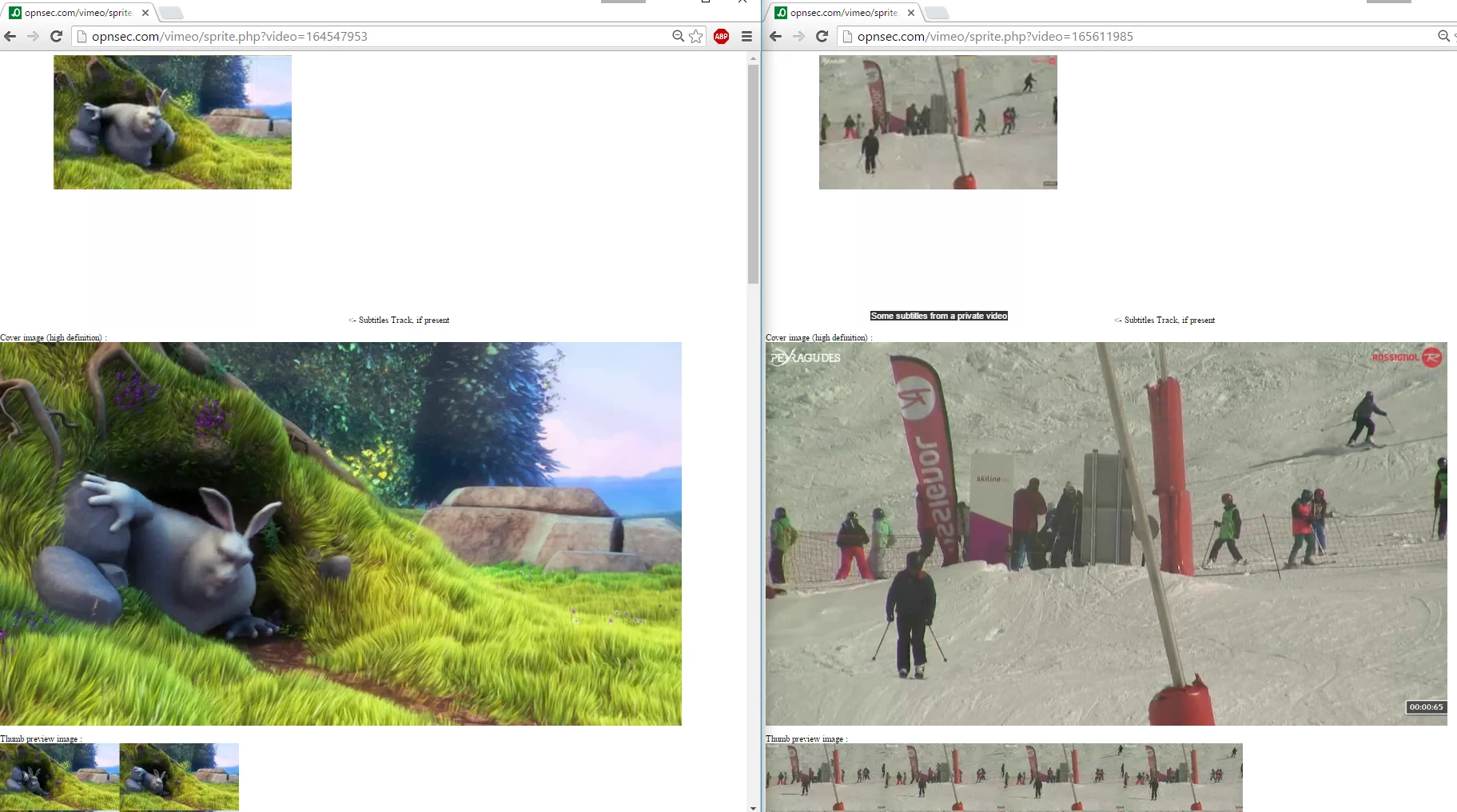
When a Video is private but embedable, there are some information about the video on the source code of the webpage, even if the user is not connected to Vimeo or doesn't have right to access the video. The following info are leaked on a regular request to https://player.vimeo.com/video/[VIDEO ID] : -Thumbs_preview : a large "sprite" image contaning between 1 and 120 thumbail captures from the video. -Link to the subtitles tracks, which can be download by anybody.
In addition, when the request is done via php without "user agent" header, the response is a different, and this time it is the cover image of the video that is leaked in HD.
Non embedable video are not vulnerable. Some private videos that are embedable are not vulnerable but most of them are vulnerable, including "only me", "people I follow", "people I choose" and "password" videos.
Proof of Concept
POC link : http://opnsec.com/vimeo/sprite.php?video=[VIDEO_ID]
I made a program that assemble the leaked info and displays the thumbail as a video with the subtitles if there are active subtitles.
POC requirements :
- POC works better with Chrome, alternatively it works with Internet Explorer, with Firefox the POC will not play video.
- You must replace [VIDEO_ID] by the Vimeo Video Id of a private but embedable video of your choice
POC instruction :
- Open the POC link after replacing [VIDEO_ID]
- If the video is not vulnerable, the webpage will tell you and you have to try another private but embedable video id.
- If the video is vulnerable, the POC webpage will show the leaked infos.
Example with my private videos : http://opnsec.com/vimeo/sprite.php?video=165611985 (password video with subtitles)
http://opnsec.com/vimeo/sprite.php?video=164583453 (Only me video with subtitles)
http://opnsec.com/vimeo/sprite.php?video=164547953 ("Only people I choose" video)
You can also look at the source code of https://player.vimeo.com/video/[VIDEO ID] and look for : Thumbail image :
"thumb_preview":{"url":"https://i.vimeocdn.com/1462563898-0x460a87ad7791195a99cad7e8d90cc27884cc4d9d/sprite/165611985/120?q=48&h=126&ver=1&w=224&n=4","frame_width":224.0,"height":3780.0,"width":896.0,"frame_height":126,"frames":120,"columns":4.0
Subtitles files :
text_tracks":[{"lang":"en","url":"/texttrack/4448008.vtt?token=572cf43a_0x73110f8c34c181b72c78140a21768dad684874e4","kind":"subtitles","id":4448008,"label":"English"}]
HD Cover Image (only if no user agent in header of request) (strip the image size at the end of the file url to have the highest definition image) :
background:url('https://i.vimeocdn.com/video/569517416_640.jpg')
If you need more info like POC source code or if the POC doesn't work feel free to contact me.
Regards,
Enguerran Gillier ██████████████████ ██████████████████████
Attachments
Context
Vimeo's embedded player lives at https://player.vimeo.com/video/[VIDEO_ID]. When a video is private but embeddable, the player page is still served to anyone who requests that URL, whether or not they are logged in to Vimeo and whether or not they have permission to watch the video. The player page is a normal HTML document that carries the player's configuration and metadata inline, so whatever is placed in that document is readable by anyone who can fetch it.
The report describes an information disclosure in that page: private but embeddable videos leak a thumbnail sprite, subtitle track links, and, under one specific request condition, the HD cover image. Non-embeddable videos are not affected. Among private videos that are embeddable, some are not vulnerable, but most are, including videos set to "only me", "people I follow", "people I choose" and "password".
Setup
The POC takes the ID of a private but embeddable video as input. The proof of concept is a PHP page hosted at opnsec.com that fetches the player page, assembles the leaked data and renders the thumbnails as a video together with the subtitles when active subtitles exist.
POC requirements, as stated in the report:
- The POC works better with Chrome; it also works with Internet Explorer, but with Firefox the POC will not play the video.
- The
[VIDEO_ID]placeholder must be replaced with the Vimeo video ID of a private but embeddable video of your choice.
Finding it
The player page for a private but embeddable video contains information about the video even when the visitor is not connected to Vimeo or has no right to access the video. A regular request to https://player.vimeo.com/video/[VIDEO ID] leaks:
Thumbs_preview: a large sprite image containing between 1 and 120 thumbnail captures from the video.- Links to the subtitle tracks, which anybody can download.
A second observation concerns the request itself: when the request is made from PHP without a user agent header, the response is different, and in that case the HD cover image of the video is leaked.
Exploitation
Step 1: Confirm the video is private but embeddable
The precondition is a video that is private but embeddable. The report lists the privacy settings that were found vulnerable: "only me", "people I follow", "people I choose" and "password". Non-embeddable videos are not vulnerable, and some embeddable private videos are not vulnerable either, so the first step is to try a candidate and see whether the player page carries the data.
Step 2: Run the POC against the video ID
Open the POC link after replacing [VIDEO_ID]:
http://opnsec.com/vimeo/sprite.php?video=[VIDEO_ID]
If the video is not vulnerable, the page says so and another private but embeddable video ID has to be tried. If it is vulnerable, the page shows the leaked information. The researcher's own examples:
http://opnsec.com/vimeo/sprite.php?video=165611985
This one is a password video with subtitles.
http://opnsec.com/vimeo/sprite.php?video=164583453
This one is an "Only me" video with subtitles.
http://opnsec.com/vimeo/sprite.php?video=164547953
This one is an "Only people I choose" video.
Step 3: Read the player page source directly
Instead of the POC, the same data can be read from the source of https://player.vimeo.com/video/[VIDEO ID]. The thumbnail sprite appears as follows:
"thumb_preview":{"url":"https://i.vimeocdn.com/1462563898-[redacted]/sprite/165611985/120?q=48&h=126&ver=1&w=224&n=4","frame_width":224.0,"height":3780.0,"width":896.0,"frame_height":126,"frames":120,"columns":4.0
The url points at a sprite on i.vimeocdn.com, and the surrounding fields give values such as frame_width 224, frame_height 126, frames 120, columns 4, width 896 and height 3780. That is the sprite the POC reassembles into a moving preview.
Subtitle files appear in the same document:
text_tracks":[{"lang":"en","url":"/texttrack/4448008.vtt?[redacted]","kind":"subtitles","id":4448008,"label":"English"}]
The entry contains lang, a url to a .vtt file with a token, kind, id and label. Because the URL is in the page, anyone who can read the page can download the track.
Step 4: Request without a user agent to get the HD cover
When the request is made from PHP without a user agent header, the response differs and leaks the cover image of the video in HD:
background:url('https://i.vimeocdn.com/video/569517416_640.jpg')
The report notes that stripping the image size at the end of the file URL gives the highest definition image.
Root cause
The player page embeds the video's metadata, including the thumbnail sprite URL and the subtitle track URLs with their tokens, in the HTML it returns. The page is served for private but embeddable videos to unauthenticated visitors, so the metadata is disclosed along with it. The report does not describe the server-side code, so the exact reason the data is included for private videos is not stated; The report does not state why the data is included for private videos.. The report notes that without a user agent header the response is different and leaks the HD cover image.
Impact
Anyone who knows a video ID can retrieve, for a private but embeddable video: a sprite of between 1 and 120 thumbnail captures from the video, and links to the subtitle tracks, which anybody can download. With a request made without a user agent header, the HD cover image is also disclosed. This applies to videos set to "only me", "people I follow", "people I choose" and "password". Non-embeddable videos are not vulnerable, and some embeddable private videos are not vulnerable either, so the attack depends on the target video being one of the affected embeddable private videos.
Fix
The report does not describe a fix or a change made in response. What it establishes is the behaviour to remove: the player page for a private video should not include the thumbnail sprite, the subtitle track URLs or the cover image for viewers who are not authorised to access the video, and the response should not vary to disclose the cover image based on the absence of a user agent header.
Variants to test
- Fetch the embed player page for a private video while logged out and search the HTML for sprite, thumbnail, subtitle and cover image URLs. A positive result is any of those URLs present and retrievable without authentication.
- Repeat the request with no
User-Agentheader and compare the response body. A positive result is a different body that contains additional media URLs. - Take any subtitle
.vttURL found in the page and request it directly without cookies. A positive result is the track downloading. - Take the sprite URL and check whether the image can be fetched without authentication. A positive result is the sprite image being returned.
- Try the same checks across each private privacy setting ("only me", "people I follow", "people I choose", "password") and across non-embeddable videos as a control. A positive result is disclosure on the private settings and none on the control.
Attachments
What happened, in plain words
Vimeo is a website where people upload and watch videos. One of its features lets you take a video and put it on another website, for example inside a blog post. This is called an embed: Vimeo gives you a small player that lives at a special address, https://player.vimeo.com/video/[VIDEO_ID], and that player can be dropped into any page. The [VIDEO_ID] part is a number that identifies one particular video, a bit like a house number identifies one house on a street.
Vimeo also lets you keep a video private. Private means you choose who may watch it: only you, only people you follow, only people you pick, or anyone who knows a password. You would expect that a private video stays private.
The researcher found that when a private video is also embeddable (allowed to be shown on other websites), the player page still hands out information about that video to anybody who asks for it, even a person who is not logged in to Vimeo and has no permission to watch it. The leaked information is:
- a large image made of many small pictures taken from the video (a sprite), which effectively shows what happens in the video;
- links to the subtitle files, which anybody can download;
- and, if the request is made in one particular way, the high definition cover image of the video.
Videos that are not embeddable are not affected. Among private videos that are embeddable, some are not affected either, but most are, including videos set to "only me", "people I follow", "people I choose" and "password".
This kind of problem is called information disclosure: nothing is broken or deleted, but information that should have stayed hidden is given out to the wrong people.
Background you need
What a web page really is
When you type an address into your browser, the browser sends a request to a computer somewhere (the server) and the server sends back a response. For a normal web page the response is a text document written in a language called HTML. Your browser reads that text and draws the page: headings, pictures, buttons. The text itself is called the source of the page, and you can see it in most browsers by right-clicking and choosing something like "View page source".
A useful everyday comparison: the HTML is the recipe, and what you see on screen is the finished cake. The recipe often contains ingredients that never end up visible on the plate, such as addresses of images or configuration values. If a secret is written in the recipe, anyone who can read the recipe can read the secret, even if it is never shown on screen.
What an embedded player is
An embedded player is a small web page that only contains a video player. Other websites include it inside their own pages, the way a shop might put a television in its window showing a channel produced elsewhere. The player page is still a normal web page served by Vimeo, so it can be fetched directly by anyone who knows its address, without going through the website that embeds it.
What a video ID is
Every video on Vimeo has a number, its ID. It appears in the address of the player. If you know the ID, you can ask the server for that player page. IDs are numbers, so in principle somebody could try many of them one after another, although the report does not discuss how easy guessing would be.
What a sprite is
A sprite is one single image file that contains many small pictures arranged in a grid, like a sheet of stamps. Video sites use sprites to show a preview when you move your mouse along the progress bar: instead of loading hundreds of separate images, the browser loads one sheet and shows the right square. The report says the sprite here contains between 1 and 120 thumbnail captures from the video. A thumbnail is a small still picture taken from the video, so a sheet of 120 of them reveals a lot about what the video shows.
What subtitles and a .vtt file are
Subtitles are the lines of text shown at the bottom of a video. They are stored in a separate file, usually ending in .vtt (Web Video Text Tracks), which the player downloads and displays in time with the video. If you can download that file, you can read the whole dialogue of the video as text.
What a token is
A token is a long random-looking string that acts like a temporary key. Websites put tokens in links so that the server can check the link was legitimately produced, a bit like a cloakroom ticket: whoever holds the ticket can collect the coat. If a token is written into a page that anybody can read, then anybody can use it.
What a user agent is
Every time a browser asks a server for a page, it sends a few lines of extra information along with the request, called headers. One of them is the user agent, which tells the server what kind of browser and operating system is asking, for example "Chrome on Windows". Programmers can also write small programs that fetch pages; such a program can choose to send no user agent at all. Servers sometimes behave differently depending on these headers, for example to serve a simpler page to old browsers. The report found that this particular server behaves differently when no user agent is sent.
What PHP is
PHP is a programming language often used to build web pages on the server side. A file ending in .php is a small program that runs on a server and produces a page. The proof of concept in this report is such a program: it fetches Vimeo's player page, picks out the leaked pieces and displays them.
The setup
The POC takes the ID of a private but embeddable video as input. They built a proof of concept, a small PHP page hosted at opnsec.com, which fetches the player page, puts the leaked pieces together and shows the thumbnails as a moving video, with the subtitles when the video has active subtitles.
A proof of concept (often shortened to POC) is a small demonstration that proves a problem is real, without causing harm. Think of it as a model built to scale: it does not need to be the real building, it only needs to show that the building would stand.
The report states two requirements for the POC:
- It works better with Chrome. It also works with Internet Explorer, but with Firefox the POC will not play the video.
- You must replace
[VIDEO_ID]with the Vimeo video ID of a private but embeddable video of your choice.
Finding it
The player page of a private but embeddable video contains information about the video in its source. The page contained information about the video even though the visitor was not connected to Vimeo and had no right to access the video. A regular request to https://player.vimeo.com/video/[VIDEO ID] leaks two things:
Thumbs_preview: a large sprite image containing between 1 and 120 thumbnail captures from the video.- Links to the subtitle tracks, which anybody can download.
There was a second observation, this time about how the request is made. When the request is made from PHP without a user agent header, the response is different, and this time it is the HD cover image of the video that is leaked. HD means high definition, a large, sharp version of the image, as opposed to the small preview you might see in a list.
Exploitation
Step 1: Confirm the video is private but embeddable
The starting condition is a video that is private but embeddable. The report lists the privacy settings that were found vulnerable: "only me", "people I follow", "people I choose" and "password". Non-embeddable videos are not vulnerable, and some embeddable private videos are not vulnerable either, so the first step is simply to try a candidate and see whether the player page carries the data.
Why this step first: the whole problem depends on the combination of two settings, private and embeddable. If either is missing, there is nothing to find, so checking the combination saves time before looking at anything else.
Step 2: Run the POC against the video ID
Open the POC link after replacing [VIDEO_ID]:
http://opnsec.com/vimeo/sprite.php?video=[VIDEO_ID]
Line by line:
http://is the protocol, the set of rules used to talk to the server. Here it is the unencrypted version.opnsec.comis the domain, the name of the server hosting the researcher's POC./vimeo/sprite.phpis the path to the PHP program on that server. The name suggests it deals with the sprite.?video=[VIDEO_ID]is the query string: extra information passed to the program. The?starts it,videois the name of the value and[VIDEO_ID]is the placeholder you replace with a real number. It works like filling in a form field before pressing submit.
If the video is not vulnerable, the page says so and another private but embeddable video ID has to be tried. If it is vulnerable, the page shows the leaked information.
The researcher's own examples:
http://opnsec.com/vimeo/sprite.php?video=165611985
This one is a password video with subtitles: the video is protected by a password, and it has subtitles.
http://opnsec.com/vimeo/sprite.php?video=164583453
This one is an "Only me" video with subtitles: the strictest private setting, visible only to its owner, and it has subtitles.
http://opnsec.com/vimeo/sprite.php?video=164547953
This one is an "Only people I choose" video: private to a hand-picked list of people.
Why these examples matter: each one is a different privacy setting, and each one still leaked. That shows the problem is not limited to one setting.
Step 3: Read the player page source directly
Instead of using the POC, the same data can be read from the source of https://player.vimeo.com/video/[VIDEO ID]. The thumbnail sprite appears as follows:
"thumb_preview":{"url":"https://i.vimeocdn.com/1462563898-[redacted]/sprite/165611985/120?q=48&h=126&ver=1&w=224&n=4","frame_width":224.0,"height":3780.0,"width":896.0,"frame_height":126,"frames":120,"columns":4.0
Line by line, in plain words:
"thumb_preview"is the name of the setting. It holds a group of values inside curly braces{ }."url"is the address of the sprite image oni.vimeocdn.com, a server Vimeo uses to deliver images. The address contains a long random-looking part, thensprite/165611985/120, which ties it to video 165611985 and to 120 frames. After the?come parameters:q=48,h=126,ver=1,w=224,n=4. These are instructions for the image server, for example the height and width wanted."frame_width":224.0and"frame_height":126say how big each small picture in the sheet is, in pixels. A pixel is one tiny dot of colour on a screen."frames":120says there are 120 small pictures."columns":4.0says the sheet is arranged in 4 columns across."width":896.0and"height":3780.0give the size of the whole sheet. You can check the arithmetic yourself: 4 columns times 224 pixels wide is 896, and 120 frames divided by 4 columns is 30 rows, times 126 pixels high is 3780. That is the sprite the POC reassembles into a moving preview.
Why this matters: the address of the sprite is written in the page. Anyone who can read the page can copy that address and fetch the image, no login needed.
Subtitle files appear in the same document:
text_tracks":[{"lang":"en","url":"/texttrack/4448008.vtt?[redacted]","kind":"subtitles","id":4448008,"label":"English"}]
Line by line:
text_tracksis the name of the list. The square brackets[ ]mean a list, and here the list has one entry inside curly braces."lang":"en"is the language code,enfor English."url"is the address of the subtitle file. It starts with/texttrack/, a path on the same server, and ends in.vtt. After the?comestoken=followed by a long string. That token is the key that lets the file be downloaded."kind":"subtitles"says what sort of track it is."id":4448008is the track's own number."label":"English"is the name shown to viewers in the player's menu.
Because the URL, token included, is written in the page, anyone who can read the page can download the track. The token is meant to be a key, but here the key is left in the door.
Step 4: Request without a user agent to get the HD cover
When the request is made from PHP without a user agent header, the response differs and leaks the cover image of the video in HD:
background:url('https://i.vimeocdn.com/video/569517416_640.jpg')
Line by line:
background:url(...)is a piece of styling code, the kind used to put an image behind something on a page. The browser reads the address inside the brackets and fetches that image.https://i.vimeocdn.com/video/569517416_640.jpgis the address of the cover image.569517416is part of the image address and_640is a size marker at the end of the file URL.
The report notes that stripping the image size at the end of the file URL gives the highest definition image. In other words, if you remove the _640 part, the image server returns the largest version it has.
Why it happens
The player page writes the video's details into the HTML it returns, including the sprite address and the subtitle addresses with their tokens. For private but embeddable videos, that page is served to visitors who are not logged in, so the details go out with it. The report does not describe the server-side code, so the exact reason the data is included for private videos is not stated. The report does not state why the data is included for private videos. The separate HD cover image response for requests without a user agent suggests the response varies on that header, and the variant served in that case includes the cover image.
What it means for the people affected
Someone who is not logged in and who knows a video ID can retrieve, for a private but embeddable video: a sprite of between 1 and 120 thumbnail captures from the video, and links to the subtitle tracks, which anybody can download. With a request made without a user agent header, the HD cover image is also disclosed. This applies to videos set to "only me", "people I follow", "people I choose" and "password". Non-embeddable videos are not vulnerable, and some embeddable private videos are not vulnerable either, so the attack depends on the target video being one of the affected embeddable private videos.
In everyday terms: the video itself may not play for a stranger, but the stranger can still see a sheet of stills from it, read its dialogue as text, and in one case see its cover in high quality. For a video meant for a small group of people, that is a real loss of privacy.
What should change
What it establishes is the behaviour to remove: the player page for a private video should not include the thumbnail sprite, the subtitle track URLs or the cover image for viewers who are not authorised to access the video, and the response should not vary to disclose the cover image based on the absence of a user agent header.
Things to try if you want to look for similar problems
- Fetch the embed player page for a private video while logged out and search the HTML for sprite, thumbnail, subtitle and cover image addresses. A positive result is any of those addresses being present and retrievable without logging in.
- Repeat the request with no
User-Agentheader and compare the response body. A positive result is a different body that contains additional media addresses. - Take any subtitle
.vttaddress found in the page and request it directly without cookies. A positive result is the track downloading. - Take the sprite address and check whether the image can be fetched without logging in. A positive result is the sprite image being returned.
- Try the same checks across each private privacy setting ("only me", "people I follow", "people I choose", "password") and across non-embeddable videos as a control. A positive result is disclosure on the private settings and none on the control. A control is a case you expect to behave correctly, used to show that the difference you see is caused by the thing you are testing and not by something else.
Attachments
Glossary
- API: a way for one program to ask another program for data or actions, like a waiter taking your order to the kitchen.
- Cookie: a small piece of data a website stores in your browser so it can recognise you on later requests, for example to keep you logged in.
- Cover image: the picture shown to represent a video before it plays, like a book cover.
- Embed / embeddable: a video is embeddable when it is allowed to be shown inside another website through a player page.
- Header: an extra line of information sent along with a web request or response, such as the user agent.
- HD (high definition): a large, sharp version of an image or video, as opposed to a small preview.
- HTML: the text language web pages are written in; the browser reads it and draws the page.
- Information disclosure: a security problem where information that should stay hidden is given to someone who should not have it.
- Parameter: a named value passed in a web address after the
?, such asvideo=165611985. - PHP: a programming language often used to build web pages on the server side.
- Pixel: one tiny dot of colour on a screen; image sizes are measured in pixels.
- Player page: the small web page that contains just the video player, used when a video is embedded elsewhere.
- POC (proof of concept): a small demonstration that proves a problem is real without causing harm.
- Private video: a video whose owner has restricted who may watch it.
- Query string: the part of a web address after the
?, carrying extra values to the server. - Request / response: the message your browser sends to a server, and the message the server sends back.
- Source: the underlying text of a web page, as opposed to what is drawn on screen.
- Sprite: one image file containing many small pictures arranged in a grid, used for video previews.
- Subtitle: the lines of text shown at the bottom of a video, stored in a separate file.
- Thumbnail: a small still picture taken from a video.
- Token: a long random-looking string used as a key to authorise access to something, like a cloakroom ticket.
- User agent: a header that tells the server what browser and operating system are asking for the page.
- .vtt: the file format used for subtitle tracks (Web Video Text Tracks).






