VMware Workstation: Attack surface through Virtual Printer
The virtual printer feature in VMware Workstation processes EMFSPOOL data from guest machines using TPView.dll, which handles JPEG2000, font, and EMF records. Fuzzing this component revealed memory corruption and integer overflow bugs that could potentially be exploited from a guest to the host.
 Published on blog.khonggianmang.vn
In this article, I will introduce an approach to find bugs on closed source applications using the fuzzing method. VMware Workstation is an interesting example to do, please go through each part I present below to better understand this target.
The full write-up lives on its author's site
It belongs to its author, so we link to it rather than copy it. The other two tabs are our own rewrites, checked against it.
Context
VMware Workstation ships a feature called Virtual Printer, which lets a guest machine print documents using printers available on the host machine. In practice it is printer sharing: data flows from the guest to the host, and that direction is what makes it interesting, because a guest that can drive host-side parsing code is a step towards VM escape.
Virtual Printer is not enabled by default. The data the guest sends is defined in the Enhanced Metafile Spool format (EMFSPOOL), a format that stores portable definitions of print jobs as a sequence of records. EMFSPOOL in turn can carry other formats inside its records: images, EMF files, fonts. That composition is the attack surface. The report points to Microsoft's documentation for EMF and EMFSPOOL and to j00ru's whitepaper on the EMF attack surface for background.
Earlier work on this surface is cited: in 2015 Kostya Kortchinsky reported a series of bugs including a stack overflow and built a working exploit; in 2016 j00ru used fuzzing to find bugs in the JPEG2000, EMF and font handling.
Setup
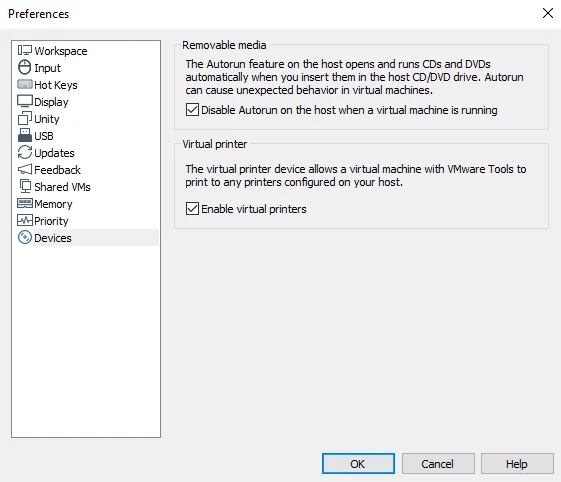
Virtual Printer has to be turned on first. The report shows the settings dialog used to enable it:
The architecture is summarised in the next figure:
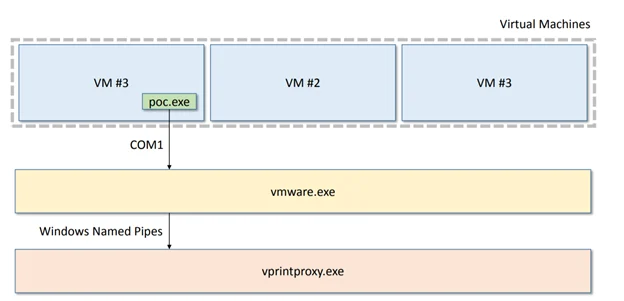
The process of interest is vprintproxy.exe, launched on the host machine. Data travels from the guest to that process over port COM1. No permissions are required to send it, so any user in the guest can do so. The payload is EMFSPOOL, which allows attaching other formats to records: images, EMFs, fonts.
On the tooling side, the researcher started from j00ru's public POCs, tweaked them to fit the current version, and used them to debug the Virtual Printer data flow. Two observations came out of that:
- The data processing happens in
TPView.dll. - Data sent from the guest to the host is processed only in
TPView.dll; on the transmission line nothing else modifies it.
Static analysis and debugging of TPView.dll showed the virtual printer handling records that carry JPEG2000, OTF and TTF content. The harnesses were built around the DLL itself rather than porting it to Linux, which the author notes j00ru did for the Irfanview JPEG2000 library (the same code base as in TPView.dll) because porting a DLL was not something he had experience with. The harnesses can then be driven by Winafl, pe-afl or Tiny-afl, a tool the author built on top of TinyInst.
Finding it
JPEG2000 records
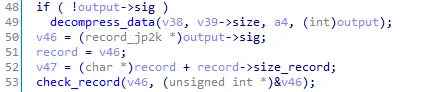
For JPEG2000, the record is one that TPView.dll adds to EMFSPOOL. The function sub_100584CE processes the JPEG2000 record coming from the guest. Inside it, the program decompresses the data and checks its fields, because data from the guest has been compressed with zlib.
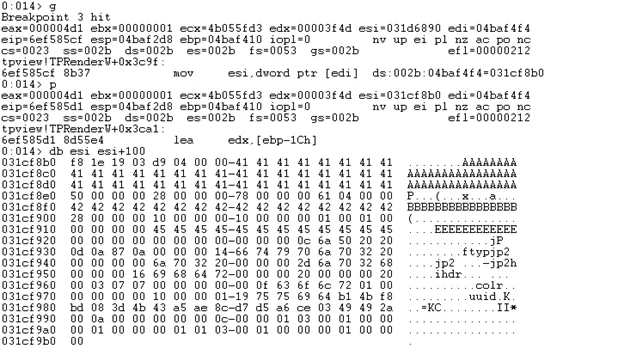
The result of the decompressdata function is shown next: the address of the decompressed data ends up in the esi register.
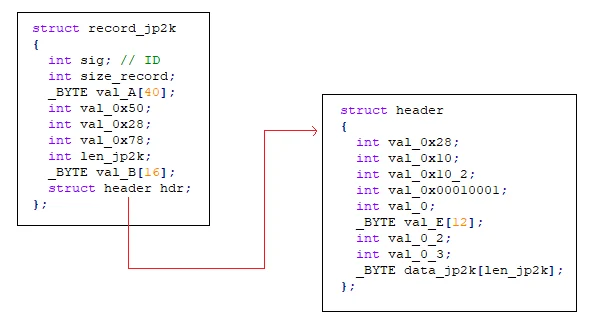
The check_record function validates the fields of the decompressed data. From it the researcher recreated the record_jp2k struct and the header struct:
Once decompression and field checks are done, the program computes values from record_jp2k and header to process the image. Lines 84 to 110 create a record_jp2k v20 that stores the JPEG2000 data after processing, and process_jp2k does the parsing.
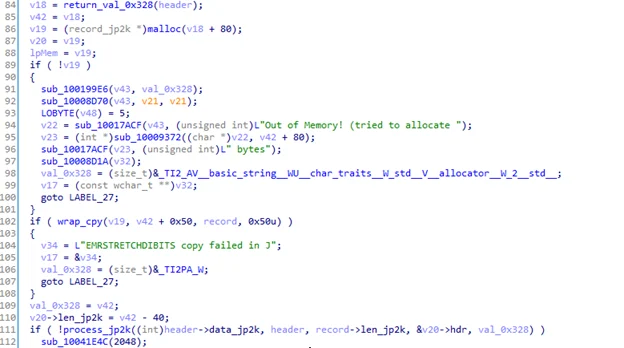
process_jp2k takes these parameters:
header->data_jp2k: the JPEG2000 image file dataheader: the header structrecord->len_jp2k: the JPEG2000 file sizev20->hdr: struct holding the data after processingval_0x328: the size of the output record, value 0x328
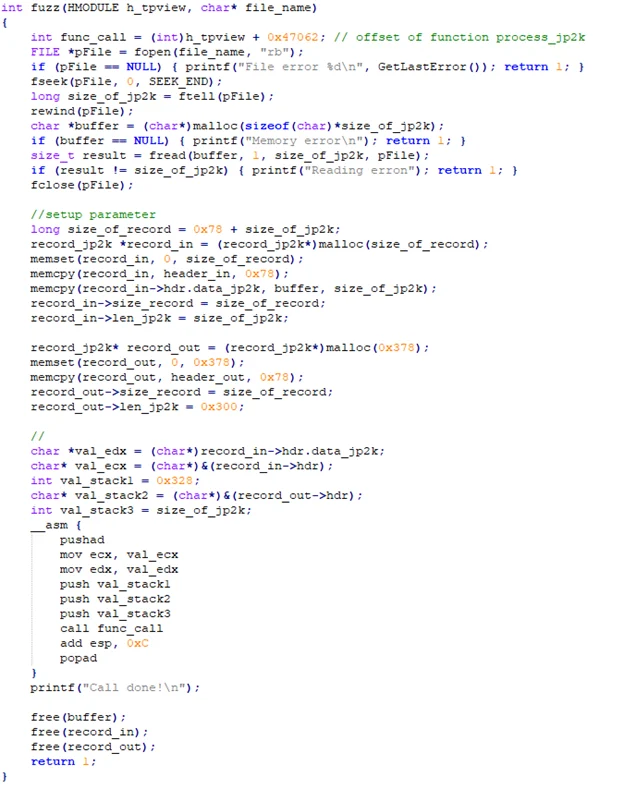
The key insight is that process_jp2k can serve directly as the entry point of a harness: its input is very close to a plain JPEG2000 image and depends little on other values in EMFSPOOL. The harness built on that basis:
Font records
TPView.dll fully processes five font records that EMFSPOOL defines:
EMRI_ENGINE_FONT: a font in TrueType format.EMRI_TYPE1_FONT: a font in PostScript Type 1 format.EMRI_DESIGNVECTOR: a font's design vector, characterising its appearance in 16 properties.EMRI_SUBSET_FONT: a partial TrueType font with enough glyph outlines for pages up to the current one.EMRI_DELTA_FONT: new glyphs to merge with data from a precedingEMRI_SUBSET_FONTrecord.
Each record has its own handler. Debugging the font flow identified sub_10013B06 as the function that takes font data from the guest and processes it.
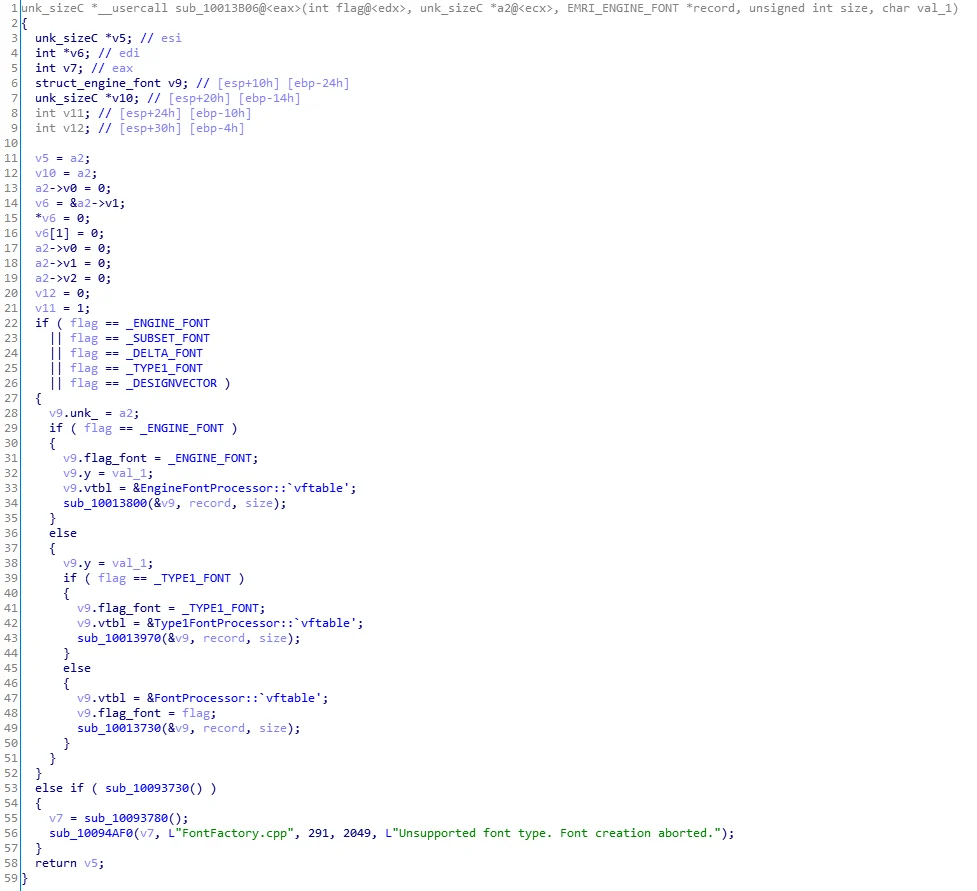
The function takes five parameters. The first, flag, selects the record type:
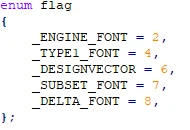
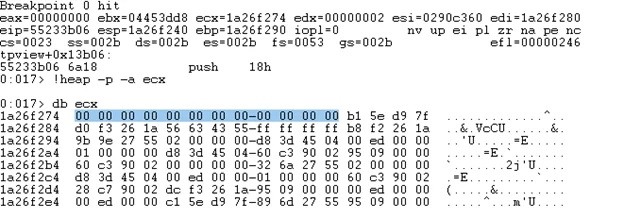
The remaining parameters were checked in WinDbg with a breakpoint on sub_10013B06. The second parameter is a 12-byte memory area initialised with NULL; the ecx register holds it.
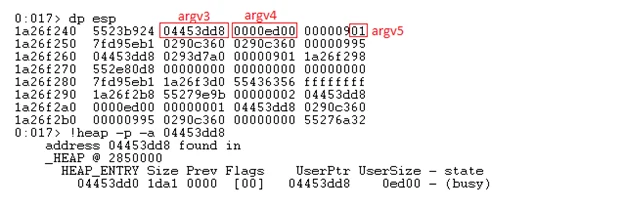
The last three parameters are shown below. The memory address 0x4453DD8 (argv3) holds the font record, the fourth parameter (argv4) is the size of that memory, and the fifth (argv5) is 1 byte and was always 1 across the runs checked.
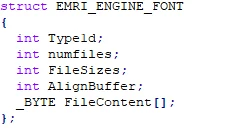
The third parameter is the record data, whose structure differs per record type and follows Microsoft's documentation. For an EMRI_ENGINE_FONT record the fields are shown below; in this case the record stored in parameter 3 starts at the Type1ID field.
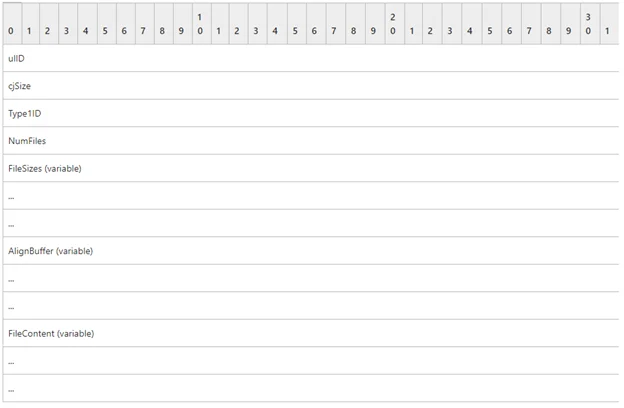
The fields mean:
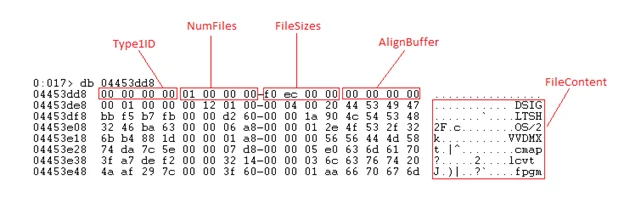
Type1ID(4 bytes): 32-bit unsigned integer, must be 0x00000000 to indicate TrueType.NumFiles(4 bytes): 32-bit unsigned integer, number of files attached to the record.FileSizes(variable): a variable number of 32-bit unsigned integers giving the sizes of the attached files.AlignBuffer(variable): up to 7 bytes, to make what follows 64-bit aligned.FileContent(variable): 32-bit aligned data with the glyph definitions, in TrueType format.
With one TTF file per record, the initialised EMRI_ENGINE_FONT struct looks like this:
And the corresponding fields in WinDbg:
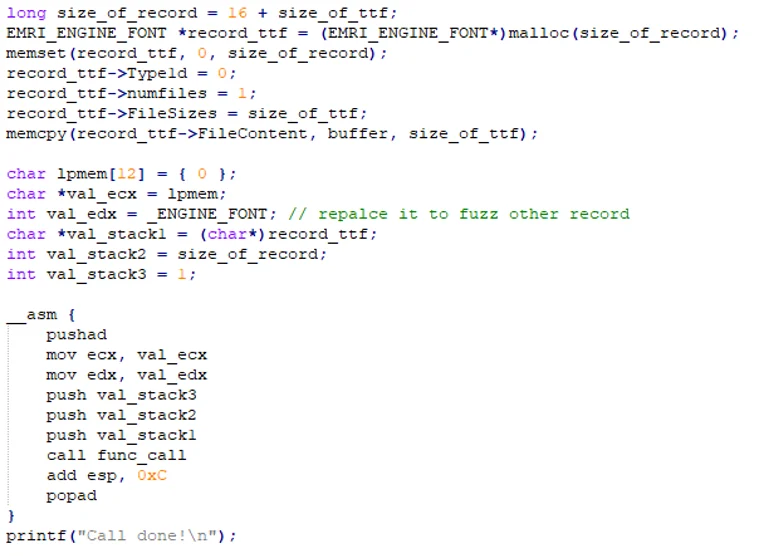
That is enough to build a harness that calls sub_10013B06 directly. The sample below fuzzes EMRI_ENGINE_FONT; the other records are the same with a different flag.
EMF records
Besides JPEG2000 and fonts, TPView.dll handles the EMRI_METAFILE record, which carries an EMF file. After receiving the data, the DLL writes it to a file in the %temp% directory and calls the Windows APIs that handle it: GetEnhMetaFileW, EnumEnhMetaFile, PlayEnhMetaFileRecord, GetEnhMetaFileHeader, GetEnhMetaFilePaletteEntries and others. The interesting one is EnumEnhMetaFile:
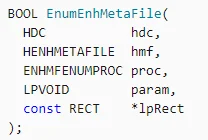
This API walks the records in an EMF file through a callback passed as its third parameter. It is called from sub_10042BB6 in TPView.dll. The callback is the function that parses and processes the EMF records, so it was chosen as the fuzzing target.

The callback is the proc function. The difficulty was the fourth parameter, param, passed to the callback. It is a local variable, so recovering its fields took a long time of tracing back. The approach was to reverse statically a little, guess the fields, and confirm by debugging.
The first step was to guess its size.
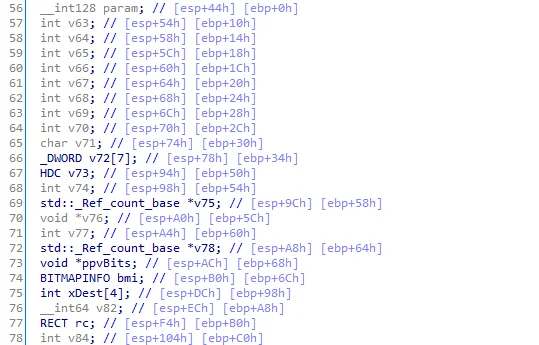
In sub_10042BB6, param starts at ebp+0h, followed by a series of variables. The fifth parameter of EnumEnhMetaFile is a RECT, which in this function is the variable xDest at ebp+98h. So the largest possible size for param is 0x98: anything larger would overwrite xDest.
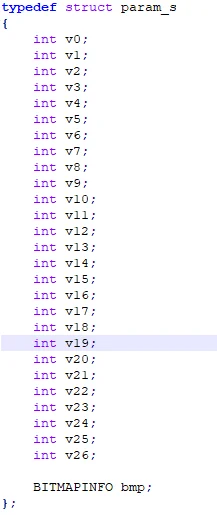
A param_s struct of size 0x98 was created with those fields, and the remaining fields were recovered next.
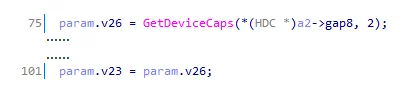
Lines 75 and 101 of sub_10042BB6 initialise v23 and v26 through the GetDeviceCaps API, so those two fields hold an int devcap value.
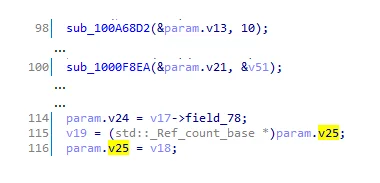
Four fields then get special attention: v13, v21, v24, v25.
Field v13
v13 is passed to sub_100A68D2:
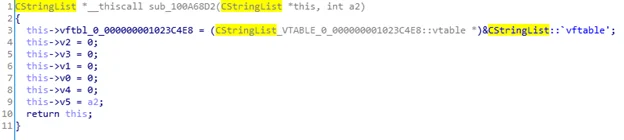
That function initialises a CStringList structure, recreated as follows:
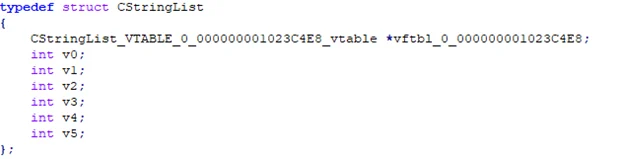
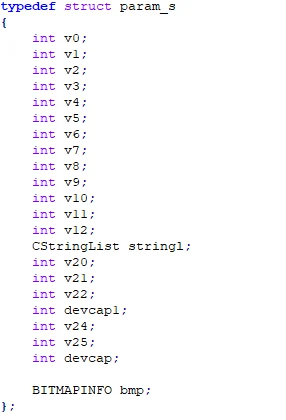
CStringList is 0x1C bytes, so v13 through v19 in param_s are its memory area. The updated struct:
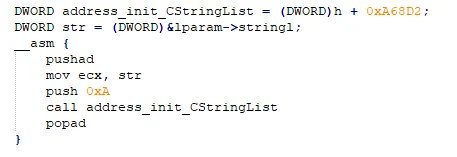
And the code to initialise CStringList:
Field v21
Unlike v13, v21 is copied from elsewhere by sub_1000F8EA, which copies an 8-byte memory area:
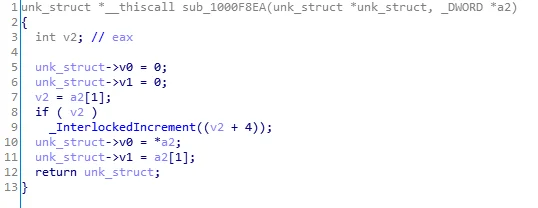
That initialises two fields, v21 and v22. Because the value comes from another memory area, static analysis alone is not enough, so breakpoints were set before the EnumEnhMetaFile call.
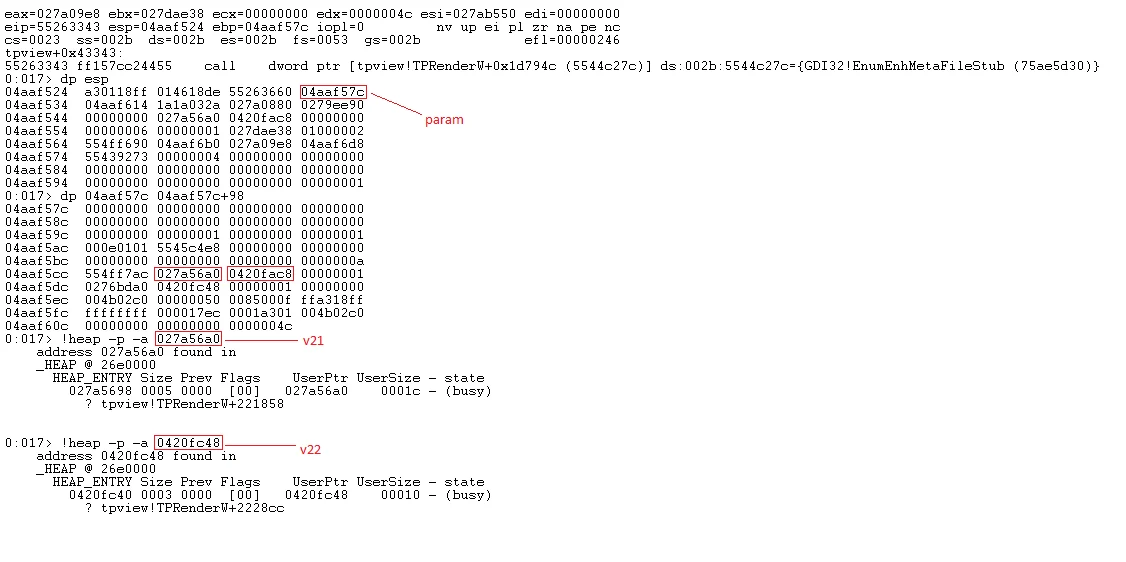
param_s sits at 0x4AAF57C, and v21 and v22 are 0x1c and 0x10 bytes at the addresses shown. Checking the tpview!TPRenderW+221858 and tpview!TPRenderW+2228cc addresses showed that sub_1001B7FD initialises the memory for v21 and sub_1004559D initialises the memory for v22. Reversing both functions gave the fields of those memory areas, and param_s was updated (struct names chosen by the author):
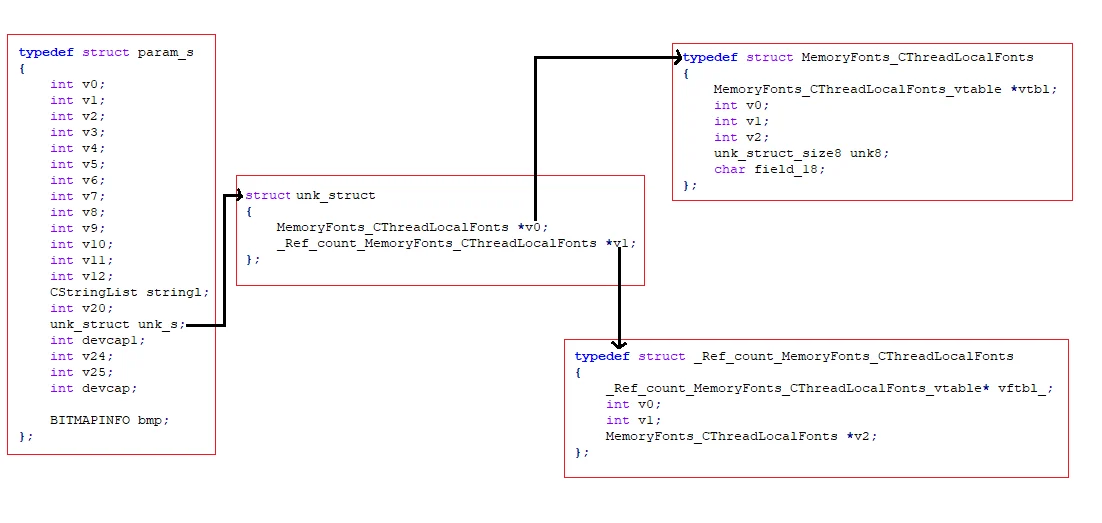
The initialisation code for those two structs:
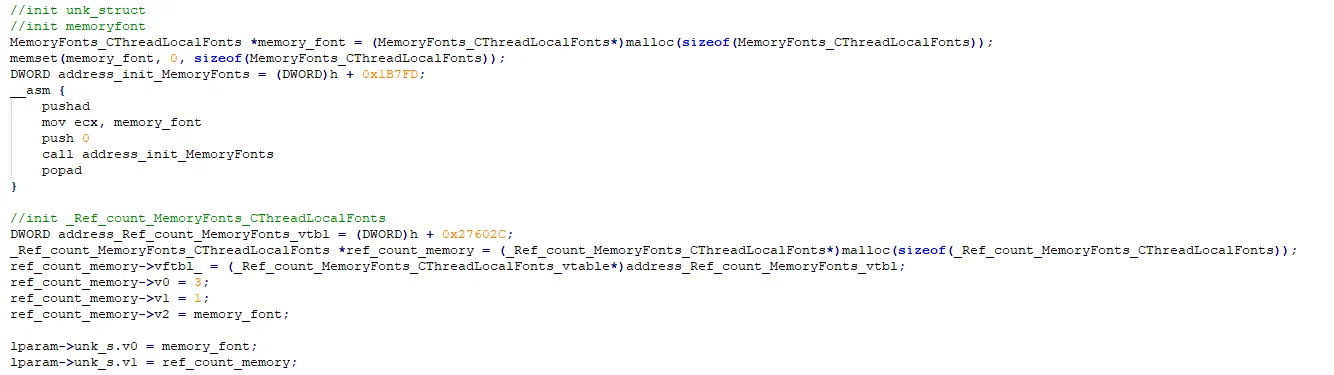
Fields v24 and v25
As with v21, the initialisation functions for v24 and v25 were checked by debugging:
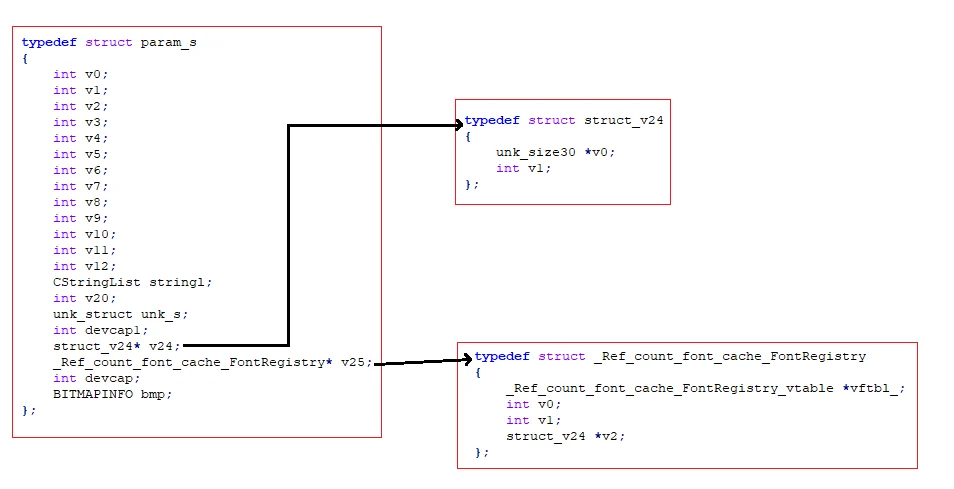
And the code to initialise them:
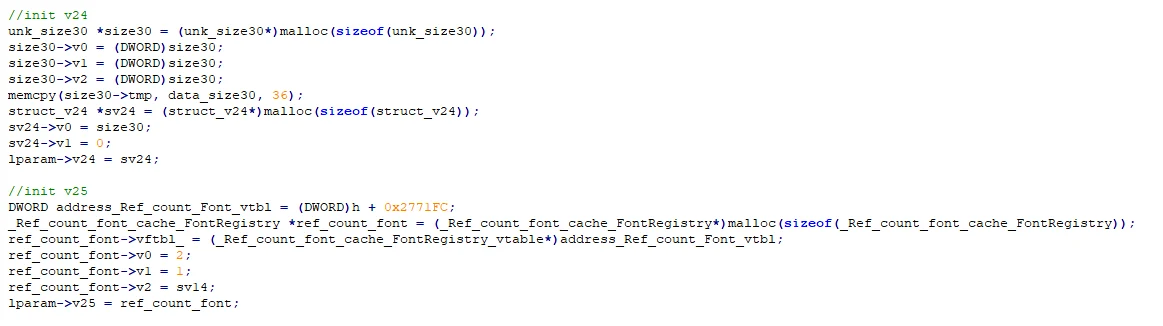
With that, the param argument for EnumEnhMetaFile was fully reconstructed. The harness is completed by calling the API and passing the parameters:

Exploitation
The harnesses above call the parsing functions directly, so a crashing input found by the fuzzer corresponds to a record that can be delivered from the guest over COM1 to vprintproxy.exe on the host. The report does not include a full end-to-end exploit chain, only the harness construction and the bugs found.
- Enable Virtual Printer on the host, as shown in the settings figure.
- Build the JPEG2000 harness around
process_jp2k, feeding it data shaped like a JPEG2000 image. - Build the font harness around
sub_10013B06, passing theflagfor the record type and anEMRI_ENGINE_FONTstructure with one TTF file inFileContent. - Build the EMF harness around the
proccallback used byEnumEnhMetaFile, with the reconstructedparam_sof size 0x98. - Run the harnesses under Winafl, pe-afl or Tiny-afl.
For corpus, JPEG2000 and font samples are plentiful online (j00ru's font creation tool is cited). For EMF, the author wrote a generator producing EMF files with common records such as bitmap, control, comment and clipping.
Root cause
The bugs are a memory corruption in the JPEG2000 record handling and integer overflows in the font record handling inside TPView.dll. The JPEG2000 path decompresses guest-controlled data with zlib and then validates fields in check_record before handing them to process_jp2k; the font path passes guest-controlled record data and size into sub_10013B06. In both cases the parsing code trusts values derived from the guest. The report does not give the specific faulty instruction or the exact field that overflows, so the precise defect is not stated. What the report does establish is that the data crosses from guest to host without any intermediary modifying it, so the only validation is whatever TPView.dll performs itself.
Impact
A guest user, with no special permissions, can send EMFSPOOL data over COM1 to vprintproxy.exe on the host. Bugs in the parsing of that data are therefore reachable from inside the VM, which is the path towards VM escape. The concrete results reported are:
| Record type | Bugs |
|---|---|
| JPEG2000 | 1 memory corruption |
| Font | 2 integer overflows (CVE-2020-3989 and CVE-2020-3990) |
Two further issues were found during reversing but are not security bugs: the EMRI_TYPE1_FONT processing flow is incorrect because of incorrect field checking, and a bad EMF file can hit an int 3 through exception handling, leading to a denial of service.
Fix
The report does not describe the patches for CVE-2020-3989 and CVE-2020-3990.
Variants to test
- The other font records (
EMRI_TYPE1_FONT,EMRI_DESIGNVECTOR,EMRI_SUBSET_FONT,EMRI_DELTA_FONT): reuse thesub_10013B06harness with a differentflag. A positive result is a crash in the handler for that record type. - The
EMRI_TYPE1_FONTflow specifically, since its field checking is already known to be incorrect. A positive result is a record that is accepted with inconsistent field values. - EMF records beyond bitmap, control, comment and clipping: extend the EMF generator and fuzz the
proccallback. A positive result is a crash inside the callback while walking records. - Other formats carried in EMFSPOOL records that
TPView.dllhandles (the report mentions OTF alongside TTF). A positive result is a crash in the corresponding handler. - The
param_sreconstruction itself: the 0x98 boundary againstxDestis a useful check. A positive result would be a record that causes the callback's parameter area to be written past 0x98.
What happened, in plain words
VMware Workstation is a program that lets you run a whole other computer inside a window on your own computer. The computer you are sitting at is called the host; the pretend computer running inside the window is called the guest (or virtual machine, VM). VMware Workstation has a feature called Virtual Printer that lets the guest print documents on printers that are plugged into the host. That sounds harmless, but it means data flows from the guest to the host, and the host has to read and understand that data. If the guest can send data that the host misreads, the guest might be able to break out of its box and run code on the host. That breakout is called a VM escape, and it is a serious thing, because normally the whole point of a VM is that the guest is contained.
This article is about how the researcher found bugs in the code that reads that print data. The method is fuzzing: instead of reading the code line by line and reasoning about it, you feed a program huge numbers of slightly mutated inputs and watch for crashes. A crash is a strong hint that the program mishandled the input, and mishandled input is often a security bug.
The data the guest sends is in a format called EMFSPOOL (Enhanced Metafile Spool format). Think of it as an envelope for a print job: it is a long list of numbered items called records, and each record says "here is a picture", "here is a font", "here is a page description" and so on. Because EMFSPOOL can carry other file formats inside its records (images, EMF files, fonts), it is a rich target: every format it can carry is another piece of host code that the guest can reach. The report points to Microsoft's documentation for EMF and EMFSPOOL and to a whitepaper by j00ru about the EMF attack surface for background.
This is not the first time people looked here. In 2015 Kostya Kortchinsky reported a series of bugs on this surface, including a stack overflow (a bug where a program writes more data into a fixed-size memory area than it can hold, spilling into neighbouring memory), and he built a working exploit. In 2016 j00ru used fuzzing to find bugs in the handling of JPEG2000 images, EMF files and fonts.
Setting up the target
Virtual Printer is off by default. The report shows the settings dialog used to switch it on:
The picture shows the VMware Workstation settings where the Virtual Printer option is enabled.
The overall picture of how the pieces fit together, and where an attacker can reach in, is in the next figure:
The diagram shows the architecture of the Virtual Printer and its attack surface: the guest sends print data, and a process on the host receives and parses it.
The process that matters is vprintproxy.exe, which runs on the host machine. Data travels from the guest to that process over COM1. COM1 is a serial port, one of the old-style connectors on a PC; here it is used as a simple channel between guest and host. No permissions are needed to send data over it, so any user inside the guest can do it. The payload is EMFSPOOL, which can attach other formats to its records: images, EMFs, fonts.
On the tooling side, the researcher started from j00ru's publicly released POCs (proof-of-concept files: small samples that demonstrate a bug or a format) and tweaked them to fit the current version of the software. He then used them to watch the Virtual Printer's data flow while it ran. Two observations came out of that:
- The data processing happens in a library file called
TPView.dll. A DLL is a shared library on Windows: a file full of functions that programs load and call, rather than each program carrying its own copy. - Data sent from the guest to the host is processed only in
TPView.dll; on the way there, nothing else modifies it. That matters because it means the only validation the data ever gets is whateverTPView.dlldoes itself.
Reading the DLL's code and watching it run showed the virtual printer handling records that carry JPEG2000 images, OTF fonts and TTF fonts. The researcher built his test harnesses around the DLL itself rather than porting it to Linux. Porting means taking a Windows library and making it run on another operating system; j00ru had done that for the Irfanview JPEG2000 library, which shares the same code base as the one in TPView.dll, and it made fuzzing much faster. The author says he had no experience porting DLLs, so he chose the direct route. The harnesses can then be driven by fuzzing tools called Winafl, pe-afl or Tiny-afl, the last being a tool the author built on top of TinyInst.
A harness is a small program you write that calls one specific function of the target directly, with input you control, so the fuzzer can hammer that function without needing the whole application, a real printer, or a real guest machine.
Finding it
JPEG2000 records
JPEG2000 is an image format, a newer cousin of the familiar JPEG. For JPEG2000, the record is one that TPView.dll itself adds to EMFSPOOL. The function sub_100584CE processes the JPEG2000 record coming from the guest. A function name like sub_100584CE is what you see in a disassembler or debugger when the original name has been stripped out of the compiled program: the tool just labels the code at that address. Inside this function, the program decompresses the data and checks its fields, because data from the guest has been compressed with zlib. Compression is like vacuum-packing clothes to fit them in a suitcase: the data is squeezed down for transport, and the receiver has to unpack it before use. zlib is a very common library for that job.
The screenshot shows the decompression of the data in the JPEG2000 record and the check of its fields inside sub_100584CE.
The result of the decompressdata function is shown next: the address of the decompressed data ends up in the esi register.
A register is a tiny, very fast storage slot inside the processor. esi is one of them. Seeing the address of the unpacked data land in esi tells the researcher where the program keeps its pointer to that data, which is the first thing you need if you want to follow the data onward.
The check_record function validates the fields of the decompressed data. From reading it, the researcher recreated two structs, record_jp2k and header. A struct is a template describing how a block of memory is laid out: field one at this offset, field two at that offset, and so on. Recreating a struct in your own tools is how you make sense of raw bytes.
The figure shows the record_jp2k struct and the header struct as the researcher recreated them.
Once decompression and field checks are done, the program computes values from record_jp2k and header to process the image. Lines 84 to 110 create a record_jp2k v20 that stores the JPEG2000 data after processing, and process_jp2k does the parsing.
The code initialises record_jp2k v20, the variable that stores the results of the process_jp2k function.
process_jp2k takes these parameters:
header->data_jp2k: the JPEG2000 image file dataheader: the header structrecord->len_jp2k: the JPEG2000 file sizev20->hdr: struct holding the data after processingval_0x328: the size of the output record, value 0x328
A parameter (or argument) is a value you hand to a function when you call it, the way you hand ingredients to a cook. The notation header->data_jp2k means "the field called data_jp2k inside the struct called header". The value 0x328 is written in hexadecimal, a base-16 way of writing numbers that programmers use because it maps neatly onto binary; 0x328 is 808 in ordinary decimal.
The key insight is that process_jp2k can serve directly as the entry point of a harness: its input is very close to a plain JPEG2000 image and depends little on other values in EMFSPOOL. In other words, you do not need to build a whole valid print job to reach this code; you can call the function with something that looks like an image file. The harness built on that basis:
The harness uses the JPEG2000 format handling of TPView.dll as its fuzzing target.
Font records
TPView.dll fully processes five font records that EMFSPOOL defines:
EMRI_ENGINE_FONT: a font in TrueType format.EMRI_TYPE1_FONT: a font in PostScript Type 1 format.EMRI_DESIGNVECTOR: a font's design vector, characterising its appearance in 16 properties.EMRI_SUBSET_FONT: a partial TrueType font with enough glyph outlines for pages up to the current one.EMRI_DELTA_FONT: new glyphs to merge with data from a precedingEMRI_SUBSET_FONTrecord.
A font is the file that tells a computer what letters look like. TrueType and PostScript Type 1 are two common font formats. A glyph is the drawing of a single character. A subset font contains only the characters actually used so far, which keeps print jobs small; a delta font then adds the characters needed later.
Each record has its own handler. Debugging the font flow identified sub_10013B06 as the function that takes font data from the guest and processes it.
The screenshot shows the sub_10013B06 function, which processes the font record.
The function takes five parameters. The first, flag, selects the record type:
The figure lists the flag values that TPView.dll can handle, one per record type.
The remaining parameters were checked in WinDbg, Microsoft's debugger for Windows, with a breakpoint on sub_10013B06. A breakpoint is a marker you set on a line of code so the program pauses there when it reaches it, letting you inspect every value. The second parameter is a 12-byte memory area initialised with NULL; the ecx register holds it.
The second parameter value is shown in the ecx register.
NULL here means the memory is filled with zeros, i.e. it starts out empty. The last three parameters are shown below. The memory address 0x4453DD8 (argv3) holds the font record, the fourth parameter (argv4) is the size of that memory, and the fifth (argv5) is 1 byte and was always 1 across the runs checked.
The figure shows the remaining three parameters of sub_10013B06: the address of the font record, its size, and the one-byte fifth parameter.
Knowing that a parameter is a pointer to some bytes plus a separate size is important, because that pairing is exactly where size-related bugs live: if the code trusts the size more than the actual bytes, or the other way round, memory gets mishandled.
The third parameter is the record data, whose structure differs per record type and follows Microsoft's documentation. For an EMRI_ENGINE_FONT record the fields are shown below; in this case the record stored in parameter 3 starts at the Type1ID field.
An example of the structure of an EMRI_ENGINE_FONT record, showing its fields.
The fields mean:
Type1ID(4 bytes): 32-bit unsigned integer, must be 0x00000000 to indicate TrueType.NumFiles(4 bytes): 32-bit unsigned integer, number of files attached to the record.FileSizes(variable): a variable number of 32-bit unsigned integers giving the sizes of the attached files.AlignBuffer(variable): up to 7 bytes, to make what follows 64-bit aligned.FileContent(variable): 32-bit aligned data with the glyph definitions, in TrueType format.
An unsigned integer is a whole number that cannot be negative. "32-bit" means it is stored in four bytes. "Aligned" means the data is placed at a memory address that is a multiple of some number (here 64 bits, i.e. 8 bytes), because processors read memory faster that way; the AlignBuffer is padding inserted to achieve that.
With one TTF file per record, the initialised EMRI_ENGINE_FONT struct looks like this:
The EMRI_ENGINE_FONT struct as the researcher initialised it, with a single TTF file.
And the corresponding fields in WinDbg:
The struct fields of EMRI_ENGINE_FONT as they appear in the debugger, matching the layout above.
That is enough to build a harness that calls sub_10013B06 directly. The sample below fuzzes EMRI_ENGINE_FONT; the other records are the same with a different flag.
A sample harness used to fuzz EMRI_ENGINE_FONT records.
EMF records
Besides JPEG2000 and fonts, TPView.dll handles the EMRI_METAFILE record, which carries an EMF file. EMF (Enhanced Metafile Format) is a Windows format for storing a picture as a list of drawing instructions rather than as pixels. After receiving the data, the DLL writes it to a file in the %temp% directory and calls the Windows APIs that handle it: GetEnhMetaFileW, EnumEnhMetaFile, PlayEnhMetaFileRecord, GetEnhMetaFileHeader, GetEnhMetaFilePaletteEntries and others.
An API is a function that the operating system offers to programs, a service counter you can walk up to and ask for something. %temp% is the folder Windows uses for temporary files. The interesting API here is EnumEnhMetaFile:
The EnumEnhMetaFile API and its parameters.
This API walks the records in an EMF file through a callback passed as its third parameter. A callback is a function you hand to someone else's code and say "call this for each item you find". It is called from sub_10042BB6 in TPView.dll. The callback is the function that parses and processes the EMF records, so it was chosen as the fuzzing target.
The code that calls the EnumEnhMetaFile API to process the EMF file.
The callback is the proc function. The difficulty was the fourth parameter, param, passed to the callback. It is a local variable, meaning it lives only inside the function that created it, so recovering its fields took a long time of tracing back. The approach was to reverse statically a little, guess the fields, and confirm by debugging. Static analysis means reading the compiled code without running it; the opposite, watching it run, is dynamic analysis. The two are used together here: guess from reading, confirm by watching.
The first step was to guess its size.
The section of code that defines the parameters of the sub_10042BB6 function.
In sub_10042BB6, param starts at ebp+0h, followed by a series of variables. ebp is a register that marks the base of the current function's chunk of memory, so ebp+0h means "the very start of it". The fifth parameter of EnumEnhMetaFile is a RECT, which in this function is the variable xDest at ebp+98h. A RECT is a simple struct describing a rectangle (left, top, right, bottom). So the largest possible size for param is 0x98: anything larger would overwrite xDest.
This is a neat piece of reasoning: the next variable's position tells you where the previous one must end. It is like working out how long a shelf is by seeing where the next shelf starts.
The param_s struct as the researcher initialised it, sized 0x98.
A param_s struct of size 0x98 was created with those fields, and the remaining fields were recovered next.
The code that initialises the two fields v23 and v26 in param_s.
Lines 75 and 101 of sub_10042BB6 initialise v23 and v26 through the GetDeviceCaps API, so those two fields hold an int devcap value. GetDeviceCaps asks a device, such as a printer or display, for one of its capabilities, for example its resolution; the answer is a plain integer.
The code that initialises the fields v13, v21, v24 and v25 in param_s.
Four fields then get special attention: v13, v21, v24, v25.
Field v13
v13 is passed to sub_100A68D2:
The sub_100A68D2 function, which initialises a CStringList.
That function initialises a CStringList structure, recreated as follows:
The CStringList struct as the researcher recreated it.
A CStringList is a list of text strings, a common building block in Windows programs. CStringList is 0x1C bytes, so v13 through v19 in param_s are its memory area. The updated struct:
The param_s struct updated to include the CStringList area.
And the code to initialise CStringList:
The code that initialises the CStringList struct.
Field v21
Unlike v13, v21 is copied from elsewhere by sub_1000F8EA, which copies an 8-byte memory area:
The sub_1000F8EA function, which assigns values to the fields v21 and v22.
That initialises two fields, v21 and v22. Because the value comes from another memory area, static analysis alone is not enough, so breakpoints were set before the EnumEnhMetaFile call.
A breakpoint set before the EnumEnhMetaFile API call, used to check the values of v21 and v22.
param_s sits at 0x4AAF57C, and v21 and v22 are 0x1c and 0x10 bytes at the addresses shown. Checking the tpview!TPRenderW+221858 and tpview!TPRenderW+2228cc addresses showed that sub_1001B7FD initialises the memory for v21 and sub_1004559D initialises the memory for v22. Reversing both functions gave the fields of those memory areas, and param_s was updated (struct names chosen by the author):
The param_s struct updated with the fields recovered from sub_1001B7FD and sub_1004559D.
The initialisation code for those two structs:
The code that initialises the two structs assigned to v21 and v22.
Fields v24 and v25
As with v21, the initialisation functions for v24 and v25 were checked by debugging:
The final param_s struct, with the fields for v24 and v25 recovered.
And the code to initialise them:
The code that initialises the two fields v24 and v25.
With that, the param argument for EnumEnhMetaFile was fully reconstructed. The harness is completed by calling the API and passing the parameters:
The code that calls the proc function to complete the harness.
Exploitation
The harnesses above call the parsing functions directly, so a crashing input found by the fuzzer corresponds to a record that can be delivered from the guest over COM1 to vprintproxy.exe on the host. The report does not include a full end-to-end exploit chain, only the harness construction and the bugs found.
- Enable Virtual Printer on the host, as shown in the settings figure.
- Build the JPEG2000 harness around
process_jp2k, feeding it data shaped like a JPEG2000 image. - Build the font harness around
sub_10013B06, passing theflagfor the record type and anEMRI_ENGINE_FONTstructure with one TTF file inFileContent. - Build the EMF harness around the
proccallback used byEnumEnhMetaFile, with the reconstructedparam_sof size 0x98. - Run the harnesses under Winafl, pe-afl or Tiny-afl.
For corpus (the starting set of sample inputs a fuzzer mutates), JPEG2000 and font samples are plentiful online (j00ru's font creation tool is cited). For EMF, the author wrote a generator producing EMF files with common records such as bitmap, control, comment and clipping.
Root cause
The bugs are a memory corruption in the JPEG2000 record handling and integer overflows in the font record handling inside TPView.dll. Memory corruption means the program writes to memory it should not touch, or reads it as the wrong type, so the data there becomes garbage or the program crashes. Integer overflow means a number gets too big for the space reserved for it and wraps around to a small value, like an old car odometer rolling from 99999 back to 00000; code that then uses that small number as a size can be tricked into allocating or copying the wrong amount.
The JPEG2000 path decompresses guest-controlled data with zlib and then validates fields in check_record before handing them to process_jp2k; the font path passes guest-controlled record data and size into sub_10013B06. In both cases the parsing code trusts values derived from the guest. The report does not give the specific faulty instruction or the exact field that overflows, so the precise defect is not stated. What the report does establish is that the data crosses from guest to host without any intermediary modifying it, so the only validation is whatever TPView.dll performs itself.
Impact
A guest user, with no special permissions, can send EMFSPOOL data over COM1 to vprintproxy.exe on the host. Bugs in the parsing of that data are therefore reachable from inside the VM, which is the path towards VM escape. The concrete results reported are:
| Record type | Bugs |
|---|---|
| JPEG2000 | 1 memory corruption |
| Font | 2 integer overflows (CVE-2020-3989 and CVE-2020-3990) |
A CVE is a public catalogue number for a known security flaw, so that everyone discussing it means the same thing.
Two further issues were found during reversing but are not security bugs: the EMRI_TYPE1_FONT processing flow is incorrect because of incorrect field checking, and a bad EMF file can hit an int 3 through exception handling, leading to a denial of service. int 3 is a special processor instruction that debuggers use to pause a program; if it fires in normal use, the program stops. Denial of service means making a program or machine stop working, without necessarily taking it over.
Fix
The report does not describe the patches for CVE-2020-3989 and CVE-2020-3990.
Variants to test
- The other font records (
EMRI_TYPE1_FONT,EMRI_DESIGNVECTOR,EMRI_SUBSET_FONT,EMRI_DELTA_FONT): reuse thesub_10013B06harness with a differentflag. A positive result is a crash in the handler for that record type. - The
EMRI_TYPE1_FONTflow specifically, since its field checking is already known to be incorrect. A positive result is a record that is accepted with inconsistent field values. - EMF records beyond bitmap, control, comment and clipping: extend the EMF generator and fuzz the
proccallback. A positive result is a crash inside the callback while walking records. - Other formats carried in EMFSPOOL records that
TPView.dllhandles (the report mentions OTF alongside TTF). A positive result is a crash in the corresponding handler. - The
param_sreconstruction itself: the 0x98 boundary againstxDestis a useful check. A positive result would be a record that causes the callback's parameter area to be written past 0x98.
Glossary
- Host: the real computer you are sitting at, which runs the virtual machine.
- Guest: the virtual machine running inside the host, treated as a separate computer.
- VM escape: a bug that lets code inside a guest break out and run on the host.
- Virtual Printer: a VMware Workstation feature that lets the guest print on the host's printers, sending data from guest to host.
- Fuzzing: feeding a program many mutated inputs to find crashes and bugs.
- Harness: a small program that calls one target function directly so a fuzzer can test it in isolation.
- EMF: Enhanced Metafile Format, a Windows format storing a picture as a list of drawing instructions.
- EMFSPOOL: Enhanced Metafile Spool format, a container for print jobs made of records, able to carry images, EMF files and fonts.
- Record: one numbered item in an EMFSPOOL or EMF file, such as a picture, a font or a drawing instruction.
- COM1: a serial port, used here as the channel that carries data from guest to host.
- DLL: a shared library file on Windows containing functions that programs load and call.
- POC: proof of concept, a small sample that demonstrates a bug or a format.
- zlib: a common library for compressing and decompressing data.
- Register: a tiny, fast storage slot inside the processor, such as
esi,ecxorebp. - Struct: a template describing how a block of memory is laid out, field by field.
- Parameter (argument): a value handed to a function when it is called.
- Hexadecimal: base-16 number notation, written with a
0xprefix, used because it maps neatly onto binary. - WinDbg: Microsoft's debugger for Windows.
- Breakpoint: a marker that pauses a running program at a chosen line so values can be inspected.
- Debugger: a tool that runs a program step by step and lets you inspect its memory and registers.
- Static analysis: reading compiled code without running it.
- Dynamic analysis: watching a program run, for example in a debugger.
- Disassembler: a tool that turns compiled machine code back into readable assembly instructions.
- API: a function offered by the operating system or a library for programs to call.
- Callback: a function you pass to someone else's code so it can call it for each item it processes.
- Local variable: a variable that exists only inside the function that created it.
- RECT: a simple struct describing a rectangle by its left, top, right and bottom coordinates.
- Unsigned integer: a whole number that cannot be negative.
- Alignment: placing data at memory addresses that are multiples of a given size, for speed; padding is inserted to achieve it.
- Glyph: the drawing of a single character in a font.
- Subset font: a font containing only the characters used so far.
- Delta font: a font record adding new glyphs to an earlier subset font.
- Memory corruption: a bug where a program writes to or reads memory it should not, producing garbage data or a crash.
- Integer overflow: a bug where a number grows too large for its storage and wraps around to a small value.
- Stack overflow: a bug where more data is written into a fixed-size memory area than it can hold, spilling into neighbouring memory.
- Denial of service: making a program or machine stop working, without necessarily taking it over.
- CVE: a public catalogue number for a known security flaw.
- Corpus: the starting set of sample inputs a fuzzer mutates.
- Winafl, pe-afl, Tiny-afl: fuzzing tools that drive harnesses; Tiny-afl was built by the author on top of TinyInst.


