VMWARE official vcdx reflected XSS
The VMware VCDX login page reflected a user-supplied email value back into the HTML response without encoding it, so a crafted login request could execute script in the browser. An attacker could use this to run script in a victim's session on that site.

Before you begin, see if the VMware vulnerability policy has something to pay attention to, This is what you should pay attention to in participating in any loophole reward program.
The full write-up lives on its author's site
It belongs to its author, so we link to it rather than copy it. The other two tabs are our own rewrites, checked against it.
Context
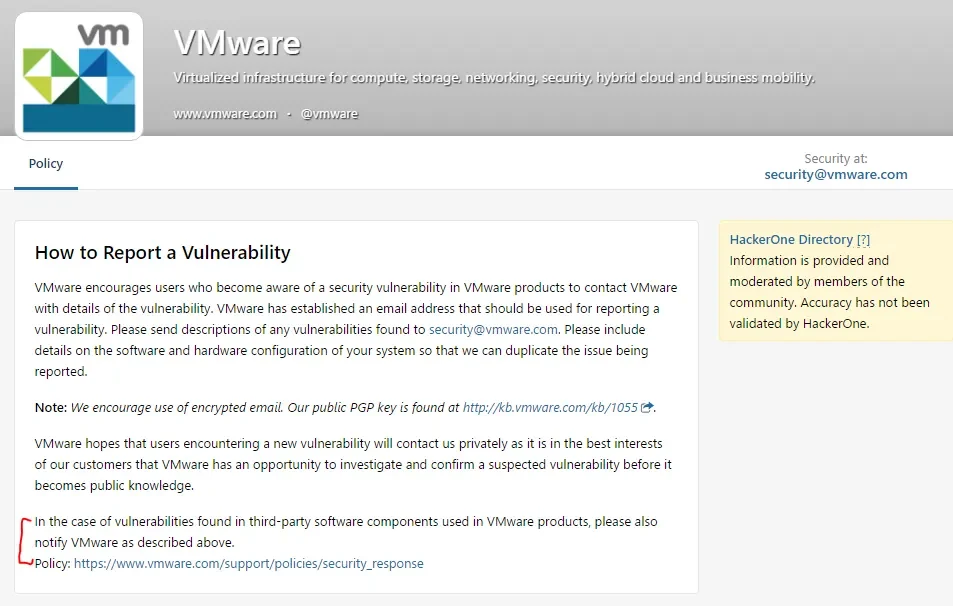
VMware runs a certification programme for its products, and the VCDX certification has an expert badge associated with it. The researcher, Honc (@honcbb), was browsing the HackerOne bug bounty programme and decided to start with a large enterprise, choosing VMware. Before doing anything, they read the VMware vulnerability policy to see what needed attention when participating in the reward programme. The only point worth noting was that vulnerabilities found in third-party software components used in VMware products should also be reported to VMware.
Policy: https://www.vmware.com/support/policies/security_response
Because the researcher used VMware products, they wondered whether each product had a certification expert badge, and went looking for the site that hosts it.

The site is:
https://vcdx.vmware.com/
It is a VMware certification expert site, but there seemed to be no place to register, so the researcher went to the login page at https://vcdx.vmware.com/login.
Setup
No accounts, roles or special tooling are described. The researcher worked against the public login page and used a proxy to capture and modify the login request. The captured request carries a Firefox 50.0 user agent on Windows (WOW64).
Finding it
The researcher notes that many people would first try SQL injection statements on a login form, but they did not think too much about that, reasoning that a big company would not have such an obvious flaw. Instead, out of habit ("based on occupational diseases"), they tried to enter an XSS string into the form:
"><img src=x Onerror:alert (1)/>
They then used their proxy to modify the captured login request.
Exploitation
Step 1: capture the login request
The login form submits a POST to /login on vcdx.vmware.com. The captured request, as shown in the report, is:
POST /login HTTP/1.1

Host: vcdx.vmware.com

User-Agent: Mozilla/5.0 (Windows NT 10.0; WOW64; rv:50.0) Gecko/20100101 Firefox/50.0

Accept: text/html,application/xhtml+xml,application/xml;q=0.9,*/*;q=0.8

Accept-Language: en-US,en;q=0.5

Accept-Encoding: gzip, deflate, br

Referer: https://vcdx.vmware.com/login

Cookie: connect.sid=[redacted]

X-Forwarded-For: [redacted]

Connection: close

Upgrade-Insecure-Requests: 1

Content-Type: application/x-www-form-urlencoded

Content-Length: 75

redirectTo=&email=%22%3E%3Csvg%2Fonload%3Dalert%28domain%29%3E%22&password=
The body is form-encoded and carries three parameters: redirectTo (empty), email and password (empty). The email value is the URL-encoded payload "><svg/onload=alert(domain)>". The Cookie header carries a connect.sid session cookie, which is redacted here. The request also includes an X-Forwarded-For: [redacted] header and a Content-Length: 75 matching the body.
Step 2: observe the reflected payload
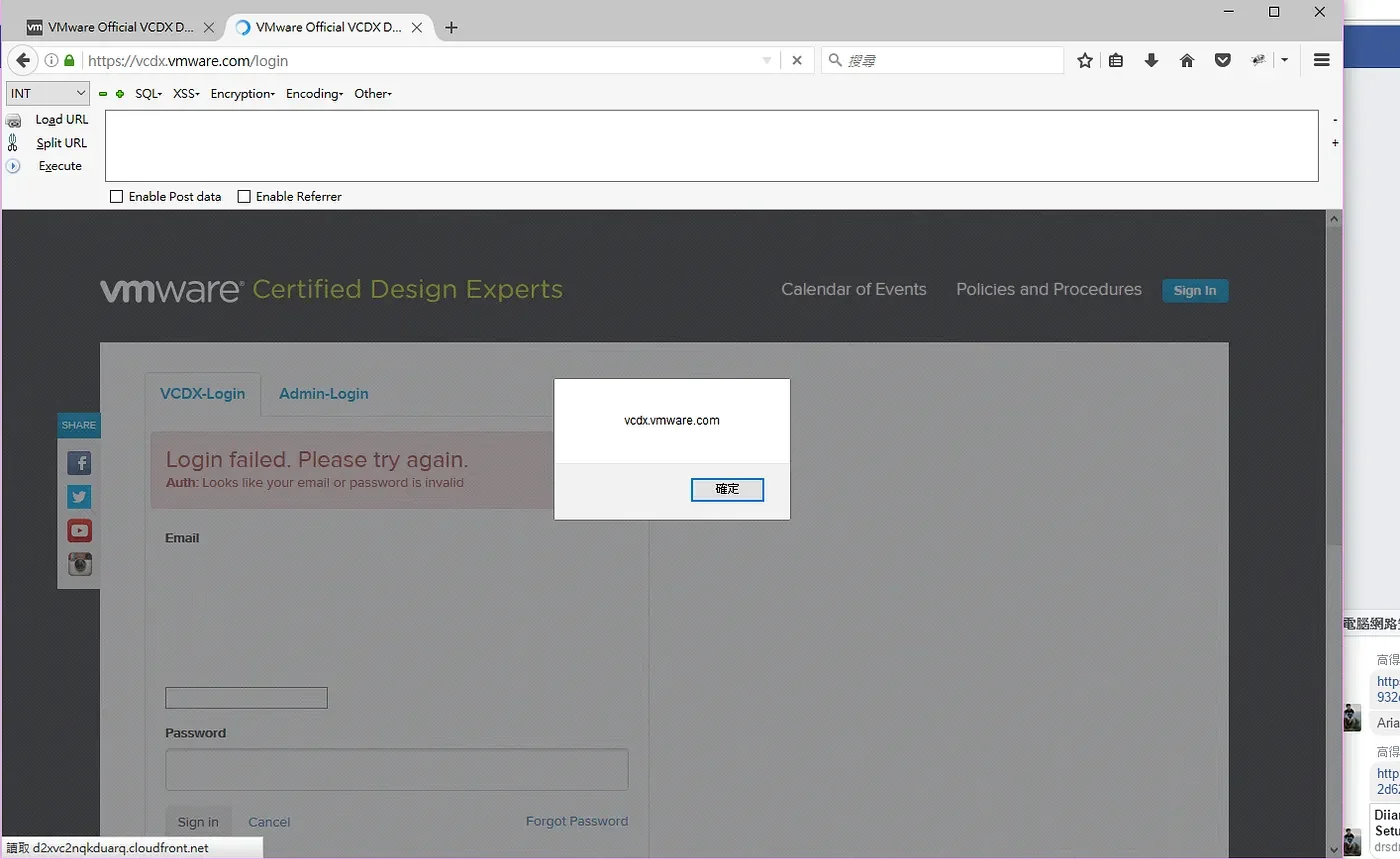
The researcher states that the request produced a response XSS and was sure this was a vulnerability. The screenshot shows the result of the request with the payload in the email parameter.
Root cause
The report does not describe the server-side code or the exact place in the response where the email value is reflected. The report shows the email value being reflected in the response, but does not describe the reflection point or any defences. The payload uses an svg element with an onload handler, while the initial probe used an img with onerror. The report does not say which defences, if any, were present or why they failed.
Impact
The report describes this as a reflected XSS on the VCDX login page. The researcher does not set out a specific attack scenario, victims or preconditions beyond the reflection itself. In general terms, a reflected XSS on a login page can be used to run script in the context of the site for a user who follows a crafted link or submits a crafted form, but the report does not go into this.
Fix
The timeline records a 2017/03/25 entry saying it fixes.
Timeline
- 2017/02/13 08:46: vulnerability details provided to the VMware Security Team
- 2017/02/14 11:35: response from Vinay that inspection is in progress
- 2017/03/25 02:09: entry saying it fixes
- 2017/03/31 05:18: told there would be VMware swag memorabilia
Variants to test
- Submit the same
emailpayload to other endpoints that accept an email address and reflect it, such as registration, password reset or profile update forms. A positive result is the payload appearing unencoded in the HTML response and executing in the browser. - Try the
redirectToparameter with a payload, since it is present in the same request body. A positive result is the value being reflected into a redirect target or into the page without encoding. - Try other event-handler payloads on the same parameter, such as
"><img src=x onerror=alert(1)>, to see whether filtering is specific to certain tags. A positive result is script execution with a different element. - Test the login form on other VMware certification or product sites that share the same codebase. A positive result is the same reflection behaviour on those hosts.
What happened, in plain words
A security researcher was browsing HackerOne, a website where companies offer rewards to people who find bugs in their software. They decided to start with a large company and picked VMware, which makes software used to run virtual machines and much more.
Before poking at anything, they read VMware's vulnerability policy, the page that explains the rules for taking part in the reward programme. The only point they thought worth noting was that if you find a bug in third-party software that VMware products use, you should still tell VMware about it.
Policy: https://www.vmware.com/support/policies/security_response
Because the researcher used VMware products themselves, they wondered whether each product had a certification expert badge, and went looking for the website that hosts it.
The site is:
https://vcdx.vmware.com/
This is a VMware certification expert site. There seemed to be no place to register, so the researcher went to the login page at https://vcdx.vmware.com/login.
On a login form, many people would first try SQL injection, which is an attempt to sneak database commands into a form field so the database misbehaves. The researcher did not bother, reasoning that a big company would not leave such an obvious flaw. Instead, out of habit, they typed an XSS string into the form. XSS, short for cross-site scripting, means getting your own little piece of code (usually JavaScript, the language browsers run) into a page so that it runs in someone else's browser. The string they typed was:
"><img src=x Onerror:alert (1)/>
They then used a proxy to change the login request before it left their computer. A proxy is a tool that sits between your browser and the website, letting you see and edit every message going each way, like a postal worker who opens your letters and can rewrite them before delivery.
Step 1: capture the login request
The login form sends a POST request to /login on vcdx.vmware.com. A POST request is the way a browser submits data to a server, for example when you press a login button. The captured request, as shown in the report, is:
POST /login HTTP/1.1

Host: vcdx.vmware.com

User-Agent: Mozilla/5.0 (Windows NT 10.0; WOW64; rv:50.0) Gecko/20100101 Firefox/50.0

Accept: text/html,application/xhtml+xml,application/xml;q=0.9,*/*;q=0.8

Accept-Language: en-US,en;q=0.5

Accept-Encoding: gzip, deflate, br

Referer: https://vcdx.vmware.com/login

Cookie: connect.sid=[redacted]

X-Forwarded-For: [redacted]

Connection: close

Upgrade-Insecure-Requests: 1

Content-Type: application/x-www-form-urlencoded

Content-Length: 75

redirectTo=&email=%22%3E%3Csvg%2Fonload%3Dalert%28domain%29%3E%22&password=
Line by line, in plain words:
POST /login HTTP/1.1is the first line of the request: the method (POST, meaning "here is some data"), the path on the site (/login), and the version of the HTTP protocol being spoken.Host: vcdx.vmware.comtells the server which website the request is for. One server can host many sites, so it needs to know which one you want.User-Agent: ...is the browser introducing itself. Here it says Firefox 50.0 on Windows. The report's captured request shows this user agent.Accept: ...lists the kinds of content the browser is willing to receive, such as HTML pages and XML.Accept-Language: en-US,en;q=0.5says the browser prefers English.Accept-Encoding: gzip, deflate, brsays the browser can accept compressed responses to save bandwidth.Referer: https://vcdx.vmware.com/logintells the server which page the request came from, here the login page itself.Cookie: connect.sid=[redacted]carries a cookie. A cookie is a small piece of data the site stored in your browser earlier, and the browser sends it back with every request so the site can recognise you.connect.sidis the name of this session cookie: a session is the site's memory of your visit, and the long random value is the ticket that identifies it. It is redacted here because anyone holding it could act as that user.X-Forwarded-For: [redacted]is a header that proxies and load balancers use to pass along the original client address. Here it carries 8.8.8.8.Connection: closeasks the server to close the network connection after this response instead of keeping it open.Upgrade-Insecure-Requests: 1tells the server the browser would prefer an encrypted HTTPS version of the page if one exists.Content-Type: application/x-www-form-urlencodedsays the body is formatted like a web form: pairs of names and values joined with&.Content-Length: 75says the body is 75 bytes long, so the server knows where it ends.- The last line is the body itself:
redirectTo=&email=%22%3E%3Csvg%2Fonload%3Dalert%28domain%29%3E%22&password=. It has three fields.redirectTois empty,passwordis empty, andemailholds the payload. The payload is written in percent-encoding, the way browsers safely carry special characters in a form:%22is a double quote,%3Eis>,%3Cis<,%2Fis/,%28is(and%29is). Decoded, theemailvalue is"><svg/onload=alert(domain)>". That is a double quote to close whatever attribute the site puts the value in, then a>to close the surrounding tag, then ansvgelement whoseonloadhandler runsalert(domain)as soon as the element loads.alertis the browser's pop-up box, so if the box appears, the injected code ran.
Step 2: observe the reflected payload
The researcher states that the request produced a response XSS and was sure this was a vulnerability. A reflected XSS is one where the value you sent comes straight back in the page the server returns, and the browser then treats it as part of the page and runs it. The screenshot shows the result of the request with the payload in the email parameter.
Why it worked
The report does not describe the server-side code or the exact place in the response where the email value is reflected. The report shows the email value being reflected in the response, but does not describe the reflection point or any defences. Neutralising, or encoding, means turning characters like < and > into harmless text so the browser shows them instead of treating them as code. The payload uses an svg element with an onload handler, while the initial probe used an img with onerror. The report does not say which defences, if any, were present or why they failed.
What it means
The report describes this as a reflected XSS on the VCDX login page. The researcher does not set out a specific attack scenario, victims or preconditions beyond the reflection itself. In general terms, a reflected XSS on a login page can be used to run script in the context of the site for a user who follows a crafted link or submits a crafted form, but the report does not go into this.
The fix
The timeline records a 2017/03/25 entry saying it fixes.
Timeline
- 2017/02/13 08:46: vulnerability details provided to the VMware Security Team
- 2017/02/14 11:35: response from Vinay that inspection is in progress
- 2017/03/25 02:09: entry saying it fixes
- 2017/03/31 05:18: told there would be VMware swag memorabilia
Other places to try the same idea
- Submit the same
emailpayload to other endpoints that accept an email address and reflect it, such as registration, password reset or profile update forms. A positive result is the payload appearing unencoded in the HTML response and executing in the browser. - Try the
redirectToparameter with a payload, since it is present in the same request body. A positive result is the value being reflected into a redirect target or into the page without encoding. - Try other event-handler payloads on the same parameter, such as
"><img src=x onerror=alert(1)>, to see whether filtering is specific to certain tags. A positive result is script execution with a different element. - Test the login form on other VMware certification or product sites that share the same codebase. A positive result is the same reflection behaviour on those hosts.
Glossary
- Bug bounty programme: a scheme where a company pays or thanks people who report security bugs in its systems.
- HackerOne: a platform where bug bounty programmes are listed and reports are submitted.
- Vulnerability policy: a company's page stating which bugs it wants reported and how.
- Third-party component: software made by another company that a product includes and relies on.
- VCDX: an expert-level VMware certification.
- SQL injection: tricking a form or URL into running database commands by putting database syntax into an input field.
- XSS (cross-site scripting): getting your own code into a web page so it runs in another user's browser.
- Reflected XSS: XSS where the value you sent is echoed straight back in the response and runs there.
- JavaScript: the programming language browsers run to make pages interactive.
- Proxy: a tool between your browser and a website that lets you view and edit the traffic in both directions.
- POST request: an HTTP request that carries data to the server, such as a login form submission.
- HTTP: the protocol browsers and servers use to exchange requests and responses.
- Header: a named line in an HTTP request or response carrying information about it.
- Host: the header naming which website the request is addressed to.
- User-Agent: the header in which the browser identifies itself and its version.
- Referer: the header telling the server which page the request came from.
- Cookie: a small value stored in your browser and sent back with requests so the site can recognise you.
- Session: the site's memory of your visit, identified by a session cookie.
- Session cookie: the cookie holding the identifier for your session; anyone with it can act as you.
- X-Forwarded-For: a header used by proxies to pass along the original client address.
- Content-Type: the header saying how the request body is formatted.
- Content-Length: the header giving the size of the request body in bytes.
- Form-encoded: a body format of name=value pairs joined with
&, as web forms send them. - Percent-encoding (URL encoding): writing special characters as
%followed by two hex digits, such as%22for a double quote. - Payload: the crafted value an attacker sends to trigger a bug.
svgelement: an HTML element for drawing vector graphics; itsonloadhandler runs when it loads.onloadhandler: code attached to an element that runs when the element finishes loading.onerrorhandler: code attached to an element that runs when it fails to load, such as a broken image.alert: the browser function that shows a pop-up box, often used to prove script ran.- Encoding (output encoding): converting characters like
<and>into harmless text so the browser displays them instead of running them. - Endpoint: a specific address on a site that accepts requests, such as
/login. - Codebase: the shared source code that several sites or features are built from.