Internet Safety for Kids & Families — Trend Micro Bypass DOM XSS
A search parameter on a Trend Micro site reflected user input into the page without proper encoding, and the site's filter only blocked specific strings such as the onerror attribute. An attacker could craft a link that runs script in a victim's browser by using an alternative tag and attribute.

I was holding a cup of coffee, I want to say to practice a , find trend Micro loophole Policy project, want to say see can find some loopholes as one of the technical exercises
The full write-up lives on its author's site
It belongs to its author, so we link to it rather than copy it. The other two tabs are our own rewrites, checked against it.
Context
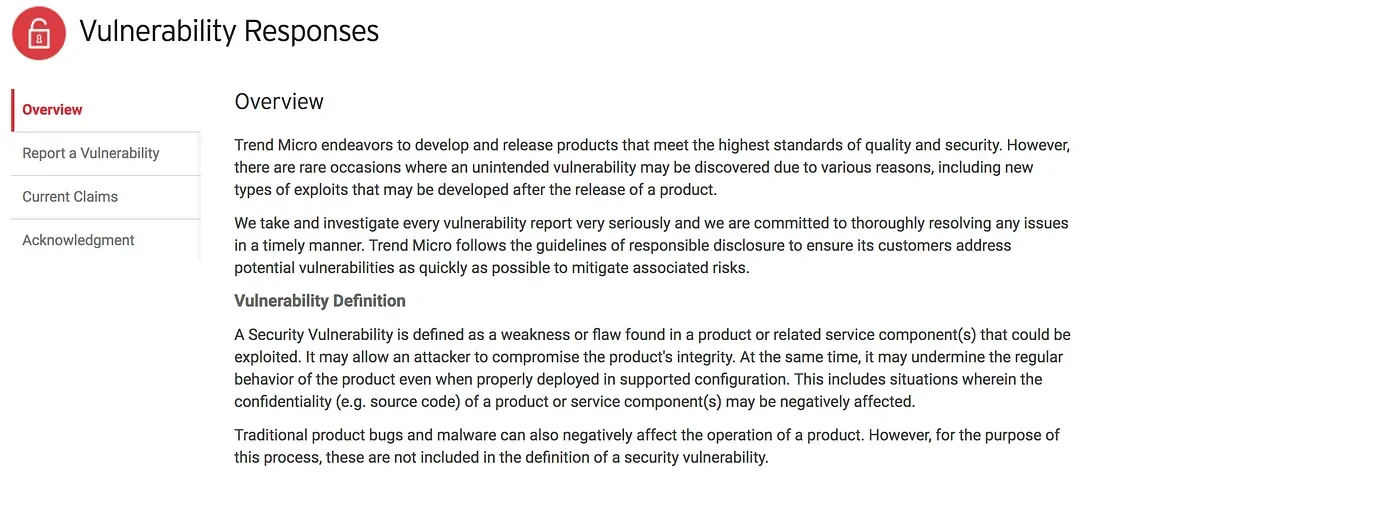
The target of this exercise was Trend Micro's Internet Safety for Kids & Families site, reachable at http://internetsafety.trendmicro.com/. The report shows an input box and a search parameter s. The researcher approached it as a technical exercise after reading Trend Micro's vulnerability disclosure policy, with the stated intention of reporting any finding to the vendor's security team quickly, together with a reproduction method.
Setup
No accounts, roles or special tooling are described. The researcher says they began by trying to crack subdomains of *.trendmicro.com with tools, then moved their attention to http://internetsafety.trendmicro.com/. The general approach described is to fuzz and probe parameter values and input boxes of the web application, and to sniff the server.
Finding it
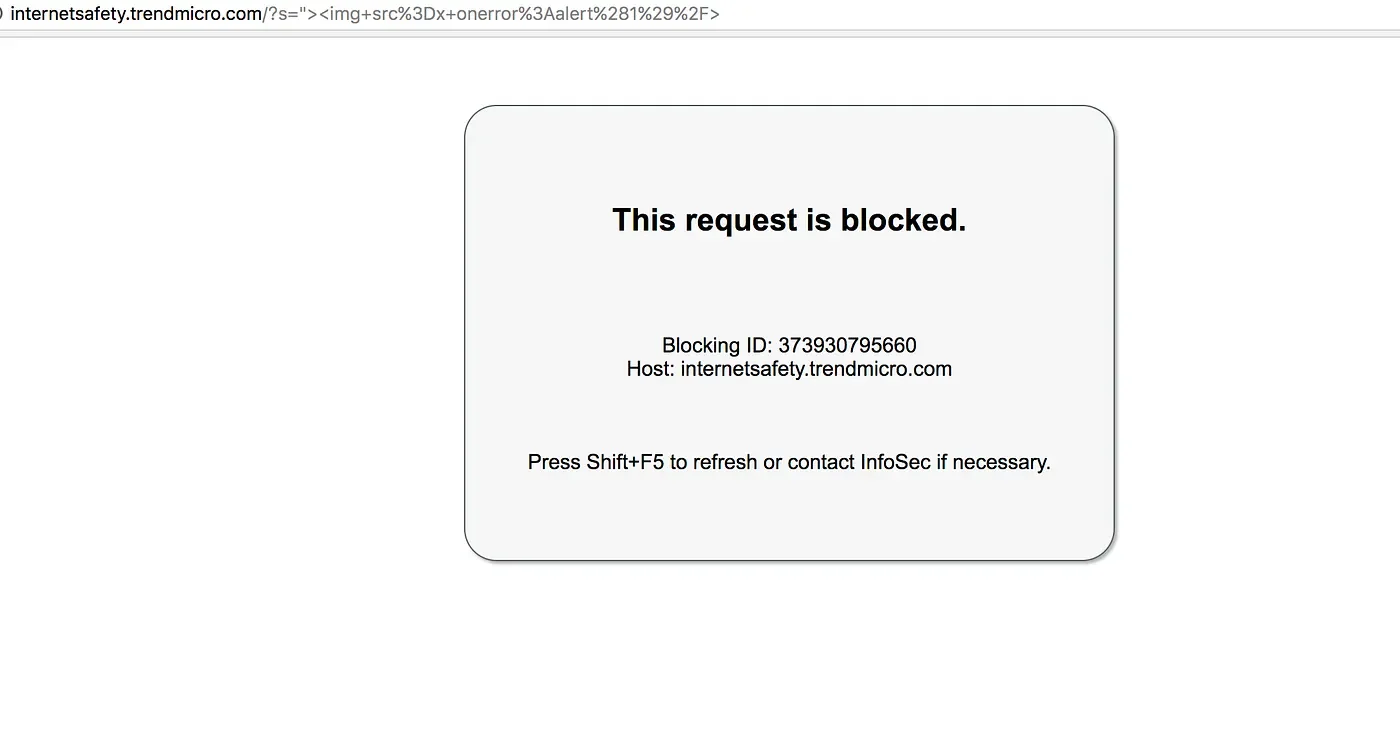
The researcher's first move was the standard one: put an XSS proof of concept into the input box, using the s parameter.
http://internetsafety.trendmicro.com/?s=%22%3E%3Cimg+src%3Dx+onerror%3Aalert%281%29%2F%3E
Decoded, the payload is "><img src=x oneror:alert(1)/>. The request was blocked, which the researcher read as a firewall or WAF filtering the input. That raised the question of what exactly was being filtered: the > symbol, or the special strings img and onerror?

Exploitation
Step 1: test whether "> and < survive
Rather than assume the whole payload was blocked, the researcher sent only the opening characters.
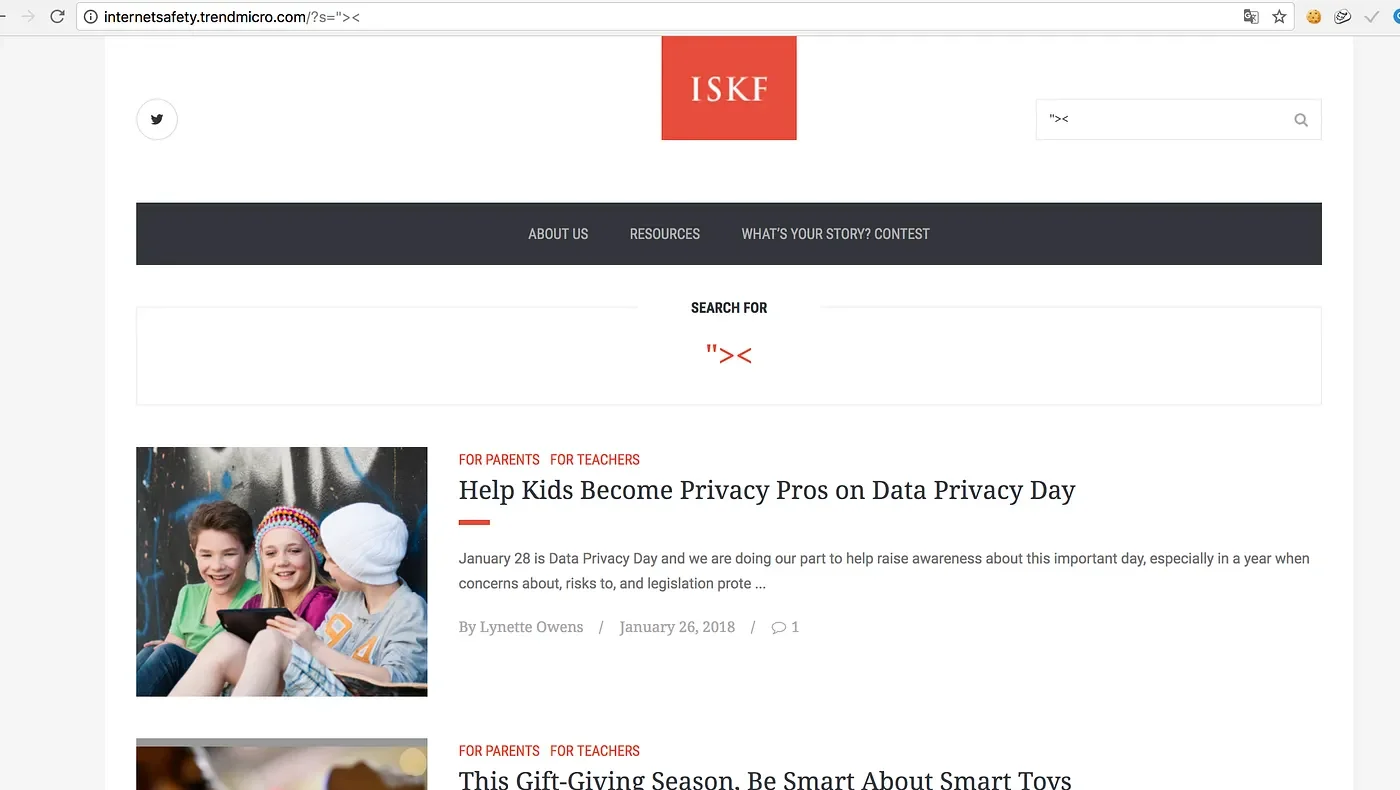
http://internetsafety.trendmicro.com/?s=%22%3E%3C
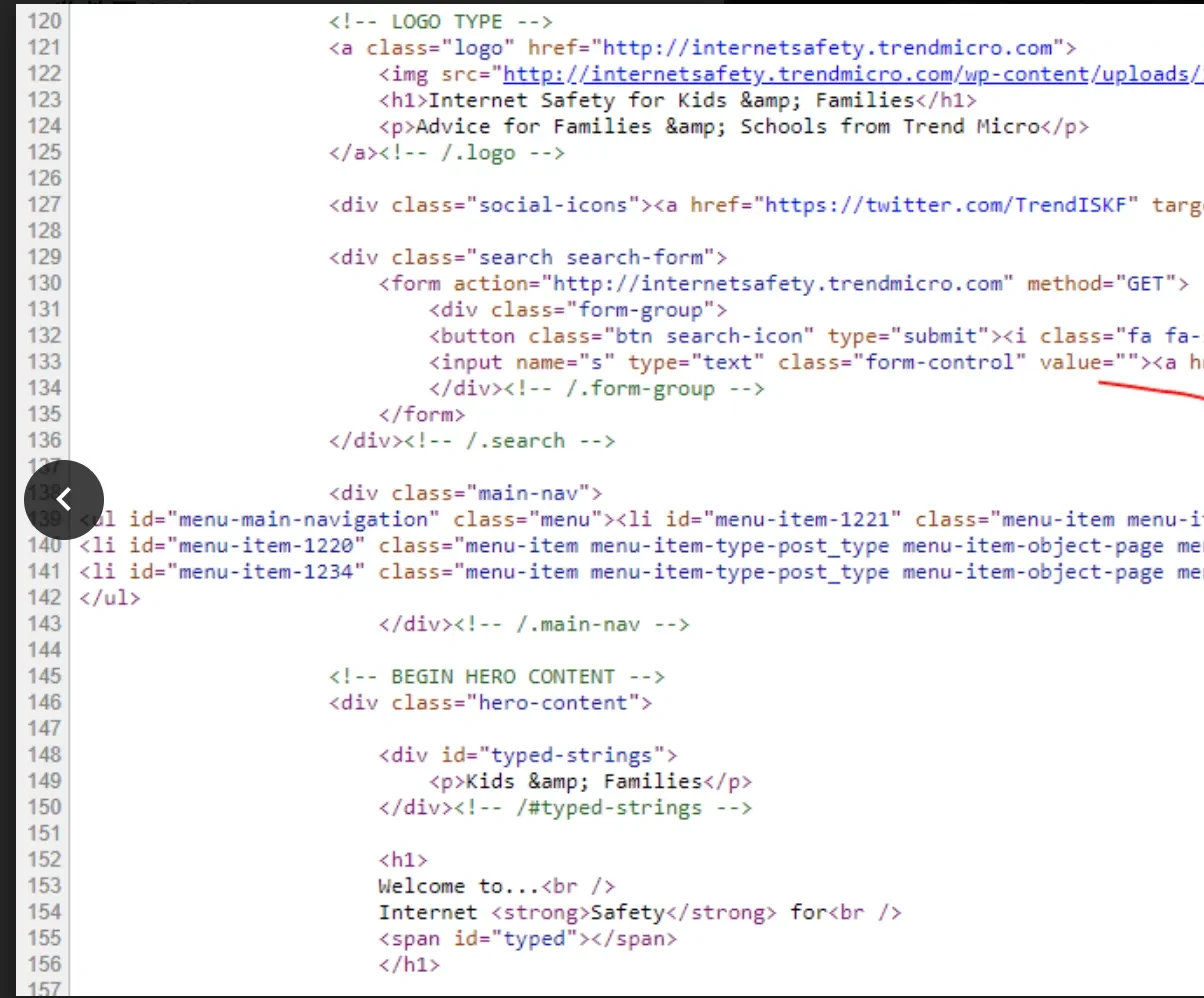
This is ">< after URL decoding. Unexpectedly, it was not filtered. Viewing the source of the response showed the characters reflected into the page.
Step 2: test whether an img tag survives
The next probe added the start of an image tag.
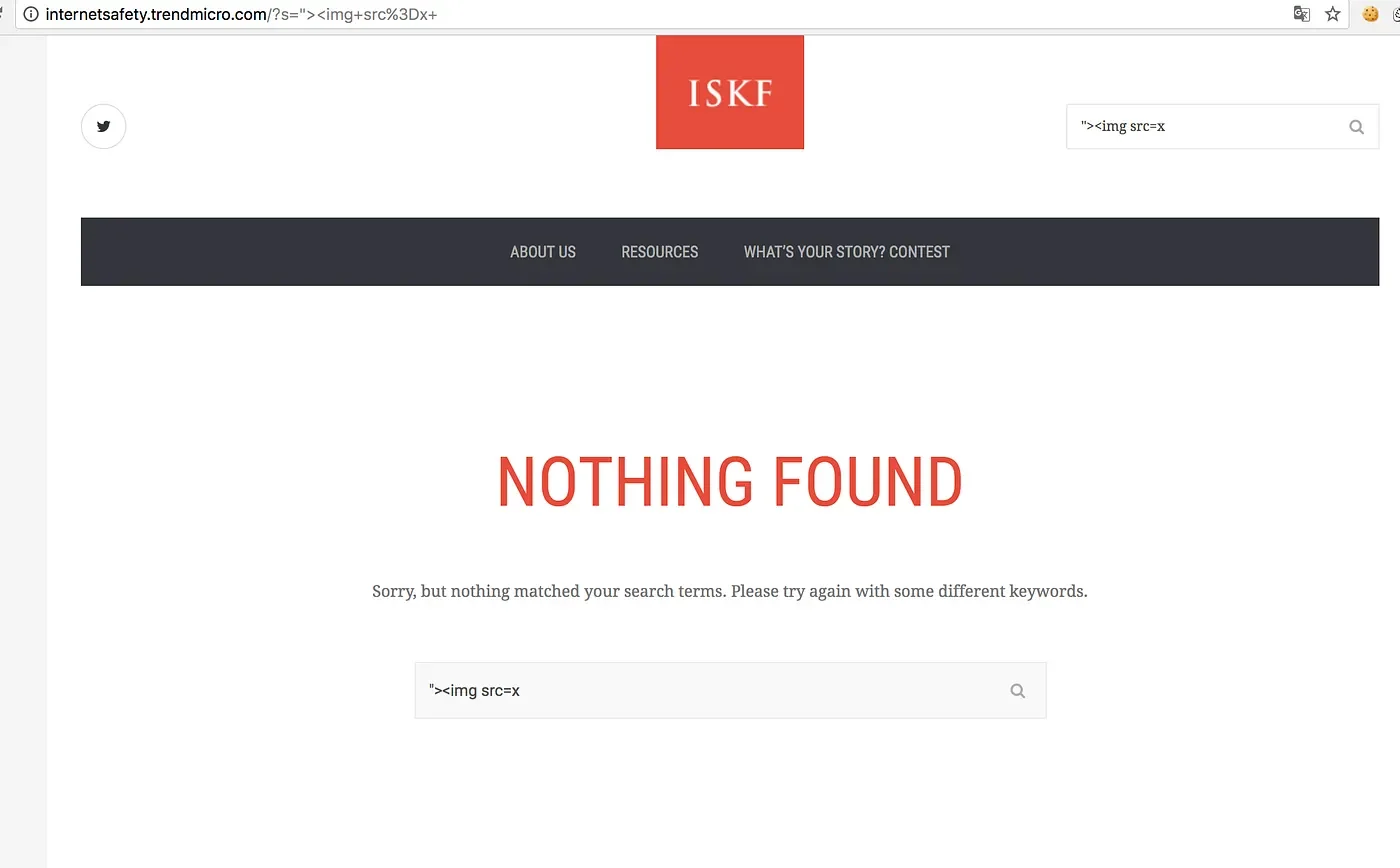
http://internetsafety.trendmicro.com/?s="><img src=x
This was also not filtered, so the tag itself got through.
Step 3: test whether the event handler survives
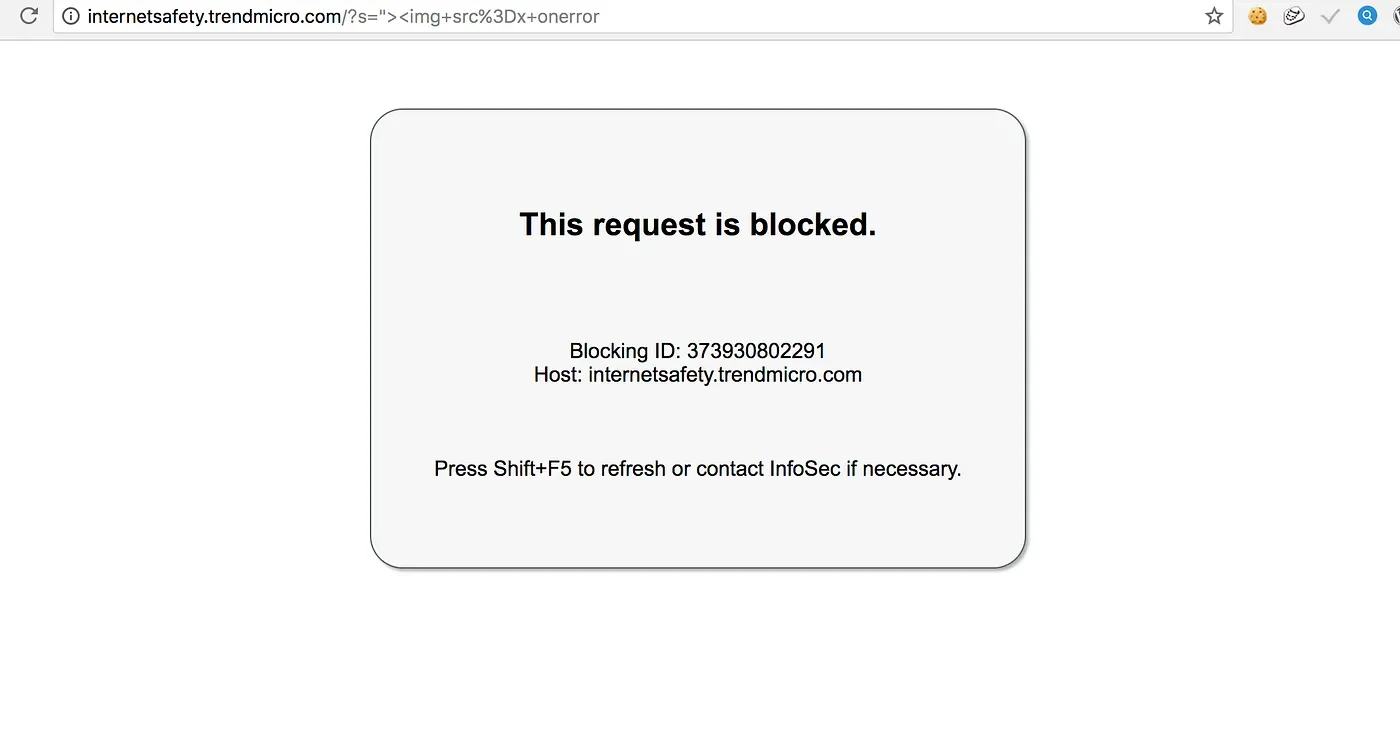
The remaining question was whether the handler that executes script, onerror, was filtered. The researcher tested it and found that it was: the onerror syntax was filtered out.
Step 4: switch to an anchor with a data URI
With onerror blocked, the researcher moved to an HTML anchor (a) element and combined it with a data: URI carrying a base64-encoded SVG payload, URL-encoding the syntax as an attempt.
http://internetsafety.trendmicro.com/?s="><a+href%3D"data%3Atext%2Fhtml%3Bbase64%2CPHN2Zy9vbmxvYWQ9YWxlcnQoMik%2B">click<%2Fa>
The base64 string PHN2Zy9vbmxvYWQ9YWxlcnQoMik+ decodes to <svg/onload=alert(2)>, so the injected markup is an anchor whose href is a data:text/html document containing an SVG that runs alert(2) on load, with the visible link text click.
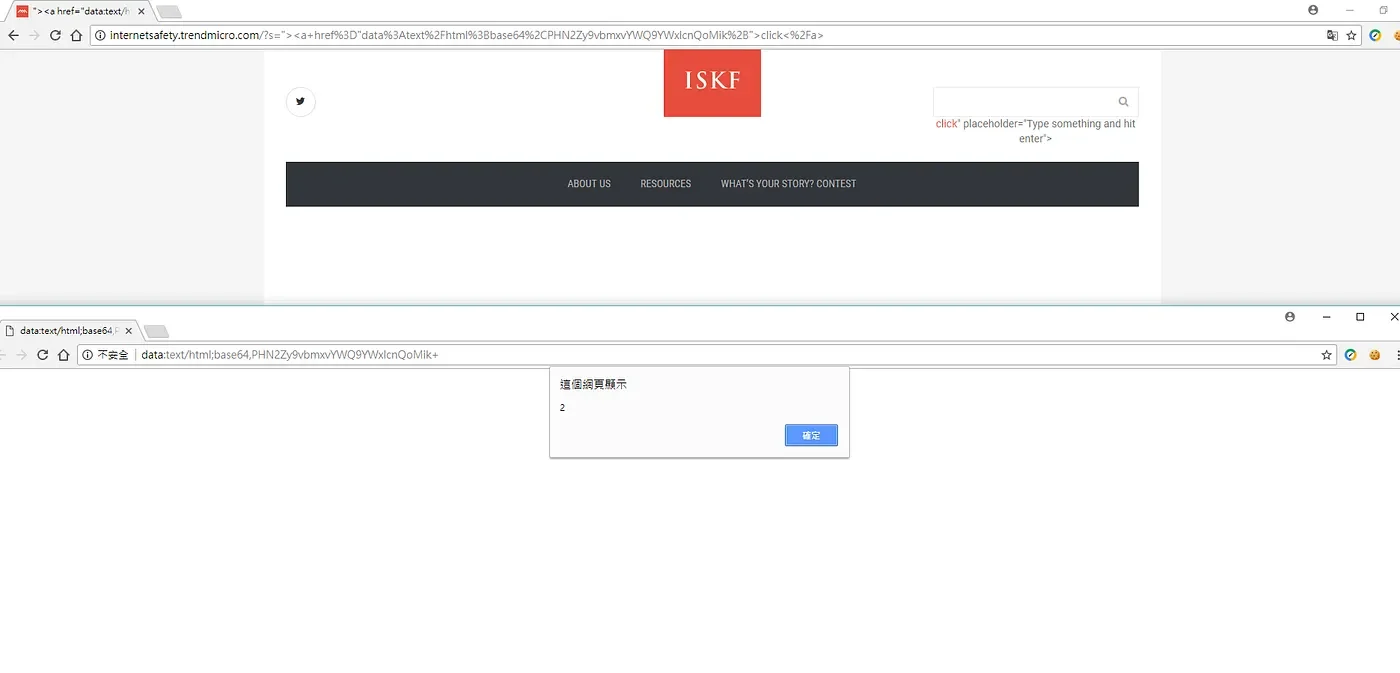
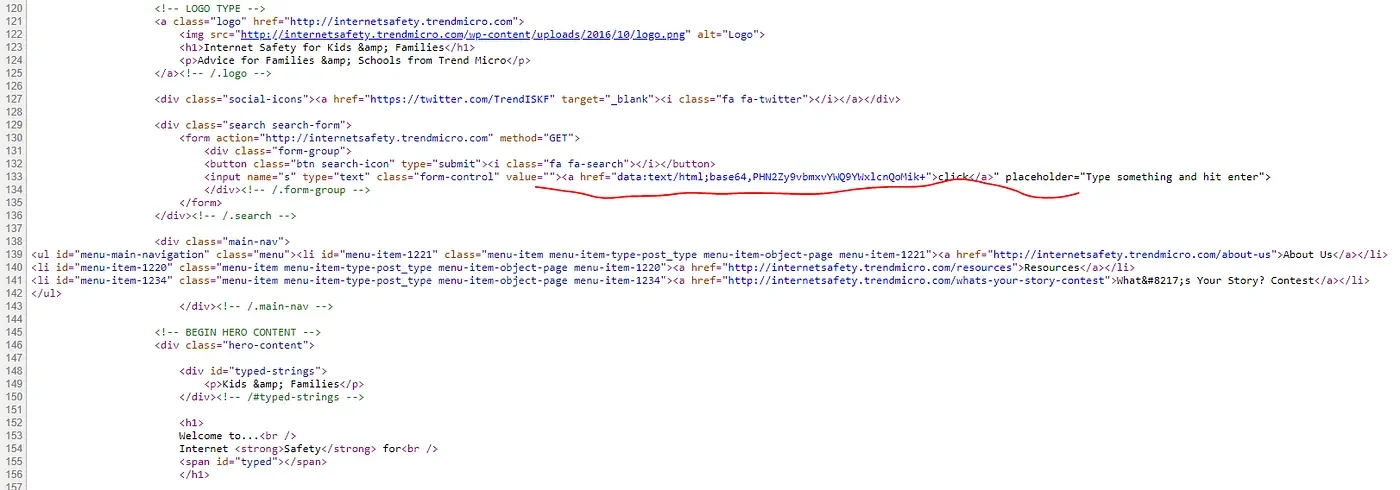
The response came back successfully.
Root cause
The researcher's conclusion is that the application filtered only some strings rather than strictly filtering what the client passed in. The onerror handler was removed, but the quote, angle bracket, img tag and the anchor with a data: URI were not, so a different execution path (an SVG onload inside a data: URI) reached the browser intact. The report does not describe the server-side code, so the exact filtering implementation is not shown; the behaviour is consistent with a blacklist of specific tokens rather than context-aware output encoding.
Impact
The report demonstrates script execution in the context of the site through the s parameter, using alert(1) and alert(2) as proof. It does not describe what an attacker could reach beyond that, nor any user data or session handling, so the practical impact beyond reflected script execution in a victim's browser is not established here.
Fix
The timeline records a fix on 2018/03/01, without describing the change. The lesson the researcher draws is that filtering individual strings is not enough; input should be handled strictly rather than by blocking a list of known-bad tokens.
Variants to test
- Send only the opening characters of a payload (
"><) and inspect the response source. A positive result is the characters appearing unencoded in the HTML. - Send a tag without its handler (
"><img src=x) to see whether tag names are filtered separately from event handlers. A positive result is the tag surviving while the handler is stripped. - Replace a blocked handler with an alternative execution path, such as an anchor with a
data:text/html;base64,URI containing an SVG withonload. A positive result is the payload being accepted in the response. - Base64-encode the script portion and check whether the filter inspects the decoded content. A positive result is the encoded payload passing through untouched.
Timeline
- 2018/02/11 03:52: vulnerability details provided to the Trend Micro Security Team
- 2018/02/11 05:53: automatic reply received, inspection in progress
- 2018/03/01 11:53: fixed
- 2018/03/05 11:07: researcher listed on Trend Micro's acknowledgment (Hall Of Fame) page
What happened, in plain words
A security researcher spent some free time looking for weaknesses in websites belonging to Trend Micro, a security company. One of those websites is a site aimed at children and families, called Internet Safety for Kids & Families, at http://internetsafety.trendmicro.com/. The site has a search box that sends a parameter called s.
The researcher typed some special characters into that search box, the kind of characters that a browser treats as instructions rather than as text. The site put some of those characters back into the page, though it filtered others. Because of that, the researcher could make the page run a small piece of JavaScript, which is the programming language that browsers use to make pages interactive. Making a page run someone else's JavaScript is called cross-site scripting, usually shortened to XSS. When the script runs because the page's own client-side code inserted the input, it is called DOM XSS.
The site did have a filter that removed some of the dangerous words, but not all of them. The researcher found a different way to make the browser run script, and it worked. The researcher reported it to Trend Micro, the timeline records a fix, and the researcher was added to the company's Hall of Fame page.
This article walks through the same steps the researcher took, explaining each idea from scratch. You only need a browser and a computer to follow along.
The starting point: a bug bounty policy
The researcher began by reading Trend Micro's vulnerability disclosure policy. A vulnerability disclosure policy is a public document in which a company says: if you find a security problem in our systems, here is how to tell us, here is what you are allowed to test, and here is what we promise to do. Some companies run a bug bounty programme, where they may pay money for good reports. The researcher describes the session as a technical exercise, with the intention of reporting anything found to the vendor's security team quickly, together with a way to reproduce it.
A reproduction method matters because a report that says "your site is broken" is hard to act on. A report that says "open this exact URL and you will see the problem" can be checked in seconds.
Looking at subdomains first
A domain is a name on the internet, like trendmicro.com. A subdomain is a name placed in front of it, like internetsafety.trendmicro.com or www.trendmicro.com. Large companies own many subdomains, and each one can be a different application, sometimes built by different teams at different times, with different levels of care.
A common first step when testing a company is to find out which subdomains exist. The researcher says they tried to crack subdomains of *.trendmicro.com with tools. Cracking here means guessing names: tools try a long list of common words (mail, shop, blog, support, and so on) in front of the domain and see which ones answer. The * is a wildcard meaning "anything".
After that, the researcher became curious about one particular host and moved the target to:
http://internetsafety.trendmicro.com/
Reading this line: http is the protocol, the set of rules browsers and servers use to exchange pages. internetsafety.trendmicro.com is the host name. The trailing / means the home page of that host.
The general approach: fuzzing and input boxes
The researcher describes the general method as fuzzing and probing the parameter values or input boxes of the web application, and also sniffing the server.
- Fuzzing means sending lots of unusual, malformed or unexpected input and watching how the application reacts. You are not looking for a specific answer; you are looking for a reaction that differs from the normal one.
- A parameter is a named value attached to a URL, after a question mark. In
?s=hello, the parameter is calledsand its value ishello. Web applications use parameters to know what you asked for. - An input box is the field on the page where you type, such as a search field. Behind the scenes it usually sends a parameter too.
- Sniffing the server means observing the traffic between your browser and the server, for example with the developer tools built into every browser, to see what is actually sent and returned.
First attempt: a classic XSS test
The researcher's first move was the standard one: put a small XSS proof of concept into the search box, using the s parameter.
http://internetsafety.trendmicro.com/?s=%22%3E%3Cimg+src%3Dx+onerror%3Aalert%281%29%2F%3E
Line by line, in plain words:
http://internetsafety.trendmicro.com/is the site.?starts the list of parameters.s=is the parameter name the search box uses.- Everything after
s=is the value, written in URL encoding. URLs cannot contain spaces or many punctuation characters directly, so they are written as%followed by two hexadecimal digits.%22is a double quote,%3Eis>,%3Cis<,%3Dis=,%3Ais:,%28is(,%29is),%2Fis/, and+stands for a space.
Decoded, the value is:
"><img src=x oneror:alert(1)/>
What this is trying to do: the leading "> is meant to close whatever HTML attribute the site has put the search term inside, so that what follows is treated as new HTML rather than as text. Then <img src=x ...> asks the browser to display an image whose address is x, which does not exist. Because the image cannot load, the browser fires an event called onerror, meaning "loading failed". The text after onerror is supposed to be JavaScript that runs when that happens. Here the researcher wrote oneror rather than onerror and used a colon rather than an equals sign, so this particular string is a rough test rather than a working payload. The point of the test is to see whether the site lets the characters through at all.
A payload is simply the piece of input you send to try to trigger a behaviour. A proof of concept, or PoC, is a minimal demonstration that a problem is real.
The request was blocked. The researcher read that as a firewall or WAF filtering the input. A firewall is a device or program that inspects network traffic and drops what looks disallowed. A WAF, web application firewall, is the same idea specialised for websites: it looks at the content of requests and blocks ones that match patterns it considers dangerous.
Asking the right question: what exactly is blocked?
A block tells you that something in your input was rejected, but not which part. The researcher started to wonder what was actually being filtered: the > symbol, or the special strings img and onerror?
This is the key habit in this kind of testing. Instead of sending one big payload and giving up when it fails, you send smaller and smaller pieces to find out which piece the filter objects to. It is like finding which ingredient a fussy eater dislikes by offering each one separately.
At first the researcher thought there might be no vulnerability at all. Then the results turned out to be more interesting than expected.
Step 1: do the quote and angle bracket survive?
Rather than assume the whole payload was blocked, the researcher sent only the opening characters.
http://internetsafety.trendmicro.com/?s=%22%3E%3C
Decoded, this is "><: a double quote, a greater-than sign and a less-than sign. These are the characters that break out of an HTML attribute and start a new tag. If a site lets them through unencoded, it is a strong sign that whatever you type can become part of the page's structure.
Unexpectedly, it was not filtered. Viewing the source of the response showed the characters reflected into the page. Viewing the source means asking the browser to show the raw HTML the server sent, rather than the rendered page; every browser offers this. Reflected means your input came back in the response, unchanged.
Step 2: does an image tag survive?
The next probe added the start of an image tag.
http://internetsafety.trendmicro.com/?s="><img src=x
Here the value is written partly in plain characters rather than fully URL-encoded, which browsers accept. Decoded, the value is "><img src=x: the same breakout characters, followed by the opening of an img tag with a source of x. There is no closing > yet, on purpose: the researcher is testing whether the word img and the tag structure get through, separately from any event handler.
This was also not filtered, so the tag itself got through.
Step 3: is the event handler blocked?
The remaining question was whether the handler that executes script, onerror, was filtered. An event handler is an attribute on an HTML element that tells the browser "when this happens to this element, run this code". onerror fires when something fails to load, such as a missing image.
The researcher tested it and found that it was: the onerror syntax was filtered out.
So the picture is now clear. The filter is not blocking the dangerous structural characters, and it is not blocking the img tag. It is blocking one specific word, onerror. That is a blacklist: a list of known-bad words that get removed. A blacklist only stops what someone thought to write down.
Step 4: a different way to run script
With onerror blocked, the researcher needed another way to make the browser execute JavaScript. The idea was to use an HTML anchor, the a element, which is what makes a clickable link, and to point it at a data: URI.
A URI is an address. Most addresses you see start with http:// or https:// and point at a server. A data: URI is different: it contains the content itself, inline, instead of pointing anywhere. data:text/html;base64,... means "the content is HTML, and it is written in base64". Base64 is a way of writing arbitrary bytes using only ordinary letters, digits and a couple of symbols, so that content can travel safely inside a URL or a text field. The browser decodes it back to the original bytes before using it.
The researcher combined the syntax and URL-encoded it as an attempt:
http://internetsafety.trendmicro.com/?s="><a+href%3D"data%3Atext%2Fhtml%3Bbase64%2CPHN2Zy9vbmxvYWQ9YWxlcnQoMik%2B">click<%2Fa>
Line by line:
?s=starts the search parameter, as before.">closes the attribute the search term sits in and starts new markup.<a+href%3Dis<a href=with the space written as+and the equals sign URL-encoded. It opens an anchor and begins itshrefattribute, which is the address the link points to."data%3Atext%2Fhtml%3Bbase64%2CPHN2Zy9vbmxvYWQ9YWxlcnQoMik%2B"is the address, in quotes:data:text/html;base64,PHN2Zy9vbmxvYWQ9YWxlcnQoMik+. The semicolon separates the media type from the encoding, and the comma separates the encoding from the data itself.>clickcloses the opening tag and gives the link the visible textclick.<%2Fa>is</a>, which closes the anchor.
The base64 string PHN2Zy9vbmxvYWQ9YWxlcnQoMik+ decodes to:
<svg/onload=alert(2)>
An SVG is a format for drawing vector graphics, and browsers can display it inside HTML. Crucially, SVG elements support their own event handlers, and onload fires when the element has finished loading. So the injected markup is an anchor whose address is a small HTML document containing an SVG that runs alert(2) as soon as it loads. alert is a built-in browser function that shows a pop-up box with a message; it is the standard harmless way to prove that script ran, because if you see the box, your code executed.
Why this route? Because the filter was looking for onerror. It was not looking for onload, and it was not looking inside a base64 string, where the word onload does not appear in readable form at all.
The response came back successfully.
Why it worked
The researcher's conclusion is that the application filtered only some strings rather than strictly filtering what the client passed in. The client here means the browser: the thing sending the request. The onerror handler was removed, but the quote, the angle bracket, the img tag and the anchor with a data: URI were not. So a different execution path, an SVG onload inside a data: URI, reached the browser intact.
The proper defence is not to remove words from a list. It is to encode output according to where the value is being placed, so that characters like <, > and " are turned into text that the browser displays but never interprets as markup. That approach is called context-aware output encoding, and it works no matter which words an attacker chooses, because it does not depend on knowing them in advance.
What this means in practice
The report demonstrates script execution in the context of the site through the s parameter, using alert(1) and alert(2) as proof. It does not describe what an attacker could reach beyond that, nor any user data or session handling, so the practical impact beyond reflected script execution in a victim's browser is not established here.
In general terms, script running in a site's own page can act with that site's authority in the visitor's browser: it can read what the page can read and act as the visitor towards that site. That is why XSS is taken seriously even when the demonstration is only a pop-up.
The fix
The timeline records a fix on 2018/03/01, without describing the change. The lesson the researcher draws is that filtering individual strings is not enough; input should be handled strictly rather than by blocking a list of known-bad tokens.
Things worth trying if you want to practise
These are the same probes, framed as exercises. Only test sites that invite it, such as ones with a disclosure policy or a practice range.
- Send only the opening characters of a payload (
"><) and inspect the response source. A positive result is the characters appearing unencoded in the HTML. - Send a tag without its handler (
"><img src=x) to see whether tag names are filtered separately from event handlers. A positive result is the tag surviving while the handler is stripped. - Replace a blocked handler with an alternative execution path, such as an anchor with a
data:text/html;base64,URI containing an SVG withonload. A positive result is the payload being accepted in the response. - Base64-encode the script portion and check whether the filter inspects the decoded content. A positive result is the encoded payload passing through untouched.
Timeline
- 2018/02/11 03:52: vulnerability details provided to the Trend Micro Security Team
- 2018/02/11 05:53: automatic reply received, inspection in progress
- 2018/03/01 11:53: fixed
- 2018/03/05 11:07: researcher listed on Trend Micro's acknowledgment (Hall Of Fame) page
Glossary
- Anchor (
aelement): the HTML element that creates a clickable link, whose destination is given by itshrefattribute. - Base64: an encoding that turns arbitrary bytes into ordinary letters, digits and a few symbols, so the content can travel inside a URL or text field; the browser decodes it back before use.
- Blacklist: a defence that blocks a list of known-bad words or patterns; it only stops what someone thought to list.
- Bug bounty programme: a scheme in which a company invites people to report security problems, often with a reward.
- Client: the program making a request, here the browser, as opposed to the server that answers.
- Context-aware output encoding: turning characters such as
<,>and"into harmless text according to where the value is placed on the page, so the browser displays them but never treats them as markup. data:URI: an address that contains the content itself, inline, instead of pointing at a server; for exampledata:text/html;base64,....- DOM XSS: XSS where the script runs because the page's own client-side code inserted the input into the page, rather than the server storing it.
- Domain: a name on the internet, such as
trendmicro.com. - Event handler: an attribute on an HTML element that runs code when something happens to that element, such as
onerrorwhen an image fails to load oronloadwhen it finishes loading. - Firewall: a device or program that inspects network traffic and drops what looks disallowed.
- Fuzzing: sending lots of unusual or malformed input and watching for a reaction that differs from the normal one.
- Hall of Fame: a public page where a company thanks people who reported security problems.
- HTML: the language that describes the structure of a web page, made of elements written as tags such as
<img>and<a>. - HTTP: the protocol browsers and servers use to exchange pages and other content.
- Input box: a field on a page where you type, such as a search field.
- JavaScript: the programming language browsers run to make pages interactive.
onerror: an event handler that fires when something, such as an image, fails to load.onload: an event handler that fires when something, such as an image or an SVG, has finished loading.- Parameter: a named value attached to a URL after a question mark, as in
?s=hello. - Payload: the piece of input you send to try to trigger a behaviour.
- Proof of concept (PoC): a minimal demonstration that a problem is real.
- Reflected: input that comes back in the response, unchanged.
- Sniffing: observing the traffic between browser and server, for example with the browser's developer tools.
- Subdomain: a name placed in front of a domain, such as
internetsafety.trendmicro.com. - SVG: a format for drawing vector graphics that browsers can display inside HTML, and whose elements support their own event handlers.
- Tag: the piece of HTML syntax that marks an element, such as
<img>or<a>. - URI: an address;
http://anddata:are two kinds. - URL encoding: writing characters that URLs cannot contain directly as
%followed by two hexadecimal digits, with+standing for a space. - Vulnerability disclosure policy: a public document saying how to report security problems to a company, what testing is allowed, and what the company promises in return.
- WAF (web application firewall): a firewall specialised for websites, which inspects the content of requests and blocks ones matching patterns it considers dangerous.
- Wildcard (
*): a symbol meaning "anything", as in*.trendmicro.comfor any subdomain oftrendmicro.com.