HTML injection and information disclosure in support panel
A support form on weblate.org and hosted.weblate.org allowed HTML injection via all input fields, causing an image tag to load and send requests to an attacker-controlled server. This exposed the IP addresses and user agent of support panel staff who viewed the poisoned request.
 Originally disclosed on HackerOne
- Triaged in 1 hour
- Fixed in 3 hours
- Disclosed after 6 days
Hello Weblate Team!
I found HTML injection and information disclosure in support panel
###Description
There is a form to weblate.org and hosted.weblate.org to send to support
I poisoned the request, where I inserted such payload in all fields:
">{{media:0}}
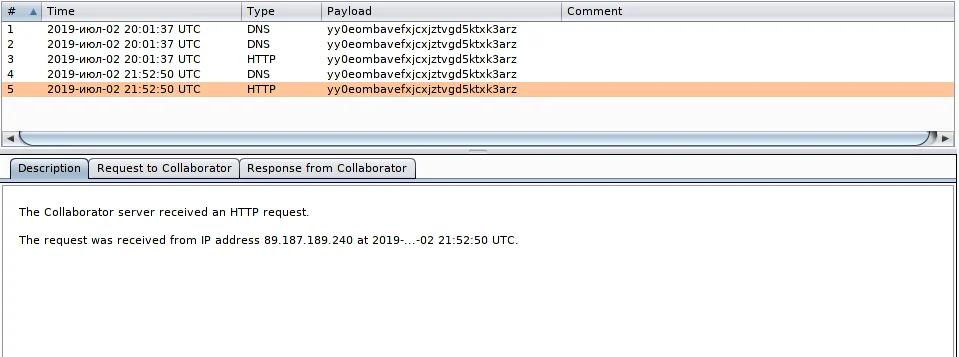
After that, when my payload got into the support panel, it was reproduced and the picture was uploaded, after that requests were sent to my server
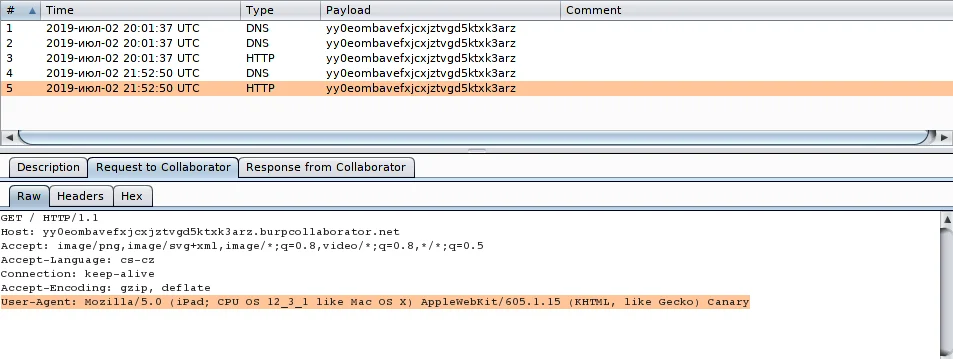
#####So HTML injection is there Further, having examined in detail the requests that came to me on the server, I saw (private) ip addresses of administrators or employees (support panel)
IP Adresses
37.9.65.65
89.187.189.240
95.108.197.9
178.154.167.78
User Agent
User-Agent: Mozilla/5.0 (iPad; CPU OS 12_3_1 like Mac OS X) AppleWebKit/605.1.15 (KHTML, like Gecko) Canary
Impact
The vulnerability allows you to execute HTML code in the support panel, also steal personal data of administrators, employees, for example: IP Addresses, which browsers employees use, and so on.
Best regards Bogdan
Attachments
Not written yet. The AI write-up for this report has not been written yet. The Original tab links to the source.
How it worked
Root cause
Likely the support form did not sanitise or encode user-supplied input before rendering it in the support panel.
Impact
The vulnerability allows execution of HTML code in the support panel and could expose personal data of administrators and employees, such as IP addresses and browser information.
What the attacker needed
Access to the support form; staff views the support request
How it was found
- Submit a support request to weblate.org or hosted.weblate.org with an HTML payload in all fields.
- Wait for the payload to appear in the support panel.
- Observe that the image loads and requests are sent to the attacker's server.
- Inspect the incoming requests to see staff IP addresses and user agent.
Explained by bugbounty.wiki with AI from the original and checked against quotes from it; it can still be wrong. Read the original before relying on a detail.
Not written yet. The AI write-up for this report has not been written yet. The Original tab links to the source.
A support form let someone type HTML code that was later shown to staff without being cleaned. When staff opened the message, their browser loaded an image from the attacker's server, revealing their IP address and browser details.
What is XSS?
Script an attacker supplies runs in another user's browser, on the target's origin, with that user's session.




