CVE-2022-29844: A Classic Buffer Overflow On The Western Digital My Cloud Pro Series PR4100
A buffer overflow in the FTP service's user command handling let an unauthenticated attacker overwrite global variables, bypass authentication and access checks, and read or write arbitrary files. This allowed the attacker to upload a web shell and gain remote code execution as root on the NAS.

Prior to being patched by Western Digital, a memory corruption vulnerability existed in the FTP service of the My Cloud Pro Series PR4100. It allowed unauthenticated attackers to read arbitrary files and, in certain cases, write them.
The full write-up lives on its author's site
It belongs to its author, so we link to it rather than copy it. The other two tabs are our own rewrites, checked against it.
Context
The target is the Western Digital My Cloud Pro Series PR4100, a Network Attached Storage (NAS) device. The feature at the centre of the report is its FTP service, which is based on Pure-FTPd with custom patches from Western Digital. The FTP service allows users to log in, change directories, and read or write files on shares. Shares can be configured as "Public", which is the default when a share is made available over FTP. The vulnerability, CVE-2022-29844, is a memory corruption issue in the FTP service that allows unauthenticated attackers to read arbitrary files and, under certain conditions, write them, leading to remote command execution. The report is an excerpt from a whitepaper by Luca Moro (@johncool__) presented at Pwn2Own Toronto 2022, where he earned $40,000 and 4 points towards Master of Pwn.
Setup
The exploitation requires the FTP service to be activated. While reading arbitrary files is always possible once the vulnerability is triggered, writing requires at least one share to be "Public" and accessible via FTP. This is the default configuration when a share is made available on FTP, so it is a common case. The firmware version used during the event can be downloaded from Western Digital's site (WDMyCloudPR4100_5.24.108_prod.bin). The GPL source code and Western Digital's modifications are also available (WDMyCloud_PR4100_GPL_v5.24.108_20220826.tar.gz). The custom patches are located in the path WDMyCloud_PR4100_GPL_v5.24.108_20220826/open-source-packages/pure-ftpd/pure-ftpd-1.0.47/patch/ within the archive. To apply the patches, the report says to run certain commands, but the exact commands are not shown in the excerpt. The researcher used reverse engineering of the firmware and source code auditing to discover the issue.
Finding it
The researcher reverse engineered the firmware and audited the source code. The FTP service is based on Pure-FTPd 1.0.47 with custom patches. One modification concerns the function douser(), which is called when a user issues the FTP command user to log in. In this function, the argument const char *username is user controlled. The researcher spotted a buffer overflow in the first strncpy call. When username is larger than 2048 bytes, an overwrite occurs after the global variable auth_name, which is located in the .bss section. The overwritten data is fully controlled by the user, with the only requirement that the data must not contain any NULL bytes besides the terminating one. The report lists some of the relevant global variables located after auth_name, including loggedin (which indicates whether a user is authenticated) and wd (which represents the path of the working directory). By overwriting and abusing both variables, it is possible to achieve arbitrary file read and write using the FTP commands cwd, retr, and stor.
Exploitation
The overall strategy for command execution is to read or write an arbitrary file to install a backdoor served by the NAS webserver. The first step is to bypass authentication without valid credentials. Then, to read or write a file, the attacker uses FTP commands, particularly cwd to change the working directory, which requires attention due to access control checks. After understanding how cwd is implemented, the exploit achieves file read and write.
Step One: The Authentication Bypass
Normally, authentication is done with two FTP commands: user (implemented in douser()) and pass (implemented in dopass()). Without authentication, other FTP commands cannot be used to fetch or store files. The dopass() function checks the password and sets the global variable loggedin to 1, and may use setuid() to change the user ID. The vulnerability allows overflowing loggedin. By issuing only a malicious user command with a long enough name, the attacker can make loggedin become something other than 0, which is sufficient to make the server think the user is logged in. A side effect is that the process does not use setuid(), so the user root remains the user of the running process. This has consequences later.
Step Two: Access control
Before retrieving or storing files, the attacker must change the current working directory using the cwd path command. This is handled by docwd(), which Western Digital patched to include access control checks. The main check is a call to check_allowed(wd_tmp, allowed), where wd_tmp is the concatenation of the global string wd and the user-controlled argument dir. check_allowed() returns a value greater than 0 if the user is allowed to enter the directory. The same function is called for retr and stor. check_allowed() is specific to Western Digital and is implemented in the closed-source /wd/usr/lib/libftp_allow.so. It checks whether the current user (using getuid() and getpwuid()) has access to the required path, relying on Get_Share_Permission() to determine permissions over a share. The logic of check_allowed() can be summarised as:
- If the path is
/, it returns 1 (readable). - If the path looks like
/<some_path>, it returns the value ofGet_Share_Permission(some_path, pw_name). - Otherwise, it returns its second argument
perm, which is the global variableallowedpassed in the call fromdocwd().
The last case is interesting: for paths that do not start with /, no real check is enforced; access control relies only on the global variable allowed. This will be used later. Get_Share_Permission() is also closed source and specific to Western Digital. It opens /etc/NAS_CFG/ftp.xml, which specifies authorisations on shares. It returns 1 for readable shares for a given username, 2 for readable and writable, and 0 for other states. The file /etc/NAS_CFG/ftp.xml maps user permissions and reflects the "Shares" tab in the administration web page. An example of this file is shown in the report, but the exact content is not included in the excerpt. In that example, Get_Share_Permission() would return 2 for the path "share1" for any account, 2 for "share2" for account user2, 1 for "share2" for account admin, and 0 for "share2" for all other accounts. In the context of the authentication bypass, the user passed to Get_Share_Permission() is root. This may seem ideal but is not, because root is different from the default administrator account admin, and root does not make sense in the ACL context. Consequently, Get_Share_Permission() likely does not give permission to root. However, in the example, "share1" would still return 2 (writable) for root because of the parameter #@allaccount# in its write_list. This is because share1 is configured as "Public" (see Figure 1). This means everyone with valid credentials can access this share via FTP, and this is the default configuration for FTP shares. Note that "Public" here is different from anonymous access: a username and password are still required to read or write anything on share1. So it is fair to expect some security for Public shares.
Step Three: Reaching Arbitrary Directories to Read or Write
At this point, authentication is bypassed, but the cwd command cannot be used on arbitrary directories because check_allowed() prevents it for most folders that are not a Share. For example, /etc/ cannot be reached. As seen earlier, check_allowed() is called with wd_tmp (path) and allowed (int). When the user-given path dir does not start with '/', wd_tmp is the concatenation of the global path wd and dir. Using the vulnerability, wd_tmp can be rewritten. Thus, the path argument of check_allowed() can be fully chosen by the attacker. Using the peculiarities of check_allowed() with control of the first argument, the following strategy allows reaching arbitrary folders with write access:
- Use the
uservulnerability to rewriteloggedinand bypass authentication. - Use
cwd share1, which is writable by root. This setsallowedto 2. - Use the
uservulnerability to rewrite and erasewdso thatwd_tmp[0] == 0. This preventscheck_allowed()from checking anything and forces it to return its second argument (allowed). - Use
cwdto any path without a starting slash (e.g.etc/). Because of the previous step, this is allowed, and the server thinks the user has write permissions to the folder.
After that, the stor command can be used to achieve arbitrary file write. Per the FTP protocol, this command must be preceded by a port command so the server connects to the client on the given port (FTP active mode). However, there is a limitation: the attacker must know a valid and writable (i.e. Public) share name. One way around this is to first obtain arbitrary file read to read /etc/NAS_CFG/ftp.xml. With that file's contents, the attacker can find valid share names for the write strategy. By noticing that check_allowed() always returns 1 when called with / as path, a similar strategy achieves arbitrary file read:
- Use
cwd /, which is always "readable", settingallowedto 1. - Use the
uservulnerability to rewrite and erasewd_tmpso thatwd_tmp[0] == 0. This preventscheck_allowed()from checking anything and returns its second argument (allowed). etc/NAS_CFG/). Because of the previous step, this is allowed, and the server thinks the user has read permissions on the folder.
After that, the retr command achieves arbitrary file read, again preceded by port per FTP standards. In summary, the vulnerability is used to rewrite a global stored path to control an argument of check_allowed(). This circumvents the check and forces check_allowed() to return the value of its previous invocation, stored in allowed. By using cwd in a valid directory and then this attack, any folder can be reached with the permissions of the valid directory. Since / is readable, /etc/NAS_CFG/ can be reached with read permissions to get read access to ftp.xml and learn a writable directory name. From there, the same strategy accesses any location with writable permissions.
Getting Remote Code Execution
With arbitrary file read and write, the next step is remote code execution (RCE). The report notes that arbitrary file read might be sufficient for command execution of a sort, for example by stealing user passwords, session cookies, or other secrets stored on the filesystem. However, RCE via file write is easier and only adds a small requirement since FTP shares are Public by default. Therefore, the exploit uses the file write technique, though RCE might be possible without it. Command execution is achieved in a couple of steps. First, a PHP web shell is uploaded to /var/www/cmd.php. This makes the web server serve the URL /cmd.php and execute the GET argument cmd. While this might be sufficient, a proper reverse Python shell is uploaded to /tmp/python_shell.py and executed via the web shell. The Python shell connects back to the attacker device and provides a root shell. The report does not show the exact contents of the web shell or the Python shell.
Root cause
The root cause is a buffer overflow in the douser() function of the patched Pure-FTPd. The function uses strncpy to copy the user-supplied username into the global auth_name buffer without proper bounds checking. When username exceeds 2048 bytes, it overwrites adjacent global variables in the .bss section, including loggedin and wd. This allows bypassing authentication by setting loggedin to a non-zero value and manipulating the working directory path wd. The access control function check_allowed() relies on the global allowed variable and the path wd_tmp. By erasing wd (so wd_tmp[0] == 0), the attacker forces check_allowed() to skip its path-based checks and return the previously set allowed value, effectively bypassing access controls. The existing defences, such as the custom access control checks in docwd() and check_allowed(), did not stop the attack because they depend on global state that can be corrupted by the overflow. The report does not specify whether other mitigations like stack canaries or ASLR were present or bypassed; The report does not discuss stack canaries or ASLR..
Impact
An unauthenticated attacker can exploit this vulnerability to read arbitrary files and, if at least one share is Public (the default when sharing via FTP), write arbitrary files. This can lead to full compromise of the NAS, including remote command execution as root. The attacker can install a backdoor or steal sensitive information such as passwords and session cookies. The vulnerability requires the FTP service to be activated, but reading is always possible once the service is on. Writing requires a Public share, which is a common configuration. The report notes that the vulnerability was patched in firmware version 5.26.119.
Fix
Western Digital patched the vulnerability in firmware version 5.26.119. According to the vendor's writeup, the vulnerability was addressed by correcting the memory corruption condition that could allow an attacker to read and write arbitrary files. The report does not provide details on the specific code changes.
Variants to test
- Test other FTP commands that handle user input, such as
pass,cwd,retr,stor, for similar buffer overflows. A positive result would be a crash or memory corruption when sending overly long arguments. - Audit other custom patches in Pure-FTPd or other services for unsafe string functions like
strcpy,strcat,sprintf. Look for global buffers in.bssthat are adjacent to security-critical variables (e.g. authentication flags, path pointers). - Examine the
check_allowed()logic for other bypasses: try paths that do not start with/after manipulating global state, or test if other commands (e.g.list,nlst) use similar checks that can be tricked. - Check if the authentication bypass works without a Public share by finding other ways to set
allowedto a permissive value, such as using a share that is readable but not writable, or exploiting a different global variable. - Test the web shell upload technique on other embedded devices with writable web directories and PHP support. A positive result would be execution of arbitrary commands via a crafted PHP file.
What happened, in plain words
A security researcher named Luca Moro found a serious flaw in a home and small-office storage device made by Western Digital, the My Cloud Pro Series PR4100. This kind of device is called a NAS, short for Network Attached Storage: a box that sits on your network and holds files, so that computers on the same network can save and fetch files from it, a bit like a shared cupboard that everyone in an office can reach.
One of the ways you can reach that cupboard is a service called FTP, short for File Transfer Protocol. FTP is an old, simple way of sending and receiving files over a network. The NAS runs an FTP server, which is a program that listens for FTP connections and lets people log in, look around folders and copy files in and out.
The flaw is a buffer overflow. To understand that, imagine a row of small labelled boxes on a shelf, each meant to hold one item. If someone hands you a very long item and you keep pushing it into a box that is too small, the extra part spills over into the next boxes and overwrites whatever was in them. In a computer, memory is organised in a similar way: a program reserves a fixed amount of space for a piece of data, and if it copies more than that space allows, the extra bytes land on top of neighbouring data. That is a buffer overflow, and it is a kind of memory corruption, meaning the program's own memory ends up holding values the programmer never intended.
Because of this flaw, an attacker who can reach the FTP service can read any file on the device and, in certain conditions, write files too. Reading and writing arbitrary files on a server is a big deal: it can lead to full control of the machine, including running commands of the attacker's choosing. That is called remote command execution, or RCE.
The researcher demonstrated this at a hacking contest called Pwn2Own Toronto 2022, where vendors put their products up to be attacked and researchers win prizes for successful exploits. His entry earned $40,000 and 4 points towards a contest title called Master of Pwn. The blog post you are reading is an excerpt from the whitepaper he submitted, describing the vulnerability CVE-2022-29844. A CVE is a public catalogue number for a known security flaw, so people can refer to the same issue unambiguously.
The setup you need for the attack
For the attack to work, the FTP service on the NAS has to be switched on. That is a setting in the device's administration pages. Once it is on, reading arbitrary files is always possible. Writing files needs one extra thing: at least one share must be marked as "Public" and reachable over FTP. A share is simply a folder that the NAS makes available to other computers. "Public" here means the share is open to every account that can log in over FTP, not that anyone at all can walk in without a password. The report stresses that this is the default setting when you make a share available over FTP, so it is a very common situation.
Here is the Network Services panel showing FTP Access enabled:
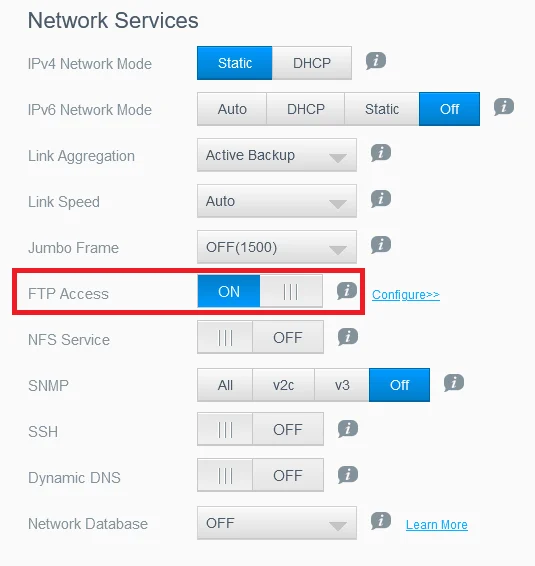
Figure 1 - Network Services Panel
The picture shows the device's settings page where the FTP service is turned on. Without this switch, there is nothing to attack.
Here is the control panel for configuring FTP shares. Note that the needed settings are enabled by default when sharing a folder via FTP.
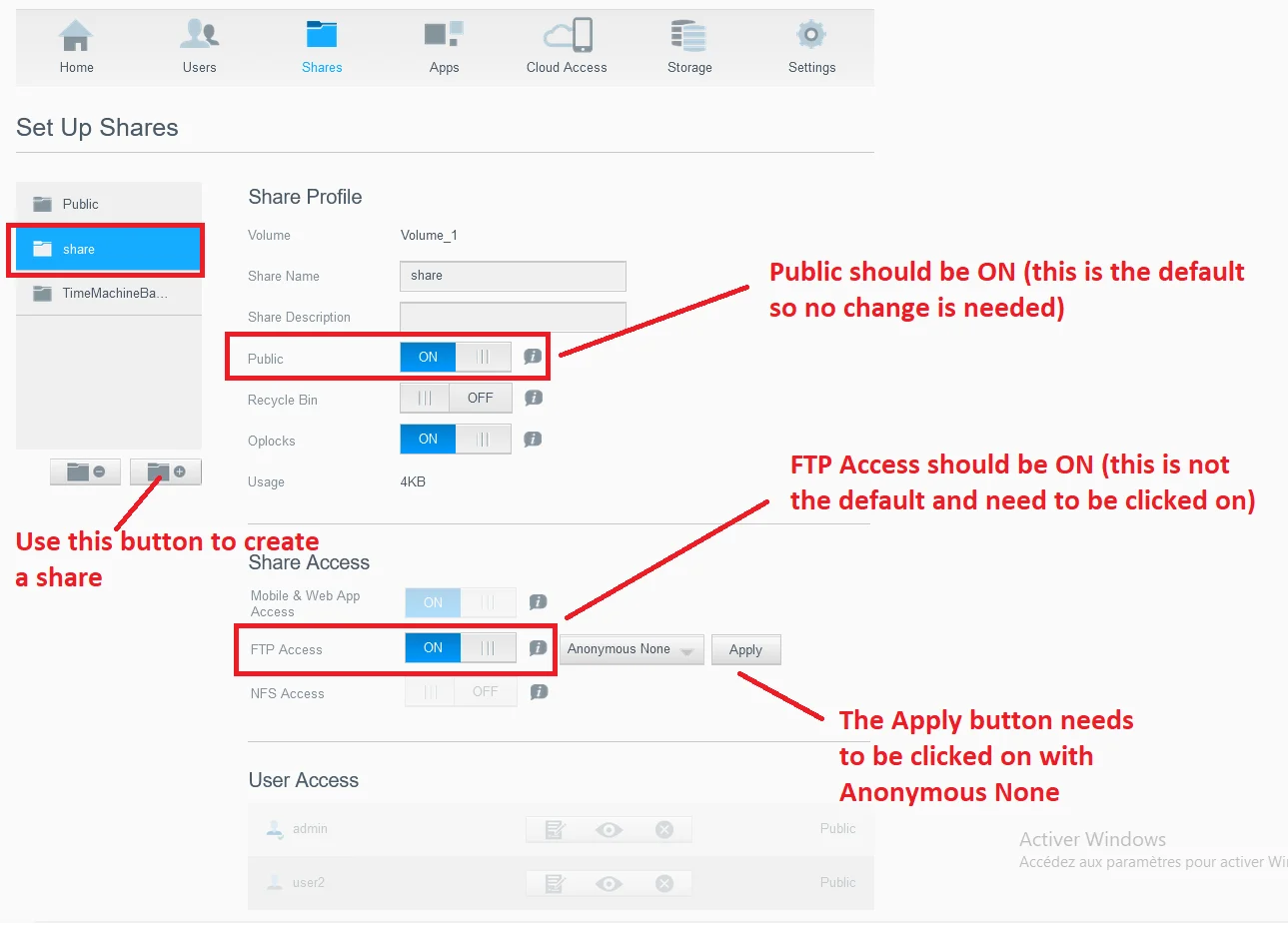
Figure 2 - Control panel dialog for setting up FTP shares
This second picture shows the dialog where a folder is shared over FTP. The point of showing it is that the dangerous settings, in particular making the share Public, are already ticked when you share a folder. So a normal administrator who just wants to share a folder ends up in the vulnerable configuration without doing anything unusual.
How the flaw was found
The researcher did not have secret inside information. He took the firmware, which is the software image that runs on the device, and examined it. He also read the source code. Source code is the human-readable text a programmer writes; firmware is the compiled, machine-ready version that ships on the device. Two techniques are named here:
- Reverse engineering the firmware: taking the shipped software apart to see what it does, since the original source may not be available for every part.
- Source code auditing: reading source code line by line, looking for mistakes.
The firmware used during the event can be downloaded from Western Digital's site, as WDMyCloudPR4100_5.24.108_prod.bin. The archive can be carved to extract a SquashFS filesystem. SquashFS is a compressed, read-only filesystem format often used on embedded devices; "carving" here means pulling the filesystem image out of the firmware file so its contents can be browsed like ordinary folders.
The GPL source code and the modifications made by Western Digital can be downloaded as WDMyCloud_PR4100_GPL_v5.24.108_20220826.tar.gz. GPL is a software licence that requires companies to publish the source code of programs they build on top of GPL-licensed software. That is why the modified source is publicly available at all.
The FTP service used by the NAS is based on the Pure-FTPd open source implementation with a few custom patches made by Western Digital. Open source means the original program's code is public; a patch is a small change applied on top. Western Digital took Pure-FTPd and added its own modifications, and those modifications are where the problem lives.
After extracting the GPL tar archive, one can find the custom modification in the path WDMyCloud_PR4100_GPL_v5.24.108_20220826/open-source-packages/pure-ftpd/pure-ftpd-1.0.47/patch/ within the archive listed above. In plain words: inside the downloaded source bundle, follow that folder path and you reach the folder holding Western Digital's changes to Pure-FTPd version 1.0.47.
To apply the WD patches, run the following commands:
The report says commands are run here, but the excerpt does not show them, so there is nothing to copy. The purpose of applying the patches would be to rebuild the software with Western Digital's changes so the researcher can study exactly what those changes do.
The bug itself
One of the modifications concerns the function douser(), which is called when a user issues the FTP command user in order to log in. A function is a named block of code that does one job; here, douser() handles the moment a client says "I want to log in as this name". In the next code example, the content pointed by the argument const char *username is user controlled. That phrase means the text after the user command comes straight from whoever is connecting, so an attacker can put anything they like there.
We can spot a buffer overflow vulnerability in the first strncpy. strncpy is a standard C library function that copies characters from one place to another, up to a given maximum. If the maximum is set wrongly, or not checked against the real size of the destination, it can copy more than the destination can hold. When username is larger than 2048 bytes an overwrite occurs after auth_name which is located in the .bss section. A byte is one character of text, so 2048 bytes is roughly 2048 characters. auth_name is a global variable, meaning a named storage area that the whole program can see, not just one function. The .bss section is the part of a program's memory that holds global variables which start out empty; it is a fixed region laid out at load time. Because auth_name sits in that region, whatever comes after it in memory is other global variables, and a long enough username spills into them.
The overwritten data is fully controlled by the user. The only requirement is that the data should not contain any NULL bytes beside the finishing one. A NULL byte is a byte with the value zero. In C, strings are terminated by a NULL byte, so a zero inside the text would make the program think the string ended early. The attacker therefore avoids zero bytes in the payload, except the one that legitimately ends the string.
Here are some of the relevant global variables located after auth_name:
The report lists them but the excerpt does not reproduce the list, so the exact names beyond the two discussed below are not available here.
The global variable loggedin is especially useful as it represents whether a user was authenticated. In other words, it is a simple flag: zero means "not logged in", anything else means "logged in". The string wd is also valuable as it represents the path of the working directory. The working directory is the folder the FTP session is currently "standing in", the same idea as the folder you have open in a file browser. By overwriting and abusing both of these variables, it is possible to achieve an arbitrary file read and write by using the FTP commands cwd, retr, and stor. Those three commands mean, respectively: change directory, retrieve (download) a file, and store (upload) a file.
The exploitation plan
Given the previous analysis, the overall strategy for getting command execution would be to read or write an arbitrary file in order to install a backdoor served by the NAS webserver. A backdoor is a small program planted on the device that lets the attacker come back later. The NAS also runs a webserver, the program that serves its web administration pages, and that webserver will happily serve any file placed in the right folder. So if the attacker can write a file into the webserver's folder, the webserver will run it.
The first step would be to find a way to authenticate without valid credentials. This section explains how to do so given the vulnerability. Then, to read or write a file, it seems reasonable to try to use the FTP features and commands. This would require changing the current working directory of the FTP session by using the command cwd . This step needs some attention because of various access control checks detailed in this section. After a better understanding on how cwd is implemented, we will see how the exploit manages to achieve a file read and write.
Step one: the authentication bypass
As expected, the attacker does not have any credential on the NAS. Moreover, we must assume the FTP service is not accessible to anonymous user. Anonymous access is a common FTP feature where you can log in with a generic name and no real password; the report assumes that is switched off, so a real login is required. Therefore, it is necessary to find a way to bypass the authentication.
Usually, authentication is achieved in two FTP commands:
user: this specifies the username we want to use to log on. It is implemented indouser().pass: this gives the password for the previous username. It is implemented indopass().
It is worth mentioning that without first authenticating, it is impossible to use other FTP commands to fetch or store files. The server checks the login flag before doing anything useful, which is exactly why the flag is such a valuable target.
A simplified description of the dopass() implementation is to check the user password and set the global variable loggedin to 1 and eventually to use setuid() to change the user ID of the running process. A user ID is the number the operating system uses to decide what a program is allowed to do; setuid() switches the program from running as a powerful account to running as the ordinary user who logged in. That is a safety measure: even if the FTP server starts as the all-powerful root account, it drops down to a limited account once someone logs in.
As previously seen, the vulnerability allows the attacker to overflow the variable loggedin. It is possible to make the server think that the user has already logged in by issuing only a malicious user command with a name long enough so that loggedin becomes something other than 0, which is sufficient. In everyday terms: instead of typing a correct password, the attacker sends an overlong username that spills into the "logged in" flag and flips it on.
One side effect is that the process will not use setuid() so the user root will remain the user of the running process. This will have some consequences later. Because the normal login path never ran, the safety step of dropping privileges never happened, so the FTP server keeps running as root, the most powerful account on the system. That makes everything that follows more damaging.
Step two: access control
An overview of the implementation
Before retrieving or storing files, we need to change the current working directory of the FTP session by using the cwd path command. This command handling is implemented by the function docwd(), which was patched by Western Digital to include access control checks. Access control means deciding who is allowed to go where. Here are some of the relevant parts:
The report shows code from docwd() at this point, but the excerpt does not include it, so the exact lines cannot be reproduced.
The main access control check revolves around the call to check_allowed(wd_tmp, allowed), where wd_tmp is the concatenation of the global string wd and the user-controlled argument dir. Concatenation means joining two pieces of text end to end. So the path being checked is built from the folder the session is already in (wd) plus whatever folder name the user typed (dir). The general idea is that check_allowed() returns something greater than 0 if the user is allowed to enter the directory.
In a similar fashion, the function check_allowed() is called when the user tries to read (retr) or write a file (stor). To provide some additional detail, check_allowed() is specific to Western Digital and is implemented in the closed source /wd/usr/lib/libftp_allow.so as seen in the example below. Closed source means the code is not published, so the researcher had to study the compiled library rather than readable source. A .so file is a shared library, a bundle of code that other programs load and use.
This function checks whether the current user (using getuid() and getpwuid()) has access to the required path. getuid() asks the operating system for the current user ID, and getpwuid() looks up the details of that user, such as the account name. The function relies on the Get_Share_Permission() function to determine the permissions over a path representing a share.
We can sum up the check_allowed() method as follows:
- If the path is
/, thencheck_allowed()returns 1, which means the path is readable. The single slash/is the very top of the filesystem, the root folder from which all others hang. - If path looks like
/<some_path>, thencheck_allowed()returns the value ofGet_Share_Permission(some_path, pw_name). A path starting with a slash is an absolute path, meaning it is spelled out from the top of the filesystem rather than relative to where you currently are. - Otherwise,
check_allowed()returns its second argumentperm, which is the global variableallowedthat was passed along in the calldocwd().
The last case is interesting because it means that for paths that do not start with /, no check is really enforced. Indeed, in that case, the access control check only relies on the global variable allowed. This in peculiar will be used later. In plain words: if the folder name the user typed does not begin with a slash, the function skips the real permission lookup and just repeats whatever permission value was set the last time a check succeeded. That is the crack the exploit will widen.
The Get_Share_Permission() function is also closed source and specific to Western Digital. Because of this, we won't dig deeper here. The gist of that function is that it opens the file /etc/NAS_CFG/ftp.xml, which specifies the authorizations on the share. A file ending in .xml is a text file structured with tags, a common way to store configuration. This particular file is the device's record of which accounts may read or write which shares.
The Get_Share_Permission() function returns 1 for readable shares for a given username and 2 for readable and writable files and 0 for other states. So the numbers are a simple code: 0 means no access, 1 means read only, 2 means read and write. The file /etc/NAS_CFG/ftp.xml maps the user's permissions and is an image of what is configured in the "Shares" tab of the administration web page. Here is an example of this file:
The report shows an example of the file at this point, but the excerpt does not include its contents, so it cannot be reproduced here.
In that example, Get_Share_Permission() would:
- return 2 for the path "share1" for any account.
- return 2 for the path "share2" for the account
user2. - return 1 for the path "share2" for the account
admin. - return 0 for the path "share2" for all other accounts.
Reading that table in plain words: share1 is open to everyone with read and write; share2 gives user2 read and write, gives admin read only, and gives everyone else nothing.
In our context with the previous authentication bypass, the user that is being passed to the Get_Share_Permission() function is root. This may seem ideal, but it is not in the context of the access control. That is because root is different than the default administrator account, which is admin. Additionally, the user root does not make sense in the ACL context. ACL stands for access control list, the list of who may do what. The device's share permissions were written with ordinary named accounts in mind, not the system's internal superuser, so root simply is not on the lists. Consequently, it is likely that Get_Share_Permission() does not give permission to our user root.
That being said, in the previous example, "share1" would still return 2 (making it writable) for the user root. That is because of the parameter #@allaccount# appearing in its write_list. This is because share1 represents a share configured as "Public" (see Figure 1 above). This means that everyone with valid credentials can access this share via FTP. In fact, this is the default configuration for FTP shares. The special marker #@allaccount# is how the configuration says "every account", so even an unexpected account name like root matches it.
Please note that Public in this context is a different concept than anonymous access since you would still require a username and password to write or read anything on share1. In that sense, it is fair to expect some kind of security for Public shares. The everyday comparison: a Public share is like a meeting room that any employee with a badge can enter, not like a room with the door propped open to the street.
Step three: reaching arbitrary directories to read or write
At this point, we already bypassed the FTP authentication, but we cannot yet use the cwd command on an arbitrary directory as the check_allowed() function is preventing that command for most folders that are not a Share. For example, we cannot reach the /etc/ directory. /etc/ is a standard system folder on Linux-like systems that holds configuration files, so it is exactly the kind of place an attacker wants to reach.
As seen earlier, check_allowed() is called with the variable wd_tmp (path) and allowed (int). Additionally, when the user given path dir does not start with '/', the content of wd_tmp is the concatenation of the global path wd and dir. This is interesting because using the vulnerability, we can rewrite wd_tmp. To summarise, the path argument of check_allowed() can be fully chosen by the attacker. The overflow lets the attacker overwrite the stored wd value, and since wd_tmp is built from wd, the attacker indirectly controls the path that the permission check examines.
Using the peculiarities of the check_allowed() function with the control of the first argument, the following strategy allows reaching arbitrary folders with write access:
- Use the
uservulnerability to rewriteloggedinand bypass authentication. - Use
cwd share1, which is writable by root. Therefore, this setsallowedto 2. - Use the
uservulnerability to rewrite and erasewdso thatwd_tmp[0] == 0. As explained previously, this will preventcheck_allowed()from checking anything and forces it to return its second argument (allowed). - Use
cwdto any path without starting slash (e.g.etc/). Because of the previous step, this will be allowed, and the server will think that the user has write permissions to the folder.
Walking through it: step 1 gets you in the door. Step 2 walks into a folder you are genuinely allowed to write to, which quietly records "write permission" in the allowed variable. Step 3 uses the overflow again, this time to blank out the stored current folder, so the next permission check sees an empty path and takes the shortcut branch that just repeats allowed. Step 4 then asks to change into a folder whose name does not start with a slash, and the shortcut lets it through with the write permission from step 2 still in force.
After that, it is possible to use the stor command to achieve an arbitrary file write. In accordance with the FTP protocol, this command is to be preceded by a port command so that the server will connect to the client on the given port (FTP active mode). FTP has two ways of moving data. In active mode, the client tells the server a port to connect back to, and the server opens that connection. The port command is how the client gives those details. This is a detail of how FTP works, not part of the vulnerability.
However, there is one limitation with the previous strategy. The attacker must know a valid and writable (i.e. Public) share name. One way to get around this is to first obtain an arbitrary file read capability in order to read the /etc/NAS_CFG/ftp.xml file. With the contents of that file, the attacker can find valid share names to use in the write strategy. In other words, the configuration file is a map of which shares exist and which are open, so reading it first turns a guessing problem into a lookup.
By noticing that the check_allowed() function always returns 1 when called with / as path, we can construct a similar strategy to achieve arbitrary file read:
- Use the
uservulnerability to rewriteloggedinand bypass the authentication. - Use the
cwd /command, which is always "readable", therefore settingallowedto 1. - Use the
uservulnerability to rewrite and erasewd_tmpso thatwd_tmp[0] == 0. As explained previously, this will preventcheck_allowed()from checking anything. It will return its second argument (allowed). - Use the
cwdcommand to any path without starting slash (for exampleetc/NAS_CFG/). Because of the previous step, this will be allowed, and the server will think that the user has read permissions on the folder.
This is the same trick with a different starting point. Instead of stepping into a writable share to record "write", the attacker steps into the top-level /, which is always readable, to record "read". Then the same blanking of wd and the same slash-free path carry that read permission into a system folder.
After that, it is possible to use the retr command to achieve an arbitrary file read. Here again, one must use the port command per FTP standards.
To summarise, the vulnerability is used to rewrite a global stored path in order to control an argument of check_allowed(). This allows the attacker to circumvent the check and force check_allowed() to return the value of its previous invocation, stored in the value allowed. By using the cwd command in a valid directory then using this attack, it is possible to reach any folder with the permissions of the valid directory. Since the root directory (/) is readable, we can reach /etc/NAS_CFG/ with read permissions to get a read access to the ftp.xml file and learn a writable directory name. From there, we apply the same strategy to access any location with writable permissions. The everyday comparison: the guard at the door checks your badge only when you give a full address; if you give a vague one, the guard just repeats the last answer they gave. So you first get a legitimate answer for a place you are allowed into, then keep asking vague questions and the guard keeps saying yes.
Getting remote code execution
At that point, we have both arbitrary file read and write access on the NAS. It is the time to investigate getting remote code execution (RCE). RCE means making the device run commands of your choosing, which is effectively full control.
It is worth mentioning that an arbitrary file read might be sufficient to achieve command execution of a sort. For instance, one might find ways to steal user passwords, session cookies, or other secrets stored on the filesystem. A session cookie is a small piece of data a website stores in your browser to remember that you are logged in; if an attacker copies it, they can often act as you without knowing your password. However, getting RCE with the file write is easier and only adds a small requirement since FTP shares are Public by default. Therefore, the exploit uses the file write technique, though we know that RCE might be possible without it.
The command execution is achieved in a couple of steps. To begin, a PHP web shell is uploaded to /var/www/cmd.php. PHP is a programming language commonly used for web pages, and a web shell is a small script placed on a server that lets an attacker run commands through the browser. /var/www/ is the folder the webserver serves pages from, so a file placed there becomes a web page. This makes the web server serve the url /cmd.php and executes the GET argument cmd. A GET argument is the part of a web address after a question mark, like page.php?name=value; the server passes that value to the script. So visiting /cmd.php?cmd=... would run whatever command is in cmd. While this might be sufficient, a proper reverse Python shell is uploaded in /tmp/python_shell.py and is executed thanks to the web shell. A reverse shell is a program that connects from the victim machine back to the attacker, giving the attacker a command prompt on the victim. /tmp/ is a scratch folder for temporary files. The Python shell connects back to the attacker device and provides a root shell. A root shell is a command prompt with the highest level of permission on the machine.
The report does not show the exact contents of the web shell or the Python shell, so there is no code to reproduce here.
Root cause
The root cause is a buffer overflow in the douser() function of the patched Pure-FTPd. The function uses strncpy to copy the user-supplied username into the global auth_name buffer without proper bounds checking. Bounds checking means confirming that the amount of data being copied fits in the space available. When username exceeds 2048 bytes, it overwrites adjacent global variables in the .bss section, including loggedin and wd. This allows bypassing authentication by setting loggedin to a non-zero value and manipulating the working directory path wd. The access control function check_allowed() relies on the global allowed variable and the path wd_tmp. By erasing wd (so wd_tmp[0] == 0), the attacker forces check_allowed() to skip its path-based checks and return the previously set allowed value, effectively bypassing access controls. The existing defences, such as the custom access control checks in docwd() and check_allowed(), did not stop the attack because they depend on global state that can be corrupted by the overflow. The report does not specify whether other mitigations like stack canaries or ASLR were present or bypassed; The report does not discuss stack canaries or ASLR.. A stack canary is a small guard value placed next to data on the stack so that an overflow is noticed; ASLR is address space layout randomisation, which shuffles where things sit in memory to make attacks harder.
Impact
An unauthenticated attacker can exploit this vulnerability to read arbitrary files and, if at least one share is Public (the default when sharing via FTP), write arbitrary files. Unauthenticated means without any valid login. This can lead to full compromise of the NAS, including remote command execution as root. The attacker can install a backdoor or steal sensitive information such as passwords and session cookies. A pivot point means using the compromised device as a stepping stone to reach other machines on the same network. The vulnerability requires the FTP service to be activated, but reading is always possible once the service is on. Writing requires a Public share, which is a common configuration. The report notes that the vulnerability was patched in firmware version 5.26.119.
Fix
Western Digital patched the vulnerability in firmware version 5.26.119. According to the vendor's writeup, the vulnerability was addressed by correcting the memory corruption condition that could allow an attacker to read and write arbitrary files. The report does not provide details on the specific code changes. The report does not confirm which of these was done.
Variants to test
These are ideas for further research, written for someone learning how to look for similar bugs:
- Test other FTP commands that handle user input, such as
pass,cwd,retr,stor, for similar buffer overflows. A positive result would be a crash or memory corruption when sending overly long arguments. - Audit other custom patches in Pure-FTPd or other services for unsafe string functions like
strcpy,strcat,sprintf. These are C functions that copy or build text and can overflow if the destination is too small. Look for global buffers in.bssthat are adjacent to security-critical variables (e.g. authentication flags, path pointers). - Examine the
check_allowed()logic for other bypasses: try paths that do not start with/after manipulating global state, or test if other commands (e.g.list,nlst) use similar checks that can be tricked.listandnlstare FTP commands that list folder contents. - Check if the authentication bypass works without a Public share by finding other ways to set
allowedto a permissive value, such as using a share that is readable but not writable, or exploiting a different global variable. - Test the web shell upload technique on other embedded devices with writable web directories and PHP support. A positive result would be execution of arbitrary commands via a crafted PHP file.
Glossary
- ACL (access control list): a list that records which users or accounts are allowed to do what.
- Anonymous access: an FTP feature that lets people log in with a generic name and no real password.
- ASLR (address space layout randomisation): a defence that shuffles where things sit in memory so attackers cannot rely on fixed addresses.
- Backdoor: a small program planted on a device that lets an attacker return later.
- Bounds checking: confirming that data being copied fits in the space available.
- Buffer overflow: copying more data into a fixed-size memory area than it can hold, so the extra spills into neighbouring data.
- Byte: a unit of data, roughly one character of text.
.bsssection: the part of a program's memory holding global variables that start out empty.- Closed source: software whose code is not published.
- Concatenation: joining two pieces of text end to end.
- CVE: a public catalogue number for a known security flaw.
cwd: the FTP command to change the current working directory.- Firmware: the software image that runs on a device.
- FTP (File Transfer Protocol): an old, simple protocol for sending and receiving files over a network.
- Function: a named block of code that does one job.
- GET argument: the part of a web address after a question mark, passed to the server script.
- Global variable: a named storage area that the whole program can see.
- GPL: a software licence requiring companies to publish the source code of programs built on GPL-licensed software.
- Memory corruption: a state where a program's memory holds values the programmer never intended.
- NAS (Network Attached Storage): a device on a network that holds files for other computers to use.
- NULL byte: a byte with the value zero, used in C to mark the end of a string.
- Open source: software whose original code is public.
- Patch: a small change applied on top of existing software.
- PHP: a programming language commonly used for web pages.
- Pivot point: a compromised machine used as a stepping stone to reach other machines.
portcommand: the FTP command by which a client tells the server which port to connect back to in active mode.- Pwn2Own: a hacking contest where researchers attack vendor products for prizes.
- RCE (remote command execution): making a remote machine run commands of your choosing.
- Reverse engineering: taking shipped software apart to see what it does.
- Reverse shell: a program that connects from the victim machine back to the attacker, giving a command prompt.
retr: the FTP command to download (retrieve) a file.- Root: the most powerful account on a Linux-like system.
- Root shell: a command prompt with the highest level of permission on the machine.
- Session cookie: a small piece of data a website stores in your browser to remember that you are logged in.
setuid(): a system call that changes the user ID a program runs as, often used to drop privileges.- Share: a folder a NAS makes available to other computers.
- Shared library (
.so): a bundle of code that other programs load and use. - Source code: the human-readable text a programmer writes.
- SquashFS: a compressed, read-only filesystem format often used on embedded devices.
- Stack canary: a small guard value placed next to data on the stack so an overflow is noticed.
stor: the FTP command to upload (store) a file.strncpy: a standard C function that copies characters up to a given maximum.- Unauthenticated: without any valid login.
- User ID: the number the operating system uses to decide what a program is allowed to do.
- Web shell: a small script placed on a server that lets an attacker run commands through the browser.
- Webserver: the program that serves web pages.
- Working directory: the folder a session is currently standing in.
- XML: a text file format structured with tags, often used for configuration.

