Advisory: Western Digital My Cloud Pro Series PR4100 RCE
A connectivity checking service on the Western Digital My Cloud PR4100 executed shell commands built from the HTTP status text returned by a remote server. An attacker who could intercept the device's plaintext HTTP request could inject a command and run it as root.
 Published on iot-inspector.com
A few months ago, we took part in Pwn2Own Austin 2021. Organized by the Zero Day Initiative, the event focuses on the exploitation of vulnerabilities in phones, printers, NAS, and more – a welcomed opportunity to put our skills to the test and compete with the brightest minds in the reversing and exploitation scene.
The full write-up lives on its author's site
It belongs to its author, so we link to it rather than copy it. The other two tabs are our own rewrites, checked against it.
Context
This advisory covers a command injection vulnerability in the Western Digital My Cloud Pro Series PR4100, a network-attached storage device. The affected component is ConnectivityService, a binary that runs on the device by default and performs connectivity checks.
On boot, and then every 300 seconds, ConnectivityService verifies three things:
- whether it can reach the local
REST SDKserver - whether it can ping the local gateway
- whether it can reach the remote cloud service
The cloud connectivity check is the interesting one. The researcher rebuilt the relevant C code from Ghidra's disassembly. It fetches a healthcheck page over plain HTTP from http://downloads.mycloud.com/healthcheck/index.html using wget, inspects the output, and logs the result with a utility called analyticlog.
The advisory lists the following details:
| Field | Value |
|---|---|
| Affected vendor & product | Western Digital MyCloud PR4100 |
| Vulnerable version | MyCloud OS < 5.19.117 |
| Fixed version | MyCloud OS 5.19.117 |
| CVE | CVE-2022-22991 |
| Impact | 8.8 (high), AV:A/AC:L/PR:N/UI:N/S:U/C:H/I:H/A:H |
| Credit | Q. Kaiser, IoT Inspector Research Lab; Martin Rakhmanov, Spider Labs |
The vulnerability was exploited during Pwn2Own Austin 2021, organised by the Zero Day Initiative. The same vulnerability was independently discovered during the event by Martin Rakhmanov of Spider Labs. The exploit submitted at the contest actually failed, and the write-up includes a root cause analysis of that failure as well.

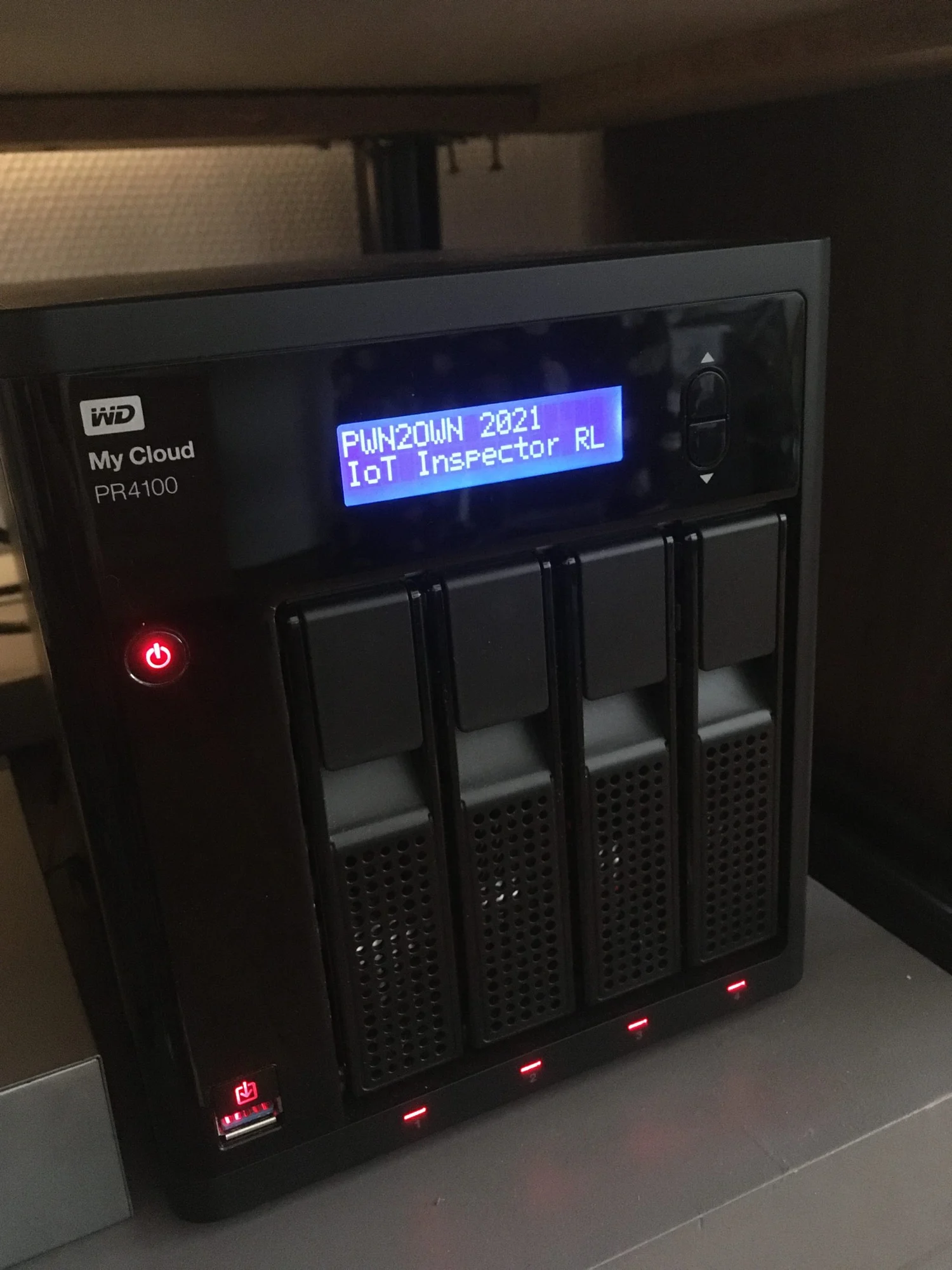
Compromising PR4100 from the comfort of your office is easy.
Setup
The firmware image analysed in the binary triage is named _WDMyCloudPR4100_5.16.105_prod.bin. The exploit was implemented as a man-in-the-middle attack targeting the vulnerable device only, using scapy to sniff and craft packets.
For the vulnerable code path to be taken, two conditions must be met:
- the gateway must answer to ICMP echo-request packets sent by
ConnectivityService - the staging server (
staging.mycloud.com) must be unreachable
Finding it
The IoT Inspector Research Lab uses a triage technique inspired by Zhijie Gui et al. "FIRMCORN: Vulnerability-Oriented Fuzzing of IoT Firmware via Optimized Virtual Execution", to scour large firmware images for vulnerable binaries. Binaries are classified according to two indices:
- a vulnerability index representing the amount of insecure function calls and ratio of memory instructions
- a complexity index representing code complexity from average cyclomatic complexity
Running this against the PR4100 firmware put ConnectivityService in position 3:
python3 firmware_index.py --verbose /home/quentin/research/_WDMyCloudPR4100_5.16.105_prod.bin.extracted/squashfs-root
#   filename                            avg complexity avg vuln       avg composite  med composite
0   /python37/bin/python3.7             109.17         6.74           986.89         77.00
1   /wd/usr/sbin/hdVerify               60.30          4.88           654.07         74.00
2   /wd/usr/sbin/ConnectivityService    25.00          6.21           306.50         57.00
Looking at the cloud connectivity check in the disassembly, the researcher reconstructed the following C code:
FILE* stream;
FILE* stream_00;
char content[0x100];
char cmd_buf[129];
char* cloud_api_url = "http://downloads.mycloud.com/healthcheck/index.html";

system("rm -rf /tmp/healthcheck ; mkdir /tmp/healthcheck");
system("cd /tmp/healthcheck ; wget -o /tmp/healthcheck/check.txt %s", cloud_api_url);

// check if the request could be sent out by wget
sprintf(cmd_buf,"cat %s/%s | grep \"%s\"","/tmp/healthcheck","check.txt", "HTTP request sent, awaiting response... ");
stream = popen((char *)cmd_buf,"r");
if (stream != NULL) {
    success = fgets(content,0x100,stream);
    // the request could not be sent by wget
    if (success == NULL) {
        // we don't care because the output of wget is therefore non-controllable
    }
    else{
        // inlined string length checks
    // check if response is 200 OK
    is_200_ok = strstr(content,"200 OK");
    if (is_200_ok != (char *)0x0) {
            fclose(__stream);
            sprintf((char *)cmd_buf,"%s:HTTP-response:\"200 OK\"",
                  "analyticlog -l NOTICE -s ConnectivityService -m checkCloudConnect string");
            system((char *)cmd_buf);
            sprintf(&DAT_00105200,"%s:HTTP-response:\"200 OK\"",
                  "analyticlog -l NOTICE -s ConnectivityService -m checkCloudConnect string");
            return 1;
        }
    // call logging utility with the command 'analyticlog -l NOTICE -s ConnectivityService -m checkCloudConnect string:content:"first 0x100 bytes of file"
    // SHOULD BE VULNERABLE
        sprintf(cmd_buf,"%s:HTTP-response:\"%s\"",
          "analyticlog -l NOTICE -s ConnectivityService -m checkCloudConnect string",
          content);
        system(cmd_buf);
    }
}
The procedure does the following:
- It sends a GET request to a remote server using
wgetand saves the command output to/tmp/healthcheck/check.txt. - It greps the file for
HTTP request sent, awaiting response... - If there is a match, it checks whether the matched content contains
200 OKand callsanalyticlog.
The problem is that the matched line, which includes the HTTP status textual phrase returned by the remote server, is placed into cmd_buf and passed to system(). The status phrase is attacker-controlled data, so a malicious command injected there is executed by the device. To reach the vulnerable branch, the response must have a status other than 200 OK, because a 200 OK response takes the earlier branch that logs a fixed string.
Exploitation
Step 1: Position the attacker on the path
The exploit is a man-in-the-middle attack targeting the vulnerable device only. The attacker ARP spoofs the device by sending gratuitous ARP responses to the device for the LAN gateway, so that all outgoing traffic from the target device is headed to the attacker.
Step 2: Satisfy the connectivity preconditions
scapy sniffers for ICMP and DNS traffic run in their own dedicated threads:
- whenever an ICMP echo-request for the gateway is observed, an ICMP echo-reply is crafted and sent back to the device
- whenever DNS requests for
staging.mycloud.comare seen, they are not answered - whenever DNS requests for
downloads.mycloud.comare seen, a DNS answer holding the attacker's IP address is crafted
This forces ConnectivityService to contact the attacker's malicious HTTP server.
Step 3: Return the malicious status phrase
The ConnectivityService client sends a GET request with wget. Because the connection is plaintext, the attacker hijacks it and returns the following response:
HTTP/1.0 200 `touch /tmp/pwn2own`
Server: BaseHTTP/0.6 Python/3.8.10
Date: Thu, 02 Sep 2021 10:45:30 GMT
The status phrase contains a backtick-wrapped command, touch /tmp/pwn2own. Note that the status code is 200 but the phrase is not OK, so the strstr(content,"200 OK") check does not match and the vulnerable branch is taken.
Step 4: The grep output carries the payload
The device then executes the grep call and puts the output in a buffer:
$ grep "HTTP request sent, awaiting response... " /tmp/healthcheck/check.txt
HTTP request sent, awaiting response... 200 `touch /tmp/pwn2own`
Step 5: The buffer reaches system()
That buffer is then used to execute the following command, leading to the execution of the injected command:
$ analyticlog -l NOTICE -s ConnectivityService -m checkCloudConnect \
string:HTTP-response:"HTTP request sent, awaiting response... 200 `touch /tmp/pwn2own`"
The backticks cause the shell to run touch /tmp/pwn2own while evaluating the argument to analyticlog. In the full exploit, the malicious HTTP server answers with a command injection payload that leads the device into establishing a reverse shell to the attacker, along with some LCD/LED effects for the contest.
Why the Pwn2Own attempt failed
The exploit hardcoded an IP address in the fake DNS responder:
def fake_dns(iface, target_ip):

    spoof_domains = {
        "downloads.mycloud.com": "[redacted]",
    }
For the other entries the team had two separate devices and could cross-validate within the team that the exploit worked as expected. With this one, the mistake went unnoticed until the first failed attempt. Wireshark was running in the background, so the problem was immediately visible and the ZDI engineer was guided to fix it on the fly. However, the device did not send further DNS requests, and the attempt ultimately failed.
Root cause
Two fundamental issues allowed the vulnerability to be exploited. First, untrusted data is supplied with insufficient validation to system(). The HTTP status textual phrase from a remote server is copied into a command buffer and executed by the shell, so shell metacharacters in the phrase, such as backticks, are interpreted. Second, the healthcheck is fetched over plain HTTP, which lets an attacker on the path replace the response.
The 200 OK check does not help: it only decides which branch is taken, and the branch that logs the response content is exactly the one that passes the content to system(). The report notes that consistent usage of encrypted communication would likely have made the exploit almost impossible, since man-in-the-middling a TLS encrypted connection would probably have led the researchers to give up on the exploitation attempt.
Impact
The CVSS score given in the advisory is 8.8 (high) with the vector AV:A/AC:L/PR:N/UI:N/S:U/C:H/I:H/A:H. An attacker who can man-in-the-middle traffic between the device and the cloud service can execute arbitrary commands on the device, leading to a root shell. The attack requires the two preconditions above: the gateway must answer ICMP echo-requests from ConnectivityService, and staging.mycloud.com must be unreachable. The described vector is not the typical infection vector chosen by ransomware campaigns, so the report says the bug likely won't be abused by malware authors soon. Updates from the vendor should still be applied in a timely manner.
Fix
The vulnerability is fixed in MyCloud OS 5.19.117; versions below that are vulnerable. The vendor advisory is WDC-22002, and the ZDI advisory is ZDI-22-077. The report's key takeaway is that supplying untrusted data with insufficient validation to system() is always a recipe for disaster, and that consistent usage of encrypted communication would have rendered the exploit almost impossible. Applying basic security principles would have prevented the vulnerability or made it useless.
Variants to test
- Look for binaries that call
system()orpopen()with strings built from network responses, such as status lines, headers or fetched file contents. A positive result is a code path where remote text reaches a shell without sanitisation. - Check periodic connectivity or healthcheck services that fetch over plain HTTP. A positive result is a request to an HTTP URL whose response body or status phrase is later used in a command.
- Test whether a status phrase other than
OKchanges which branch is taken. A positive result is a code path that logs or executes the response content only when the status is not the expected one. - Review DNS resolution for cloud hostnames used by such services. A positive result is a service that accepts an attacker-supplied DNS answer and connects to the attacker's address.
- Check whether ICMP replies from the gateway are required before the cloud check runs. A positive result is a service that can be steered into the vulnerable path by answering echo-requests locally.
Timeline
- 2021-12-01: Vulnerability reported to vendor
- 2022-01-17: ZDI release advisory
- 2022-02-15: Coordinated public release of IoT Inspector advisory
What happened, in plain words
A group of security researchers at the IoT Inspector Research Lab found a way to make a Western Digital My Cloud Pro Series PR4100, a box you plug into your home or office network to store files, run commands of their choosing. The box has a small program inside it that, every five minutes, checks whether it can reach the internet. That program builds a text command and hands it to the operating system to run. The text includes a piece of the reply it gets back from a server on the internet, and the researchers worked out that they could put their own command into that reply. The box would then run it.
They entered this attack into Pwn2Own Austin 2021, a contest organised by the Zero Day Initiative where researchers demonstrate working attacks against real devices such as phones, printers and network storage. Their entry actually failed on the day, and the write-up explains why. During the same contest, Martin Rakhmanov of Spider Labs independently found the same vulnerability.
The bug is tracked as CVE-2022-22991 and is fixed in MyCloud OS 5.19.117. The advisory was published on 15 February 2022.
Compromising PR4100 from the comfort of your office is easy.
The device and the program involved
A network-attached storage device, or NAS, is a small computer whose job is to hold files so that other computers on the same network can read and write them. The PR4100 is one of these. It runs an operating system called MyCloud OS, and like any computer it runs small programs in the background without anyone watching.
One of those programs is called ConnectivityService. A program like this is often called a service or a daemon: it starts when the device boots and then keeps running quietly. Its job is to check that the device is still connected to the things it depends on. On boot, and then every 300 seconds (five minutes), it checks three things:
- whether it can reach the local
REST SDKserver - whether it can ping the local gateway
- whether it can reach the remote cloud service
A few of those words need unpacking.
A server is a computer that answers requests from other computers. A client is the computer making the request. When you open a website, your browser is the client and the machine hosting the site is the server.
A gateway is the device on a local network, usually the router, that connects that network to the outside world. When your computer wants to reach the internet, it sends the traffic to the gateway, which forwards it onwards. Ping is a simple test: one computer sends a small message called an ICMP echo-request and waits for an echo-reply. If a reply comes back, the two machines can reach each other.
A REST SDK is a small web service running on the device itself that other software can talk to. REST is a common style for web interfaces where each URL represents something you can ask about or change, and SDK stands for software development kit, a set of tools for building software against it. You can think of it as a reception desk inside the device that other programs can walk up to and ask questions.
The cloud service is a server on the internet, run by the manufacturer, that the device talks to. The check we care about is this one: the device fetches a small page from http://downloads.mycloud.com/healthcheck/index.html to see whether the internet is reachable.
The vulnerability in one sentence
A command injection is a vulnerability where a program builds a command for the operating system out of text it does not fully control, and an attacker manages to slip extra commands into that text. The operating system then runs the attacker's commands as if they were part of the original instruction. The everyday comparison is a form where you write your name, and the clerk reads the whole line aloud to a colleague; if you write your name followed by "; and also open the safe", the colleague may do both things.
Here, the text that ends up in the command comes from an HTTP response sent by a remote server. Because the connection is plain HTTP, anyone sitting on the network path between the device and that server can replace the response with their own. That is what the researchers did.
The vulnerable code
The researcher rebuilt the relevant part of the program from its compiled form. The rebuilt C code looks like this:
FILE* stream;
FILE* stream_00;
char content[0x100];
char cmd_buf[129];
char* cloud_api_url = "http://downloads.mycloud.com/healthcheck/index.html";

system("rm -rf /tmp/healthcheck ; mkdir /tmp/healthcheck");
system("cd /tmp/healthcheck ; wget -o /tmp/healthcheck/check.txt %s", cloud_api_url);

// check if the request could be sent out by wget
sprintf(cmd_buf,"cat %s/%s | grep \"%s\"","/tmp/healthcheck","check.txt", "HTTP request sent, awaiting response... ");
stream = popen((char *)cmd_buf,"r");
if (stream != NULL) {
    success = fgets(content,0x100,stream);
    // the request could not be sent by wget
    if (success == NULL) {
        // we don't care because the output of wget is therefore non-controllable
    }
    else{
        // inlined string length checks
    // check if response is 200 OK
    is_200_ok = strstr(content,"200 OK");
    if (is_200_ok != (char *)0x0) {
            fclose(__stream);
            sprintf((char *)cmd_buf,"%s:HTTP-response:\"200 OK\"",
                  "analyticlog -l NOTICE -s ConnectivityService -m checkCloudConnect string");
            system((char *)cmd_buf);
            sprintf(&DAT_00105200,"%s:HTTP-response:\"200 OK\"",
                  "analyticlog -l NOTICE -s ConnectivityService -m checkCloudConnect string");
            return 1;
        }
    // call logging utility with the command 'analyticlog -l NOTICE -s ConnectivityService -m checkCloudConnect string:content:"first 0x100 bytes of file"
    // SHOULD BE VULNERABLE
        sprintf(cmd_buf,"%s:HTTP-response:\"%s\"",
          "analyticlog -l NOTICE -s ConnectivityService -m checkCloudConnect string",
          content);
        system(cmd_buf);
    }
}
Line by line, in plain words:
FILE* stream;andFILE* stream_00;declare handles for reading from a running command, the way a bookmark marks your place in a book.char content[0x100];reserves a small box of 256 bytes (0x100 in hexadecimal) to hold text read back from a command.char cmd_buf[129];reserves a 129-byte box for building a command string.char* cloud_api_url = "http://downloads.mycloud.com/healthcheck/index.html";stores the address of the healthcheck page. Note thehttp://, nothttps://: the traffic is not encrypted.system("rm -rf /tmp/healthcheck ; mkdir /tmp/healthcheck");asks the operating system to delete the folder/tmp/healthcheckand recreate it.system()is a C function that hands a string to the shell, the program that interprets typed commands, and waits for it to finish. The;separates two commands, so both run.system("cd /tmp/healthcheck ; wget -o /tmp/healthcheck/check.txt %s", cloud_api_url);moves into that folder and runswget, a command-line tool that downloads a URL, saving its own output tocheck.txt. The%sis a placeholder filled with the URL.sprintf(cmd_buf,"cat %s/%s | grep \"%s\"", ...)builds a command that reads the file withcatand pipes it intogrep, a tool that prints only the lines matching a pattern. The pattern is the literal textHTTP request sent, awaiting response..., which is whatwgetprints when it has sent a request and is waiting for the reply.stream = popen((char *)cmd_buf,"r");runs that command and opens a pipe to read its output.popenis likesystem()but lets the program read what the command prints.success = fgets(content,0x100,stream);reads up to 256 bytes of that output intocontent.- If
successisNULL, nothing was read, and the comment says the program does not care because the output is then not controllable by anyone else. is_200_ok = strstr(content,"200 OK");looks for the exact text200 OKinsidecontent.strstrsearches a string for a substring.- If
200 OKis found, the program logs a fixed message withanalyticlogand returns 1. Nothing from the response is used in the command here. - Otherwise,
sprintf(cmd_buf,"%s:HTTP-response:\"%s\"", ...)builds a command that includescontentinside it, andsystem(cmd_buf);runs it. The comment above it,SHOULD BE VULNERABLE, is the researcher's own note that this is the dangerous line.
In short, the procedure does three things:
- It sends a GET request to a remote server using
wgetand saves the command output to/tmp/healthcheck/check.txt. - It greps the file for
HTTP request sent, awaiting response... - If there is a match, it checks whether the matched content contains
200 OKand callsanalyticlog.
The matched line contains the HTTP status phrase sent back by the remote server. An HTTP response begins with a status line such as HTTP/1.0 200 OK: the number is the status code and the words after it are the status phrase, which the server is free to write however it likes. That phrase ends up inside content, and content ends up inside a command passed to system(). If the phrase contains characters the shell treats as instructions, the shell will follow them.
To reach that dangerous line, the response must not contain the exact text 200 OK, because that text sends the program down the earlier, safe branch.
Finding the program in the first place
A firmware image is the complete software package that gets written onto a device. It is large, and it contains hundreds of programs. The lab uses a technique inspired by Zhijie Gui and others in a paper called "FIRMCORN: Vulnerability-Oriented Fuzzing of IoT Firmware via Optimized Virtual Execution" to decide where to look first. Each program is scored on two indices:
- a vulnerability index representing the amount of insecure function calls and ratio of memory instructions
- a complexity index representing code complexity from average cyclomatic complexity
An insecure function call is a call to something like system() that can run arbitrary commands. Cyclomatic complexity is a count of how many different paths a program can take through its code; more branches mean more places for a mistake to hide. Programs that score high on both are worth reading first.
Running this against the PR4100 firmware put ConnectivityService in position 3:
python3 firmware_index.py --verbose /home/quentin/research/_WDMyCloudPR4100_5.16.105_prod.bin.extracted/squashfs-root
#   filename                            avg complexity avg vuln       avg composite  med composite
0   /python37/bin/python3.7             109.17         6.74           986.89         77.00
1   /wd/usr/sbin/hdVerify               60.30          4.88           654.07         74.00
2   /wd/usr/sbin/ConnectivityService    25.00          6.21           306.50         57.00
What this shows:
- The first line runs a Python script,
firmware_index.py, against a folder extracted from a firmware file named_WDMyCloudPR4100_5.16.105_prod.bin. The.extractedpart of the path and thesquashfs-rootfolder name tell you the firmware has already been unpacked; SquashFS is a compressed filesystem format commonly used in firmware. - The table lists the top three programs by score. The columns are the program's path, its average complexity, its average vulnerability score, and two combined scores.
ConnectivityServicesits at row 2, which is third place, with an average complexity of 25.00 and an average vulnerability score of 6.21. That is why the researchers opened it up and read it.
Setting up the attack
The firmware image analysed in the triage is named _WDMyCloudPR4100_5.16.105_prod.bin. The attack is a man-in-the-middle attack: the attacker places themselves on the network path between two parties so that traffic passes through them and can be read or altered. Here it targets the vulnerable device only.
To make the device take the dangerous path, two conditions must be met:
- the gateway must answer to ICMP echo-request packets sent by
ConnectivityService - the staging server (
staging.mycloud.com) must be unreachable
The attacker also needs to be able to answer DNS queries for downloads.mycloud.com with an address of their own, and to serve HTTP on that address. DNS is the internet's address book: when a program asks for downloads.mycloud.com, a DNS server replies with the numeric address of a machine. If the attacker answers that question instead, the device will connect to the attacker's machine believing it is talking to the manufacturer.
The tool used for this is scapy, a Python library for crafting and sniffing network packets. ARP is the protocol a machine uses to find the hardware address of another machine on the same local network. By sending unsolicited, or gratuitous, ARP replies claiming that the gateway's address belongs to the attacker's machine, the attacker convinces the device to send its outgoing traffic to the attacker instead of the router.
Step by step through the exploit
Step 1: Position the attacker on the path
The exploit is a man-in-the-middle attack targeting the vulnerable device only. The attacker ARP spoofs the device by sending gratuitous ARP responses to the device for the LAN gateway, so that all outgoing traffic from the target device is headed to the attacker. From that point on, the device's internet traffic arrives at the attacker's machine first.
Step 2: Satisfy the connectivity preconditions
scapy sniffers for ICMP and DNS traffic run in their own dedicated threads. A thread is one line of work inside a program; running the sniffers in separate threads means the program can watch for pings and for DNS questions at the same time without one blocking the other.
- whenever an ICMP echo-request for the gateway is observed, an ICMP echo-reply is crafted and sent back to the device
- whenever DNS requests for
staging.mycloud.comare seen, they are not answered - whenever DNS requests for
downloads.mycloud.comare seen, a DNS answer holding the attacker's IP address is crafted
Each of these has a purpose. Answering the ping keeps the device convinced its local network is healthy. Ignoring the staging server's name makes that check fail, which is the condition needed to reach the healthcheck. Answering the healthcheck name with the attacker's own address sends the device to the attacker's web server.
This forces ConnectivityService to contact the attacker's malicious HTTP server.
Step 3: Return the malicious status phrase
The ConnectivityService client sends a GET request with wget. Because the connection is plaintext, the attacker hijacks it and returns the following response:
HTTP/1.0 200 `touch /tmp/pwn2own`
Server: BaseHTTP/0.6 Python/3.8.10
Date: Thu, 02 Sep 2021 10:45:30 GMT
What each part means:
HTTP/1.0 200is the status line: the protocol version and the status code 200, which normally means success.`touch /tmp/pwn2own`is the status phrase. Normally this would be the wordOK. Here it is a command wrapped in backticks. In a shell, backticks mean "run what is inside and put its output here".Server: BaseHTTP/0.6 Python/3.8.10is a header saying which software produced the response. It is ordinary and harmless.Date: Thu, 02 Sep 2021 10:45:30 GMTis the date header, also ordinary.
The status code is 200 but the phrase is not OK, so the strstr(content,"200 OK") check does not match and the vulnerable branch is taken. This is the neat part of the trick: the device sees a successful-looking response, but the text it copies into its command is not the text it expected.
Step 4: The grep output carries the payload
The device then executes the grep call and puts the output in a buffer:
$ grep "HTTP request sent, awaiting response... " /tmp/healthcheck/check.txt
HTTP request sent, awaiting response... 200 `touch /tmp/pwn2own`
This shows the command the device runs and the line it gets back. grep was told to print lines containing HTTP request sent, awaiting response... , and the line it printed includes the status phrase from the attacker's response, backticks and all. That line is what lands in the content buffer.
Step 5: The buffer reaches system()
That buffer is then used to execute the following command, leading to the execution of the injected command:
$ analyticlog -l NOTICE -s ConnectivityService -m checkCloudConnect \
string:HTTP-response:"HTTP request sent, awaiting response... 200 `touch /tmp/pwn2own`"
analyticlog is a logging utility on the device. The command tells it to record a notice from ConnectivityService with a message that includes the response text. The backslash at the end of the first line is just a way of writing one long command across two lines.
The important detail is the backticks. Before the shell runs analyticlog, it scans the command for backticks and runs whatever is inside them first. So it runs touch /tmp/pwn2own, which creates an empty file at that path, and substitutes the (empty) output into the command. The logging utility then runs as normal, and the attacker's command has already executed.
In the full exploit, the malicious HTTP server answers with a command injection payload that leads the device into establishing a reverse shell to the attacker, along with some LCD/LED effects for the contest. A reverse shell is a connection from the victim device back to the attacker that gives the attacker a command prompt on the device. It is called reverse because the device makes the connection outwards, which often slips past firewalls that block incoming connections.
Why the Pwn2Own attempt failed
The exploit hardcoded an IP address in the fake DNS responder:
def fake_dns(iface, target_ip):

    spoof_domains = {
        "downloads.mycloud.com": "[redacted]",
    }
This is a small Python function that defines a lookup table, called a dictionary, mapping the hostname downloads.mycloud.com to a fixed address. When the device asks for that name, the function answers with that address. The address was hardcoded in the exploit code.
For the other entries the team had two separate devices and could cross-validate within the team that the exploit worked as expected. With this one, the mistake went unnoticed until the first failed attempt. Wireshark, a program that records and displays network traffic, was running in the background, so the problem was immediately visible and the ZDI engineer was guided to fix it on the fly. However, the device did not send further DNS requests, and the attempt ultimately failed. The device did not send further DNS requests, so the fix could not be applied in time.
Root cause
Two fundamental issues allowed the vulnerability to be exploited.
First, untrusted data is supplied with insufficient validation to system(). The HTTP status textual phrase from a remote server is copied into a command buffer and executed by the shell, so shell metacharacters in the phrase, such as backticks, are interpreted. Validation here means checking that text is what you expect before using it; the program does no such check.
Second, the healthcheck is fetched over plain HTTP, which lets an attacker on the path replace the response. Plain HTTP is not encrypted, so anyone who can see the traffic can also change it.
The 200 OK check does not help: it only decides which branch is taken, and the branch that logs the response content is exactly the one that passes the content to system(). The report notes that consistent usage of encrypted communication would likely have made the exploit almost impossible, since man-in-the-middling a TLS encrypted connection would probably have led the researchers to give up on the exploitation attempt. TLS is the encryption layer behind HTTPS; it lets the client verify it is talking to the real server and makes the traffic unreadable and unchangeable in transit.
Impact
The CVSS score given in the advisory is 8.8 (high) with the vector AV:A/AC:L/PR:N/UI:N/S:U/C:H/I:H/A:H. CVSS is a standard scoring system for the severity of a vulnerability, and the vector is the shorthand string that records how the score was reached. Reading it piece by piece:
| Part | Meaning |
|---|---|
| AV:A | Attack vector: adjacent network, meaning the attacker must be on the same local network or a neighbouring one |
| AC:L | Attack complexity: low |
| PR:N | Privileges required: none |
| UI:N | User interaction: none |
| S:U | Scope: unchanged, the impact stays within the vulnerable component |
| C:H | Confidentiality: high impact |
| I:H | Integrity: high impact |
| A:H | Availability: high impact |
An attacker who can man-in-the-middle traffic between the device and the cloud service can execute arbitrary commands on the device, leading to a root shell. Root is the all-powerful account on a Linux system, so a root shell means full control of the device. The attack requires the two preconditions above: the gateway must answer ICMP echo-requests from ConnectivityService, and staging.mycloud.com must be unreachable.
The described vector is not the typical infection vector chosen by ransomware campaigns, so the report says the bug likely won't be abused by malware authors soon. Ransomware is malicious software that encrypts a victim's files and demands payment to unlock them. Updates from the vendor should still be applied in a timely manner.
Fix
The vulnerability is fixed in MyCloud OS 5.19.117; versions below that are vulnerable. The vendor advisory is WDC-22002, and the ZDI advisory is ZDI-22-077. The report's key takeaway is that supplying untrusted data with insufficient validation to system() is always a recipe for disaster, and that consistent usage of encrypted communication would have rendered the exploit almost impossible. Applying basic security principles would have prevented the vulnerability or made it useless.
Variants to test
If you are looking for similar bugs in other devices, these are the things the report suggests checking:
- Look for binaries that call
system()orpopen()with strings built from network responses, such as status lines, headers or fetched file contents. A positive result is a code path where remote text reaches a shell without sanitisation. - Check periodic connectivity or healthcheck services that fetch over plain HTTP. A positive result is a request to an HTTP URL whose response body or status phrase is later used in a command.
- Test whether a status phrase other than
OKchanges which branch is taken. A positive result is a code path that logs or executes the response content only when the status is not the expected one. - Review DNS resolution for cloud hostnames used by such services. A positive result is a service that accepts an attacker-supplied DNS answer and connects to the attacker's address.
- Check whether ICMP replies from the gateway are required before the cloud check runs. A positive result is a service that can be steered into the vulnerable path by answering echo-requests locally.
Timeline
- 2021-12-01: Vulnerability reported to vendor
- 2022-01-17: ZDI release advisory
- 2022-02-15: Coordinated public release of IoT Inspector advisory
Glossary
- ARP spoofing: Sending fake ARP replies on a local network so that another machine sends its traffic to you instead of to the real gateway.
- ARP: The protocol a machine uses to find the hardware address of another machine on the same local network.
- Backticks: Characters (`) that tell a shell to run the command between them and substitute its output.
- Binary: A program in the compiled form the processor runs, as opposed to human-readable source code.
- Client: A computer or program that makes a request to a server.
- Cloud service: A server on the internet, run by the manufacturer, that a device talks to.
- Command injection: A vulnerability where attacker-controlled text is placed into a command for the operating system, letting the attacker run extra commands.
- Complexity index: A score for how many different paths a program can take through its code.
- CVSS: A standard scoring system for the severity of a vulnerability.
- Cyclomatic complexity: A count of the number of independent paths through a piece of code.
- Daemon: A program that runs in the background without a user watching it.
- DNS: The internet's address book, translating names such as
downloads.mycloud.cominto numeric addresses. - Firmware: The complete software package written onto a device.
- Gateway: The device on a local network, usually the router, that connects it to the outside world.
- GET request: An HTTP request that asks a server for a resource, such as a page.
- Ghidra: A tool that turns compiled machine instructions back into something resembling source code.
- grep: A command-line tool that prints only the lines of a file matching a pattern.
- Header: A line in an HTTP request or response carrying metadata, such as the server software or the date.
- HTTP: The protocol browsers and servers use to exchange web pages and other resources; plain HTTP is not encrypted.
- ICMP echo-request / echo-reply: The pair of messages used by the ping command to test whether two machines can reach each other.
- Insecure function call: A call to a function such as
system()that can run arbitrary commands. - Man-in-the-middle: An attack where the attacker sits on the network path between two parties and can read or alter their traffic.
- NAS: Network-attached storage, a small computer whose job is to hold files for other computers on a network.
- popen: A C function that runs a shell command and lets the program read its output.
- Ransomware: Malicious software that encrypts a victim's files and demands payment to unlock them.
- REST: A common style for web interfaces where each URL represents something that can be asked about or changed.
- Reverse shell: A connection from a victim device back to an attacker that gives the attacker a command prompt on the device.
- Root: The all-powerful account on a Linux system.
- Root shell: A command prompt running with root privileges, meaning full control of the device.
- scapy: A Python library for crafting and sniffing network packets.
- SDK: Software development kit, a set of tools for building software against a service.
- Server: A computer that answers requests from other computers.
- Shell: The program that interprets typed commands and runs them.
- SquashFS: A compressed filesystem format commonly used in firmware.
- Status code: The number in an HTTP response, such as 200, indicating the outcome.
- Status phrase: The words after the status code in an HTTP response, such as OK; the server can write them freely.
- system(): A C function that hands a string to the shell and waits for it to finish.
- Thread: One line of work inside a program, allowing several things to happen at once.
- TLS: The encryption layer behind HTTPS, which also lets the client verify it is talking to the real server.
- Validation: Checking that text is what you expect before using it.
- Vulnerability index: A score for how many insecure function calls a program makes and how many memory instructions it contains.
- wget: A command-line tool that downloads a URL.
- Wireshark: A program that records and displays network traffic.