Unauthenticated WordPress Database Repair DoS
The WordPress database repair page at /wp-admin/maint/repair.php is accessible without authentication when WP_ALLOW_REPAIR is enabled, and it lacks rate limiting. An attacker can repeatedly trigger resource-intensive repair operations, exhausting server resources and causing a denial of service.

- Disclosed after 31 hours
Summary:
The WordPress Database Repair feature, accessible via the /wp-admin/maint/repair.php endpoint, is vulnerable due to improper access control and insecure design. When WP_ALLOW_REPAIR is set to true in the wp-config.php file, the repair page becomes publicly accessible without requiring any authentication. This vulnerability arises from two main issues: the absence of authentication for accessing the repair endpoint and the insecure nature of the WordPress repair feature, which lacks any limits or restrictions on access frequency or user verification. Consequently, an attacker can repeatedly trigger resource-intensive database repair operations, overwhelming server resources and resulting in a Denial of Service (DoS) condition.
This vulnerability can be categorized under these two CWE's as it fails to impose necessary restrictions on who can access this critical functionality.
CWE-306: Missing Authentication for Critical Function CWE-400: Uncontrolled Resource Consumption
Platform(s) Affected:
Wordpress Core <6.6 https://core.svn.wordpress.org/branches/6.6/
Steps To Reproduce:
-
Ensure that
WP_ALLOW_REPAIRis set totruein thewp-config.phpfile of the target WordPress installation.PHP define('WP_ALLOW_REPAIR', true); -
Access the database repair endpoint directly by visiting the URL:
http://target-site.com/wp-admin/maint/repair.php. -
Note that the page allows access without authentication. Select either the "Repair Database" or "Repair and Optimize Database" button.
-
To exploit this vulnerability, repeatedly send GET requests to
http://target-site.com/wp-admin/maint/repair.php?repair=1to trigger the database repair process.-
You can use a simple bash script or a tool like
cURLto automate the requests:Bash while true; do curl -X GET "http://target-site.com/wp-admin/maint/repair.php?repair=1"; sleep 1; done -
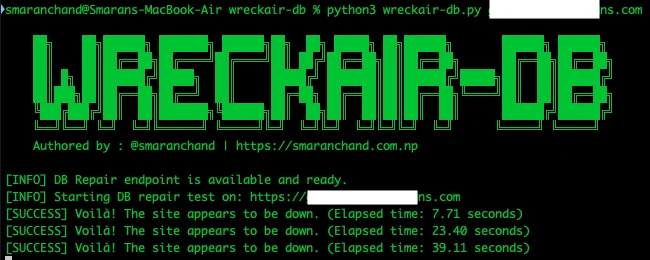
To be more practical, I have weaponized it with a simple python script that can bring the site down for as long as the attacker desires. The script is hosted at https://raw.githubusercontent.com/smaranchand/wreckair-db/refs/heads/main/wreckair-db.py?token=GHSAT0AAAAAACZBPSANBXQSCUVHV6JYC2LUZYQVXVQ
Note: Let me know if it is not accessible.
-
-
Observe that the repeated requests will eventually exhaust server resources, causing the site to become unresponsive, results in a Denial of Service (DoS) condition, impacting the availability of the target WordPress site.
Supporting Material/References:
Impact
The impact of this vulnerability is severe, as it allows an unauthenticated attacker to make the target WordPress site unresponsive through repeated use of the database repair functionality. This Denial of Service (DoS) condition disrupts the availability of the website, rendering it inaccessible to legitimate users. The lack of authentication and rate limiting on a critical function makes it easy for attackers to exploit, resulting in significant downtime, potential loss of business, and damage to the reputation of the affected website. Additionally, this vulnerability has been active for a long time, going unreported and unnoticed, making it a persistent threat to WordPress installations that enable the repair feature without proper security measures.
Mitigations
To mitigate this vulnerability, the following actions are recommended:
-
Require Authentication: WordPress should require authentication for accessing the
/wp-admin/maint/repair.phpendpoint, even whenWP_ALLOW_REPAIRis set totrue. This would ensure that only authorized users can initiate database repair operations. -
Restrict Access: Implement IP-based access control to limit access to the repair page only to trusted IP addresses. This would prevent unauthorized users from accessing the endpoint.
-
Use a One-Time Token Mechanism: Introduce a secure one-time token mechanism to allow temporary access to the repair page. This token should expire after a short period, reducing the risk of exploitation.
-
Rate Limiting: Apply rate limiting to the
/wp-admin/maint/repair.phpendpoint to restrict how frequently repair requests can be made. This will help mitigate the risk of resource exhaustion through repeated requests.
By implementing these mitigations, the risk associated with this vulnerability can be significantly reduced, ensuring that the database repair functionality is only used by authorized personnel and cannot be abused to create a DoS condition.
Not written yet. The AI write-up for this report has not been written yet. The Original tab links to the source.
How it worked
Root cause
Likely the repair endpoint was designed for emergency use and never given authentication or rate limiting, so enabling it exposes a costly operation to anyone.
Impact
An unauthenticated attacker could make the site unresponsive through repeated repair requests, disrupting availability for legitimate users.
What the attacker needed
WP_ALLOW_REPAIR set to true; network access to the site
The fix
WordPress should require authentication, restrict access, use a one-time token, and apply rate limiting to the repair endpoint.
How it was found
- Confirm that WP_ALLOW_REPAIR is set to true in wp-config.php.
- Visit the repair page directly at /wp-admin/maint/repair.php and note no login is required.
- Choose the repair or repair-and-optimize option.
- Repeatedly request the repair URL with the repair parameter to trigger the process.
- Observe the server becoming unresponsive as resources are exhausted.
Explained by bugbounty.wiki with AI from the original and checked against quotes from it; it can still be wrong. Read the original before relying on a detail.
Not written yet. The AI write-up for this report has not been written yet. The Original tab links to the source.
WordPress has a built-in tool to fix a broken database, but if a setting is turned on, anyone can reach that tool without logging in. Each use of the tool is heavy on the server, so sending many requests can make the site slow or unavailable for normal visitors.
What is DoS?
A request that exhausts resources or crashes a component. Many programs forbid testing it; reports usually show it from code, not by attacking.


