€1500 | 2FA Bypass: How We Bypassed the 2nd Factor Without Ever Passing It
The 2FA settings endpoint accepted a half-authenticated session (after password but before SMS code) and allowed changing the 2FA preference to 'never', which disabled the second factor and promoted the session to fully logged in. An attacker with only a password could take over any account with 2FA enabled.
 Published on medium.com
Cybersecurity
The full write-up lives on its author's site
It belongs to its author, so we link to it rather than copy it. The other two tabs are our own rewrites, checked against it.
Context
This is a two-factor authentication bypass on a private bug bounty program, found by Ashar Mahmood together with his hunting partner Faique. The target is a web application that lets people register either a personal account or a company account. Accounts can enable two-step verification over SMS, with a security preference that controls when the second factor is demanded. The strongest setting is "Every time I log in", which means password plus a six digit SMS code on every login.
The bug is that the 2FA settings page could be reached from a session that had only passed the password step, and from there the second factor could be switched off entirely. The report paid €750, plus a €750 bonus.
Setup
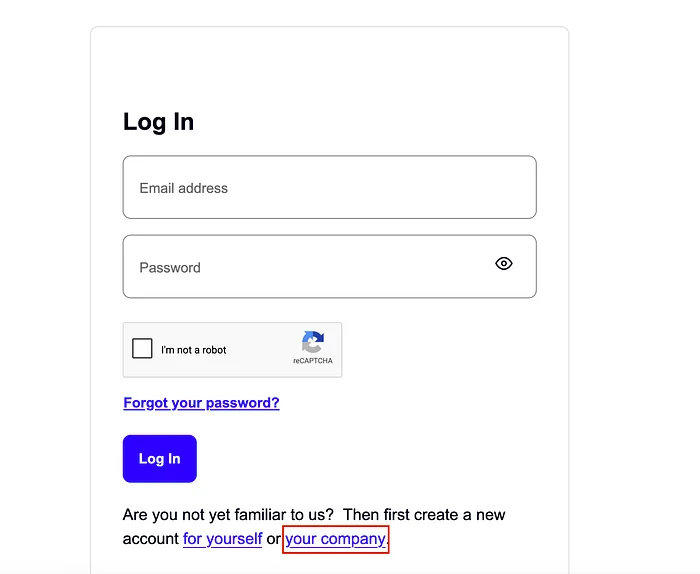
The application offers two registration flavours. On the login page there is a small link to create an account for "your company".
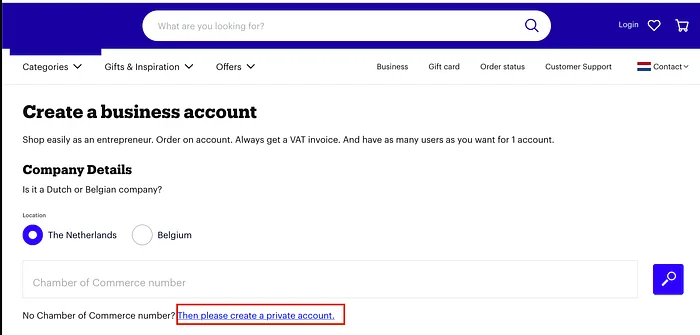
Following the company signup leads to a business form that contains an escape hatch: if you do not have a Chamber of Commerce number, it offers to create a normal private account instead.
That is the route the researcher took. He created a plain account, verified the email address, and then enabled two-step verification on his own test account, set to "Every time I log in".
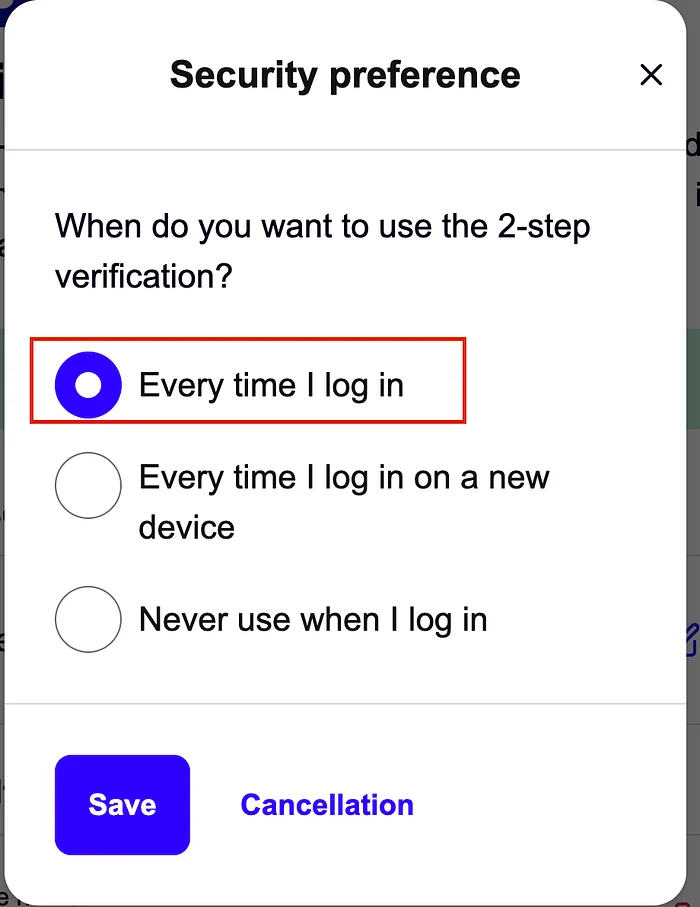
At that point the account is fully protected: password plus an SMS code on every login. That is the precondition for the whole attack, since the bypass only matters against an account that has 2FA switched on.
Finding it
The researcher logged out, opened an incognito window, and logged back in with only the email address and password. As expected, the SMS challenge appeared and asked for the six digit code.
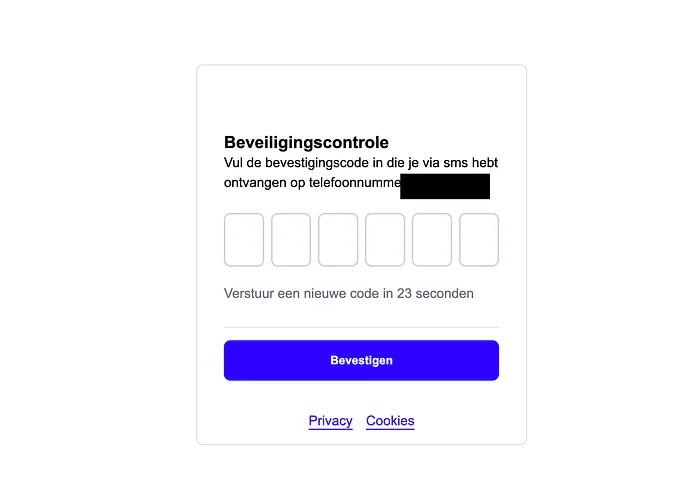
At this moment the session is not logged in. The password has been proven, the second factor has not. The only actions this session should be allowed to perform are entering the code, resending the code, or cancelling. Instead of entering the code, the researcher opened a second tab and navigated straight to the 2FA settings page:
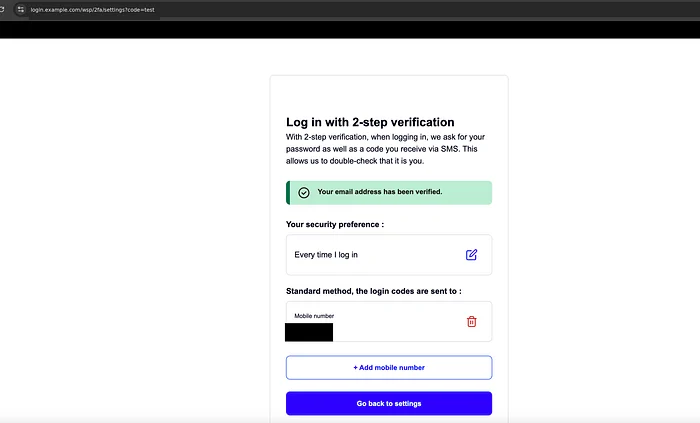
https://login.example.com/wsp/2fa/settings?code=test
Two things stood out. First, the code parameter did not matter: code=test is clearly not a real verification token, and the page loaded anyway. Second, and this is the actual bug, the page loaded using the half-finished login session. The email address even showed as verified.
Exploitation
Step 1: Reach the settings page from the mid-challenge session
With the SMS prompt still waiting in the first tab, the second tab requested the settings URL shown above. The endpoint accepted the half-authenticated session and rendered the account security page, including the current security preference of "Every time I log in". No valid code value was needed.
Step 2: Switch the preference to "Never use when I log in"
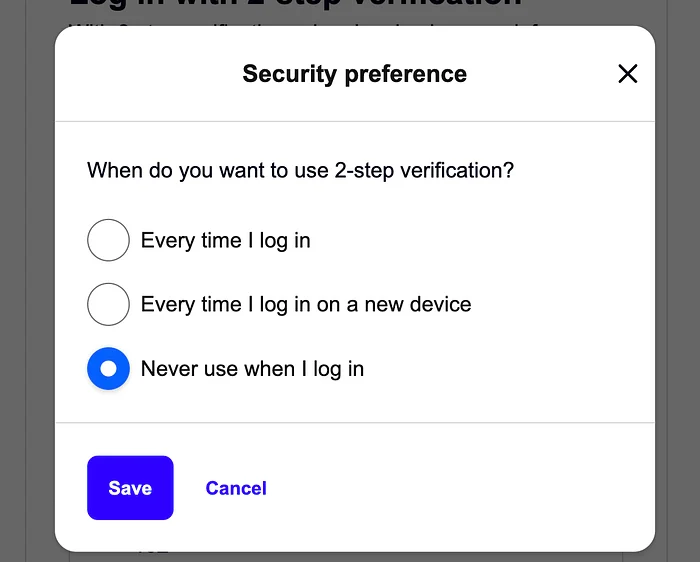
From that page the researcher opened the security preference and changed it from "Every time I log in" to "Never use when I log in", then saved.
Step 3: Return to settings and land inside the account
After saving, he clicked "go back to settings" and landed on the account security page, fully logged in. No code was ever entered.

With 2FA set to "never", the challenge had nothing left to enforce, and the session was promoted to fully authenticated. The whole flow, from the SMS prompt to a logged-in account, is: open a new tab, hit the settings URL, switch to "Never use", save, land inside the account.
Root cause
When the password step succeeds, the application issues a session, but it is a half-authenticated session. It represents "this person knows the password and is now being challenged", not "this person is logged in". Everything after that point is supposed to stay locked until the SMS code is accepted.
The flaw is that the 2FA settings endpoint never checked which kind of session it was talking to. It treated the half-authenticated session as if it belonged to a fully logged-in user and allowed security settings to be changed. The researcher used that gap to switch off the exact control standing between him and the account. Once 2FA was set to "never", the challenge had nothing left to enforce, and the session was promoted to fully authenticated.
In short, a session that had passed one factor was allowed to disable the second factor. The application confused "being challenged" with "being logged in". The ignored code=test is a second, separate weakness: the endpoint was not validating the token it was handed either.
Impact
Any account with 2FA enabled could be fully taken over with the password alone. Once inside, an attacker could:
- Act as the victim, including viewing and changing their orders.
- Access personal data such as order history, saved addresses, and potentially stored payment details.
- Permanently disable 2FA on the victim's account, leaving it weaker for every future login.
The whole point of the second factor is to survive a leaked or guessed password, and this bug quietly removed that protection. The precondition is that the attacker already holds a valid password for a 2FA-protected account.
Fix
The report recommends two changes, plus one more:
- Bind sensitive actions to a fully authenticated session. Changing 2FA settings should only be possible after the second factor is actually satisfied, never from a mid-challenge session.
- Re-authenticate for security-sensitive changes. Turning 2FA off is exactly the kind of action that should require stepping up, not stepping around.
- Validate the
codevalue instead of accepting anything.
- Other settings endpoints from a mid-challenge session. Try password change, email change, recovery options and API key pages while the 2FA prompt is pending. A positive result is any of them rendering or accepting a change before the code is entered.
- Ignored token parameters. Send a clearly invalid value such as
code=testto any endpoint that expects a verification token. A positive result is the page loading or the action succeeding anyway. - Preference downgrade as the bypass. On other targets, look for a setting that controls whether the second factor is required, and try to change it from the partial session. A positive result is the challenge disappearing and the session becoming fully authenticated without a code.
- Session promotion after the change. After modifying a security setting from the partial session, reload a normal authenticated page. A positive result is being treated as fully logged in.
Key learning
A valid session is not the same as a completed login. Whenever an application has a multi-step gate, examine what a partial session is allowed to touch. If a half-authenticated user can reach the switch that turns off the very check they are stuck on, the whole gate falls.

What happened, in plain words
Imagine a bank vault with two locks. The first lock opens with your password. The second lock opens with a six digit code sent to your phone. The whole idea is that a thief who steals your password still cannot get in, because they do not have your phone.
On this website, the researcher found that after opening the first lock, the door to the room containing the switch for the second lock was left unlocked. He walked in, flipped the second lock to "off", and the vault opened. He never typed a code.
That is a two-factor authentication bypass. "Two-factor" means two separate proofs of who you are: something you know (the password) and something you have (the phone that receives the code). "Bypass" means getting past a check without satisfying it.
The researcher is Ashar Mahmood, working with his friend Faique, on a private bug bounty program. A bug bounty program is a scheme where a company invites outside researchers to look for security mistakes in its systems and pays them for reporting the mistakes responsibly instead of exploiting them. "Private" means only invited researchers can take part. The report paid €750, plus a €750 bonus.

The image is captioned "Lets goo!!".
The setup
Before any attack, you need to understand the product. The target is a web application, meaning a website you use through a browser. It lets people register in two flavours: a personal account, or a company account. On the login page there is a small link to create an account for "your company".
The screenshot shows the login page, with personal details redacted.
Why does this matter? Because the way accounts are created often hints at how the rest of the system is built. If there are two kinds of signup, there may be two kinds of session, two sets of rules, and gaps between them. Attackers read signup flows carefully for exactly this reason.
The researcher followed the company signup. On the business form there is an escape hatch: if you do not have a Chamber of Commerce number, it offers to just make you a normal private account instead. A Chamber of Commerce number is an official registration number that businesses in some countries receive; the site uses it to prove a company really exists.
The screenshot shows the "Create a business account" page with the line "Then please create a private account".
So he created a plain account, verified his email, and then did what any attacker would do to their own test account: he turned on two-step verification, set to "Every time I log in".
The screenshot shows the security preference modal with "Every time I log in" selected.
A security preference here is a setting that decides when the site asks for the second factor. "Every time I log in" is the strictest option: password plus an SMS code on every single login. SMS means text message. Two-step verification (also called 2FA, for two-factor authentication) is the general name for this password-plus-code arrangement.
Why set it to the strictest option? Because the bug only matters against an account that actually has 2FA switched on. If the account had no second factor, there would be nothing to bypass. Setting up the protection first is how you create the conditions to test whether the protection can be broken.
At this point the account is fully protected. That is the starting line.
The breakthrough
The researcher logged out, opened an incognito window, and logged back in with just the email and password. An incognito window is a browser window that starts with no saved cookies or logins, so it behaves like a fresh visitor. A cookie is a small piece of data the website stores in your browser so it can recognise you on the next request; it is how a site remembers that you logged in.
As expected, the SMS challenge appeared and asked for the six digit code.
The screenshot shows the SMS verification screen, with details redacted.
This is the interesting moment. At this exact point the researcher is not logged in. He has proven his password but not the second factor. The only things this session should be allowed to do are: enter the code, resend the code, or cancel. That is it.
A session is the website's memory of your current visit. When you log in, the server gives your browser a session identifier (usually inside a cookie), and every later request carries that identifier so the server knows who is asking. Think of it like a wristband at an event: the staff check the wristband instead of asking for your ID at every door.
Here the wristband is a special one. It says "this person knows the password and is now being challenged". It does not say "this person is logged in". The report calls this a half-authenticated session: half of the login is done, half is still pending.
Instead of entering the code, the researcher opened a second tab and went straight to the 2FA settings page:
https://login.example.com/wsp/2fa/settings?code=test
Line by line, in plain words:
https://is the protocol, the language the browser uses to talk to the site securely.login.example.comis the address of the server.example.comis a placeholder domain used in write-ups so the real target is not named./wsp/2fa/settingsis the path, the part of the address that names which page or feature you want. Here it is the settings page for two-factor authentication.?code=testis the query string, extra information sent along with the address. The part before the=is the parameter name (code), the part after is its value (test).
A parameter is just a named slot for a value, like a form field in the address bar. The site was apparently expecting a verification code in that slot. The researcher deliberately put test there, a value that is obviously not a real code, to see whether the site checked it at all.
Two things jumped out. First, the code parameter did not matter. He passed code=test, a value that is clearly not a real verification token, and the page loaded anyway. A token in this context is a short value the server issues and later checks to prove something happened, such as a code being verified. If the server accepts any value, the token is not doing its job.
Second, and this is the actual bug, the page loaded using the half-finished login session. His email even showed as verified.
The screenshot shows the settings page loaded with code=test in the address, and the security preference reading "Every time I log in".
Why is that second point the real bug? Because the page should have refused to load at all for a session that had not finished the login. The code being ignored is sloppy, but the deeper problem is that a half-finished session was treated as a finished one. The site confused "being challenged" with "being logged in".
Exploitation
Step 1: Reach the settings page from the mid-challenge session
With the SMS prompt still waiting in the first tab, the second tab requested the settings URL shown above. The endpoint accepted the half-authenticated session and rendered the account security page, including the current security preference of "Every time I log in". No valid code value was needed.
An endpoint is a specific address on a server that does one job, like a counter in a building. You go to the counter for passports, another for driving licences. Here the endpoint is the one that shows and changes 2FA settings. "Rendered" simply means the server sent back a page the browser could display.
Why open a second tab rather than navigate away? Because the first tab holds the pending challenge. Keeping it open preserves the half-finished session exactly as it is, so the second tab can test what that same session is allowed to do elsewhere. It is like leaving one queue to check whether a side door is open, without losing your place.
Step 2: Switch the preference to "Never use when I log in"
From that page the researcher opened the security preference and changed it from "Every time I log in" to "Never use when I log in", then saved.
The screenshot shows the security preference modal with "Never use when I log in" selected.
Why this change? Because it is the switch that controls the very check he was stuck on. If the site believes the second factor is never needed, then the pending SMS challenge has nothing left to enforce. He is not guessing the code or intercepting the SMS; he is turning off the requirement for the code.
Step 3: Return to settings and land inside the account
After saving, he clicked "go back to settings" and landed on the account security page, fully logged in. No code was ever entered.
The image shows the whole flow: from the SMS prompt, open a new tab, hit the settings URL, switch to "Never use", save, and land inside the account.
With 2FA set to "never", the challenge had nothing left to enforce, and the session was promoted to fully authenticated. Promoted here means the site upgraded the half-finished session to a full one. The whole flow, from the SMS prompt to a logged-in account, is: open a new tab, hit the settings URL, switch to "Never use", save, land inside the account.
Why did this actually work?
The trick is easy. The reason it worked is the part worth understanding.
When you pass the password step, the application hands you a session, but it is a half-authenticated session. It represents "this person knows the password and is now being challenged", not "this person is logged in". Everything after that point is supposed to stay locked until the SMS code is accepted.
The flaw is that the 2FA settings endpoint never checked which kind of session it was talking to. It treated the half-authenticated session as if it belonged to a fully logged-in user and allowed security settings to be changed. The researcher used that gap to switch off the exact control standing between him and the account. Once 2FA was set to "never", the challenge had nothing left to enforce, and the session was promoted to fully authenticated.
In short, a session that had passed one factor was allowed to disable the second factor. The application confused "being challenged" with "being logged in". The ignored code=test is a second, separate weakness: the endpoint was not validating the token it was handed either.
A useful comparison is a hotel. At check-in you show your passport and get a key card. Some doors, like the gym or the pool, should only open once you are fully checked in. If the front desk hands you a card that opens the room where the lock settings are kept, before your booking is confirmed, then the check-in process is pointless. The card should have limited permissions until check-in finishes.
Impact
Any account with 2FA enabled could be fully taken over with the password alone. Once inside, an attacker could:
- Act as the victim, including viewing and changing their orders.
- Access personal data such as order history, saved addresses, and potentially stored payment details.
- Permanently disable 2FA on the victim's account, leaving it weaker for every future login.
The whole point of the second factor is to survive a leaked or guessed password, and this bug quietly removed that protection. The precondition is that the attacker already holds a valid password for a 2FA-protected account.
That precondition matters. This is not a bug that lets someone in with nothing. It is a bug that turns "password plus phone" into "password only". Passwords leak all the time, through reused passwords, data breaches and phishing, so the second factor is often the only thing left standing. Removing it is serious.
Recommended fix
The report recommends two changes, plus one more:
- Bind sensitive actions to a fully authenticated session. Changing 2FA settings should only be possible after the second factor is actually satisfied, never from a mid-challenge session.
- Re-authenticate for security-sensitive changes. Turning 2FA off is exactly the kind of action that should require stepping up, not stepping around.
- Validate the
codevalue instead of accepting anything.
"Bind" here means tie the action to a stricter condition: the server should check not just that a session exists, but that the session has completed every step. "Re-authenticate" means ask for proof again, such as the password or a fresh code, right before a dangerous change. It is the same idea as a bank asking for your PIN again before you change your address.
Variants to test
Once you understand the shape of a bug, you can look for the same shape elsewhere. These are variations worth testing:
- Other settings endpoints from a mid-challenge session. Try password change, email change, recovery options and API key pages while the 2FA prompt is pending. A positive result is any of them rendering or accepting a change before the code is entered. An API key is a long secret string that lets a program act on your behalf, so a page that shows or changes it is highly sensitive.
- Ignored token parameters. Send a clearly invalid value such as
code=testto any endpoint that expects a verification token. A positive result is the page loading or the action succeeding anyway. - Preference downgrade as the bypass. On other targets, look for a setting that controls whether the second factor is required, and try to change it from the partial session. A positive result is the challenge disappearing and the session becoming fully authenticated without a code.
- Session promotion after the change. After modifying a security setting from the partial session, reload a normal authenticated page. A positive result is being treated as fully logged in.
Key learning
A valid session is not the same as a completed login. Whenever an application has a multi-step gate, examine what a partial session is allowed to touch. If a half-authenticated user can reach the switch that turns off the very check they are stuck on, the whole gate falls.
The most dangerous state in an auth flow is the in-between one. Everyone hardens "logged out" and "logged in", but the half second where you have passed one check and not the other often gets treated like a formality. It is not a formality. It is a fully separate trust level, and it needs its own rules.
The final image is a sign-off, captioned "Thankyou for your time!! See you soon !".
Glossary
- 2FA (two-factor authentication): a login that needs two different proofs, typically a password plus a code from your phone.
- API key: a long secret string that lets a program act on your behalf on a service.
- Bug bounty program: a scheme where a company pays outside researchers for finding and reporting security mistakes.
- Bypass: getting past a security check without satisfying it.
- Chamber of Commerce number: an official registration number proving a business exists in some countries.
- Cookie: a small piece of data a website stores in your browser so it can recognise you on later requests.
- Endpoint: a specific address on a server that performs one job, such as showing or changing a setting.
- Half-authenticated session: a session created after the password step but before the second factor is completed.
- Incognito window: a browser window that starts with no saved cookies or logins, behaving like a fresh visitor.
- Parameter: a named slot for a value, often in the address bar after a
?, such ascode=test. - Path: the part of a web address that names which page or feature you want, such as
/wsp/2fa/settings. - Promoted (session): upgraded from a partial state to a fully logged-in state.
- Query string: the part of a web address after the
?that carries extra values. - Rendered: turned into a page the browser can display.
- Re-authenticate: ask for proof of identity again, such as the password, right before a sensitive action.
- Security preference: a setting that decides when the site asks for the second factor.
- Session: the website's memory of your current visit, usually tracked by an identifier in a cookie.
- SMS: a text message, used here to deliver the second-factor code.
- Token: a short value the server issues and later checks to prove something happened, such as a code being verified.
- Two-step verification: another name for 2FA, a login that needs a password plus a second proof.
- Web application: a website you use through a browser, with features and accounts rather than just pages to read.

