1st Bug Bounty WriteUp: Open Redirect To XSS on Login Page
An error page on a login subdomain took a redirect_uri parameter and sent users to whatever URL it contained, and the same parameter also accepted a javascript: scheme. By splitting a script payload into concatenated string fragments, the author bypassed the site's filtering and got script execution in the page.
 Published on nassimchami.medium.com
Hello hackers Hope you are doing well, My name is Nassim, i’m a bug bounty hunter, started a few months, i was discover many vulnerabilities, and now i want to share interesting bug i found and how escalate from open redirect to reflected xss.
The full write-up lives on its author's site
It belongs to its author, so we link to it rather than copy it. The other two tabs are our own rewrites, checked against it.
Context
This is a write-up of a bug found on a private web application program, referred to throughout as redacted.net. The program had 80 assets in scope, and the researcher went through them one by one. The interesting asset was a subdomain that presented an email input, the first step of what looks like a login or account-recovery flow.
The feature that turned out to be vulnerable is an error page. After submitting an email address and clicking next, the application sent the user to a URL of the form:
https://subdomain.redacted.net/error_page?redirect_uri={redirect_url}&message={error_message}&extra_message={error_message}
The page takes three parameters. message and extra_message are printed on the page as the error text, and the researcher found they could be spoofed with a different error message. redirect_uri is tied to a button on the page, Back To Login, which sends the user to whatever URL sits in that parameter. That button is the entry point for both bugs described here.
Setup
No accounts, roles, tools or versions are described. The work was done against a private program the researcher had been invited to, on a subdomain of redacted.net, and the only precondition was reaching the error page through the email form. The escalation to XSS took roughly two hours of probing the WAF's behaviour, as described below.
Finding it
The researcher started by working out how the email form behaved: adding a random email address and clicking next. That submission produced the error_page URL above, and the three parameters stood out immediately.
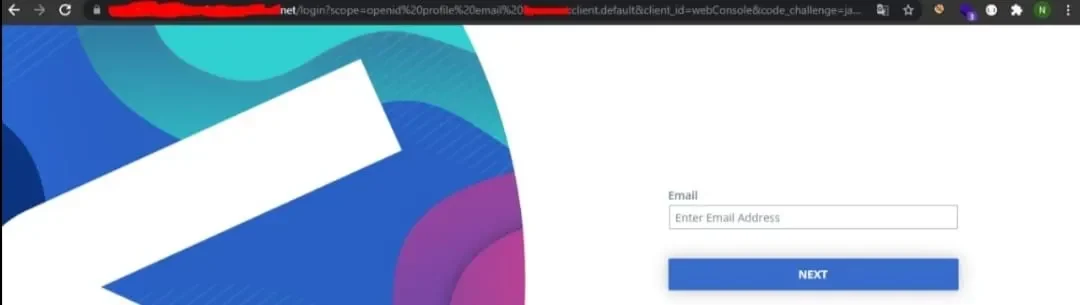
The screenshot sits next to the description of the subdomain's email input.
Two of the parameters, message and extra_message, are reflected into the page as the error message, and the researcher confirmed they could be replaced with a different error message. The third, redirect_uri, controls where the Back To Login button sends the user. A parameter that takes a URL and is used as a redirect target is exactly the shape of an open redirect, so that was the first thing to test.
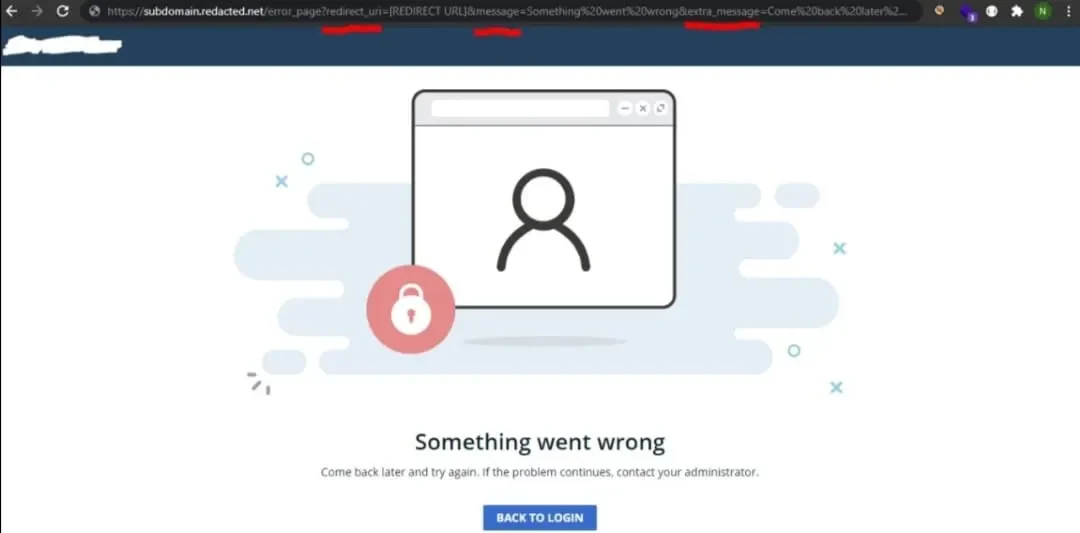
The screenshot sits next to the error page URL with its three parameters.
Exploitation
Step 1: confirm the open redirect
The researcher replaced the value of redirect_uri with a different URL and clicked Back To Login. The browser was redirected to the supplied URL, which confirms the parameter is used as a redirect target.
Step 2: probe the WAF in a javascript: context
Rather than stopping at the redirect, the researcher tried to escalate it to reflected XSS by putting JavaScript into redirect_uri. The first obstacle was a WAF. After about two hours of testing, the researcher bypassed it. The report notes that the filtering looks like a WAF or hardening setting when the injection is JavaScript code, but not when the injection point is tags. The behaviours observed while probing were:
document.location.href='//t.co'is blocked.- Referring to the same property through string concatenation,
let tt='documen';let yy='t';let uu='.locatio';let ii='n';let oo='.hre';let pp='f';let aa=tt+yy+uu+ii+oo+pp;a='//example.com';, does not work even though it is valid code. - A
<tag>in ajavascript:context is blocked. let a='<tag';let b='>';c=a+bis not blocked.let bb='<svg onload='is blocked, because theonloadevent triggers the WAF.let bb='<svg onload';let cc='='is not blocked.()andlet a='(';let b=')'are blocked.let a=')';let b='('is not blocked.
The report lists these observations without stating a general rule for the filter.
Step 3: build the payload
Using string concatenation, the final payload was:
let bb='<svg onload';let cc='=';dd='promp';ff=')';gg='t(';hh='>';aa=bb+cc+dd+gg+ff+hh
The concatenation in aa produces the working markup at runtime.
Step 4: URL-encode and deliver
The payload was then URL-encoded:
%6c%65%74%20%62%62%3d%27%3c%73%76%67%20%6f%6e%6c%6f%61%64%27%3b%6c%65%74%20%63%63%3d%27%3d%27%3b%64%64%3d%27%70%72%6f%6d%70%27%3b%66%66%3d%27%29%27%3b%67%67%3d%27%74%28%27%3b%68%68%3d%27%3e%27%3b%6c%6c%3d%62%62%2b%63%63%2b%64%64%2b%67%67%2b%66%66%2b%68%68
The encoded payload was placed in redirect_uri with the javascript: scheme, and the researcher reports that it worked successfully.
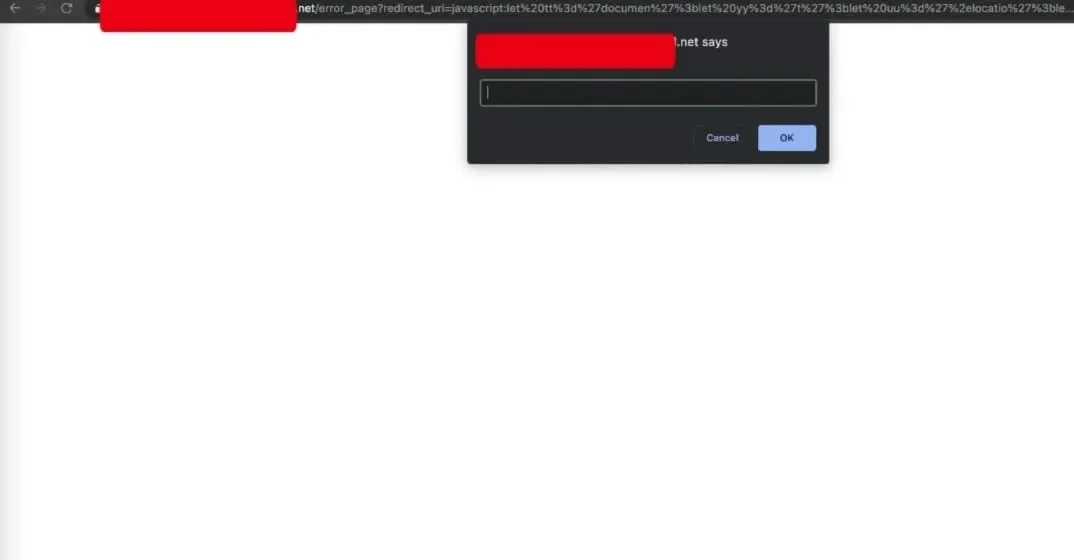
The screenshot sits where the researcher reports that replacing the payload in redirect_uri worked successfully.
Root cause
The redirect_uri parameter is used as the destination of the Back To Login button, and an external URL placed there was followed. That is the open redirect. The researcher then put a javascript: payload into redirect_uri and reports that it worked, which is the reflected XSS.
The WAF in front of the application did not stop the escalation. Based on the behaviour observed, it matches complete constructs such as a full document.location.href reference, a whole tag, an onload attribute with its value, or a matched pair of parentheses. Fragmenting those constructs into separate string literals and concatenating them at runtime produces the same code without matching any signature. The report does not describe the server-side validation, if any, so the exact reason the javascript: scheme was accepted is not stated.
Impact
The open redirect lets an attacker send a victim from a redacted.net URL to another destination. The researcher reports that the javascript: payload in redirect_uri worked successfully. The report does not describe what data or sessions were reachable from that subdomain, so the practical reach of the XSS beyond the prompt() proof is not stated.
Fix
Variants to test
- Submit the email form on other subdomains of the same program and inspect the resulting error page URL for parameters that carry a redirect target or reflected error text. A positive result is a parameter whose value changes where a button or link sends you.
- Replace the redirect value with an external URL and click the button. A positive result is the browser leaving the application for the supplied URL.
- Replace the redirect value with a
javascript:payload and click the button. A positive result is script execution in the application's origin. - When a WAF blocks a payload, split the blocked construct into string fragments and concatenate them at runtime, as done here with the tag, the event handler and the parentheses. A positive result is the assembled payload executing while the original form stays blocked.
- Test the
messageandextra_messageparameters for reflection of markup, since the report confirms they are printed on the page and can be spoofed. A positive result is injected content rendered as markup rather than text.
What happened, in plain words
A security researcher named Nassim Chami was invited to a private bug bounty program, a scheme where a company pays people to look for security holes in its systems before criminals find them. The program covered a website he calls redacted.net, and it listed 80 assets in scope. An asset is simply a piece of the company's online presence that the researcher is allowed to test, such as a website, a subdomain or an application. He went through those assets one by one.
One subdomain caught his attention because it showed an email input box, the kind of field you see on a login or password recovery page. He typed a random email address, clicked next, and watched what the browser did. The page sent him to an error page whose web address contained three pieces of information after a question mark. Those pieces are called parameters: they are values passed to a web page in its address so the page can change what it shows. One of them, redirect_uri, told a button where to send the visitor. He changed it to a different website, clicked the button, and the browser went there. That is an open redirect: the site will forward you to any address you name, not just its own pages.
He did not stop there. He wanted to turn that same parameter into a way to run his own JavaScript, the programming language that browsers execute to make pages interactive. Running attacker-supplied JavaScript inside a trusted site is called cross-site scripting, or XSS. A security filter called a web application firewall, or WAF, stood in the way. After about two hours of testing he worked out how the filter recognised bad input, split his code into harmless-looking pieces, joined them back together in the browser, and got his script to run. This article walks through each step in the same order, explaining every term as it comes up.
Background: the pieces you need to know
Before following the steps, here are the basic ideas the rest of the article relies on.
- Web address and parameters. A web address (URL) can carry extra values after a
?, separated by&. For example,page?colour=red&size=bigpasses two parameters,colourandsize. The page's code reads them and changes what it displays or does. Parameters are a normal, useful feature, but they are also a common place for attackers to poke, because anything in the address can be changed by whoever holds the link. - Redirect. A redirect is when a website tells your browser "do not show this page, go to that other address instead". Sites use it all the time, for example after you log in. An open redirect is when the site takes the destination from a parameter and does not check it, so anyone can craft a link on the trusted site that sends visitors anywhere.
- JavaScript and the
javascript:scheme. JavaScript is the language browsers run to make pages do things. Browsers also understand a special address prefix,javascript:, which means "run what follows as JavaScript instead of loading a page". If a site puts a user-supplied value into a link or redirect without checking it, ajavascript:value can make the browser execute code. - XSS (cross-site scripting). XSS is when an attacker gets their own JavaScript to run in the context of a trusted website, inside a victim's browser. Reflected XSS means the malicious code travels in the link itself: the victim clicks a crafted URL, the site echoes the code back into the page, and the browser runs it. Because the code runs as if it came from the trusted site, it can act with that site's privileges.
- WAF (web application firewall). A WAF is a filter that sits in front of a website and inspects incoming requests, blocking ones that look like attacks. It typically works by matching patterns, called signatures, such as a known dangerous word or a complete piece of code. Because it matches patterns, it can sometimes be fooled by writing the same thing in a different shape.
- String concatenation. In programming, a string is a piece of text. Concatenation means gluing strings together, usually with
+.'foo' + 'bar'producesfoobar. This matters later because a filter may block the wordfoobarbut not the two halvesfooandbarjoined at runtime. - URL encoding. Addresses cannot contain every character directly, so browsers and tools encode special characters as
%followed by two hexadecimal digits. For example, a space becomes%20and a single quote becomes%27. Encoding a payload lets it travel safely inside a URL; the receiving side decodes it back.
The setup
The report does not describe any accounts, roles, tools or software versions. The work was done against a private program the researcher had been invited to, on a subdomain of redacted.net. The only precondition was reaching the error page through the email form. The escalation to XSS took roughly two hours of probing how the WAF behaved.
Finding it
The researcher started by working out how the email form behaved. He added a random email address and clicked next. That submission produced an error page URL of this shape:
https://subdomain.redacted.net/error_page?redirect_uri={redirect_url}&message={error_message}&extra_message={error_message}
Line by line, in plain words:
https://subdomain.redacted.net/error_pageis the page itself, an error page on the subdomain.?marks the start of the parameters.redirect_uri={redirect_url}is the first parameter. The curly braces are placeholders: in a real request this value is an actual address. This parameter decides where a button on the page will send you.&message={error_message}is the second parameter, carrying the text of an error message to display.&extra_message={error_message}is the third, carrying additional error text.
The screenshot sits next to the description of the subdomain's email input.
Two of the parameters, message and extra_message, are printed on the page as the error message. The researcher confirmed he could replace them with a different error message, meaning the page displays whatever text is supplied. The third, redirect_uri, controls where the Back To Login button sends the user. A parameter that takes a web address and is used as a redirect target is exactly the shape of an open redirect, so that was the first thing to test.
The screenshot sits next to the error page URL with its three parameters.
Exploitation
Step 1: confirm the open redirect
The researcher replaced the value of redirect_uri with a different URL and clicked Back To Login. The browser was redirected to the supplied URL, which confirms the parameter is used as a redirect target. In other words, the site will forward a visitor to another address placed in the link.
Step 2: probe the WAF in a javascript: context
Rather than stopping at the redirect, the researcher tried to escalate it to reflected XSS by putting JavaScript into redirect_uri. The idea is that if the button will follow any address, and the browser understands javascript: addresses as code, then a javascript: value in the parameter might make the button run code instead of navigating.
The first obstacle was a WAF. After about two hours of testing, the researcher bypassed it. The report notes that the filtering looks like a WAF or hardening setting when the injection is JavaScript code, but not when the injection point is tags. In other words, the filter seemed tuned to catch code-shaped input, while markup-shaped input (tags) was treated differently. The behaviours observed while probing were:
document.location.href='//t.co'is blocked.- Referring to the same property through string concatenation,
let tt='documen';let yy='t';let uu='.locatio';let ii='n';let oo='.hre';let pp='f';let aa=tt+yy+uu+ii+oo+pp;a='//example.com';, does not work even though it is valid code. - A
<tag>in ajavascript:context is blocked. let a='<tag';let b='>';c=a+bis not blocked.let bb='<svg onload='is blocked, because theonloadevent triggers the WAF.let bb='<svg onload';let cc='='is not blocked.()andlet a='(';let b=')'are blocked.let a=')';let b='('is not blocked.
What do these lines mean? document.location.href is the browser's way of reading or setting the current page address; setting it to another address navigates there. The WAF blocked that complete phrase. Splitting it into fragments and gluing them with + produced valid code, but the report says it did not work, so something else also stopped it. A <tag> is markup such as <svg>, and the WAF blocked a complete tag but not a tag assembled from a <tag piece and a > piece. onload is an event attribute: it tells the browser to run code when an element finishes loading, and the WAF blocked it when written together with its =. Parentheses () are used to call functions, and the WAF blocked a matched pair but not the two halves written separately.
The report lists these observations without stating a general rule for the filter.
Step 3: build the payload
Using string concatenation, the final payload was:
let bb='<svg onload';let cc='=';dd='promp';ff=')';gg='t(';hh='>';aa=bb+cc+dd+gg+ff+hh
Line by line:
let bb='<svg onload'stores the opening of ansvgelement together with the start of theonloadattribute. On its own this is just text; the tag is not closed and the attribute has no value.let cc='='stores the equals sign that joins the attribute name to its value.dd='promp'stores the first part of the wordprompt.ff=')'stores a closing parenthesis.gg='t('stores the lettertand an opening parenthesis, completing the wordpromptand opening its argument list.hh='>'stores the character that closes the tag.aa=bb+cc+dd+gg+ff+hhglues all the fragments together into one string.
The concatenation in aa produces the working markup at runtime. prompt() is a built-in browser function that opens a small dialog box asking for input; it is a harmless way to prove that code ran.
Step 4: URL-encode and deliver
The payload was then URL-encoded:
%6c%65%74%20%62%62%3d%27%3c%73%76%67%20%6f%6e%6c%6f%61%64%27%3b%6c%65%74%20%63%63%3d%27%3d%27%3b%64%64%3d%27%70%72%6f%6d%70%27%3b%66%66%3d%27%29%27%3b%67%67%3d%27%74%28%27%3b%68%68%3d%27%3e%27%3b%6c%6c%3d%62%62%2b%63%63%2b%64%64%2b%67%67%2b%66%66%2b%68%68
This is the same JavaScript as above, written so it can travel inside a web address. Each % followed by two characters stands for one original character: %6c is l, %65 is e, %74 is t, %20 is a space, %3d is =, %27 is a single quote, %3c is <, %3e is >, %3b is ;, %2b is +, %28 is (, %29 is ). Decoded, it reads back as the payload from Step 3.
The encoded payload was placed in redirect_uri with the javascript: scheme, and the researcher reports that it worked successfully. The javascript: prefix is what tells the browser to treat the rest as code rather than as a page address.
The screenshot sits where the researcher reports that replacing the payload in redirect_uri worked successfully.
Root cause
The redirect_uri parameter is used as the destination of the Back To Login button, and an external URL placed there was followed. An allowlist is a fixed list of permitted values; without one, any address is accepted. That is the open redirect. The researcher then put a javascript: payload into redirect_uri and reports that it worked, which is the reflected XSS. A sink is any place where data ends up being interpreted as code.
The WAF in front of the application did not stop the escalation. Based on the behaviour observed, it matches complete constructs such as a full document.location.href reference, a whole tag, an onload attribute with its value, or a matched pair of parentheses. Fragmenting those constructs into separate string literals and concatenating them at runtime produces the same code without matching any signature. The report does not describe the server-side validation, if any, so the exact reason the javascript: scheme was accepted is not stated.
Impact
The open redirect lets an attacker send a victim from a redacted.net URL to another destination. The researcher reports that the javascript: payload in redirect_uri worked successfully. An origin is the combination of scheme, host and port that a browser uses to decide which site a page belongs to.
Fix
Variants to test
If you want to look for similar bugs yourself, here is the same approach written as a checklist. Each item says what to do and what a positive result looks like.
- Submit the email form on other subdomains of the same program and inspect the resulting error page URL for parameters that carry a redirect target or reflected error text. A positive result is a parameter whose value changes where a button or link sends you.
- Replace the redirect value with an external URL and click the button. A positive result is the browser leaving the application for the supplied URL.
- Replace the redirect value with a
javascript:payload and click the button. A positive result is script execution in the application's origin. - When a WAF blocks a payload, split the blocked construct into string fragments and concatenate them at runtime, as done here with the tag, the event handler and the parentheses. A positive result is the assembled payload executing while the original form stays blocked.
- Test the
messageandextra_messageparameters for reflection of markup, since the report confirms they are printed on the page and can be spoofed. A positive result is injected content rendered as markup rather than text.
Glossary
- Asset: a piece of a company's online presence, such as a website or subdomain, that a bug bounty program allows researchers to test.
- Bug bounty program: a scheme where a company invites and often pays researchers to find security holes in its systems.
- Cross-site scripting (XSS): a vulnerability where an attacker gets their own JavaScript to run inside a trusted website in a victim's browser.
- Reflected XSS: XSS where the malicious code travels in the link itself and the site echoes it back into the page.
- Open redirect: a vulnerability where a site takes a destination from a parameter without checking it, so anyone can craft a link that forwards visitors anywhere.
- Parameter: a value passed to a web page in its address after a
?, used by the page to change what it shows or does. - Redirect: a website telling the browser to go to a different address instead of showing the current page.
- JavaScript: the programming language browsers run to make pages interactive.
javascript:scheme: a special address prefix that tells the browser to run what follows as JavaScript instead of loading a page.- WAF (web application firewall): a filter in front of a website that inspects requests and blocks ones matching known attack patterns.
- Signature: a pattern a filter looks for to recognise an attack.
- String: a piece of text in programming.
- String concatenation: gluing strings together, usually with
+, to build a longer string at runtime. - URL encoding: writing special characters in a web address as
%followed by two hexadecimal digits so they can travel safely. - Payload: the piece of input an attacker sends to trigger a vulnerability.
- Sink: any place where data ends up being interpreted as code.
- Allowlist: a fixed list of permitted values; anything not on the list is rejected.
- Origin: the combination of scheme, host and port that a browser uses to decide which site a page belongs to.
document.location.href: the browser property that reads or sets the current page address.onload: an event attribute that tells the browser to run code when an element finishes loading.prompt(): a built-in browser function that opens a dialog asking for input, often used to prove code ran.- Phishing: tricking someone into visiting a fake page or handing over information, often by abusing a trusted link.




