Exploiting a difficult Out-Of-Band XXE via FTP connections.
An XML parsing endpoint was vulnerable to out-of-band XML External Entity injection, allowing an attacker to make the server send requests to external systems and exfiltrate local files. The attacker could read single-line files over HTTP and, by using an FTP server, retrieve arbitrary local files from multiple hosts.
 Published on medium.com
I’m excited to share with you a detailed account of my encounter with a challenging Out-Of-Band XXE vulnerability. This particular issue was unique as it involved exploiting FTP connections to access local files.
The full write-up lives on its author's site
It belongs to its author, so we link to it rather than copy it. The other two tabs are our own rewrites, checked against it.

Context
The target was an endpoint that receives and parses XML input and then displays the parsed data. The endpoint was strict about the format it accepted: only one specific XML structure was tolerated, and any deviation produced a JSON response containing 'error': true. One detail stood out during reconnaissance: the XML payloads were being transmitted inside JSON rather than as a raw XML body.
The report does not name the product or the programme. It describes the work as the author's first encounter with XXE, and the whole exercise as an attempt to move from a blind, error-suppressed parser to full local file disclosure.
Setup
The tooling used across the phases was:
- Burp Collaborator, to observe out-of-band HTTP and DNS interactions.
- A Python HTTP server on the researcher's own network, to receive exfiltrated data and to host a malicious DTD.
- A Python FTP server, to receive files pushed out by the vulnerable server.
- A
.dtdfile hosted alongside the HTTP server.
The precondition that shaped everything later was the server-side stack: the out-of-band interactions revealed a user agent of Java/17.0.3. That version detail is what made the FTP-based technique viable in the final phase.
Finding it
The first attempt was the classic direct file read payload, the kind that declares an external entity pointing at a local file and references it in the document body. It did not work: the endpoint answered with the same 'error': true JSON response.
Payload
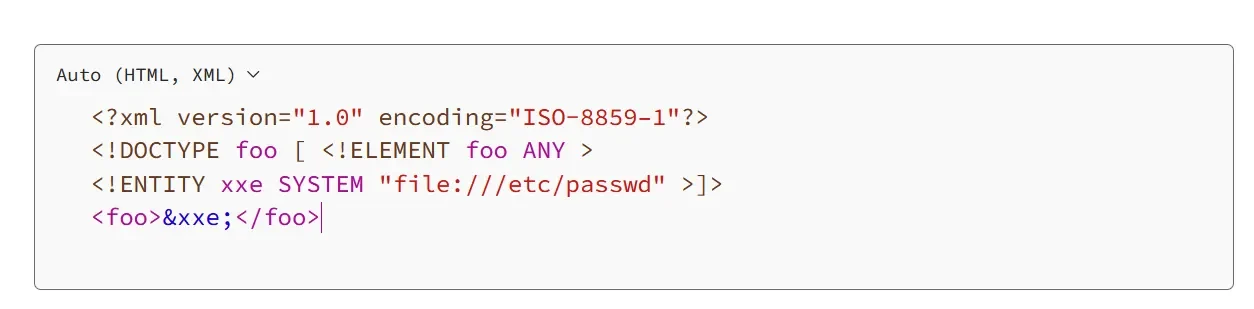
With no error output of any kind, there was no feedback channel to guide the exploitation. The parser was failing silently from the attacker's point of view, which is what pushed the work towards out-of-band techniques.
Exploitation
Step 1: confirming out-of-band interaction
Since local files could not be read directly, the next question was whether the parser would resolve external entities at all, and whether it could be made to reach attacker-controlled infrastructure. That would open the door to blind SSRF and internal port scanning, which the author assessed as a Medium P3 severity issue.
The payload used to trigger an external request was:

The result was HTTP and DNS requests arriving on Burp Collaborator. The user agent on those requests was Java/17.0.3, which identified the server-side stack and became the key detail for the last phase.
Step 2: internal port scanning by timing
With external requests confirmed, the next test was whether the same primitive could reach internal addresses. The author sent requests to [redacted]:80, expected to be open, and [redacted]:444, presumed closed, and compared response times.

The payload targeting port 80 returned notably quickly, while the one targeting port 444 lagged. That difference confirmed that internal port scanning was feasible through response timing, which would place the report at Medium/P3.
Step 3: exfiltrating single-line files over HTTP
The next goal was to read actual file contents rather than just prove reachability. The method found through research was to extract single-line files, such as etc/hostname, by running an HTTP server on the researcher's network and having the target send the file to it.
A simple Python script set up a local HTTP server primed to monitor incoming requests:
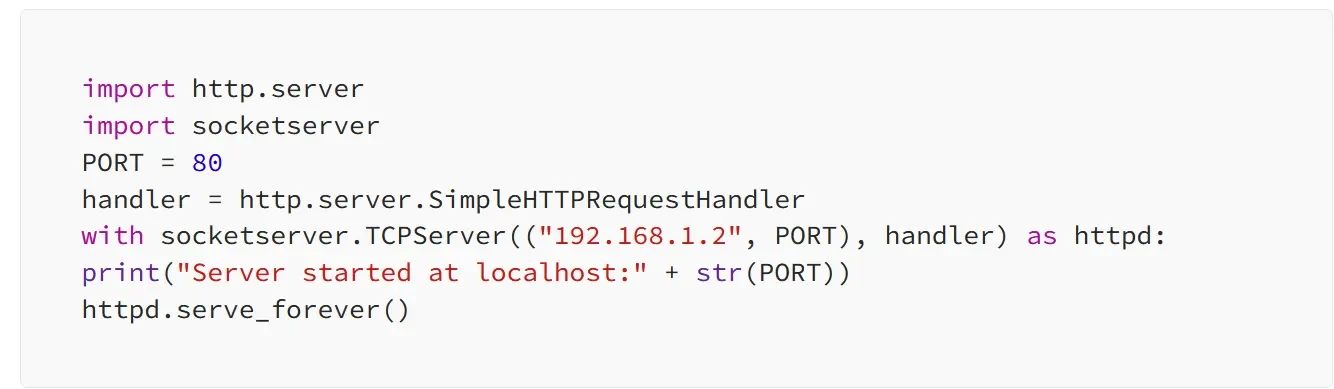
With the server running, an XML payload was built to transmit the desired file over HTTP:
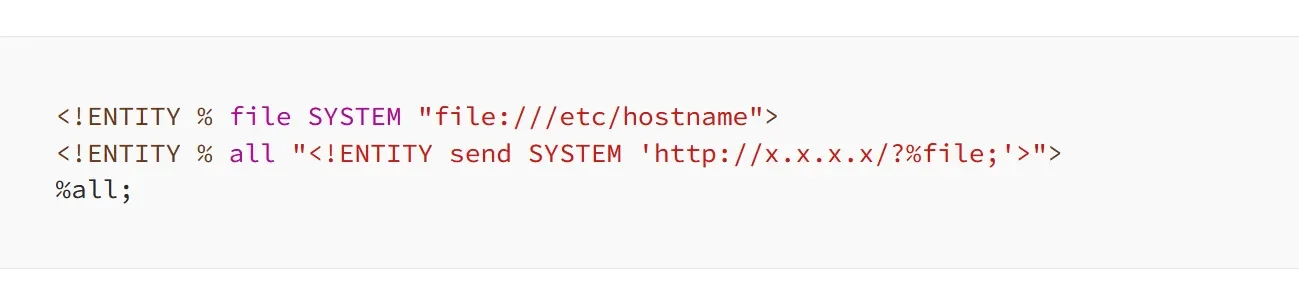
Executing the payload produced an HTTP interaction on the researcher's server with the hostname displayed in it. Single-line files could be extracted this way, and the author wanted to go further.
Step 4: fetching arbitrary local files over FTP
After days of effort and dead ends, the author returned to the Java/17.0.3 detail and used it to establish an FTP connection from the target to an external resource, transmitting any file over FTP. The technique requires a malicious .dtd hosted on the attacker's network, which instructs the server to forward a specified file over FTP.
Two components were prepared: the malicious DTD and an FTP server script.
malicious.dtd

ftp server.py
#!/usr/bin/env python3import socketimport sysimport argparsename = """=--------------------------------------=| 230 OOB || an Out-Of-Band XXE tool || ____ _____ ___ ___ ____ || (___ \(__ / / _ \ / _ \| _ \ || __) ) / / | | | | | | | |_) ) || / __/ (__ \| | | | | | | _ ( || | |___ ___) ) |_| | |_| | |_) ) |m| |_____|____/ \___/ \___/|____/ || by Corben Leo || || - https://www.corben.io || - https://hackerone.com/cdl || - https://twitter.com/hacker_ |=--------------------------------------="""print(name)# Setting up the FTP serverparser = argparse.ArgumentParser(description='An Out-of-Band XXE tool by Corben Leo')args = parser.parse_args()HOST = '[redacted]'PORT = 21welcome = b'220 oob-xxe\n'ftp_catch_all_response = b'230 more data please!\n'ftp_user_response = b'331 hello world!\n'ftp_pass_response = b'230 my password is also hunter2!\n's = socket.socket(socket.AF_INET, socket.SOCK_STREAM)def main(): try: s.bind((HOST, PORT)) except socket.error as msg: print('[+] ERROR: Bind failed. ') sys.exit() s.listen(10) print('[+] 230OOB started on port: '+str(PORT)) conn, addr = s.accept() print('[*] Connection from: '+addr[0]+"!") conn.sendall(welcome) while True: data = conn.recv(1024) ftp_command = data.split(b" ", 1) response = { 'user': ftp_user_response, 'pass': ftp_pass_response, }.get(ftp_command[0].lower(), ftp_catch_all_response) conn.sendall(response) line = data.decode('UTF-8') line = line.replace("\n","").replace("CWD","") print(line) extract(line) s.close()def extract(data): fopen = open('./extracted.log', 'a') fopen.write(data) fopen.close()try: main()except KeyboardInterrupt: s.close()
Each received line is stripped of newlines and of the string CWD, printed, and appended to ./extracted.log.
The final payload

With the HTTP server hosting malicious.dtd and the FTP server running, the payload was sent through the input field. The FTP server received the retrieved files.
Root cause
Impact
Through the out-of-band channel the author could read local files from the server, including multi-line files via FTP, and could perform blind SSRF and internal port scanning by timing. During testing, interactions with numerous servers were observed, which the author says significantly amplified the impact because files could be extracted from multiple hosts. The report does not describe the content or sensitivity of the files retrieved.
Fix
The issue was resolved within 12 hours of reporting, and the author received a substantial bounty plus an additional 50% bonus on the initial amount.
Variants to test
- Wrap XML in JSON. If the endpoint takes XML inside a JSON field, try the same external entity payloads there; a positive result is an out-of-band interaction on your Collaborator or server.
- Compare timing against an open and a closed local port. A fast response for the open port and a slow one for the closed port indicates blind SSRF and port scanning.
- Host a malicious DTD and reference it from the payload. A positive result is the target fetching the DTD from your HTTP server.
- Run a permissive FTP server and point the DTD at it. A positive result is the target connecting to port 21 and sending file content as FTP commands, which your script logs.
- Check the user agent of any out-of-band request.
- Try single-line files over HTTP first. A hostname appearing in your HTTP server log confirms file read before you invest in the FTP setup.
What happened, in plain words
A security researcher found a website feature that reads a special kind of data file called XML. That feature was built in a way that let the researcher trick the server into reading files stored on the server itself and sending them out to a machine the researcher controlled. The first attempts failed because the feature gave no useful error messages. The researcher then used a series of clever tricks: first proving the server could be made to contact an outside machine, then measuring how long the server took to reach different internal addresses, then pulling out a small file over a normal web request, and finally using an older file-transfer protocol called FTP to pull out larger files. The issue was resolved within 12 hours of reporting, and the researcher received a substantial bounty plus a 50% bonus.
This article walks through the same steps in the same order, explaining every idea from scratch. You only need to know how to use a browser and a computer to follow along.
Background: what XML is and why it matters here
XML is a way of writing data as text using tags, similar to HTML but meant for carrying information rather than displaying it. A very small XML document looks like this:
A program that receives XML has to parse it, meaning read it and turn it into something the program can work with. The parser is the part of the software that does this reading.
XML has a feature called entities. An entity is a named placeholder that gets replaced by some text when the document is parsed. For example, you can declare that &company; should stand for Example Ltd, and then write &company; anywhere in the document. This is handy for repeated text.
Entities can also point at external resources, meaning something outside the document itself, such as a file on the server's disk or a URL. That is the feature at the heart of this story. When a parser is configured to allow external entities, an attacker who can submit XML can ask the server to go and fetch something on their behalf. This class of vulnerability is called XXE, short for XML External Entity.
A useful everyday comparison: imagine a form at a post office where you can write "please attach the document in drawer 12". Normally that is fine because the clerk knows which drawers are safe. XXE is what happens when the clerk will happily open any drawer you name, including drawers belonging to other people, and read out what is inside.
The target and the first obstacle
The researcher found an endpoint, meaning a specific address on the website that accepts data and does something with it. This endpoint received XML, parsed it, and then displayed the parsed data back.
The endpoint was strict. It accepted only one specific XML structure. Anything else produced a JSON response containing 'error': true. JSON is a common text format for structured data, and a response like that simply means "something went wrong".
One detail stood out: the XML was being sent inside JSON, rather than as a raw XML body. In other words, the outer envelope was JSON, and one of the fields inside that JSON contained the XML text. This matters because it shows the XML still reached a parser even though it travelled in an unusual wrapper.
The report does not name the product or the bug bounty programme. The author describes this as their first encounter with XXE, and the whole exercise as an attempt to move from a parser that gave no feedback to one that would hand over local files.
The tools used
Before going further, here is what the researcher used, in plain terms:
- Burp Collaborator: a service that gives you a unique address you can put in a payload. If the target server ever tries to contact that address, the service records it. It is like leaving a marked envelope in a room and seeing whether anyone picks it up and posts it.
- A Python HTTP server on the researcher's own network: a small web server that logs every request it receives. It was used both to receive stolen data and to host a malicious file.
- A Python FTP server: FTP is an old protocol for transferring files. This server was set up to receive files that the vulnerable server would push out.
- A
.dtdfile: DTD stands for Document Type Definition. It is a file that defines the rules and entities for an XML document. If an XML document points at an external DTD, the parser will fetch that file and follow the definitions inside it. Hosting a malicious DTD is how the researcher made the server do things the original document never mentioned.
The detail that shaped everything later was the server-side technology. When the out-of-band requests arrived, the user agent was Java/17.0.3. The user agent is a label that software sends to identify itself, much like a caller saying who they are. Knowing the server ran Java version 17.0.3 told the researcher which techniques would work.
Phase 1: the classic attempt that failed
The first attempt was the classic direct file read payload. The idea is to declare an external entity that points at a local file, then reference that entity in the document body so its contents get printed back.
Payload
The attempt did not work. The endpoint answered with the same 'error': true JSON response.
Why this matters: with no error output of any kind, there was no feedback channel. The parser was failing silently from the attacker's point of view. Imagine asking a shop assistant for an item and getting only a blank stare, with no indication whether the item exists, whether you asked wrongly, or whether the assistant simply will not say. That silence is what pushed the work towards out-of-band techniques, meaning techniques where the result comes back through a different channel, such as a request to a server you control, rather than in the response you receive.
Phase 2: proving the server will contact an outside machine
Since local files could not be read directly, the next question was whether the parser would resolve external entities at all, and whether it could be made to reach infrastructure the researcher controlled. If it could, that would open the door to blind SSRF and internal port scanning.
SSRF stands for Server-Side Request Forgery. It means tricking a server into making a request on your behalf. "Blind" means you do not see the response of that request; you only see side effects, such as a hit on your own server. A comparison: asking someone to phone a number for you and tell you only whether the call connected, not what was said.
Port scanning is the practice of checking which numbered doors on a machine are open. Every network service listens on a port, which is just a number. If a port answers quickly, something is listening there; if it hangs or refuses, nothing is. The researcher assessed this combination as a Medium P3 severity issue, meaning a moderate problem in a commonly used rating scale.
The payload used to trigger an external request was:
The result was HTTP and DNS requests arriving on Burp Collaborator. DNS is the system that turns names like example.com into addresses, so a DNS hit means the server tried to look up the name. The user agent on those requests was Java/17.0.3, which identified the server-side stack and became the key detail for the last phase.
Why this step was taken: it confirmed the parser would fetch external resources. Without that confirmation, none of the later techniques would have a chance.
Phase 2 continued: scanning internal ports by timing
With external requests confirmed, the next test was whether the same primitive could reach internal addresses. The researcher sent requests to [redacted]:80, expected to be open, and [redacted]:444, presumed closed, and compared response times. [redacted] is the address a machine uses to refer to itself, often called localhost.
The payload targeting port 80 returned notably quickly, while the one targeting port 444 lagged. That difference confirmed that internal port scanning was feasible through response timing.
Why timing works: if a service is listening on a port, the connection is accepted almost immediately. If nothing is listening, the connection attempt waits and eventually fails, which takes longer. By measuring how long the server takes to answer, you can infer which ports are open without ever seeing the connection itself. It is like knocking on doors in a corridor and timing how long it takes before someone answers or the silence settles.
At this point the report would likely be classified as Medium/P3, but the researcher was still not content and wanted to go further.
Phase 3: pulling out a small file over HTTP
The next goal was to read actual file contents rather than just prove reachability. The method found through research was to extract single-line files, such as etc/hostname, by running an HTTP server on the researcher's network and having the target send the file to it. A hostname is simply the name a machine calls itself.
A simple Python script set up a local HTTP server primed to monitor incoming requests:
With the server running, an XML payload was built to transmit the desired file over HTTP:
Executing the payload produced an HTTP interaction on the researcher's server with the hostname displayed in it. Single-line files could be extracted this way, and the author wanted to go further.
It is like trying to write a whole page of text on the back of a postage stamp.
Phase 4: fetching arbitrary local files over FTP
After days of effort and dead ends, the author returned to the Java/17.0.3 detail and used it to establish an FTP connection from the target to an external resource, transmitting any file over FTP. The technique requires a malicious .dtd hosted on the attacker's network, which instructs the server to forward a specified file over FTP.
The client sends commands line by line, and the server replies. If the server can be tricked into treating the contents of a file as a series of FTP commands, then every line of the file becomes a separate command, and the receiving server can log each one. Multi-line files therefore arrive line by line, with no URL length or line-break limits.
Two components were prepared: the malicious DTD and an FTP server script.
malicious.dtd
ftp server.py
#!/usr/bin/env python3import socketimport sysimport argparsename = """=--------------------------------------=| 230 OOB || an Out-Of-Band XXE tool || ____ _____ ___ ___ ____ || (___ \(__ / / _ \ / _ \| _ \ || __) ) / / | | | | | | | |_) ) || / __/ (__ \| | | | | | | _ ( || | |___ ___) ) |_| | |_| | |_) ) |m| |_____|____/ \___/ \___/|____/ || by Corben Leo || || - https://www.corben.io || - https://hackerone.com/cdl || - https://twitter.com/hacker_ |=--------------------------------------="""print(name)# Setting up the FTP serverparser = argparse.ArgumentParser(description='An Out-of-Band XXE tool by Corben Leo')args = parser.parse_args()HOST = '[redacted]'PORT = 21welcome = b'220 oob-xxe\n'ftp_catch_all_response = b'230 more data please!\n'ftp_user_response = b'331 hello world!\n'ftp_pass_response = b'230 my password is also hunter2!\n's = socket.socket(socket.AF_INET, socket.SOCK_STREAM)def main(): try: s.bind((HOST, PORT)) except socket.error as msg: print('[+] ERROR: Bind failed. ') sys.exit() s.listen(10) print('[+] 230OOB started on port: '+str(PORT)) conn, addr = s.accept() print('[*] Connection from: '+addr[0]+"!") conn.sendall(welcome) while True: data = conn.recv(1024) ftp_command = data.split(b" ", 1) response = { 'user': ftp_user_response, 'pass': ftp_pass_response, }.get(ftp_command[0].lower(), ftp_catch_all_response) conn.sendall(response) line = data.decode('UTF-8') line = line.replace("\n","").replace("CWD","") print(line) extract(line) s.close()def extract(data): fopen = open('./extracted.log', 'a') fopen.write(data) fopen.close()try: main()except KeyboardInterrupt: s.close()
Line by line, in plain words:
- The first lines import Python's built-in tools for networking (
socket), for exiting (sys), and for reading command-line options (argparse). - The
nameblock is a decorative banner printed when the script starts. It credits the tool's author, Corben Leo. HOST = '[redacted]'andPORT = 21say which address and port the server listens on. Port 21 is the standard FTP port.- The
welcome,ftp_catch_all_response,ftp_user_responseandftp_pass_responsevariables hold canned replies. The numbers at the start are FTP status codes:220means the server is ready,331means a username is needed, and230means login succeeded. s = socket.socket(...)creates the network socket, the software object that listens for connections.main()binds the socket to the chosen address and port, then starts listening. If binding fails, it prints an error and exits.conn, addr = s.accept()waits for the first connection and records who connected.conn.sendall(welcome)sends the greeting.- The
while Trueloop reads up to 1024 bytes at a time. It splits each chunk on the first space to get the FTP command word, then picks a reply:331forUSER,230forPASS, and the catch-all230 more data please!for everything else. conn.sendall(response)sends that reply back.- The received line is decoded as text, stripped of newlines and of the string
CWD, printed, and passed toextract(). extract()opens./extracted.login append mode and writes the line into it.
A normal FTP server would refuse unknown commands and the conversation would stop; this one keeps the door open.
The final payload
With the HTTP server hosting malicious.dtd and the FTP server running, the payload was sent through the input field. The FTP server received the retrieved files.
The parser fetches the DTD, follows its instructions, and the file leaves the target machine over FTP.
Why the vulnerability existed
In everyday terms: the front door was picky about the shape of the envelope, but once the envelope was accepted, the person inside still opened any drawer named in the letter.
What the impact was
Through the out-of-band channel the author could read local files from the server, including multi-line files via FTP, and could perform blind SSRF and internal port scanning by timing. During testing, interactions with numerous servers were observed, which the author says significantly amplified the impact because files could be extracted from multiple hosts. The report does not describe the content or sensitivity of the files retrieved.
How it was fixed and what was paid
The issue was resolved within 12 hours of reporting, and the author received a substantial bounty plus an additional 50% bonus on the initial amount.
Things worth trying if you find a similar endpoint
- Wrap XML in JSON. If the endpoint takes XML inside a JSON field, try the same external entity payloads there; a positive result is an out-of-band interaction on your Collaborator or server.
- Compare timing against an open and a closed local port. A fast response for the open port and a slow one for the closed port indicates blind SSRF and port scanning.
- Host a malicious DTD and reference it from the payload. A positive result is the target fetching the DTD from your HTTP server.
- Run a permissive FTP server and point the DTD at it. A positive result is the target connecting to port 21 and sending file content as FTP commands, which your script logs.
- Check the user agent of any out-of-band request.
- Try single-line files over HTTP first. A hostname appearing in your HTTP server log confirms file read before you invest in the FTP setup.
Glossary
- API: a defined way for one piece of software to talk to another, like a service counter with specific forms to fill in.
- Blind SSRF: tricking a server into making a request for you without seeing the response, only side effects such as a hit on your own server.
- Bounty: a payment made by an organisation to a researcher who reports a security problem.
- Burp Collaborator: a service that gives you a unique address and records any request that reaches it, used to detect out-of-band interactions.
- DNS: the system that translates names such as
example.cominto network addresses. - DTD (Document Type Definition): a file that defines the rules and entities for an XML document; an external DTD is fetched by the parser when referenced.
- Endpoint: a specific address on a website or service that accepts requests and performs an action.
- Entity: a named placeholder in XML that is replaced by text or by the contents of an external resource when parsed.
- FTP: File Transfer Protocol, an older text-based protocol for sending files between machines, usually on port 21.
- Hostname: the name a machine uses to identify itself on a network.
- HTTP: the protocol browsers and servers use to exchange web pages and data.
- In-band: results that come back in the response you receive directly.
- JSON: a common text format for structured data, built from keys and values.
- Localhost: the address
[redacted], which always refers to the machine itself. - Out-of-band: results that come back through a different channel, such as a request to a server you control, rather than in the response.
- Parser: the part of a program that reads structured text such as XML and turns it into usable data.
- Payload: the crafted input sent to a target to trigger a behaviour.
- Port: a numbered channel on a machine where a network service listens.
- Port scanning: checking which ports on a machine are open by seeing which ones respond.
- P3 / Medium severity: a moderate rating on a common scale used to prioritise security issues.
- SSRF (Server-Side Request Forgery): tricking a server into making a network request on your behalf.
- User agent: a label software sends to identify itself in a request.
- XML: a text format for structured data built from tags.
- XXE (XML External Entity): a vulnerability where an XML parser resolves external entities, letting an attacker read files or make requests through the server.



