2fa Bypass Using Response Manipulation
The phone verification step for adding two-factor authentication accepted a manipulated server response, so a wrong one-time code could be treated as correct. An attacker with an account could therefore complete phone verification without knowing the real code.

vaibhavgaikwad1712.medium.com
Published on vaibhavgaikwad1712.medium.com
Cybersecurity
The full write-up lives on its author's site
It belongs to its author, so we link to it rather than copy it. The other two tabs are our own rewrites, checked against it.
Context
This is a write-up of a two-factor authentication bypass found on a private Bugcrowd program, so the site is not named. The author refers to it as https://example.com. The target had 2FA functionality, and the specific feature involved was phone number verification for adding an MFA method: after entering a phone number the application sends an OTP, and the user has to submit that code to complete the setup. The bug was in the endpoint that verifies the phone number code.
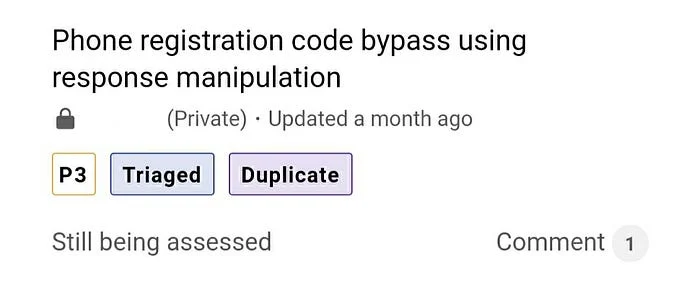
The author notes that the report was triaged and turned out to be a duplicate.


Setup
No special roles or accounts beyond a normal registration are described. The preconditions are:
- A registered account with a verified email address.
- Access to the phone number verification flow for adding MFA.
- Burp Suite, used to intercept the OTP submission request and its response.
The author does not give any product versions.
Finding it
The researcher went through the normal 2FA setup and reached the phone verification step. Submitting a wrong OTP produced a JSON response that reported "response_status" : 0 and "response_message" : "Success" at the top level, while the nested response_data carried "isSuccessful" : false together with an error message and an error code.
Exploitation
Step 1: Create an account and reach the verification page
- Go to
https://example.comand create an account. - Verify the email address and log in.
- A page appears asking for information to be filled in.
- That page contains the phone number verification functionality.
Step 2: Request an OTP
Enter a phone number and an OTP is sent to it.
Step 3: Submit a wrong OTP and intercept
Enter the OTP and intercept the submission request in Burp Suite. Put a wrong OTP in the request and intercept the response as well.
Step 4: Capture the response for a correct OTP
Before manipulating anything, send the request to Repeater and check what the response looks like when the OTP is correct, so the manipulated response can be modelled on it. The response the author shows is:
HTTP/1.1 200 OK
 Date: Wed, 10 Mar 2021 06:42:41 GMT
 Content-Type: application/json
 Content-Length: 212
 Connection: close
 Server:
 Access-Control-Allow-Origin: https://example.com
 Access-Control-Allow-Credentials: true
 X-FRAME-OPTIONS: deny
 Content-Security-Policy: default-src ‘none’
 Strict-Transport-Security: max-age=31536000; includeSubdomains; preload
 Cache-Control: no-store, no-cache

{
 “response_status” : 0,
 “response_message” : “Success”,
 “response_data” : {
 “isSuccessful” : false,
 “errorInfo” : “This isn’t the code we sent to +91xxxxxxxxx7.”,
 “errorCode” : “BDC_1357”
 }
 }
The body is a JSON object. response_status and response_message describe the transport-level outcome, while response_data.isSuccessful is the actual verification result. With a wrong code it is false, and errorInfo and errorCode explain the failure. The response also carries CORS headers allowing the application origin with credentials, and a strict Content-Security-Policy of default-src ‘none’.
Step 5: Manipulate the response
The author then edits the intercepted response. The edited response shows response_data containing only "isSuccessful" : true, with Content-Length set to 114:

HTTP/1.1 200 OK
 Date: Wed, 10 Mar 2021 06:29:34 GMT
 Content-Type: application/json
 Content-Length: 114
 Connection: close
 Server:
 Access-Control-Allow-Origin: https://example.com
 Access-Control-Allow-Credentials: true
 X-FRAME-OPTIONS: deny
 Content-Security-Policy: default-src ‘none’
 Strict-Transport-Security: max-age=31536000; includeSubdomains; preload
 Cache-Control: no-store, no-cache

{
 “response_status” : 0,
 “response_message” : “Success”,
 “response_data” : {
 “isSuccessful” : true
 }
 }
Step 6: Result
With the manipulated response in place, the wrong OTP was accepted and the phone verification step completed. The author reports that the OTP verification was bypassed and, with it, the 2FA setup flow.
Root cause
Because the response body is fully under the control of the person intercepting their own traffic, flipping isSuccessful to true and adjusting Content-Length was enough to make the front end treat the step as passed.
Impact
The researcher completed phone verification without a valid OTP by manipulating the response. In the context described, this defeats the phone verification step of adding an MFA method. The author frames the outcome as a 2FA bypass. The report does not describe what an attacker could do to another user's account, and the program treated the issue as a duplicate of an existing report.
Fix
The report does not say what the program changed.
Variants to test
- Flip the success flag in any JSON verification response. Intercept the response to an OTP, password reset code or email verification and change a boolean such as
isSuccessful,verifiedorsuccessfromfalsetotrue. A positive result is the client advancing to the next step or the account being marked verified. - Trim the body and fix
Content-Length. Remove error fields and setContent-Lengthto the new body size, as done here. A positive result is the client accepting the shortened body without a parse error and treating the step as passed. - Change the HTTP status code. Rewrite a
4xxresponse to200 OKwhile keeping the body. A positive result is the client proceeding on status alone. - Test other steps in the MFA setup flow. Try the same manipulation on the request that finalises MFA enrolment, not just the OTP check. A positive result is MFA being enabled or a session being elevated without a valid code.
- Check whether the server re-validates afterwards. After a manipulated response, reload the account settings and see whether the phone number or MFA method is actually recorded as verified server-side. A positive result is the server having accepted the state change, which turns a client-side trick into a persistent bypass.
What happened, in plain words
A security researcher was testing a website that offered two-factor authentication (2FA). 2FA is the extra step many sites ask for after your password: a short code sent to your phone, which you type in to prove it is really you. The researcher found a way to skip that check, not by guessing the code, but by editing the reply the website sent back to their own browser. The researcher bypassed the OTP verification and the 2FA setup.
The researcher reported it on Bugcrowd, a platform where companies pay people to find security problems. The report was triaged, but it turned out to be a duplicate. The program was private, so the real website name is hidden; the write-up calls it https://example.com.
The ideas you need first
Before the steps, a few plain definitions, because the whole bug depends on them.
- A request and a response. When you click a button in a browser, the browser sends a message to a server (the request) and the server sends a message back (the response). Think of it like posting a form to an office and getting a letter back saying whether it was accepted.
- An API. An API is the part of a website that the page talks to behind the scenes, usually exchanging data in a compact format rather than whole web pages. It is like a service counter: you hand over a specific form, and the clerk hands back a specific answer.
- JSON. JSON is a common way of writing that data as text, using curly braces, names in quotes, and values. It looks like
"name" : "value". It is just a structured note, readable by both people and programs. - An OTP. A one-time password: a short code that is valid once, usually sent by SMS. It is the thing that proves you hold the phone.
- An endpoint. A specific address on the server that handles one job, such as checking an OTP. Think of it as one particular counter in a large office.
- Intercepting. Tools such as Burp Suite sit between your browser and the server and let you pause, read and edit the messages going each way. It is like a mail room that opens letters in transit and lets you rewrite them before they are delivered.
- Response manipulation. This is the vulnerability class here: the server's answer is edited by the person receiving it, and the application trusts that edited answer instead of checking with the server. The everyday comparison is a bouncer who asks a colleague whether you are on the list, and you get to write the colleague's reply yourself.
- Content-Length. A header (a small label at the top of a response) that tells the browser how many bytes long the body is. If you shorten the body but leave the old number, the browser reads the wrong amount of text.
- Headers. The labels at the top of a request or response, such as
Content-TypeorContent-Length, that describe the message before the actual body.
Setting up
The researcher did not need anything special: just a normal account and a tool to intercept traffic.
- A registered account with a verified email address.
- Access to the phone number verification flow used when adding an MFA method. MFA means multi-factor authentication, the general name for asking for more than a password; 2FA is the common case of two factors.
- Burp Suite, used to pause the OTP submission request and its response.
The write-up does not mention any product versions.
Finding it
The researcher went through the normal 2FA setup and reached the phone verification step. When a wrong OTP was submitted, the server replied with JSON that said two different things at once. At the top level it reported "response_status" : 0 and "response_message" : "Success", which sounds like everything went fine. Inside, in a nested section called response_data, it said "isSuccessful" : false along with an error message and an error code.
That split is the clue. The outer part is like an envelope marked "delivered", while the inner part is the actual letter saying "this failed".
Exploitation
Step 1: Create an account and reach the verification page
- Go to
https://example.comand create an account. - Verify the email address and log in.
- A page appears asking for information to be filled in.
- That page contains the phone number verification functionality.
This is just the ordinary sign-up path. The point is to get to the feature under test, the phone verification step, the same way any real user would.
Step 2: Request an OTP
Enter a phone number, and the site sends an OTP to it. This is the normal behaviour: the site needs to know you control that number, so it sends a code only the phone's owner should see.
Step 3: Submit a wrong OTP and intercept
Enter the OTP and intercept the submission request in Burp Suite. Put a wrong OTP in the request, and intercept the response as well. The reason for using a wrong code is deliberate: you want to see exactly what a failure looks like, so you can then try to turn that failure into a success.
Step 4: Capture the response for a correct OTP
Before changing anything, the researcher sent the request to Repeater, a Burp Suite feature that lets you resend the same request over and over and study each reply. The aim was to see what the response looks like when the OTP is correct, so the edited response could be modelled on it. The response shown is:
HTTP/1.1 200 OK
 Date: Wed, 10 Mar 2021 06:42:41 GMT
 Content-Type: application/json
 Content-Length: 212
 Connection: close
 Server:
 Access-Control-Allow-Origin: https://example.com
 Access-Control-Allow-Credentials: true
 X-FRAME-OPTIONS: deny
 Content-Security-Policy: default-src ‘none’
 Strict-Transport-Security: max-age=31536000; includeSubdomains; preload
 Cache-Control: no-store, no-cache

{
 “response_status” : 0,
 “response_message” : “Success”,
 “response_data” : {
 “isSuccessful” : false,
 “errorInfo” : “This isn’t the code we sent to +91xxxxxxxxx7.”,
 “errorCode” : “BDC_1357”
 }
 }
Line by line, in plain words:
HTTP/1.1 200 OK: the version of the web protocol and the status code.200 OKmeans the server handled the request without a transport error. Note that this is a success at the message level, even though the OTP itself was wrong.Date: Wed, 10 Mar 2021 06:42:41 GMT: when the server produced the response.Content-Type: application/json: the body is JSON, the structured text format described earlier.Content-Length: 212: the body is 212 bytes long. The browser uses this number to know where the body ends.Connection: close: the connection will be closed after this response.Server:: a label for the server software; here it is left empty.Access-Control-Allow-Origin: https://example.com: a CORS header. CORS is a browser rule about which websites may read responses from this server. This one allows the application's own origin.Access-Control-Allow-Credentials: true: CORS again, saying that cookies or other credentials may be included.X-FRAME-OPTIONS: deny: tells the browser not to display this page inside a frame on another site, a defence against clickjacking (tricking users into clicking hidden buttons).Content-Security-Policy: default-src ‘none’: a rule telling the browser to load no external resources by default, a defence against injected scripts.Strict-Transport-Security: max-age=31536000; includeSubdomains; preload: tells the browser to always use HTTPS for this site for the next year (31536000 seconds), including subdomains.Cache-Control: no-store, no-cache: tells the browser and any middleboxes not to store this response, so it is not reused later.- The body: a JSON object.
response_statusandresponse_messagedescribe the overall outcome and saySuccess.response_dataholds the actual verification result:isSuccessfulisfalse, anderrorInfoanderrorCodeexplain the failure. The error message includes a phone number, which is redacted here.
The key observation is that the outer message says success while the inner flag says failure. The browser's decision about whether to continue is likely based on that inner flag.
Step 5: Manipulate the response
The edited response shows response_data containing only "isSuccessful" : true, with Content-Length set to 114:
HTTP/1.1 200 OK
 Date: Wed, 10 Mar 2021 06:29:34 GMT
 Content-Type: application/json
 Content-Length: 114
 Connection: close
 Server:
 Access-Control-Allow-Origin: https://example.com
 Access-Control-Allow-Credentials: true
 X-FRAME-OPTIONS: deny
 Content-Security-Policy: default-src ‘none’
 Strict-Transport-Security: max-age=31536000; includeSubdomains; preload
 Cache-Control: no-store, no-cache

{
 “response_status” : 0,
 “response_message” : “Success”,
 “response_data” : {
 “isSuccessful” : true
 }
 }
Line by line:
HTTP/1.1 200 OK: unchanged; the status still says the message was handled.Date: Wed, 10 Mar 2021 06:29:34 GMT: the timestamp of this edited response.Content-Type: application/json: still JSON.Content-Length: 114: the new, smaller body length.Connection: close,Server:, and the CORS, framing, security policy and caching headers are unchanged.- The body: the outer
response_statusandresponse_messageare the same, butresponse_datanow contains only"isSuccessful" : true. The error fields are gone, and the flag that the browser checks now says the verification passed.
Step 6: Result
With the manipulated response in place, the wrong OTP was accepted and the phone verification step completed. The researcher reports that the OTP verification was bypassed and, with it, the 2FA setup flow.
Why it worked
Because the response body is fully under the control of the person intercepting their own traffic, flipping isSuccessful to true and adjusting Content-Length was enough to make the front end treat the step as passed.
What it means
The researcher completed phone verification without a valid OTP by manipulating the response. In the context described, this defeats the phone verification step of adding an MFA method. The researcher frames the outcome as a 2FA bypass. The write-up does not describe what an attacker could do to another user's account, and the program treated the issue as a duplicate of an existing report.
How to fix it
Other places to try the same idea
- Flip the success flag in any JSON verification response. Intercept the response to an OTP, password reset code or email verification and change a boolean such as
isSuccessful,verifiedorsuccessfromfalsetotrue. A positive result is the browser advancing to the next step or the account being marked verified. - Trim the body and fix
Content-Length. Remove error fields and setContent-Lengthto the new body size, as done here. A positive result is the browser accepting the shortened body without a parse error and treating the step as passed. - Change the HTTP status code. Rewrite a
4xxresponse to200 OKwhile keeping the body. A positive result is the browser proceeding on status alone. - Test other steps in the MFA setup flow. Try the same manipulation on the request that finalises MFA enrolment, not just the OTP check. A positive result is MFA being enabled or a session being elevated without a valid code.
- Check whether the server re-validates afterwards. After a manipulated response, reload the account settings and see whether the phone number or MFA method is actually recorded as verified on the server. A positive result is the server having accepted the state change, which turns a browser-side trick into a lasting bypass.
Glossary
- 2FA (two-factor authentication): asking for two different proofs of identity, usually a password plus a code sent to your phone.
- MFA (multi-factor authentication): the general name for using more than one proof of identity; 2FA is the common case of two.
- OTP (one-time password): a short code valid once, often sent by SMS, used to prove you hold the phone.
- Request: the message your browser sends to a server when you do something on a site.
- Response: the message the server sends back.
- API: the behind-the-scenes part of a site that exchanges data with the page, rather than whole web pages.
- Endpoint: a specific address on the server that handles one job, such as checking an OTP.
- JSON: a text format for structured data, using curly braces, quoted names and values.
- Header: a label at the top of a request or response describing the message, such as
Content-Type. - Content-Length: a header stating how many bytes long the body is.
- Content-Type: a header stating what format the body is in, such as
application/json. - Status code: a number in the response saying how the request went, such as
200 OKfor success or4xxfor a client error. - CORS: a browser rule about which websites may read responses from a server.
- Access-Control-Allow-Origin: a CORS header naming which origin may read the response.
- Access-Control-Allow-Credentials: a CORS header saying whether cookies or other credentials may be included.
- X-FRAME-OPTIONS: a header telling the browser not to display the page inside a frame on another site, a defence against clickjacking.
- Clickjacking: tricking a user into clicking something hidden inside a frame.
- Content-Security-Policy: a header telling the browser which resources it may load, a defence against injected scripts.
- Strict-Transport-Security: a header telling the browser to always use HTTPS for the site for a set time.
- Cache-Control: a header telling the browser and middleboxes whether to store the response.
- Intercepting: pausing and reading or editing messages between your browser and the server, using a tool such as Burp Suite.
- Burp Suite: a tool that sits between browser and server and lets you pause, read and edit traffic.
- Repeater: a Burp Suite feature for resending the same request repeatedly and studying each reply.
- Response manipulation: editing the server's reply in transit and having the application trust the edited version.
- Bypass: getting past a check without satisfying it.
- Triaged: reviewed and confirmed as a real issue by the program.
- Duplicate: a report of an issue that has already been reported.
- Bugcrowd: a platform where companies receive security reports and pay for valid ones.
- Private program: a bug bounty program that only invited researchers can see, so the site is not named publicly.
- Origin: the combination of scheme, host and port that identifies a website, used in CORS rules.
- HTTPS: the encrypted version of the web protocol.
- Boolean: a value that is either true or false.
- Redacted: hidden or replaced, here for a phone number.


