3 Name Fields, 3 Bugs: How Free Text Became a Phishing Delivery System
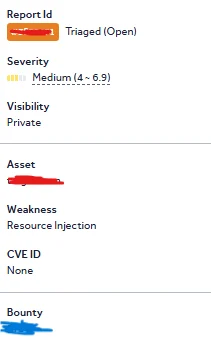
Three name fields in a private program's checkout, gift registry and credit card application flows were copied unsanitised into automatic emails, allowing an attacker to inject HTML links or plain-text phishing messages into mail sent from the company's real servers. The first report was initially closed as informative but later acknowledged as a known issue, while the other two were validated and paid.

Cybersecurity
The full write-up lives on its author's site
It belongs to its author, so we link to it rather than copy it. The other two tabs are our own rewrites, checked against it.
Context
This is a write-up of three separate reports filed against the same private bug bounty program. The product is a storefront platform with several customer-facing flows: a checkout with gift and shipping contact fields, a gift registry feature that lets customers invite collaborators by email, and a store credit card sign-up flow. Each of these flows has a name field that accepts free text, and each of those fields is copied into an automatic email sent by the company's own mail system.
The feature normally does something mundane: it personalises transactional mail. The order confirmation and the order cancellation notice greet the gift recipient and the shipping contact by name; the gift registry invite greets the invited guest by name; the credit card sign-up confirmation greets the applicant by name. The name is typed by one user and rendered into mail delivered to another.
Setup
The researcher, Omar Mohamed (0xnanashi), tested a private program and filed three reports against it. The write-up does not name the program, the company, the endpoints or the request formats beyond the JSON field names shown in the payloads. No specific tools or versions are listed; the work involved intercepting requests (the gift registry invite is described as intercepted) and editing JSON body fields.
The preconditions are minimal. For the checkout finding, an account able to place an order is enough, and no valid payment credentials are needed because the order cancels itself. For the registry finding, an account able to build a gift registry and invite a collaborator is enough. For the credit card finding, access to the sign-up flow is enough. In every case the only account the attacker needs is their own.
Finding it
The pattern the researcher kept running into is simple. A name field is meant for a person's name, but the backend never checks what was actually typed. The value is copied straight into an automatic email, and the mail system cannot tell a real name from an attack payload.
WHAT THE FIELD EXPECTS:      "Omar Mohamed"
what can go in:     "VERIFY YOUR PAYMENT: fake-verify-link.com"
The site never asked whether the text was a name. That is the whole bug, repeated three times in three different corners of the same platform. Once the first instance was confirmed, the researcher looked for the same mistake behind other form fields.
Exploitation
Step 1: confirm the checkout field is reflected
During checkout, two separate name fields, one for a gift recipient and one for the shipping contact, each feed their own automatic email: the order confirmation and, separately, the order cancellation notice. Neither field was sanitised. The first pass was only to confirm the field was reflected at all:
"first_name": "Confirm At'x.com",
This established that the typed value reached the generated mail rather than being dropped or replaced.
Step 2: inject HTML into the shipping contact name
The real payload went into the shipping/receiver name field:
"receiver_first_name": "Is Not You? Cancel At <a href=\"[link]\">Here</a>",
This is an anchor element with attacker-chosen link text and destination, placed where a name is expected. Because the field was not sanitised, the markup was carried into the email body as HTML rather than escaped as text.
Step 3: place the order and read the mail
The researcher placed the order with no valid payment. The order cancels itself automatically when the payment credentials are wrong, and both emails still arrived, each containing a genuine, working, clickable link in the middle of otherwise real company mail.
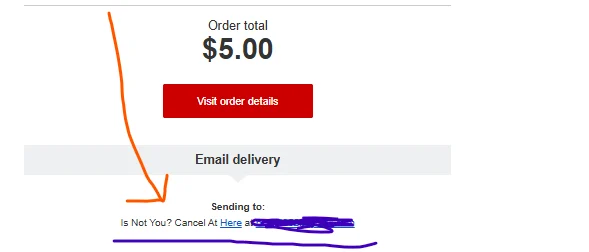
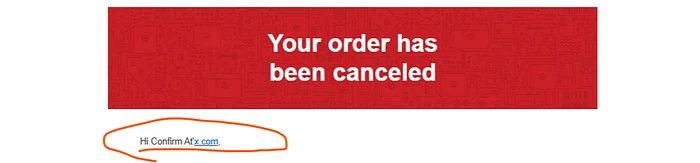
The researcher's own summary of why this instance is the serious one:
- Real HTML injection: an actual working link, not just suspicious-looking text, which is far more convincing than typical phishing copy.
- Two independent templates: the identical flaw fires in both the confirmation and the cancellation message, so it is a pattern rather than a one-off.
- Zero cost, fully automatic: even an order with no valid payment fires both emails before it cancels itself. It is scriptable, repeatable and free.
- Sent from the company's real servers: because the mail genuinely comes from their trusted sending system, it skips spam filters and skips the "does this look right" instinct most people rely on.
Step 4: the triage pushback and the rebuttal
The report was closed first. The company's reasoning was that an attacker would need access to the victim's email account to change the account email to theirs, so there was no real-world risk. It was closed as Informative, not a security issue.
The researcher's rebuttal is that this is not how the flow works. The confirmation step only re-verifies the attacker's own existing email, never the victim's. The victim's address is just a string typed into a text box; it is never opened, accessed or confirmed before it starts receiving the injected emails. The only account an attacker ever needs is their own. The researcher wrote this back plainly. A few days later the write-up moves on to the next finding.
Step 5: gift registry invite
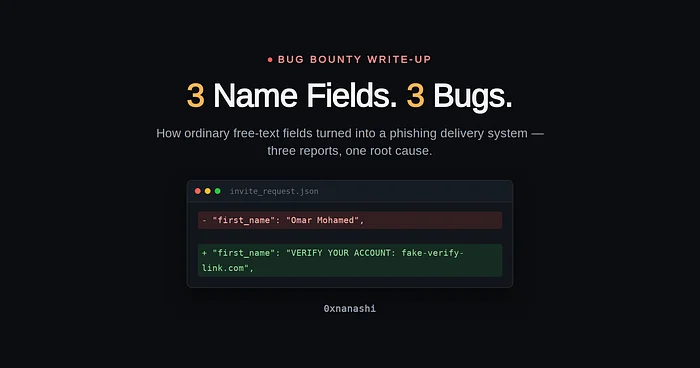
The site lets customers build a gift registry, such as a wedding registry or a baby shower list, and invite a collaborator by email from the settings page. One of those invite fields is meant to hold a guest's name. The researcher intercepted the invite request and, instead of a name, supplied an urgent-sounding message with a fake link stitched into it:
what the field expects:   "Omar Mohamed"
what I typed instead:     "YOU MUST VERIFY YOUR ACCOUNT: fake-verify-link.com"
The invite was sent. The guest's actual inbox received an official-looking email, sent from the company's own real mail system rather than a spoofed one, telling them to verify their account.

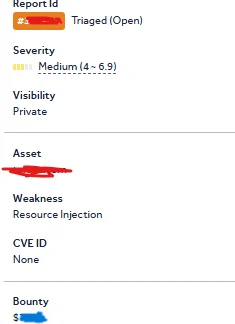
This one was validated and paid, a $$$ bounty.
Step 6: store credit card application
The store's credit card sign-up flow has its own confirmation email, and its first_name field went into that email exactly as typed, with no checks at all. Here no working link was needed, only plain text:
what the field expects:   "Nanashi"
what I typed instead:     "Go to www.fake-site.com"
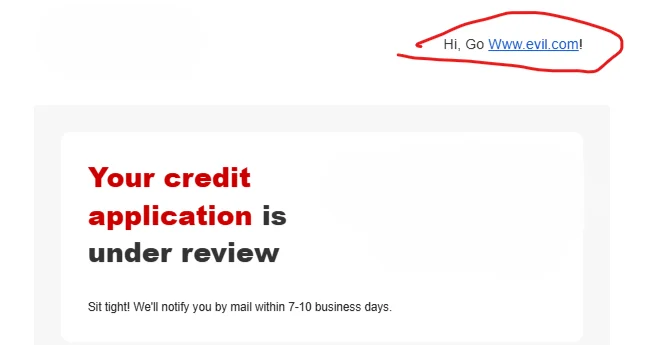
This was also validated and paid, a $$$ bounty.
Root cause
The mistake is the same in all three flows: a free-text name field is treated as trusted content and interpolated into an HTML email template without output encoding. The mail system has no way to distinguish a real name from markup or a lure, so it renders whatever it was handed. The existing defences did not stop it because the mail is generated and sent by the company's own infrastructure, which means it carries the company's reputation and passes spam filtering; and because the field is a name box, which is easy to assume is low risk. The first report was closed on the grounds that the flow required access to the victim's mailbox, which the researcher showed it did not.
Impact
An attacker with an ordinary account can cause the company's own mail system to deliver convincing phishing to a third party's inbox. In the checkout flow the recipient is the gift recipient or shipping contact named in the order, and both the confirmation and the cancellation templates can be abused. In the registry flow the recipient is an invited collaborator. In the credit card flow the confirmation email carried the typed first name. The messages arrive from the real sending system, so they skip spam filters and the recipient's instinct that something looks off. The checkout variant needs no valid payment and fires automatically before the order cancels, so it is cheap and repeatable. The registry and credit card variants were validated and paid; the checkout report was initially closed as Informative, then reopened, and was later closed as a known issue because the company knew about that bug internally. The write-up reports $$$$ earned across 2 confirmed reports.
Fix
The write-up does not describe a fix applied by the company. What it argues for is output encoding: email HTML needs the same discipline as web HTML, so any typed value placed into a mail template should be escaped, and "it's just an email template" is not an exemption. Every typed field should be treated as untrusted the moment it is placed into an email or a page, regardless of how small the field seems.
Variants to test
- Gift and shipping name fields at checkout. Put an anchor tag in the recipient or contact name and place an order that will fail payment. A positive result is both the confirmation and the cancellation email arriving with a working link rendered as HTML.
- Collaborator invite name fields. Intercept the invite request and replace the guest name with an urgent message and a link. A positive result is the invited address receiving company-sent mail containing the text or link exactly as typed.
- Sign-up confirmation name fields. Submit a plain-text lure such as a domain name in the first name field of the store credit card sign-up flow. A positive result is the confirmation email containing the text verbatim, with no escaping.
- Any other free-text field that reaches a template.
- Triage assumptions about verification. When a report is closed on the grounds that the victim's account must be accessed, check whether the confirmation step only verifies the attacker's own address. A positive result is a flow where the victim's address is only ever a typed string.
What happened, in plain words
A security researcher named Omar Mohamed, who goes by 0xnanashi, tested a private bug bounty program. A bug bounty program is a scheme where a company invites outside testers to look for security mistakes in its systems and pays them for reporting what they find. He found the same mistake in three different places on the same platform, and he wrote up all three reports together.
The platform is a storefront: a service that lets businesses run an online shop. It has several features that ordinary customers use. There is a checkout where you can buy something and name a gift recipient and a shipping contact. There is a gift registry, which is a wish list for an event such as a wedding or a baby shower, where you can invite other people by email. And there is a sign-up flow for a store credit card.
In each of those three places there is a box where you type a name. The platform takes whatever you typed and drops it into an automatic email that it sends from its own mail system. The problem is that nobody checks what you typed. You can type a name, or you can type a fake warning and a link. The email system cannot tell the difference, so it sends your text to somebody else's inbox, looking like a genuine message from the company.
That kind of trick is called phishing: a message that pretends to come from a trusted organisation in order to get the reader to click a link, hand over a password, or pay money. Normally phishing is easy to spot because it comes from a strange address. Here the mail came from the company's real system, which makes it far more convincing.
The researcher's point is that once he found the first instance, he kept finding the same mistake behind a different form field. The rest of this article walks through the three findings, explains each concept from scratch, and shows the exact text he typed into each field.
The one blind spot behind all three
Before the individual findings, it helps to understand the shared pattern, because all three bugs are the same bug wearing different clothes.
Many websites have a text box for a name: your own name, the name of somebody you are sending a gift to, the name of a shipping contact. That text is usually copied straight into an automatic email. For example, an order confirmation might begin "Dear Omar Mohamed, your order has shipped." The name is typed by one person and shown to another.
If the backend never checks what was actually typed, you can put almost anything in that box: a fake warning, a web address, even working HTML. HTML is the language that web pages and formatted emails are written in. It is what turns plain text into bold text, headings and clickable links. A link in HTML looks like <a href="https://example.com">click here</a>, where the part in quotes is the destination and the words between the tags are what the reader sees.
The email system does not know the difference between a real name and an attack payload. It just sends whatever it was handed. Here is the researcher's own sketch of the gap:
WHAT THE FIELD EXPECTS:      "Omar Mohamed"
what can go in:     "VERIFY YOUR PAYMENT: fake-verify-link.com"
Line by line: the first line shows what the developer had in mind, an ordinary human name. The second line shows what the box will actually accept, a sentence designed to alarm the reader and push them towards a fake web address. Nothing in the field stops the second line from being typed.
The site never asked whether the text was actually a name. That is the whole bug, repeated three times in three different corners of the same platform. Once the first instance was confirmed, the researcher went looking for the same mistake behind other form fields.
Finding #1: checkout emails, real HTML and not just text
This is the one that worried the researcher while he was testing it.
During checkout, two separate name fields, one for a gift recipient and one for the shipping contact, each feed their own automatic email. One email is the order confirmation. The other is the order cancellation notice, which is sent separately. Neither field was sanitised. Sanitising means cleaning input before using it: stripping out or neutralising anything that is not plain text, such as HTML tags. Neither field did that, and this time the flaw let through actual HTML, not just plain text.
Step 1: confirm the checkout field is reflected
The first pass was only to confirm the field was reflected at all. Reflected means the value you typed comes back to you somewhere, in this case in the generated email, instead of being dropped or replaced.
"first_name": "Confirm At'x.com",
This is a fragment of JSON, a common text format for sending data between a browser and a server. It is written as pairs: a field name in quotes, a colon, then the value in quotes. Here the field is called first_name and the value is the text Confirm At'x.com. The researcher typed that harmless-looking string into the first name field and checked whether it appeared in the mail. It did, which established that the typed value reached the generated mail rather than being thrown away.
Step 2: inject HTML into the shipping contact name
The real payload went into the shipping or receiver name field. A payload is the actual malicious input an attacker sends, as opposed to the harmless test value used to probe the field.
"receiver_first_name": "Is Not You? Cancel At <a href=\"[link]\">Here</a>",
Line by line: receiver_first_name is the field for the person receiving the shipment. Its value is a sentence, Is Not You? Cancel At, followed by an HTML anchor element. The anchor is <a href="[link]">Here</a>. The href part holds the destination address, shown here as [link] because the write-up does not give the real one. The words Here are what the reader would see and click. The backslashes before the inner quotes are an escape: they tell the JSON parser that those quotes are part of the text, not the end of it.
This is an anchor element with attacker-chosen link text and destination, placed where a name is expected. Because the field was not sanitised, the markup was carried into the email body as HTML rather than escaped as text. Escaping is the opposite of sanitising: it turns a character that would otherwise be treated as code into harmless visible text. If the field had been escaped, the reader would have seen the literal characters <a href=...> in the email instead of a clickable link.
Step 3: place the order and read the mail
The researcher placed the order with no valid payment. The order cancels itself automatically when the payment credentials are wrong, and both emails still arrived, each containing a genuine, working, clickable link in the middle of otherwise real company mail.
The researcher's own summary of why this instance is the serious one:
- Real HTML injection: an actual working link, not just suspicious-looking text, which is far more convincing than typical phishing copy.
- Two independent templates: the identical flaw fires in both the confirmation and the cancellation message, so it is a pattern rather than a one-off. A template is the reusable skeleton of an email, with blanks that get filled in with values such as a name.
- Zero cost, fully automatic: even an order with no valid payment fires both emails before it cancels itself. It is scriptable, repeatable and free. Scriptable means the steps can be automated with a program, so an attacker can do it over and over without manual effort.
- Sent from the company's real servers: because the mail genuinely comes from their trusted sending system, it skips spam filters and skips the "does this look right" instinct most people rely on. A spam filter is software that inspects incoming mail and blocks messages that look like bulk or fraudulent advertising.
Step 4: the triage pushback and the rebuttal
The report was closed first. Triage is the first review a security report gets, where a company decides whether it describes a real problem. The company's reasoning was that an attacker would need access to the victim's email account to change the account email to theirs, so there was no real-world risk. It was closed as Informative, a label meaning the report was read but judged not to be a security issue.
The researcher's rebuttal is that this is not how the flow works. The confirmation step only re-verifies the attacker's own existing email, never the victim's. The victim's address is just a string typed into a text box; it is never opened, accessed or confirmed before it starts receiving the injected emails. The only account an attacker ever needs is their own. The researcher wrote this back plainly. A few days later the write-up moves on to the next finding.
Step 5: gift registry invite
The site lets customers build a gift registry, such as a wedding registry or a baby shower list, and invite a collaborator by email from the settings page. A collaborator here is somebody the registry owner invites to help manage the list. One of those invite fields is meant to hold a guest's name.
The researcher intercepted the invite request. Intercepting means catching the data your browser sends to the server before it leaves, usually with a tool that sits between the two, so you can read and edit it. Instead of a name, he supplied an urgent-sounding message with a fake link stitched into it:
what the field expects:   "Omar Mohamed"
what I typed instead:     "YOU MUST VERIFY YOUR ACCOUNT: fake-verify-link.com"
Line by line: the first line is the ordinary value the developer expected, a person's name. The second line is what the researcher actually sent: a command in capitals telling the reader they must verify their account, followed by a web address that is not the company's. The capitals and the word "MUST" are there to create urgency, which is a standard phishing technique.
The invite was sent. The guest's actual inbox received an official-looking email, sent from the company's own real mail system rather than a spoofed one, telling them to verify their account. Spoofing means faking the sender address so a message appears to come from somebody else; here no spoofing was needed, because the company really did send it.
This one was validated and paid, a $$$ bounty. Validated means the company confirmed the bug was real, and a bounty is the payment a program makes for a valid report.
Step 6: store credit card application
The store's credit card sign-up flow has its own confirmation email, and its first_name field went into that email exactly as typed, with no checks at all. Here no working link was needed, only plain text:
what the field expects:   "Nanashi"
what I typed instead:     "Go to www.fake-site.com"
Line by line: the first line is the expected value, a first name. The second line is a short instruction pointing the reader at a web address that does not belong to the company. There is no HTML here at all, just characters. That is the point: even plain text was enough to turn the confirmation email into a lure, because the field was copied in verbatim.
This was also validated and paid, a $$$ bounty.
What this actually teaches
The researcher closes with a few lessons he keeps relearning on these engagements. An engagement is a single testing project, in this case one private program.
Treat every typed field as untrusted, no matter how small. A name box deserves the same scrutiny as a login form the moment its contents are placed into an email or a page. The size of the field has nothing to do with the risk.
Email HTML needs the same discipline as web HTML. A link is a link whether it renders in a browser tab or an inbox. Output needs to be escaped either way, and "it's just an email template" is not an exemption. Output encoding is the general name for that escaping step: converting data so that it is displayed as text rather than interpreted as code.
Free-to-trigger plus a trusted sender is a dangerous combination. A flaw that costs nothing to fire, with no valid payment required, and that rides on a real company's own sending system and reputation, is dangerous.
$$$$ earned across 2 confirmed reports. The first one was unfortunately closed later as a known issue, because the company knew about that bug internally. A known issue is a bug the company already knew about internally, which is how the first report was closed.
More write-ups soon, the researcher says, and links to his LinkedIn profile.
Glossary
- Bug bounty program: a scheme where a company invites outside testers to find security mistakes and pays for valid reports.
- Private program: a bounty program open only to selected researchers rather than the public.
- Phishing: a message pretending to come from a trusted organisation to get the reader to click a link, give up credentials or pay.
- HTML: the language used to write web pages and formatted emails, including links, bold text and headings.
- Anchor element: an HTML link, written as
<a href="destination">visible text</a>. - Payload: the actual malicious input an attacker sends, as opposed to a harmless test value.
- Sanitising: cleaning input by removing or neutralising anything that is not plain text, such as HTML tags.
- Escaping / output encoding: converting characters so they are shown as text rather than interpreted as code.
- Reflected: a typed value that comes back in a response, here in a generated email, instead of being dropped.
- JSON: a text format for sending data between browser and server, made of field names and values in quotes.
- Template: a reusable email skeleton with blanks filled in with values such as a name.
- Spam filter: software that inspects incoming mail and blocks messages that look like bulk or fraudulent advertising.
- Scriptable: able to be automated with a program, so it can be repeated cheaply.
- Intercepting: catching the data a browser sends to a server before it leaves, so it can be read and edited.
- Spoofing: faking a sender address so a message appears to come from somebody else.
- Triage: the first review of a security report, where a company decides whether it describes a real problem.
- Informative: a report label meaning the report was read but judged not to be a security issue.
- Validated: confirmed by the company as a real bug.
- Bounty: the payment a program makes for a valid report.
- Known issue: a bug the company already knew about internally, so the report is not paid.
- Engagement: a single testing project, here one private program.
- Collaborator: in the gift registry, somebody the owner invites by email to help manage the list.
- Gift registry: a wish list for an event such as a wedding or baby shower, shared with guests.




