₹4,000 for a 2-Minute Google Search: Publicly Exposed Invoice Leaking Customer PII
An invoice PDF hosted on the target domain was publicly indexed by Google and accessible without authentication, exposing a customer's name, address, phone, email, order details and payment-related information. Anyone who found the indexed URL could read that personal data.
 Published on medium.com
Bug Bounty
The full write-up lives on its author's site
It belongs to its author, so we link to it rather than copy it. The other two tabs are our own rewrites, checked against it.
Context
The target is a company referred to throughout as redacted.com. The report does not describe the product or the business, only that the company issues invoices to customers and hosts a self-hosted bug bounty program. The feature at the centre of the finding is the invoice document itself: a PDF that customers receive, which contains their name, address, contact details, order information and payment-related information. Nothing in the report says how the invoice is generated, where it is stored, or what access controls, if any, were intended to protect it.
The weakness class the author assigns is sensitive information disclosure, specifically a publicly accessible sensitive document. The author rates severity as High, with the caveat that this depends on the organisation's own security assessment and the exact data exposed.
Setup
No accounts, roles, tooling versions or special preconditions are described. The only tool used was Google, and the only capability required was the ability to run a search query. The document was reachable directly from search results without authentication, so no session, cookie or credential was needed at any point.
Finding it
The researcher began with a Google dork aimed at PDF documents indexed under the target domain:
site:redacted.com ext:pdf
The site: operator restricts results to the given domain, and ext:pdf restricts them to files with a .pdf extension. The search returned several PDF files associated with the domain. Among those results was an invoice that could be opened straight from the search results, with no authentication step in between.
The researcher opened the document expecting relatively harmless information and instead found a significant amount of customer data. What made it clearly wrong was not any odd response or error message but the combination of two facts: the document was indexed by a public search engine, and it contained personal and payment-related data that a customer would not expect to be public.
Exploitation
Step 1: Run the dork
site:redacted.com ext:pdf
This returns PDFs indexed under the target domain. The important part is that the query needs no knowledge of the application's structure: it only relies on the documents having been crawled and indexed.
Step 2: Review the indexed PDF results
The results included several PDF files associated with the domain. The researcher reviewed them and identified one that was an invoice.
Step 3: Open the PDF
Opening the document required no authentication and no special access. The report states this explicitly: anyone who discovered the indexed URL could potentially access the information. The invoice contained the following categories of data:
- Customer's full name
- Home/shipping address
- Phone number
- Email address
- Order information
- Transaction/order details
- Payment/card-related information
- Other personally identifiable information (PII)
The report does not reproduce the document, the URL, or any response headers, so there is nothing further to quote about how the file was served.
Step 4: Stop and report
For responsible disclosure the researcher did not download, distribute or unnecessarily access additional customer records. The report was submitted to the company's self-hosted bug bounty program with the vulnerable URL, the steps to reproduce, a description of the exposed information, the security impact, and screenshots with the sensitive information appropriately redacted.
Root cause
The report does not describe the server configuration or the code that produced the document, so the precise mistake is not established. What can be said from the evidence is that a document containing customer PII was stored at a location that was publicly reachable without authentication and was reachable by search engine crawlers, which then indexed it. Neither of those measures would be a real access control, but their absence is consistent with the document being indexed at all.
The document could be opened without any authentication or special access. The report's own framing is that a document should not be assumed safe simply because it is not linked from the site's visible pages. It is not: an unlinked but publicly accessible file can still be discovered and indexed.
Impact
The report describes the exposure of one invoice containing a customer's data. Because it combined identity, contact, address, order and payment-related data, the author argues the potential impact is greater than the sum of the fields. The consequences listed are privacy violations, identity-related fraud, phishing and social-engineering attacks, targeted scams, customer impersonation, exposure of private residential information, potential misuse of payment-related information, and regulatory or privacy compliance issues for the organisation.
The key condition is that no technical exploitation was necessary: the information was already publicly accessible through a search engine, so anyone who found the indexed URL could reach it.
Fix
It records only that the security team reviewed the report, confirmed the vulnerability, and awarded a ₹4,000 bounty, and that the issue is marked resolved and responsibly disclosed. Based on the finding, the measures that would address it are to require authentication and authorisation before an invoice can be served, to stop serving customer documents from publicly reachable paths, and to monitor what sensitive content search engines have indexed. The report does not confirm which of these were applied.
Result
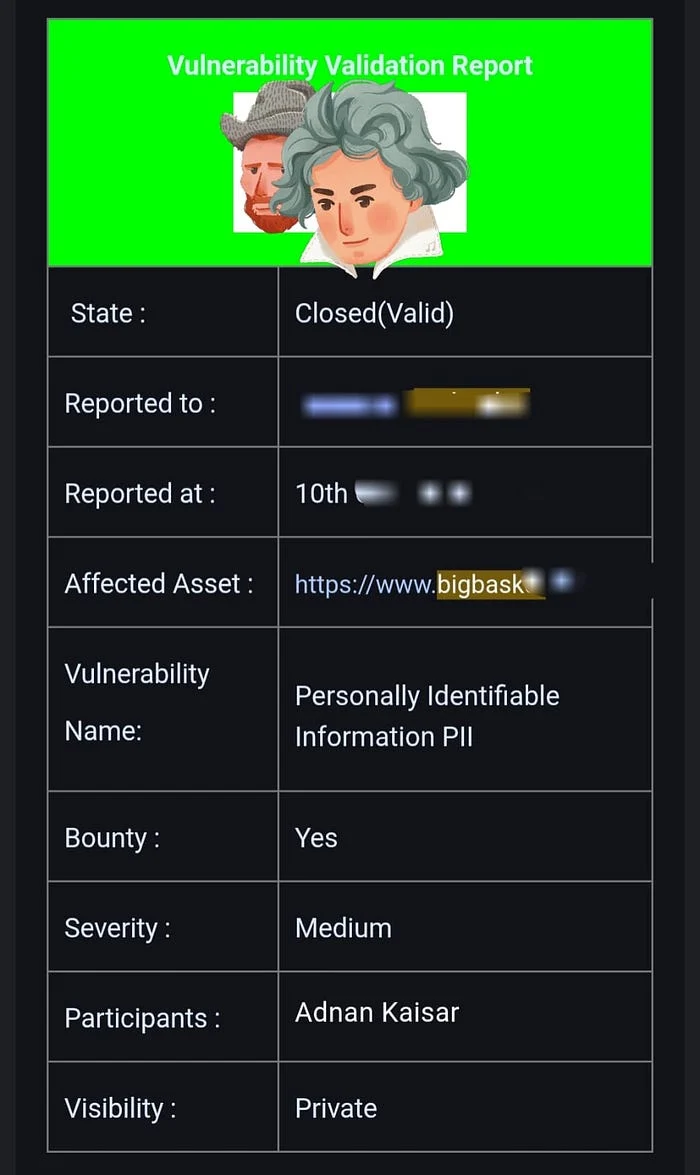
The screenshot shows the bounty report confirming the reward. The bounty received was ₹4,000. The whole discovery, from the search to the sensitive information, took roughly one to two minutes.
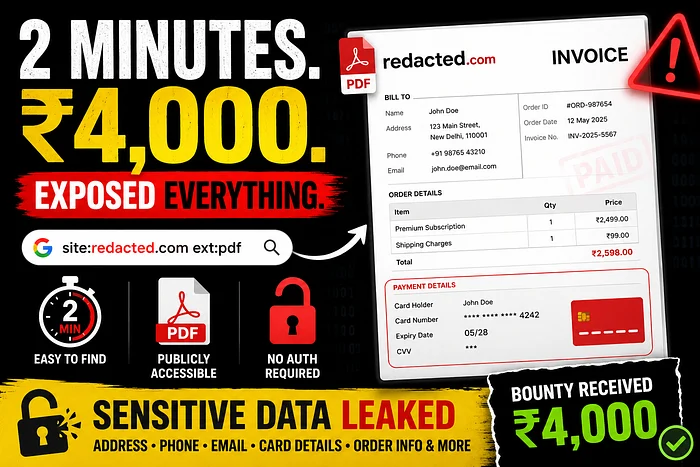
The image sits at the point in the write-up where the author contrasts the size of the reward with the effort involved: the discovery took less than two minutes.
Variants to test
The technique generalises to any target that publishes documents. Each of these is a concrete query to try, with what a positive result looks like.
- Other document types on the same domain. Swap the extension in the dork for
doc,docx,xls,xlsx,csvortxt. A positive result is an indexed file containing customer, order or internal data that opens without authentication. - Other subdomains and related domains. Run the same dork against subdomains and sibling domains of the target. A positive result is a document served from a host that has no login in front of it.
- Invoice and receipt keywords. Combine the site restriction with terms such as
invoice,receiptorstatement. A positive result is a document whose filename or indexed snippet suggests a per-customer record. - Backup and export files. Look for extensions such as
bak,zip,sqlorlogunder the target domain. A positive result is an archive or dump that is downloadable directly. - Indexing check after the fix. Re-run the original dork periodically. A positive result is that the document is still indexed, which means the file is still reachable even if the page that linked it was removed.
Each of these depends on the same precondition as the original finding: the file must be publicly reachable and crawlable. If a document is behind authentication, the dork will not surface its contents.
What happened, in plain words
A security researcher found a company document on the open internet that should never have been there. The document was an invoice: the kind of bill a company sends a customer after they buy something. This particular invoice contained a lot of private information about one customer, including their name, home address, phone number, email address, order details and payment-related information.
The researcher did not break into anything. They did not guess a password, use a special tool, or exploit a flaw in the company's website. They simply typed a search into Google, and Google handed back a link to the invoice. Anyone with a browser could have done the same.
The company in the report is referred to only as redacted.com. The report does not say what the company sells or what kind of business it runs, only that it sends invoices to customers and runs its own bug bounty programme. A bug bounty programme is a scheme where a company invites outside people to report security problems and pays them for valid findings, instead of punishing them. This one was self-hosted, meaning the company ran the reporting process itself rather than using a third-party platform.
The researcher reported the problem responsibly, the company confirmed it, and they paid a bounty of ₹4,000. The whole discovery, from opening Google to seeing the private data, took less than two minutes.
The image appears where the author points out the contrast between the small effort and the reward: the entire discovery took less than two minutes.
The target and the document
The target is a company called redacted.com throughout the report. The report does not describe the product or the business. What it does tell us is that the company issues invoices to its customers and that it hosts a bug bounty programme of its own.
The feature at the centre of the finding is the invoice document itself. An invoice is a PDF, which is a common file format for documents that look the same on every computer, whether it is a phone, a laptop or a printer. Customers receive these PDFs, and each one contains their name, address, contact details, order information and payment-related information.
A PDF is just a file, like a photo or a text document. Normally a company keeps such files on a server, which is a computer that stores files and sends them out when someone asks. If the server is set up so that anyone who knows the file's address can download it, then the file is public, even if no page on the website links to it. That distinction matters a lot here, and we will come back to it.
Access controls are the rules that decide who is allowed to see or do something, like a bouncer at a door checking names against a list.
The weakness class the author assigns is sensitive information disclosure, specifically a publicly accessible sensitive document. In plain terms: private data was sitting somewhere the public could reach. The author rates severity as High, with the caveat that this depends on the organisation's own security assessment and the exact data exposed. Severity is a rough measure of how bad a problem is, and different organisations can score the same issue differently.
Setup
There was no setup to speak of. The report describes no accounts, no roles, no tool versions and no special preconditions. The only tool used was Google, and the only capability required was the ability to run a search query.
The document was reachable directly from search results without authentication, so no session, cookie or credential was needed at any point. Authentication means proving who you are, usually with a username and password. A session is the period during which a website remembers that you have already logged in. A cookie is a small piece of data your browser stores and sends back to a website so the site can recognise you between page loads, a bit like a wristband at an event that proves you already showed your ticket. None of that was involved here: the file simply opened.
Finding it
The researcher began with a Google dork aimed at PDF documents indexed under the target domain. A Google dork is just a search query that uses special operators to narrow results in a precise way. Search engines understand a handful of these operators, and they are useful for finding things that were never meant to be found.
site:redacted.com ext:pdf
Here is what each part does:
site:redacted.comtells Google to return only results from that one domain. A domain is the registered name in a web address, such asredacted.com. This operator is what keeps the search focused on the target company instead of the whole internet.ext:pdftells Google to return only files whose extension is.pdf. An extension is the short suffix at the end of a filename, like.pdfor.jpg, that tells you what kind of file it is. This operator is what filters out ordinary web pages and leaves only documents.- The space between the two parts means "and": results must match both conditions.
The search returned several PDF files associated with the domain. Among those results was an invoice that could be opened straight from the search results, with no authentication step in between. That last point is the heart of the finding. Normally, to see your own invoice, you would log in to a website, and the site would check that the invoice belongs to you before showing it. Here, the file was already sitting at a public address, and Google had found it and listed it.
The researcher opened the document expecting relatively harmless information and instead found a significant amount of customer data. What made it clearly wrong was not any odd response or error message but the combination of two facts: the document was indexed by a public search engine, and it contained personal and payment-related data that a customer would not expect to be public. Indexed means the search engine has visited the file, read it, and added it to its list of results, so it can appear in searches.
Exploitation
Step 1: Run the dork
site:redacted.com ext:pdf
This returns PDFs indexed under the target domain. The important part is that the query needs no knowledge of the application's structure: it only relies on the documents having been crawled and indexed. Crawling is what a search engine does when it follows links and visits pages automatically, like a librarian walking the shelves and noting every book. The researcher did not need to know any file names, folder names or web addresses in advance. They asked Google what it already knew.
Step 2: Review the indexed PDF results
The results included several PDF files associated with the domain. The researcher reviewed them and identified one that was an invoice. This step is mostly patience: you look through what the search engine returned and pick out the ones that look like they might contain private data. The report does not list the other files or say what they contained.
Step 3: Open the PDF
Opening the document required no authentication and no special access. The report states this explicitly: anyone who discovered the indexed URL could potentially access the information. A URL is simply a web address, the thing you type into a browser's address bar. The invoice contained the following categories of data:
- Customer's full name
- Home/shipping address
- Phone number
- Email address
- Order information
- Transaction/order details
- Payment/card-related information
- Other personally identifiable information (PII)
PII, or personally identifiable information, is any data that can be used to identify a specific person, either on its own or combined with other details. A first name alone might not identify anyone, but a full name plus a home address plus a phone number almost certainly does.
The report does not reproduce the document, the URL, or any response headers, so there is nothing further to quote about how the file was served. Response headers are small pieces of information a server sends alongside a file, describing things like the file type and how it should be cached. Their absence from the report means we cannot say anything about them.
Step 4: Stop and report
For responsible disclosure the researcher did not download, distribute or unnecessarily access additional customer records. Responsible disclosure is the practice of telling the organisation privately, giving it time to fix the problem, and not making the data public or using it for anything else. It is the difference between finding a wallet on the street and handing it to the police, versus taking the cash.
The report was submitted to the company's self-hosted bug bounty programme with the vulnerable URL, the steps to reproduce, a description of the exposed information, the security impact, and screenshots with the sensitive information appropriately redacted. Redacted means covered up or removed, so the report itself does not leak the very data it is about. Steps to reproduce are the exact sequence someone else can follow to see the same problem for themselves, which is what lets the company confirm the finding rather than take it on trust.
Root cause
What can be said from the evidence is that a document containing customer PII was stored at a location that was publicly reachable without authentication and was reachable by search engine crawlers, which then indexed it.
A directory is a folder on a server. robots.txt is a plain text file a website can place at its root to tell search engine crawlers which parts they should not visit. X-Robots-Tag is a header a server can send with a file to tell crawlers how to treat it. Neither of those measures would be a real access control, but their absence is consistent with the document being indexed at all. Think of robots.txt as a polite sign saying "please do not enter": well-behaved visitors obey it, but it does not lock the door.
The document could be opened without any authentication or special access. Authentication is proving who you are; authorisation is deciding what you are allowed to see once you have proved it. The report's own framing is that a document should not be assumed safe simply because it is not linked from the site's visible pages. It is not: an unlinked but publicly accessible file can still be discovered and indexed. A useful comparison is a house key left under the doormat. Nobody advertises it, but that does not make the house secure.
Impact
The report describes the exposure of one invoice containing a customer's data. Because it combined identity, contact, address, order and payment-related data, the author argues the potential impact is greater than the sum of the fields. Each piece alone is a small clue; together they describe a real person in enough detail to be misused.
The consequences listed are privacy violations, identity-related fraud, phishing and social-engineering attacks, targeted scams, customer impersonation, exposure of private residential information, potential misuse of payment-related information, and regulatory or privacy compliance issues for the organisation. Phishing is a trick where someone pretends to be a trusted party, often using real details to sound convincing, to get you to hand over more information or money. Social engineering is the broader version of that: manipulating people rather than machines. Regulatory or privacy compliance issues means the company may have broken laws or rules about how personal data must be handled.
The key condition is that no technical exploitation was necessary: the information was already publicly accessible through a search engine, so anyone who found the indexed URL could reach it.
Fix
It records only that the security team reviewed the report, confirmed the vulnerability, and awarded a ₹4,000 bounty, and that the issue is marked resolved and responsibly disclosed.
Based on the finding, the measures that would address it are to require authentication and authorisation before an invoice can be served, to stop serving customer documents from publicly reachable paths, and to monitor what sensitive content search engines have indexed. The report does not confirm which of these were applied. Monitoring is the ongoing part: even after a fix, you want to keep checking that nothing new has slipped out.
Result
The screenshot shows the bounty report confirming the reward. The bounty received was ₹4,000. The whole discovery, from the search to the sensitive information, took roughly one to two minutes.
The image sits at the point in the write-up where the author contrasts the size of the reward with the effort involved: the discovery took less than two minutes.
Variants to test
The technique generalises to any target that publishes documents. Each of these is a concrete query to try, with what a positive result looks like. These are the kinds of variations a beginner can try on a target they are authorised to test, such as one with a bug bounty programme.
- Other document types on the same domain. Swap the extension in the dork for
doc,docx,xls,xlsx,csvortxt. A positive result is an indexed file containing customer, order or internal data that opens without authentication. The idea is that invoices are not the only documents a company produces; spreadsheets and text files can leak just as much. - Other subdomains and related domains. Run the same dork against subdomains and sibling domains of the target. A subdomain is a prefix on a domain, such as
shop.redacted.comversusredacted.com. A positive result is a document served from a host that has no login in front of it. Companies often protect the main site well and forget the smaller ones. - Invoice and receipt keywords. Combine the site restriction with terms such as
invoice,receiptorstatement. A positive result is a document whose filename or indexed snippet suggests a per-customer record. A snippet is the short preview of text Google shows under each result. - Backup and export files. Look for extensions such as
bak,zip,sqlorlogunder the target domain. A positive result is an archive or dump that is downloadable directly. A backup is a copy of data kept in case the original is lost, and it often contains far more than any single invoice. - Indexing check after the fix. Re-run the original dork periodically. A positive result is that the document is still indexed, which means the file is still reachable even if the page that linked it was removed. Removing a link does not remove the file.
Each of these depends on the same precondition as the original finding: the file must be publicly reachable and crawlable. If a document is behind authentication, the dork will not surface its contents. That is the whole point: the search engine can only show what it was allowed to see.
Glossary
- Access control: the rules that decide who may see or do something, like a bouncer checking a guest list.
- Authentication: proving who you are, usually with a username and password.
- Authorisation: deciding what you are allowed to see or do once you have proved who you are.
- Backup: a copy of data kept in case the original is lost or damaged.
- Bug bounty programme: a scheme where a company pays outside people for reporting security problems.
- Cookie: a small piece of data a browser stores and sends back to a website so the site can recognise you between page loads.
- Crawler: software a search engine uses to visit pages and files automatically and add them to its index.
- Directory: a folder on a server.
- Domain: the main part of a web address, such as
redacted.com. - Dork: a search query that uses special operators to narrow results precisely.
- Extension: the suffix at the end of a filename, such as
.pdf, that indicates the file type. - Header: a small piece of information a server sends alongside a file or page, describing how it should be handled.
- Indexed: visited, read and added to a search engine's list of results so it can appear in searches.
- Invoice: a bill a company sends a customer after a purchase.
- PDF: a document file format that looks the same on any device.
- Phishing: a trick where someone pretends to be a trusted party to get you to hand over information or money.
- PII (personally identifiable information): any data that can identify a specific person, alone or combined with other details.
- Redacted: covered up or removed, so the sensitive part is not visible.
- Responsible disclosure: telling an organisation privately about a security problem and giving it time to fix it, without making the data public.
robots.txt: a plain text file at a website's root that tells crawlers which parts they should not visit.- Self-hosted: run by the company itself rather than through a third-party platform.
- Sensitive information disclosure: a weakness where private data is exposed to people who should not see it.
- Server: a computer that stores files and sends them out when someone asks.
- Session: the period during which a website remembers that you have already logged in.
- Severity: a rough measure of how bad a security problem is.
- Snippet: the short preview of text a search engine shows under each result.
- Social engineering: manipulating people, rather than machines, to get information or access.
- Subdomain: a prefix on a domain, such as
shop.redacted.com. - URL: a web address, the thing you type into a browser's address bar.
X-Robots-Tag: a header a server can send with a file to tell crawlers how to treat it.



