$50k RCE in JetBrains IDE
JetBrains IDEs ran a local HTTP server with permissive CORS, allowing any website to read project files and, on Windows and OS X, to load a malicious project from a remote share and execute code. An attacker could steal secrets or achieve remote code execution when a victim visited a malicious page while the IDE was open.

blog.saynotolinux.com
Published on blog.saynotolinux.com
From at least 2013 until May 2016 JetBrains’ IDEs were vulnerable to local file leakage, with the Windows (EDIT: and OS X) versions additionally being vulnerable to remote code execution. The only prerequisite for the attack was to have the victim visit an attacker-controlled webpage while the IDE was open.
The full write-up lives on its author's site
It belongs to its author, so we link to it rather than copy it. The other two tabs are our own rewrites, checked against it.
Context
JetBrains' IDEs, including PyCharm, Android Studio, WebStorm and IntelliJ IDEA, ship with a built-in HTTP server. The feature was added to WebStorm in early 2013 so that developers would not need to set up their own web server to preview pages in a browser: clicking "view in browser" navigates the browser to http://localhost:63342/<projectname>/<your_file.html>, and scripts and subresources are served the same way, for example http://localhost:63342/<projectname>/some_script.js.
The report describes the server as always on, and tracks the always-on webserver back to WebStorm in 2013. From at least 2013 until May 2016 it was vulnerable to local file leakage, and on Windows and OS X it was additionally vulnerable to remote code execution. The only prerequisite for the attack was that the victim visit an attacker-controlled webpage while the IDE was open. The researcher tracked the core of most of these issues (CORS allowing all origins plus the always-on webserver) back to the commit that added the webserver to WebStorm in 2013, and believed that all JetBrains IDEs with always-on servers since then were vulnerable to variants of these attacks. The RCE affecting Windows and OS X was present in all IDE releases since at least 13 July 2015, and was probably exploitable earlier via other means.
Setup
To follow along you need a copy of PyCharm 5.0.4, or an old build of PyCharm 2016.1, since the issue had been patched by the time of writing. The researcher recommends doing this in a VM. The downloads given are:
- Linux:
https://download.jetbrains.com/python/pycharm-community-5.0.4.tar.gz - OS X:
https://download.jetbrains.com/python/pycharm-community-5.0.4.dmg - Windows:
https://download.jetbrains.com/python/pycharm-community-5.0.4.exe
Finding it
The researcher had started work on inter-protocol exploitation research and was looking for interesting targets, thinking there might be interesting services listening on the local device. Running lsof -P -ITCP | grep LISTEN to list programs listening on local TCP ports returned output showing PyCharm bound to ports, which the researcher had never noticed despite using PyCharm as their IDE for a while. The next step was to nmap the ports to see what was being sent over them and what the protocol was. The result looked like an HTTP server, which is unusual for a local application.
Looking at the CORS headers served with responses, something smelled off. PyCharm's HTTP server was essentially saying that web pages on any origin, including http://attacker.com, were allowed to make credentialed requests to it and read the response. The linked source is NettyUtil.java in intellij-community. The questions that followed were what the HTTP server was, whether it served anything sensitive, and whether it mattered that random pages could read its contents.
Searching the web for references to the port number led to the WebStorm feature added in early 2013. To verify that PyCharm embeds the same server as WebStorm, the researcher created a project named "testing" in PyCharm, placed a file named "something.txt" in the root, and tried to fetch it. It worked: any site can read any of your project files so long as it can guess the project name and filename. That includes in-tree configuration files containing secrets such as AWS keys. An HTML snippet included on attacker.com could do the same thing as the cURL command. As-is, this would mostly be useful for targeted attacks, since guessing directory structures to reach interesting files is a pain, so the next question was how to weaponise it.
Exploitation
Step 1: escaping the project directory
Files such as SSH keys live at standard locations and are more interesting to an attacker than possible credentials for a database that might not even be accessible. The obvious thing to try is dot segments in the request URI. Per RFC 3986, dot segments in paths must be normalised away by either the client or the server, and cURL behaves the same way a browser would. However, PyCharm's internal HTTP server treats dot segments with urlencoded /s such as %2F..%2F as semantically equivalent to the unencoded /../ form, and browsers will not normalise those away.
The only limitation is that the attacker must know the name of a project the victim has open: requesting /invalidproject/<anything> always returns 404. The obvious choice is a dictionary of potential project names, requesting /<potential_projectname>/.idea/workspace.xml, a metadata file automatically added to most JetBrains projects. A 200 for testing confirms it is a valid project. The researcher wrote a naive JavaScript PoC for this. There is no rate-limiting, and about 2000 project names a second could be tried with Chrome even on an older laptop.
Step 2: avoiding the project name guess with /api/internal
Having to guess a valid, open project name is a big mitigating factor, so the researcher started looking at the various APIs PyCharm exposed via the same webserver. This led to the /api/internal endpoint, which corresponds to JetBrainsProtocolHandlerHttpService. It lets you pass in a JSON blob containing a URL with a jetbrains: scheme, and the IDE does something special with it. As far as the researcher could tell, none of the IDEs actually install a systemwide handler for those URLs, and the URLs are undocumented.
The jetbrains://<project_name>/open/<path> handler seemed promising: it lets you open a project by passing in its absolute path. The /etc directory exists on most *NIX-like systems, so the researcher tried opening that.
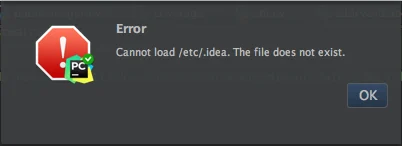
The directory has to actually contain a JetBrains-style project; any old directory will not do. Fortunately, PyCharm 2016.1 and above ship with a JetBrains-style project in their system folder. Under OS X this is in /Applications/PyCharm.app/Contents/helpers, and opening that worked.
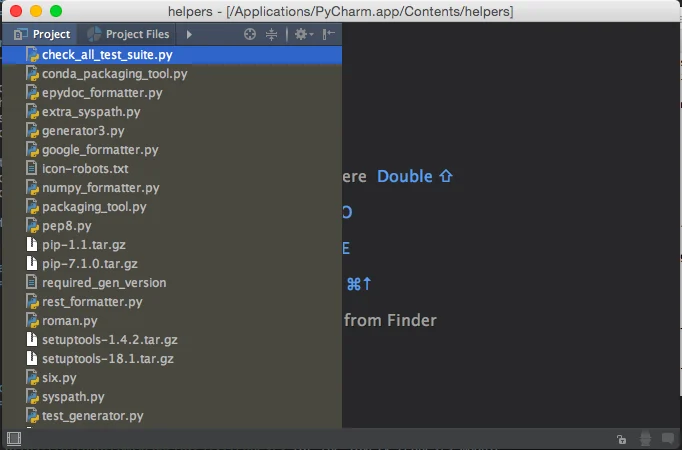
With the helpers project open, there is no need to guess an open project name. There is no standard location for PyCharm's root folder under Linux (it is wherever the user happened to untar it to), but it can be determined by requesting /api/about?more=true and looking at the homePath key. Once helpers is open, the user's home directory is determined from the /api/about?more=true response and used to construct a URL to their SSH keys, for example /helpers/..%2f..%2f..%2f..%2f..%2f..%2fhome/<user>/.ssh/id_rsa.
Step 3: Windows, UNC paths and SMB
The helpers trick only works if the user has PyCharm 2016.1 installed; everywhere else an open project name still has to be guessed. For something that works reliably with other JetBrains IDEs such as IntelliJ IDEA and Android Studio, note that the jetbrains://project/open handler accepts a completely arbitrary path for the project to open, which makes UNC paths an obvious choice. UNC paths are a Windows-specific path form for referencing files on a network share, of the form \\servername\sharename\filepath. Many Windows file APIs, and the Java APIs that wrap them, accept UNC paths and transparently connect to an SMB share on another computer, allowing reads and writes to the remote files as if they were local. If the IDE can be made to open a project from an attacker's SMB share, there is no need to guess what projects are on the victim's computer.
To test, the researcher set up a remote Samba instance with an unauthenticated SMB share named "anontesting" containing a JetBrains project, then tried opening it. Assuming the victim's ISP does not block outbound SMB traffic (due to the large number of worms that have historically propagated via SMB vulnerabilities), the victim can be made to load an arbitrary project from an SMB share the attacker controls.
Step 4: from project load to code execution
Projects for each of JetBrains' IDEs have a notion of startup tasks. In PyCharm a Python script can be set to run automatically on project load, and on Android Studio and IntelliJ IDEA a .jar can be run. The researcher set the project so that the hax.py script in the project root runs automatically when the project opens.
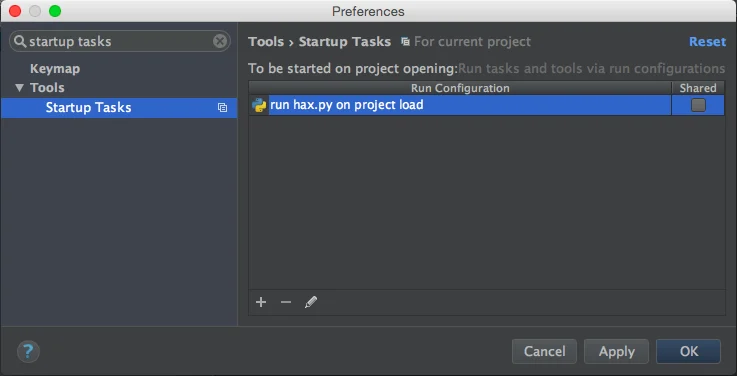
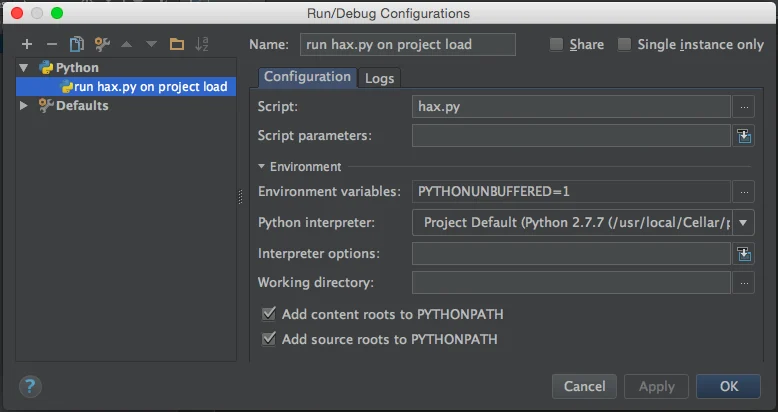
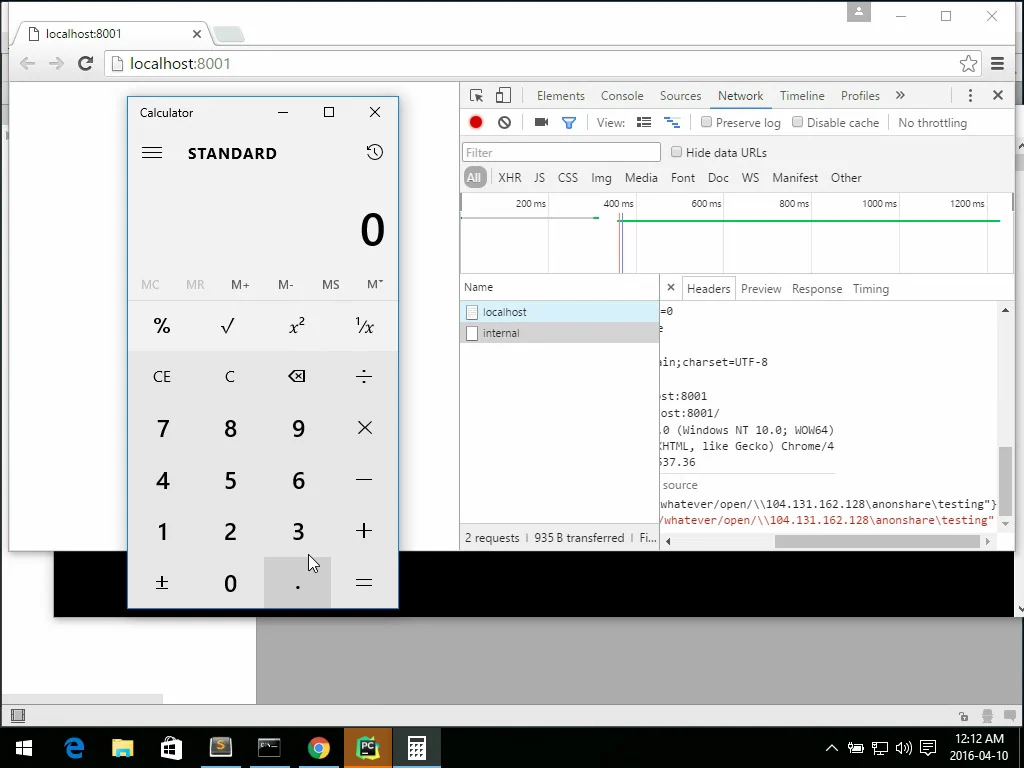
A hax.py file containing the payload is then added to the project root. The project is placed on the anonymous SMB share, and a page is hosted with the payload that causes the victim to load the malicious project. As soon as the victim navigates to that page, the payload triggers and the calculator opens.
Step 5: OS X via NFS and /net
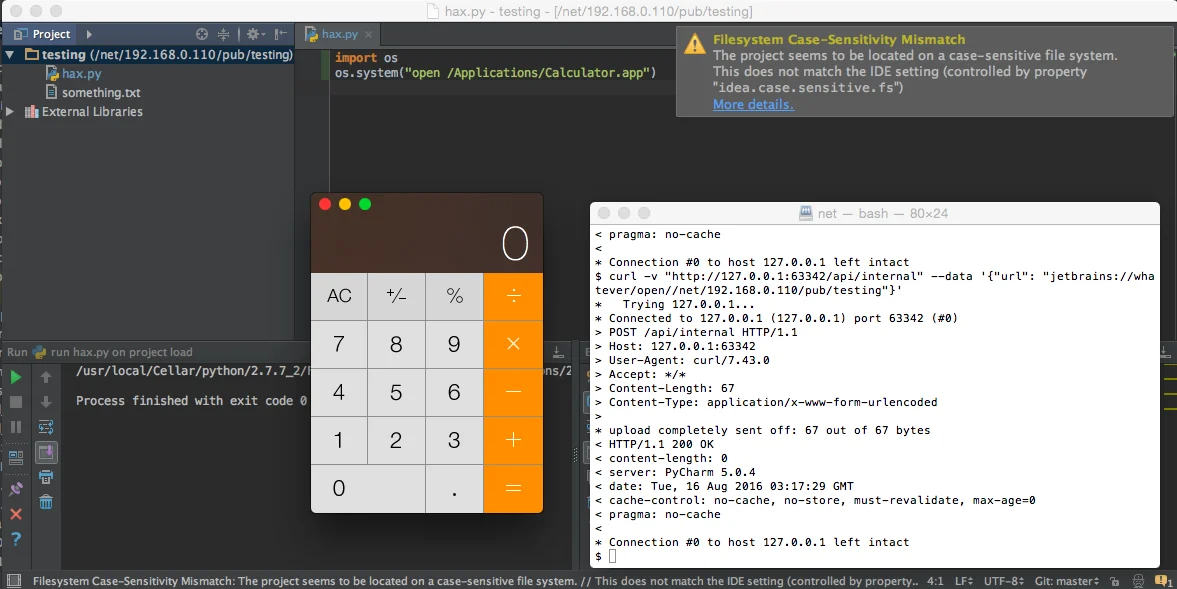
After the post was initially published, comex pointed out on Hacker News that OS X auto-mounts remote NFS shares when they are accessed via the /net autofs mountpoint. Exploiting the RCE under OS X is therefore similar to Windows, but with an anonymous NFS share opened as /net/<hostname>/<sharename>/<projectname>, with the HTML PoC looking something like the snippet shown. This likely applies to any *NIX-like system with an autofs mountpoint that uses -hosts, but OS X is the only OS the researcher could find where autofs is configured like this in the default install.
Published PoCs
- Minimal file leaking PoC:
http://saynotolinux.com/tests/jetbrains/minimal.html - Weaponised file leaking PoC:
http://saynotolinux.com/tests/jetbrains/sleuth.html - No live PoC for the Windows or OS X RCEs, because the researcher did not want to host public-facing SMB or NFS shares.
Root cause
The core of most of the issues is the combination of CORS policies allowing all origins and an always-on webserver. The server told browsers that pages on any origin were allowed to make credentialed requests to it and read the responses, so a page on attacker.com could read project files served from localhost. The path handling treated urlencoded /s in dot segments as equivalent to unencoded ones, so %2F..%2F escaped the project directory even though browsers normalise the plain form away. The /api/internal endpoint accepted jetbrains: URLs and the jetbrains://<project_name>/open/<path> handler opened arbitrary absolute paths as projects, including UNC paths on Windows and /net NFS paths on OS X. Because project load can run startup tasks, opening an attacker-controlled project from a remote share turned file access into code execution.
Impact
Any site could read any project file whose project name and filename it could guess, including configuration files with secrets such as AWS keys. With the /api/internal trick and the helpers project shipped with PyCharm 2016.1 and above, guessing an open project name was unnecessary. and SSH keys and other files outside the project could be read. On Windows, and later on OS X, an attacker could get code execution on the victim's machine by having them load a malicious project from an SMB or NFS share, provided the victim visits the attacker's page while the IDE is open and, on Windows, the ISP does not block outbound SMB traffic. The researcher describes the file disclosure as mostly useful for targeted attacks when the project name has to be guessed.
Fix
All of the issues were fixed in the patch released on 11 May 2016. JetBrains took several steps that the researcher is aware of:
- All requests to the local HTTP server now require an unguessable auth token to be included in the request, or the server returns a
4xxstatus code. - The problematic CORS policies were removed entirely.
- The
Hostheader's value is now validated to prevent similar exploits via DNS rebinding.
Variants to test
- Look for local HTTP servers started by desktop applications and check their CORS headers. A positive result is an
Access-Control-Allow-Originthat reflects or allows any origin together with credentials, letting a page on another origin read responses. - Try urlencoded dot segments such as
%2F..%2Fagainst file-serving endpoints. A positive result is a response containing a file outside the intended root. - Enumerate internal API endpoints such as
/api/internalthat accept URLs or paths. A positive result is a handler that opens an arbitrary absolute path, especially a UNC path or anautofs/netpath. - Check whether project or workspace formats support startup tasks that run on load. A positive result is a script or
.jarexecuted automatically when an attacker-supplied project is opened. - Probe for endpoints that reveal installation paths, such as
/api/about?more=truereturning ahomePathkey, which helps construct paths to sensitive files.
Vendor response and timeline
The researcher thanks Hadi Hariri and the rest of the JetBrains team for their proactive response: the email requesting a security contact was answered within an hour, and the issue was resolved relatively quickly. JetBrains sent a patchset against intellij-community and a binary build with their proposed solutions, and were receptive to feedback about potential issues. Although JetBrains did not have a bug bounty programme that the researcher was aware of, and no reward was expected, JetBrains awarded a bounty of $50,000 for the report and help reviewing the patch. The researcher asked them to donate the bulk of it to the PyPy project to fund improved Python 3 support.
- 2016-04-04: discovered the local file disclosure issue
- 2016-04-06: requested a security contact from the vendor
- 2016-04-06: vendor replied with security contact information and requested vulnerability details
- 2016-04-07: sent the vendor a PoC for the local file disclosure vulnerability
- 2016-04-10: sent a more detailed report with remediation steps and details about the RCE on Windows
- 2016-04-12: vendor responded that they were working on a patch
- 2016-04-14: vendor responded with a patch against the open-source
intellij-communityrepo for review - 2016-04-14: sent feedback requesting changes to the patch, along with mitigation bypass PoCs
- 2016-04-15: vendor responded that they were working on an updated patch addressing the concerns
- 2016-04-26: vendor indicated a patch would be released soon
- 2016-05-11: coordinated release of security patches for all JetBrains IDEs and publication of the security advisory
What happened, in plain words
JetBrains makes a family of programs that programmers use to write code. These programs are called IDEs, short for Integrated Development Environments. The best known ones are PyCharm (for Python), WebStorm (for web pages), Android Studio (for Android apps) and IntelliJ IDEA (for Java).
These programs can start a small web server on your own computer while they are running. A web server is the software that hands out web pages to a browser; normally it runs on a website's machine, but here it runs on yours. The idea was convenience: instead of setting up a separate web server to preview a page you are building, you click a button in the IDE and it opens your browser at an address on your own machine.
That little server had two serious flaws. First, it told every website in the world that its pages were allowed to read what the server returned. Second, it could be tricked into handing out files from anywhere on the disk, not just the project folder. On Windows and on OS X it could go further: it could be made to open a project stored on a remote file share controlled by an attacker, and opening such a project could automatically run a program of the attacker's choosing. That last part is remote code execution, usually shortened to RCE: someone else gets your computer to run their code.
The only thing the victim had to do was visit a malicious web page while the IDE was open. No download, no clicking "run", no password.
The researcher found the file-reading problem on 4 April 2016, reported it, and worked with JetBrains on a fix. Patches went out on 11 May 2016. JetBrains later awarded a $50,000 bounty, most of which the researcher asked to be donated to the PyPy project.
Background: what the IDE's built-in server is for
The feature was added to WebStorm in early 2013. The point was that a developer would not need to set up their own web server just to look at a page in a browser. Clicking "view in browser" sends the browser to an address like http://localhost:63342/<projectname>/<your_file.html>, and any scripts or images the page needs are served the same way, for example http://localhost:63342/<projectname>/some_script.js.
A few words in that address matter later:
localhostmeans "this same computer". It is the machine you are sitting at, not a machine on the internet.63342is a port number. A port is like a numbered door on a computer; different programs listen at different doors. The browser knocks on door 63342 and the IDE answers.<projectname>is the name of the folder the IDE has open as a project.
The server is always on while the IDE runs. From at least 2013 until May 2016 it leaked local files, and on Windows and OS X it also allowed remote code execution. The researcher traced the core of most of these issues, namely the cross-origin sharing rules that allowed every origin plus the always-on server, back to the commit that added the server to WebStorm in 2013, and believed that every JetBrains IDE with an always-on server since then was vulnerable to variants of these attacks. The code execution flaw affecting Windows and OS X was in all IDE releases since at least 13 July 2015, and was probably exploitable earlier by other means.
Setting up a test copy
To follow along you need a copy of PyCharm 5.0.4, or an old build of PyCharm 2016.1, because the problem had already been fixed by the time the write-up appeared. The researcher recommends doing this in a VM. A VM, or virtual machine, is a computer simulated inside your computer: if something goes wrong, you throw the simulated machine away and your real one is untouched. The downloads given are:
- Linux:
https://download.jetbrains.com/python/pycharm-community-5.0.4.tar.gz - OS X:
https://download.jetbrains.com/python/pycharm-community-5.0.4.dmg - Windows:
https://download.jetbrains.com/python/pycharm-community-5.0.4.exe
How it was found
The researcher had just started work on inter-protocol exploitation research and was looking for interesting targets, thinking there might be interesting services listening on their own device. Inter-protocol exploitation means making one kind of program talk to another kind in a way its authors did not intend, for example a browser talking to a server that was never meant to face the browser.
To see what was listening on local network doors, they ran this command:
lsof -P -ITCP | grep LISTEN
Line by line:
lsoflists open files. On Unix-like systems, network connections are also treated as files, so this tool can list them too.-Pstops it from translating port numbers into service names, so you see the raw number.-ITCPrestricts the output to TCP connections. TCP is the common protocol underneath web traffic.|(the pipe) takes the output of the first command and feeds it to the next one.grep LISTENkeeps only the lines containing the word LISTEN, that is, the programs waiting for incoming connections.
The output showed PyCharm bound to ports, which the researcher had never noticed despite using PyCharm as their IDE for a while. "Bound to a port" means the program has claimed that numbered door and is waiting for someone to knock.
The next step was to probe those ports with nmap, a tool that scans ports and reports what answers, to see what was being sent over them and what the protocol was. The answer looked like an HTTP server. HTTP is the language browsers and web servers speak. A local desktop program speaking HTTP is unusual, and unusual is interesting.
Then the researcher looked at the CORS headers in the responses. CORS stands for Cross-Origin Resource Sharing. It is a set of rules, sent as extra lines in a web server's reply, that tell the browser which other websites are allowed to read that reply. An origin is the combination of scheme, host and port, so http://attacker.com and http://localhost:63342 are different origins even though both are HTTP. By default a browser refuses to let a page from one origin read a reply from another; CORS is how a server opts in to allowing it.
Something smelled off. PyCharm's HTTP server was essentially saying that web pages on any origin, including http://attacker.com, were allowed to make credentialed requests to it and read the response. "Credentialed" means the request carries the browser's stored credentials, such as cookies, for that address. The linked source is NettyUtil.java in intellij-community, JetBrains' public code repository.
Three questions followed: what was this HTTP server, did it serve anything sensitive, and did it matter that random pages could read its contents?
Searching the web for references to the port number led to the WebStorm feature added in early 2013. To check that PyCharm embeds the same server as WebStorm, the researcher created a project named "testing" in PyCharm, put a file named "something.txt" in its root, and tried to fetch it. It worked. Any site can read any of your project files so long as it can guess the project name and the filename. That includes configuration files kept inside the project that contain secrets such as AWS keys. AWS keys are the username-and-password equivalent for Amazon's cloud services; anyone holding them can use the victim's cloud account.
An HTML snippet placed on attacker.com could do the same thing as the command-line fetch. As it stood, this would mostly be useful for targeted attacks, because guessing folder structures to reach interesting files is a pain. So the next question was how to turn it into something more powerful.
Step 1: getting out of the project folder
Files such as SSH keys live at standard locations and are more interesting to an attacker than possible credentials for some database that might not even be reachable. An SSH key is a file that proves who you are when connecting to servers, roughly like a key to many doors at once.
The obvious thing to try is dot segments in the requested address. A dot segment is the .. you have seen in file paths, meaning "go up one folder". According to RFC 3986, the document that defines web addresses, dot segments in a path must be normalised away by either the client or the server. Normalising means tidying the address up before using it, so /a/../b becomes /b. cURL, a command-line tool for fetching web addresses, behaves the same way a browser would and tidies them away.
However, PyCharm's internal HTTP server treats dot segments written with urlencoded slashes, such as %2F..%2F, as meaning the same as the plain /../ form, and browsers do not tidy the encoded form away. URL encoding is a way of writing characters that would otherwise be special; %2F is simply another way of writing /. So the browser sends the encoded form untouched, and the server decodes it and walks up out of the project folder.
The only limitation is that the attacker must know the name of a project the victim has open. Requesting /invalidproject/<anything> always returns 404. 404 is the status code a web server sends when the address does not exist. The obvious choice is a dictionary of likely project names, requesting /<potential_projectname>/.idea/workspace.xml, a metadata file that is automatically added to most JetBrains projects. A 200 for testing confirms it is a valid project; 200 is the status code for "here is your answer".
The researcher wrote a simple JavaScript proof of concept for this. A proof of concept, or PoC, is a small demonstration that a problem is real. There is no rate-limiting, meaning nothing slows down repeated requests, and about 2000 project names a second could be tried with Chrome even on an older laptop.
Step 2: skipping the name guessing with /api/internal
Having to guess a valid, open project name is a big mitigating factor, so the researcher started looking at the various APIs PyCharm exposed through the same web server. An API is a set of addresses a program offers so other programs can ask it to do things; think of a restaurant menu rather than the kitchen. This led to the /api/internal endpoint. An endpoint is one specific address on a server that does one specific job.
/api/internal corresponds to JetBrainsProtocolHandlerHttpService. It lets you pass in a JSON blob containing a URL with a jetbrains: scheme, and the IDE does something special with it. JSON is a plain-text format for structured data, and a blob is just an unstructured lump of it. A scheme is the first part of an address, the http: in http://... or the mailto: in mailto:...; jetbrains: is a scheme of JetBrains' own. As far as the researcher could tell, none of the IDEs actually install a systemwide handler for those URLs, and the URLs are undocumented.
The jetbrains://<project_name>/open/<path> handler seemed promising: it lets you open a project by passing in its absolute path. An absolute path is a full address on the disk, starting from the very top, such as /etc, rather than a relative one like myfolder. The /etc folder exists on most Unix-like systems, so the researcher tried opening that.
The screenshot shows the attempt to open /etc as a project. The folder has to actually contain a JetBrains-style project; any old folder will not do. Fortunately, PyCharm 2016.1 and above ship with a JetBrains-style project in their system folder. Under OS X this is in /Applications/PyCharm.app/Contents/helpers, and opening that worked.
The screenshot shows the helpers project being opened successfully. With the helpers project open, there is no need to guess an open project name. There is no standard location for PyCharm's root folder under Linux, because it is wherever the user happened to unpack it, but it can be found by requesting /api/about?more=true and looking at the homePath key. A key is a named field inside a structured answer, like a labelled box in a form.
Once helpers is open, the user's home folder is worked out from the /api/about?more=true response and used to build an address to their SSH keys, for example:
/helpers/..%2f..%2f..%2f..%2f..%2f..%2fhome/<user>/.ssh/id_rsa
Reading it piece by piece:
/helpersis the project that is now open, so the server accepts the request.- Each
..%2fis an encoded "go up one folder". Six of them climb six levels up from the project folder. home/<user>then walks down into the user's home folder..ssh/id_rsais the private SSH key file.
Step 3: Windows, UNC paths and SMB
The helpers trick only works if the user has PyCharm 2016.1 installed; everywhere else an open project name still has to be guessed. For something that works reliably with other JetBrains IDEs such as IntelliJ IDEA and Android Studio, note that the jetbrains://project/open handler accepts a completely arbitrary path for the project to open. That makes UNC paths an obvious choice.
UNC paths are a Windows-specific way of writing a path that points at a file on a network share, of the form \\servername\sharename\filepath. A network share is a folder on one computer that another computer can use as if it were local. SMB is the protocol Windows uses to talk to such shares. Many Windows file APIs, and the Java APIs that wrap them, accept UNC paths and transparently connect to an SMB share on another computer, allowing reads and writes to the remote files as if they were local. An API here means the set of functions a program calls to ask the operating system to do something, such as open a file.
If the IDE can be made to open a project from an attacker's SMB share, there is no need to guess what projects are on the victim's computer. To test, the researcher set up a remote Samba instance with an unauthenticated SMB share named "anontesting" containing a JetBrains project, then tried opening it. Samba is software that speaks SMB on non-Windows machines; unauthenticated means no username or password is needed to connect.
Assuming the victim's ISP does not block outbound SMB traffic, the victim can be made to load an arbitrary project from an SMB share the attacker controls. An ISP is the company providing the victim's internet connection. Outbound SMB is often blocked because of the large number of worms that have historically spread through SMB vulnerabilities; a worm is self-spreading malicious software.
Step 4: from opening a project to running code
Projects for each of JetBrains' IDEs have a notion of startup tasks. A startup task is something the IDE does automatically when a project is opened. In PyCharm a Python script can be set to run automatically on project load, and on Android Studio and IntelliJ IDEA a .jar can be run. A .jar is a packaged Java program.
The researcher set the project so that the hax.py script in the project root runs automatically when the project opens.
The two screenshots show that setting in the IDE: the project is configured so that hax.py in the project root runs on load. A hax.py file containing the payload is then added to the project root. A payload is the part of an attack that actually does the damage. The project is placed on the anonymous SMB share, and a page is hosted with the payload that causes the victim to load the malicious project. As soon as the victim navigates to that page, the payload triggers and the calculator opens. The calculator is the harmless program researchers use to prove code ran: if the calculator appears, their code executed.
The screenshot relates to the payload triggering and the calculator opening.
Step 5: OS X through NFS and /net
After the post was first published, comex pointed out on Hacker News that OS X automatically mounts remote NFS shares when they are accessed through the /net autofs mountpoint. NFS is a network file-sharing protocol, the Unix world's rough equivalent of SMB. Mounting means making a remote folder appear as a local one. autofs is a feature that mounts folders automatically the first time something touches them, and /net is a special folder where it does this for network hosts.
Exploiting the code execution under OS X is therefore similar to Windows, but with an anonymous NFS share opened as /net/<hostname>/<sharename>/<projectname>, with the HTML PoC looking something like the snippet shown. This likely applies to any Unix-like system with an autofs mountpoint that uses -hosts, but OS X is the only OS the researcher could find where autofs is configured like this in the default install.
Published proofs of concept
- Minimal file leaking PoC:
http://saynotolinux.com/tests/jetbrains/minimal.html - Weaponised file leaking PoC:
http://saynotolinux.com/tests/jetbrains/sleuth.html - No live PoC for the Windows or OS X code execution, because the researcher did not want to host public-facing SMB or NFS shares.
Why it worked
The core of most of the issues is the combination of CORS policies allowing all origins and an always-on web server. The server told browsers that pages on any origin were allowed to make credentialed requests to it and read the responses, so a page on attacker.com could read project files served from localhost.
The path handling treated urlencoded slashes in dot segments as equivalent to unencoded ones, so %2F..%2F escaped the project folder even though browsers tidy the plain form away.
The /api/internal endpoint accepted jetbrains: URLs, and the jetbrains://<project_name>/open/<path> handler opened arbitrary absolute paths as projects, including UNC paths on Windows and /net NFS paths on OS X. Because opening a project can run startup tasks, opening an attacker-controlled project from a remote share turned file access into code execution.
What an attacker could get
Any site could read any project file whose project name and filename it could guess, including configuration files with secrets such as AWS keys. With the /api/internal trick and the helpers project shipped with PyCharm 2016.1 and above, guessing an open project name was unnecessary. and SSH keys and other files outside the project could be read. On Windows, and later on OS X, an attacker could get code execution on the victim's machine by having them load a malicious project from an SMB or NFS share, provided the victim visits the attacker's page while the IDE is open and, on Windows, the ISP does not block outbound SMB traffic. The researcher describes the file disclosure as mostly useful for targeted attacks when the project name has to be guessed.
The fix
All of the issues were fixed in the patch released on 11 May 2016. JetBrains took several steps that the researcher is aware of:
- All requests to the local HTTP server now require an unguessable auth token to be included in the request, or the server returns a
4xxstatus code. An auth token is a long random string that proves the request comes from someone allowed to make it;4xxis the family of status codes meaning "your request was refused". - The problematic CORS policies were removed entirely.
- The
Hostheader's value is now validated to prevent similar exploits via DNS rebinding. TheHostheader is the line in a request saying which site the browser thinks it is talking to. DNS rebinding is a trick where a domain name is made to point at a different machine after the browser has already checked it, so the browser ends up talking to a local service it did not mean to reach.
Things worth testing elsewhere
- Look for local HTTP servers started by desktop applications and check their CORS headers. A positive result is an
Access-Control-Allow-Originthat reflects or allows any origin together with credentials, letting a page on another origin read responses. - Try urlencoded dot segments such as
%2F..%2Fagainst file-serving endpoints. A positive result is a response containing a file outside the intended root. - Enumerate internal API endpoints such as
/api/internalthat accept URLs or paths. A positive result is a handler that opens an arbitrary absolute path, especially a UNC path or anautofs/netpath. - Check whether project or workspace formats support startup tasks that run on load. A positive result is a script or
.jarexecuted automatically when an attacker-supplied project is opened. - Probe for endpoints that reveal installation paths, such as
/api/about?more=truereturning ahomePathkey, which helps construct paths to sensitive files.
How JetBrains responded
The researcher thanks Hadi Hariri and the rest of the JetBrains team for their proactive response: the email asking for a security contact was answered within an hour, and the issue was resolved relatively quickly. JetBrains sent a patchset against intellij-community and a binary build with their proposed solutions, and were receptive to feedback about potential issues. Although JetBrains did not have a bug bounty programme that the researcher was aware of, and no reward was expected, JetBrains awarded a bounty of $50,000 for the report and help reviewing the patch. The researcher asked them to donate the bulk of it to the PyPy project to fund improved Python 3 support.
Timeline
- 2016-04-04: discovered the local file disclosure issue
- 2016-04-06: requested a security contact from the vendor
- 2016-04-06: vendor replied with security contact information and requested vulnerability details
- 2016-04-07: sent the vendor a PoC for the local file disclosure vulnerability
- 2016-04-10: sent a more detailed report with remediation steps and details about the code execution on Windows
- 2016-04-12: vendor responded that they were working on a patch
- 2016-04-14: vendor responded with a patch against the open-source
intellij-communityrepo for review - 2016-04-14: sent feedback requesting changes to the patch, along with mitigation bypass PoCs
- 2016-04-15: vendor responded that they were working on an updated patch addressing the concerns
- 2016-04-26: vendor indicated a patch would be released soon
- 2016-05-11: coordinated release of security patches for all JetBrains IDEs and publication of the security advisory
Glossary
- API: a set of addresses or functions a program offers so other programs can ask it to do things.
- Absolute path: a full file address starting from the top of the disk, such as
/etc, rather than a relative one. - Auth token: a long random string included in a request to prove it is allowed.
- autofs: a Unix feature that mounts a folder automatically the first time something touches it.
- AWS keys: credentials for Amazon's cloud services; whoever holds them can use that account.
- Bounty: a reward a company pays for a security report.
- CORS: Cross-Origin Resource Sharing, rules a server sends to tell browsers which other sites may read its replies.
- Credentials: stored proof of identity, such as cookies, that a browser attaches to requests.
- cURL: a command-line tool for fetching web addresses.
- DNS rebinding: a trick that makes a domain name point at a different machine after the browser has checked it.
- Dot segment: the
..in a path, meaning "go up one folder". - Endpoint: one specific address on a server that does one specific job.
- HTTP: the language browsers and web servers speak.
- IDE: Integrated Development Environment, a program for writing code.
- ISP: the company providing your internet connection.
- JSON: a plain-text format for structured data.
- localhost: the name meaning "this same computer".
- Mount: make a remote folder appear as a local one.
- NFS: a network file-sharing protocol used mostly on Unix-like systems.
- nmap: a tool that scans ports and reports what answers.
- Normalise: tidy up a web address before using it, for example turning
/a/../binto/b. - Origin: the combination of scheme, host and port that a browser uses to decide what may read what.
- Payload: the part of an attack that actually does the damage.
- PoC: proof of concept, a small demonstration that a problem is real.
- Port: a numbered door on a computer that a program listens at.
- Rate-limiting: slowing down or capping repeated requests.
- RCE: remote code execution, getting someone else's computer to run your code.
- RFC 3986: the document that defines web addresses.
- Samba: software that speaks SMB on non-Windows machines.
- Scheme: the first part of an address, such as
http:ormailto:. - SMB: the protocol Windows uses to talk to network shares.
- SSH key: a file that proves who you are when connecting to servers.
- Startup task: something an IDE does automatically when a project is opened.
- TCP: the common protocol underneath web traffic.
- UNC path: a Windows way of writing a path that points at a file on a network share.
- URL encoding: writing special characters in an address in a safe form, such as
%2Ffor/. - VM: virtual machine, a computer simulated inside your computer.
- Worm: self-spreading malicious software.
- 404: the status code meaning the address does not exist.
- 200: the status code meaning "here is your answer".
- 4xx: the family of status codes meaning the request was refused.
.jar: a packaged Java program.


