6 Hours = 25 Reflected XSS and 2 Open Redirects
The author found 25 reflected cross-site scripting issues in a hidden input field on campaign pages, and two open redirects in an SSO endpoint. An attacker could run script in a victim's browser or send them to an attacker-controlled site.

medium.com
Published on medium.com
Bug Bounty
The full write-up lives on its author's site
It belongs to its author, so we link to it rather than copy it. The other two tabs are our own rewrites, checked against it.
Context
This is a write-up about a vulnerability disclosure programme (VDP) rather than a paid bounty programme. The author notes that the domains mentioned are not real, and the target is referred to throughout as target.com and free.palestine.com. The work covered a large scope: subdomain enumeration, crawling, archived URL collection, parameter discovery and injection testing. The author splits bug hunting into two types:
- Type 1: big scope, recon, fuzzing and injections (RXSS and SQLi)
- Type 2: small scope, logic, authentication and access control bugs
The author prefers type 2, but this engagement was type 1, and it produced 27 bugs: 25 reflected XSS and 2 open redirects. The vulnerable endpoints were on a subdomain, their URLs contained a sequential-looking numeric segment and a trailing alphanumeric chunk, and they reflected a parameter into a hidden input field.
Setup
The recon stage was automated. The tools used were:
subfinder,findomainandassetfinderfor subdomain enumerationhttpxfor liveness checkingkatana,gauandurlfinderfor URL collectionurofor de-duplicating near-identical URLskxssfor finding reflections in parametersarjunfor parameter fuzzingffufin clusterbomb mode for brute forcing
No accounts or roles are described. The only stated precondition is that the work was done against a VDP with a large scope, and that the domains in the write-up are not real.
Finding it
Subdomain enumeration
Three enumeration tools were run into one file, then the results were filtered down to live hosts:
subfinder -all -silent -d target.com >> subs.txtfindomain -t target.com -q >> subs.txtassetfinder --subs-only target.com >> subs.txtsort -u subs.txt | httpx -silent -threads 50 -rate-limit 150 -timeout 10 > live.txt
subfinder -all uses all sources, findomain -q runs quietly, and assetfinder --subs-only returns subdomains only. The output is sorted and de-duplicated, then passed to httpx with 50 threads, a rate limit of 150 and a 10 second timeout, keeping only hosts that respond.
URL collection
cat live.txt | katana -silent -jc -d 5 > urls.txtcat subs.txt | gau --threads 50 --providers wayback,otx,urlscan,commoncrawl >> urls.txtcat subs.txt | urlfinder -silent -all >> urls.txtsort -u urls.txt | uro > urls_clean.txt
katana crawls the live hosts with JavaScript crawling enabled (-jc) to a depth of 5. gau pulls archived URLs from wayback, otx, urlscan and commoncrawl with 50 threads. urlfinder adds its own results with -all. The combined list is sorted, de-duplicated, and passed through uro, which strips near-duplicate URLs.
Reflection hunting
Reflected XSS lives in parameters and in raw < > " ' characters that are not filtered, so the next step keeps only URLs with a query string and runs them through kxss:
grep -a '\?' urls_clean.txt | sort -u > params.txtkxss < params.txt | grep -iE "Unfiltered:.*[\"'<>]"
kxss takes URLs and prints one line per parameter in the form Unfiltered: [" ' < >], so the grep keeps only parameters where those characters come back unfiltered. The author left this running while out with friends and came back to a large pile of reflections.
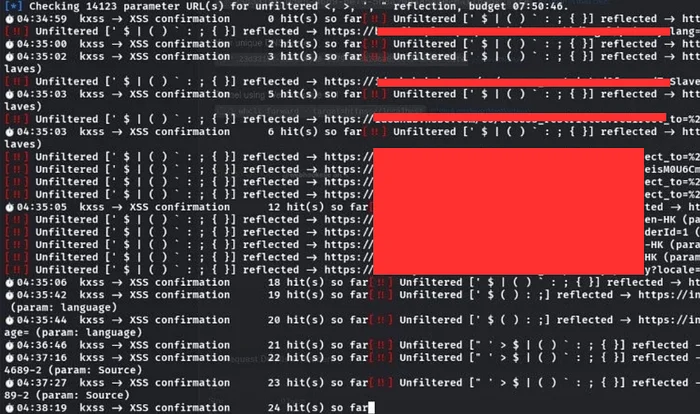
Going through the reflections one by one produced 6 XSS. Three of them were the most interesting: they were on the same subdomain and all used the same ck parameter. The reflection point was:
<input type="hidden" value="HERE"">
Angle brackets were filtered, so a straightforward " autofocus onfocus=alert(1) x=" payload was not usable: the input is hidden, and hidden fields can never take focus. The author instead used:
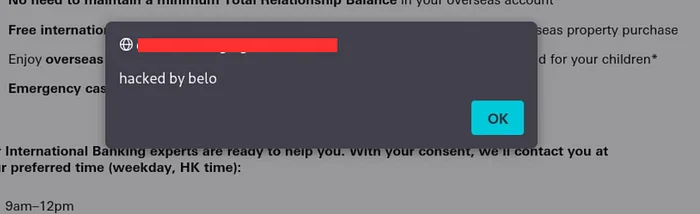
<input type="hidden" value="" oncontentvisibilityautostatechange="alert('hacked by belo')" style="content-visibility:auto" x="">
The author says he does not know what content-visibility: auto is, having seen it on PortSwigger, and that the event fires when this thing is automatic. The trick avoids the need for focus. The author notes this works on Chrome only.
Exploitation
Step 1: notice the URL pattern
The three endpoints looked sequential: a numbered segment with a trailing alphanumeric chunk. The pages and URLs shared the same words, PINS, PROA and PROP, which the author believes are campaign-related. A Google dork was used to find more of them:
site:free.palestine ("PINS" OR "PROA" OR "PROP")
Step 2: collect matching URLs and fuzz parameters
Every URL from gau matching those prefixes was collected, then passed to arjun, because not all endpoints used the same ck parameter: the reflection point was the same, but the parameter name was not always:
gau free.palestine.com | grep -iE 'PINS|PROA|PROP' > collected.txtarjun --stable -w ~/Seclist/params -i collected.txt
This produced more XSS against the same vulnerable hidden input reflection and confirmed the shape of the vulnerable endpoints:
{KNOWN1}{NNN}_DA{KNOWN2}_ENS KNOWN1 in (PINS, PROA, PROP) NNN in 000-999KNOWN2 in (J2P,GB9,C0C,L58,...) 3 capital letter + numbers
Only the numeric segment (NNN, 000 to 999) was truly unknown. KNOWN1 was the three prefixes, and KNOWN2 was the list of three-capital-letter-plus-numbers chunks collected from endpoints already found.
Step 3: brute force the numeric segment
Three wordlists were fed into ffuf in clusterbomb mode:
ffuf -w known1.txt:PFX -w nums.txt:NUM -w known2.txt:LET \ -u "https://free.palestine.com/PFXNUM_DALET_ENS" -ac
PFX supplies the prefix, NUM the 000 to 999 number, and LET the alphanumeric chunk. -ac enables automatic calibration so that baseline responses are filtered out. Continuing to recognise patterns and brute force them led to 25 confirmed reflected XSS in total.
Step 4: open redirects
While going through the XSS hits, the author found:
https://free2.palestine.com/sso/?redirect=https%3A%2F%2Ffree2.palestine.com.evil.com
This redirected straight to free2.palestine.com.evil.com. A similar-looking subdomain was then tried with the same parameter and was also vulnerable:
https://free2-preprod.palestine.com/sso/?redirect=https%3A%2F%2Ffree2-preprod.palestine.com.evil.com
That brought the total to 27 bugs. The author notes it would have been 7 without pattern recognition, and that whenever you find a bug you should search for it elsewhere.
Root cause
The report does not describe the server-side code. What it shows is that the ck parameter (and other parameter names on the same endpoints) is reflected into a hidden input's value attribute, and that angle brackets are filtered while double quotes are not. That allows an attacker to break out of the attribute and add a new event handler attribute. The hidden input cannot receive focus, so the usual autofocus/onfocus trick does not work; the content-visibility: auto style plus the oncontentvisibilityautostatechange event provides an alternative trigger in Chrome.
The redirect parameter on the /sso/ endpoint accepted free2.palestine.com.evil.com and redirected there. The report does not state how the redirect target is validated.
Impact
An attacker who can get a victim to open a crafted URL can execute JavaScript in the context of the affected subdomain. The XSS payloads described work in Chrome only. The open redirects let an attacker send users from the legitimate SSO endpoint to an attacker-controlled host.
Fix
Variants to test
- Run
kxssover archived and crawled URLs and look forUnfiltered: [" ' < >]lines, then test each parameter in its actual reflection context. - When a reflection lands in a hidden input, try event handlers that do not need focus, such as
oncontentvisibilityautostatechangewithstyle="content-visibility:auto", and confirm in Chrome. - When you find one vulnerable endpoint, look at its URL shape for sequential or patterned segments, then use a dork and
ffufclusterbomb to enumerate siblings. A positive result is the same reflection appearing on many endpoints. - Run
arjunagainst collected URLs to find parameter names other than the one you first found. A positive result is a new parameter that reflects unfiltered characters. - Test
redirectparameters with a host that starts with the legitimate domain followed by an attacker-controlled suffix, such aslegit.example.com.evil.com. A positive result is a redirect to the attacker-controlled host.
What happened, in plain words
A security researcher found 27 security bugs while testing a website. Twenty-five of them were the same kind of bug, called reflected cross-site scripting (XSS), and two were a different kind, called open redirects. The bugs were found on a vulnerability disclosure programme (VDP), which is a scheme where a company invites people to report security problems, usually without paying a reward. The author says the domains in the write-up are not real, so the names like target.com and free.palestine.com are stand-ins.
The author divides bug hunting into two styles:
- Type 1: a large scope, where you map out many subdomains, crawl the site, fuzz inputs and look for injection bugs such as reflected XSS and SQL injection (SQLi).
- Type 2: a small scope, where you focus on logic mistakes, login and permission problems.
The author prefers type 2, but this job was type 1. The vulnerable endpoints were on one subdomain. Their web addresses contained a number that looked sequential, followed by a chunk of letters and digits. Each page echoed a value from the address back into a hidden form field.
Before going further, a few words on the vocabulary used throughout.
A subdomain is a named part of a larger domain. If example.com is the main building, shop.example.com and mail.example.com are separate wings with their own doors. Companies often have many of them, and each one is a possible way in.
A URL is a web address. The part after a ? is the query string, a list of parameters (name and value pairs) that the page receives. For example, in https://shop.example.com/search?q=shoes, the parameter is q and its value is shoes.
Reflected XSS is a bug where the site takes something from the URL and prints it straight back into the page without cleaning it. If the site prints your text as if it were part of the page's own instructions (its HTML), you can slip in a small script. The victim's browser then runs that script as if the site itself had written it. A simple comparison: a noticeboard where visitors can pin notes, and the person in charge copies whatever you write onto the official letterhead without checking it.
An open redirect is a bug where a page whose job is to send you onward (for example, after login) will send you to any address you name, including one controlled by an attacker. It is like a receptionist who will call any number a visitor asks for, including a scam call centre, and hand over the phone.
From 0 to 6 bugs (6 XSS)
The author notes that this reconnaissance stage was automated, that the programme is a VDP, and that the domains mentioned are not real.
Step 1: find the subdomains
Bug hunting 101 is subdomain enumeration: finding all the named parts of the target's domain. Three tools were run and their output piled into one file, then the pile was filtered down to hosts that actually answer:
subfinder -all -silent -d target.com >> subs.txtfindomain -t target.com -q >> subs.txtassetfinder --subs-only target.com >> subs.txtsort -u subs.txt | httpx -silent -threads 50 -rate-limit 150 -timeout 10 > live.txt
Line by line:
subfinder -all -silent -d target.com >> subs.txtaskssubfinderto look up subdomains oftarget.comusing all of its sources, quietly (-silent), and appends (>>) the results to a file calledsubs.txt.findomain -t target.com -q >> subs.txtdoes the same job with a second tool,findomain, in quiet mode (-q), appending to the same file.assetfinder --subs-only target.com >> subs.txtadds a third tool's findings, restricted to subdomains only.sort -u subs.txt | httpx -silent -threads 50 -rate-limit 150 -timeout 10 > live.txtsorts the combined list and removes duplicates (sort -u), then pipes it tohttpx.httpxtries each host to see whether it responds. It uses 50 parallel workers (-threads 50), sends at most 150 requests per second (-rate-limit 150), gives up after 10 seconds per host (-timeout 10), and writes the hosts that answered tolive.txt.
Why three tools? Each one draws on different sources, so combining them finds more names than any single tool. Why check liveness? A long list of names is useless if most of them no longer exist; you want the ones with a live web server behind them.
Step 2: collect the URLs
Next comes URL collection. katana crawls what is live right now, while gau and urlfinder dig through archives of previously seen URLs:
cat live.txt | katana -silent -jc -d 5 > urls.txtcat subs.txt | gau --threads 50 --providers wayback,otx,urlscan,commoncrawl >> urls.txtcat subs.txt | urlfinder -silent -all >> urls.txtsort -u urls.txt | uro > urls_clean.txt
Line by line:
cat live.txt | katana -silent -jc -d 5 > urls.txtfeeds the live hosts tokatana, a crawler. A crawler is a program that opens a page, follows every link it finds, and repeats.-jctells it to also run and follow JavaScript, because modern sites build links in the browser.-d 5limits it to five links deep from the starting page. The output goes tourls.txt.cat subs.txt | gau --threads 50 --providers wayback,otx,urlscan,commoncrawl >> urls.txtrunsgau, which fetches URLs that have been seen before by public archives: the Wayback Machine, OTX, urlscan and Common Crawl. It uses 50 threads and appends the results.cat subs.txt | urlfinder -silent -all >> urls.txtadds a third source,urlfinder, with all of its options enabled.sort -u urls.txt | uro > urls_clean.txtsorts and de-duplicates, then passes the list throughuro, which strips near-duplicate URLs (for example, the same page with a tracking parameter added). The result isurls_clean.txt.
Why archives? A crawler only sees what is linked today. Archives remember pages that were linked months ago, including old campaign pages that are still live but no longer advertised.
Step 3: look for reflections
Now the actual XSS part. Reflected XSS lives in parameters, and in the raw characters < > " ' coming back unfiltered. So the author first grabs every URL that has a query string, then runs those through kxss:
grep -a '\?' urls_clean.txt | sort -u > params.txtkxss < params.txt | grep -iE "Unfiltered:.*[\"'<>]"
Line by line:
grep -a '\?' urls_clean.txt | sort -u > params.txtkeeps only lines containing a question mark, which marks a query string.-atellsgrepto treat the files as text even if they contain odd bytes. The result is sorted, de-duplicated and saved asparams.txt.kxss < params.txt | grep -iE "Unfiltered:.*[\"'<>]"feeds those URLs tokxss, a tool that requests each URL and checks whether the parameter values come back in the response. It prints one line per parameter in the formUnfiltered: [" ' < >]. The secondgrepkeeps only the lines where those special characters came back unfiltered.
Why these characters? In HTML, < and > start and end tags, and quotes delimit attribute values. If a site hands them back untouched, you may be able to change the page's structure rather than just its text.
This takes a while, so the author left it running and went out with friends. Coming back later gave a beautiful view: a pile of reflections.
Going through them one by one produced 6 XSS. Three were the most interesting: they were on the same subdomain and all used the same ck parameter. The reflection point was:
<input type="hidden" value="HERE"">
This is a snippet of HTML, the language pages are written in. An <input> is a form field. type="hidden" means the field is not shown to the visitor; it exists only to carry a value that the page will submit later. value="HERE" is where the site puts the parameter's content. The stray " at the end shows that the site's own code is already slightly malformed.
Angle brackets were filtered, so the author could not simply throw this at it:
" autofocus onfocus=alert(1) x="
That payload is a classic trick. It starts with a double quote to close the value attribute early, then adds new attributes: autofocus makes the browser focus the field automatically, and onfocus=alert(1) runs a tiny script when focus happens. The trailing x=" swallows the site's leftover quote so the HTML stays valid. But it does not work here, because the input is hidden, and hidden fields can never take focus. No focus means no onfocus, so no script.
Instead the author popped an alert using:
<input type="hidden" value="" oncontentvisibilityautostatechange="alert('hacked by belo')" style="content-visibility:auto" x="">
Line by line:
<input type="hidden" value=""starts a hidden field with an empty value. The double quote aftervalue=closes the attribute, which is the break-out.oncontentvisibilityautostatechange="alert('hacked by belo')"adds an event handler. An event handler is an attribute whose value is a small script that the browser runs when a named event happens. Here the event is a change in the element's visibility state.style="content-visibility:auto"applies a CSS style. CSS is the language that controls how a page looks.content-visibility: autolets the browser skip work on content that is off screen and decide by itself when the element becomes visible or hidden.x=""is a filler attribute that absorbs the site's leftover quote, keeping the HTML well formed.
The author admits not knowing what content-visibility: auto really is, having seen it on PortSwigger, and notes that the event fires when this thing is automatic. The trick avoids the need for focus entirely. It works on Chrome only.
From 6 to 25 bugs (19 XSS)
If you already know where this is going, you have bug hunter eyes. If not, no worries.
Step 1: notice the URL pattern
Looking again at the three endpoints, they looked sequential: a numbered segment with a trailing alphanumeric chunk. The pages and the URLs shared the same words, PINS, PROA and PROP, which the author thinks are campaign-related. A Google dork was used to find more of them:
site:free.palestine ("PINS" OR "PROA" OR "PROP")
A Google dork is a search query that uses special operators to find very specific pages. site: restricts results to one domain, and OR accepts any of several words. The point is to ask a search engine to list pages that a normal menu would never show you.
Step 2: collect matching URLs and fuzz parameters
Next the author collected every URL from gau matching those prefixes and ran them through arjun to fuzz for parameters, because not all of them used the same ck parameter: the reflection point was the same, but the parameter name was not always:
gau free.palestine.com | grep -iE 'PINS|PROA|PROP' > collected.txtarjun --stable -w ~/Seclist/params -i collected.txt
Line by line:
gau free.palestine.com | grep -iE 'PINS|PROA|PROP' > collected.txtasksgaufor archived URLs of the subdomain, then keeps only lines containing one of the three words, ignoring case (-iE), and saves them tocollected.txt.arjun --stable -w ~/Seclist/params -i collected.txtrunsarjun, a tool that guesses parameter names. It tries each name from a wordlist (-w ~/Seclist/params, a list of common parameter names) against each URL in the input file (-i collected.txt).--stablemakes it use a steadier, less noisy method.
Why fuzz parameter names? The page reflects whatever parameter it receives, but the name of that parameter is not fixed. If you only test ck, you miss pages that use id or campaign instead.
This produced more XSS against the same vulnerable hidden input reflection and confirmed the shape of the vulnerable endpoints:
{KNOWN1}{NNN}_DA{KNOWN2}_ENS KNOWN1 in (PINS, PROA, PROP) NNN in 000-999KNOWN2 in (J2P,GB9,C0C,L58,...) 3 capital letter + numbers
Read it as a template. KNOWN1 is one of the three prefixes. NNN is a three-digit number from 000 to 999. KNOWN2 is a chunk of three capital letters plus numbers, such as J2P, GB9, C0C or L58. The literal _DA and _ENS stay the same. Only the number was truly unknown: the prefixes were just three words, and the chunks had been collected from endpoints already found.
Step 3: brute force the numeric segment
Three wordlists were fed into ffuf in clusterbomb mode:
ffuf -w known1.txt:PFX -w nums.txt:NUM -w known2.txt:LET \ -u "https://free.palestine.com/PFXNUM_DALET_ENS" -ac
Line by line:
ffufis a tool that sends many requests quickly and reports the ones that stand out.-w known1.txt:PFXloads the first wordlist and labels itPFX(the prefix).-w nums.txt:NUMloads the numbers 000 to 999 and labels themNUM.-w known2.txt:LETloads the letter-and-number chunks and labels themLET.-u "https://free.palestine.com/PFXNUM_DALET_ENS"is the address template. Each label is replaced by a value from its list.-acturns on automatic calibration, which first measures what a normal, boring response looks like and then filters those out, so only unusual responses are shown.
Clusterbomb mode means every combination is tried: each prefix with each number with each chunk. That is a lot of requests, but it is the only way to cover a three-part pattern. Continuing to recognise patterns and brute force them led to 25 confirmed reflected XSS in total. That is the whole point of pattern recognition.
From 25 to 27 bugs (2 open redirects)
This part was easy. While going through those XSS hits the author ran into:
https://free2.palestine.com/sso/?redirect=https%3A%2F%2Ffree2.palestine.com.evil.com
This redirected straight to free2.palestine.com.evil.com. The %3A and %2F are encoded forms of : and /, so the redirect parameter's value is https://free2.palestine.com.evil.com. The attacker's host begins with the legitimate domain name and then adds .evil.com at the end.
Remembering a similar-looking subdomain, the author tried the same parameter on it and it was also vulnerable:
https://free2-preprod.palestine.com/sso/?redirect=https%3A%2F%2Ffree2-preprod.palestine.com.evil.com
preprod usually means pre-production, a test copy of the site.
Total: 27 bugs, and it would have been 7 without pattern recognition. Whenever you find a bug, search for it somewhere else; you will surely find it.
Glossary
- API: a way for one program to talk to another, like a service counter where you ask for something by name and get a defined answer back.
- arjun: a tool that guesses parameter names for a URL.
- assetfinder: a tool that finds subdomains.
- attribute: a name and value inside an HTML tag, such as
type="hidden", that tells the browser something about the element. - brute force: trying every possibility from a list or range until something works.
- clusterbomb mode: a mode in
ffufthat tries every combination of values from several wordlists. - Common Crawl: a public archive of pages crawled from the web.
- content-visibility: a CSS property that lets the browser decide when to render content that is off screen.
- cookie: a small piece of data a site stores in your browser so it can recognise you on later requests, like a cloakroom ticket.
- CSS: the language that controls how a web page looks.
- crawler: a program that opens pages and follows links to discover more pages.
- CSS injection: a bug where attacker-controlled text ends up inside a page's styles, letting the attacker change how the page looks or behaves.
- dork: a search query using special operators to find specific pages.
- event handler: an HTML attribute whose value is a small script that runs when a named event happens, such as a click or a focus.
- ffuf: a fast tool for sending many requests and spotting unusual responses.
- findomain: a tool that finds subdomains.
- gau: a tool that fetches known URLs from public archives.
- Google dork: see dork.
- hidden input: a form field that is not shown to the visitor but still carries a value.
- HTML: the language web pages are written in, made of tags and attributes.
- httpx: a tool that checks whether hosts respond.
- JavaScript: the programming language browsers run, which can change a page after it loads.
- katana: a crawler that can also follow JavaScript-built links.
- kxss: a tool that checks whether parameter values come back unfiltered in responses.
- open redirect: a bug where a page sends the visitor to any address supplied in the URL, including an attacker's.
- OTX: a public threat-intelligence service that also keeps lists of URLs.
- parameter: a name and value pair in a URL's query string, such as
q=shoes. - payload: the crafted input an attacker sends to trigger a bug.
- PortSwigger: a well-known security learning site.
- pre-production: a test copy of a site, often less guarded than the live one.
- query string: the part of a URL after the
?, holding parameters. - reconnaissance: the information-gathering stage before testing, such as finding subdomains and URLs.
- reflected XSS: a bug where input from the URL is printed back into the page without cleaning, letting an attacker run script in the victim's browser.
- SQL injection (SQLi): a bug where attacker input changes a database query, letting the attacker read or alter data.
- SSO: single sign-on, a login service that signs you in once and passes you to other sites.
- subdomain: a named part of a larger domain, such as
shop.example.comunderexample.com. - subfinder: a tool that finds subdomains.
- token: a short value that proves who you are or carries state between requests, like a stamped ticket.
- uro: a tool that removes near-duplicate URLs.
- urlfinder: a tool that collects URLs.
- URL: a web address.
- VDP: vulnerability disclosure programme, a scheme where a company invites reports of security problems, usually without a reward.
- Wayback Machine: a public archive of old web pages.
- wordlist: a file of candidate values, such as common parameter names or numbers, used for guessing.
- XSS: cross-site scripting, a bug that lets an attacker run script in another user's browser through a vulnerable site.




