A commonly overlooked XSS vector
The application escaped forward slashes in data embedded in script tags but did not properly sanitise HTML, allowing an attacker to inject a comment and script tags to break out of the script context. This enabled HTML injection and cross-site scripting when other user-controlled input appeared later in the page.
 Published on creds.nl
One of CREDS’ areas of expertise is web application testing. We have a team that focusses solely on web application testing and web application vulnerability research.
The full write-up lives on its author's site
It belongs to its author, so we link to it rather than copy it. The other two tabs are our own rewrites, checked against it.
Context
This write-up comes from CREDS, whose web application testing team describes a layered Cross-Site Scripting attack that is often overlooked by pentesters. The subject is not one named product but a pattern seen across several applications: dynamically generated data embedded inside <script> tags, because doing so avoids an additional HTTP request to fetch that data. The report gives no specific target, endpoint or parameter names.
The feature in question is ordinary: a page renders server-side data into a JavaScript context, for example a console.log call, and also reflects user input into HTML tag attributes elsewhere on the same page.
Setup
No accounts, roles, tools or versions are described. The only precondition is the one the report builds towards: a page where user input reaches a script tag, and somewhere later in the same document another input point inside an HTML tag attribute that accepts the characters <, >, - and /.
Finding it
The researcher noticed that several applications escaped data embedded in script tags in an unexpected manner. Sending my test <b> input </b> returned HTML like this:
<html>
<body>
<script>
	console.log("my test <b> input <\/b>");
</script>
</body>
</html>
The application does not escape the less-than and greater-than characters (<, >) to their hex representation (\x3c and \x3e); instead it escapes the / to \/. That defeats the classic vector of embedding </script><script>alert(1)</script> inside script tags:
<html>
<body>
<script>
	console.log("my test </script><script>alert(1)</script>");
</script>
</body>
</html>
The report notes complicated historical reasons for popularising this escaping: it lets JavaScript use the values without the HTML parser trying to interpret them and potentially breaking the JavaScript. It works because JavaScript treats / and \/ as the same character, whereas the HTML parser treats them as different.
Escaping the solidus to \/ does not sanitise the data, however. HTML can still be injected, provided some fairly common conditions hold. The reason is that the HTML parser does not simply scan for </script>; it has additional restrictions. After an HTML comment opener (<!--) inside a script tag, it ignores all following sets of script open and close tags until it encounters the comment closer (-->). The report adds a note that closing a script tag inside an HTML comment still closes the previously open script tag.
Exploitation
With that behaviour in mind, the researcher looked for a location somewhere after the script tag where input can be placed and where <, >, - and / and text are accepted. Quite a few applications do not escape these characters inside HTML tag attributes. The example document is:
<html>
<body>
<script>
	console.log("input_1");
</script>
...
<input type="text" value="input_2">
...
</body>
</html>
Step 1: open a comment and a script tag in the first input
Set the first input to <!--<script> and the second to --><script><b>html injected</b>, producing:
<html>
<body>
<script>
	console.log("<!--<script>");
</script>
...
<input type="text" value="--></script><b>test</b>">
...
</body>
</html>
The set of script tags embedded in the first script tag is ignored by the HTML parser, which effectively changes the content of the script tag to:
console.log("<!--<script>");
</script>
...
<input type="text" value="-->
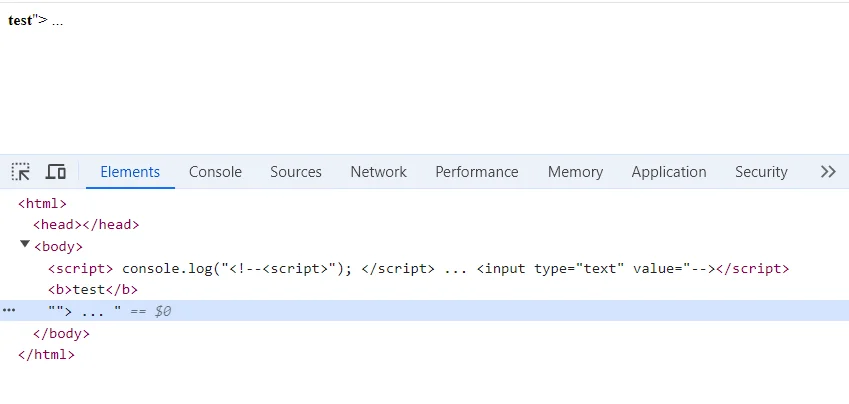
This is not valid JavaScript and throws a syntax error. By changing where the script tag ends, part of the HTML document is effectively commented out, changing its structure. Everything after the user-supplied --></script> is now seen as part of the HTML, and browsers display it as shown here:
Step 2: turn the injection into script execution
With a working HTML injection, the cross-site scripting step is trivial: change the second parameter to --></script><script>alert(1)</script>. The final document looks like this:
<html>
<body>
<script>
	console.log("<!--<script>");
</script>
...
<input type="text" value="--></script><script>alert(1)</script>">
...
</body>
</html>
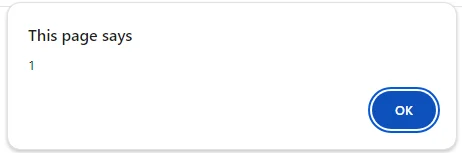
The resulting HTML produces an alert box:
Root cause
The mistake is treating the escaping of / to \/ as sanitisation. It neutralises the classic </script> breakout but leaves < and > untouched, so the data is still not safe inside a script context. The HTML parser's comment handling inside script tags then lets an attacker move the effective end of the script element, and a second, attribute-context input point that does not escape <, >, - and / supplies the closing sequence. Escaping the solidus to \/ does not sanitise the data.
Impact
An attacker who controls both input points can inject HTML into the page and execute script in the victim's browser, as the alert demonstrates. The report does not describe a specific victim population, session impact or data exposure; it frames the issue as a general vector that is becoming more common as applications increasingly send dynamically generated data in script tags to avoid an extra HTTP request.
Fix
The report does not describe a fix or a change made to any application.
Variants to test
- Send
my test <b> input </b>to any parameter reflected inside a script tag and inspect the response. A positive result is<and>returned unescaped while/becomes\/. - Look for a second reflection later in the same document inside an HTML tag attribute. A positive result is that attribute accepting
<,>,-and/without encoding. - Submit
<!--<script>in the first input and--><script><b>html injected</b>in the second. A positive result is the injected markup rendering in the page, confirming the script tag was effectively ended early. - Replace the second payload with
--></script><script>alert(1)</script>. A positive result is the alert box firing, confirming script execution.
What happened, in plain words
A security team at CREDS was testing web applications, the kind of software you use through a browser. They found a way to make a web page run code that the page's owner never intended to run. This class of bug is called Cross-Site Scripting, usually shortened to XSS. In an XSS attack, an attacker gets their own instructions (usually a small piece of JavaScript, the language browsers use to make pages interactive) to run inside someone else's page, in that person's browser.
The trick in this write-up is layered. It combines two things that each look harmless on their own: a script tag, which is the part of a page that holds JavaScript, and an HTML comment, which is a piece of the page that browsers are supposed to ignore. The report does not name a specific product, endpoint or parameter. It describes a pattern the team saw in several applications, and it explains why the usual defence against this kind of attack does not cover it.
A quick word on the moving parts, because everything below depends on them:
- HTML is the language that describes what is on a web page: headings, paragraphs, input boxes, and so on. It is written with tags in angle brackets, like
<b>for bold text. - JavaScript is a programming language that runs inside the browser. It can read and change the page, and it is what makes pages interactive.
- A
<script>tag is how HTML says "the text between these tags is JavaScript, please run it". - The HTML parser is the part of the browser that reads the page's HTML and builds the page from it. It follows detailed rules about what counts as a tag, what counts as text, and what counts as a comment.
- Escaping means replacing a character that has a special meaning with a safe stand-in, so the parser treats it as ordinary text instead of as instructions.
The setup
The report describes no accounts, no tools and no software versions. The only precondition is the one the attack builds towards: a page where something you type ends up inside a script tag, and somewhere later on the same page another place where you can type, inside an HTML tag attribute (an attribute is a setting on a tag, such as the starting text of an input box), and that second place accepts the characters <, >, - and /.
Finding it
The researcher noticed that several applications handled data placed inside script tags in an unexpected way. When they sent the text my test <b> input </b>, the application sent back HTML like this:
<html>
<body>
<script>
	console.log("my test <b> input <\/b>");
</script>
</body>
</html>
Line by line, in plain words:
<html>and<body>open the page and its visible body. They are ordinary page structure.<script>starts a block of JavaScript.console.log(...)is a JavaScript instruction that prints whatever is inside the brackets to the browser's developer console, a kind of log window. Here it prints the text the user sent.</script>ends the JavaScript block, and</body>and</html>close the page.
The important part is inside the printed text. The application did not escape the less-than and greater-than characters (< and >) into their hexadecimal representation (\x3c and \x3e). Hexadecimal is just another way of writing a character down; \x3c means "the character with code 3c", which is <. Instead, the application escaped the forward slash / into \/.
Why does that matter? The classic XSS attack against a script tag is to send the text </script><script>alert(1)</script>. The idea is to close the script block early and open a new one containing your own code. alert(1) is a JavaScript instruction that makes the browser show a pop-up box with the number 1 in it; it is the standard harmless proof that code ran. If the application had left the slash alone, the page would look like this:
<html>
<body>
<script>
	console.log("my test </script><script>alert(1)</script>");
</script>
</body>
</html>
Here the first </script> would end the original script block, the following <script> would start a new one, and the browser would run alert(1). The report notes that this classic attack produces a well-known alert box.
But the application turned / into \/, so the browser never sees a real </script> in the user's text. The report explains why applications do this: there are complicated historical reasons, and the escaping is often done so that JavaScript can use the values without the HTML parser trying to interpret them and potentially breaking the JavaScript. It works because JavaScript treats / and \/ as the same character, while the HTML parser treats them as different. In other words, the JavaScript still sees the slash it expects, but the HTML parser does not see a closing tag.
Escaping the solidus (the formal name for the / character) to \/ does not sanitise the data, though. Sanitising means cleaning input so it cannot do harm. HTML can still be injected, as long as some fairly common conditions hold. The reason is that the HTML parser does not simply scan for </script>. It has an additional set of strange restrictions. For example, after an HTML comment opener (<!--) inside a script tag, it starts ignoring all following sets of script open and close tags until it encounters the closing of the HTML comment (-->). A comment is text the browser is meant to skip; <!-- starts one and --> ends it.
The report adds a note: closing a script tag inside an HTML comment still closes the previously open script tag. That detail is what makes the next step possible.
Exploitation
With that behaviour in mind, the researcher looked for a place somewhere after the script tag where input can be placed and where <, >, - and / and text are accepted. It turns out that quite a few applications do not escape these characters inside HTML tag attributes. The example document is:
<html>
<body>
<script>
	console.log("input_1");
</script>
...
<input type="text" value="input_2">
...
</body>
</html>
Line by line:
- The script block prints
input_1, which stands for whatever the user typed into the first input point. - The
...lines stand for other page content that the report does not describe. <input type="text" value="input_2">is a text box.type="text"says it is a single-line text field, andvalue="input_2"is the text already sitting in it, which here stands for whatever the user typed into the second input point.
Step 1: open a comment and a script tag in the first input
Set the first input to <!--<script> and the second to --><script><b>html injected</b>. The page then looks like this:
<html>
<body>
<script>
	console.log("<!--<script>");
</script>
...
<input type="text" value="--></script><b>test</b>">
...
</body>
</html>
Line by line:
- Inside the script block, the printed text now begins with
<!--, which opens an HTML comment, followed by<script>, which looks like the start of a new script tag. - In the input box, the
valueattribute now contains-->, which closes that comment, then</script>, which looks like the end of a script block, then<b>test</b>, which is bold text.
The set of script tags embedded in the first script tag is ignored by the HTML parser. The report says this effectively changes the content of the script tag to:
console.log("<!--<script>");
</script>
...
<input type="text" value="-->
In plain words: the parser, following its comment rule, does not treat the <script> inside the comment as a new script. But the </script> that arrives later, from the second input, does end the original script block. So the script block now ends in the middle of the page, not where the developer intended. What is left inside it is not valid JavaScript and throws a syntax error, meaning the browser complains that the code makes no sense. That error is not the point. The point is that by changing where the script tag ends, part of the HTML document is effectively commented out, which changes the page's structure. Everything after the user-supplied --></script> is now seen as part of the HTML, and browsers display it as shown here:
Step 2: turn the injection into script execution
With a working HTML injection, the cross-site scripting step is trivial. Change the second parameter to --></script><script>alert(1)</script>. The final document looks like this:
<html>
<body>
<script>
	console.log("<!--<script>");
</script>
...
<input type="text" value="--></script><script>alert(1)</script>">
...
</body>
</html>
Line by line:
- The first input still opens the comment with
<!--<script>, so the parser ignores the script tags that follow inside the script block. - The second input closes the comment with
-->, ends the original script block with</script>, and then opens a fresh script block with<script>containingalert(1). - The browser runs that new block, and the alert box appears.
The resulting HTML produces an alert box:
Root cause
The mistake is treating the escaping of / to \/ as sanitisation. It neutralises the classic </script> breakout, but it leaves < and > untouched, so the data is still not safe inside a script context. The HTML parser's comment handling inside script tags then lets an attacker move the effective end of the script element, and a second input point, in an attribute context, that does not escape <, >, - and / supplies the closing sequence. Escaping the solidus to \/ does not sanitise the data.
Impact
An attacker who controls both input points can inject HTML into the page and run script in the victim's browser, as the alert demonstrates. It frames the issue as a general vector that is becoming more common, because applications increasingly send dynamically generated data in script tags to avoid an extra HTTP request. An HTTP request is simply a browser asking a server for something, such as a page or a piece of data; skipping one makes a page load faster.
Fix
Context-aware means the encoding is chosen to suit where the data lands: the rules for text inside a script are not the same as the rules for text inside an attribute.
Variants to test
- Send
my test <b> input </b>to any parameter reflected inside a script tag and inspect the response. A positive result is<and>returned unescaped while/becomes\/. - Look for a second reflection later in the same document inside an HTML tag attribute. A positive result is that attribute accepting
<,>,-and/without encoding. - Submit
<!--<script>in the first input and--><script><b>html injected</b>in the second. A positive result is the injected markup rendering in the page, confirming the script tag was effectively ended early. - Replace the second payload with
--></script><script>alert(1)</script>. A positive result is the alert box firing, confirming script execution.
Glossary
- HTML: the language that describes the structure and content of a web page, written with tags in angle brackets.
- JavaScript: the programming language that runs inside a browser and makes pages interactive.
- Script tag: the HTML element,
<script>, that marks a block of JavaScript for the browser to run. - HTML parser: the part of the browser that reads HTML and decides what is a tag, what is text and what is a comment.
- Attribute: a setting on an HTML tag, such as the starting text of an input box, written as
name="value". - Escaping: replacing a character that has special meaning with a safe stand-in so it is treated as ordinary text.
- Sanitising: cleaning input so that it cannot do harm when it is used in a page.
- Hexadecimal: a way of writing characters by their numeric code, for example
\x3cfor<. - Solidus: the formal name for the forward slash character,
/. - HTML comment: text between
<!--and-->that the browser is meant to ignore. - Cross-Site Scripting (XSS): a bug where an attacker gets their own JavaScript to run inside someone else's web page, in that person's browser.
alert(1): a JavaScript instruction that shows a pop-up box; used as harmless proof that code ran.- Syntax error: a complaint from the browser that a piece of JavaScript makes no sense and cannot run.
- HTML injection: getting your own HTML into a page so the browser renders it as part of the page.
- HTTP request: a browser asking a server for something, such as a page or a piece of data.
- Context-aware output encoding: choosing the right escaping for where data lands, because the rules for script text and attribute text differ.
- Parameter: an input value that a page accepts and uses, such as text typed into a form field.




