A perfect duplicate or how to send an email with a spoofed invoice’s content
An unauthenticated email-sending endpoint accepted arbitrary recipient, subject, and Base64-encoded PDF body, allowing an attacker to send an email with a spoofed invoice attachment. The attacker could impersonate a legitimate invoice and potentially redirect payments to their own bank account.
 Published on medium.com
This is a story about one of my most interesting findings without a happy ending. Spoiler alert — the bug was closed as duplicace.
The full write-up lives on its author's site
It belongs to its author, so we link to it rather than copy it. The other two tabs are our own rewrites, checked against it.
Context
This is a story about an email-sending API discovered on a host during routine reconnaissance. The endpoint, /sendmail, accepts JSON and, when given the right parameters, sends an email with a PDF attachment. The report does not name the program or the product behind the host; the host and port are shown only as host and exoticport. The endpoint sends an email of a chosen type to a chosen address; with type set to pdf it attaches a PDF.
The finding was ultimately closed as a duplicate. The author notes that a duplicate is still a valid bug and treats the exercise as a reason to improve automation, as well as a lesson in the API itself.
Setup
The report describes no accounts, roles or special tooling. The work started from a dictionary run against a host, followed by manual requests. The only precondition visible in the text is network access to the host on the exotic port. The author omits the boring parts of HTTP requests and responses to keep the write-up short.
Finding it
A dictionary run against the host surfaced one interesting path. A GET to it returned 405 Method Not Allowed, which told the author the endpoint existed but wanted a different verb:
GET /sendmail HTTP/1.1Host: host:exoticportHTTP/1.1 405 Method Not Allowedcontent-length: 0
A 405 on GET is a strong hint that the route is registered for another method, so the next step was POST.
Exploitation
Step 1: POST with an empty JSON body
POST /sendmail HTTP/1.1Host: host:exoticportContent-Type: application/jsonContent-Length: 0HTTP/1.1 422 Unprocessable Entity[CUT] type missing [CUT]
The server answered 422 Unprocessable Entity and complained that type was missing. The endpoint was parsing JSON and validating a required field called type.
Step 2: Send type as a number
POST /sendmail HTTP/1.1Host: host:exoticportContent-Type: application/jsonContent-Length: 12{“type”:0}HTTP/1.1 422 Unprocessable Entity[CUT] expected=string, got=number, field=type [CUT]
The error message revealed the expected type: type had to be a string, not a number. The author then spent some time enumerating and guessing, and googling, what values a type field could take on an API that apparently sends emails.
Step 3: Guess a type and add a recipient
The author found a working value and assumed there should also be a to field:
POST /sendmail HTTP/1.1Host: host:exoticportContent-Type: application/jsonContent-Length: 25{“type”:”pdf”, “to”:””}HTTP/1.1 500 Internal Server Error[CUT] invalid address [CUT]
With type set to pdf and an empty to, the server returned 500 Internal Server Error with invalid address. That confirmed both the field name and that the address was being validated.
Step 4: Send to a valid address
POST /sendmail HTTP/1.1Host: host:exoticportContent-Type: application/jsonContent-Length: 53{“type”:”pdf”, “to”:”[valid-email]”}HTTP/1.1 200 OK[CUT] mail Sent [CUT]
With a valid address the response was 200 OK and mail Sent. The author opened the inbox and found an email with a PDF attachment named invoice. The attachment was empty. That raised the obvious next question: could the subject and the attachment content be controlled?
Step 5: Control the subject
The subject was easy: the parameter was named subject.
Step 6: Control the PDF content
The second part required a bit of guesswork again. The parameter containing the PDF content was named body, and its content needed to be Base64 encoded. For the final proof of concept the author wrote a short script:
import base64, requestsdef uploadfile(filename): resp = requests.post(“http://host:exoticport/sendmail", data = {“type”:”pdf”, “to”:”[valid-email]”, “subject”: “invoice_spoof”, “body” : base64.b64encode(open(filename, “rb”).read())}) uploadfile(‘test.pdf’)
The script reads a local PDF, Base64 encodes it, and posts it as body together with type, to and subject. The results looked like this:
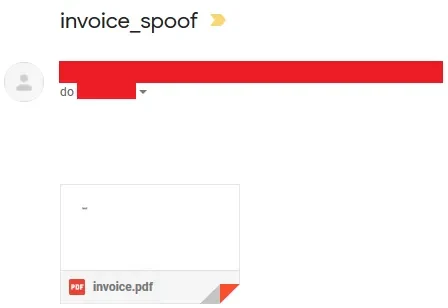
Email message with invoice
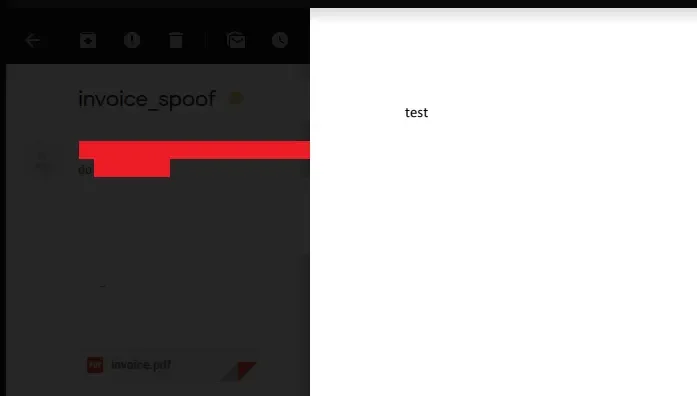
Spoofed invoice content
The first image shows the delivered email message with the invoice attachment; the second shows the spoofed invoice content inside the attachment. With this, the author could spoof an invoice carrying their own bank account and possibly redirect payments to themselves. The author calls it a perfect P1 bug, though it was closed as a duplicate.
Root cause
The report does not describe the server-side code, so the underlying mistake is not stated. What the requests show is an unauthenticated endpoint that accepts a JSON body and lets the caller choose the recipient, the subject and the raw PDF content, with the content supplied as Base64. The type field selects the kind of email, and pdf produces a PDF attachment.
Impact
An attacker who can reach the endpoint can send an email to a valid address, with a chosen subject and a chosen PDF attachment. In the author's example the attachment was an invoice with the attacker's bank account, which could plausibly redirect payments. The author's own framing is that this could have been a P1, but the report was closed as a duplicate, so the final severity assigned by the program is not given.
Fix
Based on the exchange, the endpoint should require authentication and authorisation before sending mail, should not let an unauthenticated caller choose arbitrary recipients, subjects and attachment contents, and should rate-limit or otherwise constrain use of the mail-sending path. Which of these, if any, the program applied is not stated.
Variants to test
- Other verbs on discovered paths. When a dictionary hit returns
405, tryPOST,PUTandPATCHwith an empty JSON body and read the validation error. A positive result is a422naming a required field, as happened here withtype. - Type confusion on required fields. Send a number where a string is expected and read the error. A positive result is a message such as
expected=string, got=number, field=type, which confirms the parser and the field name. - Field enumeration on mail APIs. Once a
typevalue is found, add likely fields one at a time (to,subject,body,cc,bcc,from,reply-to) and watch the status codes. A positive result is a500with a validation message, or a200withmail Sent. - Attachment content control. If a
bodyor similar parameter accepts Base64, submit a small PDF and check the delivered attachment. A positive result is an attachment whose content matches what was sent. - Recipient validation bypass. Try addresses that pass the
invalid addresscheck but resolve somewhere unexpected, such as plus-addressing or a domain you control. - Sender spoofing checks. Send to a mailbox you control and inspect the headers for SPF, DKIM and DMARC results.
What happened, in plain words
A security researcher was looking around a website's server, the way you might walk around a building trying doors to see which ones are unlocked. One door turned out to be a mail-sending service: a piece of software on the server that, when asked in the right way, sends an email to an address you name, with a PDF file attached.
The researcher worked out how to talk to it, step by step, by reading the error messages it gave back. In the end they could send an email to a valid address, with a chosen subject line, carrying a PDF they supplied. In their example the PDF was an invoice showing their own bank account number, which is the kind of document a company might pay without asking questions.
They reported it, hoping for a reward. It was closed as a duplicate: someone else had already reported the same bug. A duplicate still counts as a real bug, and the researcher treats the whole thing as a lesson, both about this kind of service and about doing more of the boring checking automatically.
The pieces you need to know
Before following the steps, here are the few ideas the story relies on.
A server and a port. When your browser visits a site, it connects to a computer (the server) on a numbered channel called a port. The usual web port is 443 for secure sites, but servers can listen on other numbers too. The report hides the real address and shows only host and exoticport, meaning an unusual port number.
A request and a response. Your browser sends a request ("please give me this page") and the server sends back a response (the page, or an error). Each request has a method, which is a verb saying what you want to do. GET means "give me something". POST means "here is some data, do something with it".
Status codes. Every response starts with a three-digit number. 200 means fine. 405 means "this address exists but not for that verb". 422 means "I understood your data but something in it is wrong". 500 means "I broke while handling this".
JSON. A simple text format for structured data, looking like {"name": "value"}. Curly braces hold a set of labelled fields. It is how one program hands data to another.
An API. Short for application programming interface: a service built to be talked to by other software rather than by a person clicking buttons. Think of a restaurant's serving hatch: you do not walk into the kitchen, you pass a written order through the hatch and get a dish back. Here the hatch is the address /sendmail and the order is a JSON body.
Base64. A way of writing any file's raw bytes using only ordinary letters, digits and a couple of symbols, so the data can travel inside text. It makes the data about a third longer. When something asks for Base64, it wants the file converted this way first.
A dictionary run. Trying a long list of common names against a server, one after another, to see which ones exist. Like trying every key on a big keyring.
P1 and duplicate. Bug bounty programs rank findings by severity; P1 is the top tier, a serious problem. A duplicate means the same issue was already reported, so the second report is closed without a separate reward.
Finding the door
The researcher started with a dictionary run against the host. Most names led nowhere; one was interesting. The report leaves out the dull parts of the requests and responses, so what follows is trimmed.
GET /sendmail HTTP/1.1Host: host:exoticportHTTP/1.1 405 Method Not Allowedcontent-length: 0
Line by line:
GET /sendmail HTTP/1.1asks the server for the path/sendmailusing theGETverb and version 1.1 of the web protocol.Host: host:exoticportsays which machine and port is being asked. The real values are hidden.HTTP/1.1 405 Method Not Allowedis the server's answer: this path exists, but not forGET.content-length: 0says the answer has no body.
Why this mattered: a 405 is the server telling you the door is real but opens with a different handle. The obvious next handle to try is POST, the verb used to send data.
Step 1: POST with nothing in it
POST /sendmail HTTP/1.1Host: host:exoticportContent-Type: application/jsonContent-Length: 0HTTP/1.1 422 Unprocessable Entity[CUT] type missing [CUT]
POST /sendmail HTTP/1.1now uses thePOSTverb on the same path.Content-Type: application/jsonannounces that the data being sent is JSON.Content-Length: 0says the body is empty, zero bytes.- The answer is
422 Unprocessable Entity, and the message saystype missing.
Why this mattered: the server did not reject the request outright. It read the (empty) JSON, looked for a field called type, did not find it, and said so. That is a gift: it names a field the service needs. The [CUT] marks show where the researcher trimmed the message.
Step 2: Give type a number
POST /sendmail HTTP/1.1Host: host:exoticportContent-Type: application/jsonContent-Length: 12{“type”:0}HTTP/1.1 422 Unprocessable Entity[CUT] expected=string, got=number, field=type [CUT]
- The request is the same, but now the body is
{"type":0}, a JSON object with one field,type, set to the number zero. Content-Length: 12is the size of that body in bytes.- The answer is again
422, withexpected=string, got=number, field=type.
Why this mattered: the error spells out the rule. The field type must be text (a string), not a number. Sending the wrong kind of value on purpose is a cheap way to make a server describe its own expectations. The researcher then spent time guessing and searching online for what values a type field could take on a service that sends emails.
Step 3: Guess a type and add a recipient
A working value was found, and the researcher assumed there should also be a field naming who receives the mail:
POST /sendmail HTTP/1.1Host: host:exoticportContent-Type: application/jsonContent-Length: 25{“type”:”pdf”, “to”:””}HTTP/1.1 500 Internal Server Error[CUT] invalid address [CUT]
- The body is now
{"type":"pdf", "to":""}:typeis the textpdf, andtois an empty string. Content-Length: 25is the size of that body.- The answer is
500 Internal Server Errorwithinvalid address.
Why this mattered: two things were confirmed at once. The field really is called to, and the server checks the address before using it. A 500 here is not a crash to be scared of; it is the server saying "I tried to use this and it was not a valid address".
Step 4: Send to a real address
POST /sendmail HTTP/1.1Host: host:exoticportContent-Type: application/jsonContent-Length: 53{“type”:”pdf”, “to”:”[valid-email]”}HTTP/1.1 200 OK[CUT] mail Sent [CUT]
- The body is
{"type":"pdf", "to":"[valid-email]"}: the same request, with a real address in place of the empty one. The address is replaced with a placeholder here. Content-Length: 53is the size of that body.- The answer is
200 OKwithmail Sent.
Why this mattered: the service worked. The researcher opened their inbox and found an email with a PDF attachment named invoice. The attachment was empty. That immediately raises the next question: can the sender also choose the subject line and what goes inside the PDF?
Step 5: Choose the subject
The subject was easy. The field was simply called subject. No guessing needed.
Step 6: Choose what is inside the PDF
The second part took a bit of guesswork again. The field holding the PDF content was called body, and its value had to be Base64 encoded. For the final proof of concept the researcher wrote a short script:
import base64, requestsdef uploadfile(filename): resp = requests.post(“http://host:exoticport/sendmail", data = {“type”:”pdf”, “to”:”[valid-email]”, “subject”: “invoice_spoof”, “body” : base64.b64encode(open(filename, “rb”).read())}) uploadfile(‘test.pdf’)
Line by line, in plain words:
import base64, requestsloads two ready-made toolkits: one that converts data to Base64, and one that can send web requests.def uploadfile(filename):starts a small reusable block of steps that takes the name of a file to send.requests.post(...)sends aPOSTrequest to the/sendmailaddress on the hidden host and port.data = {...}is the set of fields being sent:typeispdf,tois a placeholder address,subjectisinvoice_spoof, andbodyis the file's contents converted to Base64.open(filename, "rb").read()opens the file in binary mode and reads all of it, so the raw bytes of the PDF are what gets encoded.base64.b64encode(...)turns those bytes into Base64 text.uploadfile('test.pdf')runs the block once, sending a local file calledtest.pdf.
Why this mattered: the script does by machine what would be tedious by hand, converting a real PDF into the text form the service expects and posting it as the attachment content. The results looked like this:
Email message with invoice
Spoofed invoice content
The first image shows the delivered email with the invoice attachment. The second shows the spoofed invoice content inside that attachment. With this, the researcher could produce an invoice carrying their own bank account details and possibly redirect payments to themselves. They call it a perfect P1 bug.
Why it worked
The report does not describe the server's code, so the exact mistake inside it is not stated. What the requests show is a mail-sending address that the author used without any login or permission check being mentioned. The caller chooses the recipient, the subject and the raw PDF content, with the content supplied as Base64. The type field picks the kind of email, and pdf produces a PDF attachment. The only checks visible in the answers are the text check on type and the address check on to. The exchange shows no check on what the attachment contains. Whether a login existed but was not required, or was never built, the report does not say.
What it could have been used for
Anyone able to reach the address could send an email to a valid address, with a chosen subject and a chosen PDF attachment. In the researcher's example the attachment was an invoice with their bank account, which could plausibly redirect a payment. The researcher's own view is that it could have been a P1, but it was closed as a duplicate, so the severity the program finally assigned is not given.
How it should have been fixed
Going by the exchange, the address should require a login and a permission check before sending anything, should not let an unknown caller pick arbitrary recipients, subjects and attachment contents, and should limit how often it can be used. Which of these, if any, the program applied is not stated.
Things to try on other targets
- Other verbs on paths you find. When a dictionary hit answers
405, tryPOST,PUTandPATCHwith an empty JSON body and read the complaint. A good sign is a422naming a required field, as happened here withtype. - Wrong kinds of value on required fields. Send a number where text is expected and read the error. A good sign is a message like
expected=string, got=number, field=type, which confirms both the parser and the field name. - Guessing field names on mail services. Once a
typevalue works, add likely fields one at a time (to,subject,body,cc,bcc,from,reply-to) and watch the status codes. A good sign is a500with a complaint, or a200withmail Sent. - Controlling attachment content. If a
bodyor similar field accepts Base64, send a small PDF and check what arrives. A good sign is an attachment whose content matches what you sent. - Getting past the address check. Try addresses that pass the
invalid addresscheck but end up somewhere unexpected, such as plus-addressing or a domain you control. - Checking sender spoofing. Send to a mailbox you control and look at the message headers for SPF, DKIM and DMARC results.
Glossary
- API: a service built to be used by other software, which takes a structured request and returns a structured answer.
- Base64: a way of writing any file's bytes as ordinary text characters, so the data can be carried inside a text field.
- Body: the part of a request or response that carries the actual data, as opposed to the headers.
- Bug bounty program: an arrangement where an organisation pays researchers for reporting security problems to it.
- Content-Length: a header stating how many bytes long the body is.
- Content-Type: a header stating what format the body is in, such as JSON.
- Dictionary run: trying a long list of common names against a server to discover which paths exist.
- Duplicate: a report closed because the same issue had already been reported.
- GET: the request verb meaning "give me something".
- Header: a labelled line in a request or response carrying information about it, such as the host or the content type.
- Host: the machine (and optionally port) a request is addressed to.
- HTTP: the language browsers and servers use to exchange requests and responses.
- JSON: a text format for structured data, written as labelled fields inside curly braces.
- Method (verb): the word in a request saying what kind of action is wanted, such as
GETorPOST. - P1: the top severity tier in a bug bounty program, meaning a serious problem.
- Port: a numbered channel on a computer that a service listens on.
- POST: the request verb meaning "here is some data, do something with it".
- Proof of concept (PoC): a small demonstration that a bug is real and can be triggered.
- Request: a message from a client to a server asking for something or sending data.
- Response: the server's reply to a request, starting with a status code.
- SPF, DKIM, DMARC: three email checks that help a receiving mail server judge whether a message really came from the domain it claims.
- Status code: the three-digit number at the start of a response, such as
200,405,422or500. - String: a piece of text, as opposed to a number.
- 200 OK: the status code meaning the request succeeded.
- 405 Method Not Allowed: the status code meaning the path exists but not for the verb used.
- 422 Unprocessable Entity: the status code meaning the request was understood but its contents were invalid.
- 500 Internal Server Error: the status code meaning the server failed while handling the request.




