A short tale of Account verification bypass
The email verification link contained a JWT with the user's email, and the server did not validate the JWT signature. An attacker could change the email in the token to verify any email address without access to that mailbox.
 Published on medium.com
{{media:0}}
The full write-up lives on its author's site
It belongs to its author, so we link to it rather than copy it. The other two tabs are our own rewrites, checked against it.
Context
Satyendra Kumar tested a private bug bounty program, starting from the main domain after reviewing the program's scope and collecting subdomains. The main page offered two action buttons, login and signup, plus an email newsletter and some company information. The feature at the centre of the write-up is the signup flow and its email verification step: after submitting the signup form, the application sends a verification email containing a link, and the account is presumably only confirmed once that link is visited.
The report does not name the program, the application or the affected host, and gives no version numbers.
Setup
No special tooling was prepared in advance. The researcher created an account through the normal signup form, received the verification email, and inspected the link in it. The only external tool used was the JWT decoder at https://jwt.io/, found through a Google search for JWT. The precondition for the attack is the ability to sign up and receive a verification email.
Finding it
After submitting the signup form with all required details, a popup asked the researcher to verify the email address. Opening the mailbox and copying the verification link, the interesting part was the link itself: it carried a parameter whose value was a code string shaped like xxx.yyy.zzz. That three-part, dot-separated structure is the classic shape of a JSON Web Token, and searching for the encoding led to the JWT definition: an open standard (RFC 7519) that defines a compact and self-contained way of transmitting information between parties as a JSON object, verifiable and trustworthy because it is digitally signed.
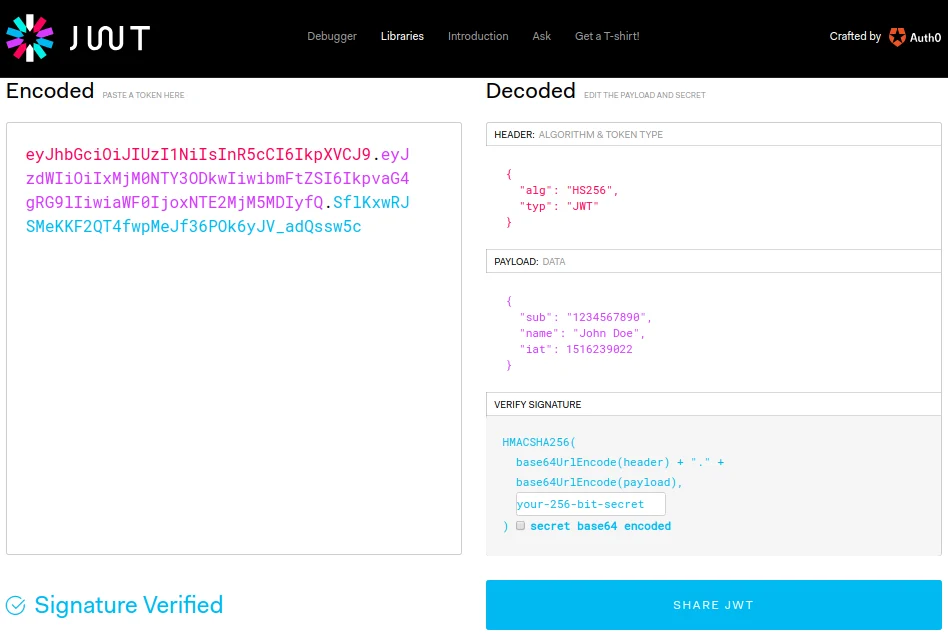
The researcher then went looking for a way to decode the token and found https://jwt.io/ as the first Google result, a site used for JWT decoding.

Example
Pasting the token into jwt.io produced a payload containing, among other fields, a name and an email address, in the following shape (the address is redacted here):
{
 "name": "yourname",
 "email": "[redacted]"
}
The token therefore carried the account's email address in a form the client could read and, as the next step showed, rewrite.
Exploitation
Step 1: Obtain a fresh verification token
The researcher signed up again and received a new verification email, but this time did not verify the email. The researcher signed up again and received a new verification email, but did not verify it.
Step 2: Change the email inside the token
In jwt.io, the email field in the previous token's payload was replaced with a different email address, and the new generated JWT was copied from jwt.io.
Step 3: Use the crafted token in the verification link
The crafted token was placed in the verification parameter of the link and the request was sent. The result was a successful verification bypass: the server accepted the token even though its signature no longer matched the modified payload.
Root cause
The server was not validating the JWT correctly against its signature. It only validated the email encoded in the JWT, so any token whose payload named the target email was treated as proof that the address had been verified. Because the payload is only base64url-encoded and readable by anyone holding the link, editing it is trivial; the signature is the only thing that binds the payload to the issuer, and that check was missing or ineffective. The report does not describe the server-side code, so the exact reason the signature check failed is not stated.
Impact
The bypass lets an attacker have an email address treated as verified by editing the email inside a token. The report frames this as an account verification bypass and does not go further into what the verified state unlocks, so the downstream consequences on this particular application are not described. The attack requires only the ability to sign up and receive verification emails.
Fix
The measure the finding calls for is server-side verification of the JWT signature with the correct key before trusting any claim in the payload, and rejecting tokens whose signature does not validate. The report itself closes with the lesson to always analyse encodings and encryptions and to understand the implemented mechanism.
Variants to test
- Tamper with any claim in a token used for email or account verification and resubmit it. A positive result is that the modified claim is honoured, for example a different address is marked verified.
- Try the
nonealgorithm and an empty signature on the same parameter. A positive result is that the server accepts the token without a signature. - Re-sign a modified payload with a guessed or default secret. A positive result is that the server accepts a token signed with a key it should not know.
- Reuse a token issued for one account against another account's verification flow. A positive result is that the second account becomes verified.
- Decode every token the application hands out, including password reset and invitation links, and check whether the payload carries identity claims the server trusts without a signature check. A positive result is any flow where an edited claim changes the outcome.
What happened, in plain words
A security researcher signed up for an account on a website, received the usual "please verify your email" message, and looked closely at the link inside it. The link contained a long code made of three parts separated by dots. That code turned out to be a JSON Web Token, or JWT: a small package of information that the website hands to your browser and expects back later. The package is readable by anyone who has it, and it is supposed to be protected by a digital signature so that nobody can change its contents without the website noticing.
The website did not check that signature properly. It only looked at the email address written inside the token. So the researcher took a token that had been issued for one address, edited the address inside it, and sent it back. The website accepted it and treated the new address as verified. That is an account verification bypass: a step that is supposed to prove you own an email address was completed without proving anything.
This write-up walks through the same steps in the same order, explaining each idea from scratch. The program, the application and the host are not named in the report, and no version numbers are given.
The setting
Satyendra Kumar was testing a private bug bounty program. A bug bounty program is an arrangement where a company invites researchers to look for security problems in its systems and report them, sometimes for a reward. A private program means only invited researchers may take part. The researcher read the program's scope (the list of systems that are in bounds), collected some subdomains, and started with the main domain.
On the main page there were two action buttons, login and signup, an email newsletter box, and some company information. The feature that matters here is the signup flow and its email verification step. After you submit the signup form, the application sends you an email containing a link, and the account is presumably only confirmed once you visit that link. This is a common pattern: it stops people from creating accounts with email addresses they do not control.
Getting ready
No special tools were prepared in advance. The researcher created an account through the normal signup form, received the verification email, and looked at the link inside it. The only outside tool used was the JWT decoder at https://jwt.io/, found through a Google search for JWT.
The precondition for the attack is the ability to sign up and receive a verification email.
Finding it
- Submit the signup form with all the required details.
- A popup asks you to verify your email address.
- Open your mailbox and copy the verification link.
- Look at the link itself rather than clicking it.
The interesting part was the link. It carried a parameter whose value was a code string shaped like xxx.yyy.zzz. A parameter is the part of a web address after a question mark that carries a named value, for example ?token=abc. The three-part, dot-separated shape is the classic shape of a JSON Web Token.
A JWT has three sections, each encoded separately and joined with dots: a header (which says how the token is signed), a payload (the actual information, such as a name or an email address), and a signature (the cryptographic stamp that proves the payload came from the website and was not altered). The payload is not encrypted. It is only encoded, which means it is written in a form that can be turned back into readable text by anyone. Think of it like a sealed envelope with a clear window: everyone can read the letter through the window, but the seal is supposed to prove nobody opened it and swapped the letter.
Searching for the encoding led to the standard definition: JSON Web Token (JWT) is an open standard (RFC 7519) that defines a compact and self-contained way for securely transmitting information between parties as a JSON object. This information can be verified and trusted because it is digitally signed.
JSON itself is just a text format for structured data, made of names and values in curly braces, like a very simple form. A digital signature is a mathematical stamp computed from the content and a secret key held by the server; if anyone changes the content, the stamp no longer matches.
The researcher then went looking for a way to decode the token and found https://jwt.io/ as the first Google result, a site used for JWT decoding. Decoding means turning the encoded text back into readable form. It does not require any secret, because the payload was never secret.
Example
Pasting the token into jwt.io produced a payload containing, among other fields, a name and an email address, in this shape (the address is redacted here):
{
 "name": "yourname",
 "email": "[redacted]"
}
Line by line: the outer curly braces mark the start and end of one JSON object. "name": "yourname" is a field called name whose value is the text yourname. "email": "[redacted]" is a field called email whose value is an email address. The commas separate fields. The report shows the payload with filler text around these fields, meaning there were other fields as well that are not relevant here.
The token therefore carried the account's email address in a form the client could read and, as the next step showed, rewrite. The client is your browser, or any tool acting on your behalf. Anything the client can read, the client can also change before sending it back.
Exploitation
Step 1: Obtain a fresh verification token
The researcher signed up again and received a new verification email, but this time did not verify the email. The researcher signed up again and received a new verification email, but did not verify it.
Step 2: Change the email inside the token
In jwt.io, the email field in the previous token's payload was replaced with a different email address, and the new generated JWT was copied from jwt.io.
Why this step: the goal is to see whether the server trusts the email written in the payload. If it does, then changing that email changes which address gets marked as verified. The tool simply re-encodes the edited payload into the same three-part format.
Step 3: Use the crafted token in the verification link
The crafted token was placed in the verification parameter of the link and the request was sent. The result was a successful verification bypass: the server accepted the token even though its signature no longer matched the modified payload.
Why this works: the signature is the only thing that binds the payload to the issuer. Once the payload is edited, the old signature no longer matches it. A correct server recomputes the signature from the payload and its secret key and rejects the token when the two do not agree. This server did not do that.
Root cause
The server was not validating the JWT correctly against its signature. It only validated the email encoded in the JWT, so any token whose payload named the target email was treated as proof that the address had been verified.
Because the payload is only base64url-encoded and readable by anyone holding the link, editing it is trivial. Base64url is a way of writing arbitrary bytes as plain letters, digits and a couple of punctuation characters so they can travel safely inside a web address; it is an encoding, not a lock. The signature is the only thing that binds the payload to the issuer, and that check was missing or ineffective. The report does not describe the server-side code, so the exact reason the signature check failed is not stated.
Impact
The bypass lets an attacker have an email address treated as verified by editing the email inside a token. The report frames this as an account verification bypass and does not go further into what the verified state unlocks, so the downstream consequences on this particular application are not described. The attack requires only the ability to sign up and receive verification emails.
Fix
The report does not say what the program changed. The measure the finding calls for is server-side verification of the JWT signature with the correct key before trusting any claim in the payload, and rejecting tokens whose signature does not validate. In plain terms: read the payload only after the stamp has been checked, never before.
The report closes with the lesson to always analyse encodings and encryptions and to understand the implemented mechanism. Encodings are reversible by design and hide nothing; encryption is meant to hide content, but only if it is used correctly. Knowing which one you are looking at tells you what an attacker can change.
Variants to test
- Tamper with any claim in a token used for email or account verification and resubmit it. A positive result is that the modified claim is honoured, for example a different address is marked verified.
- Try the
nonealgorithm and an empty signature on the same parameter. A positive result is that the server accepts the token without a signature. Thenonealgorithm is a JWT header value meaning "no signature at all"; a correct server must refuse it. - Re-sign a modified payload with a guessed or default secret. A positive result is that the server accepts a token signed with a key it should not know. A default secret is a key that ships with example code and is never changed in production.
- Reuse a token issued for one account against another account's verification flow. A positive result is that the second account becomes verified.
- Decode every token the application hands out, including password reset and invitation links, and check whether the payload carries identity claims the server trusts without a signature check. A positive result is any flow where an edited claim changes the outcome.
Glossary
- Bug bounty program: an arrangement where a company invites researchers to find and report security problems, sometimes for a reward.
- Private program: a bug bounty program open only to invited researchers.
- Scope: the list of systems a program allows researchers to test.
- Subdomain: a named subdivision of a domain, such as shop.example.com under example.com.
- Signup flow: the series of pages and requests that create a new account.
- Email verification: a step where the site sends a link to your email address and confirms the address when you visit it.
- Parameter: a named value attached to a web address after a question mark, such as
?token=abc. - JWT (JSON Web Token): a compact, self-contained package of information made of a header, a payload and a signature, joined by dots, defined by RFC 7519.
- Header (of a JWT): the first section, which describes how the token is signed.
- Payload (of a JWT): the middle section, which carries the actual claims such as a name or email address.
- Signature (of a JWT): the third section, a cryptographic stamp computed from the content and a secret key, used to detect changes.
- Claim: a single piece of information inside a token, such as an email address.
- JSON: a text format for structured data made of names and values in curly braces.
- Encoding: a reversible transformation that changes how data is written, not what it means; it hides nothing.
- Base64url: an encoding that writes bytes as plain letters, digits and a few punctuation characters so they can travel inside a web address.
- Decoding: turning encoded text back into readable form.
- Encryption: a transformation that hides content so that only holders of the right key can read it.
- Digital signature: a mathematical stamp computed from content and a secret key, used to prove the content came from the key holder and was not altered.
- Client: the program acting on your behalf, usually your browser.
- Server: the computer that receives your requests and decides what to do with them.
- Server-side validation: checking something on the server rather than trusting what the client sends.
- Account verification bypass: getting past a step meant to prove you own something, such as an email address, without actually proving it.
nonealgorithm: a JWT header value meaning the token carries no signature; a correct server must reject it.- Default secret: a signing key that ships with example code and is never changed in production.
- Root cause: the underlying reason a vulnerability exists, as opposed to its visible symptom.