A Simple Dirsearch Tool Led Me to an Information Disclosure Vulnerability!
A PHP endpoint that was not linked from the application returned a directory listing of PDF filenames. An attacker could use those filenames to access documents that may contain personal details and application records.
 Published on medium.com
Bug Bounty
The full write-up lives on its author's site
It belongs to its author, so we link to it rather than copy it. The other two tabs are our own rewrites, checked against it.
Context
This write-up describes a content-discovery exercise against a web application that exposed a directory of PDF documents through a PHP script. The application itself is not named: the host is redacted throughout, and the report gives no product name, program name or bounty details. What we do know is that the application stores documents and that one of its endpoints, files.php, sits under a /request/ path. Instead of displaying a conventional application page or redirecting to an authentication screen, the endpoint returned a large list of PDF filenames.
The author's framing is deliberately modest: no advanced exploit, no complex payload, no hours of manual testing. The whole finding came out of a routine path-discovery run followed by opening one result in a browser.
Setup
The only tool used was Dirsearch, the open-source web path scanner by maurosoria. The author configured it to test several web application extensions: PHP, ASP, ASPX, JSP, HTML and HTM. The stated objective was to identify accessible paths and to investigate endpoints that returned potentially interesting responses.
No accounts, roles, credentials or special preconditions are described.
Finding it
The reasoning before the scan is the standard one for this kind of work. A web application can contain endpoints that are not linked from its homepage or normal navigation, for example:
- Legacy PHP scripts.
- Internal application directories.
- Backup files.
- Document storage locations.
- Testing and debugging endpoints.
- Unlinked administrative functionality.
- Publicly accessible resources.
Dirsearch is used to enumerate such paths. Depending on server configuration, response codes and content lengths help separate interesting resources from noise. The relevant output from the scan is shown below.
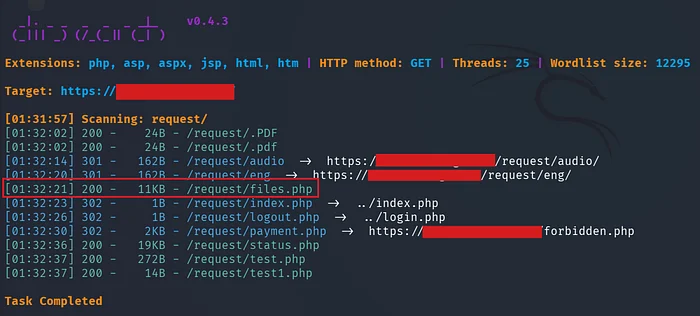
The author is explicit that a hit was not treated as a finding at this stage. An HTTP 200 response only means the server returned a response; it does not by itself mean the resource holds sensitive information or that access controls are missing. So the next step was to open the discovered endpoint directly in a browser and observe what came back.
Exploitation
Step 1: open the discovered endpoint
The endpoint reported by the scan was:
Instead of rendering a conventional application page or redirecting to an authentication screen, the endpoint returned a large list of PDF filenames. That is the whole of the exploitation: opening the endpoint in a browser and receiving a file listing.
Step 2: read the listing
The response contained numerous filenames whose patterns appeared to correspond to application or document reference identifiers. Some examples observed in the response are shown here.
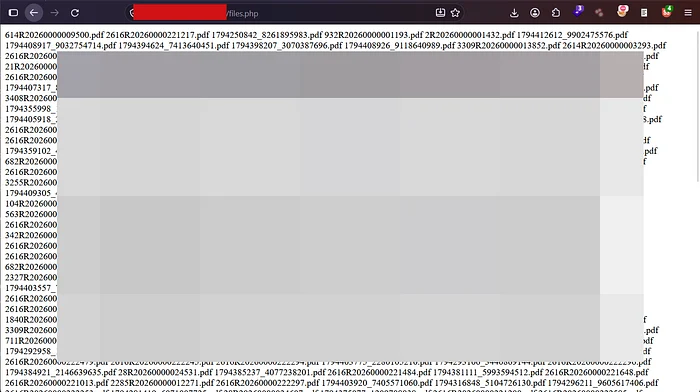
The significance is in what those names represent. If the listed PDFs can be fetched directly, they may expose personal details, application records and official correspondence, which amounts to unauthorised disclosure of sensitive data. The author presents this as the potential consequence of the listing rather than as something verified file by file.

Root cause
The report does not include the source of files.php, so the exact mistake is not shown. What the behaviour implies is that the script returns a list of PDF filenames to any caller, without checking who is asking. In other words, the access control that should guard the document store appears to be absent from this script.
The report does not describe any defence that was present and bypassed.
Impact
The exposure is an information disclosure. The listing itself reveals the naming scheme of stored documents, including identifiers that appear to map to applications or documents. If those files are retrievable, the disclosure could extend to personal details, application records and official correspondence. The author hedges appropriately: the files could expose sensitive information when accessed directly, and the result would be unauthorised disclosure of sensitive data. The report does not state how many files were listed, whether the files themselves were downloadable without authentication, or which data subjects were affected.
Fix
The fix that follows from the behaviour is to require authorisation on files.php before it returns anything, and to avoid returning directory contents to the client at all: serve documents through a handler that checks the caller's rights to the specific document, and keep storage listings out of HTTP responses. Removing or restricting the script, or placing the document store outside the web root, would also close the path.
Variants to test
- Extension sweep on document paths. Run Dirsearch (or any content-discovery tool) with PHP, ASP, ASPX, JSP, HTML and HTM extensions against directories that look like storage or request handlers. A positive result is a 200 with a body that lists filenames rather than rendering a page.
- Direct access to unlinked scripts. For every feature reached through navigation, guess the underlying script name in the same directory. A positive result is the script answering without a redirect to login.
- Compare authenticated and unauthenticated responses. Request the same endpoint with and without a session. A positive result is identical content in both cases, which shows the check is missing rather than merely weak.
- Check whether listed files are fetchable. Take a filename from a listing and request it directly. A positive result is the document being served to an unauthenticated client.
- Look for identifier patterns in listings. If filenames follow application or document reference schemes, note whether the identifiers are sequential or guessable. A positive result is a listing that lets you enumerate records you have no right to see.
What happened, in plain words
A security researcher was looking at a website that stores documents, things like PDF files. He did not use any clever trick. He ran a free tool that tries lots of common file and folder names on a website, the way you might try lots of door handles in a corridor to see which ones are unlocked. One of the names it tried was a small program file called files.php. When he opened that address in his browser, instead of a normal page or a login screen, the site handed him a long list of the names of PDF files it keeps. The endpoint answered with the list instead of a normal page or a login screen. That kind of mistake is called an information disclosure: the site tells you something it should have kept private.
The rest of this article walks through the same steps the researcher took, in the same order, and explains every term along the way. You only need a browser and a computer to follow the ideas.
The situation
The target is a web application that stores documents. The report does not name the product, the company or the bug bounty programme, and the website address is hidden (redacted) throughout. What matters is the shape of the problem: somewhere under a path called /request/ there is a file called files.php.
A path is the part of a web address after the site name, like the folders on your computer. So /request/files.php means: inside the folder request, there is a file files.php. The .php ending tells you it is a PHP script. PHP is a programming language used to build web pages; when your browser asks for a .php address, the web server runs that little program and sends back whatever it produces.
Instead of a normal application page or a login screen, it simply answered with a list of file names.
- Serve one specific document that the visitor asked for.
- Check that the visitor is logged in before doing anything.
- Send a visitor who is not logged in to a login page.
Here it did none of those. It simply answered, to anyone, with a list of file names.
The researcher is careful to set expectations low: no advanced exploit, no complicated payload, no hours of manual testing. The whole finding came from a routine scan and then opening one result in a browser.
The tool and the setup
The only tool used was Dirsearch, an open-source web path scanner. "Open-source" means the code is public and free to use. A path scanner is a program that takes a long list of common file and folder names and asks the website for each one in turn, then reports which ones answered. Think of it as knocking on every door in a building with a list of likely room names, and noting which doors open.
The researcher told Dirsearch to try several file extensions, the endings that tell you what kind of file something is:
- PHP (
.php), a script run by the server. - ASP and ASPX (
.asp,.aspx), older and newer Microsoft server script formats. - JSP (
.jsp), a Java server page format. - HTML and HTM (
.html,.htm), plain web pages.
The goal, in his words, was to identify accessible paths and to investigate endpoints that returned potentially interesting responses. An endpoint is simply an address on the server that does something when you ask for it, like a service window in a building. "Potentially interesting" means: worth a closer look, not yet a problem.
No accounts, passwords, roles or special conditions are described.
Why look for hidden paths at all
Before the scan, the researcher explains the reasoning. A web application can contain addresses that are not linked from its homepage or its normal menus. You cannot reach them by clicking around, but they still exist and still answer if you know the name. Examples he gives:
- Legacy PHP scripts: old programs left behind from earlier versions of the site.
- Internal application directories: folders meant for the site's own use.
- Backup files: copies made for safety, which often contain more than the live site.
- Document storage locations: the folders where uploaded or generated documents sit.
- Testing and debugging endpoints: tools left switched on after development.
- Unlinked administrative functionality: admin pages with no menu entry.
- Publicly accessible resources: files that were meant to be internal but are not protected.
Dirsearch exists to find such paths. Depending on how the server is set up, the response code and the content length help separate interesting results from noise. The response code is the three-digit number a server sends with every answer; 200 means "here is the page", 404 means "not found", and so on. The content length is how big the answer is. A page that is much bigger or smaller than the usual "not found" page is worth a look.
The relevant output from the scan is shown below.
The screenshot shows the scan output: the list of paths Dirsearch tried and the responses it got back. The point of looking at it is to spot an address that answered when it perhaps should not have.
A 200 is not a vulnerability
The researcher is explicit that he did not treat every HTTP 200 response as a vulnerability. HTTP is the language browsers and servers use to talk to each other, and 200 is its code for "success, here is the content". But success only means the server returned something. It does not automatically mean the resource contains sensitive information, or that access controls are missing. Access controls are the rules that decide who is allowed to see what, like a lock on a door.
So the next step was simple: open the discovered endpoint directly in a browser and see what the application returned. This is the difference between a scanner's hint and a real finding. The scanner says "this address answered"; a human then looks at what the answer actually is.
Opening the endpoint
The endpoint reported by the scan was:
Line by line, in plain words:
https://is the secure version of the web address scheme. Thesstands for secure: the traffic between your browser and the server is encrypted, so nobody in between can read it.[REDACTED-HOST]is where the site's name would be. It has been hidden to protect the owner./request/is a folder on the site.files.phpis the script inside that folder.
Opening that address in a browser asks the server for the page, without any login.
Instead of showing a normal application page or sending him to a login screen, the endpoint returned a large list of PDF filenames. That is the whole of the exploitation: opening the endpoint in a browser and receiving a file listing. "Unauthenticated" means without proving who you are; no username, no password, no session.
Reading the listing
The response contained many filenames whose patterns appeared to correspond to application or document reference identifiers. An identifier is a name or number used to tell one record from another, like a ticket number. Some examples observed in the response are shown here.
The screenshot shows the kind of filenames that came back. The important part is not the individual names but the pattern: the names look like they map to particular applications or documents in the site's records. If you can see the names, you learn how the site names its files, and you may be able to guess other names.
Why this matters: if the listed PDFs can be fetched directly, they may expose personal details, application records and official correspondence. That would amount to unauthorised disclosure of sensitive data. The researcher presents this as the potential consequence of the listing, not as something he checked file by file.
The final screenshot illustrates the exposure: the listed documents, if reachable, would reveal information about people and their records.
Why it happened
The report does not include the source code of files.php, so the exact mistake is not shown. What the behaviour implies is that the script returns a list of PDF filenames to whoever asks, without checking who is asking. In other words, the access control that should guard the document store appears to be missing from this script.
The report does not describe any defence that was present and then bypassed. Authorisation is the process of deciding whether a particular person is allowed to do a particular thing, as opposed to authentication, which is about proving who they are.
What the impact is
The exposure is an information disclosure: the site reveals information to someone who should not have it. The listing itself reveals the naming scheme of stored documents, including identifiers that appear to map to applications or documents. If those files are retrievable, the disclosure could extend to personal details, application records and official correspondence.
The researcher is careful with his wording: the files could expose sensitive information when accessed directly, and the result would be unauthorised disclosure of sensitive data.
How it should be fixed
The fix that follows from the behaviour is to require authorisation on files.php before it returns anything, and to avoid sending folder contents to the browser at all. Documents should be served through a handler that checks whether the caller is allowed to see that specific document, and storage listings should be kept out of web responses. Removing or restricting the script, or moving the document store outside the web root, would also close the path. The web root is the folder the web server is allowed to serve files from; anything outside it cannot be fetched by address.
Other things to try
These are variations on the same idea, useful if you want to practise the technique on a site you are allowed to test.
- Extension sweep on document paths. Run Dirsearch, or any content-discovery tool, with PHP, ASP, ASPX, JSP, HTML and HTM extensions against folders that look like storage or request handlers. A positive result is a 200 whose body lists filenames rather than showing a normal page.
- Direct access to unlinked scripts. For every feature you reach through the menus, guess the underlying script name in the same folder. A positive result is the script answering without sending you to a login page.
- Compare logged-in and logged-out responses. Request the same endpoint with and without a session. A session is the server's way of remembering that you logged in, usually via a cookie, which is a small piece of data your browser stores and sends back with each request. A positive result is identical content in both cases, which shows the check is missing rather than merely weak.
- Check whether listed files can be fetched. Take a filename from a listing and request it directly. A positive result is the document being served to someone who is not logged in.
- Look for identifier patterns in listings. If filenames follow an application or document reference scheme, note whether the identifiers are sequential or guessable. A positive result is a listing that lets you work through records you have no right to see.
Glossary
- Access control: the rules that decide who may see or do what on a site.
- ASP / ASPX: Microsoft server-side script formats, older and newer respectively.
- Authentication: proving who you are, usually with a username and password.
- Authorisation: deciding whether an identified person is allowed to do a particular thing.
- Content length: the size of a server's answer, used as a hint when scanning.
- Cookie: a small piece of data a site stores in your browser and receives back on later requests, often used to remember a login.
- Dirsearch: an open-source tool that tries many common file and folder names on a website.
- Endpoint: an address on a server that does something when requested.
- Extension: the ending of a filename, such as
.phpor.pdf, that indicates the file type. - GET request: the ordinary request a browser makes to fetch a page, carrying no login by itself.
- HTML / HTM: the standard format of web pages.
- HTTP: the language browsers and servers use to exchange requests and responses.
- HTTP 200: the response code meaning the server returned content successfully.
- HTTP 404: the response code meaning the requested address was not found.
- Identifier: a name or number that distinguishes one record from another.
- Information disclosure: a flaw where a site reveals information to someone who should not have it.
- JSP: a Java server page format.
- Open-source: software whose code is public and free to use.
- Path: the part of a web address after the site name, like folders on a computer.
- Payload: the specific input an attacker sends to try to trigger a flaw.
- PHP: a programming language commonly used to build web pages on the server.
- Response code: the three-digit number a server sends with every answer, such as 200 or 404.
- Session: the server's record that you are logged in, usually tied to a cookie.
- Unauthenticated: without having proved who you are.
- Web root: the folder a web server is allowed to serve files from.
- Web path scanner: a tool that requests many likely file and folder names to find ones that exist.



