A Story of DOM XSS
A parameter used for redirection was reflected into the page's back button, allowing an attacker to redirect users to an arbitrary site. The researcher then escalated this open redirection to DOM XSS by using a javascript: payload.

medium.com
Published on medium.com
Bug Bounty
The full write-up lives on its author's site
It belongs to its author, so we link to it rather than copy it. The other two tabs are our own rewrites, checked against it.
Context
This write-up describes how an open redirection on a web application was escalated into DOM-based cross-site scripting. The target's name is redacted in the report, so the application, its product and the feature that exposes the vulnerable parameter are not identified. What the report does say is that the researcher was performing recon against the target and testing the application's internal functionality and usage when he came across a URL containing a Source.URI= parameter. The report does not describe what the parameter normally controls or which page of the application it belongs to.
The author frames DOM XSS as a client-side vulnerability that occurs when JavaScript code accepts a source and mishandles it in such a way that it executes in a sink. He illustrates the idea with a small page that takes the fragment from the URL and passes it to window.location:
<html> <head> <title>DOM XSS Example</title> </head> <body> <script> var x = document.location.hash.substr(1); window.location=x; </script></body></html>
In that example, whatever follows the hash in the URL is used as a redirect destination. Supplying javascript:alert(1) after the hash causes alert(1) to execute, which is the proof of the DOM XSS. The author's stated exploit for the example is:
http://www.victim.com/domxss.html#javascript:alert(1)
That example is the mental model for the real finding: a value taken from the URL and written into a navigation sink.
Setup
No accounts, roles, tools or versions are described. The only precondition visible in the report is that the researcher had access to the application and was examining its functionality and usage during recon. The target is referred to only as target.com, with the real name redacted.
Finding it
The researcher reports that recon on the target produced nothing interesting, so he turned to testing the application's internal functionality by examining all of its features and how they are used. During that review he found an interesting URL containing the Source.URI= parameter.
Seeing a parameter that looked like it carried a URI, his first thought was open redirection, so he set the parameter to https://evil.com to see whether the application would send the browser to the attacker domain.
Exploitation
Step 1: test the parameter for open redirection
The parameter was set to the attacker domain:
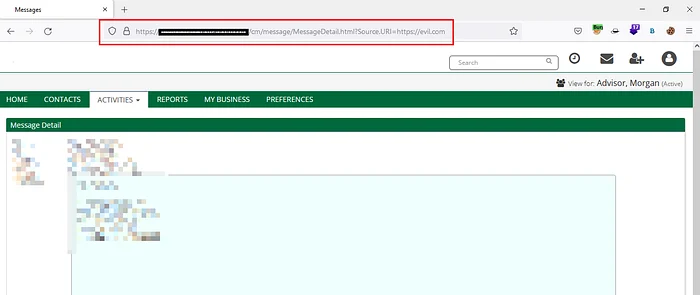
After injecting the payload, the researcher checked the application's source code, expecting to see himself redirected to the attacker domain.
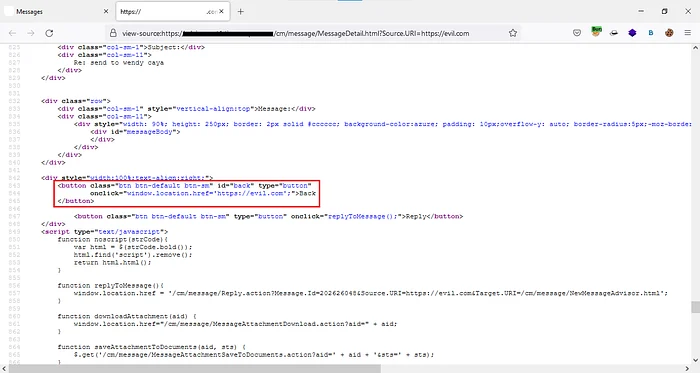
Step 2: observe where the payload lands
Instead of an immediate redirect, the payload appeared to have been injected into the page's back button. Returning to the application and pressing the back button took him to evil.com.
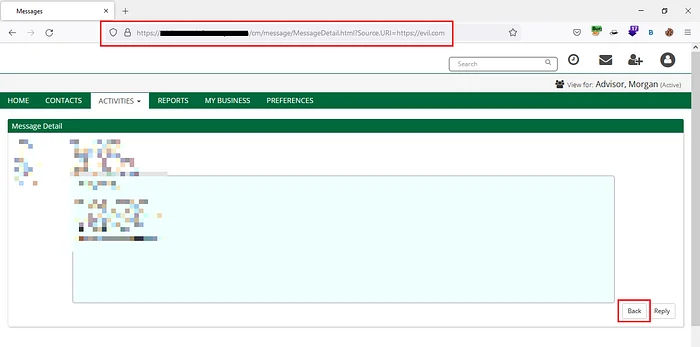
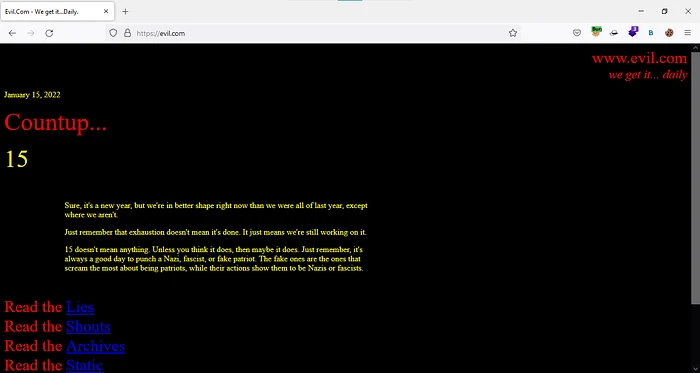
The report captions this result as open redirection: the payload appeared to have been injected into the page's back button, and pressing it took him to evil.com.
Step 3: escalate to DOM XSS
With a URL-controlled value reaching a navigation sink, the researcher immediately considered escalating the open redirection to cross-site scripting.
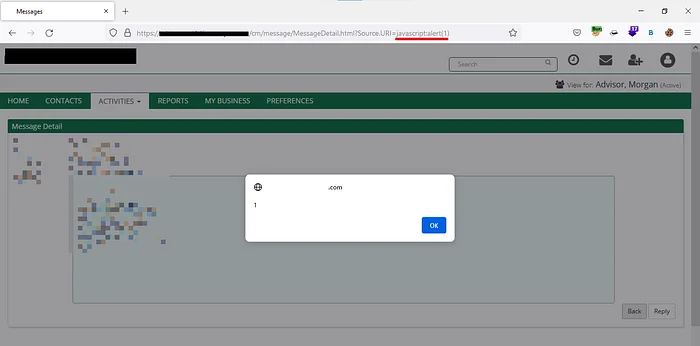
He states that he was able to achieve DOM XSS using a simple payload, but the report does not reproduce that payload, the exact URL, or the response. The report does not describe the escalation payload or how it worked.
Root cause
The application takes a value from the URL, here the Source.URI= parameter, and writes it into the page where it is used as a navigation target for the back button. The value from the URL ends up used as a navigation target for the back button, which the researcher turned into an open redirect and then escalated to DOM XSS.
Impact
An attacker who can get a victim to open a crafted URL can control where the application's back button sends the victim, which is an open redirection. With the escalation the researcher achieved, the same crafted URL can execute script in the context of the application, giving DOM XSS.
Fix
The behaviour it describes points to validating the Source.URI= value before it is used as a navigation target: restricting it to expected destinations, rejecting unexpected schemes such as javascript:, and avoiding writing URL-controlled values into navigation sinks without checks.
Variants to test
- Parameters whose names suggest a destination, such as
Source.URI,redirect,return,nextorurl. A positive result is the browser navigating to an external domain you supplied. - The same parameters with a
javascript:scheme. A positive result is script execution in the application's origin, for example an alert box. - Values that are reflected into the page and later used by a button or link, as with the back button here. A positive result is the stored value being used as a navigation target when the control is activated.
- Fragment-based sinks of the kind shown in the article's example, where the value after the hash is passed to
window.location. A positive result isjavascript:alert(1)after the hash executing.
What happened, in plain words
A security researcher was looking around a website (the report calls it target.com and hides its real name) to see what it could do. He found a link that contained a parameter called Source.URI=. A parameter is the part of a web address after a question mark that carries a value, like the q in a search URL that holds what you typed. The name Source.URI= suggested to him that the value was meant to be a web address (a URI is just a way of naming a resource, usually a URL, the address you type in a browser).
His first idea was that the site might let him put any address there and then send the visitor to it. That trick is called open redirection: the site takes an address from the visitor and forwards the browser to it without checking whether the address belongs to the site. So he put https://evil.com (used as a stand-in for an attacker's site) into the parameter and watched what happened.
Instead of redirecting straight away, the site wrote his value into the page, specifically into the page's back button. When he pressed that back button, the browser went to evil.com. That confirmed the open redirection.
He then asked a bigger question: if the site puts my text into a button that navigates somewhere, can I make it run code instead of navigating? The answer was yes. He says he achieved DOM XSS with a simple payload. DOM XSS means a script that runs in the visitor's browser, in the context of the vulnerable site, because the site took a value from the address bar and used it in a dangerous way. The report does not show the exact payload or URL he used for that final step.
This article walks through the same story for someone who has never done security testing: what each term means, why each step was taken, and what the screenshots show.
The idea behind DOM XSS, explained from zero
A web page is a document that your browser builds from HTML (the structure), CSS (the look) and JavaScript (the behaviour). JavaScript is the programming language that runs inside your browser and can change the page, read the address bar, and send the browser to another page.
When a page runs JavaScript, the browser gives that script a model of the page called the DOM, short for Document Object Model. Think of the DOM as a live map of the page: every heading, button and link is an object on the map, and the script can read and change them.
DOM XSS happens when a script takes a value from somewhere the visitor can control (called a source) and passes it into a place where it gets treated as code or as a destination (called a sink) without proper checks. A useful comparison: a source is like a stranger handing you a note, and a sink is like a machine that reads the note out loud. If the machine reads any note as an instruction, the stranger can make it do things.
The author gives a tiny example page to make this concrete:
<html> <head> <title>DOM XSS Example</title> </head> <body> <script> var x = document.location.hash.substr(1); window.location=x; </script></body></html>
Line by line, in plain words:
<html> ... </html>wraps the whole page.<head>and<title>give the page a title that appears in the browser tab.<body>is the visible part of the page.<script>starts a block of JavaScript that the browser will run.var x = document.location.hash.substr(1);reads the part of the address after the#symbol (the hash) and stores it in a variable calledx. The.substr(1)drops the first character, which is the#itself, soxholds only what comes after it.window.location=x;tells the browser to navigate to whatever is inx. This is the sink: the value from the address bar is used as a destination.</script></body></html>closes the script, the body and the page.
So if the address ends in #javascript:alert(1), the variable x becomes javascript:alert(1), and the browser is told to go there. A javascript: address is not a normal web address: it tells the browser to run the text after the colon as JavaScript. The result is that alert(1) runs, which pops up a small dialog box with the number 1. That pop-up is the standard harmless proof that script execution is possible.
The author's stated exploit for this example is:
http://www.victim.com/domxss.html#javascript:alert(1)
This is a made-up address for a made-up site (victim.com), used only to show the pattern. The real finding later in the article follows the same pattern: a value taken from the address bar and handed to something that navigates.
Before you start
The report does not describe any accounts, roles, tools or software versions. The only thing it says about preparation is that the researcher had access to the application and was going through its features and how they are used. The target is called target.com throughout, with the real name hidden.
Finding it
Step by step, as the report tells it:
- The researcher did recon on the target. Recon (short for reconnaissance) means looking around a site to map what it offers before trying anything: pages, links, forms, features. He says this produced nothing interesting.
- Because the broad look found nothing, he changed approach and tested the application's internal functionality, examining all of its features and how they are used. In everyday terms: instead of scanning the outside of the building, he walked through every room and tried every door handle.
- During that review he came across an interesting URL containing the
Source.URI=parameter.
Seeing a parameter whose name suggested it carried a URI, his first thought was open redirection. That is a reasonable first guess: if a site lets you supply a destination, the natural test is to supply a destination of your own and see whether the browser goes there.
Testing it
Step 1: try an open redirection
He set the parameter to the attacker domain:
This is not a complete URL, just the parameter and its value as they would appear in the address. Source.URI is the parameter name, = separates the name from the value, and https://evil.com is the value. evil.com is used as a stand-in for an attacker's site: if the browser ends up there, the site is willing to send visitors anywhere.
The screenshot shows the URL with the parameter set to https://evil.com.
After injecting the payload, he checked the application's source code, expecting to see himself redirected to the attacker domain. Viewing the source code means asking the browser to show the raw HTML and JavaScript the server sent, rather than the rendered page. Testers do this because the visible page can hide what the script is actually doing with your input.
The screenshot shows the application's source code after the payload was injected.
Step 2: see where the value ended up
There was no immediate redirect. Instead, the payload appeared to have been injected into the page's back button. Returning to the application and pressing the back button took him to evil.com.
The second of these screenshots is captioned Open Redirection.
What this means in plain words: the payload appeared to have been injected into the page's back button, and pressing it sent him to evil.com. The redirection is real, but it is delayed until the visitor presses that button. A comparison: a normal redirect is a door that swings open as soon as you arrive; this one is a door that only opens when you push it.
Step 3: turn the redirection into script execution
With a value from the URL reaching something that navigates, the researcher immediately considered escalating the open redirection to cross-site scripting. The reasoning is the same as in the example at the top: if the destination is not checked, then a javascript: destination may be accepted, and a javascript: destination runs code instead of travelling to a page.
He states that he was able to achieve DOM XSS using a simple payload. The report does not reproduce that payload, the exact URL, or the response, so there is nothing more specific to show here. What can be said is that the mechanism is the one already described: a value taken from the URL and passed to a navigation sink, where a javascript: scheme executes script instead of navigating.
Why it works
The application takes a value from the URL, here the Source.URI= parameter, and the payload appeared in the page's back button, which then navigated to evil.com. Two consequences follow:
- An attacker can supply any external address, which turns the back button into an open redirect.
The description above follows the behaviour the researcher observed.
What an attacker could do with it
Someone who can get a victim to open a crafted link can control where the application's back button sends that victim. That is the open redirection. With the escalation the researcher achieved, the same crafted link can run script in the context of the application, which is the DOM XSS. Running script in the application's context matters because the browser treats that script as coming from the site itself, so it can do what the site's own code can do.
How it should be fixed
The behaviour it describes points to checking the Source.URI= value before it is used as a destination: restrict it to expected destinations, reject unexpected schemes such as javascript:, and avoid writing URL-controlled values into navigation sinks without checks.
Other places to look for the same pattern
- Parameters whose names suggest a destination, such as
Source.URI,redirect,return,nextorurl. A positive result is the browser navigating to an external domain you supplied. - The same parameters with a
javascript:scheme. A positive result is script execution in the application's origin, for example an alert box. - Values that are reflected into the page and later used by a button or link, as with the back button here. A positive result is the stored value being used as a destination when the control is activated.
- Fragment-based sinks of the kind shown in the article's example, where the value after the hash is passed to
window.location. A positive result isjavascript:alert(1)after the hash executing.
Glossary
- Parameter: the name=value pair in a web address after the question mark, used to pass information to the site.
- URI / URL: a way of naming a resource; a URL is the address you type in a browser, such as
https://example.com/page. - Open redirection: a flaw where a site takes a destination from the visitor and sends the browser there without checking that the destination is allowed.
- Payload: the value a tester supplies to try to trigger a flaw, here
https://evil.comor ajavascript:value. - DOM: Document Object Model, the browser's live map of the page that JavaScript can read and change.
- DOM XSS: script execution in the browser caused by a page taking a value the visitor controls and using it in a dangerous place without proper checks.
- Source: in DOM XSS, the place the value comes from, such as the address bar.
- Sink: in DOM XSS, the place the value is used, such as a navigation target, where it can be treated as code or as a destination.
- JavaScript: the programming language that runs in the browser and makes pages interactive.
- HTML: the markup language that gives a page its structure.
- Script: a block of JavaScript that the browser runs.
- Variable: a named box in a script that holds a value, such as
x. - Hash / fragment: the part of a web address after the
#symbol. window.location: the browser object that holds the current address and navigates when you assign a new value to it.javascript:scheme: an address that starts withjavascript:and tells the browser to run the text after the colon as code instead of navigating.alert(1): a JavaScript function that shows a small dialog box; used as harmless proof that script ran.- Scheme: the first part of an address before the colon, such as
https:orjavascript:. - Origin: the combination of scheme, host and port that the browser uses to decide which site a script belongs to.
- Recon: reconnaissance, looking around a site to map its pages and features before testing.
- Source code: the raw HTML and JavaScript a server sends, which a browser can display instead of the rendered page.
- Sanitisation: cleaning or checking a value so it cannot be misused.
- Escalation: turning a lower-impact flaw into a higher-impact one, as here from open redirection to DOM XSS.
- Redirect: sending the browser from one address to another.
- Domain: the name of a site, such as
evil.com.



