A swag for a Open Redirect — Google Dork — Bug Bounty
A login page accepted a full URL in its target parameter and redirected the user to that external domain after a form action. An attacker could craft a link on the real domain that sends victims to a phishing site.

Hello Folks 👋,I have found a good open redirect with my param scanner. I will tell you here how I found it and what kind of swag I got.
The full write-up lives on its author's site
It belongs to its author, so we link to it rather than copy it. The other two tabs are our own rewrites, checked against it.
Context
The target was a private bug bounty programme the researcher had been invited to. The feature involved is a login page reached through a Google search result. That page took a target parameter whose value was a full URL, and the application used it to decide where to send the user after the login form was submitted or cancelled. In the normal case the parameter pointed at another subdomain of the same site, so the redirect stayed inside the application.
Setup
The researcher worked with Burp, recording proxy history with all redirects and links so that earlier traffic could be searched later. The author's custom parameter scanner, PSFuzz, was involved in the search; the author notes it was being extended to scan for open redirects. Google Dorks were used to locate candidate pages. No accounts, roles or specific versions are described.
Finding it
The starting point was a Google Dork aimed at pages that carry a target parameter:
site:*redacted.com inurl:target
One result was the login page of the site. The researcher routinely tests login pages, and here the target parameter held a whole URL, which invited testing. The URL looked like this:
https://my.redacted.com/forgetUsername?target=https:%2F%2Fwww.redacted.com
Even in this legitimate-looking form the link already left the my subdomain and landed on the www subdomain, which showed that the parameter really did control the destination rather than being restricted to a path on the same host.
Exploitation
Step 1: replace the target with an external domain
The value of target was swapped for a domain the researcher controlled the choice of, here HackerOne's public site:
https://my.redacted.com/forgetUsername?target=https:%2F%2Fwww.hackerone.com
The value is URL-encoded (https:%2F%2F). The parameter is a full URL, and an external domain was accepted.
Step 2: submit or cancel the form
On the login page, clicking submit or cancel triggers the redirect. The researcher notes that either action is enough; no valid credentials are needed.
Step 3: observe the redirect
After the form action, the browser is sent to the injected domain. The payload used was:
target=https:%2F%2Fwww.hackerone.com
and the result was a redirect to www.hackerone.com.
Root cause
The application takes user-controllable data from the target parameter and uses it directly as a redirection target. The report describes this as the application unsafely injecting user-controllable data into a redirection target. The destination was not restricted to the application's own domains, since an external URL was accepted. The parameter was used to move between the my and www subdomains, and an external domain was also accepted.
Impact
An attacker can construct a URL on the real application domain that redirects to any external domain. Because the link starts on the genuine application URL, with the correct domain and a valid SSL certificate, it lends credibility to phishing attacks: many users would not notice the subsequent redirect to a different domain even if they checked those characteristics. The report frames this as facilitation of phishing against application users. It also notes that an open redirect does not always equal a security breach, since some are intentional, which makes a bounty harder to obtain.
Fix
The report does not state what change was made. The timeline shows the issue was resolved on 20 May 2021, two days after it was accepted, but the fix itself is not described. A fix would need to constrain the target value to the application's own hosts, for example by validating it against an allowlist of permitted subdomains rather than accepting arbitrary URLs.
Timeline
| Event | Date |
|---|---|
| Submitted | 18 May, 2021 |
| Accepted | 18 May, 2021 |
| Triaged | 19 May, 2021 |
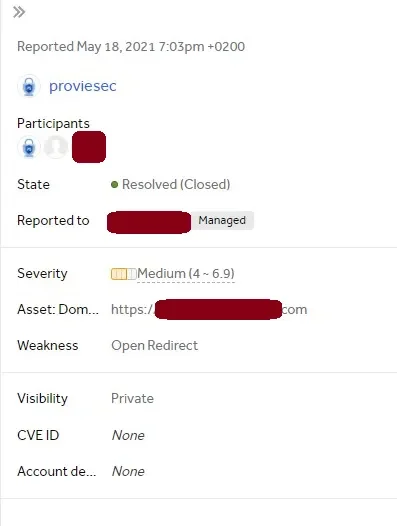
| Resolved | 20 May, 2021 |
| Closed and rewarded with swag | 03 Jun, 2021 |
After 6 months the researcher received a package: an item of clothing, a bug bounty coin and a hiking utensil, with a total value of 60 dollars.
Variants to test
- Run the same dork pattern against other scopes, for example
site:*example.com inurl:target, and look for parameters whose values are full URLs. A positive result is a parameter that already points at a different host of the same organisation. - Replace the value with an external domain, keeping the encoding style the application uses (
https:%2F%2Fhere). A positive result is a redirect to that external domain after submitting or cancelling the form. - Try the redirect trigger without valid credentials, since submit or cancel was enough here. A positive result is the redirect happening for an unauthenticated user.
- Check other parameter names that commonly carry destinations, such as
redirect,next,returnorurl, on login and logout pages. A positive result is the same off-domain redirect. - Use the payload lists and dork collections the author links to, including the open redirect dorks and payload repositories, to widen coverage. A positive result is any parameter that accepts an external URL and redirects to it.
The author closes with a video discussing when an open redirect is intentional and therefore harder to reward.
What happened, in plain words
A security researcher was invited to a private bug bounty programme. A bug bounty programme is a scheme run by a company that pays people, in money or in gifts, for reporting security problems in its websites before criminals find them. "Private" means you can only take part if you are invited.
The researcher found a login page through a Google search. That page had a setting in its web address, called a target parameter, that told the site where to send you after you clicked submit or cancel. Normally it sent you to another part of the same company's site. The researcher changed that setting to point at a completely different website, and the site obediently sent the browser there. This kind of flaw is called an open redirect.
Because the link still started with the company's real web address, it looked trustworthy. That is what makes open redirects useful to criminals: they can build a link that looks like it belongs to a bank or a shop, and the victim ends up on a fake page. The company accepted the report, and the issue was marked resolved within a few days; about six months later a parcel of gifts, known in the community as swag, arrived.
The background you need first
Before the steps make sense, here are the few ideas the whole story rests on.
A URL and its parts. A URL is the address you type in a browser, for example https://my.redacted.com/forgetUsername?target=https:%2F%2Fwww.redacted.com. Reading it left to right:
https://is the protocol, the language the browser and the server use to talk. Thesmeans the traffic is encrypted.my.redacted.comis the host, the name of the server. Themypart is a subdomain, a smaller section of the mainredacted.comdomain. Companies often split their sites this way:my.for the customer area,www.for the public site, and so on./forgetUsernameis the path, which page on that server you want.?target=...is the query string. Everything after the?is a list of parameters, little named values the page receives. Here the parameter is calledtargetand its value is whatever comes after the=.
A parameter. Think of a parameter as a blank field on a form that the page fills in from the address. A shop might use ?colour=red to show red items. The page trusts whatever is written there, and that trust is where bugs live.
URL encoding. Some characters are not allowed raw inside a URL, so they are written as a percent sign plus two characters. %2F is the encoded form of the slash /. So https:%2F%2Fwww.hackerone.com is just https://www.hackerone.com written in a form the URL can carry safely. It is the same address, spelled differently.
A redirect. A redirect is the server telling your browser "not here, go there instead" and handing it a new address. You have seen it when a short link opens a longer page, or when a site sends you to a login screen. It is a normal, useful mechanism.
An open redirect. An open redirect is when the site lets the visitor choose that new address, with no restriction on where it points. If the site only ever redirects to its own pages, it is closed and safe. If it will redirect anywhere on the internet, it is open, and anyone can aim it at a page they control.
A subdomain. As above, a named section of a domain, like my. or www.. The distinction matters here because the legitimate use of the parameter moved the visitor between two subdomains of the same company.
Burp. Burp Suite is a tool that sits between your browser and the websites you visit and records every request and response. A request is what your browser asks the server for; a response is what the server sends back. Recording them means you can search your own past traffic later instead of trying to remember it.
A scanner. A scanner is a program that automatically tries many addresses and settings and flags anything that looks wrong. The researcher's own scanner is called PSFuzz, and the report says it was being extended to look for open redirects.
A Google Dork. A dork is a search query built with special operators to find pages with particular features rather than particular words. site: limits results to one domain, and inurl: looks for text inside the address itself. Dorks are a way of asking Google to hand you a list of candidate pages to test.
A bug bounty programme and swag. As described above: a company invites researchers to test its systems and rewards good reports. Swag is the informal name for the merchandise some companies send instead of, or alongside, money.
Setting up
The researcher had been invited to a new private bug bounty programme and decided to start with the easy targets. Burp was running, recording all traffic including redirects and links, so that anything interesting could be found again by searching. PSFuzz, the custom parameter scanner, was used to help find the issue, and the author notes it was being modified to scan for open redirects too. Google Dorks were used to locate candidate pages. The report does not describe any accounts, user roles or software versions.
Finding the page
The starting point was a Google Dork aimed at pages that carry a target parameter:
site:*redacted.com inurl:target
Line by line:
site:*redacted.comtells Google to return only pages on that domain. The*is a wildcard standing in for the subdomain part, so any subdomain of the company qualifies.inurl:targettells Google to return only pages whose address contains the wordtarget. That is the parameter name the researcher was hunting for.
Put together, the query asks: "show me every page on this company's sites whose address mentions target." The idea is that a parameter named target is likely to hold a destination, and a destination is exactly what an open redirect needs.
One result was the login page of the site. The researcher routinely tests login pages, and here the target parameter held a whole URL, which invited testing. The URL looked like this:
https://my.redacted.com/forgetUsername?target=https:%2F%2Fwww.redacted.com
Line by line:
https://my.redacted.comis the host: themysubdomain of the company's site./forgetUsernameis the page, a login-related page.?target=starts the query string and names the parameter.https:%2F%2Fwww.redacted.comis the value, which is a full URL, written with encoded slashes. Decoded, it ishttps://www.redacted.com.
Why this mattered: even in this perfectly normal-looking form, the link already left the my subdomain and landed on the www subdomain. That proved the parameter really did control the destination, rather than being limited to a path on the same host. If the site had only ever redirected within my.redacted.com, there would have been nothing to exploit. Because it was happy to cross to www.redacted.com, the next question was whether it would cross to anywhere at all.
Exploiting it
Step 1: replace the target with an external domain
The value of target was swapped for a domain of the researcher's choosing, here HackerOne's public site:
https://my.redacted.com/forgetUsername?target=https:%2F%2Fwww.hackerone.com
Line by line:
- Everything up to
?target=is unchanged: same host, same page, same parameter name. - The value is now
https:%2F%2Fwww.hackerone.com, which decodes tohttps://www.hackerone.com, a site that has nothing to do with the company. - The encoded slashes are kept as in the original URL.
The reason for this step is simple: if the site accepts this value and redirects to it, the redirect is open. If the site rejects it or ignores it, the redirect is closed. The researcher is testing the boundary of what the parameter will accept.
Step 2: submit or cancel the form
On the login page, clicking submit or cancel triggers the redirect. The researcher notes that either action is enough, and that no valid credentials are needed. Credentials are a username and password; the point is that you do not have to log in, or even have an account, to make the redirect happen.
Step 3: observe the redirect
After the form action, the browser is sent to the injected domain. The payload used was:
target=https:%2F%2Fwww.hackerone.com
Line by line:
target=is the name of the parameter the page reads.https:%2F%2Fwww.hackerone.comis the value, a full external URL with encoded slashes.
and the result was a redirect to www.hackerone.com.
Why it works
The application takes data the visitor controls, from the target parameter, and uses it directly as the place to redirect to. The report describes this as the application unsafely injecting user-controllable data into a redirection target. The destination was not restricted to the company's own domains, since an external URL was accepted. The parameter was used to move between the my and www subdomains, and an external domain was also accepted.
A useful comparison: it is like a receptionist who will fetch any visitor's coat from the cloakroom, but who also accepts a note saying "my coat is in a stranger's car outside" and walks out to fetch it. The job is legitimate; the missing check on the note is the flaw.
What an attacker could do with it
An attacker can build a URL on the real application domain that redirects to any external domain. Because the link starts with the genuine application address, with the correct domain and a valid SSL certificate, it lends credibility to phishing attacks. Phishing is the trick of luring someone to a fake page that looks real, usually to steal a password. Many users would not notice the subsequent redirect to a different domain even if they checked the domain and the padlock. The report frames the impact as making phishing against the application's users easier.
It also notes that an open redirect does not always equal a security breach, since some are intentional, which makes a bounty harder to obtain.
The fix
The report does not state what change was made. The timeline shows the issue was resolved on 20 May 2021, two days after it was accepted, but the fix itself is not described. A fix would need to constrain the target value to the company's own hosts, for example by checking it against a list of permitted subdomains rather than accepting arbitrary URLs.
Timeline
| Event | Date |
|---|---|
| Submitted | 18 May, 2021 |
| Accepted | 18 May, 2021 |
| Triaged | 19 May, 2021 |
| Resolved | 20 May, 2021 |
| Closed and rewarded with swag | 03 Jun, 2021 |
"Submitted" means the researcher sent the report. "Accepted" means the programme agreed to look at it. "Triaged" means it was sorted and confirmed as a real issue. "Resolved" means the company fixed it. "Closed and rewarded" means the report was finished and the reward was granted.
After 6 months the researcher received a package: an item of clothing, a bug bounty coin and a hiking utensil, with a total value of 60 dollars. The researcher notes the parcel was beautifully packaged and that the company's logo was all over it, which is why the report describes the contents rather than showing them.
How to look for the same thing yourself
- Run the same dork pattern against other scopes, for example
site:*example.com inurl:target, and look for parameters whose values are full URLs. A positive result is a parameter that already points at a different host of the same organisation. The reasoning: if it already crosses from one subdomain to another, it may cross to any domain. - Replace the value with an external domain, keeping the encoding style the application uses (
https:%2F%2Fhere). A positive result is a redirect to that external domain after submitting or cancelling the form. The reasoning: this is the actual test of whether the redirect is open. - Try the redirect trigger without valid credentials, since submit or cancel was enough here. A positive result is the redirect happening for an unauthenticated user. The reasoning: an attacker has no account, so the bug must work without one.
- Check other parameter names that commonly carry destinations, such as
redirect,next,returnorurl, on login and logout pages. A positive result is the same off-domain redirect. The reasoning:targetis only one of several names developers give to "where to go next". - Use the payload lists and dork collections the author links to, including the open redirect dorks and payload repositories, to widen coverage. A positive result is any parameter that accepts an external URL and redirects to it. The reasoning: other people have already collected the common patterns, so you do not have to invent them.
The author closes with a video discussing when an open redirect is intentional and therefore harder to reward.
Glossary
- Bug bounty programme: a scheme where a company rewards people for reporting security problems in its systems.
- Private programme: a bug bounty programme you can only join if invited.
- Swag: merchandise a company sends as a reward, such as clothing or coins.
- URL: the address of a page or resource on the web.
- Protocol: the agreed language two computers use to talk, such as
https. - Host: the server name in a URL, such as
my.redacted.com. - Domain: the main name of a site, such as
redacted.com. - Subdomain: a named section of a domain, such as
my.orwww.. - Path: the part of a URL that names the page, such as
/forgetUsername. - Query string: the part of a URL after the
?, carrying named values. - Parameter: a named value passed to a page in the query string, such as
target. - URL encoding: writing special characters as a percent sign plus two characters, such as
%2Ffor/. - Redirect: the server telling the browser to go to a different address.
- Open redirect: a redirect whose destination the visitor can choose, with no restriction to the site's own pages.
- Request: what a browser asks a server for.
- Response: what a server sends back.
- Burp Suite: a tool that sits between browser and server and records all traffic.
- Scanner: a program that automatically tries many addresses and settings to find weaknesses.
- PSFuzz: the researcher's own parameter scanner.
- Google Dork: a search query using special operators to find pages with particular features.
site:: a dork operator limiting results to one domain.inurl:: a dork operator looking for text inside the address.- Payload: the crafted value an attacker sends to trigger a bug.
- Credentials: a username and password used to log in.
- Unauthenticated: not logged in, with no account or session.
- Phishing: tricking someone into visiting a fake page, usually to steal a password.
- SSL certificate: the proof a site presents that its encrypted connection is genuine, shown as the padlock in a browser.
- Allowlist: a list of things that are explicitly permitted, with everything else refused.
- Triaged: sorted and confirmed as a real issue by the programme.
- Resolved: fixed by the company.