My First Reflected XSS Bug Bounty — Google Dork — $xxx

Today I will share a Reflected XSS vulnerability that was reported by me, to a security team as part of their bug bounty program at Hackerone. I became aware of this XSS flaw through a good Google Dork of mine.
The full write-up lives on its author's site
It belongs to its author, so we link to it rather than copy it. The other two tabs are our own rewrites, checked against it.
Context
This is a write-up of a reflected cross-site scripting (XSS) finding that the author reported to a security team through their HackerOne bug bounty program. The affected asset is described only as redacted.com; the report does not name the company or the program. The vulnerable feature is a commercial quiz page, thanks.html under /lp/ecommerce/commercial-quiz/. That page takes the answers and the final score as query string parameters.
The author frames the discovery around Google Dorking: using advanced Google search queries to surface pages and parameters that are not easy to find by browsing. The dork in this case was aimed at quiz pages that carry query string parameters.
Setup
No accounts, roles or special access were needed. The work was done from the public internet against the public quiz page, using Google search to locate the target and a browser to test the parameter. The author lists the following tools and resources for XSS hunting in general:
- XSStrike: https://github.com/s0md3v/XSStrike
- dalfox: https://github.com/hahwul/dalfox
- ezXSS: https://github.com/ssl/ezXSS
- An XSS payload list: https://github.com/Proviesec/xss-payload-list/
- A dorking site that indexes XSS tools: https://provie.github.io/Provies-Bug-Bounty-Dorking-Site-PBBDS/#XSS
For dorking itself the author points to two collections: their own list at https://github.com/Proviesec/google-dorks and the Google Hacking Database at https://www.exploit-db.com/google-hacking-database. The report shows one example dork string, without saying which target it was used against:
intitle:"index of" intext:"Index of /" +.htaccessfiletype:logsite:medium.com
Finding it
The author searched Google with a dork restricted to the target domain and to quiz pages that contain an ampersand, that is, pages with more than one query parameter:
Only two results came back. The author took the first result and looked at it more closely.
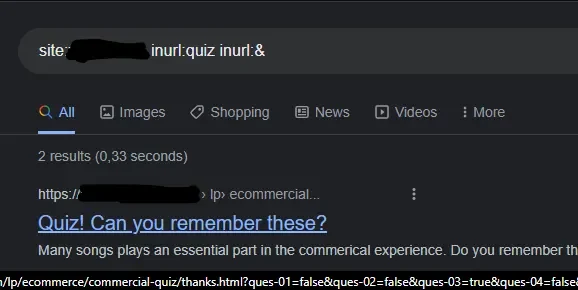
The screenshot shows the Google search results for that dork, the two hits that motivated the next step.
Exploitation
Step 1: load the quiz result page
The first result was the quiz thank-you page, which takes each answer and the score as parameters:
https://www.redacted.com/lp/ecommerce/commercial-quiz/thanks.html?ques-01=false&ques-02=false&ques-03=true&ques-04=false&ques-05=false&ques-06=true&ques-07=false&ques-08=false&ques-09=false&ques-10=false&score=99
The ques-01 to ques-10 parameters carry the individual answers as booleans, and score carries the final result. The page takes these values from the query string, which is worth testing for reflection.
Step 2: replace the score with a payload
The author changed the score parameter from 99 to the following URL-encoded value:
99testme%3CIMG%20%22%22%22%3E%3CSCRIPT%3Ealert(document.cookie)%3C/SCRIPT%3E%22\%3E
Decoded, this is 99testme<IMG """><SCRIPT>alert(document.cookie)</SCRIPT>">. The value is 99testme followed by an IMG tag, a SCRIPT block calling alert(document.cookie), and trailing quote and backslash characters. The trailing quote and backslash attempt to close and neutralise the surrounding markup.
Step 3: observe execution
When the modified URL was loaded, an alert box appeared showing the value of document.cookie. That confirms the injected script ran in the page's origin rather than being rendered as inert text.
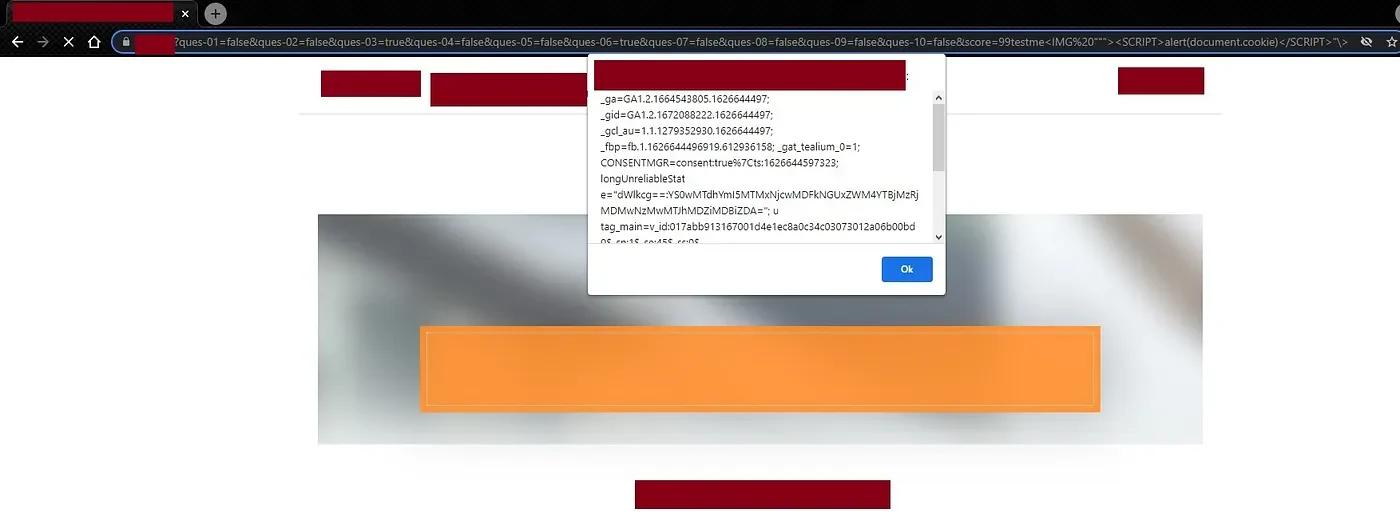
The screenshot shows the alert box with the cookie value, the proof that the payload executed.
Step 4: report
The author then spent two days trying to combine the XSS with other bugs. That chaining did not lead anywhere, so only the XSS itself was reported, and it earned a triple-digit bounty. The report does not state the exact amount.
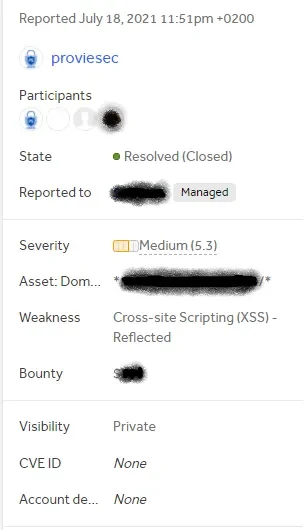
The screenshot shows the short HackerOne report as it was submitted.
Timeline
| Event | Date |
|---|---|
| Submitted | 18 Jul, 2021 |
| Accepted | 20 Jul, 2021 |
| Triaged | 23 Jul, 2021 |
| Resolved | 25 Jul, 2021 |
| Closed | 08 Nov, 2021 |
Root cause
The score parameter is reflected into the page, and the supplied markup was parsed and executed.
Impact
An attacker who can get a victim to open a crafted quiz URL runs JavaScript in the origin of redacted.com. In the proof of concept the script read document.cookie. The report does not demonstrate a specific account takeover or name the data that could be reached; the impact is stated at the level of bypassing the same-origin policy and being able to steal private information from victims. Exploitation requires the victim to follow the crafted link.
Fix
The general remedy for this class is to encode the score and ques-* values for the context in which they are emitted, so that characters such as <, > and quotes are rendered as text, and to avoid inserting request data into HTML, script or attribute contexts without context-appropriate escaping.
Variants to test
The author's summary advice is to research before firing payloads: see whether inputs are reflected, and check each parameter before applying payloads. Concretely, on other targets:
- Run dorks that combine a site restriction with a parameter hint, for example
site:target.com inurl:quiz inurl:&, and inspect every result rather than only the first. A positive result is a page whose query parameters are echoed into the response. - On any page that reflects a value, test whether the reflection is HTML-encoded. A positive result is your markup appearing unencoded in the response body.
- Try the same context-breaking approach shown here, a plausible prefix followed by a tag that closes the surrounding construct and a script that calls
alert(document.cookie). A positive result is the alert firing in the target origin. - A positive result is execution from a parameter other than the one already known to be vulnerable.
- Where the XSS works, look for ways to chain it with other issues, as the author attempted. A positive result would be the XSS enabling an action that a standalone alert does not demonstrate.
What happened, in plain words
A security researcher found a bug in a website that let him run his own small program inside other people's browsers when they visited a specially crafted link. This kind of bug is called reflected cross-site scripting, or XSS for short. He found the website using a clever Google search, tested one of the page's address parameters with a short piece of code, and saw a pop-up box appear on screen. That pop-up was the proof the bug was real. He reported it through the company's bug bounty programme on HackerOne, a platform where companies pay people for finding security problems, and he received a triple-digit payment. The report does not state the exact amount.
The affected site is only ever called redacted.com in the write-up. The company and the programme are not named. The vulnerable feature is a commercial quiz page, thanks.html, which takes ten answer parameters and a score. That page takes the answers and the score from the web address itself. Printing something from the address back onto the page is exactly the situation worth testing, because if the page prints it without cleaning it up, the visitor's browser will treat it as part of the page rather than as plain text.
What is Reflected XSS?
Every web page you look at is built from instructions called HTML, a language that tells the browser what to display and how. HTML uses tags, written between angle brackets like <b> for bold or <img> for an image. A browser reads these tags and turns them into the page you see. JavaScript is a programming language that browsers also understand; it lets a page do things, such as react to a click or read information stored in the browser.
Cross-site scripting is a bug where a website lets an attacker slip their own HTML or JavaScript into the page. When a victim opens the infected page, the browser cannot tell the attacker's code apart from the website's own code, so it runs it. The attacker has then bypassed the browser's same-origin policy, a rule that stops one website from reading another website's data, and can steal private information from the victim.
The word reflected means the malicious code travels in the link itself: it goes from the attacker's link, to the website, and straight back out into the page the victim sees. Nothing is stored on the server. The victim has to click the crafted link for the attack to work.
What are Google Dorks
Google lets you add special words to a search to narrow it down in ways the normal search box does not offer. These special search strings are called Google Dorks. Google Dorking is the practice of using them to find information that is not easy to reach by simply browsing a website, including pages and parameters that hint at vulnerabilities.
Think of it like a library catalogue that can search by shelf position and publication year, not just by title. You are not reading every book; you are asking the catalogue a precise question to find the few books that match.
Google Dorking is actually quite simple. You just need to know some basics about dorks that can give you the information you need. The write-up shows one example dork string, without saying which target it was used against:
intitle:"index of" intext:"Index of /" +.htaccessfiletype:logsite:medium.com
Line by line, in plain words:
intitle:"index of"asks Google for pages whose title contains the phrase "index of". Many web servers show a plain file listing with that title when a folder has no home page.intext:"Index of /"asks for pages whose visible text contains "Index of /", the heading those file listings usually show.+.htaccessasks for pages that mention.htaccess, a small configuration file that web servers use to control access and behaviour.filetype:logasks for files that are log files, the running records servers keep of what happened.site:medium.comrestricts the whole search to one website, in this example medium.com.
Here can you find more of them: https://github.com/Proviesec/google-dorks
And the Google Hacking Database contains a lot of google dorks that can find vulnerabilities or signs of a CVE: https://www.exploit-db.com/google-hacking-database
A CVE is a public catalogue number given to a known security flaw, so people can refer to the same flaw unambiguously.
How I found the Bug:
- I have search on google with this dork:
site:redacted.com inurl:quiz inurl:& - Then I found only 2 results in the google search and took a deeper look at the first result.
Why this dork? Each part does a job:
site:redacted.comlimits the results to the target website only, so you are not searching the whole internet.inurl:quizasks for pages whose web address contains the word "quiz", which points at the quiz feature.inurl:&asks for addresses that contain an ampersand. In a web address, the ampersand separates one parameter from the next, so a page with an ampersand in its address is a page that takes more than one piece of information from the address. Those are the pages most worth testing, because each parameter is a possible place where input comes back out.
A parameter is a named value attached to the end of a web address, after a question mark. In example.com/page?colour=blue, the parameter is colour and its value is blue. Parameters are how a page receives information from whoever opened the link.
The screenshot shows the Google search results for that dork, the two hits that motivated the next step.
Next steps:
- Go to https://www.redacted.com/lp/ecommerce/commercial-quiz/thanks.html?ques-01=false&ques-02=false&ques-03=true&ques-04=false&ques-05=false&ques-06=true&ques-07=false&ques-08=false&ques-09=false&ques-10=false&score=99
- change the parameter score to
99testme%3CIMG%20%22%22%22%3E%3CSCRIPT%3Ealert(document.cookie)%3C/SCRIPT%3E%22\%3E - An alert box with the value of document.cookie pops.
- Then I tried to combine the bug with other bugs. But after 2 days I only reported the XSS bug and got a triple digit bounty for this.
Let us walk through the first address. It is the quiz thank-you page, the page a visitor lands on after finishing the quiz. Everything after the question mark is the information the page receives:
ques-01=falsethroughques-10=false(with some set totrue) are the ten answers. Each is a true-or-false value, one per question.score=99is the final result shown to the visitor.
The page is designed to display these values back to the visitor, which is exactly the condition worth testing: input that comes from the address and is reflected into the page.
For the second step, the researcher replaced the score value 99 with a longer string. The string looks like nonsense at first glance because many of its characters are written in a coded form. Web addresses cannot safely contain spaces, angle brackets and some other characters, so they are written as a percent sign followed by two characters. This is called URL encoding, and the browser decodes it back to normal characters before the page sees it.
Here is the payload exactly as it was used:
99testme%3CIMG%20%22%22%22%3E%3CSCRIPT%3Ealert(document.cookie)%3C/SCRIPT%3E%22\%3E
Decoded, this is 99testme<IMG """><SCRIPT>alert(document.cookie)</SCRIPT>">. Piece by piece:
99testmeis the start of the value, before the encoded markup.%3Cdecodes to<and%3Edecodes to>, the angle brackets that start and end an HTML tag.IMGis the name of an image tag, followed by quote characters.%3CSCRIPT%3Edecodes to<SCRIPT>, which opens a script block, and%3C/SCRIPT%3Edecodes to</SCRIPT>, which closes it.alert(document.cookie)is the code inside the script.alertmakes the browser show a pop-up box.document.cookieis the browser's way of reading the cookies that belong to the current website.- The value ends with
%22(a double quote) and\%3E(a backslash and a closing angle bracket).
A cookie is a small piece of text that a website asks the browser to store and to send back on every later request to that site. Websites commonly use a cookie to remember that you are logged in. If a script can read that cookie, it may expose private information. That is why alert(document.cookie) is the classic proof: it shows, on screen, exactly the kind of private value an attacker would be after.
When the modified address was loaded, an alert box appeared showing the value of document.cookie. That confirms the injected script ran as part of the page, in the website's own origin, rather than being displayed as harmless text.
The screenshot shows the alert box with the cookie value, the proof that the payload executed.
After that, the researcher spent two days trying to combine the XSS with other bugs. That chaining did not lead anywhere, so only the XSS itself was reported, and it earned a triple-digit bounty.
The screenshot shows the short HackerOne report as it was submitted.
Timeline:
Submitted: 18 Jul, 2021
Accepted: 20 Jul, 2021
Triaged: 23 Jul, 2021
Resolved: 25 Jul, 2021
Closed: 08 Nov, 2021
In bug bounty terms, submitted means the report was sent in, accepted means the programme acknowledged it as worth looking at, triaged means it was confirmed as a genuine security issue and passed to the people who fix it, resolved means the issue was marked as resolved by the programme, and closed means the report was formally finished.
Tools / Reports
How can you find XSS?
Tools:
- My favorite tool, XSStrike: https://github.com/s0md3v/XSStrike
- https://github.com/hahwul/dalfox
- https://github.com/ssl/ezXSS
- XSS Payload-List: https://github.com/Proviesec/xss-payload-list/
- You can also always find new tools on my Github page, including XSS tools. I only include tools which are also accessible via website or mobile: https://provie.github.io/Provies-Bug-Bounty-Dorking-Site-PBBDS/#XSS
These are programs that automate part of the testing: they send candidate payloads to parameters and watch the responses for signs that one of them executed. A payload list is simply a collection of ready-made test strings. Using a tool does not replace thinking about where input goes; it speeds up the checking once you have chosen a target.
Similar reports:
- https://hackerone.com/reports/191810 / 3,000$ / uber.com
- https://hackerone.com/reports/840759 / 3,000$ / New Relic
- https://hackerone.com/reports/176754 / 2,500$ / Twitter
- https://hackerone.com/reports/470206 / 1,500$ / Shopify
These are other publicly disclosed XSS reports, listed so a beginner can read how the same class of bug looks on different companies and what it has been worth.
Summary
Tip: “Old procedures, many reports, big scops” Don’t let this bother you. Try to find more and more parameters and test them all.
Do your research well before testing XSS. Don’t shoot the payloads on every parameter. Think first, then test the parameters. For example, see if the inputs are reflected or not. And check each parameter before using it to apply payloads.
In practice that means: find a page that takes parameters, open it normally, and look at whether the values you typed appear on the page. Only the parameters that come back out are worth sending a payload to. Then test them one at a time, so you know which one is responsible when something happens.
Before I conclude, I would like to recommend a tool that can enhance your security when using Google Dorks, NordVPN. By using this VPN service, you can ensure that your online activities remain encrypted and private. Please use this affiliate link to sign up: https://go.nordvpn.net/aff_c?offer_id=15&aff_id=90078. It doesn’t cost you anything extra but it supports my work.
Here’s my Hackerone profile: https://hackerone.com/proviesec Here’s my Twitter: https://twitter.com/proviesec Here’s my Github: https://github.com/Proviesec
Please feel free to ask me and suggest changes I should consider next time.
Do you need another good article? -> https://infosecwriteups.com/broken-link-hijacking-404-google-play-store-xxx-bounty-96e79a8dfd71
Glossary
- XSS (cross-site scripting): a bug where a website lets an attacker's HTML or JavaScript run inside a victim's browser as if it were the site's own code.
- Reflected XSS: XSS where the malicious code travels in the link and is echoed straight back into the page, with nothing stored on the server.
- HTML: the language of tags that tells a browser what to display on a page.
- Tag: an instruction in HTML written between angle brackets, such as
<img>or<script>. - JavaScript: a programming language that browsers run, used to make pages interactive.
- Same-origin policy: a browser rule that stops one website from reading another website's data.
- Google Dork: a special search string using advanced Google operators to find specific pages or information.
- Google Dorking: the practice of using Google Dorks to surface pages and parameters that are hard to find by browsing.
- CVE: a public catalogue number assigned to a known security flaw.
- Parameter: a named value attached to a web address after a question mark, used to pass information to a page.
- Query string: the part of a web address after the question mark, made up of parameters separated by ampersands.
- Ampersand (
&): the character that separates one parameter from the next in a web address. - URL encoding: writing characters that are unsafe in a web address as a percent sign plus two characters, which the browser decodes before the page sees them.
- Payload: the piece of code an attacker sends to test or exploit a bug.
- Cookie: a small piece of text a website asks the browser to store and send back on later requests, often used to remember that you are logged in.
document.cookie: the browser's way of reading the cookies belonging to the current website from JavaScript.alert(): a browser function that shows a pop-up box, commonly used to prove that injected script ran.- Origin: the combination of scheme, host and port that identifies a website to the browser for security purposes.
- Bug bounty programme: a scheme where a company pays researchers for reporting security problems to it.
- HackerOne: a platform where companies run bug bounty programmes and researchers submit reports.
- Triaged: the stage at which a programme confirms a report as a genuine security issue and passes it to the people who fix it.
- Bounty: the payment a programme gives for a valid report.
- VPN: a service that encrypts your internet traffic and routes it through another location.