A test page, a welcome email, and a changed password
A script injection on an unused test page still ran under the application's origin, so injected script could make same-origin requests to authenticated account actions. The researcher chained an email-address change with a welcome-letter feature that regenerated the password and mailed it to the new address, then logged in with the new password.

medium.com
Published on medium.com
Cybersecurity
The full write-up lives on its author's site
It belongs to its author, so we link to it rather than copy it. The other two tabs are our own rewrites, checked against it.
Context
This write-up concerns a web application whose normal interface did not link to a particular test page. The page was still reachable and still executed supplied script under the application's origin. The vendor later described it as unused and unlinked, and placed it in a limited test or development endpoint.
The account features that matter here are ordinary ones: a signed-in user can change the account's email address, and a welcome-letter action sends a message to the account address. The second action turned out to matter because it regenerated the account password and sent the credentials by email.
The report also covers two claims that did not survive scrutiny: an apparent absence of login throttling, which was withdrawn, and a username-availability check, which the vendor explained as intentional and rate-limited.
Setup
All testing was done on the researcher's own trial account and mailboxes. No other person's account was touched. Test employee records were created during the work and deactivated afterwards, and the account was restored.
The initial report was submitted on 26 March 2026. A separate report on the script's reach inside an authenticated session followed on 17 April 2026. The vendor responded on 4 May 2026, and companion reports were closed on 27 May 2026.
The report does not name the product, the endpoints, the parameters or the tooling used.
Finding it
The initial report covered three things:
- What appeared to be missing login throttling.
- A username-availability check.
- Reflected script injection on a test page.
The login responses had led the researcher to believe repeated attempts were getting through. On 13 April the vendor explained that an account locks after five invalid attempts. Retesting on the researcher's own trial account confirmed it: once locked, even the correct password was rejected.
The lesson recorded in the write-up is that too much weight had been placed on HTTP 200 responses. A server returning a page successfully says very little about whether it accepted a login attempt. The throttling claim was withdrawn.

The vendor also explained that the username-availability check was intentional and subject to network-level rate limiting. That left the test page, where supplied script had already been shown to execute. The vendor described the page as unused and unlinked.
The original screenshot showed an alert. It established that the script ran, but it did not show what happened when that script interacted with the rest of the application. That gap is what the 17 April report set out to close.
Exploitation
Step 1: script execution on the unlinked page
The page was not linked from the normal interface, but code running there still ran under the application's origin. Being outside the usual navigation did not separate it from the account functions available to a signed-in user.
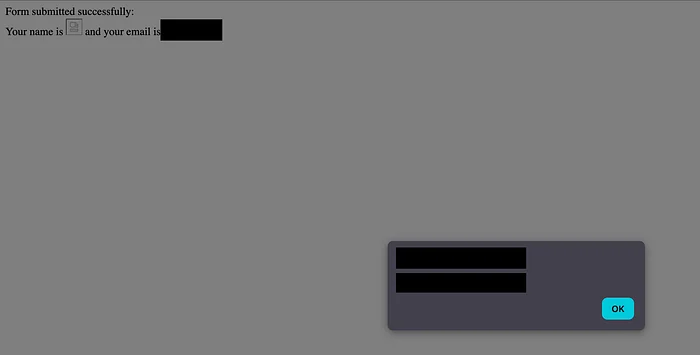
The report does not reproduce the payload or the request that delivered it.
Step 2: reaching the email-change action
The researcher used their own account to examine two actions: changing the account's email address and sending a welcome letter.
There was a check on the email-change action that relied on the request's Referer. Script executing through the test page could make a same-origin request that satisfied that check. The request came from an application page, but that did not establish that the account holder had deliberately authorised the change.
The report does not include the request or the Referer value used.
Step 3: redirecting the address
The account's email address was changed to another mailbox the researcher controlled. Changing the address determined the destination for the next step.
Step 4: triggering the welcome letter
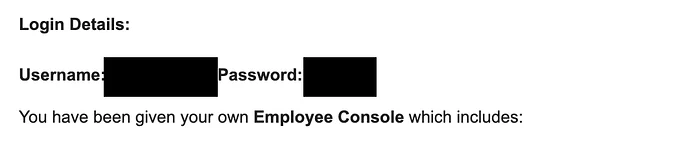
The welcome-letter action was then triggered. The application regenerated the password and sent the credentials to the replacement address.
Step 5: confirming the outcome
The report records the final checks: the previous password stopped working, and login succeeded using the new password.

The welcome letter connected the actions. Changing the email address determined the destination; regenerating the password put working credentials in the message sent there. Testing the actions together showed a consequence that the alert screenshot alone could not demonstrate.
Root cause
The chain rests on two design decisions, as the report describes them.
First, a page that was not part of the normal navigation still executed script under the application's origin. The vendor's own description, unused and unlinked, is a statement about discoverability, not about isolation. Same-origin script can call the same account functions as any other page on that origin.
Second, the email-change action's protection was a Referer check. A Referer header records where a request came from, not who intended it. Script running on a same-origin page can produce a request whose Referer satisfies the check, so the check does not distinguish a deliberate change by the account holder from one made by code running in their session.
The welcome-letter action then turned a destination change into credential replacement: it regenerated the password and mailed the new credentials to whatever address was on the account.
Impact
Under the conditions tested, script executing through the test page in a signed-in session could change the account's email address and invoke the welcome-letter action, which sent working credentials to the replacement address. The researcher demonstrated this only on their own account. The researcher demonstrated this only on their own account and mailboxes, and did not test the sequence against another person's account.
The vendor assessed the issue as High severity on 4 May 2026. Its response placed the affected page in a limited test or development endpoint and said: "This page has now been removed, and the vulnerability was limited to that endpoint."
The researcher did not independently retest the removal, and the correspondence did not establish whether the email-change or welcome-letter flows had received broader changes. The password replacement and successful login were observations from the original test; the remediation status came from the vendor's response.
Companion reports examining termination and suspension scenarios through the same foothold were closed on 27 May as ineligible for a new reward after the test page had been removed.
Fix
What was changed, according to the vendor: the test page was removed, and the vendor stated the vulnerability was limited to that endpoint.
What the report does not establish: whether the email-change or welcome-letter flows were changed. The researcher did not retest the removal.
On the evidence in the report, the durable fixes would be to remove or isolate pages that are not part of the product, and to stop relying on Referer as the sole check on a sensitive account action. A token tied to the user's intent, plus a confirmation step before credentials are regenerated and mailed, would address the chain rather than only its entry point.
Variants to test
- Unlinked pages on the same origin. Enumerate paths that are not in the navigation but still return the application shell. A positive result is a page that executes supplied script under the application's origin.
Referer-only checks on state-changing actions. Look for account actions whose only guard is theRefererheader. A positive result is a same-origin request that performs the action without any user-intent token.- Credential-bearing notifications. Find features that email credentials, reset links or one-time codes. A positive result is a flow where changing the destination address and triggering the notification delivers working credentials to the new address.
- Chained account actions. Combine a destination change with a notification trigger and check whether the old credential stops working. A positive result is a successful login with the newly delivered credential.
- Lockout behaviour. Do not infer throttling from HTTP 200 responses. A positive result for a missing lockout is a correct password being accepted after the stated number of invalid attempts, tested on your own account.
What happened, in plain words
A security researcher found a page on a website that was not linked from anywhere in the normal menu, but was still reachable if you knew the address. That page would run any small program (script) that someone put into it. Because the page belonged to the same website, the script it ran could do things as if it were the logged-in user: change the email address on the account, and trigger a "welcome letter" that, unexpectedly, created a brand new password and emailed it to whatever address was on the account.
Put together, those two ordinary features let a script change where the account email goes and have a new password mailed there. The researcher tested this only on their own trial account and mailboxes. The researcher tested this only on their own trial account and their own mailboxes, never on anyone else's account.
The same report also contains a correction. The researcher had first thought the login page had no limit on wrong password attempts. The vendor explained that an account locks after five wrong tries, and the researcher retested on their own account and found the lock really did work. They withdrew that part of the report. This kind of honesty is part of the story: a report is not only a list of wins.
The pieces you need to know first
Before walking through the steps, here are the everyday ideas the report relies on. None of them require any prior security knowledge.
- A web page and its origin. A website is a set of pages served from one address, for example
example.com. Everything served from that same address shares an origin. Browsers treat pages from the same origin as one trusted family: a script running on one page of that family can talk to the rest of the family, including the parts that need you to be logged in. Think of a building with one reception desk: once you are inside, every corridor is open to you, even the ones with no signs. - A script. A small program that a web page can run inside your browser. It can read what is on the page and send requests to the website on your behalf. When a page lets someone else's script run in it, that is called script injection, and it is dangerous precisely because the script runs with the page's permissions.
- A session and a cookie. When you log in, the website gives your browser a small piece of data, usually stored as a cookie, that says "this browser is logged in as this user". Every request your browser sends afterwards carries that cookie, so the server knows who you are without asking for your password again. Think of a wristband at an event: you show it once at the door, and after that staff let you into the rooms.
- An endpoint. A specific address on a website that does a specific job, such as "change my email" or "send the welcome letter". You can think of it as a service counter with its own number: you go to that counter to get that one thing done.
- An API request. The way a page (or a script) asks the website to do something without loading a whole new page. It is a message sent to an endpoint, and the website answers with data. Think of it as a form you slide under a door: you fill in what you want, and an answer comes back.
- The
Refererheader. Every request your browser sends can carry a small note saying which page the request came from. That note is theRefererheader. It is like a visitor signing a guestbook with "I came from room 3". It records where the request started, not who wanted it or whether they meant it. - HTTP 200. When a server answers a request, it sends a status code.
200means "here is the page you asked for, all fine". It says nothing about whether the action you asked for actually succeeded. Think of a shop assistant saying "certainly" without checking whether the item is in stock. - Login throttling and lockout. A limit on how many times someone can try a password. A lockout is the strict version: after a set number of wrong tries, the account refuses even the correct password for a while. It exists to stop someone guessing passwords over and over.
- A username-availability check. A feature that tells you whether a chosen username is already taken, usually while you are signing up. It is convenient, but it can also tell an attacker which usernames exist, which is why sites often rate-limit it.
- Rate limiting. A cap on how often someone can call a feature, so it cannot be hammered thousands of times per minute.
- Severity. A label for how serious a security issue is, usually from Low to Critical. It is an assessment, not a measurement.
The setup, and the rules the researcher followed
All the testing happened on the researcher's own trial account and on mailboxes they controlled. No other person's account was touched. Some test employee records were created along the way and deactivated afterwards, and the account was restored to how it was.
The timeline in the report is:
| Date | What happened |
|---|---|
| 26 March 2026 | First report submitted, covering three claims |
| 13 April 2026 | Vendor explains the lockout; researcher retests and withdraws the throttling claim |
| 17 April 2026 | Separate report on what the script could do inside a logged-in session |
| 4 May 2026 | Vendor responds, rates the issue High, says the page was removed |
| 27 May 2026 | Companion reports closed as ineligible for a new reward |
The report does not name the product, the endpoints, the parameters or the tools used. That is normal in public write-ups: the point is the lesson, not a map for someone to repeat it on a live site.
The first report, and the part that was wrong
The first report, sent on 26 March 2026, covered three things:
- What looked like missing login throttling.
- A username-availability check.
- Reflected script injection on a test page.
Why did the researcher think throttling was missing? Because the login responses kept coming back looking normal. They read those responses as "the attempt got through". On 13 April the vendor explained that an account locks after five invalid attempts. The researcher went back to their own trial account and tested it: once locked, even the correct password was rejected.
The image above is the researcher's own correction, dated 13 April 2026 and captured from the mailbox on 21 October 2026. It records that they withdrew the login-throttling conclusion after retesting their own trial account. It is correspondence, not proof that a lockout can be bypassed.
The lesson is worth spelling out, because it is the kind of mistake anyone can make. A server returning a page successfully says very little about whether it accepted a login attempt. The 200 status is the shop assistant saying "certainly", not the item being in stock. The throttling claim was withdrawn.
The vendor also explained that the username-availability check was intentional and protected by network-level rate limiting. That left the third item: the test page, where supplied script had already been shown to run. The vendor described that page as unused and unlinked.
The original screenshot showed an alert box popping up. That proved the script ran, but it did not show what the script could do when it interacted with the rest of the application. Closing that gap is what the 17 April report set out to do.
Step by step: how the chain worked
Step 1: script running on the unlinked page
The page was not linked from the normal interface. You could not click your way to it. But code running there still ran under the application's origin, and that is the key point. Being outside the usual navigation did not separate it from the account functions available to a signed-in user. To go back to the building comparison: a room with no sign on the door is still inside the building, and the wristband still works there.
The image above shows script execution on the unused test page, as it appeared in the original report. The origin and identifiers are redacted, and the image does not show the later account-change steps.
The report does not reproduce the payload or the request that delivered it, so there is no code to walk through for this step.
Step 2: reaching the email-change action
The researcher used their own account to examine two actions: changing the account's email address, and sending a welcome letter.
There was a check on the email-change action that relied on the request's Referer. In plain words: before changing the email address, the application looked at the note saying which page the request came from, and accepted the change if that note looked right. Script running through the test page could make a request from the same origin, and that request carried a Referer that satisfied the check.
The request came from an application page, but that did not establish that the account holder had deliberately authorised the change. The Referer is the guestbook signature: it says where the request started, not who wanted it or whether they meant it. The report does not include the request or the Referer value used, so there is no code to show here either.
Step 3: pointing the address somewhere else
The account's email address was changed to another mailbox the researcher controlled. This step matters because it decides where the next step will send things. Changing the address is the aiming; the welcome letter is the firing.
Step 4: triggering the welcome letter
The welcome-letter action was then triggered. The application regenerated the password and sent the credentials to the replacement address.
The image above shows the welcome letter, which included credential fields. The values are redacted. It shows the letter itself, rather than every step of the account-change sequence or the successful login.
This is the surprising part of the design. A feature that sounds like a friendly greeting turned out to replace the account password and email the new credentials. Nobody would guess that from the name alone, which is exactly why the researcher tested the two actions together rather than separately.
Step 5: confirming the outcome
The report records the final checks: the previous password stopped working, and login succeeded using the new password.
The image above is the original notification from the test account confirming a password change. Identifiers are redacted. The email alone does not establish what triggered the change or prove a successful login; the login check is what did that.
The welcome letter is what connected the actions. Changing the email address determined the destination; regenerating the password put working credentials in the message sent there. Testing the actions together showed a consequence that the alert screenshot alone could not demonstrate.
Why it worked: the root cause
The chain rests on two design decisions, as the report describes them.
First, a page that was not part of the normal navigation still executed script under the application's origin. The vendor's own description, unused and unlinked, is a statement about discoverability, not about isolation. Same-origin script can call the same account functions as any other page on that origin. Hiding a door does not lock it.
Second, the email-change action's protection was a Referer check. A Referer header records where a request came from, not who intended it. Script running on a same-origin page can produce a request whose Referer satisfies the check, so the check does not distinguish a deliberate change by the account holder from one made by code running in their session.
The welcome-letter action then turned a destination change into credential replacement: it regenerated the password and mailed the new credentials to whatever address was on the account.
What the impact was
Under the conditions tested, script executing through the test page in a signed-in session could change the account's email address and invoke the welcome-letter action, which sent working credentials to the replacement address. The researcher demonstrated this only on their own account and mailboxes. The researcher demonstrated this only on their own account and mailboxes, and did not test the sequence against another person's account.
The vendor assessed the issue as High severity on 4 May 2026. Its response placed the affected page in a limited test or development endpoint and said: "This page has now been removed, and the vulnerability was limited to that endpoint."
The researcher did not independently retest the removal, and the correspondence did not establish whether the email-change or welcome-letter flows had received broader changes. The password replacement and successful login were observations from the original test; the remediation status came from the vendor's response.
Companion reports examining termination and suspension scenarios through the same foothold were closed on 27 May as ineligible for a new reward after the test page had been removed.
What was fixed, and what would fix it properly
What was changed, according to the vendor: the test page was removed, and the vendor stated the vulnerability was limited to that endpoint.
What the report does not establish: whether the email-change or welcome-letter flows were changed. The researcher did not retest the removal.
On the evidence in the report, the durable fixes would be to remove or isolate pages that are not part of the product, and to stop relying on Referer as the sole check on a sensitive account action. A token tied to the user's intent, plus a confirmation step before credentials are regenerated and mailed, would address the chain rather than only its entry point.
Things worth testing on your own account
If you want to practise, these are the same ideas in a form you can try on your own accounts. Never test on someone else's account or a site that has not invited testing.
- Unlinked pages on the same origin. Look for paths that are not in the navigation but still return the application shell. A positive result is a page that executes supplied script under the application's origin.
Referer-only checks on state-changing actions. Look for account actions whose only guard is theRefererheader. A positive result is a same-origin request that performs the action without any user-intent token.- Credential-bearing notifications. Find features that email credentials, reset links or one-time codes. A positive result is a flow where changing the destination address and triggering the notification delivers working credentials to the new address.
- Chained account actions. Combine a destination change with a notification trigger and check whether the old credential stops working. A positive result is a successful login with the newly delivered credential.
- Lockout behaviour. Do not infer throttling from HTTP 200 responses. A positive result for a missing lockout is a correct password being accepted after the stated number of invalid attempts, tested on your own account.
Glossary
- API: the set of addresses and rules a website offers so that pages or programs can ask it to do things and get answers back.
- Cookie: a small piece of data a website stores in your browser, often used to remember that you are logged in.
- Credentials: the details that prove who you are, usually a username and password.
- Endpoint: one specific address on a website that performs one specific job.
- Header: an extra line of information attached to a request or response, such as where the request came from.
- HTTP 200: a status code meaning the server returned the requested page successfully; it does not mean the action you asked for succeeded.
- Lockout: a rule that stops an account from logging in after too many wrong password attempts, even with the correct password, for a period.
- Origin: the combination of scheme, host and port that a page is served from; pages from the same origin are treated as one trusted family by the browser.
- Payload: the piece of code or data that is sent to a page to make it do something, such as a script.
- Rate limiting: a cap on how often a feature can be used in a given time.
Referer: a header that records which page a request came from; it says where the request started, not who wanted it.- Reflected script injection: a flaw where code supplied in a request is sent straight back into the page and run by the browser.
- Script: a small program that a web page can run inside your browser.
- Session: the period during which a website treats your browser as logged in, usually tracked with a cookie.
- Severity: a label for how serious a security issue is, from Low to Critical.
- Throttling: limiting how many attempts or requests are allowed, for example on a login form.
- Token: a value issued by the website to represent something, such as your session or your intent to perform an action.
- Username-availability check: a feature that tells you whether a chosen username is already taken.
- Vendor: the organisation that runs the website and receives the report.




