A weird XSS
A reflected cross-site scripting vulnerability existed in a URL parameter that applied a case transformation to the input. By using HTML numeric character references, the attacker bypassed the transformation and achieved script execution.
 Published on infosecwriteups.com
Hi friends, how are you? Today I came to do my first writeup to tell you how I stopped exploring in XSS in a slightly different way, so here we go.
The full write-up lives on its author's site
It belongs to its author, so we link to it rather than copy it. The other two tabs are our own rewrites, checked against it.
Context
This is a first write-up by a researcher who goes by the name gato (cat in Brazilian Portuguese). The target is a Brazilian government site, referred to throughout as redacted.xxx.br because, as the author states, the bug was not fixed at the time of writing. The affected feature is a page that reflects a parameter value back to the user. The parameter is all lower case in the request, but the application transforms the reflected value so that the first letter is upper case and the rest lower case, a treatment the author reads as formatting intended for proper names.
The weakness is reflected XSS. The report does not name the exact endpoint, the parameter, or the server software.
Setup
No accounts, roles or special access were needed. The work was done from outside, against a public site, using two tools:
- Sublist3r for subdomain enumeration.
- ParamSpider to collect parameters from the hosts found.
The author also mentions Httpx as an alternative to opening links by hand, using its -match-string and -match-regex options to search responses for a reflection. No versions are given for any of the tools.
Finding it
The author started by injecting into the simplest inputs, but everything appeared well sanitised. Subdomain enumeration with Sublist3r turned up nothing unusual, so the next step was ParamSpider to analyse the parameters of the hosts that had been found. The resulting list was huge, because the author deliberately kept both URLs returning 200 and URLs returning 404, on the reasoning that poorly built 404 pages are worth checking for reflections.
Rather than automate the check, the author opened every link in the list by hand to see whether the input was reflected. The Httpx options mentioned above are offered as a way to do the same search automatically. One page stood out:

On that page the parameter was reflected with the first letter converted to upper case and the remainder to lower case.
A first payload was tried to see whether it would execute. It did not: the case transformation was applied to the alert(1) inside the payload, so the method was not executed.

Exploitation
Step 1: Stop copying payloads
After the first failure the author pasted payloads found on the internet, which did not work. The change of approach came from an analogy with chess puzzles: each move can be answered by the application, and a move that does not work is undone before trying the next one. The author then went looking specifically for ways to perform HTML injection, because at first that was what was working.
Step 2: Use HTML character references to dodge the case transformation
The idea that worked came from the HTML Charset table: a character can be written using its numeric value, preceded by & and #. The author used the numeric value of the character, preceded by '&' and '#', and saw that the character had not been changed to upper case.

The & # characters are encoded in URL (%26 and%23 respectively) so that they are not treated as URL construction symbols
When the author pressed enter and saw that the character had not been converted to upper case, the transformation had been bypassed.
Step 3: The final payload
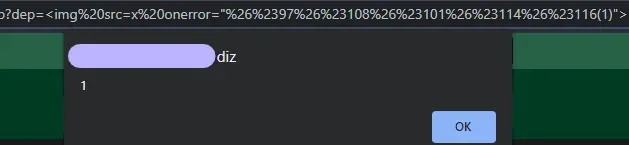
After finishing the tests, the payload was:
<img%20src=x%20onerror=”%26%2397%26%23108%26%23101%26%23114%26%23116(1)”>
How the pieces fit together:
%20is the URL encoding of the space, so the tag is parsed as<img src=x onerror=...>.src=xpoints the image at a resource that does not exist, which triggers the error handler.- The handler body is written entirely as numeric character references:
%26%2397isa,%26%23108isl,%26%23101ise,%26%23114isrand%26%23116ist. Those code points area,l,e,randt, so the browser seesalert(1)once the references are decoded. - The
&and#are themselves URL-encoded as%26and%23so that they survive URL parsing and reach the HTML as literal characters.
In that payload the handler is being sent as HTML encoding, which is why the application's case conversion no longer has any letters to change.

Root cause
The application reflects a user-controlled parameter and applies a case transformation to it. That transformation is not an output encoding step: it only changes letter case, so it does not neutralise HTML syntax. The payload uses numeric character references for the handler body, and the author reports that it executed. The report does not show the server-side code, so the exact implementation is not documented; the mechanism above is what the observed behaviour implies.
Impact
In general terms, a reflected XSS of this kind lets an attacker run script in the context of the vulnerable site for any user who follows a crafted link, but the author makes no claim about victims, data or accounts, and no severity or bounty is stated. The bug was still unfixed when the write-up was published.
Fix
A fix would require context-aware output encoding of the reflected value, together with input validation on the parameter. The case transformation should not be relied on as a defence.
Variants to test
- Case-transforming reflections. Send a payload whose letters are all numeric character references, as above. A positive result is the handler executing with the original letter case intact.
- Reflections in 404 pages. Keep 404 URLs in the parameter list, as the author did. A positive result is a parameter value appearing unescaped in the error page body.
- Automated reflection matching. Run Httpx with
-match-stringor-match-regexover the collected URLs. A positive result is a hit on your marker string in the response body, which you then inspect by hand. - Other transformations. Where an application changes case, truncates or otherwise rewrites input, try character references for the whole payload. A positive result is execution despite the rewrite.
Closing tips from the author
- Tools are great, but it is the way you use them that makes them great.
- Be patient: step away from the computer for a while and come back with a clear head.
- Stay curious.
What happened, in plain words
A young researcher who calls himself gato (the Portuguese word for cat) went looking for a security bug on a Brazilian government website. He found one: a page that takes a value and prints it back into the page. Because of a small formatting trick the site applied to that value, the page looked safe at first. By writing the dangerous part of his test in a different way, he produced a payload that the page reflected without changing its case.
This article walks through the same story from zero. You only need to know how to use a browser. Every tool, every term and every step is explained as it comes up, and the exact text the researcher typed is reproduced unchanged.
The background you need first
Before the story makes sense, here are a few ideas in everyday language.
A web page is a document the browser builds from text. When you visit a site, the server sends back a block of text written in a language called HTML. Your browser reads that text and draws the page: headings, images, buttons. Anything the server puts into that text becomes part of the page.
Some of that text can be instructions. HTML can include small programs written in a language called JavaScript. The browser runs them automatically. That is how pages do useful things like check a form as you type. It is also why a page that lets a stranger insert their own text into the HTML is dangerous: the stranger can insert a program too, and the browser will run it as if the site itself had written it.
A URL parameter is a value carried in the address bar. Look at an address like example.com/search?name=ana. Everything after the ? is a list of name and value pairs. Here the parameter is called name and its value is ana. Sites use these to remember what you searched for, which page you are on, and so on.
Reflection means the site takes a value from the URL and prints it straight back into the page it sends you. If you type ana and the page says "Hello, ana", the value was reflected. Reflection is normal and often useful. It becomes a bug when the site prints the value without cleaning it, because then the value can contain HTML and JavaScript.
Reflected XSS is exactly that bug. An attacker builds a link with a nasty value in the URL. When a victim clicks the link, the site reflects the value, the browser treats it as part of the page, and the attacker's JavaScript runs. It runs with the site's own identity, so it can do things the site would let the site itself do.
Sanitising means cleaning input so that dangerous characters cannot do harm. A site that sanitises properly turns < into something harmless before printing it, so the browser shows the character instead of treating it as the start of a tag.
URL encoding is a way of writing characters that are not allowed, or are ambiguous, in an address. A space becomes %20, for example. The browser and the server both understand these codes and translate them back.
HTML character references are a second encoding, this time inside HTML itself. You can write a character by its number: a means the letter a, because 97 is the number assigned to a in the character table. The browser turns the number into the letter when it draws the page. This matters later, because a number contains no letters at all.
A subdomain is a smaller name in front of a domain. In shop.example.com, shop is a subdomain of example.com. Large organisations have many of them, and each one is a separate place that might behave differently.
A 404 page is what a site shows when the address you asked for does not exist. Some sites build these pages badly and echo back part of the address you typed, which is worth checking.
A tool here means a small program you run on your own computer to do repetitive work, like listing subdomains or collecting URLs. The researcher used three, all free and linked in his post.
Part 1: The search
The researcher's goal was simple: find a bug on some website and earn a little money. He picked a Brazilian government site, reasoning that government sites have a very bad security history. Throughout the write-up the site is called redacted.xxx.br, because the bug had not been fixed when he published.
He began with the simplest thing possible: typing test values into the site's input boxes to see whether anything came back unfiltered. Everything looked well sanitised, so he decided to get a little heavier.
Part 2: The tools
To find those other parts, he used two programs.
- Sublist3r, which collects subdomains of a target. Think of it as asking many public directories, "does anything under this name exist?"
- ParamSpider, which takes the hosts you found and gathers the URLs on them that carry parameters, so you get a long list of addresses worth testing.
Sublist3r turned up nothing unusual. ParamSpider produced a very large list, and the researcher deliberately kept both kinds of result: addresses that load normally (the server answers with status code 200, meaning "here is your page") and addresses that do not exist (status code 404, meaning "not found"). Keeping the 404s was a deliberate choice, because a badly built error page can still print back what you asked for.
He then opened every link in the list by hand, one after another, looking for his own input appearing in the page. He mentions a shortcut for anyone repeating this: the Httpx tool can fetch a list of addresses and search each response for a string you choose, using its -match-string and -match-regex options. That saves you from clicking through hundreds of links. He did it manually, and eventually one page stood out:
On that page, the parameter was written in all lower case in the address, but it came back in the page with the first letter capitalised and the rest lower case. That is the kind of formatting a site applies to people's names, so the page was clearly doing something to the value rather than printing it untouched. The page applied a case treatment to the value rather than printing it untouched.
He tried a first test payload to see whether it would run. It did not. The capitalisation was applied to the alert(1) inside his payload, and the method was not executed.
Part 3: The injection
Step 1: Stop copying payloads
Out of patience, he did what many beginners do: he copied and pasted payloads found on the internet, one after another. None worked.
He stepped away, drank some water and thought about something else. He remembered learning chess as a child, where the teacher sets up a position and asks you to win in a fixed number of moves. Each move you make can be answered by your opponent, and if a move does not help, you take it back and try another. He started treating the website the same way: every payload is a move, the site answers it, and a move that fails is undone before the next attempt.
He then focused on HTML injection specifically, because at first that was what was working.
Step 2: Use HTML character references to dodge the capitalisation
The idea that worked came from the HTML Charset table. As explained above, you can write any character by its number, preceded by & and #. He used the numeric value of the character, preceded by '&' and '#', and saw that the character had not been changed to upper case.
The & # characters are encoded in URL (%26 and%23 respectively) so that they are not treated as URL construction symbols
That note explains a second layer. In a URL, & and # have special jobs: & separates one parameter from the next, and # marks a fragment. If you put them raw into the address, the browser may treat them as structure rather than as part of your value. Writing them as %26 and %23 tells the browser "this is a literal ampersand and a literal hash, not a separator".
When he pressed enter and saw that his character had not been converted to upper case, he broke into a huge smile.
Step 3: The final payload
After finishing the tests, the payload was:
<img%20src=x%20onerror=”%26%2397%26%23108%26%23101%26%23114%26%23116(1)”>
Here is what each piece does, in plain words.
<imgstarts an image tag. The browser expects an image to follow.%20is the URL encoding of a space, so the browser reads this as<img src=x onerror=...>. Without the encoding, a raw space in a URL can be mangled or cut off.src=xtells the image tag where the picture lives.xis not a real address, so the browser tries to load it and fails.onerror=is an attribute that holds a piece of JavaScript. The browser runs it automatically when the image fails to load. Sincexnever loads, the code always runs. This is the trick that turns a broken image into a program.- The code inside the quotes is written entirely as numbers:
%26%2397isa,%26%23108isl,%26%23101ise,%26%23114isrand%26%23116ist. Those numbers are the character codes fora,l,e,randt. When the browser decodes them, it seesalert(1). (1)is the value handed toalert, which is the built-in browser function that pops up a small dialog box. Seeing that box appear is the standard, harmless proof that your JavaScript ran.- The
&and#are written as%26and%23so they survive URL parsing and arrive at the page as literal characters, as described above.
In short: the site capitalises letters, so the payload contains no letters until the browser itself turns the numbers back into letters. By then the site's processing is long finished.
Why it worked
The site takes a value and prints it into the page, applying a capitalisation step to it. Capitalisation is not cleaning. It changes the shape of letters and nothing else, so it does not neutralise HTML. The payload used numeric character references for the handler body, and the author reports that it executed. The report does not include the site's own code, so the exact implementation is not shown; the explanation above is what the observed behaviour implies.
What it means for real users
The report does not describe any harm beyond the dialog box appearing in the researcher's own browser. In general, a reflected XSS like this lets an attacker run code in the vulnerable site's name for anyone who clicks a crafted link. The author makes no claim about victims, stolen data or accounts, and no severity rating or bounty is mentioned. The bug was still unfixed when the write-up was published.
How it should be fixed
The report does not say that anything was changed. A fix would require proper output encoding: escaping the characters that have meaning in HTML before printing the value into the page. Input validation on the parameter helps too. Capitalising letters should never be counted as a defence.
Things worth trying elsewhere
- Pages that change the case of your input. Write the whole payload as numeric character references, as above. If the code runs with its letters intact, you have found the same weakness.
- Error pages. Keep 404 addresses in your list, as the researcher did. If your value appears unescaped in the error page, that page is worth a closer look.
- Automatic searching. Run Httpx with
-match-stringor-match-regexover your collected addresses. A hit on your marker string tells you which responses to inspect by hand. - Other rewrites. Where a site changes case, cuts input short or otherwise rewrites it, try character references for the whole payload. If it still runs, the rewrite is not protecting anything.
Closing tips from the author
- Tools are great, but it is the way you use them that makes them great.
- Be patient: step away from the computer for a while and come back with a clear head.
- Stay curious.
Glossary
- 404 page: the page a site shows when the address you asked for does not exist.
- Character code: the number assigned to a character in a standard table, used to write that character as a number in HTML.
- Cross-site scripting (XSS): a bug where a site lets an attacker's JavaScript run in a visitor's browser as part of the site.
- HTML: the text language browsers use to build a page.
- HTML character reference: a character written as
&#followed by its number, which the browser turns back into the character. - Httpx: a command-line tool that fetches many addresses and can search each response for a string you choose.
- JavaScript: the programming language browsers run inside pages.
- Output encoding: escaping characters that have special meaning before printing a value into a page, so they show as text rather than acting as structure.
- Parameter: a name and value pair carried in a URL after the
?. - ParamSpider: a tool that collects URLs carrying parameters from a list of hosts.
- Payload: the text an attacker sends to try to trigger a bug.
- Reflected XSS: XSS where the attacker's value travels in the URL, is printed back by the site, and runs in the victim's browser.
- Reflection: a site printing a value you supplied back into the page it returns.
- Sanitising: cleaning input so dangerous characters cannot do harm.
- Status code 200: the server's way of saying the page was found and returned normally.
- Status code 404: the server's way of saying the page was not found.
- Subdomain: a smaller name in front of a domain, such as
shopinshop.example.com. - Sublist3r: a tool that collects subdomains of a target.
- URL: the address of a page, as shown in the browser's address bar.
- URL encoding: writing characters that are not allowed in a URL as
%followed by a code, such as%20for a space.




